Add modeling resources to a Marketplace product(将建模资源添加到 Marketplace 产品)
You can use Foundry DevOps to include your modeling resources in Marketplace products for other users to install and reuse. Learn how to create your first product.
Supported features
Models can be packaged as part of products in DevOps and deployed via Marketplace for release management purposes. Models are also supported as product inputs, allowing users to select models during installation.
Package a model
Models can be packaged into a Marketplace product as outputs (content that will be deployed) or included as inputs that users select during installation.
There are two ways to include a model in a product's outputs, Include with content, and Include with producer.
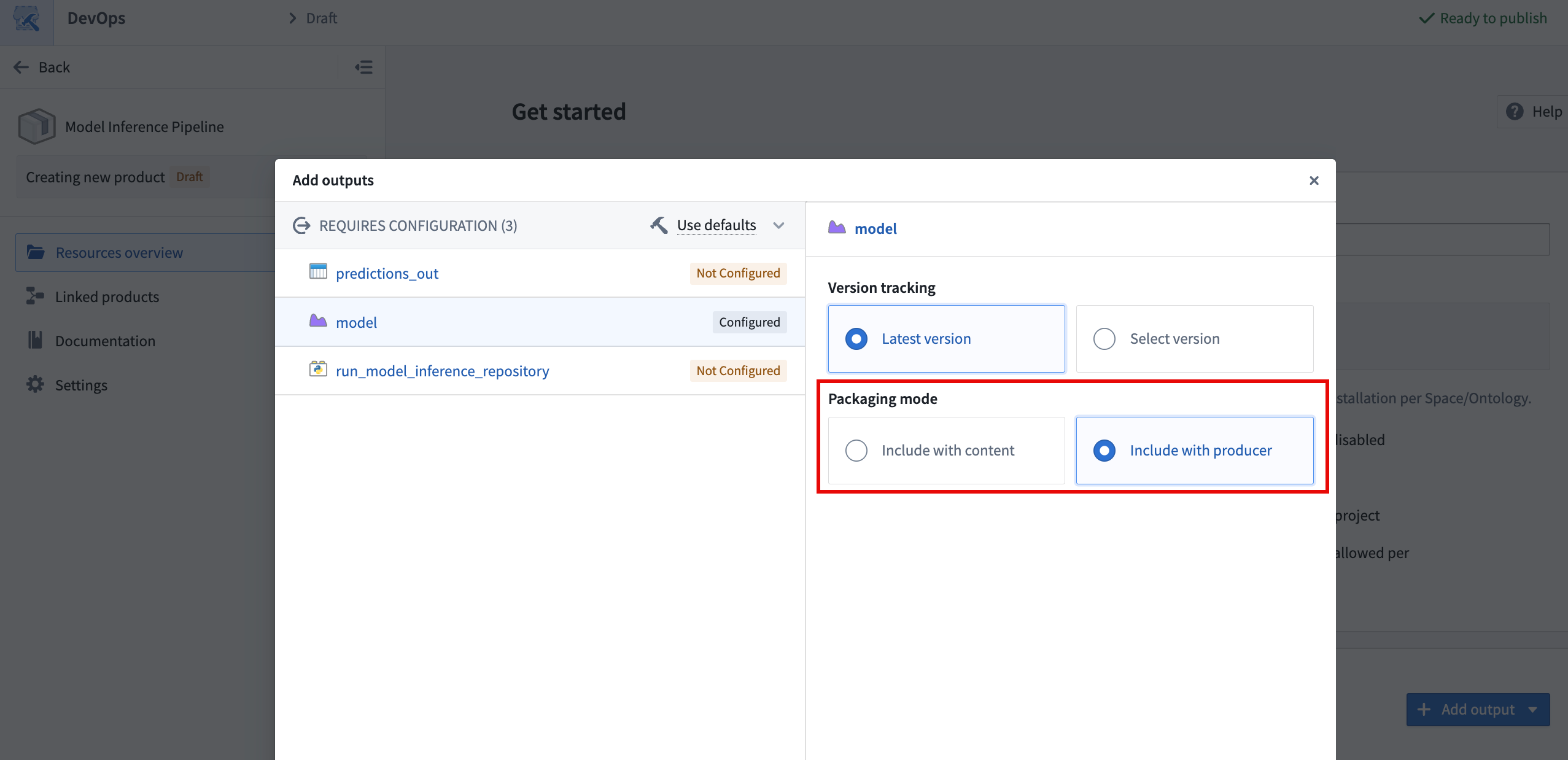
Include with content
The Include with content option installs the model as a static asset that cannot be rebuilt after it is deployed. The following are copied into the model resource when using this option:
- Saved model files and weights.
- The Python library containing the model adapter class.
- The container image that is used to back live deployments in the model application and in Modeling Objectives.
- The sidecar model inference in transforms.
Models can only be deployed as Include with content if the total model size, including files and underlying container images, is under eight gibibytes. The DevOps application will validate this condition and display an error if it is not met.
Include with producer
The Include with producer option installs the logic used to build the model so it can be built after it is deployed. This enables users to deploy models that can be trained continuously by a schedule. This is available for models built in Code Repositories and in Jupyter® notebooks published as transforms, but not for models published interactively from a Jupyter® notebook. This is because models published interactively are considered static assets and do not have logic associated with them. Support for models created in Model Studio is currently under development. When using this option, it is recommended that you package the latest version of the model to avoid confusion.
:::callout{theme="warning"}
Models deployed with a code repository producer do not have a defined container image by default, since this is produced when checks are run in the repository and used for subsequent builds that produce the model. Checks do not run when installing a product, so installed model builds are unable to produce a container image for the model. The lack of a container image on a model version will prevent the use of sidecar model inference in transforms and live deployments for the deployed version.
To solve this issue, manually trigger checks on the installed repository that produces the model to build the container image and make it available for subsequent model training builds. Manually triggering checks is required to ensure that the Python adapter logic and the environment in the container are the same as in the source model. This must be done whenever a new version of the model is deployed.
:::
Use a model as a product input
In addition to packaging models as outputs, product builders can include models as inputs to a product. During installation, users select the model to use via a model selector, which allows them to resolve specific model versions required by dependent components. This avoids the need to package the model itself, reducing package size and giving installers the flexibility to choose a model already available on their enrollment.
When a model is used as a ModelInput in packaged transforms, the transform must set use_sidecar=True. The sidecar runs the model adapter in its own container, removing the need to import the adapter library into the repository environment. Using use_sidecar=True is recommended in all cases. Learn more about running models as sidecar containers.
Live deployments
Models deployed via Marketplace can be used to serve as live deployments, subject to the caveat on model container images above. Live deployment needs to be configured manually only once after deployment, and cannot be automatically configured by Marketplace. If the model is rebuilt with a regular build or through an upgrade of the Marketplace product, the live deployment will automatically update to point to the latest version that was just created as described in the model deployment documentation.
Model functions
Set up a function on the deployed model
Like direct deployments, model functions need to be configured once on the model after deployment and will upgrade automatically upon new model version creation.
Use the model function in another function
Since model functions are not explicitly recognized by Marketplace, care needs to be taken if the model function is called from a Workshop application or from another function deployed via Marketplace. Model functions that are used in Workshop or imported into repositories will be recognized as inputs to be provided during installation. On the contrary, model functions that are not imported to a repository and instead queried directly via the Platform SDK are ignored.
Below is the recommended setup to package a model, its model function, and an outer function that calls the model function.
- Create a product containing the model. After it is deployed for the first time, configure a live deployment and publish a function that is registered to an ontology.
- Create a second product containing the outer function (TypeScript v1, TypeScript v2, or Python with an import of the model function) and any dependent applications, with the model function as an input. Use the function created in the previous step when installing this second product.
- The model function used as input needs to be updated to the latest version every time the model's API changes, since model functions will only accept typed objects fitting the model API definition.
:::callout{theme="note"} For Python and TypeScript v2 functions, the model function must be registered to an ontology to be importable into the repository. If your model function is still space-bound, migrate it to be ontology-bound to take advantage of structured dependency tracking and Marketplace input mapping. :::
Unsupported modeling features and limitations
- Modeling Objectives: Use direct model deployments for live objective deployments and model transforms for batch deployments.
- Model Studio models are not supported yet. This is planned by end of June 2026.
- Models packaged with content can only be packaged if their total size, including weights, Python environment and underlying container image, is under eight gibibytes.
- External models are not supported in DevOps or in Marketplace.
中文翻译
将建模资源添加到 Marketplace 产品
您可以使用 Foundry DevOps 将建模资源纳入 Marketplace 产品 中,供其他用户安装和复用。了解如何创建您的第一个产品。
支持的功能
模型可以作为产品的一部分在 DevOps 中打包,并通过 Marketplace 进行部署以实现发布管理。模型也支持作为产品输入(product inputs),允许用户在安装过程中选择模型。
打包模型
模型可以作为输出(outputs,即待部署的内容)打包到 Marketplace 产品中,也可以作为 输入(inputs)让用户在安装时选择。
在产品的输出中包含模型有两种方式:随内容包含(Include with content)和随生成器包含(Include with producer)。
随内容包含
随内容包含选项将模型作为静态资产(static asset)安装,部署后无法重新构建。使用此选项时,以下内容会被复制到模型资源中:
- 已保存的模型文件和权重。
- 包含模型适配器类(model adapter class)的 Python 库。
- 用于支持模型应用和建模目标中实时部署(live deployments)的容器镜像(container image)。
- 转换中的边车模型推理(sidecar model inference in transforms)。
只有当模型总大小(包括文件和底层容器镜像)小于 8 GiB 时,才能以随内容包含方式部署。DevOps 应用会验证此条件,若不满足则显示错误信息。
随生成器包含
随生成器包含选项会安装用于构建模型的逻辑,使其在部署后仍可被构建。这使得用户可以部署能够按计划持续训练的模型。此选项适用于在代码仓库(Code Repositories)和发布为转换的 Jupyter® 笔记本中构建的模型,但不适用于从 Jupyter® 笔记本交互式发布的模型。这是因为交互式发布的模型被视为静态资产,没有关联的逻辑。对 Model Studio 中创建的模型的支持目前正在开发中。使用此选项时,建议打包模型的最新版本以避免混淆。
:::callout{theme="warning"}
使用代码仓库生成器部署的模型默认没有定义的容器镜像,因为容器镜像是在仓库中运行检查(checks)时生成的,并用于后续生成模型的构建。安装产品时不会运行检查,因此已安装的模型构建无法为模型生成容器镜像。模型版本缺少容器镜像将导致无法在转换中使用边车模型推理,也无法对已部署版本进行实时部署。
要解决此问题,请手动触发已安装仓库(该仓库生成模型)上的检查,以构建容器镜像,使其可用于后续的模型训练构建。手动触发检查是必需的,以确保 Python 适配器逻辑和容器中的环境与源模型保持一致。每当部署新版本的模型时,都必须执行此操作。
:::
使用模型作为产品输入
除了将模型打包为输出外,产品构建者还可以将模型作为输入包含到产品中。在安装过程中,用户通过模型选择器(model selector)选择要使用的模型,从而解析依赖组件所需的特定模型版本。这避免了打包模型本身,减少了包的大小,并让安装者能够灵活选择其注册实例(enrollment)中已有的模型。
当模型在打包的转换中用作 ModelInput 时,转换必须设置 use_sidecar=True。边车(sidecar)会在其自己的容器中运行模型适配器,无需将适配器库导入仓库环境。建议在所有情况下使用 use_sidecar=True。了解更多关于将模型作为边车容器运行的信息。
实时部署
通过 Marketplace 部署的模型可用于提供实时部署服务,但需注意上述关于模型容器镜像的限制。实时部署在部署后只需手动配置一次,无法由 Marketplace 自动配置。如果模型通过常规构建或 Marketplace 产品升级进行重建,实时部署将自动更新,指向刚刚创建的最新版本,如模型部署文档所述。
模型函数
在已部署模型上设置函数
与直接部署类似,模型函数(model functions)需要在部署后在模型上配置一次,并在创建新模型版本时自动升级。
在其他函数中使用模型函数
由于 Marketplace 无法显式识别模型函数,因此如果模型函数从 Workshop 应用或通过 Marketplace 部署的其他函数中调用,需要格外注意。在 Workshop 中使用或导入到仓库的模型函数将被识别为安装期间需要提供的输入。相反,未导入仓库而是通过 Platform SDK 直接查询的模型函数将被忽略。
以下是打包模型、其模型函数以及调用该模型函数的外部函数的推荐设置。
- 创建一个包含模型的产品。首次部署后,配置一个实时部署,并发布一个注册到本体的函数。
- 创建第二个产品,包含外部函数(TypeScript v1、TypeScript v2 或导入模型函数的 Python 函数)以及任何依赖的应用,并将模型函数作为输入。在安装第二个产品时,使用上一步创建的函数。
- 每次模型的 API 发生变化时,用作输入的模型函数都需要更新到最新版本,因为模型函数只接受符合模型 API 定义的类型化对象。
:::callout{theme="note"} 对于 Python 和 TypeScript v2 函数,模型函数必须注册到本体才能导入到仓库中。如果您的模型函数仍绑定到空间(space-bound),请将其迁移为绑定到本体,以利用结构化依赖跟踪和 Marketplace 输入映射。 :::