Model functions developer guide(模型函数开发者指南)
Model functions are automatically generated functions that wrap live model deployments, enabling models to be used for live inference in Workshop, Vertex, and other end-user applications. Model functions have the same input and output API as the underlying model and can be called from TypeScript, Python, or used directly in applications.
This developer guide covers the behavior of model functions including version updates, API changes, and configuration options. This applies to functions published from both direct model deployments and Modeling Objective live deployments.
For instructions on how to import and call model functions in your code, see Functions on models.
:::callout{title="Prerequisites" theme="neutral"} Before publishing a model function, ensure your model satisfies the requirements for function publishing. :::
Publish a model function
Model functions can be published from two types of deployments:
- Direct model deployments: From the model page, select the + icon in the sidebar after creating a direct deployment.
- You can only have one function per branch wrapping the corresponding deployment.
- Modeling Objective live deployments: From the deployment details page, use the Publish Function card after creating a live deployment to wrap it in a function.
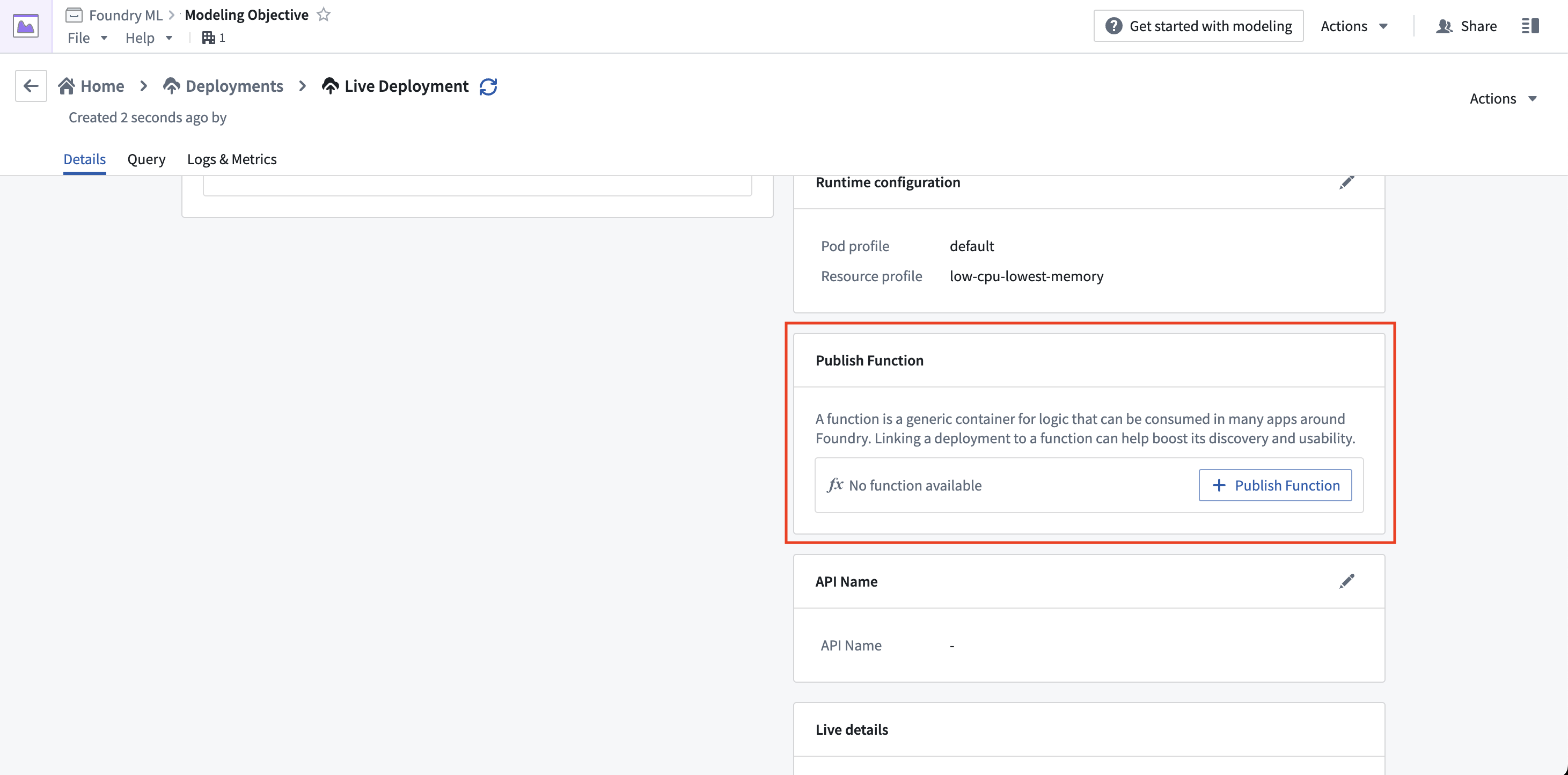
When publishing from a Modeling Objective, you will be guided through the process of setting parameters for the function.
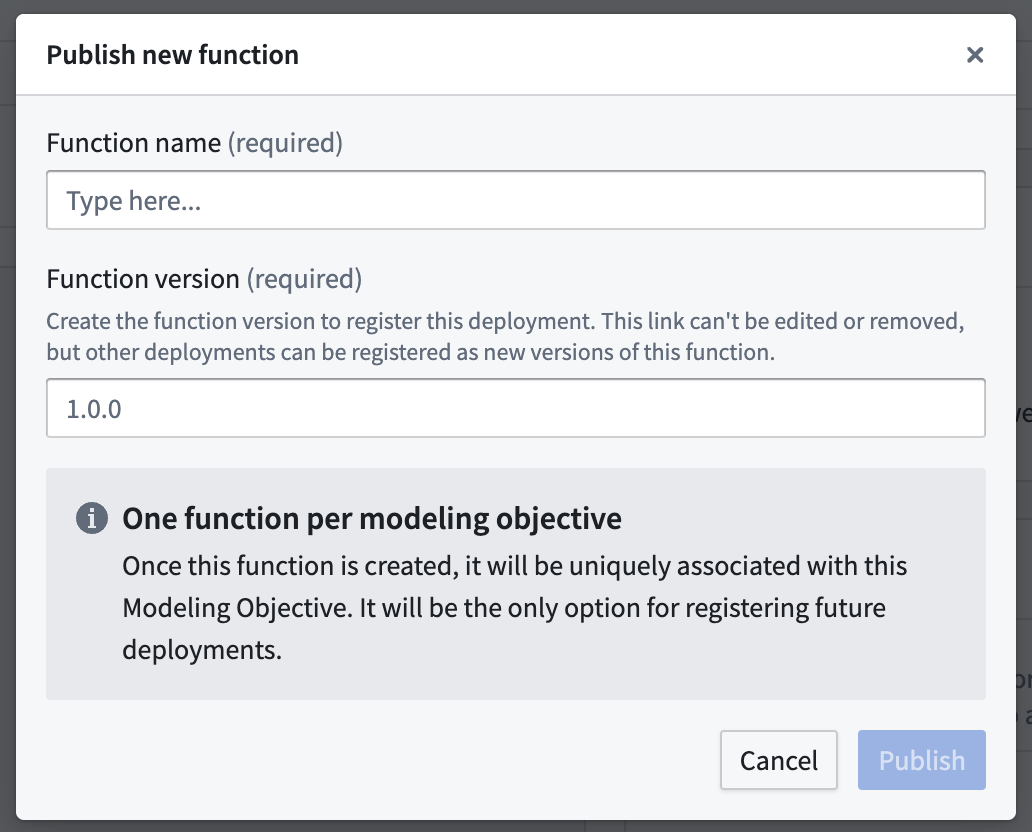
Both methods produce functionally equivalent model functions. These are simple wrappers that defer all logic to the underlying live deployment, but with the model API translated to input and outputs types recognized by functions.
To learn how to import and call model functions in your code, see Functions on models.
Function version upgrades
This section explains function upgrade behavior and how to manage consuming resources, especially in the case of Model API changes.
Direct model deployments: Automatic function version publication for each version
When a new version of the model is published on a branch with a function published, a new version of the associated function is also automatically created. It is not necessary to update consuming resources to the new function version, unless the model API has changed, as described below.
While only one function version can typically be imported in a given repository or application, users who want to import several model versions into their project for change management purposes can publish several functions on different branches to do so, since there can be one deployment and one function per branch on a model.
Modeling Objectives: Create new version after releasing if the API changed
Upon releasing a model version with an API change in Modeling Objectives, the following warning will appear in case a new function needs to be published:
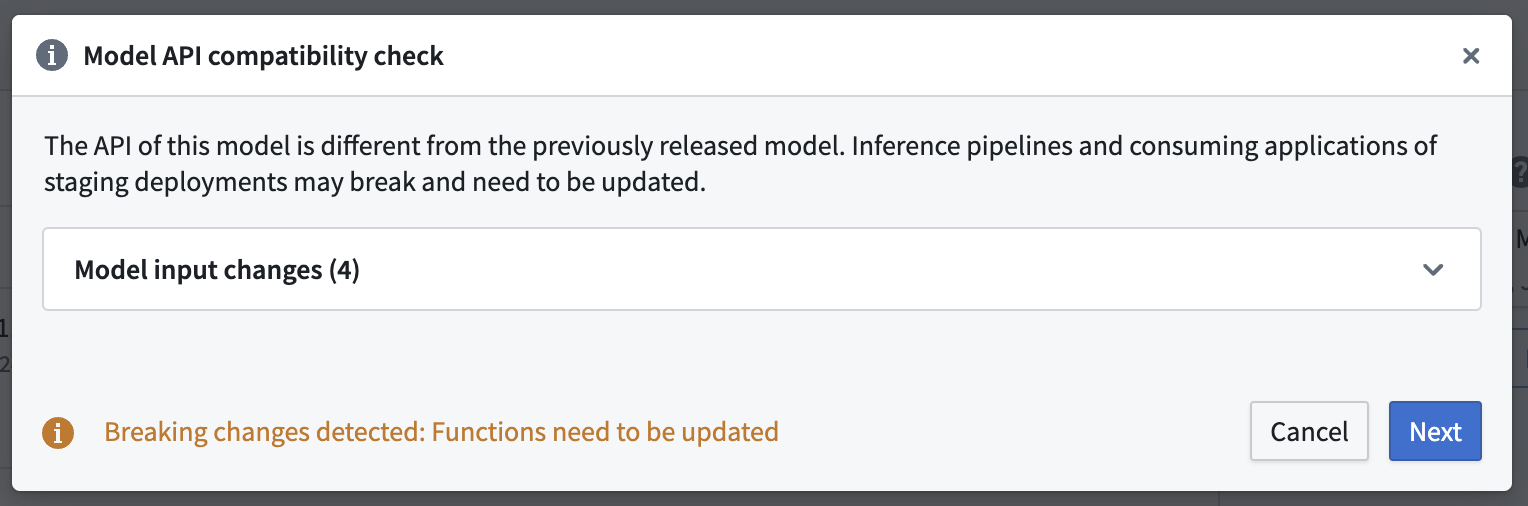
You should not ignore this warning. Updating a live deployment to a new model with a different model API will require manual action to fix downstream usage. The dialog will guide you through the process of publishing new function versions for any deployment affected by the release.
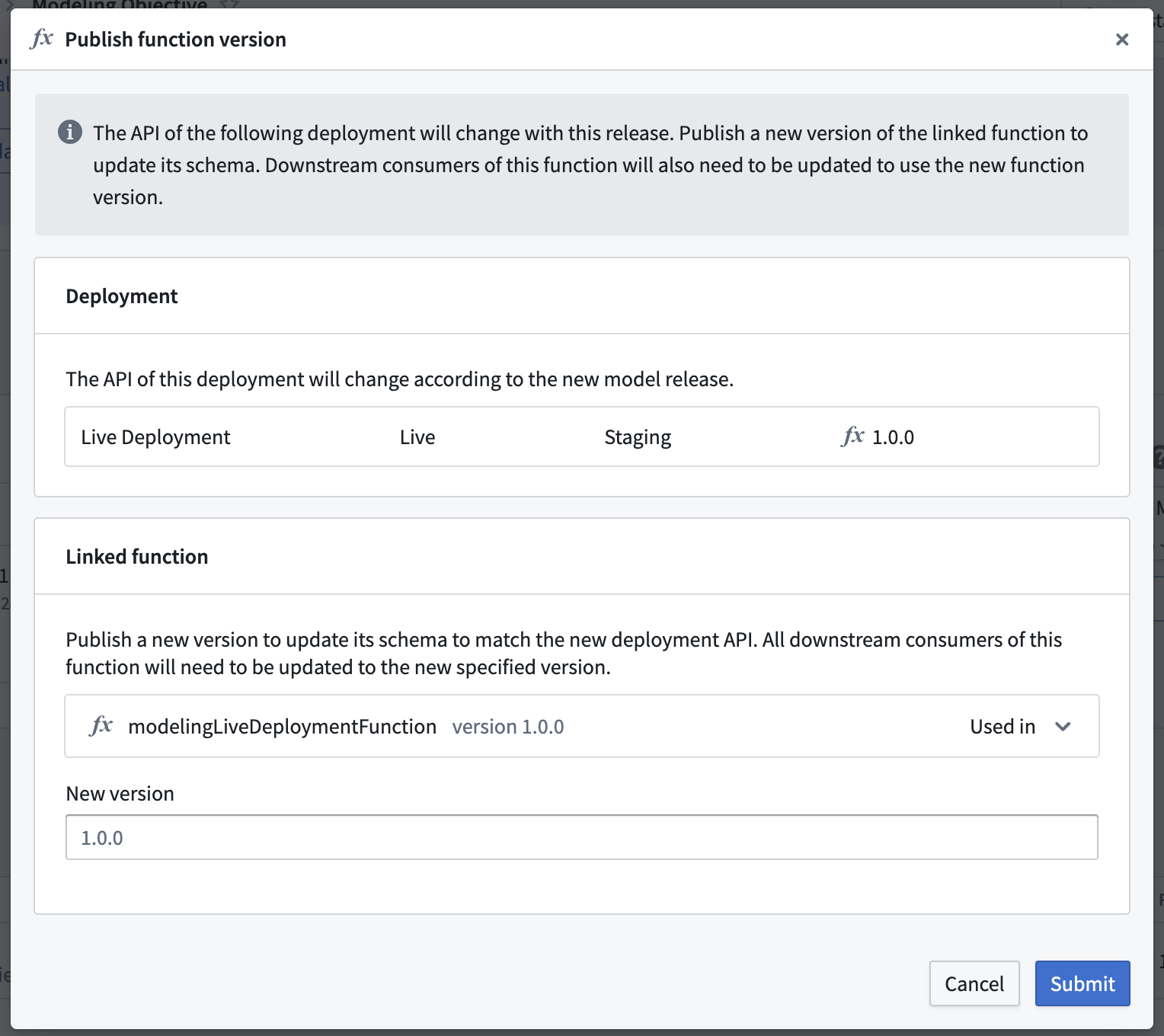
Usages of the current function version will break if you choose not to publish a new function version. To resolve this issue, return to the Details page of the deployment and publish a new function version.
Model API change
When a Model API changes between versions, consumers must be updated to continue working. This includes TypeScript v1 functions and Workshop applications. Model functions mirror your model's API using Function-supported types. After an API change:
- Previous model function versions will expose outdated APIs that no longer match the current model.
- Both functions and the underlying live deployment validate inputs/outputs against the current API.
- Previous model function versions will fail validation and stop working, as the live deployment only accepts inputs/outputs matching the new model API version.
You should update your model functions and applications after each model API change.
Upgrading a model function dependency in Code Repositories
TypeScript v1
To upgrade a model function dependency, edit the resources.json file to select the new version of the model function. This will automatically regenerate the necessary type bindings.
TypeScript v2 and Python
Simply remove and re-import the function using the Resource import sidebar, specifying the right version.
Row-wise publishing
Row-wise publishing flattens the function API for models with tabular inputs and outputs, allowing each function call to process a single row instead of an array.
For models that are single tabular input to single tabular output, row-wise function publishing will be enabled by default. This allows the model API to be flattened for each inference call so that executing the function calls one tabular row as input and outputs one tabular row. Alternatively, consider using an Object or ObjectSet directly in the Model API to facilitate use of your model with objects in functions.
For a model API that looks like the following:
    @classmethod
    def api(cls):
        inputs = {
            "input_df": pm.Pandas(columns=[("area_code", int),
                              ("num_bedrooms", int),
                              ("num_bathrooms", int)])
        }
        outputs = {
            "output_df": pm.Pandas(columns=[("area_code", int),
                              ("num_bedrooms", int),
                              ("num_bathrooms", int),
                              ("predicted_price", int)])
        }
        return inputs, outputs
The direct publishing function signature with row-wise processing would look like:
export async function housingPriceModelingObjective(parameters: {
    "area_code": FunctionsApi.Integer;
    "num_bedrooms": FunctionsApi.Integer;
    "num_bathrooms": FunctionsApi.Integer;
}): Promise<{
    "predicted_price": FunctionsApi.Double;
    "num_bathrooms": FunctionsApi.Integer;
    "area_code": FunctionsApi.Integer;
    "num_bedrooms": FunctionsApi.Integer;
}>
The direct publishing function signature without row-wise processing would look like:
export async function housingPriceModelingObjective(parameters: {
    "input_df": Array<{
        "num_bathrooms": FunctionsApi.Integer;
        "area_code": FunctionsApi.Integer;
        "num_bedrooms": FunctionsApi.Integer;
    }>;
}): Promise<{
    "output_df": Array<{
        "predicted_price": FunctionsApi.Double;
        "num_bathrooms": FunctionsApi.Integer;
        "area_code": FunctionsApi.Integer;
        "num_bedrooms": FunctionsApi.Integer;
    }>;
}>
To enable or disable row-wise processing for a given function, a new function version must be published and row-wise processing can be toggled under Advanced options.
中文翻译
模型函数开发者指南
模型函数是自动生成的函数,用于封装实时模型部署,使模型能够在Workshop、Vertex及其他终端用户应用中进行实时推理。模型函数具有与底层模型相同的输入输出API,可从TypeScript、Python调用,或直接在应用中使用。
本开发者指南涵盖模型函数的行为,包括版本更新、API变更及配置选项。本指南适用于从直接模型部署和建模目标实时部署发布的函数。
有关如何在代码中导入和调用模型函数的说明,请参阅模型上的函数。
:::callout{title="前提条件" theme="neutral"} 在发布模型函数之前,请确保您的模型满足函数发布要求。 :::
发布模型函数
模型函数可从两种类型的部署中发布:
从建模目标发布时,系统将引导您完成设置函数参数的过程。
两种方法生成的模型函数在功能上是等效的。这些函数是简单的封装器,将所有逻辑委托给底层实时部署,但将模型API转换为函数可识别的输入输出类型。
要了解如何在代码中导入和调用模型函数,请参阅模型上的函数。
函数版本升级
本节说明函数升级行为以及如何管理消费资源,特别是在模型API发生变更的情况下。
直接模型部署:每个版本自动发布函数版本
当模型的新版本在已发布函数的分支上发布时,关联函数的新版本也会自动创建。除非模型API发生变更(如下所述),否则无需将消费资源更新到新函数版本。
虽然通常每个仓库或应用只能导入一个函数版本,但希望出于变更管理目的将多个模型版本导入项目的用户,可以通过在不同分支上发布多个函数来实现,因为每个模型分支上可以有一个部署和一个函数。
建模目标:API变更后发布新版本
在建模目标中发布带有API变更的模型版本时,如果需要发布新函数,将出现以下警告:
您不应忽略此警告。将实时部署更新为具有不同模型API的新模型需要手动操作来修复下游使用。对话框将引导您为受发布影响的任何部署发布新函数版本。
如果您选择不发布新函数版本,当前函数版本的使用将会中断。要解决此问题,请返回部署的详情页面并发布新函数版本。
模型API变更
当模型API在不同版本之间发生变更时,消费者必须更新才能继续工作。这包括TypeScript v1函数和Workshop应用。模型函数使用函数支持的类型镜像您的模型API。API变更后:
- 先前的模型函数版本将暴露已过时的API,这些API不再与当前模型匹配。
- 函数和底层实时部署都会根据当前API验证输入/输出。
- 先前的模型函数版本将验证失败并停止工作,因为实时部署只接受与新版模型API匹配的输入/输出。
每次模型API变更后,您都应更新模型函数和应用。
在代码仓库中升级模型函数依赖
TypeScript v1
要升级模型函数依赖,请编辑resources.json文件,选择模型函数的新版本。这将自动重新生成必要的类型绑定。
TypeScript v2 和 Python
只需使用资源导入侧边栏移除并重新导入函数,指定正确的版本即可。
逐行发布
逐行发布会扁平化具有表格输入输出的模型的函数API,使每次函数调用处理单行数据而非数组。
对于单表格输入到单表格输出的模型,逐行函数发布将默认启用。这允许为每次推理调用扁平化模型API,使执行函数时输入一个表格行并输出一个表格行。或者,考虑在模型API中直接使用对象或对象集,以便在函数中更方便地使用模型。
对于如下所示的模型API:
    @classmethod
    def api(cls):
        inputs = {
            "input_df": pm.Pandas(columns=[("area_code", int),
                              ("num_bedrooms", int),
                              ("num_bathrooms", int)])
        }
        outputs = {
            "output_df": pm.Pandas(columns=[("area_code", int),
                              ("num_bedrooms", int),
                              ("num_bathrooms", int),
                              ("predicted_price", int)])
        }
        return inputs, outputs
启用逐行处理的直接发布函数签名如下所示:
export async function housingPriceModelingObjective(parameters: {
    "area_code": FunctionsApi.Integer;
    "num_bedrooms": FunctionsApi.Integer;
    "num_bathrooms": FunctionsApi.Integer;
}): Promise<{
    "predicted_price": FunctionsApi.Double;
    "num_bathrooms": FunctionsApi.Integer;
    "area_code": FunctionsApi.Integer;
    "num_bedrooms": FunctionsApi.Integer;
}>
未启用逐行处理的直接发布函数签名如下所示:
export async function housingPriceModelingObjective(parameters: {
    "input_df": Array<{
        "num_bathrooms": FunctionsApi.Integer;
        "area_code": FunctionsApi.Integer;
        "num_bedrooms": FunctionsApi.Integer;
    }>;
}): Promise<{
    "output_df": Array<{
        "predicted_price": FunctionsApi.Double;
        "num_bathrooms": FunctionsApi.Integer;
        "area_code": FunctionsApi.Integer;
        "num_bedrooms": FunctionsApi.Integer;
    }>;
}>
要为特定函数启用或禁用逐行处理,必须发布新函数版本,并可在高级选项下切换逐行处理。