3. Tutorial - Evaluate a model in the Modeling Objectives application(3. 教程 - 在建模目标应用中评估模型)
Before starting this tutorial, you should have already completed the modeling project setup and trained a model in a Jupyter® notebook or in Code Repositories; at this point, you should have at least one model in your modeling objective.
In this step of the tutorial, we will evaluate the performance of our model and release that model in the modeling objective. This step is recommended, but will not impact subsequent steps of this tutorial and can be returned to later. This will cover:
- What is a modeling objective?
- Configuring automatic model evaluation
- Building metrics pipelines
- Evaluating models in the evaluation dashboard
3.1 What is a modeling objective?
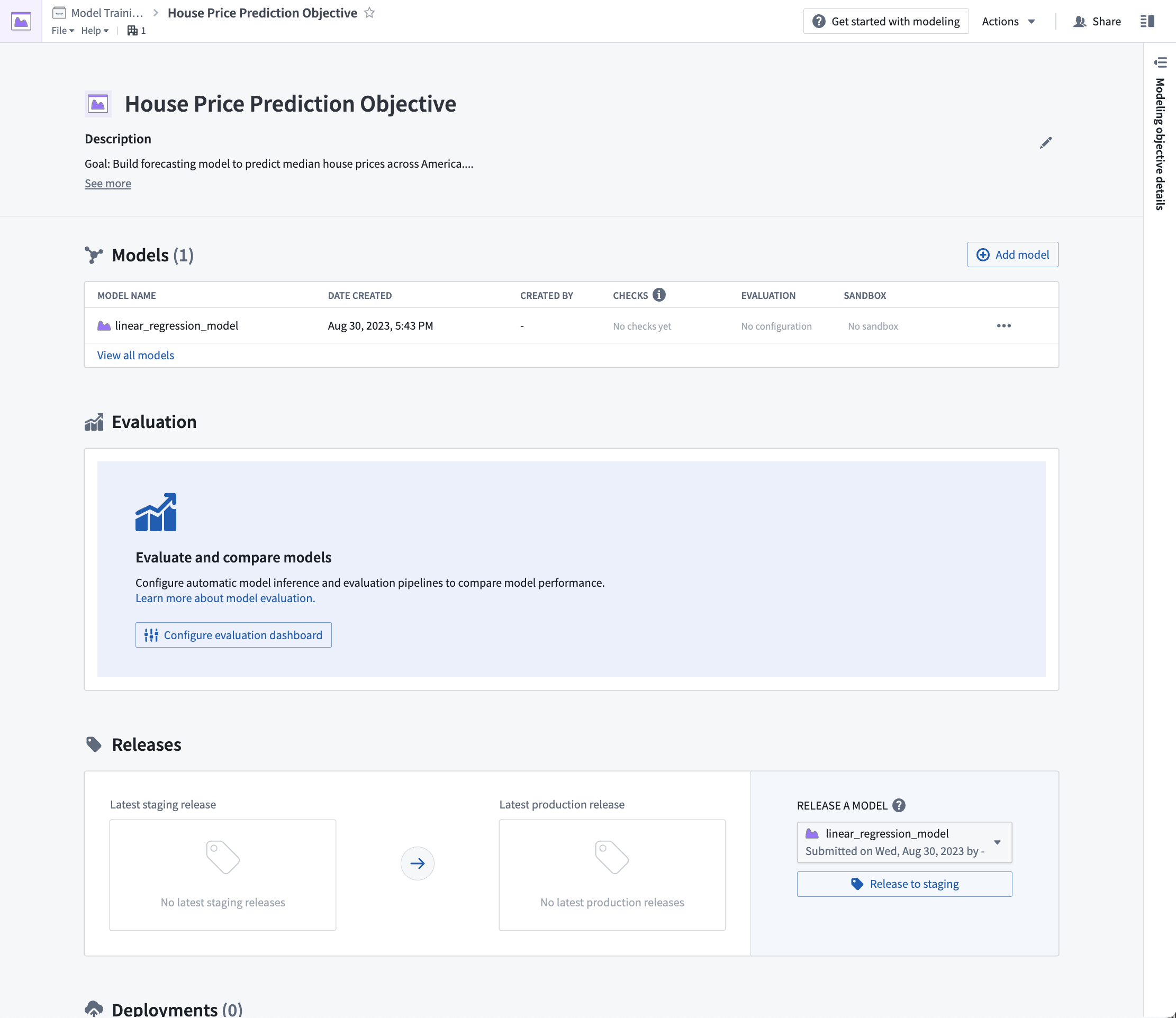
A modeling objective can be thought of as a catalog of potential production-worthy model versions. Submitting models to an objective adds a model to that catalog and makes it available for evaluation and review in the context of a specific modeling problem or goal. Each model submission, whether eventually productionized or not, helps track progress of a modeling project and maintains a history of experimentation and learning around a project space.
There are no required actions for this step of the tutorial.
3.2 How to configure automatic model evaluation
Now that we have a model candidate in our modeling objective, we can evaluate how well this model performs by generating model performance metrics inside this modeling objective. Performance metrics are an important tool in understanding how well your model performs and why your model acts the way that it does.
As the objective of this tutorial is to estimate a number (the average house price in an American census district), our modeling problem can be categorized as a regression modeling problem. For a regression modeling problem, it is common to look at evaluation metrics such as Mean absolute error, Root mean squared error. These metrics, among others, are included in Foundry's default regression evaluator and so, we will use this library to evaluate the performance of our model submissions.
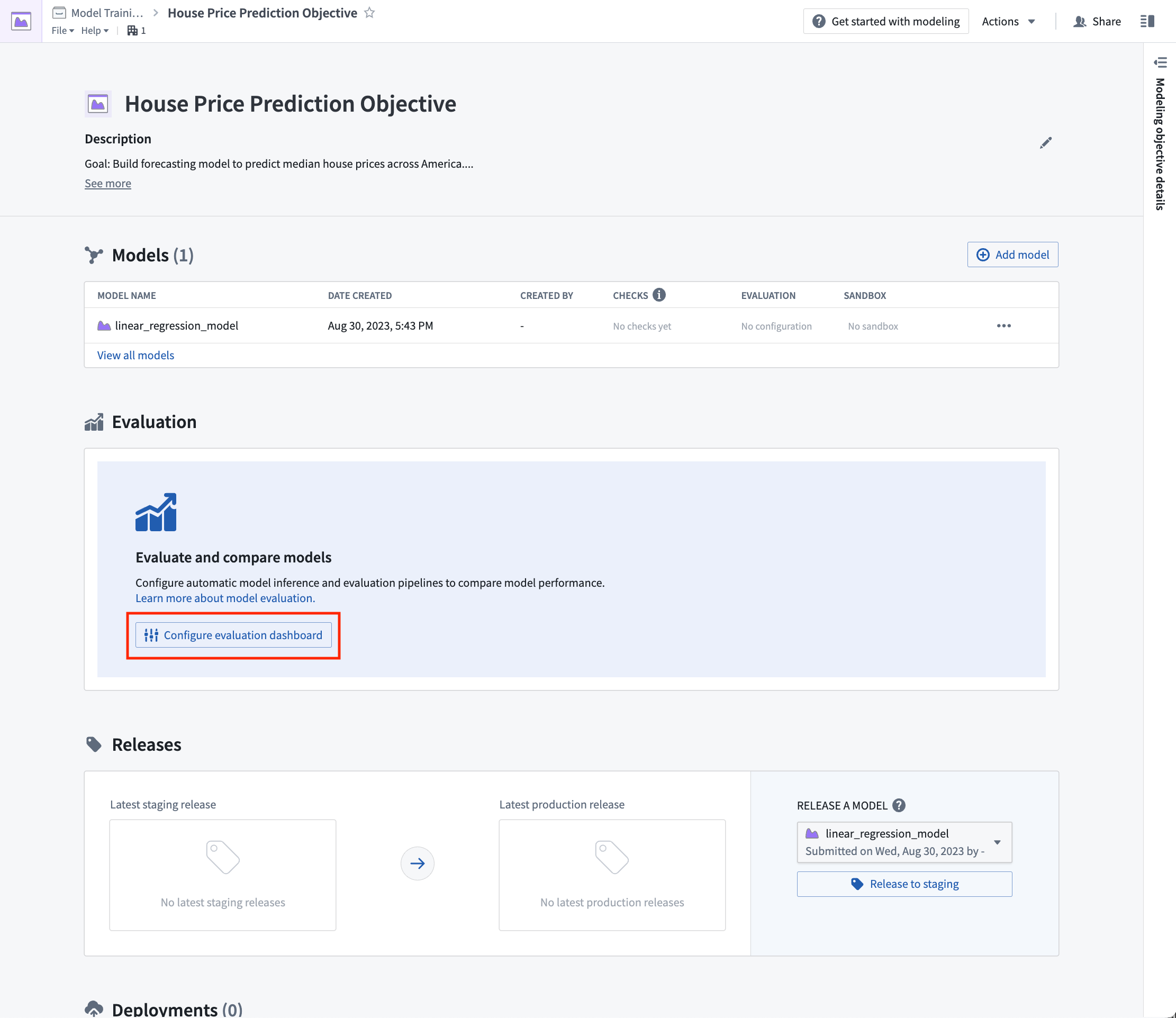
Action: From the modeling objective, select Configure evaluation dashboard.
Configure model evaluation
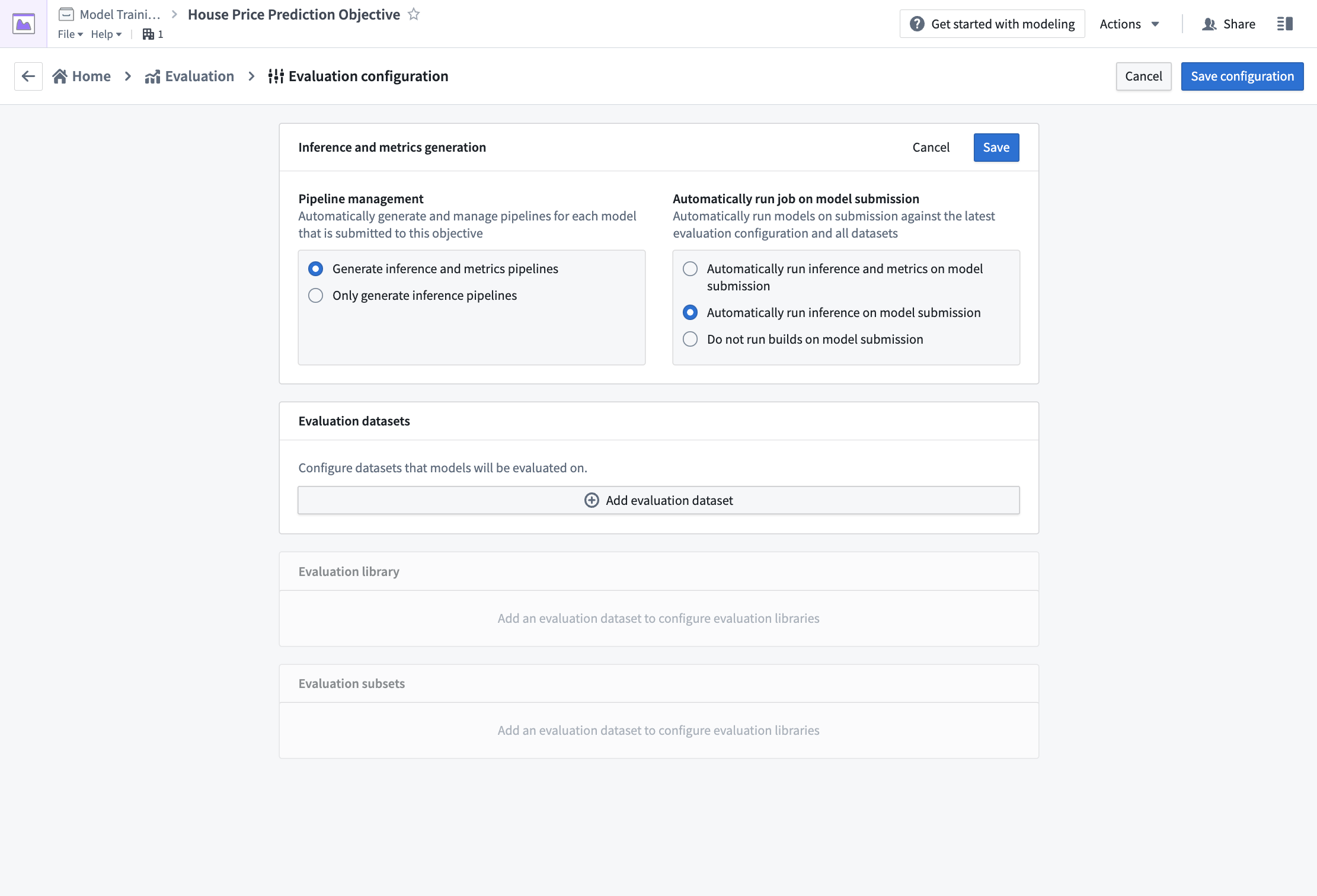
Automatic model evaluation is a useful way to ensure that models are evaluated in a standardized manner. Standardization ensures consistent model comparison and that allows you to confidently choose which model is best to use in production.
If evaluation pipeline management is enabled; Foundry will automatically generate one inference dataset for each combination of model submission and evaluation dataset. The inference dataset is the result of running inferences (generating predictions) for your model against an evaluation dataset. An evaluation dataset is defined by a user as a standardized test set for your model and requires both the features (used to generate predictions) and labels (used to compare model inferences with the ground-truth labels).
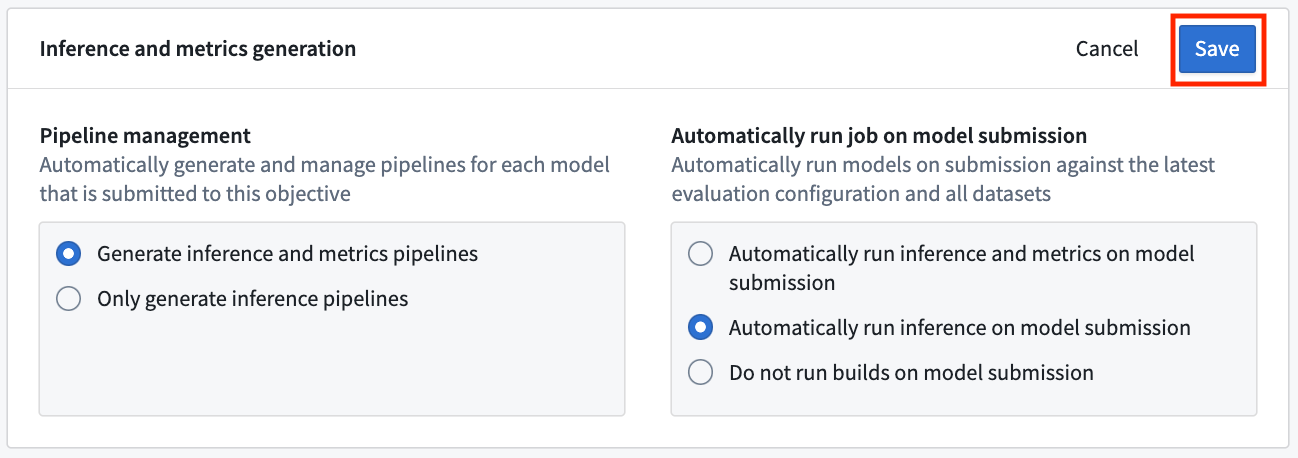
Action: To configure pipeline management, select Edit and then select both the following options: Generate inference and metrics pipelines and Automatically run inference and metrics on model submission. Then, Save to confirm your pipeline management settings.
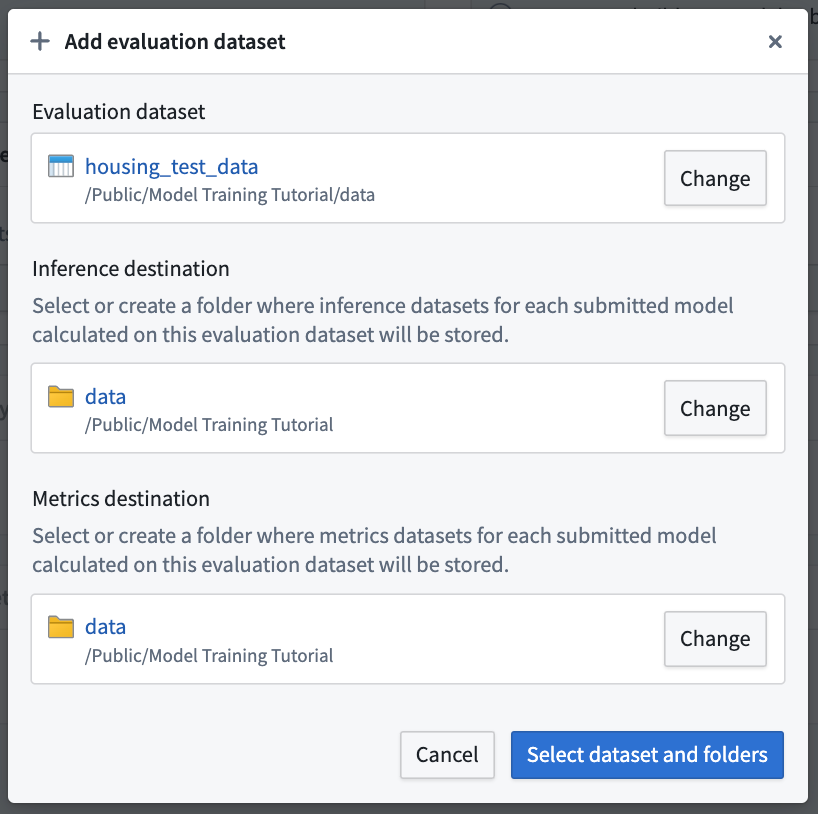
Action: To configure an evaluation dataset, select Add evaluation dataset, then the housing_test_data dataset that you created in the model training tutorial as your evaluation dataset. Select your data folder as the inference destination and metrics destination. Confirm your selection by choosing Select dataset and folders.
Configure evaluation library
The evaluation library is a parameterizable Foundry library that can be used to take an inference dataset and produce evaluation metrics that will be added to an evaluation dashboard in a modeling objective. Foundry comes with default evaluation libraries for regression and binary classification but it is also possible to create custom evaluation libraries for your specific modeling problem.
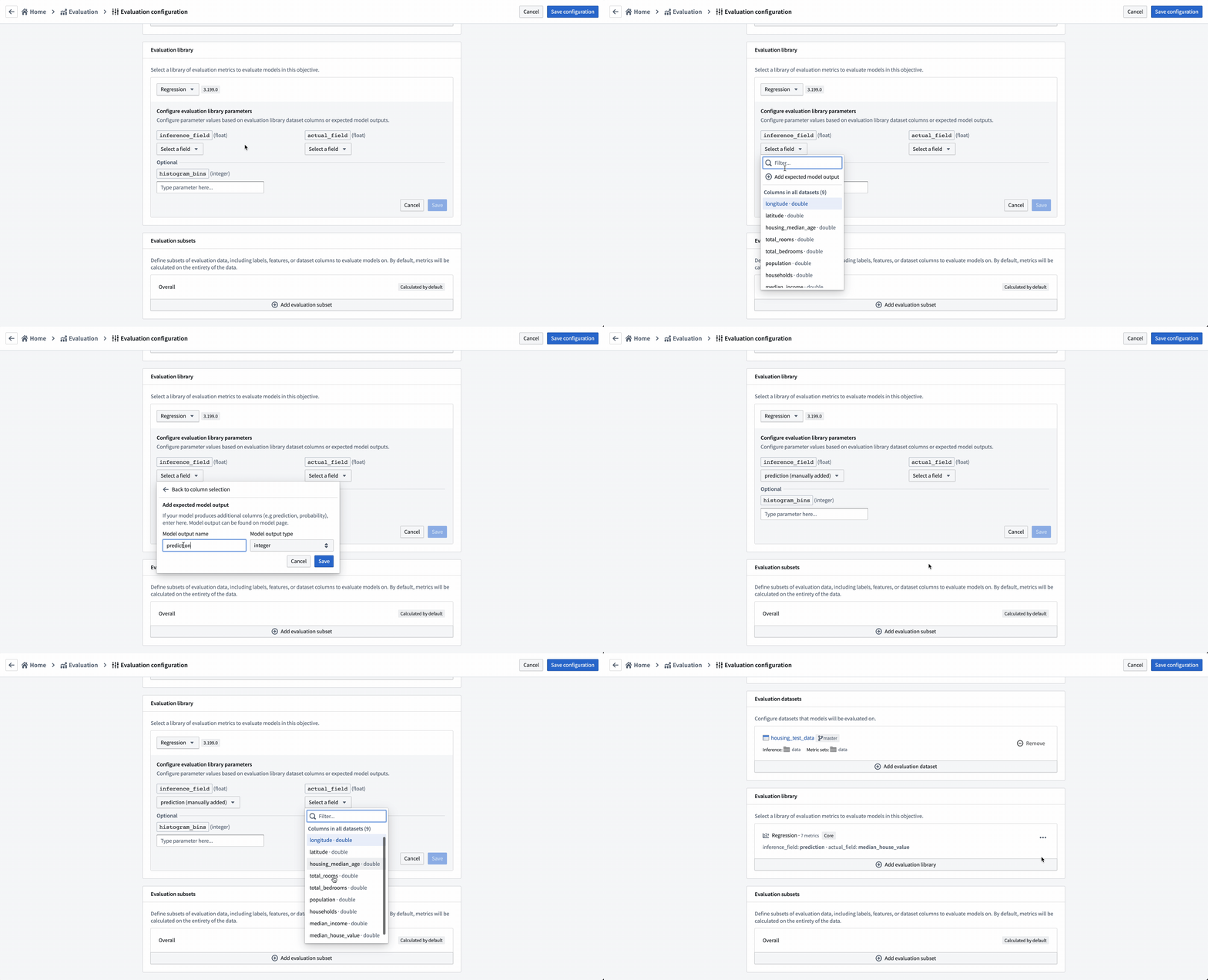
To evaluate all models added to this modeling objective, all model submissions must generate their evaluation scores consistently. In this modeling objective, we will expect that all models generate an inference column named prediction that is a float.
Action: Choose Select evaluation library and then Regression default library. Configure the inference_field as prediction of type float, the actual_field (the property we are trying to estimate) as median_house_value and leave histogram_bins empty. Save to save evaluation library configuration.
Configure evaluation subsets
Setting up evaluation subsets is an optional step in model evaluation that allows you to independently generate metrics for specific portions of the evaluation data. These metrics can all be separately analyzed in the evaluation dashboard.
You may want to enable evaluation subsets if:
- You want to understand if there are segments of your data where your model performs better than others. This can inform the bounds where this model should be used in production.
- You want to understand if there are areas where your model performs poorly, allowing you to focus future development efforts.
- You want to ensure your model is not biased against a protected group in your evaluation data.
In this case, we will examine how the model performs where the average house age is less than 5 years or more than 30 years.
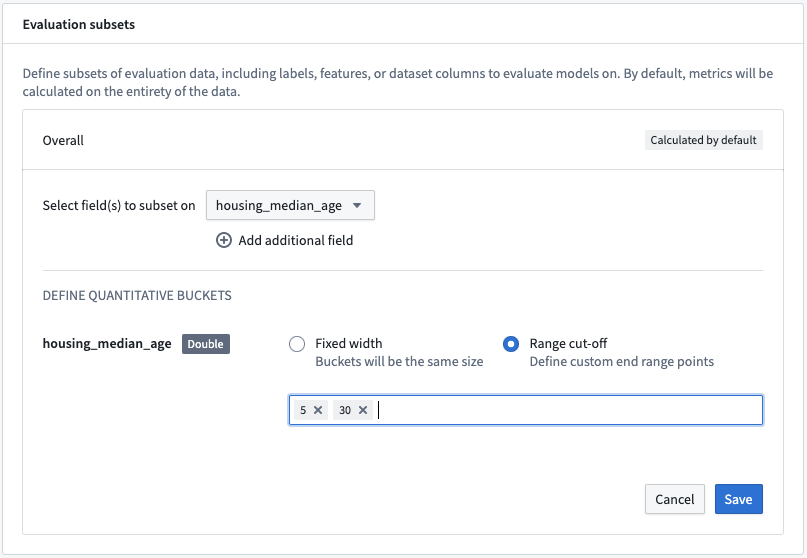
Action: Select Add evaluation subset and then the housing_median_age field. As this is a numeric field, we can define the quantitative bucketing strategy to use. In this example, we will use a Range cut-off with the buckets 5 and 30.
Action: Save the subset configuration.
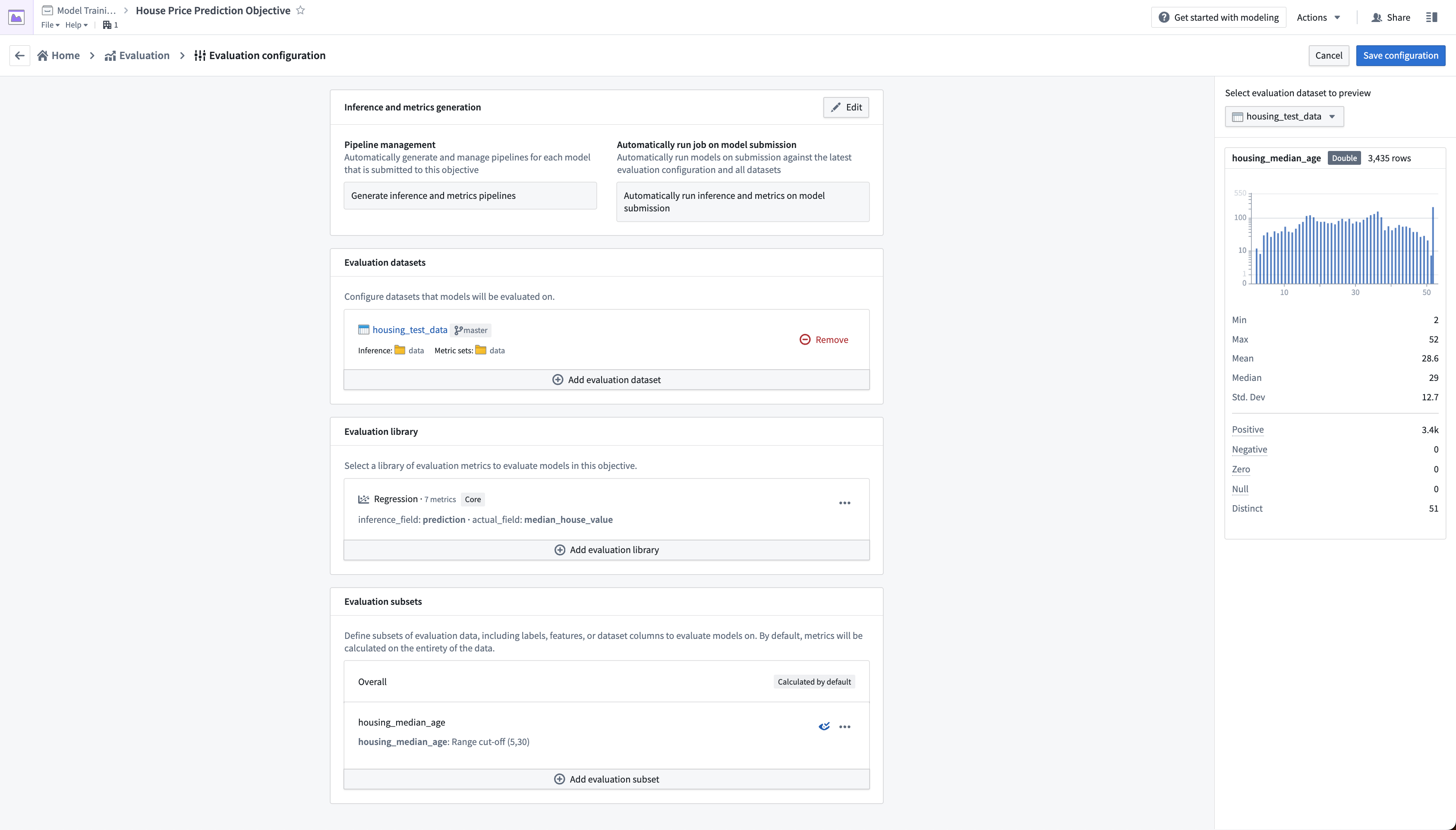
This subset configuration will evaluate the models on four different sets of data on each evaluation dataset.
Overall: This is the entire evaluation dataset.housing_median_age (<5): The evaluation dataset filtered to where thehousing_median_ageis less than 5.housing_median_age (>= 5, < 30): The evaluation dataset filtered to where thehousing_median_ageis greater than or equal to 5 but less than 30.housing_median_age (>= 30): The evaluation dataset filtered to where thehousing_median_ageis greater than or equal to 30.
This will allow us to determine whether the model is behaving similarly on records where the housing_median_age differs.
Action: Select Save configuration at the top-right of the page to save and return to the evaluation dashboard. From now, any model that you submit to this objective will automatically produce and build inference and metrics datasets that you can use to evaluate your models.
3.3 How to build metrics pipelines
After configuring your metrics pipelines, an inference dataset and metrics dataset will be created and started every time you make a model submission to this modeling objective. If configured to do so, Foundry will also automatically run those datasets and add metrics to the evaluation dashboard in your modeling objective.
In this case, as we had already added the model to this objective we will need to manually start the build of those datasets.
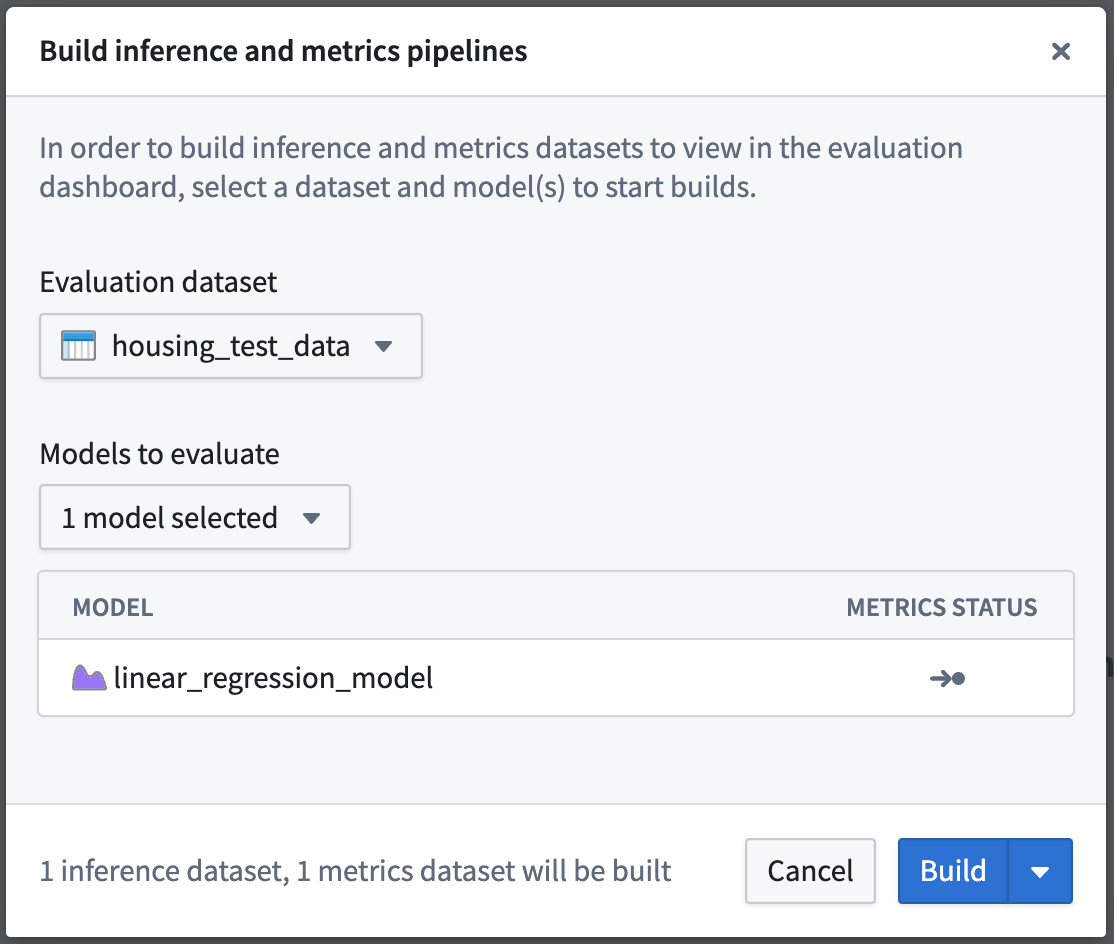
Action: Select Build Evaluation at the top right of the evaluation dashboard, then choose housing_test_data as the evaluation dashboard and linear_regression_model as the model to evaluate. Then, Build to start the inference and metrics builds.
:::callout{title="Note"} It might take a few minutes for your evaluation pipelines to be created; you may need to wait until the Build action becomes active. :::
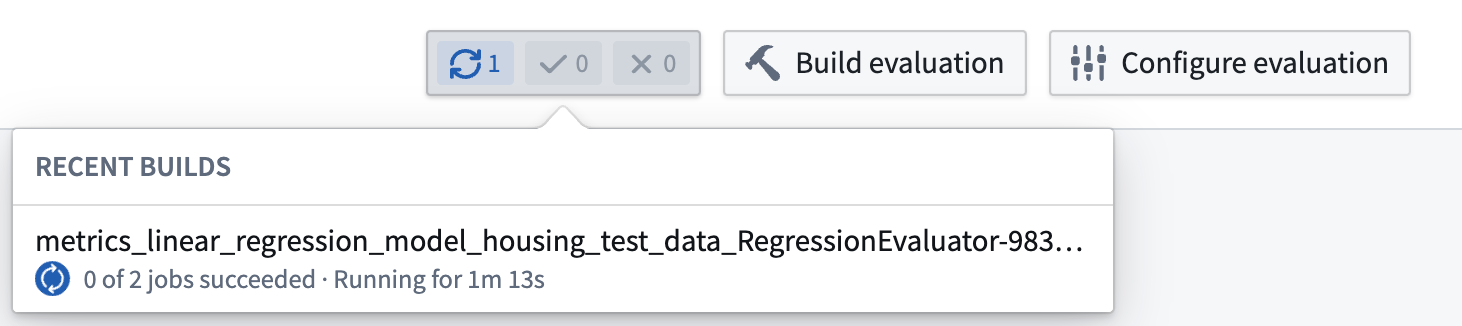
Once your build is started, you can see the progress of those builds from the evaluation dashboard by looking at the recent builds dropdown at the top-right of the evaluation dashboard.
:::callout{title="Note"} Depending on the load of your Foundry instance, running evaluation pipelines may take a few minutes. :::
3.4 How to evaluate models in the evaluation dashboard
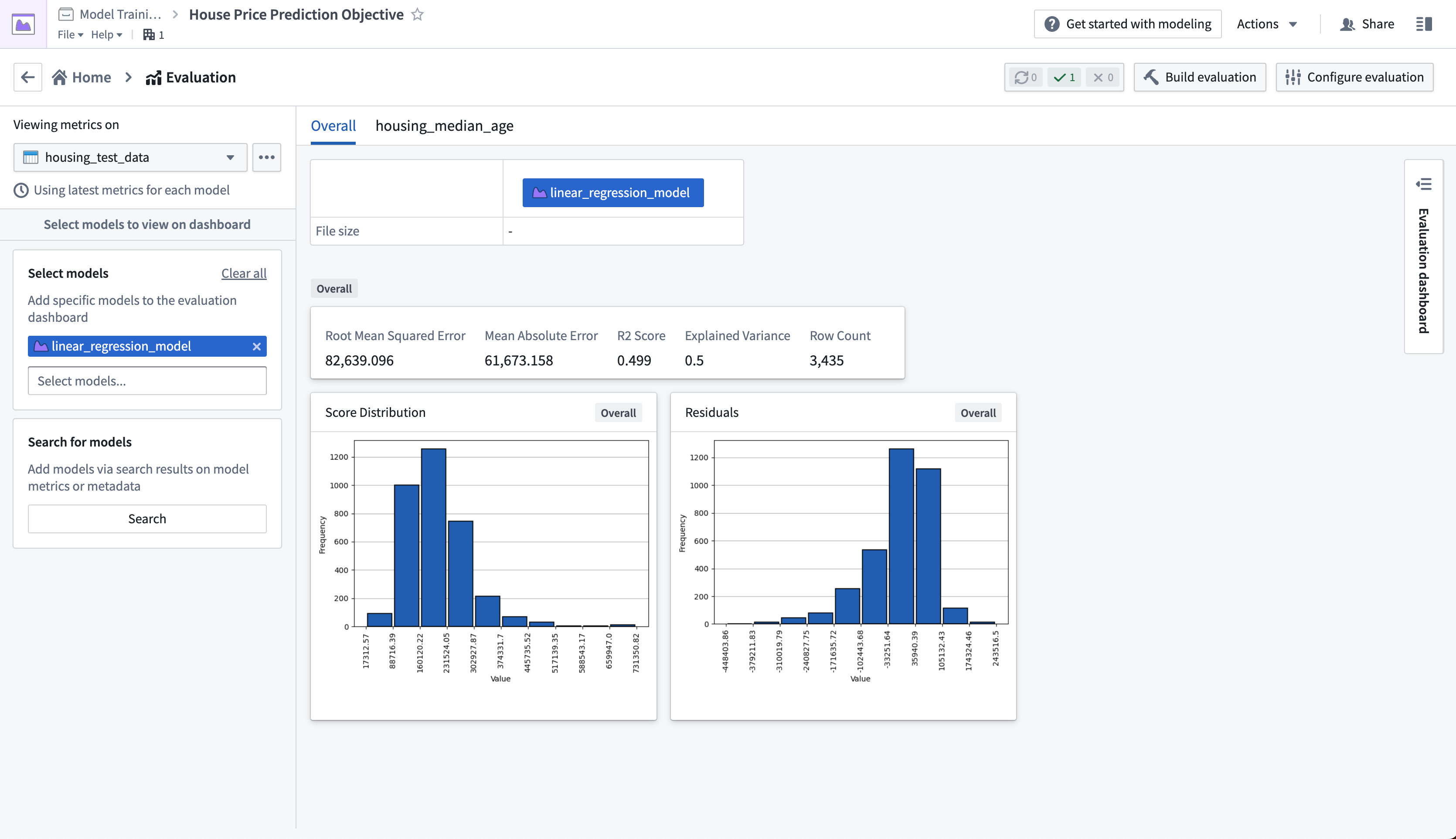
Before moving on with this tutorial, your evaluation dashboard should have successfully completed builds of your inference and metrics datasets that you created earlier. Once metrics have completed, you will be able to see and compare the metrics for all models that you have added to this modeling objective. This creates a centralized source of the performance of your modeling project.
In the regression evaluation library, we generated a range of metrics that are available in the evaluation dashboard. These metrics give us an understanding of how accurately our model is able to predict the labels (the median house price for a census district) on unseen test data.
Determining what metrics to use and what adequate performance means will vary by project. This process usually requires discussion with stakeholders, but for our fictional example, we will say this model performs well enough. In this case a Root Mean Squared Error of 82639.10 means that, on average, the model predictions are $82,639.10 away from the label in our unseen test data.
Action: Refresh the page, select the housing_test_dataset dataset in the dataset selector on the left-side bar, then select linear_regression_model from the model selector.
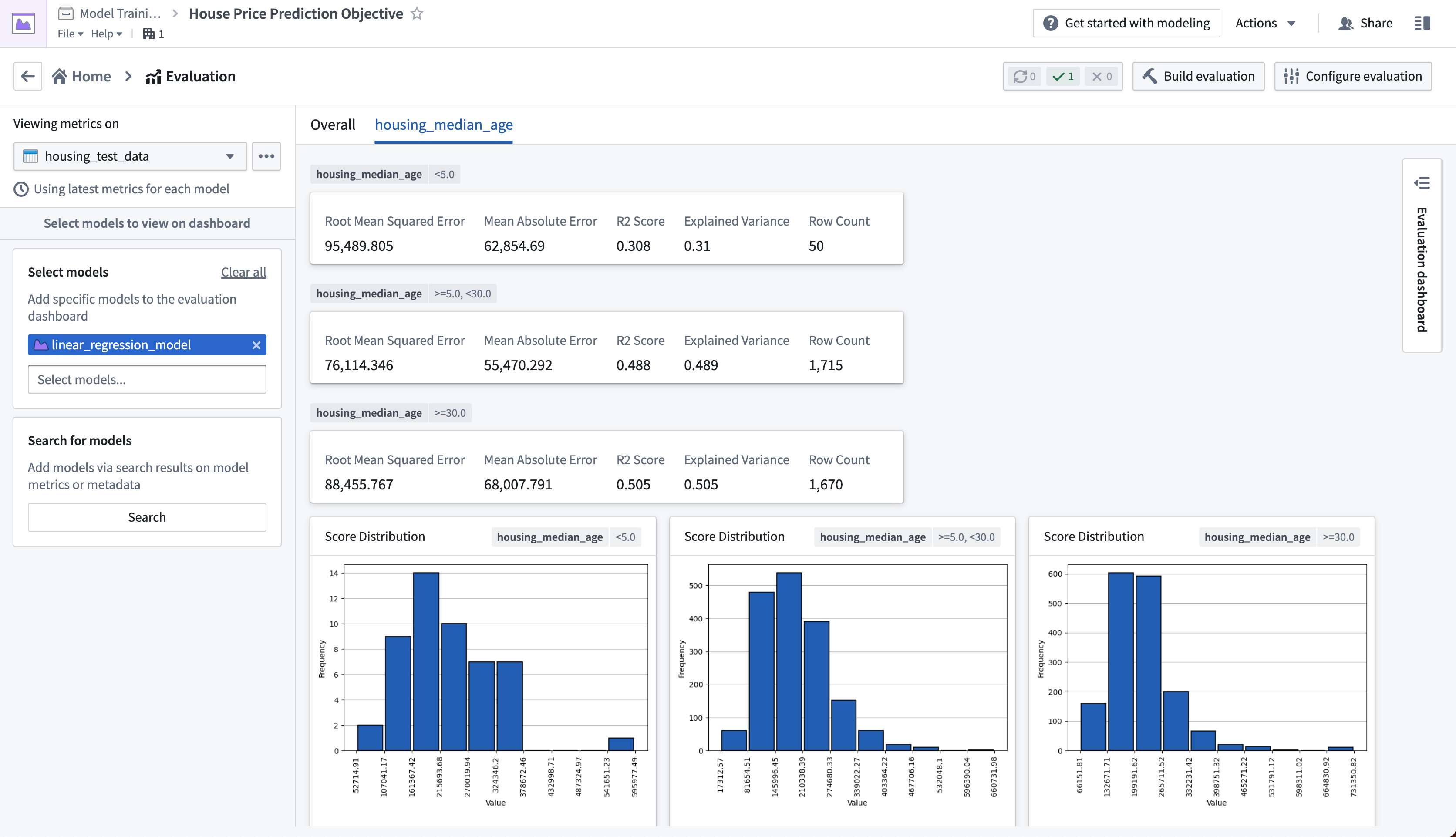
The evaluation dashboard also shows us model performance broken down by the subsets that we defined earlier. The tabs in our evaluation dashboard reflect the available subset groups we can see metrics for. In this case, we can see that our model performs best where the median house age is between 5 and 30 years old.
Action: Select the housing_median_age tab at the top of the evaluation dashboard.
Next step
Now that we have evaluated our machine learning model, we can integrate this model into a production application. Review the how to Productionize a model tutorial.
中文翻译
3. 教程 - 在建模目标应用中评估模型
开始本教程前,您应已完成建模项目设置,并在 Jupyter® notebook 或代码仓库中训练了模型;此时,您的建模目标中应至少包含一个模型。
在本教程步骤中,我们将评估模型性能并在建模目标中发布该模型。此步骤为推荐操作,但不会影响本教程后续步骤,您可稍后返回完成。本部分将涵盖:
3.1 什么是建模目标?
建模目标可视为潜在可投产模型版本的目录。将模型提交至目标即将其添加至该目录,并使其可在特定建模问题或目标的背景下进行评估与审查。每次模型提交(无论最终是否投产)都有助于追踪建模项目进展,并维护项目空间内的实验与学习历史记录。
本教程步骤无需执行任何操作。
3.2 如何配置自动模型评估
现在建模目标中已有候选模型,我们可以通过在该建模目标内生成模型性能指标来评估模型表现。性能指标是理解模型表现优劣及其行为原因的重要工具。
由于本教程的目标是估算数值(美国人口普查区的平均房价),我们的建模问题可归类为回归建模问题。对于回归建模问题,通常关注平均绝对误差、均方根误差等评估指标。这些指标包含在 Foundry 的默认回归评估器中,因此我们将使用该库来评估模型提交的性能。
操作: 在建模目标中,选择配置评估仪表板。
配置模型评估
自动模型评估是确保模型以标准化方式评估的有效方法。标准化可确保模型比较的一致性,使您能够自信地选择最适合投产的模型。
如果启用了评估管道管理,Foundry 将为每个模型提交与评估数据集的组合自动生成一个推理数据集。推理数据集是对模型针对评估数据集运行推理(生成预测)的结果。评估数据集由用户定义为模型的标准化测试集,需要同时包含特征(用于生成预测)和标签(用于将模型推理与真实标签进行比较)。
操作: 要配置管道管理,选择编辑,然后勾选以下两个选项:生成推理和指标管道和在模型提交时自动运行推理和指标。然后点击保存确认管道管理设置。
操作: 要配置评估数据集,选择添加评估数据集,然后选择您在模型训练教程中创建的 housing_test_data 数据集作为评估数据集。选择您的 data 文件夹作为推理目标和指标目标。通过选择选择数据集和文件夹确认选择。
配置评估库
评估库是一个可参数化的 Foundry 库,用于处理推理数据集并生成评估指标,这些指标将添加到建模目标的评估仪表板中。Foundry 提供了回归和二元分类的默认评估库,也可以针对特定建模问题创建自定义评估库。
为了评估添加到该建模目标的所有模型,所有模型提交必须一致地生成评估分数。在本建模目标中,我们要求所有模型生成一个名为 prediction 的推理列,类型为 float。
操作: 选择选择评估库,然后选择回归默认库。将 inference_field 配置为类型为 float 的 prediction,将 actual_field(我们试图估算的属性)配置为 median_house_value,并保持 histogram_bins 为空。点击保存保存评估库配置。
配置评估子集
设置评估子集是模型评估中的可选步骤,允许您为评估数据的特定部分独立生成指标。这些指标可在评估仪表板中单独分析。
在以下情况下,您可能希望启用评估子集:
- 您想了解数据中是否存在模型表现优于其他部分的片段。这有助于确定该模型在投产中的使用边界。
- 您想了解模型表现不佳的区域,从而集中未来的开发工作。
- 您想确保模型不会对评估数据中的受保护群体产生偏见。
在本例中,我们将检查平均房龄小于5年或大于30年时模型的表现。
操作: 选择添加评估子集,然后选择 housing_median_age 字段。由于这是数值字段,我们可以定义要使用的定量分桶策略。在本例中,我们将使用范围截断,分桶值为 5 和 30。
操作: 保存子集配置。
此子集配置将在每个评估数据集上对四组不同数据评估模型。
总体:整个评估数据集。housing_median_age (<5):筛选出housing_median_age小于5的评估数据集。housing_median_age (>= 5, < 30):筛选出housing_median_age大于等于5但小于30的评估数据集。housing_median_age (>= 30):筛选出housing_median_age大于等于30的评估数据集。
这将使我们能够确定模型在 housing_median_age 不同的记录上是否表现相似。
操作: 选择页面右上角的保存配置以保存并返回评估仪表板。从现在起,您提交到此目标的任何模型都将自动生成并构建推理和指标数据集,供您评估模型使用。
3.3 如何构建指标管道
配置指标管道后,每次向此建模目标提交模型时,都会创建并启动推理数据集和指标数据集。如果已配置,Foundry 还将自动运行这些数据集并将指标添加到建模目标的评估仪表板中。
由于我们已向此目标添加了模型,因此需要手动启动这些数据集的构建。
操作: 选择评估仪表板右上角的构建评估,然后选择 housing_test_data 作为评估仪表板,选择 linear_regression_model 作为要评估的模型。然后点击构建启动推理和指标构建。
:::callout{title="注意"} 评估管道的创建可能需要几分钟时间;您可能需要等待直到构建操作变为可用状态。 :::
构建启动后,您可以通过评估仪表板右上角的"最近构建"下拉菜单查看构建进度。
:::callout{title="注意"} 根据 Foundry 实例的负载情况,运行评估管道可能需要几分钟时间。 :::
3.4 如何在评估仪表板中评估模型
在继续本教程之前,您的评估仪表板应已成功完成之前创建的推理和指标数据集的构建。指标完成后,您将能够查看并比较已添加到此建模目标的所有模型的指标。这为建模项目的性能创建了集中式来源。
在回归评估库中,我们生成了评估仪表板中可用的一系列指标。这些指标帮助我们了解模型在未见过的测试数据上预测标签(人口普查区的房价中位数)的准确程度。
确定使用哪些指标以及何为足够性能因项目而异。此过程通常需要与利益相关者讨论,但对于我们的虚构示例,我们认为该模型表现足够好。在本例中,均方根误差为 82639.10 意味着,在未见过的测试数据中,模型预测值与标签的平均偏差为 82,639.10 美元。
操作: 刷新页面,在左侧栏的数据集选择器中选择 housing_test_dataset 数据集,然后在模型选择器中选择 linear_regression_model。
评估仪表板还按我们之前定义的子集展示了模型性能的细分。评估仪表板中的选项卡反映了我们可以查看指标的子集组。在本例中,我们可以看到模型在房龄中位数介于5到30年之间时表现最佳。
操作: 选择评估仪表板顶部的 housing_median_age 选项卡。
下一步
现在我们已经评估了机器学习模型,可以将此模型集成到生产应用中。请参阅将模型投入生产教程。