1. Tutorial - Set up a machine learning project in Foundry(1. 教程 - 在 Foundry 中设置机器学习项目)
In this step of the tutorial, you will create a machine learning project in Foundry. This step is required and will cover:
- Structuring a Foundry project for machine learning
- Managing data for machine learning
- Managing machine learning models in Foundry
- Managing machine learning projects in Foundry
1.1 How to structure a Foundry project for machine learning
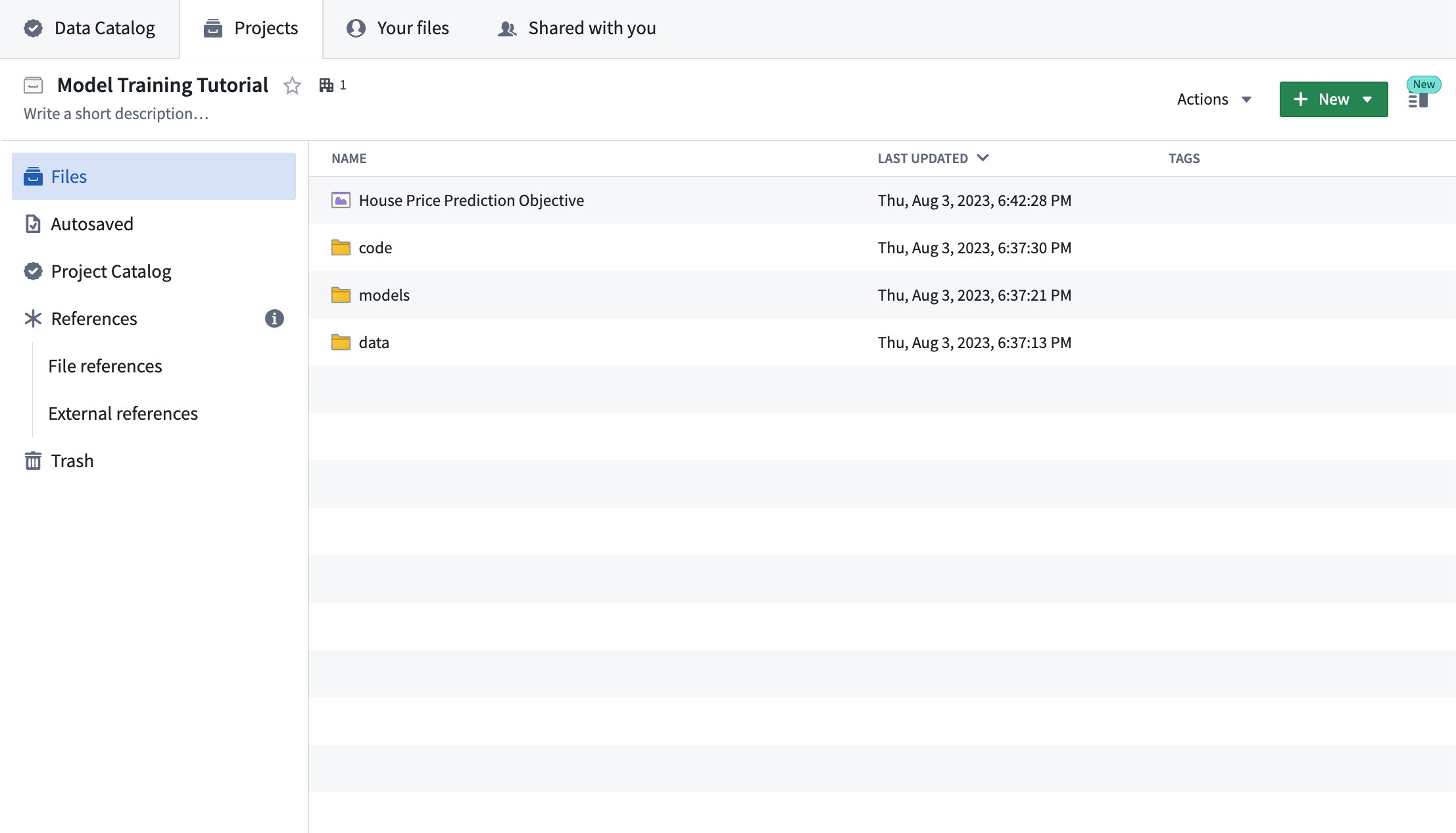
Foundry projects are folder structures to store related work. We recommend having an individual Foundry project for each machine learning project. This project should have:
- A
datafolder to store datasets used in this project, - A
modelsfolder to store models in this project, - A
codefolder to store model training logic used in this project, and, - A modeling objective to manage and deploy production models.
If you do not have permissions to create a new project, you can create a new folder in an existing project to act as the root directory of your machine learning project.
Action: Create a new Foundry project for this tutorial and create the above folders - see how. If you are unable to create a new Foundry project, create an empty folder in an existing project to mimic the root of a new project instead.
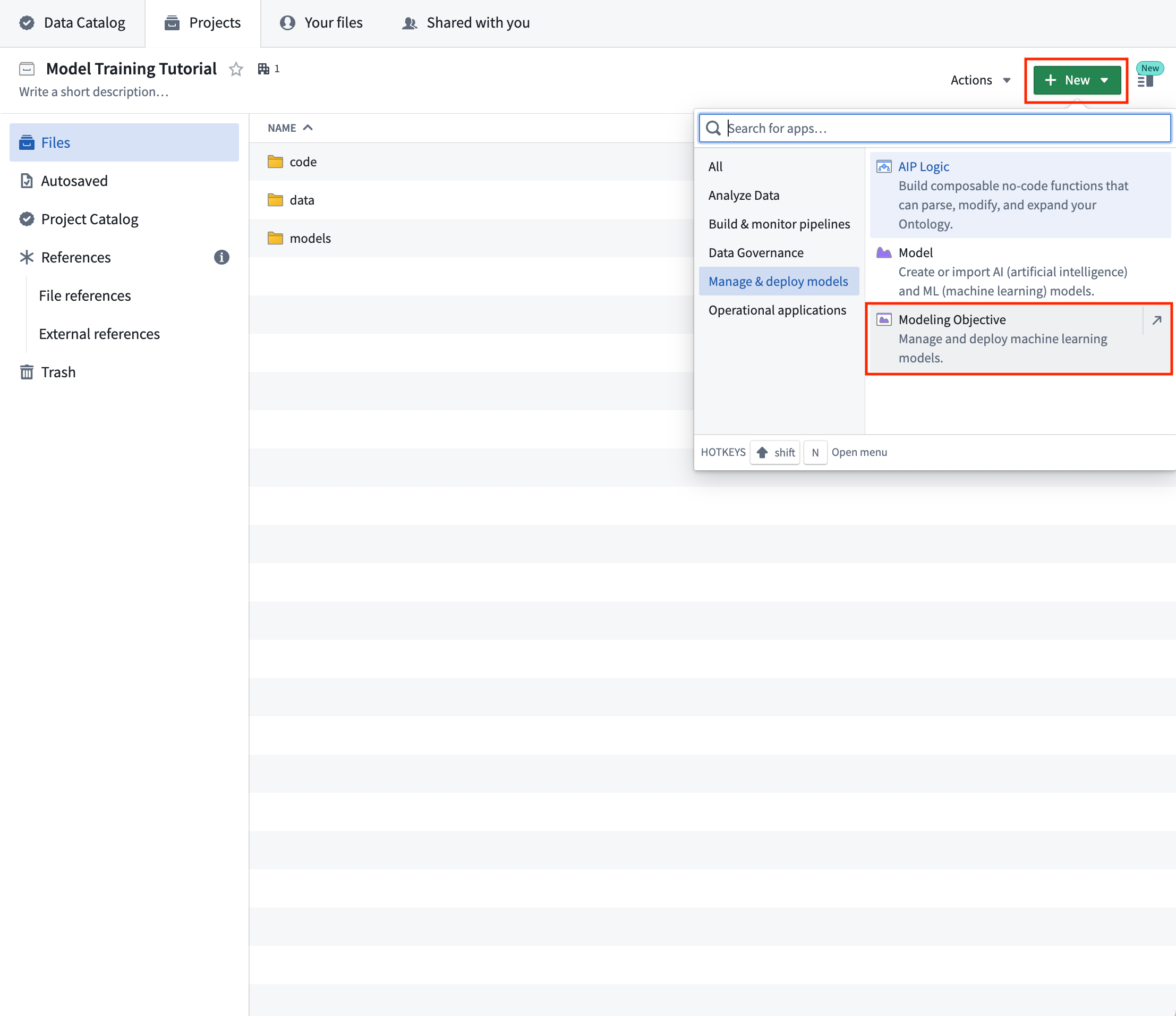
Action: In your Foundry project, Select +New > Modeling Objective. The modeling objective should be named in relation to the name of the machine learning problem you are attempting to solve. In this case, name the objective "House Price Prediction Objective".
Completed project structure
1.2 How to manage data for machine learning
In this tutorial, we are going to build a machine learning model to estimate the median house price in American census districts.
We will take feature data (historical details about the American census districts) and labels (the median house price in that census district at that time) to uncover the relationship between the features and labels and then save that relationship as a reusable model in Foundry. In the future, when we have up-to-date feature data (details about an American census district) but not the up-to-date labels (the median house price), we can apply the model on the feature data for a census district to find an estimate of the house price in that census district. This type of machine learning project is called supervised machine learning and is the most common type of machine learning project.
In Foundry, a supervised machine learning project should have two datasets:
- A labeled dataset that can be used for model training and testing, and,
- An unlabeled dataset that contains up-to-date features but no labels. We will apply the model on this dataset to generate inferences (predictions of our label).
These datasets often come from data connections to production sources or your Ontology. However, for this tutorial, we will upload CSV files to simulate those production sources.
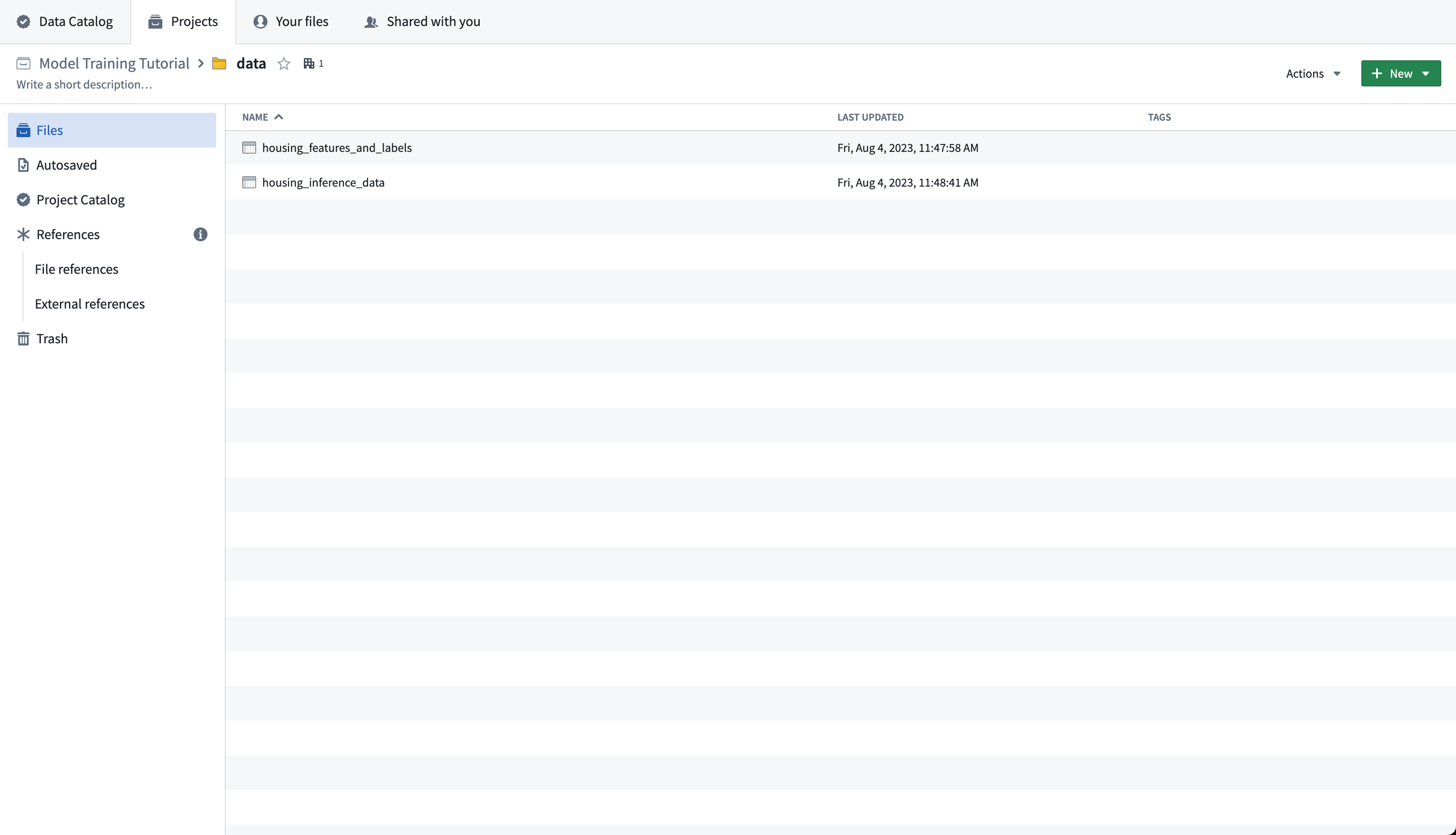
Action: Download the labeled American Housing data source and upload it in the data folder as housing_features_and_labels. Download the unlabeled American Census data source and upload it to the data folder as housing_inference_data. You can upload a CSV file into Foundry by dragging it into the folder structure - for this tutorial, upload it as a structured dataset.
Completed data folder
1.3 How to manage machine learning models
Models that are trained in Foundry are linked to the data, code, and development environment that was used to train them. This is useful as to provide a governed record of how all models were produced as well as to record and share the details of historical experimentation.
Machine learning models can be trained in Foundry in the Code Repositories application.
Code Repositories
The Code Repositories application is a web-based development environment for authoring data pipelines and machine learning logic. Foundry provides a template repository for machine learning called the Model Training template.
Code Repositories support Git for local code iteration but require committed code for running builds within Foundry. The Code Repositories application is best for authoring production and reproducible data pipelines and machine learning logic.
Integrate an existing model
If you already have a model that you want to use in Foundry, you can integrate that existing model by:
- Uploading a container image as a model
- Creating a model to proxy an externally hosted model
- Import pre-trained model files, for example from Hugging Face
There are no required actions for this step of the tutorial.
1.4 How to manage machine learning projects
In Foundry, machine learning projects are managed with the Modeling Objectives application. A modeling objective suggests best practices to manage machine learning projects by:
- Orienting the machine learning project around a specific problem
- Creating a standard for systematic model evaluation
- Enabling multiparty review of models before production use
- Maintaining a historic record of all models used in production
- Integrating model development with deployment to either batch pipelines or real-time hosted inference
In this tutorial, the modeling objective is to predict the median house price in a census district.
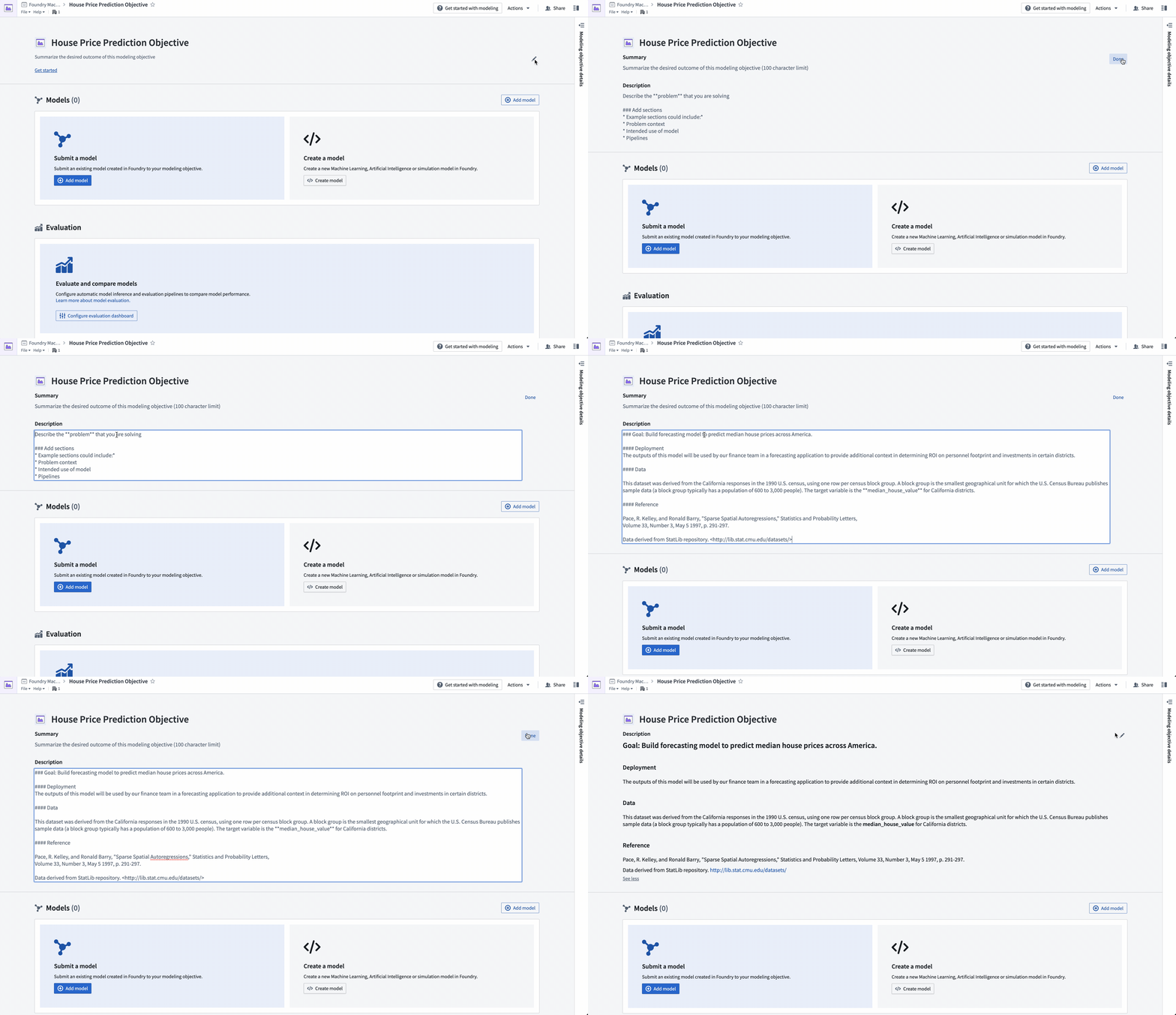
Action: Navigate to the "House Price Prediction Objective" modeling objective created earlier. Add project context in the header portion of the modeling objective to describe the problem for other teams. Select the pen icon on the right of the header to enter edit mode and add a summary and description for your objective. The description field supports Markdown. An example of suggested content is below:
#### Goal: Build forecasting model to predict median house prices across America.

#### Data

This dataset was derived from the California responses in the 1990 U.S. census, using one row per census block group. A block group is the smallest geographical unit for which the U.S. Census Bureau publishes sample data (a block group typically has a population of 600 to 3,000 people).

The target variable is the **median_house_value** for California districts.

#### Reference

Pace, R. Kelley, and Ronald Barry, "Sparse Spatial Autoregressions," Statistics and Probability Letters,
Volume 33, Number 3, May 5 1997, p. 291-297.

Data derived from StatLib repository. <http://lib.stat.cmu.edu/datasets/>
Next step
Now that we have structured our machine learning project, we will move onto model training. In this tutorial, your next step is to either train a model in Model Studio, train a model in a Jupyter® notebook or train a model in Code Repositories. Jupyter® notebooks are recommended for fast and iterative model development, while Code Repositories are recommended for production-grade data and model pipelines.
中文翻译
1. 教程 - 在 Foundry 中设置机器学习项目
在本教程的此步骤中,您将在 Foundry 中创建一个机器学习项目。此步骤为必需步骤,将涵盖以下内容:
1.1 如何为机器学习构建 Foundry 项目结构
Foundry 项目是用于存储相关工作的文件夹结构。我们建议为每个机器学习项目创建一个独立的 Foundry 项目。该项目应包含:
- 一个
data文件夹,用于存储该项目中使用的数据集, - 一个
models文件夹,用于存储该项目中的模型, - 一个
code文件夹,用于存储该项目中使用的模型训练逻辑,以及, - 一个建模目标(Modeling Objective),用于管理和部署生产模型。
如果您没有创建新项目的权限,可以在现有项目中创建一个新文件夹,作为机器学习项目的根目录。
操作: 为本教程创建一个新的 Foundry 项目,并创建上述文件夹 - 查看操作方法。如果无法创建新的 Foundry 项目,请在现有项目中创建一个空文件夹,以模拟新项目的根目录。
操作: 在您的 Foundry 项目中,选择 +新建 > 建模目标。建模目标的命名应与您尝试解决的机器学习问题名称相关。在本例中,将目标命名为"房价预测目标"。
完成的项目结构
1.2 如何管理机器学习数据
在本教程中,我们将构建一个机器学习模型,用于估算美国人口普查区的房价中位数。
我们将使用特征数据(美国人口普查区的历史详细信息)和标签(该人口普查区当时的房价中位数)来揭示特征与标签之间的关系,然后将该关系作为可复用模型保存在 Foundry 中。将来,当我们拥有最新的特征数据(美国人口普查区的详细信息)但没有最新的标签(房价中位数)时,我们可以将模型应用于某个普查区的特征数据,以估算该普查区的房价。这种类型的机器学习项目称为监督式机器学习(supervised machine learning),是最常见的机器学习项目类型。
在 Foundry 中,一个监督式机器学习项目应包含两个数据集:
- 一个带标签的数据集(labeled dataset),可用于模型训练和测试,以及,
- 一个无标签的数据集(unlabeled dataset),包含最新的特征但不包含标签。我们将把模型应用于此数据集以生成推断(对标签的预测)。
这些数据集通常来自与生产源的数据连接或您的本体(Ontology)。但是,在本教程中,我们将上传 CSV 文件来模拟这些生产源。
操作: 下载带标签的美国住房数据源,并将其作为 housing_features_and_labels 上传到 data 文件夹。下载无标签的美国人口普查数据源,并将其作为 housing_inference_data 上传到 data 文件夹。您可以通过将 CSV 文件拖入文件夹结构来将其上传到 Foundry - 在本教程中,请将其作为结构化数据集上传。
完成的数据文件夹
1.3 如何管理机器学习模型
在 Foundry 中训练的模型会与用于训练它们的数据、代码和开发环境相关联。这非常有用,因为它可以提供所有模型如何产生的受控记录,并记录和共享历史实验的详细信息。
机器学习模型可以在代码仓库(Code Repositories)应用程序中训练。
代码仓库
代码仓库应用程序是一个基于 Web 的开发环境,用于编写数据管道和机器学习逻辑。Foundry 提供了一个名为模型训练模板的机器学习模板仓库。
代码仓库支持 Git 用于本地代码迭代,但需要在 Foundry 内运行构建时提交代码。代码仓库应用程序最适合编写生产级且可复现的数据管道和机器学习逻辑。
集成现有模型
如果您已有想要在 Foundry 中使用的模型,可以通过以下方式集成该现有模型:
- 上传容器镜像作为模型
- 创建一个模型来代理外部托管的模型
- 导入预训练模型文件,例如从 Hugging Face 导入
本教程步骤无需执行任何操作。
1.4 如何管理机器学习项目
在 Foundry 中,机器学习项目通过建模目标(Modeling Objectives)应用程序进行管理。建模目标通过以下方式建议管理机器学习项目的最佳实践:
- 围绕特定问题定位机器学习项目
- 创建系统化模型评估的标准
- 在生产使用前启用模型的多方审查
- 维护所有生产中使用模型的历史记录
- 将模型开发与部署集成到批处理管道或实时托管推理中
在本教程中,建模目标是预测人口普查区的房价中位数。
操作: 导航到之前创建的"房价预测目标"建模目标。在建模目标的标题部分添加项目上下文,以向其他团队描述问题。选择标题右侧的笔图标进入编辑模式,为您的目标添加摘要和描述。描述字段支持 Markdown。以下是建议内容的示例:
#### 目标:构建预测模型,用于预测全美房价中位数。

#### 数据

该数据集源自 1990 年美国人口普查中的加利福尼亚州回复,每行对应一个人口普查区块组。区块组是美国人口普查局发布样本数据的最小地理单位(一个区块组通常有 600 到 3,000 人)。

目标变量是加利福尼亚州各区的 **median_house_value**。

#### 参考文献

Pace, R. Kelley, and Ronald Barry, "Sparse Spatial Autoregressions," Statistics and Probability Letters,
Volume 33, Number 3, May 5 1997, p. 291-297.

数据源自 StatLib 仓库。 <http://lib.stat.cmu.edu/datasets/>
下一步
现在我们已经构建了机器学习项目的结构,接下来将进入模型训练阶段。在本教程中,您的下一步是选择在 Model Studio 中训练模型、在 Jupyter® 笔记本中训练模型或在代码仓库中训练模型。建议使用 Jupyter® 笔记本进行快速迭代的模型开发,而代码仓库则适用于生产级数据和模型管道。