2c. Tutorial: Train a model in Code Repositories(2c. 教程:在代码仓库中训练模型)
Before starting this step of the tutorial, you should have completed the modeling project set up. In this tutorial, you can choose to either train a model in a Jupyter® notebook or in Code Repositories. Jupyter® notebooks are recommended for fast and iterative model development whereas code repositories are recommended for production-grade data and model pipelines.
In this step of the tutorial, we will train a model in Code Repositories. This step will cover:
- Creating a code repository for model training
- Splitting feature data for testing and training
- Authoring model training logic in Code Repositories
- Running batch inference
- Viewing a model and submit it to a modeling objective
2c.1 How to create a code repository for model training
The Code Repositories application in Foundry is a web-based development environment for authoring production-grade data and machine learning pipelines. Foundry provides a templated repository for machine learning called the Model Training template.
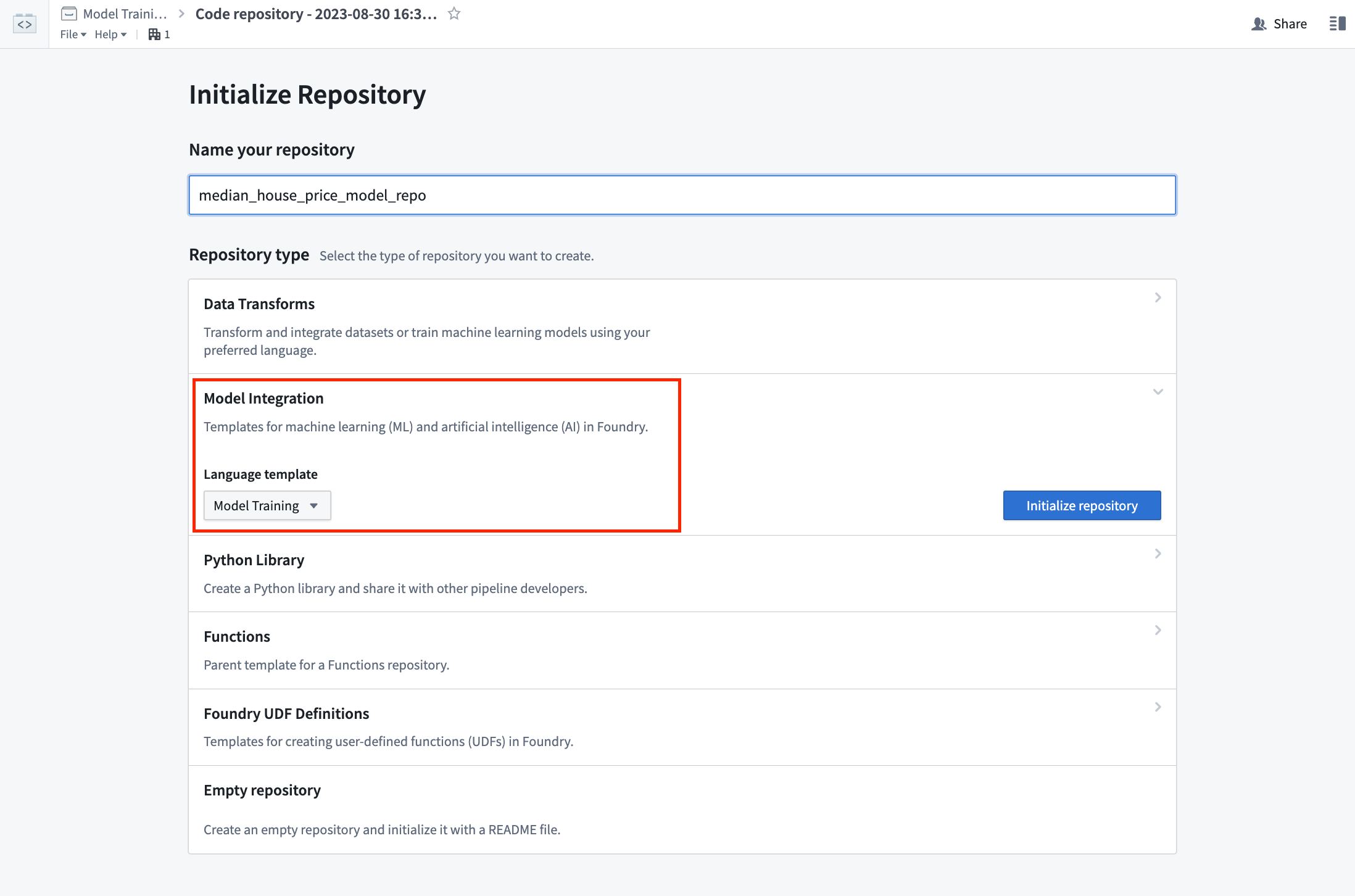
Action: In the code folder you created during the previous step of this tutorial, select + New > Code repository. Your code repository should be named in relation to the model that you are training. In this case, name the repository "median_house_price_model_repo". Select Model Training template, then Initialize.
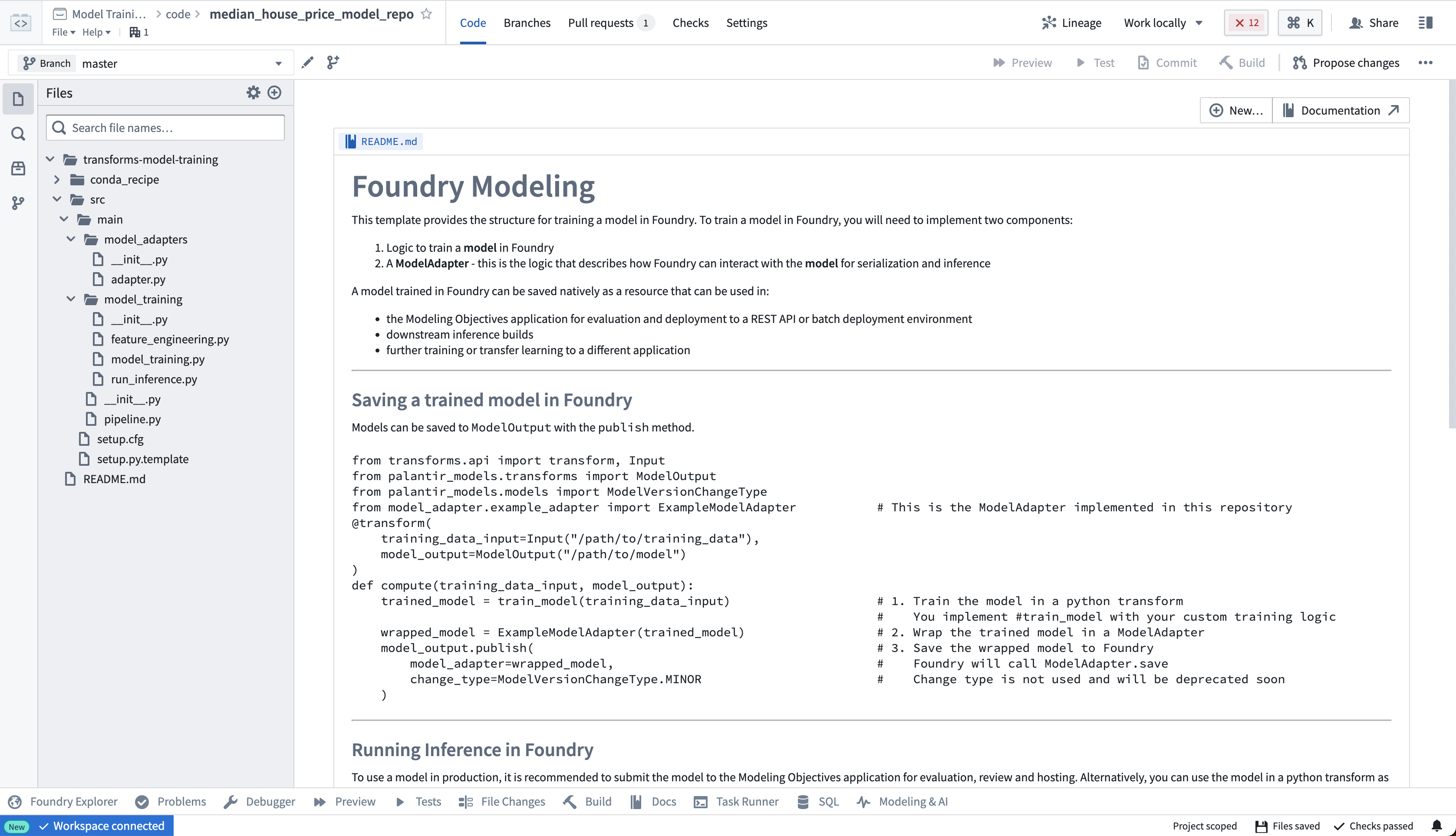
The model training template contains an example structure that we will adapt for this tutorial. You can expand the files on the left side to see an example project.
2c.2 How to split feature data for testing and training
The first step in a supervised machine learning project is to split our labeled feature data into separate datasets for training and testing. Eventually, we will want to create performance metrics (estimates of how well our model performs on new data) so we can decide whether this model is good enough to use in a production setting and so we can communicate how much to trust the results of this model with other stakeholders. We must use separate data for this validation to help ensure that the performance metrics are representative of what we will see in the real world.
As such, we are going to write a Python transform that takes our labeled feature data and splits this into our two training and testing datasets.
from transforms.api import transform, Input, Output


@transform.spark.using(
    features_and_labels_input=Input("<YOUR_PROJECT_PATH>/data/housing_features_and_labels"),
    training_output=Output("<YOUR_PROJECT_PATH>/data/housing_training_data"),
    testing_output=Output("<YOUR_PROJECT_PATH>/data/housing_test_data"),
)
def compute(features_and_labels_input, training_output, testing_output):
    # Converts this TransformInput to a PySpark DataFrame
    features_and_labels = features_and_labels_input.dataframe()

    # Randomly split the PySpark dataframe with 80% training data and 20% testing data
    training_data, testing_data = features_and_labels.randomSplit([0.8, 0.2], seed=0)

    # Write training and testing data back to Foundry
    training_output.write_dataframe(training_data)
    testing_output.write_dataframe(testing_data)
Action: Open the feature_engineering.py file in your repository and copy the above code into the repository. Update the paths to correctly point to the datasets you uploaded in the previous step of this tutorial. Select Build at the top left to run the code. You can, optionally, select Preview to test this the logic on a subset of the data for faster iteration.
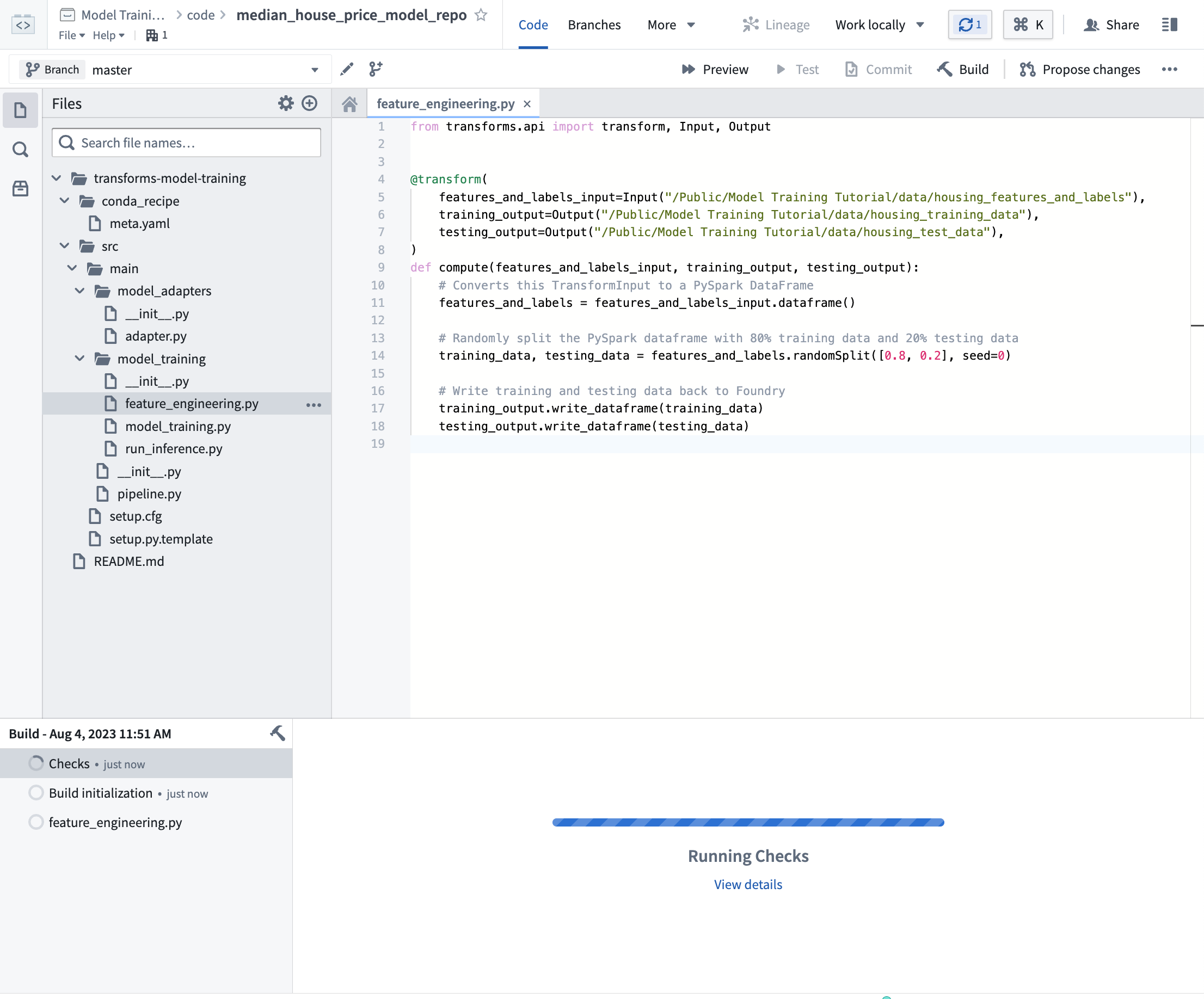
You can continue with 2c.3 while this build executes.
2c.3 How to author model training logic in Code Repositories
Models in Foundry are comprised of two components, model artifacts (the model files produced in a model training job), and a model adapter (a Python class that describes how Foundry should interact with the model artifacts to perform inference).
The model training template consists of two modules, model_training for the training job and model_adapters for the model adapter.
Model dependencies
Model training will almost always require adding Python dependencies that contain model training, serialization, inference, or evaluation logic. Foundry supports adding dependency specifications through conda. These dependency specifications are used to create a resolved Python environment for executing model training jobs.
In Foundry, these resolved dependencies are automatically packaged with your models to ensure that your model automatically has all of the logic required to perform inference (generate predictions). In this example, we will use pandas and scikit-learn to produce our model and dill to save our model.
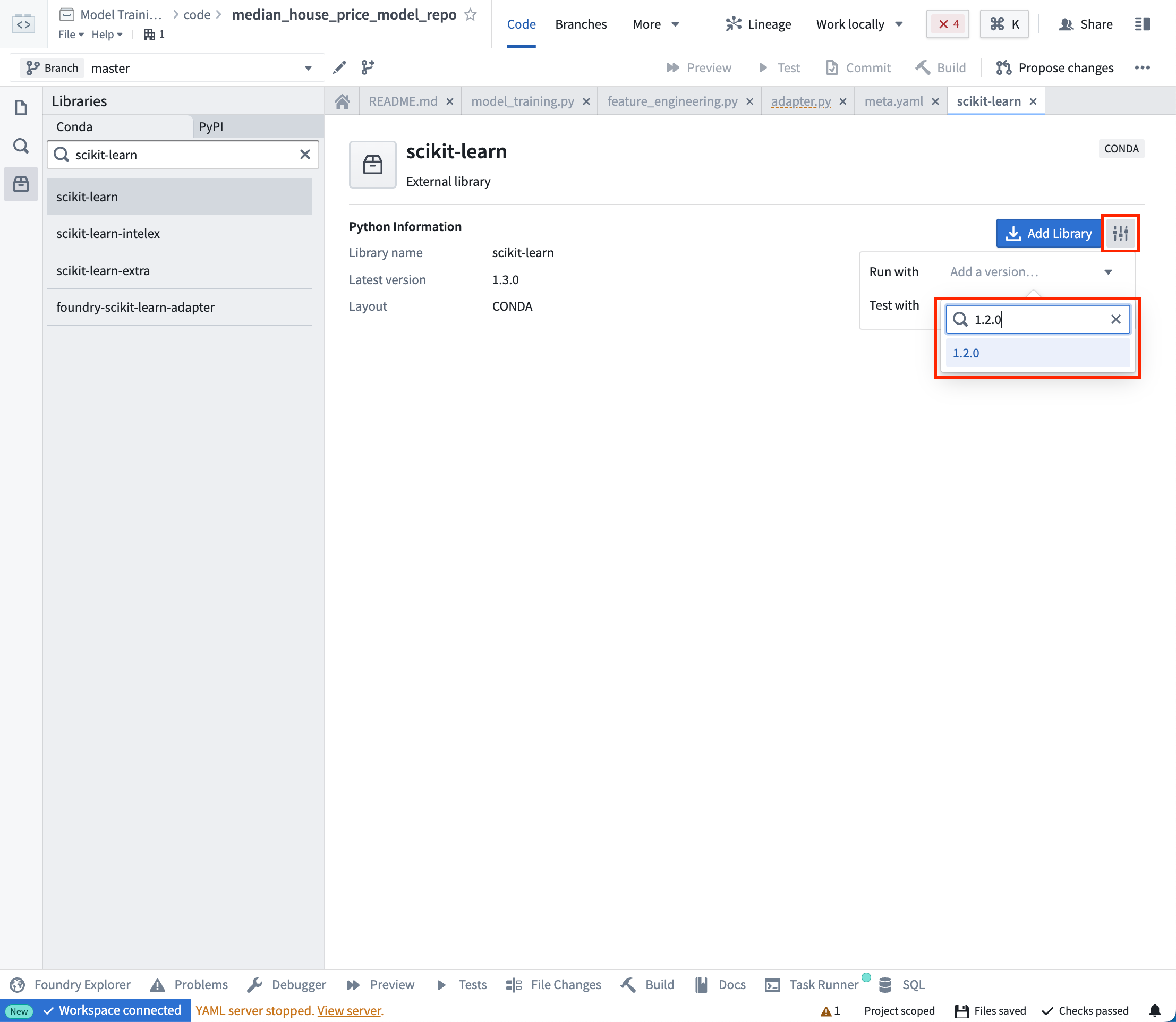
Action: On the left side bar, select Libraries and add dependencies for scikit-learn = 1.2.0, pandas = 1.5.2 and dill = 0.3.7. Then select Commit to create a resolved Python environment.
Model adapter logic
Model adapters provide a standard interface for all models in Foundry. The standard interface ensures that all models can be used immediately in production applications as Foundry will handle the infrastructure to load the model, its Python dependencies, expose its API, and interface with your model.
To enable this, you must create an instance of a ModelAdapter class to act as this communication layer.
There are 4 functions to implement:
- Model save and load: In order to reuse your model, you need to define how your model should be saved and loaded. Palantir provides many default methods of serialization (saving), and in more complex cases you can implement custom serialization logic.
- api: Defines the API of your model and tells Foundry what type of input data your model requires.
- predict: Called by Foundry to provide data to your model. This is where you can pass input data to the model and generate inferences (predictions).
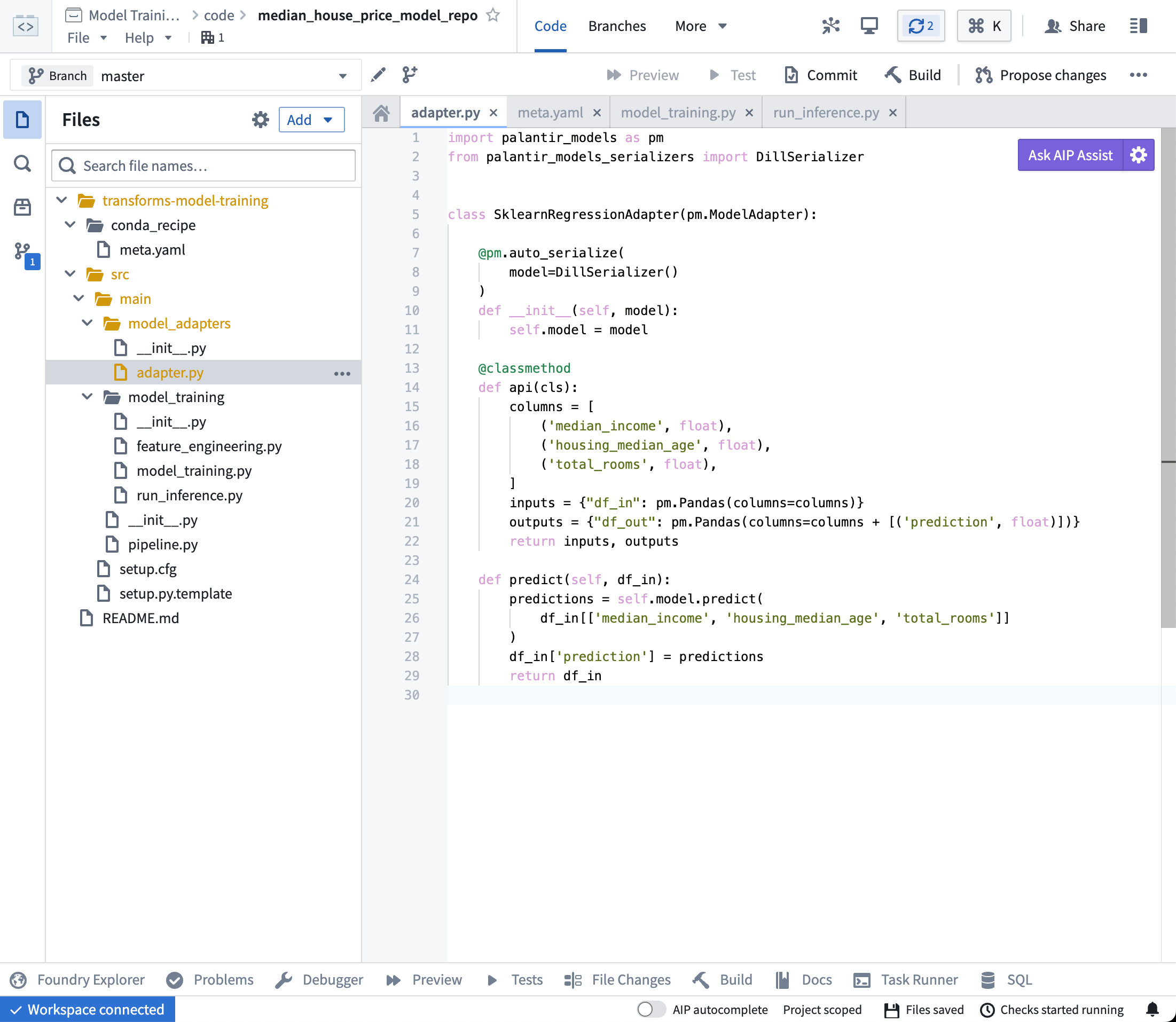
import palantir_models as pm


class SklearnRegressionAdapter(pm.ModelAdapter):

    @pm.auto_serialize
    def __init__(self, model):
        self.model = model

    @classmethod
    def api(cls):
        columns = [
            ('median_income', float),
            ('housing_median_age', float),
            ('total_rooms', float),
        ]
        return {"df_in": pm.Pandas(columns)}, \
               {"df_out": pm.Pandas(columns + [('prediction', float)])}

    def predict(self, df_in):
        df_in['prediction'] = self.model.predict(
            df_in[['median_income', 'housing_median_age', 'total_rooms']]
        )
        return df_in
Action Open the model_adapters/adapter.py file and paste the above logic into the file.
Model training Logic
Now that our dependencies are set and we have written a model adapter, we can train a model in Foundry.
from transforms.api import transform, Input
from palantir_models.transforms import ModelOutput
from main.model_adapters.adapter import SklearnRegressionAdapter


def train_model(training_df):
    from sklearn.impute import SimpleImputer
    from sklearn.linear_model import LinearRegression
    from sklearn.pipeline import Pipeline
    from sklearn.preprocessing import StandardScaler

    numeric_features = ['median_income', 'housing_median_age', 'total_rooms']
    numeric_transformer = Pipeline(
        steps=[
            ("imputer", SimpleImputer(strategy="median")),
            ("scaler", StandardScaler())
        ]
    )

    model = Pipeline(
        steps=[
            ("preprocessor", numeric_transformer),
            ("classifier", LinearRegression())
        ]
    )
    X_train = training_df[numeric_features]
    y_train = training_df['median_house_value']
    model.fit(X_train, y_train)

    return model

@transform.using(
    training_data_input=Input("<YOUR_PROJECT_PATH>/data/housing_training_data"),
    model_output=ModelOutput("<YOUR_PROJECT_PATH>/models/linear_regression_model"),
)
def compute(training_data_input, model_output):
    training_df = training_data_input.pandas()
    model = train_model(training_df)

    # Wrap the trained model in a ModelAdapter
    foundry_model = SklearnRegressionAdapter(model)

    # Publish and write the trained model to Foundry
    model_output.publish(
        model_adapter=foundry_model
    )
Optional: When you are iterating on model training and model adapter logic, it can be useful to test your changes on a subset of your training data before running a build. Select Preview at the top left to test your code.
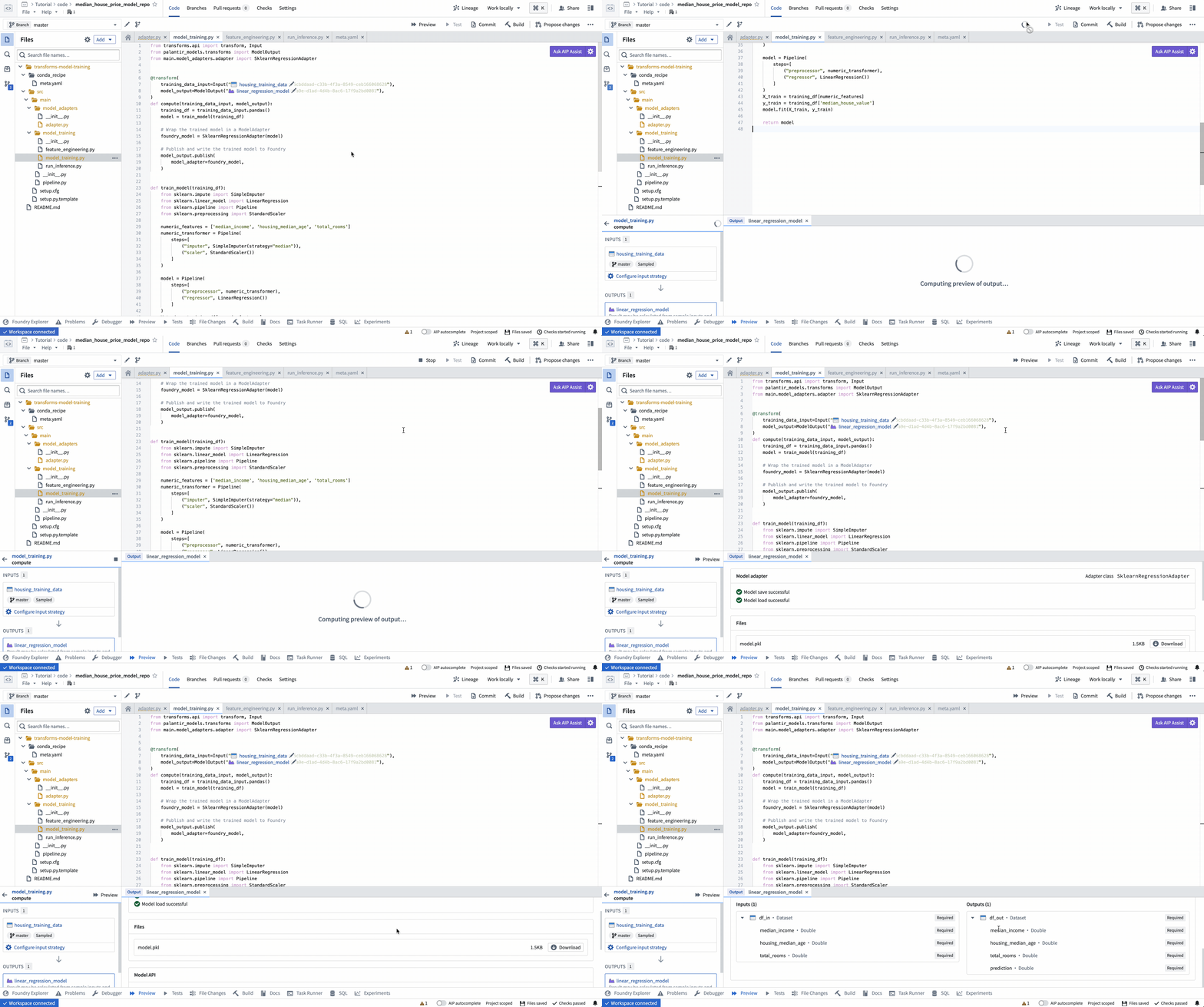
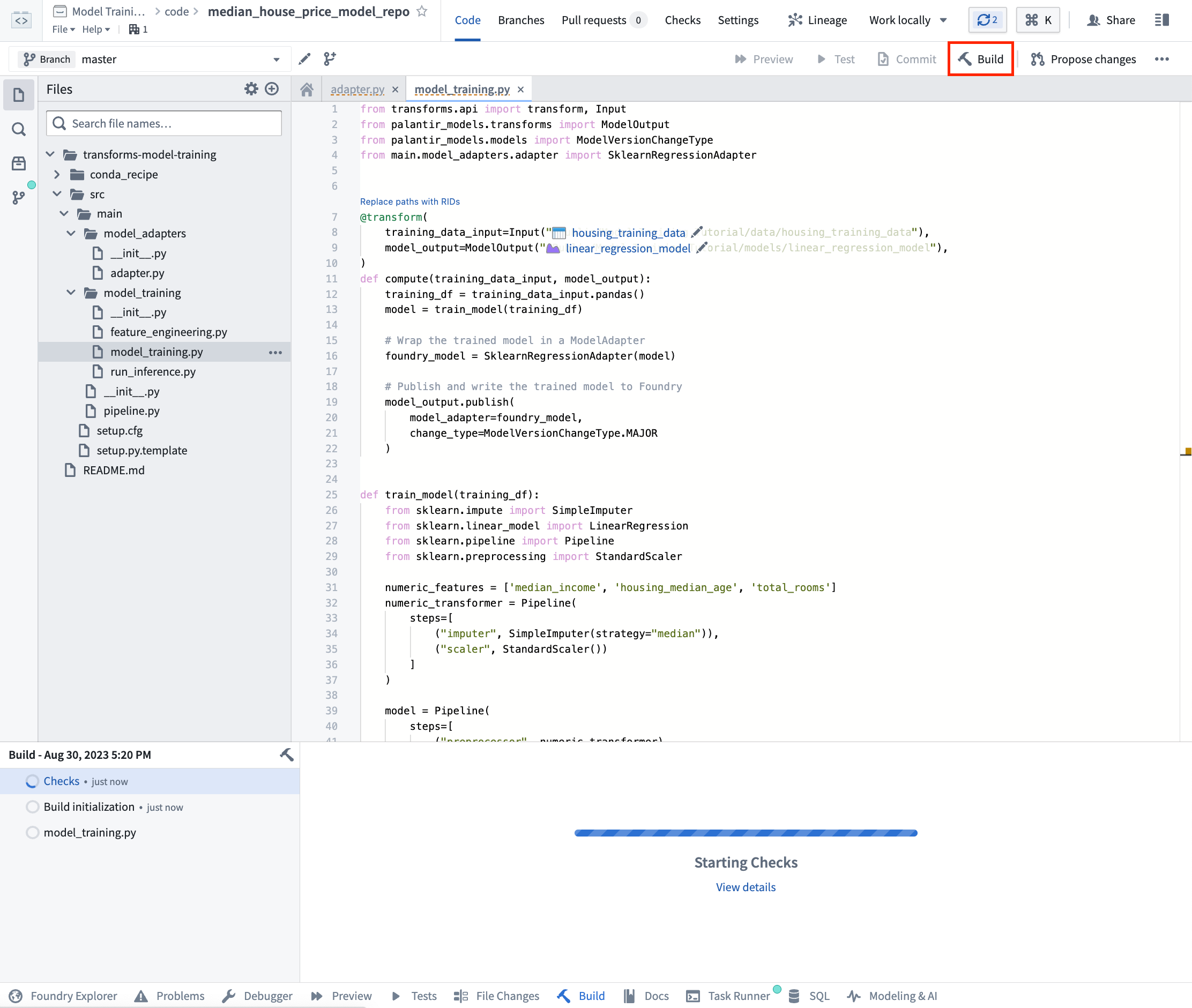
Action: Open the model_training/model_training.py file in your repository and copy the above code into the repository. Update the paths to correctly point to the training dataset and model folder you created in the step 1.1. Select Build at the top left to run the code.
(Optional) Log metrics and hyperparameters to a model experiment
Model experiments is a lightweight framework for logging metrics and hyperparameters produced during a model training run, which can then be published alongside a model and persisted in the model page.
Learn more about creating and writing to experiments.
2c.4 How to run batch inference
In Code Repositories
Once your model training logic has finished running, you can generate predictions (also known as inferences) directly in your code repository.
from transforms.api import transform, Input, Output, LightweightInput, LightweightOutput
from palantir_models.transforms import ModelInput
from palantir_models import ModelAdapter

@transform.using(
    testing_data_input=Input("<YOUR_PROJECT_PATH>/data/housing_test_data"),
    model_input=ModelInput("<YOUR_PROJECT_PATH>/models/linear_regression_model"),
    predictions_output=Output("<YOUR_PROJECT_PATH>/data/housing_testing_data_inferences")
)
def compute(
        testing_data_input: LightweightInput,
        model_input: ModelAdapter,
        predictions_output: LightweightOutput
    ):
    inference_outputs = model_input.transform(testing_data_input)
    predictions_output.write_pandas(inference_outputs.df_out)
:::callout{theme="neutral"}
To run a model within a transform repository in which the model was not defined, set use_sidecar = True in ModelInput. This will automatically import the model adapter and its dependencies, while running them in a separate environment to prevent dependency conflicts. Review the ModelInput class reference for more details.
If use_sidecar is not set to True, the model adapter and its dependencies must be imported into or defined within the current code repository.
:::
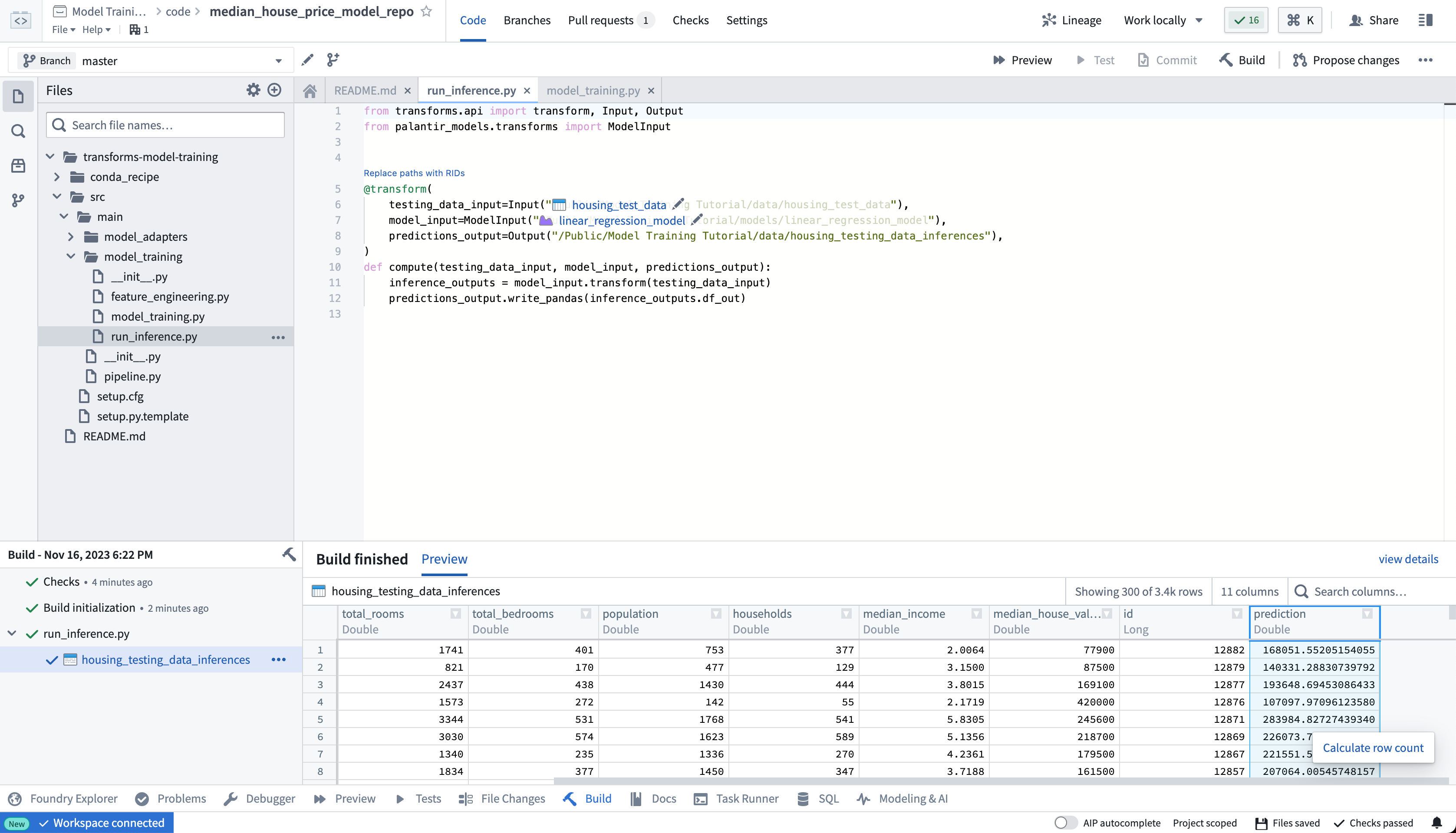
Action: Open the model_training/run_inference.py file in your repository and copy the above code into the repository. Update the paths to correctly point to the model asset and test dataset you created earlier. Select Build at the top left to run the code.
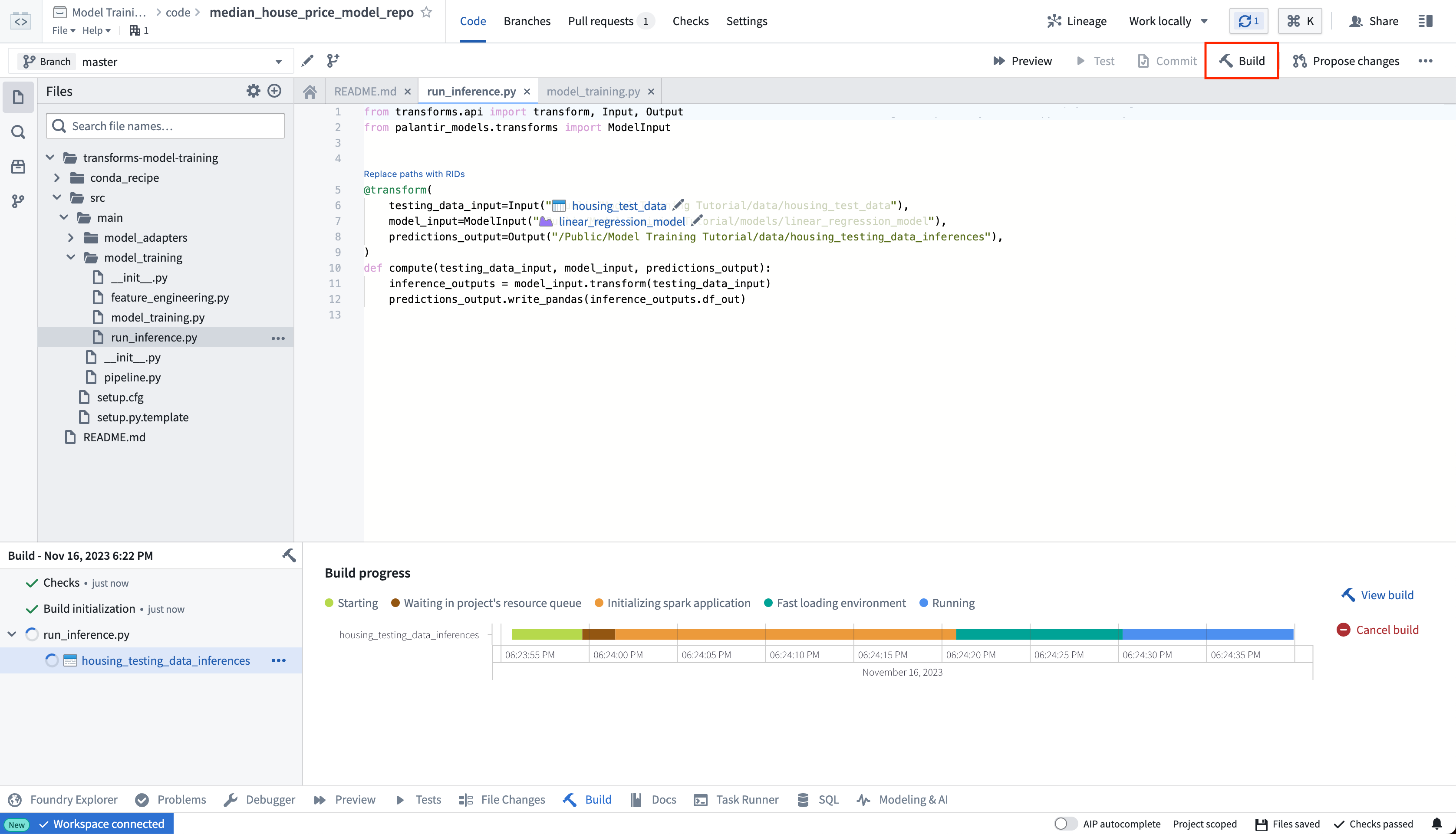
Once your build is complete, you can review the generated predictions in the build output panel.
In Pipeline Builder
Learn how to use the model in Pipeline Builder.
2c.5 Optional: Configure live inference
Optionally, this model can be consumed as a REST API via a direct deployment. Learn how to configure a direct deployment.
2c.6 How to view a model and submit it to a modeling objective
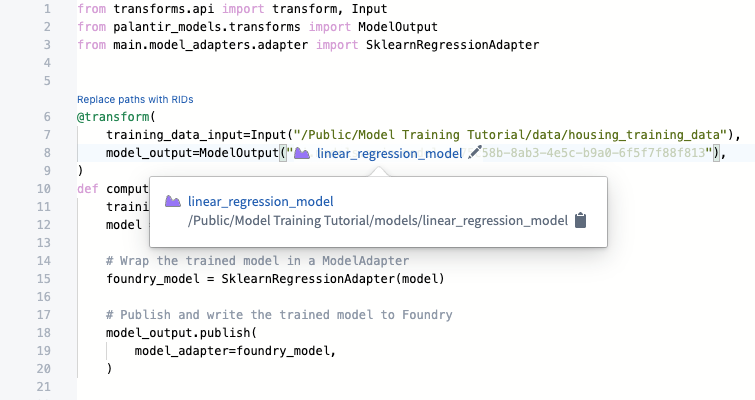
After your model is built you can open the model either by selecting linear_regression_model in the model_training/model_training.py file or by navigating to the model in the folder structure we created earlier.
The model view has the source of where the model was trained, the training datasets used to produce this model, the model API, and the model adapter this model was published as. Importantly, you can publish many different versions to the same model; these model versions are available in the dropdown menu on the left sidebar.
As the model version is connected to the specific model adapter used during training, you need to republish and build your model training process to apply any changes to the model adapter logic.
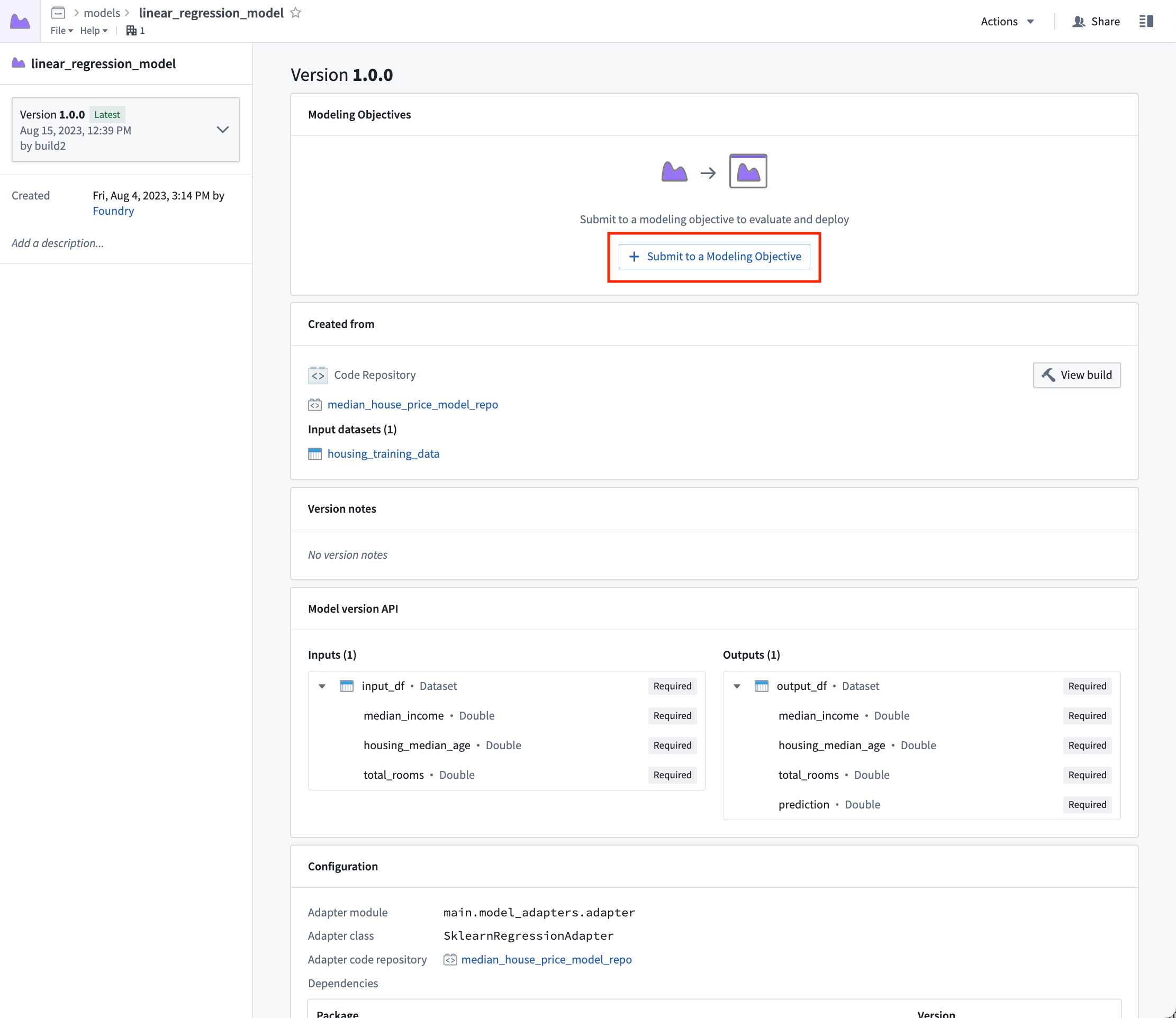
Now that we have a model, we can submit that model to our modeling objective for management, evaluation, and release to operational applications.
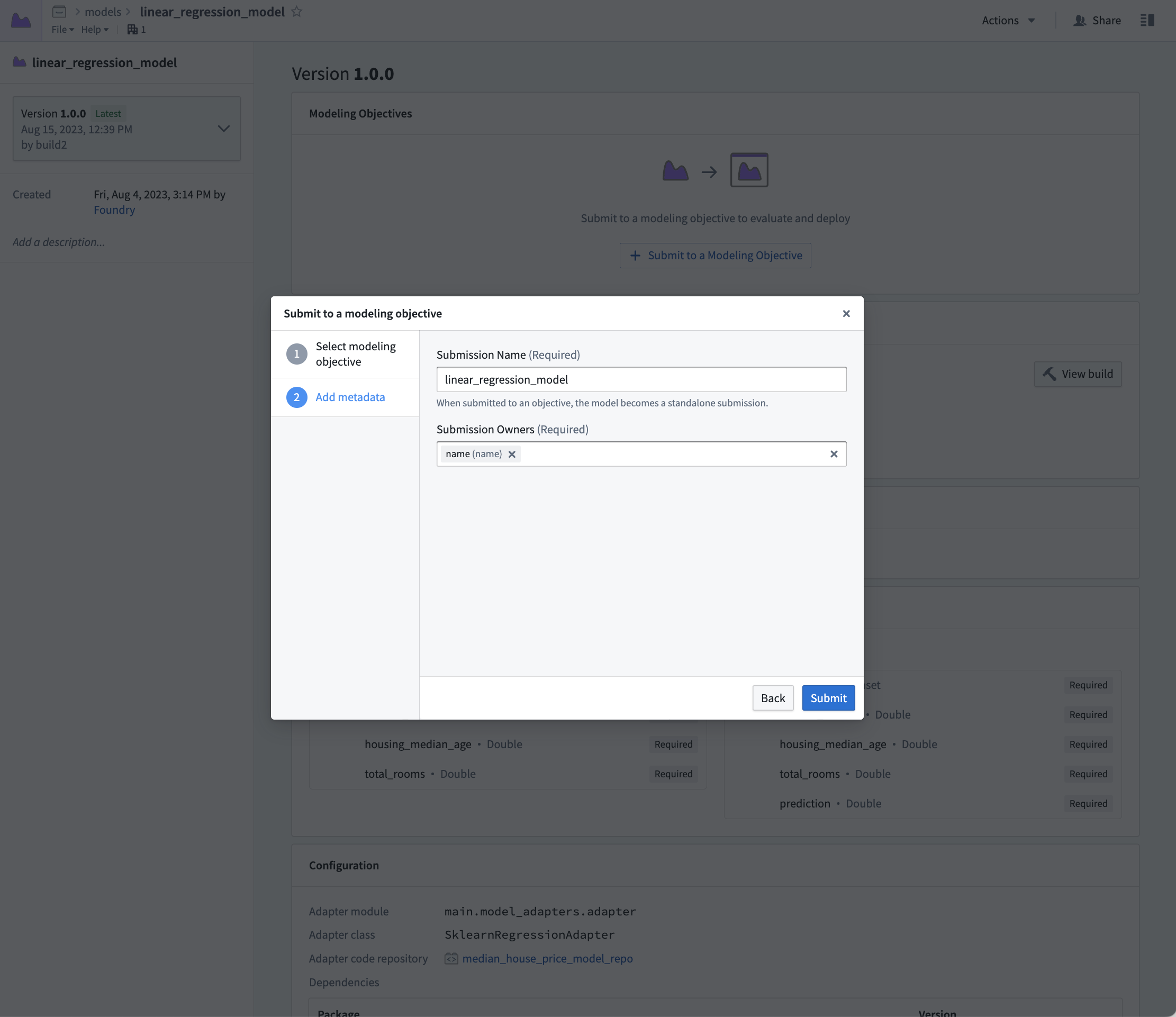
Action: Select linear_regression_model in the code to navigate to the model asset you have created, select Submit to a Modeling Objective and submit that model to the modeling objective you created in step 1 of this tutorial. You will be asked to provide a submission name and submission owner. This is metadata that is used to track the model uniquely inside the modeling objective. Name the model linear_regression_model and mark yourself as the submission owner.
Next step
Now that you have trained a model in Foundry, you can move onto model management, testing, and model evaluation. Here are some examples of additional steps you can take in Modeling Objectives:
- Automatic model evaluation
- Configuring checks for model submissions
- Live and batch inference can also be configured from the modeling objective.
- No-code batch inference in Pipeline Builder
Optionally, you can also train a model in a Jupyter® notebook with the Code Workspaces application for fast and iterative model development.
中文翻译
2c. 教程:在代码仓库中训练模型
在开始本教程步骤之前,您应先完成建模项目设置。在本教程中,您可以选择在 Jupyter® notebook 或代码仓库中训练模型。Jupyter® notebook 适合快速迭代的模型开发,而代码仓库则适用于生产级数据和模型管道。
在本教程步骤中,我们将在代码仓库中训练模型。本步骤将涵盖:
2c.1 如何创建用于模型训练的代码仓库
Foundry 中的代码仓库应用是一个基于 Web 的开发环境,用于编写生产级数据和机器学习管道。Foundry 提供了一个名为 Model Training 模板的机器学习模板仓库。
操作: 在本教程上一步创建的 code 文件夹中,选择 + New > Code repository。代码仓库的名称应与您正在训练的模型相关。在本例中,将仓库命名为 "median_house_price_model_repo"。选择 Model Training 模板,然后点击 Initialize。
模型训练模板包含一个示例结构,我们将根据本教程进行调整。您可以展开左侧文件查看示例项目。
2c.2 如何拆分特征数据用于测试和训练
监督式机器学习项目的第一步是将带标签的特征数据拆分为训练集和测试集。最终,我们需要创建性能指标(评估模型在新数据上的表现),以便判断该模型是否足够好用于生产环境,并向其他利益相关者说明模型结果的可靠程度。我们必须使用独立的数据进行验证,以确保性能指标能够代表实际应用中的表现。
因此,我们将编写一个 Python transform,将带标签的特征数据拆分为训练和测试两个数据集。
from transforms.api import transform, Input, Output


@transform.spark.using(
    features_and_labels_input=Input("<YOUR_PROJECT_PATH>/data/housing_features_and_labels"),
    training_output=Output("<YOUR_PROJECT_PATH>/data/housing_training_data"),
    testing_output=Output("<YOUR_PROJECT_PATH>/data/housing_test_data"),
)
def compute(features_and_labels_input, training_output, testing_output):
    # 将此 TransformInput 转换为 PySpark DataFrame
    features_and_labels = features_and_labels_input.dataframe()

    # 随机拆分 PySpark dataframe,80% 训练数据,20% 测试数据
    training_data, testing_data = features_and_labels.randomSplit([0.8, 0.2], seed=0)

    # 将训练和测试数据写回 Foundry
    training_output.write_dataframe(training_data)
    testing_output.write_dataframe(testing_data)
操作: 打开仓库中的 feature_engineering.py 文件,将上述代码复制到仓库中。更新路径,使其正确指向您在本教程上一步上传的数据集。选择左上角的 Build 来运行代码。您也可以选择 Preview 在数据子集上测试逻辑,以便更快迭代。
在构建执行期间,您可以继续执行 2c.3 部分。
2c.3 如何在代码仓库中编写模型训练逻辑
Foundry 中的模型由两个组件构成:模型工件(模型训练作业产生的模型文件)和模型适配器(一个 Python 类,描述 Foundry 应如何与模型工件交互以执行推理)。
模型训练模板包含两个模块:model_training 用于训练作业,model_adapters 用于模型适配器。
模型依赖项
模型训练几乎总是需要添加包含模型训练、序列化、推理或评估逻辑的 Python 依赖项。Foundry 支持通过 conda 添加依赖项规范。这些依赖项规范用于创建已解析的 Python 环境,以执行模型训练作业。
在 Foundry 中,这些已解析的依赖项会自动与您的模型打包在一起,确保模型自动拥有执行推理(生成预测)所需的所有逻辑。在本示例中,我们将使用 pandas 和 scikit-learn 来生成模型,并使用 dill 来保存模型。
操作: 在左侧边栏中,选择 Libraries 并添加依赖项:scikit-learn = 1.2.0、pandas = 1.5.2 和 dill = 0.3.7。然后选择 Commit 来创建已解析的 Python 环境。
模型适配器逻辑
模型适配器为 Foundry 中的所有模型提供了标准接口。标准接口确保所有模型可以立即在生产应用中使用,因为 Foundry 会处理加载模型、其 Python 依赖项、暴露其 API 以及与模型交互的基础设施。
为此,您必须创建一个 ModelAdapter 类的实例作为通信层。
需要实现 4 个函数:
- 模型保存和加载: 为了重用模型,您需要定义模型的保存和加载方式。Palantir 提供了许多默认的序列化方法,在更复杂的情况下,您可以实现自定义序列化逻辑。
- api: 定义模型的 API,告诉 Foundry 模型需要什么类型的输入数据。
- predict: 由 Foundry 调用以向模型提供数据。您可以在此处将输入数据传递给模型并生成推理(预测)。
import palantir_models as pm


class SklearnRegressionAdapter(pm.ModelAdapter):

    @pm.auto_serialize
    def __init__(self, model):
        self.model = model

    @classmethod
    def api(cls):
        columns = [
            ('median_income', float),
            ('housing_median_age', float),
            ('total_rooms', float),
        ]
        return {"df_in": pm.Pandas(columns)}, \
               {"df_out": pm.Pandas(columns + [('prediction', float)])}

    def predict(self, df_in):
        df_in['prediction'] = self.model.predict(
            df_in[['median_income', 'housing_median_age', 'total_rooms']]
        )
        return df_in
操作: 打开 model_adapters/adapter.py 文件,将上述逻辑粘贴到文件中。
模型训练逻辑
现在依赖项已设置好,并且我们已经编写了模型适配器,接下来可以在 Foundry 中训练模型了。
from transforms.api import transform, Input
from palantir_models.transforms import ModelOutput
from main.model_adapters.adapter import SklearnRegressionAdapter


def train_model(training_df):
    from sklearn.impute import SimpleImputer
    from sklearn.linear_model import LinearRegression
    from sklearn.pipeline import Pipeline
    from sklearn.preprocessing import StandardScaler

    numeric_features = ['median_income', 'housing_median_age', 'total_rooms']
    numeric_transformer = Pipeline(
        steps=[
            ("imputer", SimpleImputer(strategy="median")),
            ("scaler", StandardScaler())
        ]
    )

    model = Pipeline(
        steps=[
            ("preprocessor", numeric_transformer),
            ("classifier", LinearRegression())
        ]
    )
    X_train = training_df[numeric_features]
    y_train = training_df['median_house_value']
    model.fit(X_train, y_train)

    return model

@transform.using(
    training_data_input=Input("<YOUR_PROJECT_PATH>/data/housing_training_data"),
    model_output=ModelOutput("<YOUR_PROJECT_PATH>/models/linear_regression_model"),
)
def compute(training_data_input, model_output):
    training_df = training_data_input.pandas()
    model = train_model(training_df)

    # 将训练好的模型包装在 ModelAdapter 中
    foundry_model = SklearnRegressionAdapter(model)

    # 发布并将训练好的模型写入 Foundry
    model_output.publish(
        model_adapter=foundry_model
    )
可选: 当您在迭代模型训练和模型适配器逻辑时,在运行构建之前先在训练数据子集上测试更改会很有用。选择左上角的 Preview 来测试您的代码。
操作: 打开仓库中的 model_training/model_training.py 文件,将上述代码复制到仓库中。更新路径,使其正确指向您在步骤 1.1 中创建的训练数据集和模型文件夹。选择左上角的 Build 来运行代码。
(可选)将指标和超参数记录到模型实验
模型实验是一个轻量级框架,用于记录模型训练运行期间产生的指标和超参数,这些信息随后可以与模型一起发布并持久保存在模型页面中。
2c.4 如何运行批量推理
在代码仓库中
模型训练逻辑运行完成后,您可以直接在代码仓库中生成预测(也称为推理)。
from transforms.api import transform, Input, Output, LightweightInput, LightweightOutput
from palantir_models.transforms import ModelInput
from palantir_models import ModelAdapter

@transform.using(
    testing_data_input=Input("<YOUR_PROJECT_PATH>/data/housing_test_data"),
    model_input=ModelInput("<YOUR_PROJECT_PATH>/models/linear_regression_model"),
    predictions_output=Output("<YOUR_PROJECT_PATH>/data/housing_testing_data_inferences")
)
def compute(
        testing_data_input: LightweightInput,
        model_input: ModelAdapter,
        predictions_output: LightweightOutput
    ):
    inference_outputs = model_input.transform(testing_data_input)
    predictions_output.write_pandas(inference_outputs.df_out)
:::callout{theme="neutral"}
要在未定义模型的转换仓库中运行模型,请在 ModelInput 中设置 use_sidecar = True。这将自动导入模型适配器及其依赖项,并在独立环境中运行,以防止依赖项冲突。有关更多详细信息,请参阅 ModelInput 类参考。
如果 use_sidecar 未设置为 True,则必须将模型适配器及其依赖项导入或定义在当前代码仓库中。
:::
操作: 打开仓库中的 model_training/run_inference.py 文件,将上述代码复制到仓库中。更新路径,使其正确指向您之前创建的模型资产和测试数据集。选择左上角的 Build 来运行代码。
构建完成后,您可以在构建输出面板中查看生成的预测。
在 Pipeline Builder 中
2c.5 可选:配置实时推理
可选地,该模型可以通过直接部署作为 REST API 使用。了解如何配置直接部署。
2c.6 如何查看模型并提交至建模目标
模型构建完成后,您可以通过选择 model_training/model_training.py 文件中的 linear_regression_model 来打开模型,或者导航到我们之前创建的文件夹结构中的模型。
模型视图显示了模型训练的来源、用于生成此模型的训练数据集、模型 API 以及此模型发布时使用的模型适配器。重要的是,您可以向同一模型发布多个不同版本;这些模型版本可在左侧边栏的下拉菜单中找到。
由于模型版本与训练期间使用的特定模型适配器相关联,因此您需要重新发布并构建模型训练过程,才能将任何更改应用到模型适配器逻辑。
现在我们有了模型,可以将该模型提交到建模目标,以便进行管理、评估和发布到运营应用。
操作: 在代码中选择 linear_regression_model 以导航到您创建的模型资产,选择 Submit to a Modeling Objective,然后将该模型提交到您在本教程步骤 1 中创建的建模目标。系统会要求您提供提交名称和提交所有者。这些元数据用于在建模目标中唯一标识模型。将模型命名为 linear_regression_model,并将您自己标记为提交所有者。
下一步
现在您已在 Foundry 中训练了模型,可以继续进行模型管理、测试和模型评估。以下是在建模目标中可以执行的一些额外步骤示例:
- 自动模型评估
- 为模型提交配置检查
- 实时和批量推理也可以从建模目标进行配置。
- 在 Pipeline Builder 中进行无代码批量推理
可选地,您也可以使用 Code Workspaces 应用在 Jupyter® notebook 中训练模型,以实现快速迭代的模型开发。