Experiments(实验(Experiments))
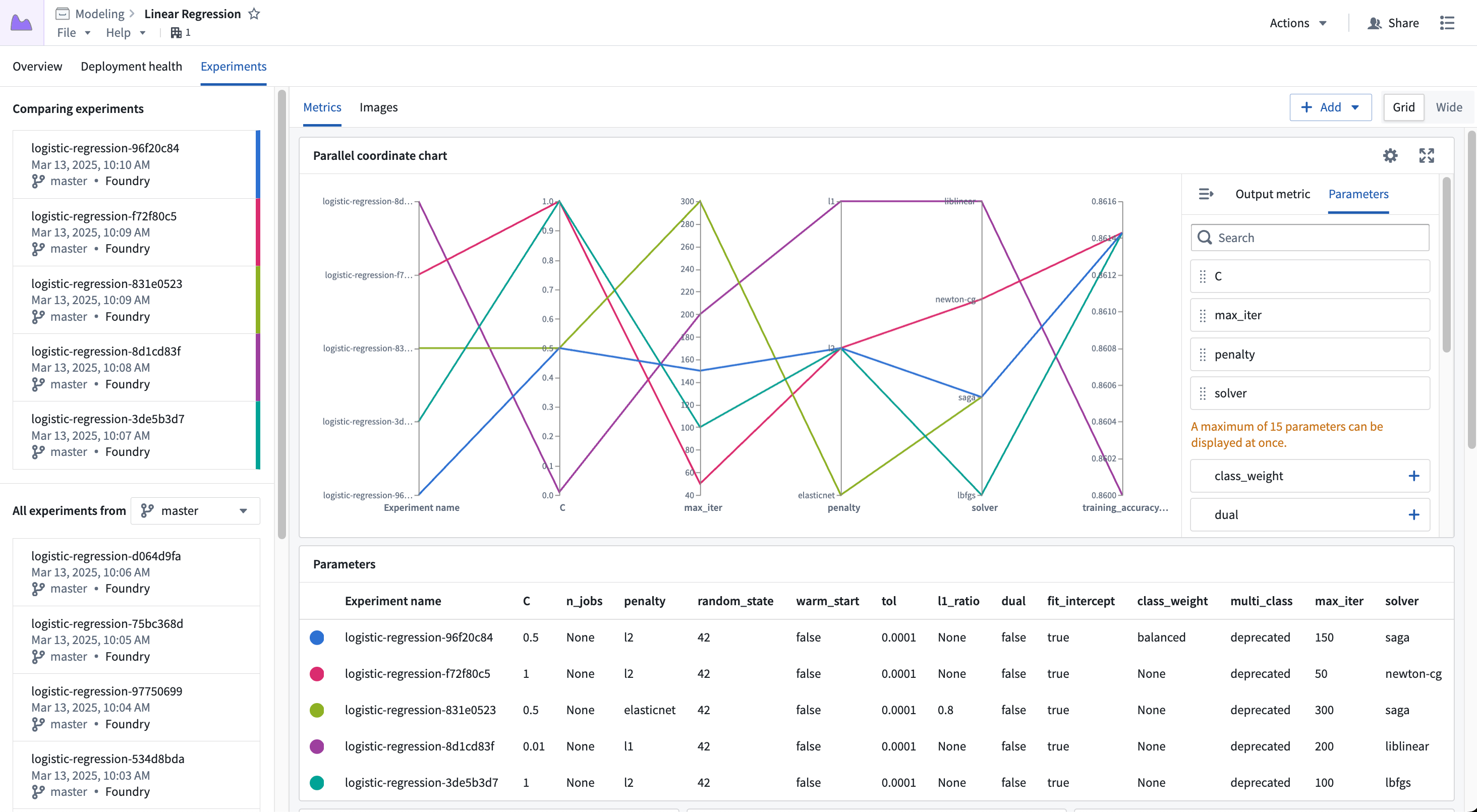
An experiment is an artifact that represents a collection of metrics produced during a model training job. Experiments allow developers to log hyperparameters and metrics during a training job, visualize them on the model page, and compare between different model versions.
Why use experiments?
The model development process is inherently iterative, and it can be difficult to keep track of different attempts at producing a model. Experiments provide a lightweight Python API for logging details related to those different attempts, including metrics and hyperparameters. Those metrics and hyperparameters can be visualized and compared between different model versions to provide a better understanding of how different parameters affect the model's performance. Below is an overview of how to create and write to experiments.
Create experiments
The ModelOutput class used to publish models from Jupyter® Code Workspaces and Code Repositories provides hooks for creating experiments.
Create experiments in Code Workspaces:
from palantir_models.code_workspaces import ModelOutput
# `my-alias` is an alias to a model in the current workspace
model_output = ModelOutput("my-alias")
experiment = model_output.create_experiment(name="my-experiment")
Create experiments in Code Repositories:
from transforms.api import configure, transform, Input
from palantir_models.transforms import ModelOutput

@transform(
    input_data=Input("..."),
    model_output=ModelOutput("..."),
)
def compute(input_data, model_output):
    experiment = model_output.create_experiment(name="my-experiment")
If any two experiments for a given model use the same name, they will be automatically deduplicated, allowing for the same code to be used multiple times without worrying about renaming the experiment.
Occasionally, model training code may fail due to network errors when writing to the experiment, or overflowing the maximum size of the series. While the Python client aims to handle these errors as gracefully as possible, there may be times where that is not possible. Clients can choose how errors should be handled, selecting from three different error handling variants:
FAIL- Will instantly re-raise the error and the code will fail.WARN(default) - Will log a warning for the error, then suppress all future errors.SUPPRESS- Will not log anything.
The error handler mode can be set during experiment creation as shown below:
from palantir_models.experiments import ErrorHandlerType
experiment = model_output.create_experiment(name="my-experiment", error_handler_type=ErrorHandlerType.FAIL)
Publish experiments
In order for experiments to be displayed in the model page, they must be published alongside a model version. Once published, experiments can be viewed in the model page.
model_output.publish(model_adapter, experiment=experiment)
Learn more about visualizing experiments after publishing.
Logging
Experiments support five types of logs: hyperparameters, metrics, images, plots, and tables.
Log hyperparameters
Hyperparameters can be logged using the Experiment.log_param and Experiment.log_params functions. Hyperparameters are single key-value pairs that are used for storing static data associated with a model training job.
experiment.log_param("learning_rate", 1e-3)
experiment.log_param("model_type", "CNN")
experiment.log_params({
    "batch_size": 12,
    "parallel": True
})
Experiments currently support logging hyperparameters of the following types:
- Boolean
- Date/Datetime
- Float
- Int
- String
Log metrics
Metrics can be logged using the Experiment.log_metric and Experiment.log_metrics functions. Metrics are logged to a series, where the series tracks each logged value in a time series. Metric values must be numeric and the step must be strictly increasing.
When logging metrics, if the metric series has not been created, a new series will be created. Additionally, callers may pass a step parameter to set the step to log to.
experiment.log_metric("train/acc", 1.5)
experiment.log_metric("test/acc", 15, step=1)
experiment.log_metrics({
    "train/acc": 5,
    "train/loss": 0.9
})
Log images
Images can be logged using Experiment.log_image. Images are logged to a series, where the series tracks each logged image in a time series. Images must be in PNG format or a Pillow ↗ image to be logged; other image formats will be rejected.
When logging images, if the image series has not been created, a new series will be created. Additionally, callers may pass a step parameter to set the step to log to.
experiment.log_image("train/bounding_boxes", pillow_image)
experiment.log_image("test/bounding_boxes", image_bytes_arr)
experiment.log_image(
    "test/segmentation",
    "path/to/image.png",
    caption="Segmentation Image",
    step=1)
Image logging can also serve as a way to log custom charts.
import matplotlib.pyplot as plt

plt.scatter(x_data, y_data)
plt.savefig("path/to/image.png")
experiment.log_image("scatter", "path/to/image.png")
Log plots
Plots can be logged using Experiment.log_plot. Plots are logged to a series, where the series tracks each logged plot in a time series. Plots must be provided as a Plotly ↗ plotly.graph_objects.Figure; other plot types will be rejected.
When logging plots, if the plot series has not been created, a new series will be created. Additionally, callers may pass a step parameter to set the step to log to.
import plotly.express as px

fig = px.line(x=[1, 2, 3], y=[0.2, 0.4, 0.6])
experiment.log_plot("train/acc", fig)
experiment.log_plot("test/acc", fig, step=1)
experiment.log_plot(
    "validation/loss",
    fig,
    caption="Validation Loss over Epochs",
    step=2,
)
Log tables
Tables can be logged using Experiment.log_table. The provided table must be either a pandas ↗ or Polars ↗ DataFrame. Other data types will be rejected.
import pandas as pd

leaderboard = pd.DataFrame({
    "model_type": ["xgboost", "decision_tree", "torch_nn"],
    "score": [0.75, 0.6, 0.93],
    "rank": [2, 3, 1]
})

experiment.log_table("model_leaderboard", leaderboard)
MLflow
MLflow ↗ is an open source toolkit for model training metrics tracking that has a wide range of built-in logging support for different machine learning libraries. Users can leverage MLflow and its autologging capabilities ↗ to streamline the integration of experiments into their model training code with minimal required changes.
After creating an experiment, users can set that experiment as the active MLflow run, and then use MLflow's Python API to write logs to the experiment.
import mlflow

experiment = model_output.create_experiment(name="my-experiment")

with experiment.as_mlflow_run():
    mlflow.sklearn.autolog()
    # training code

model_adapter = MyModelAdapter(trained_model)
model_output.publish(model_adapter, experiment=experiment)
MLflow also provides hooks for more advanced machine learning libraries (such as Keras) that may require callbacks to log metrics:
import keras
import mlflow

experiment = model_output.create_experiment(name="my-experiment")

model = keras.Sequential(
    [
        keras.Input([28, 28, 3]),
        keras.layers.Flatten(),
        keras.layers.Dense(2),
    ]
)
model.compile(
    loss=keras.losses.SparseCategoricalCrossentropy(from_logits=True),
    optimizer=keras.optimizers.Adam(0.001),
    metrics=[keras.metrics.SparseCategoricalAccuracy()],
)

with experiment.as_mlflow_run():
    model.fit(
        data,
        label,
        batch_size=16,
        epochs=8,
        callbacks=[mlflow.keras.MlflowCallback()],
    )

model_adapter = MyModelAdapter(trained_model)
model_output.publish(model_adapter, experiment=experiment)
Limitations of MLflow integration
Currently, MLflow integration with experiments does not support the full suite of MLflow tooling. The following limitations apply:
- Logging can only be done at model publication (training) time.
- Asset support is limited; any asset that is not a PNG will be silently dropped.
- Tags are silently ignored.
- Nested runs are not supported.
Limits
The below table lists limits related to experiments in Foundry.
| Description | Limit |
|---|---|
| Experiment/metric/hyperparameter name max length | 100 characters |
| Maximum values across all metric series in an experiment | 100,000 |
| Maximum number of hyperparameters per experiment | 500 |
| Maximum number of rows per table | 100,000 |
To increase these limits, contact Palantir support.
Review the model experiments Python API reference for more information.
中文翻译
实验(Experiments)
实验(Experiment) 是一种工件(artifact),用于表示模型训练任务过程中产生的指标集合。实验(Experiment)允许开发者在训练任务期间记录超参数(hyperparameters)和指标(metrics),在模型页面上进行可视化,并在不同模型版本之间进行比较。
为什么要使用实验?
模型开发过程本质上是迭代的,跟踪生成模型的不同尝试可能会变得困难。实验(Experiment)提供了一个轻量级的Python API,用于记录与这些不同尝试相关的详细信息,包括指标(metrics)和超参数(hyperparameters)。这些指标和超参数可以在不同模型版本之间进行可视化和比较,从而更好地理解不同参数如何影响模型性能。以下是创建和写入实验的概述。
创建实验(Create experiments)
用于从Jupyter® 代码工作台(Code Workspaces)和代码仓库(Code Repositories)发布模型的ModelOutput类提供了创建实验的钩子(hooks)。
在代码工作台(Code Workspaces)中创建实验:
from palantir_models.code_workspaces import ModelOutput
# `my-alias` 是当前工作空间中某个模型的别名
model_output = ModelOutput("my-alias")
experiment = model_output.create_experiment(name="my-experiment")
在代码仓库(Code Repositories)中创建实验:
from transforms.api import configure, transform, Input
from palantir_models.transforms import ModelOutput

@transform(
    input_data=Input("..."),
    model_output=ModelOutput("..."),
)
def compute(input_data, model_output):
    experiment = model_output.create_experiment(name="my-experiment")
如果给定模型的任意两个实验使用了相同的名称,它们将自动去重,从而允许重复使用相同的代码而无需担心重命名实验。
有时,模型训练代码在写入实验时可能因网络错误或超出序列(series)的最大大小而失败。虽然Python客户端旨在尽可能优雅地处理这些错误,但有时可能无法做到。客户端可以选择如何处理错误,从三种不同的错误处理变体中选择:
FAIL- 立即重新抛出错误,代码将失败。WARN(默认) - 记录错误警告,然后抑制所有后续错误。SUPPRESS- 不记录任何内容。
错误处理模式可以在创建实验时设置,如下所示:
from palantir_models.experiments import ErrorHandlerType
experiment = model_output.create_experiment(name="my-experiment", error_handler_type=ErrorHandlerType.FAIL)
发布实验(Publish experiments)
为了使实验显示在模型页面中,它们必须与模型版本一起发布。发布后,可以在模型页面中查看实验。
model_output.publish(model_adapter, experiment=experiment)
日志记录(Logging)
实验支持五种类型的日志:超参数(hyperparameters)、指标(metrics)、图像(images)、图表(plots)和表格(tables)。
记录超参数(Log hyperparameters)
可以使用Experiment.log_param和Experiment.log_params函数记录超参数。超参数是单个键值对,用于存储与模型训练任务相关的静态数据。
experiment.log_param("learning_rate", 1e-3)
experiment.log_param("model_type", "CNN")
experiment.log_params({
    "batch_size": 12,
    "parallel": True
})
实验目前支持记录以下类型的超参数:
- 布尔型(Boolean)
- 日期/日期时间(Date/Datetime)
- 浮点型(Float)
- 整型(Int)
- 字符串(String)
记录指标(Log metrics)
可以使用Experiment.log_metric和Experiment.log_metrics函数记录指标。指标被记录到一个序列(series)中,该序列以时间序列的方式跟踪每个记录的值。指标值必须是数值型,且步长(step)必须严格递增。
记录指标时,如果指标序列尚未创建,则会创建一个新序列。此外,调用者可以传递一个step参数来设置要记录的步长。
experiment.log_metric("train/acc", 1.5)
experiment.log_metric("test/acc", 15, step=1)
experiment.log_metrics({
    "train/acc": 5,
    "train/loss": 0.9
})
记录图像(Log images)
可以使用Experiment.log_image记录图像。图像被记录到一个序列(series)中,该序列以时间序列的方式跟踪每个记录的图像。图像必须是PNG格式或Pillow ↗图像才能被记录;其他图像格式将被拒绝。
记录图像时,如果图像序列尚未创建,则会创建一个新序列。此外,调用者可以传递一个step参数来设置要记录的步长。
experiment.log_image("train/bounding_boxes", pillow_image)
experiment.log_image("test/bounding_boxes", image_bytes_arr)
experiment.log_image(
    "test/segmentation",
    "path/to/image.png",
    caption="Segmentation Image",
    step=1)
图像记录也可以作为记录自定义图表的一种方式。
import matplotlib.pyplot as plt

plt.scatter(x_data, y_data)
plt.savefig("path/to/image.png")
experiment.log_image("scatter", "path/to/image.png")
记录图表(Log plots)
可以使用Experiment.log_plot记录图表。图表被记录到一个序列(series)中,该序列以时间序列的方式跟踪每个记录的图表。图表必须作为Plotly ↗的plotly.graph_objects.Figure提供;其他图表类型将被拒绝。
记录图表时,如果图表序列尚未创建,则会创建一个新序列。此外,调用者可以传递一个step参数来设置要记录的步长。
import plotly.express as px

fig = px.line(x=[1, 2, 3], y=[0.2, 0.4, 0.6])
experiment.log_plot("train/acc", fig)
experiment.log_plot("test/acc", fig, step=1)
experiment.log_plot(
    "validation/loss",
    fig,
    caption="Validation Loss over Epochs",
    step=2,
)
记录表格(Log tables)
可以使用Experiment.log_table记录表格。提供的表格必须是pandas ↗或Polars ↗的DataFrame。其他数据类型将被拒绝。
import pandas as pd

leaderboard = pd.DataFrame({
    "model_type": ["xgboost", "decision_tree", "torch_nn"],
    "score": [0.75, 0.6, 0.93],
    "rank": [2, 3, 1]
})

experiment.log_table("model_leaderboard", leaderboard)
MLflow
MLflow ↗是一个用于模型训练指标跟踪的开源工具包,具有广泛的内置日志记录支持,适用于不同的机器学习库。用户可以利用MLflow及其自动日志记录功能 ↗来简化实验与模型训练代码的集成,只需进行最少的代码更改。
创建实验后,用户可以将该实验设置为活动的MLflow运行(run),然后使用MLflow的Python API将日志写入实验。
import mlflow

experiment = model_output.create_experiment(name="my-experiment")

with experiment.as_mlflow_run():
    mlflow.sklearn.autolog()
    # training code

model_adapter = MyModelAdapter(trained_model)
model_output.publish(model_adapter, experiment=experiment)
MLflow还为更高级的机器学习库(如Keras)提供了钩子(hooks),这些库可能需要回调(callbacks)来记录指标:
import keras
import mlflow

experiment = model_output.create_experiment(name="my-experiment")

model = keras.Sequential(
    [
        keras.Input([28, 28, 3]),
        keras.layers.Flatten(),
        keras.layers.Dense(2),
    ]
)
model.compile(
    loss=keras.losses.SparseCategoricalCrossentropy(from_logits=True),
    optimizer=keras.optimizers.Adam(0.001),
    metrics=[keras.metrics.SparseCategoricalAccuracy()],
)

with experiment.as_mlflow_run():
    model.fit(
        data,
        label,
        batch_size=16,
        epochs=8,
        callbacks=[mlflow.keras.MlflowCallback()],
    )

model_adapter = MyModelAdapter(trained_model)
model_output.publish(model_adapter, experiment=experiment)
MLflow集成的限制
目前,MLflow与实验的集成不支持MLflow工具集的全部功能。以下限制适用:
- 只能在模型发布(训练)时进行日志记录。
- 资产(asset)支持有限;任何非PNG的资产将被静默丢弃。
- 标签(tags)将被静默忽略。
- 不支持嵌套运行(nested runs)。
限制(Limits)
下表列出了与Foundry中实验相关的限制。
| 描述 | 限制 |
|---|---|
| 实验/指标/超参数名称最大长度 | 100个字符 |
| 实验中所有指标序列的最大值数量 | 100,000 |
| 每个实验的最大超参数数量 | 500 |
| 每个表格的最大行数 | 100,000 |
如需提高这些限制,请联系Palantir支持。
有关更多信息,请查阅模型实验Python API参考。