Example: Integrate a Databricks model(示例:集成 Databricks 模型)
This page provides an example configuration and model adapter for a custom connection to a model hosted in Databricks. Review the benefits of external model integration to understand if an external model is suitable for your use case.
For a step-by-step guide, refer to the documentation on how to create a model adapter and how to create a connection to an externally hosted model.
In this example, you will:
- Publish and tag a model adapter
- Configure an externally hosted model to use this model adapter
- Host the model in a live deployment or Python transform and use the model
Publish and tag a Databricks tabular model adapter
The first step in connecting to an external model is to publish and tag a model adapter using the model adapter library in Code Repositories. The example model adapter below configures a connection to a Unity Catalog model deployed on Databricks Model Serving ↗. The below code was tested with versions Python 3.11.11, databricks-sdk 0.55.0, and pandas 2.2.3. For this example, we will use the wine quality prediction problem from the Databricks machine learning tutorial ↗.
Example Databricks tabular model adapter
Note that this model adapter makes the following assumptions:
- This model adapter assumes that data being provided to this model is tabular.
- This model adapter will serialize the input data to JSON and send this data to the Databricks model serving endpoint.
- This model adapter assumes that the response is deserializable from JSON to a pandas DataFrame.
- This model adapter takes three inputs to construct a client.
host: Provided in connection configuration (the host URL for your Databricks instance).serving_endpoint_name: Provided in connection configuration.token: Provided as credentials.
import logging

import palantir_models as pm
import pandas as pd
from databricks.sdk import WorkspaceClient
from databricks.sdk.service.serving import QueryEndpointResponse

logger = logging.getLogger(__name__)


class DatabricksExternalModelAdapter(pm.ExternalModelAdapter):
    def __init__(self, host, serving_endpoint_name, creds):
        self.serving_endpoint_name = serving_endpoint_name
        self.client = WorkspaceClient(host=host, token=creds["token"])

    @classmethod
    def init_external(cls, external_context: pm.ExternalContext) -> "pm.ExternalModelAdapter":
        return cls(
            host=external_context.connection_config["host"],
            serving_endpoint_name=external_context.connection_config["serving_endpoint_name"],
            creds=external_context.resolved_credentials,
        )

    @classmethod
    def api(cls):
        input_cols = [
            "fixed_acidity",
            "volatile_acidity",
            "citric_acid",
            "residual_sugar",
            "chlorides",
            "free_sulfur_dioxide",
            "total_sulfur_dioxide",
            "density",
            "pH",
            "sulphates",
            "alcohol",
            "is_red",
        ]

        inputs = {"df_in": pm.Pandas(columns=[(col, str) for col in input_cols])}
        outputs = {"df_out": pm.Pandas(columns=[("predictions", bool)])}
        return inputs, outputs

    def predict(self, df_in):
        try:
            response: QueryEndpointResponse = self.client.serving_endpoints.query(
                name=self.serving_endpoint_name,
                dataframe_records=df_in.to_dict(orient="records")
            )
        except Exception as err:
            logger.error(f"An error occurred while querying the model serving endpoint: {err}")
            raise err
        else:
            return pd.DataFrame(response.as_dict()).drop("served-model-name", axis=1)
Configure the Databricks tabular model
After publishing and tagging a model adapter, you will need to configure your externally hosted model to use this model adapter in order to provide the required configuration and credentials as expected by the model adapter.
Note that the URL is required by the above DatabricksExternalModelAdapter and should be set to the full Databricks model serving endpoint URL.
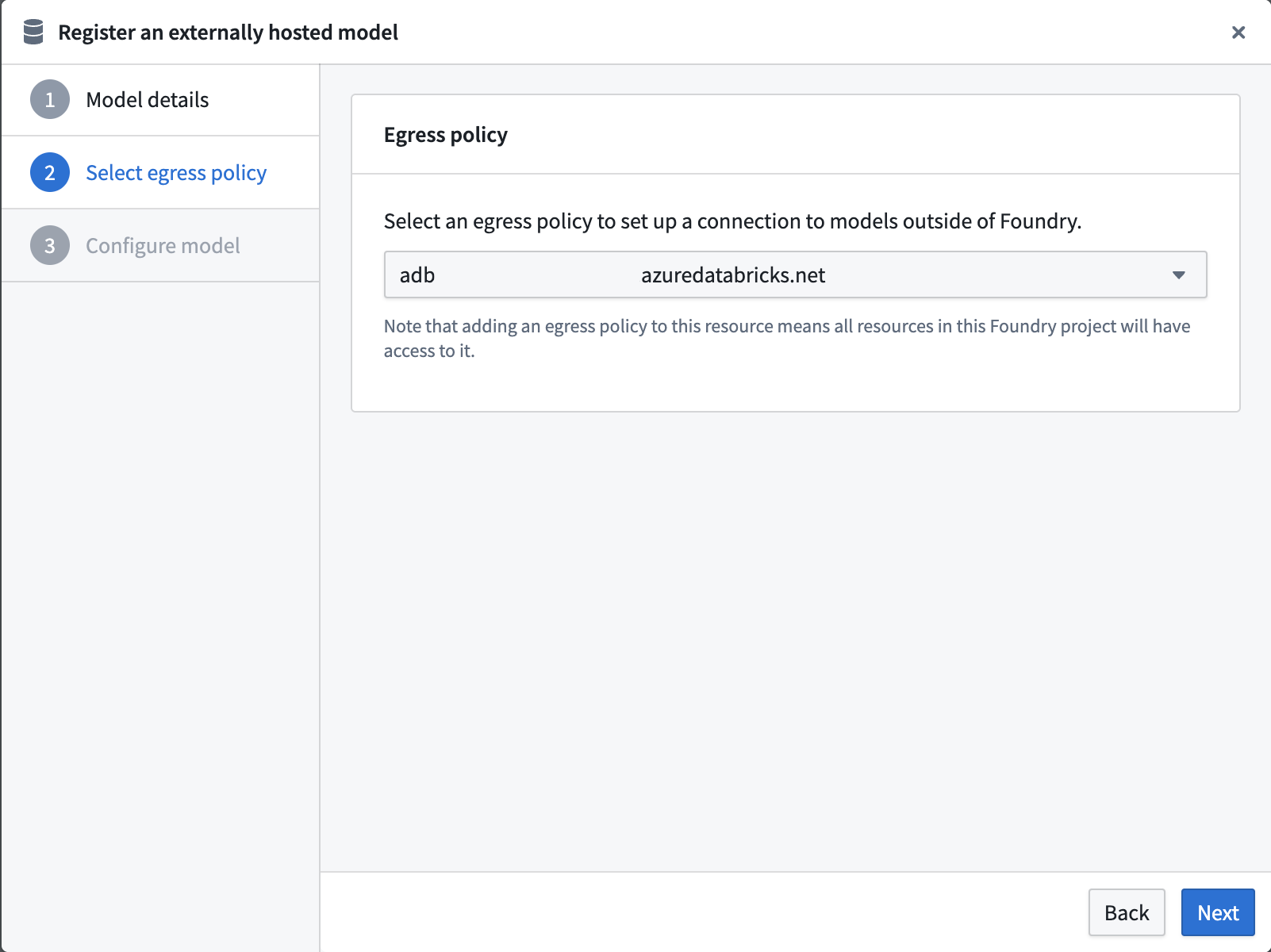
Select an egress policy
The below uses an egress policy that has been configured for your Databricks workspace domain (e.g., <workspace-name>.cloud.databricks.com or your custom domain) on Port 443.
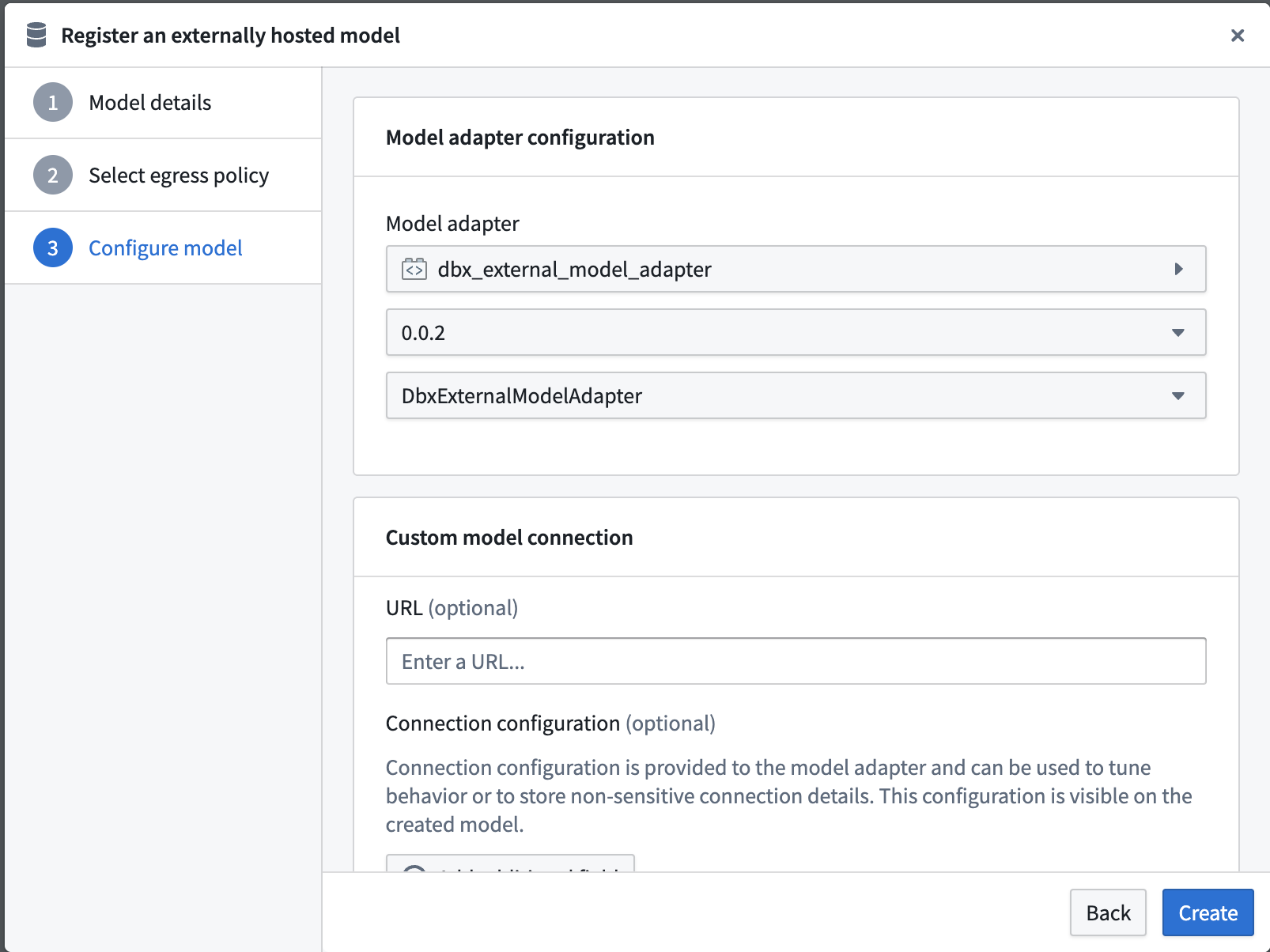
Configure model adapter
Choose the published model adapter in the Connect an externally hosted model dialog.
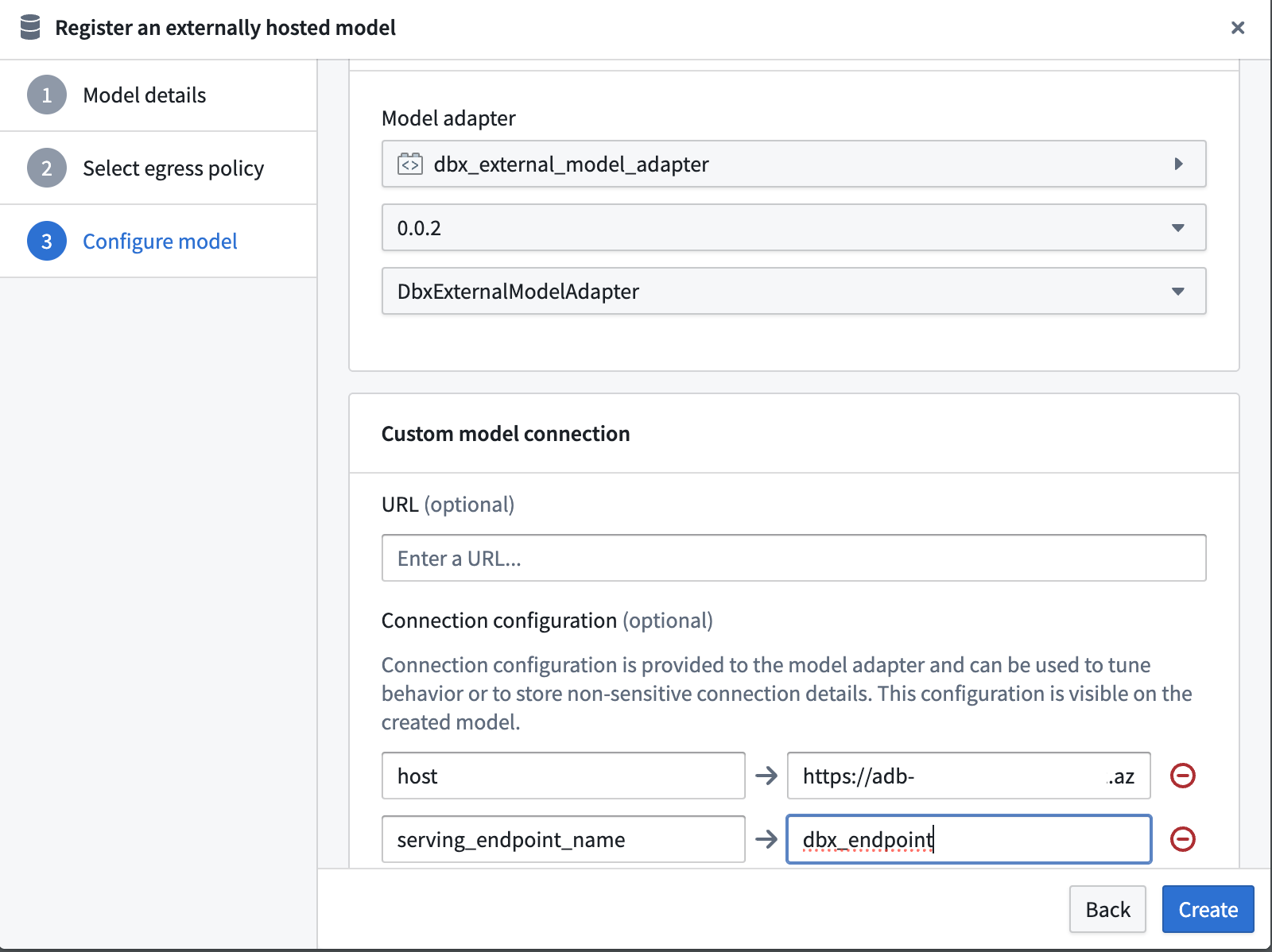
Configure connection URL
Set the Base URL to the full Databricks serving endpoint URL by setting the host and serving_endpoint_name expected by the Databricks adapter.
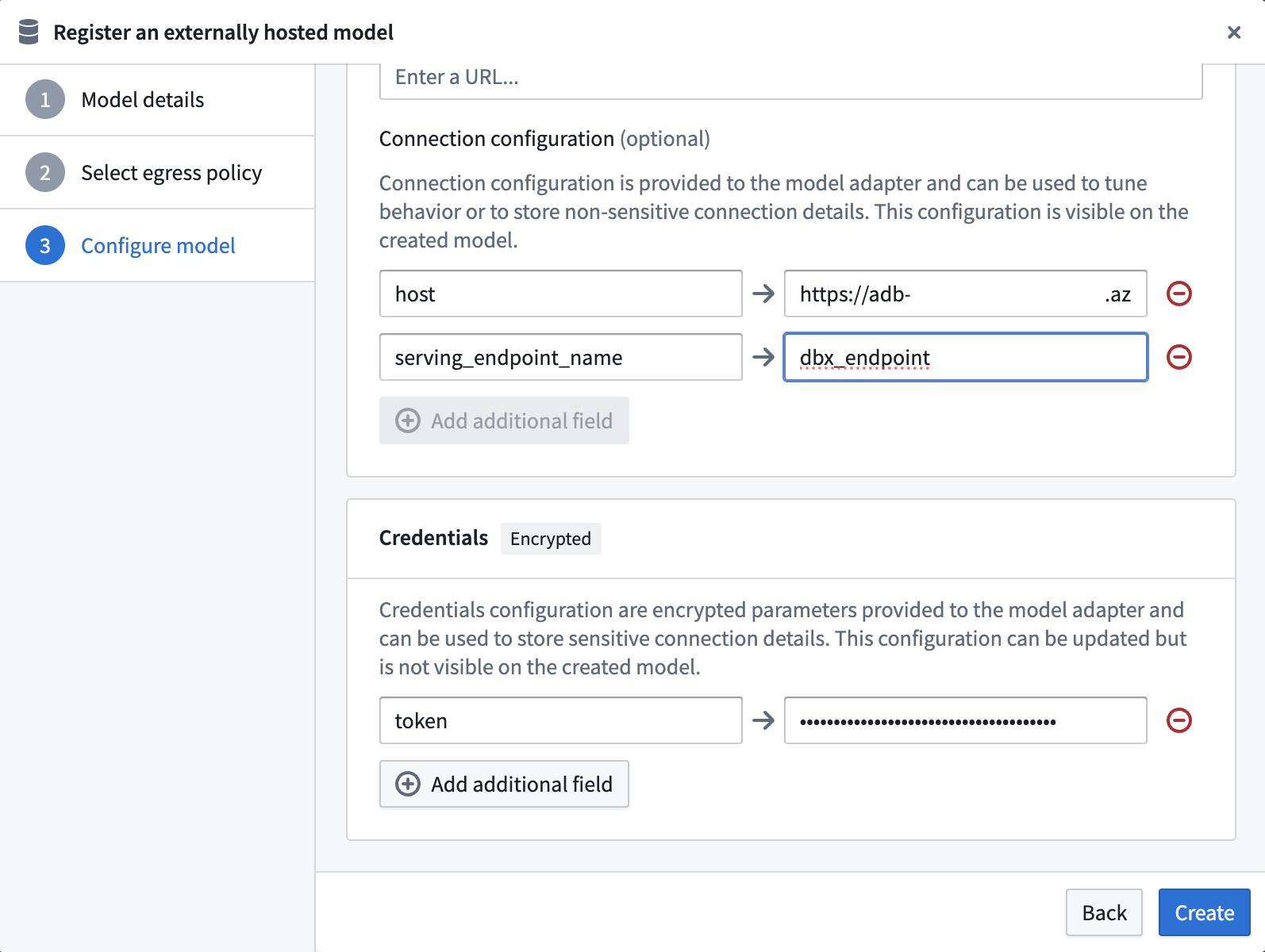
Configure credential configuration
Define credential configurations as required by the example Databricks tabular model adapter.
This adapter requires credential configuration of:
token: A Databricks personal access token with permission to access the model serving endpoint.
Use the Databricks tabular model
Now that the Databricks model has been configured, this model can be hosted in a live deployment or Python transform.
Use the Databricks tabular model in a live deployment
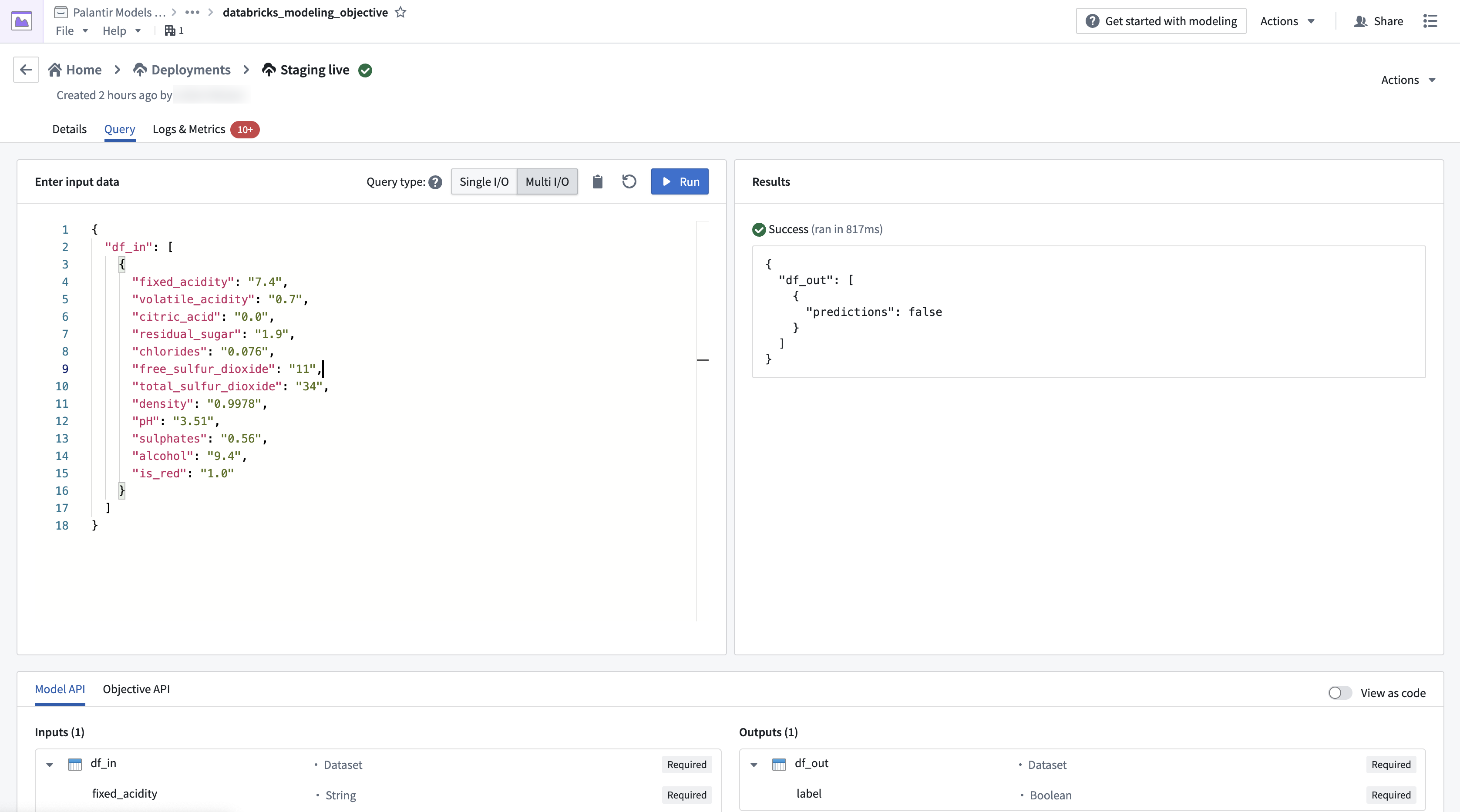
The image below shows an example query made to the Databricks model in a live deployment.
Use the Databricks tabular model in a transform
You can also use the adapter in a transform, as shown in the example code below:
import pandas as pd
from transforms.api import Output, transform, lightweight
from palantir_models.transforms import ModelInput
from transforms.external.systems import EgressPolicy, use_external_systems


@lightweight
@use_external_systems(
    egress=EgressPolicy('<databricks_egress_policy>')
)
@transform(
    out=Output("<output_dataset_path>"),
    model=ModelInput("<external_model_path>"),
)
def compute(egress, out, model):
    df_in = pd.DataFrame([
        {
            "fixed_acidity": "7.4",
            "volatile_acidity": "0.7",
            "citric_acid": "0.0",
            "residual_sugar": "1.9",
            "chlorides": "0.076",
            "free_sulfur_dioxide": "11",
            "total_sulfur_dioxide": "34",
            "density": "0.9978",
            "pH": "3.51",
            "sulphates": "0.56",
            "alcohol": "9.4",
            "is_red": "1.0"
        },
        {
            "fixed_acidity": "7.4",
            "volatile_acidity": "0.7",
            "citric_acid": "0.0",
            "residual_sugar": "1.9",
            "chlorides": "0.076",
            "free_sulfur_dioxide": "11",
            "total_sulfur_dioxide": "34",
            "density": "0.9978",
            "pH": "3.51",
            "sulphates": "0.56",
            "alcohol": "9.4",
            "is_red": "1.0"
        }
    ]
    )
    out.write_pandas(
        model.predict(df_in)
    )
中文翻译
示例:集成 Databricks 模型
本页面提供了针对 Databricks 中托管模型的自定义连接的示例配置和模型适配器(model adapter)。请先了解外部模型集成的优势,以判断外部模型是否适合您的使用场景。
如需分步指南,请参阅如何创建模型适配器和如何创建与外部托管模型的连接的文档。
在本示例中,您将完成以下操作:
发布并标记 Databricks 表格模型适配器
连接到外部模型的第一步是使用代码仓库中的模型适配器库(model adapter library)发布并标记模型适配器。下面的示例模型适配器配置了与部署在 Databricks Model Serving ↗ 上的 Unity Catalog 模型的连接。以下代码已在 Python 3.11.11、databricks-sdk 0.55.0 和 pandas 2.2.3 版本上测试通过。本示例将使用 Databricks 机器学习教程 ↗ 中的葡萄酒质量预测问题。
示例 Databricks 表格模型适配器
请注意,此模型适配器做了以下假设:
- 此模型适配器假设提供给模型的数据是表格形式(tabular)的。
- 此模型适配器会将输入数据序列化为 JSON,并将此数据发送到 Databricks 模型服务端点(model serving endpoint)。
- 此模型适配器假设响应可以从 JSON 反序列化为 pandas DataFrame。
- 此模型适配器需要三个输入来构建客户端。
host:在连接配置中提供(您的 Databricks 实例的主机 URL)。serving_endpoint_name:在连接配置中提供。token:作为凭据提供。
import logging

import palantir_models as pm
import pandas as pd
from databricks.sdk import WorkspaceClient
from databricks.sdk.service.serving import QueryEndpointResponse

logger = logging.getLogger(__name__)


class DatabricksExternalModelAdapter(pm.ExternalModelAdapter):
    def __init__(self, host, serving_endpoint_name, creds):
        self.serving_endpoint_name = serving_endpoint_name
        self.client = WorkspaceClient(host=host, token=creds["token"])

    @classmethod
    def init_external(cls, external_context: pm.ExternalContext) -> "pm.ExternalModelAdapter":
        return cls(
            host=external_context.connection_config["host"],
            serving_endpoint_name=external_context.connection_config["serving_endpoint_name"],
            creds=external_context.resolved_credentials,
        )

    @classmethod
    def api(cls):
        input_cols = [
            "fixed_acidity",
            "volatile_acidity",
            "citric_acid",
            "residual_sugar",
            "chlorides",
            "free_sulfur_dioxide",
            "total_sulfur_dioxide",
            "density",
            "pH",
            "sulphates",
            "alcohol",
            "is_red",
        ]

        inputs = {"df_in": pm.Pandas(columns=[(col, str) for col in input_cols])}
        outputs = {"df_out": pm.Pandas(columns=[("predictions", bool)])}
        return inputs, outputs

    def predict(self, df_in):
        try:
            response: QueryEndpointResponse = self.client.serving_endpoints.query(
                name=self.serving_endpoint_name,
                dataframe_records=df_in.to_dict(orient="records")
            )
        except Exception as err:
            logger.error(f"查询模型服务端点时发生错误:{err}")
            raise err
        else:
            return pd.DataFrame(response.as_dict()).drop("served-model-name", axis=1)
配置 Databricks 表格模型
发布并标记模型适配器后,您需要配置外部托管模型以使用此模型适配器,从而提供模型适配器所需的配置和凭据。
请注意,上述 DatabricksExternalModelAdapter 需要 URL,应将其设置为完整的 Databricks 模型服务端点 URL。
选择出口策略
以下使用了已为您的 Databricks 工作区域名(例如 <workspace-name>.cloud.databricks.com 或您的自定义域名)在端口 443 上配置的出口策略(egress policy)。
配置模型适配器
在连接外部托管模型对话框中选择已发布的模型适配器。
配置连接 URL
通过设置 Databricks 适配器所需的 host 和 serving_endpoint_name,将基础 URL 设置为完整的 Databricks 服务端点 URL。
配置凭据配置
按照示例 Databricks 表格模型适配器的要求定义凭据配置。
此适配器需要以下凭据配置:
token:具有访问模型服务端点权限的 Databricks 个人访问令牌(personal access token)。
使用 Databricks 表格模型
现在 Databricks 模型已配置完成,该模型可以托管在实时部署或 Python transform 中。
在实时部署中使用 Databricks 表格模型
下图显示了对实时部署中的 Databricks 模型执行的示例查询。
在 transform 中使用 Databricks 表格模型
您也可以在 transform 中使用该适配器,如下面的示例代码所示:
import pandas as pd
from transforms.api import Output, transform, lightweight
from palantir_models.transforms import ModelInput
from transforms.external.systems import EgressPolicy, use_external_systems


@lightweight
@use_external_systems(
    egress=EgressPolicy('<databricks_egress_policy>')
)
@transform(
    out=Output("<output_dataset_path>"),
    model=ModelInput("<external_model_path>"),
)
def compute(egress, out, model):
    df_in = pd.DataFrame([
        {
            "fixed_acidity": "7.4",
            "volatile_acidity": "0.7",
            "citric_acid": "0.0",
            "residual_sugar": "1.9",
            "chlorides": "0.076",
            "free_sulfur_dioxide": "11",
            "total_sulfur_dioxide": "34",
            "density": "0.9978",
            "pH": "3.51",
            "sulphates": "0.56",
            "alcohol": "9.4",
            "is_red": "1.0"
        },
        {
            "fixed_acidity": "7.4",
            "volatile_acidity": "0.7",
            "citric_acid": "0.0",
            "residual_sugar": "1.9",
            "chlorides": "0.076",
            "free_sulfur_dioxide": "11",
            "total_sulfur_dioxide": "34",
            "density": "0.9978",
            "pH": "3.51",
            "sulphates": "0.56",
            "alcohol": "9.4",
            "is_red": "1.0"
        }
    ]
    )
    out.write_pandas(
        model.predict(df_in)
    )