Example: Integrate an Open AI model(示例:集成Open AI模型)
The below documentation provides an example configuration and model adapter for a custom connection to an Open AI model. Review the benefits of external model integration to make sure this is the right fit for your use case.
For a step-by-step guide, refer to our documentation on how to create a model adapter and how to create a connection to an externally hosted model.
Example Open AI model adapter
To use this example in Foundry, publish and tag a model adapter using the model adapter library in the Code Repositories application.
This model adapter configures a connection to our Azure-hosted instance of Open AI. This was tested with Python 3.8.17, pandas 1.5.3, and openai 1.1.0. The following five inputs are required to construct an OpenAI client:
base_url- Provided as base_urlapi_type- Provided in connection configurationapi_version- Provided in connection configurationengine- Provided in connection configurationapi_key- Provided as resolved_credentials
import palantir_models as pm
import models_api.models_api_executable as executable_api

from typing import Optional

import openai
import logging

logger = logging.getLogger(__name__)


class OpenAIModelAdapter(pm.ExternalModelAdapter):
  def __init__(self, base_url, api_type, api_version, engine, api_key):
    # Define engine to be used for completions
    self.engine = engine

    # Setup OpenAI Variables
    openai.api_type = api_type
    openai.api_key = api_key
    openai.api_base = base_url
    openai.api_version = api_version

  @classmethod
  def init_external(cls, external_context) -> "pm.ExternalModelAdapter":
    base_url = external_context.base_url
    api_type = external_context.connection_config["api_type"]
    api_version = external_context.connection_config["api_version"]
    engine = external_context.connection_config["engine"]
    api_key = external_context.resolved_credentials["api_key"]
    return cls(
      base_url,
      api_type,
      api_version,
      engine,
      api_key
    )

  @classmethod
  def api(cls):
    inputs = {"df_in": pm.Pandas(columns=[("prompt", str)])}
    outputs = {"df_out": pm.Pandas(columns=[("prompt", str), ("prediction", str)])}
    return inputs, outputs

  def predict(self, df_in):
    predictions = []
    for _, row in df_in.iterrows():
      messages = [{"role": "user", "content": row['prompt']}]
      try:
        response = openai.ChatCompletion.create(
          engine=self.engine,
          messages=messages,
        )
      except openai.error.Timeout as e:
        logger.error(f"OpenAI API request timed out: {e}")
        raise e
      except openai.error.APIError as e:
        logger.error(f"OpenAI API returned an API Error: {e}")
        raise e
      except openai.error.APIConnectionError as e:
        logger.error(f"OpenAI API request failed to connect: {e}")
        raise e
      except openai.error.InvalidRequestError as e:
        logger.error(f"OpenAI API request was invalid: {e}")
        raise e
      except openai.error.AuthenticationError as e:
        logger.error(f"OpenAI API request was not authorized: {e}")
        raise e
      except openai.error.PermissionError as e:
        logger.error(f"OpenAI API request was not permitted: {e}")
        raise e
      except openai.error.RateLimitError as e:
        logger.error(f"OpenAI API request exceeded rate limit: {e}")
        raise e
      predictions.append(response.choices[0].message.content)
    df_in['prediction'] = predictions
    return df_in
Open AI model configuration
Next, configure an externally hosted model to use this model adapter and provide the required configuration and credentials as expected by the model adapter.
Note that the URL and the configuration and credentials maps are completed using the same keys as defined in the model adapter.
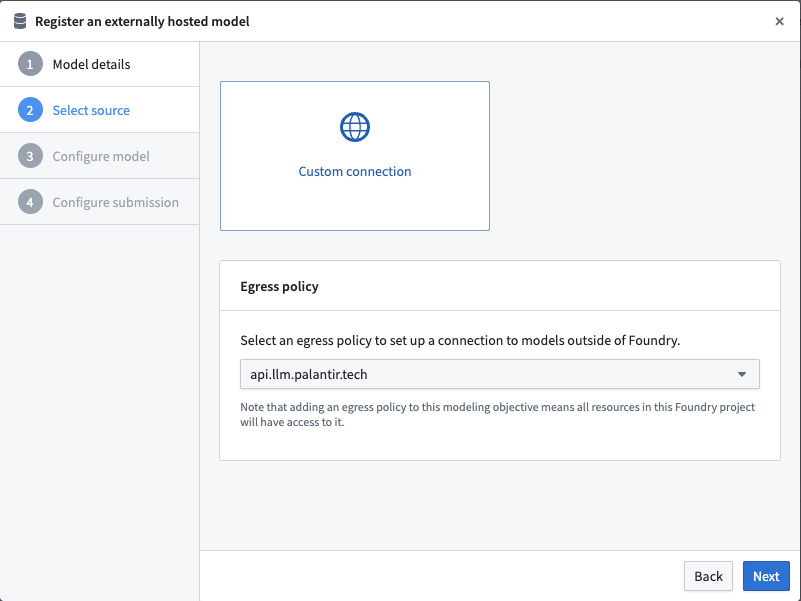
Select an egress policy
The example below uses an egress policy that has been configured for api.llm.palantir.tech (Port 443).
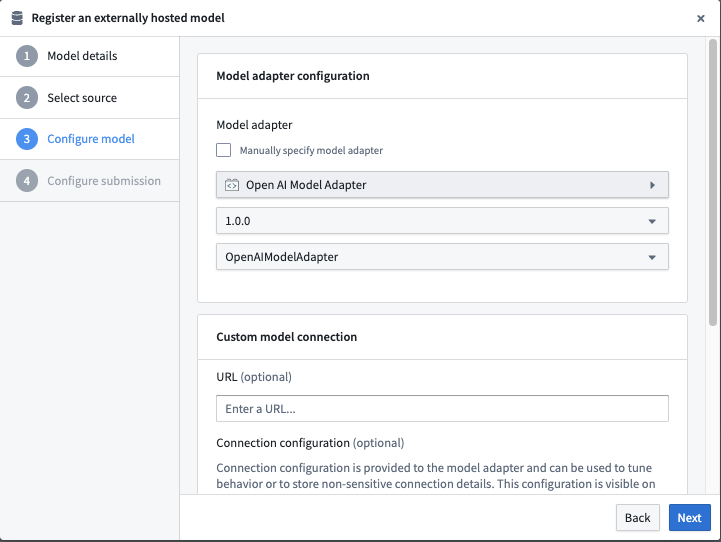
Configure model adapter
Choose the published model adapter in the Connect an externally hosted model dialog.
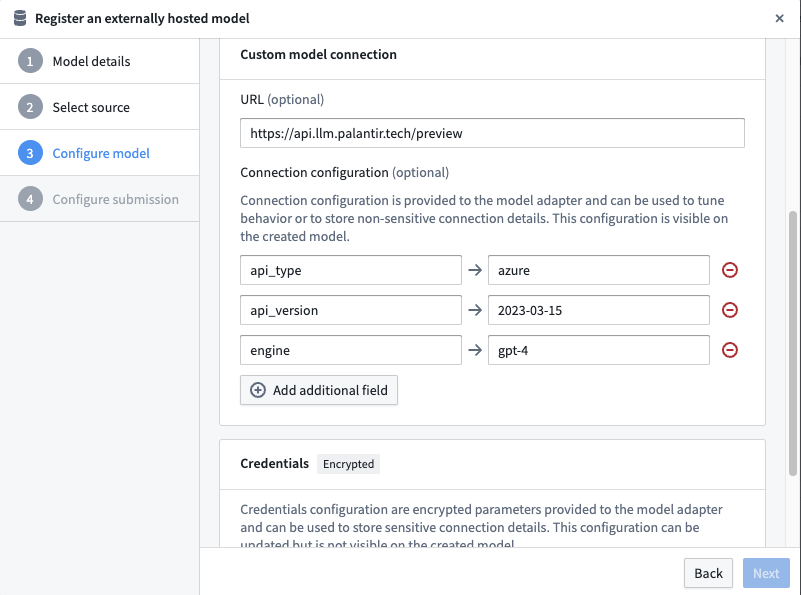
Configure URL and connection configuration
Define connection configurations as required by the example Open AI model adapter.
This adapter requires a URL of: https://api.llm.palantir.tech/preview
This adapter requires connection configuration of the following:
- api_type - The Open AI model type to run inference against.
- api_version - The API version to use.
- engine - The model engine to use.
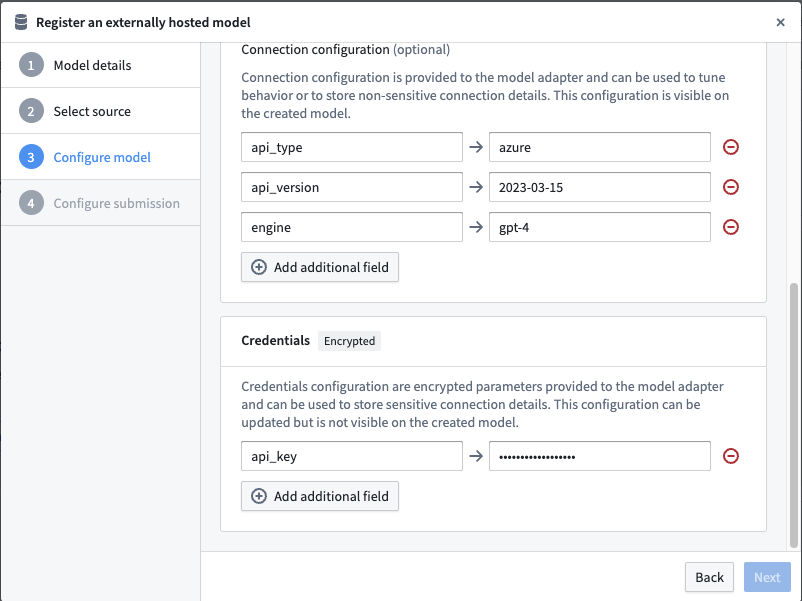
Configure credential configuration
Define credential configurations as required by the example Open AI model adapter.
This adapter requires credential configuration of the following:
- api_key - The secret key needed to query Open AI.
Open AI model usage
Now that the Open AI model has been configured, this model can be hosted in a live deployment or Python transform.
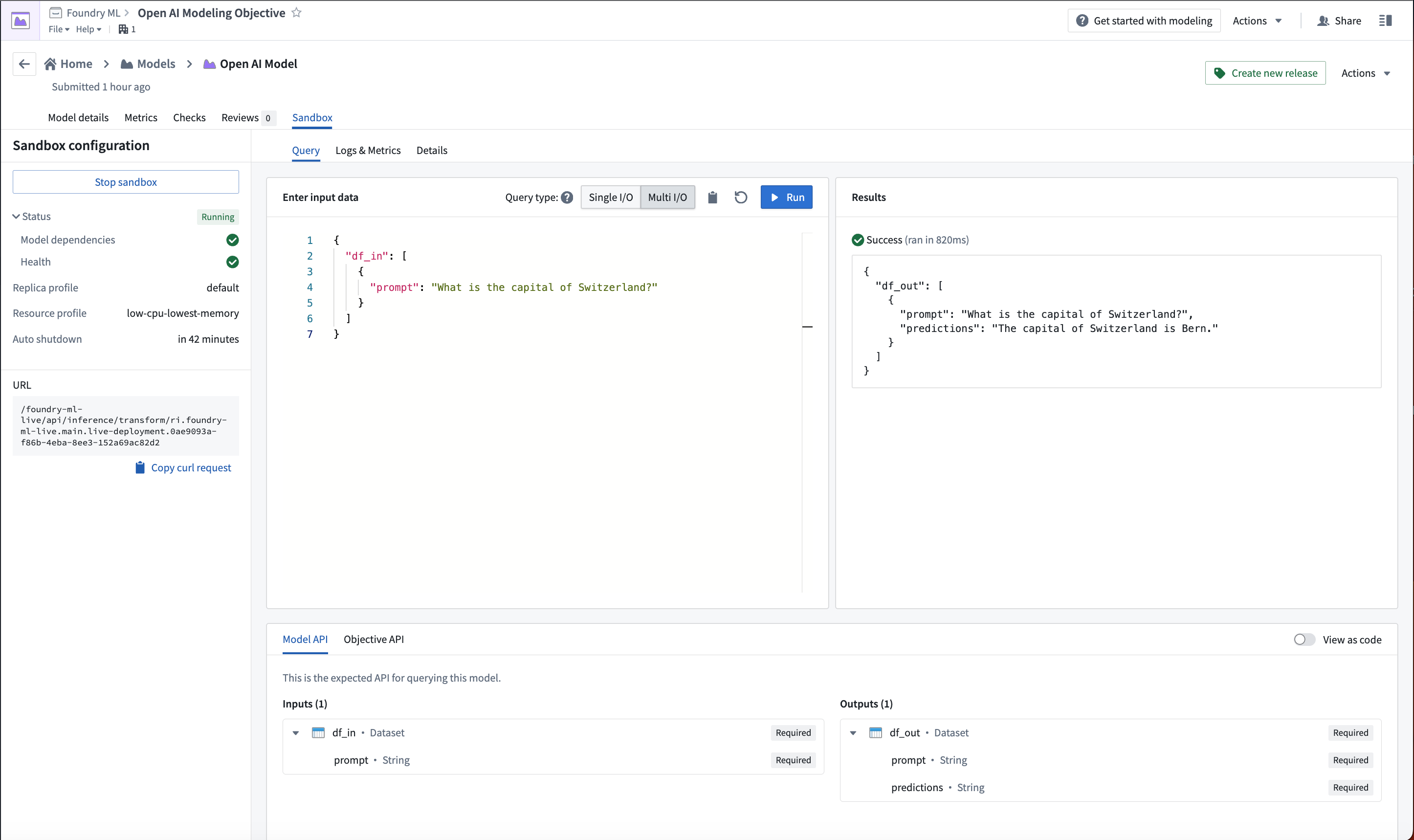
The below image shows an example query made to the Open AI model in a live deployment.
中文翻译
示例:集成Open AI模型
以下文档提供了一个自定义连接到Open AI模型的示例配置和模型适配器。请查阅在Foundry中封装外部托管模型的好处,以确保这适合您的使用场景。
如需分步指南,请参考我们关于如何创建模型适配器和如何创建外部托管模型连接的文档。
示例Open AI模型适配器
要在Foundry中使用此示例,请使用代码仓库(Code Repositories)应用程序中的模型适配器库发布并标记一个模型适配器。
此模型适配器配置了连接到我们Azure托管的Open AI实例。该适配器已在Python 3.8.17、pandas 1.5.3和openai 1.1.0环境下测试通过。构建OpenAI客户端需要以下五个输入参数:
base_url- 作为base_url提供api_type- 在连接配置(connection configuration)中提供api_version- 在连接配置(connection configuration)中提供engine- 在连接配置(connection configuration)中提供api_key- 作为resolved_credentials提供
import palantir_models as pm
import models_api.models_api_executable as executable_api

from typing import Optional

import openai
import logging

logger = logging.getLogger(__name__)


class OpenAIModelAdapter(pm.ExternalModelAdapter):
  def __init__(self, base_url, api_type, api_version, engine, api_key):
    # 定义用于补全的引擎
    self.engine = engine

    # 设置OpenAI变量
    openai.api_type = api_type
    openai.api_key = api_key
    openai.api_base = base_url
    openai.api_version = api_version

  @classmethod
  def init_external(cls, external_context) -> "pm.ExternalModelAdapter":
    base_url = external_context.base_url
    api_type = external_context.connection_config["api_type"]
    api_version = external_context.connection_config["api_version"]
    engine = external_context.connection_config["engine"]
    api_key = external_context.resolved_credentials["api_key"]
    return cls(
      base_url,
      api_type,
      api_version,
      engine,
      api_key
    )

  @classmethod
  def api(cls):
    inputs = {"df_in": pm.Pandas(columns=[("prompt", str)])}
    outputs = {"df_out": pm.Pandas(columns=[("prompt", str), ("prediction", str)])}
    return inputs, outputs

  def predict(self, df_in):
    predictions = []
    for _, row in df_in.iterrows():
      messages = [{"role": "user", "content": row['prompt']}]
      try:
        response = openai.ChatCompletion.create(
          engine=self.engine,
          messages=messages,
        )
      except openai.error.Timeout as e:
        logger.error(f"OpenAI API请求超时: {e}")
        raise e
      except openai.error.APIError as e:
        logger.error(f"OpenAI API返回API错误: {e}")
        raise e
      except openai.error.APIConnectionError as e:
        logger.error(f"OpenAI API请求连接失败: {e}")
        raise e
      except openai.error.InvalidRequestError as e:
        logger.error(f"OpenAI API请求无效: {e}")
        raise e
      except openai.error.AuthenticationError as e:
        logger.error(f"OpenAI API请求未授权: {e}")
        raise e
      except openai.error.PermissionError as e:
        logger.error(f"OpenAI API请求无权限: {e}")
        raise e
      except openai.error.RateLimitError as e:
        logger.error(f"OpenAI API请求超出速率限制: {e}")
        raise e
      predictions.append(response.choices[0].message.content)
    df_in['prediction'] = predictions
    return df_in
Open AI模型配置
接下来,配置外部托管模型以使用此模型适配器,并提供模型适配器所需的配置和凭证。
请注意,URL、配置和凭证映射均使用模型适配器中定义的相同键来完成。
选择出口策略
以下示例使用了已为api.llm.palantir.tech(端口443)配置的出口策略。
配置模型适配器
在连接外部托管模型(Connect an externally hosted model)对话框中选择已发布的模型适配器。
配置URL和连接配置
按照示例Open AI模型适配器的要求定义连接配置。
此适配器需要以下URL:https://api.llm.palantir.tech/preview
此适配器需要以下连接配置:
- api_type - 用于运行推理的Open AI模型类型。
- api_version - 要使用的API版本。
- engine - 要使用的模型引擎。
配置凭证配置
按照示例Open AI模型适配器的要求定义凭证配置。
此适配器需要以下凭证配置:
- api_key - 查询Open AI所需的密钥。
Open AI模型使用
现在Open AI模型已配置完成,该模型可以托管在实时部署(live deployment)或Python转换(Python transform)中。
下图展示了在实时部署中对Open AI模型进行的示例查询。