Example: Integrate a Vertex AI model(示例:集成 Vertex AI 模型)
The below documentation provides an example configuration and model adapter for a custom connection to a model hosted in Google's Vertex AI. Review the benefits of external model integration to make sure this is the right fit for your use case.
For a step-by-step guide, refer to the documentation on how to create a model adapter and how to create a connection to an externally hosted model.
Example Vertex AI tabular model adapter
First, publish and tag a model adapter using the model adapter library in the Code Repositories application. The below model adapter configures a connection to a model hosted in Vertex AI using the Vertex AI SDK for Python ↗ and framework. The below code was tested with versions Python 3.8.17, pandas 1.5.3,
google-cloud-aiplatform 1.32.0, google-auth 2.23.0, google-auth-oauthlib 1.1.0.
Note that this model adapter makes the following assumptions:
- This model adapter assumes that data being provided to this model is tabular.
- This model adapter will serialize the input data to JSON and send this data to the hosted Vertex AI model.
- This model adapter assumes that the response is deserializable from JSON to a pandas dataframe.
- This model adapter takes four inputs to construct a Vertex AI client.
region_name- Provided as connection configurationproject_id- Provided as connection configurationendpoint_id- Provided as connection configurationgoogle_application_credentials- Provided as credentials
import palantir_models as pm
import models_api.models_api_executable as executable_api

from google.oauth2 import service_account
from google.cloud import aiplatform
from google.api_core import exceptions

import json
import pandas as pd
import logging
from typing import Optional

logger = logging.getLogger(__name__)


class VertexAITabularAdapter(pm.ExternalModelAdapter):
  """
  :display-name: Vertex AI Tabular Model Adapter
  :description: Default model adapter for Vertex AI models that expect tabular input and output data.
  """

  def __init__(self, project_id, region_name, endpoint_id, google_application_credentials):
    self.endpoint_id = endpoint_id
    # google_application_credentials is expected to be valid string representation of the Google provided
    # secret key_file
    credentials = service_account.Credentials.from_service_account_info(
      json.loads(google_application_credentials),
      scopes=["https://www.googleapis.com/auth/cloud-platform"]
    )
    aiplatform.init(project=project_id, location=region_name, credentials=credentials)

  @classmethod
  def init_external(cls, external_context) -> "pm.ExternalModelAdapter":
    project_id = external_context.connection_config["project_id"]
    region_name = external_context.connection_config["region_name"]
    endpoint_id = external_context.connection_config["endpoint_id"]
    google_application_credentials = external_context.resolved_credentials["google_application_credentials"]
    return cls(
      project_id,
      region_name,
      endpoint_id,
      google_application_credentials
    )

  @classmethod
  def api(cls):
    inputs = {"df_in": pm.Pandas()}
    outputs = {"df_out": pm.Pandas()}
    return inputs, outputs

  def predict(self, df_in):
    instances = df_in.to_dict(orient='records')
    try:
      endpoint = aiplatform.Endpoint(endpoint_name=self.endpoint_id)
    except ValueError as error:
      logger.error("Error initializing endpoint object double check the inputted endpoint_id, project_id and "
                   "region_name.")
      raise error
    try:
      # Output from model is assumed to be json serializable
      # if result is too large for executor this may cause an OOM
      prediction_result = endpoint.predict(instances=instances)
    except exceptions.Forbidden as error:
      logger.error("Error performing inference provided google_application_credentials do not have sufficient "
                   "permissions.")
      raise error
    except exceptions.BadRequest as error:
      logger.error("Error performing inference double check your input dataframe.")
      raise error
    return pd.json_normalize(prediction_result.predictions)
Vertex AI tabular model configuration
Next, configure a externally hosted model to use this model adapter and provide the required configuration and credentials as expected by the model adapter. In this example, the model is assumed to be hosted in us-central1, but this is configurable.
Note that the URL is not required by the above VertexAITabularAdapter and so is left blank; however, the configuration and credentials maps are completed using the same keys as defined in the Model Adapter.
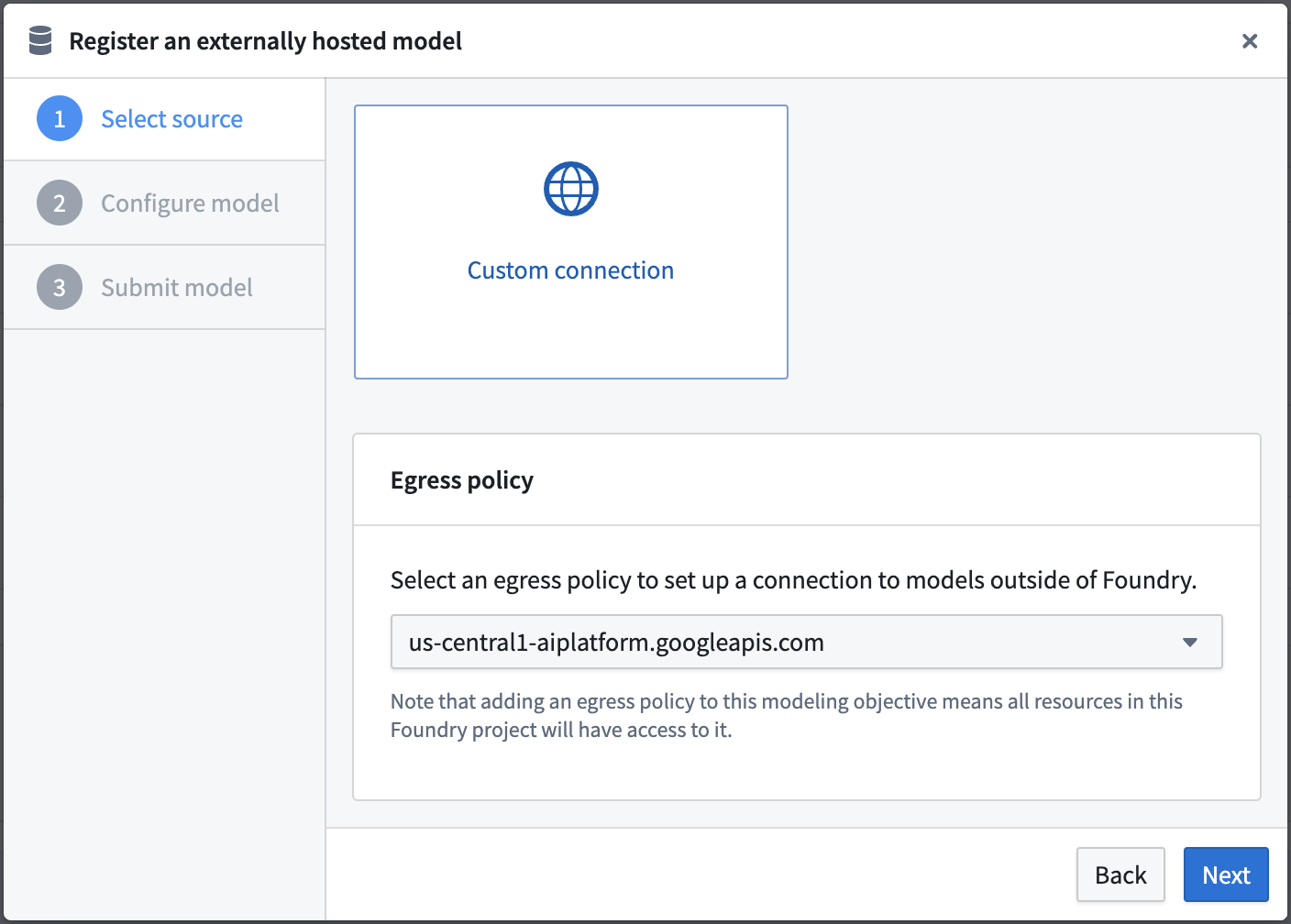
Select an egress policy
The below uses an egress policy that has been configured for us-central1-aiplatform.googleapis.com (Port 443).
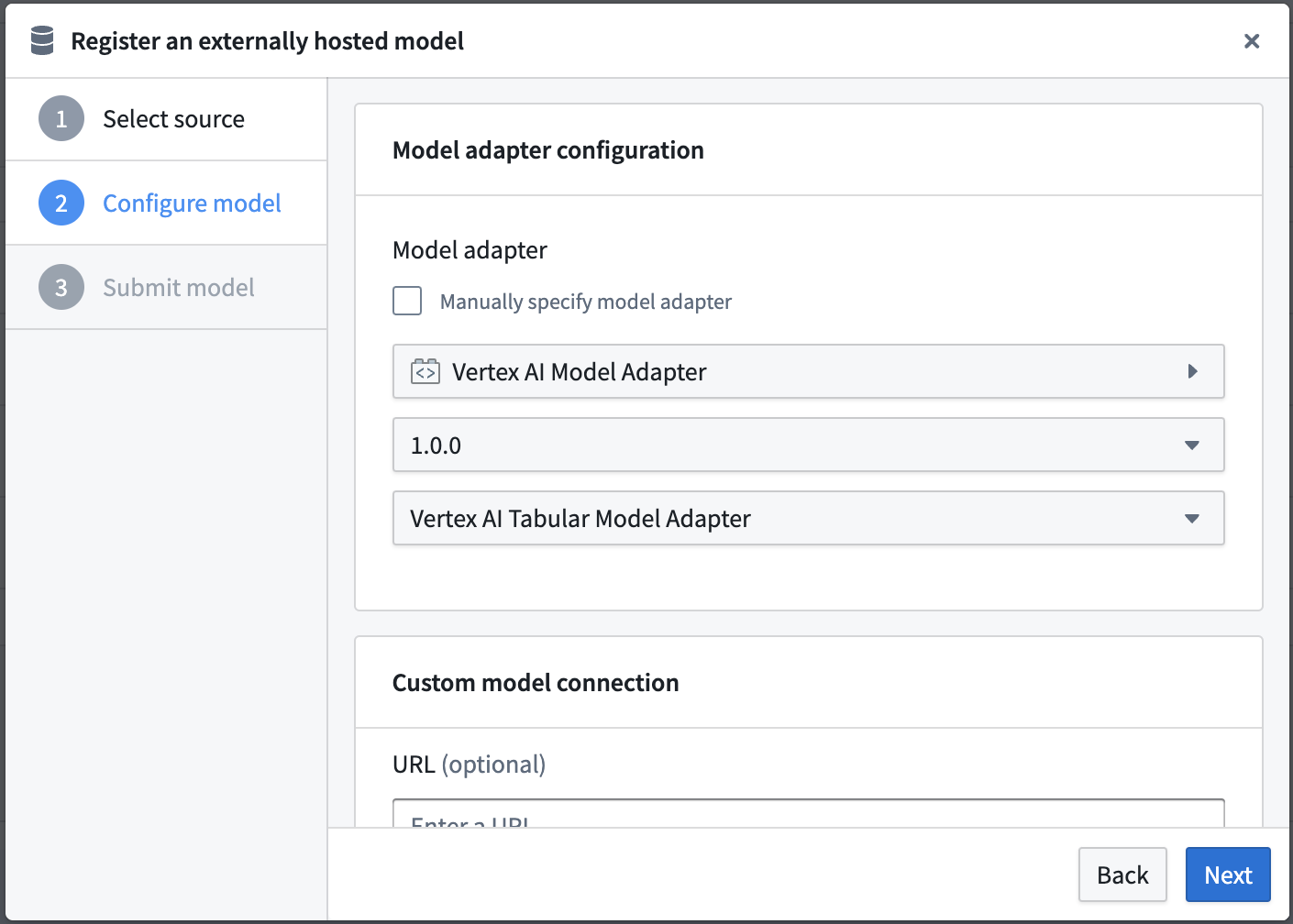
Configure model adapter
Choose the published model adapter in the Connect an externally hosted model dialog.
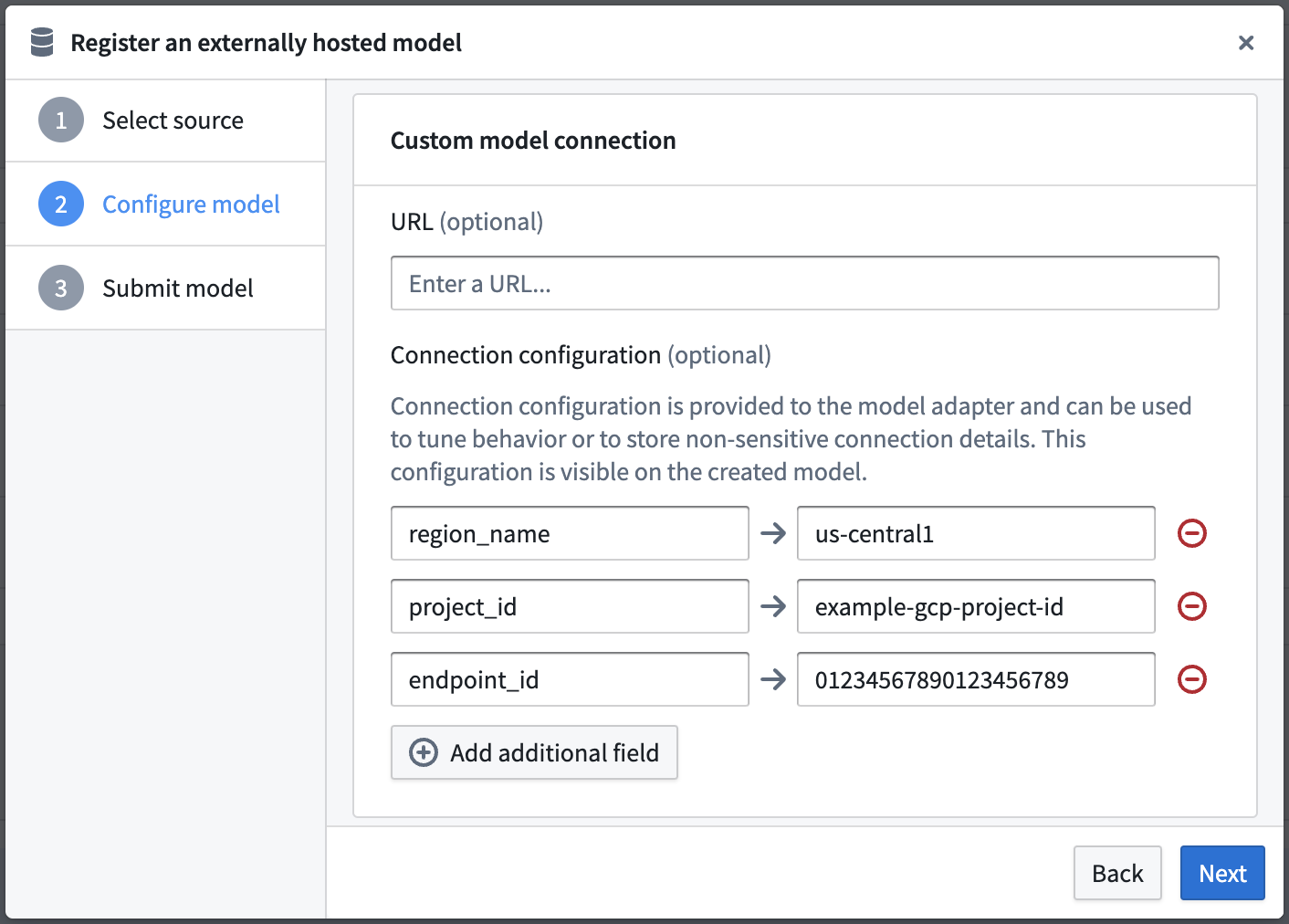
Configure connection configuration
Define connection configurations as required by the example Vertex AI tabular model adapter.
This adapter requires connection configuration of:
- region_name - The Google region name where the model is hosted.
- project_id - The unique identifier for the project this external hosted model belongs to.
- endpoint_id - The unique identifier for the externally hosted model.
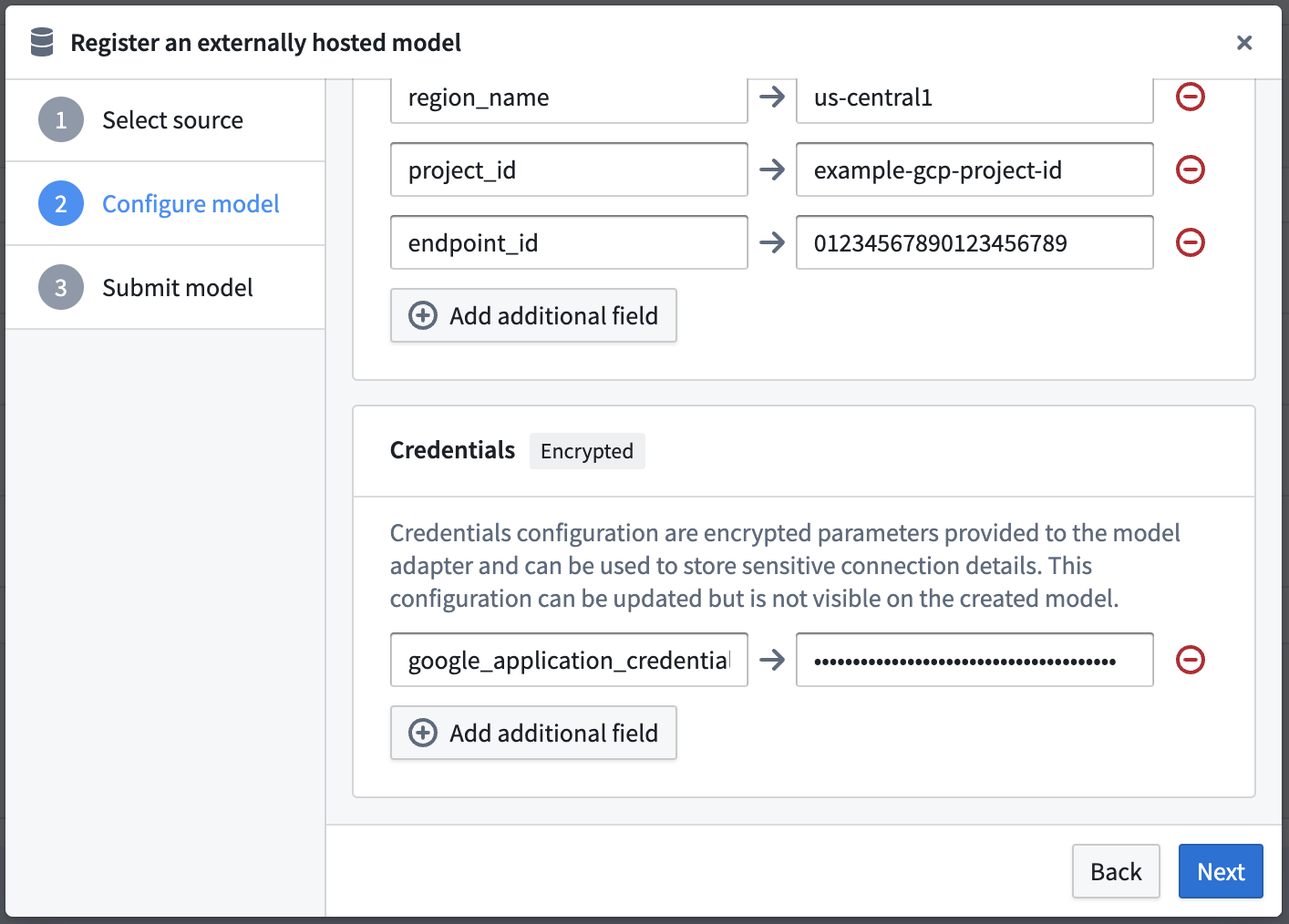
Configure credential configuration
Define credential configurations as required by the example Vertex AI tabular model adapter.
This adapter requires credential configuration of:
- google_application_credentials - This is the full contents of a service account private key file that can be used to obtain credentials for a service account. You can create a private key using the Credentials page of the Google Cloud Console ↗.
Vertex AI tabular model usage
Now that the Vertex AI model has been configured, this model can be hosted in a live deployment, or Python transform.
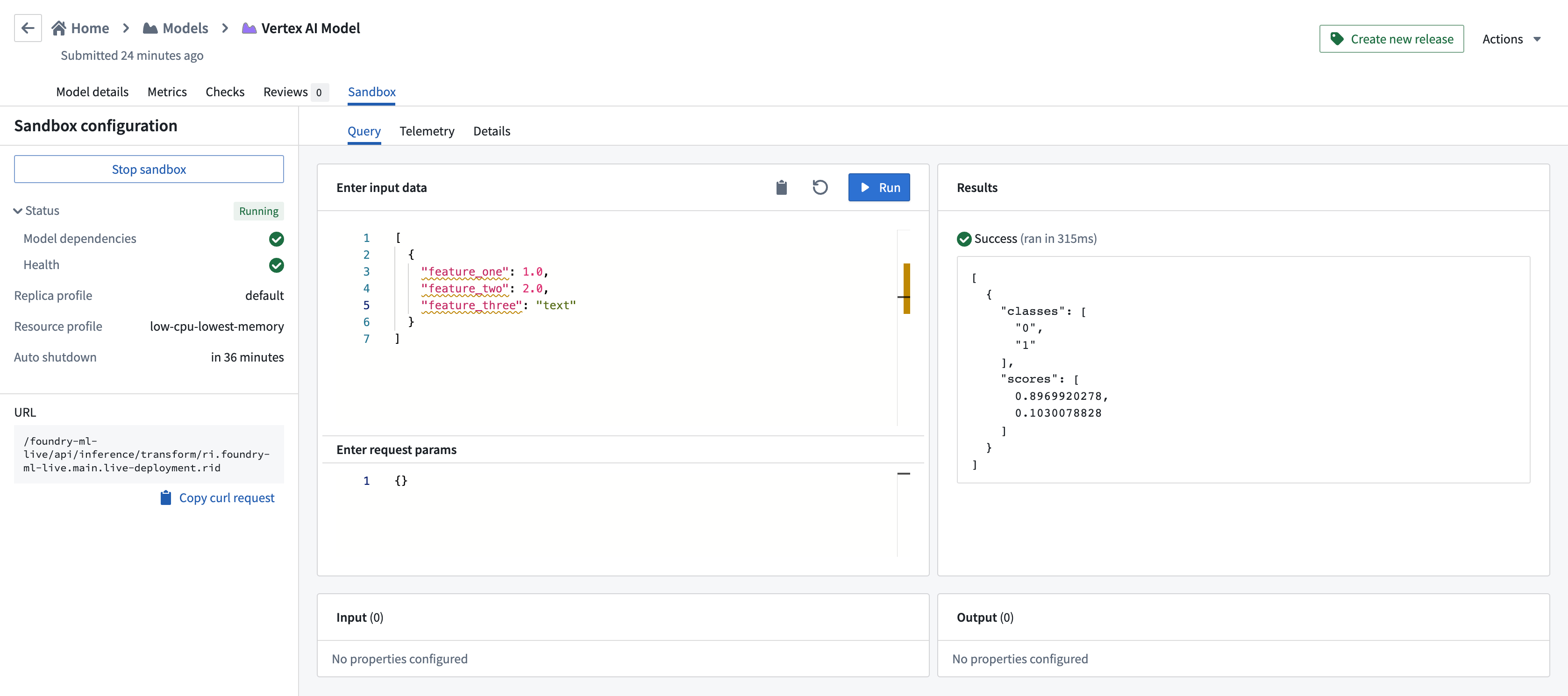
The below image shows an example query made to the Vertex AI model in a live deployment.
中文翻译
示例:集成 Vertex AI 模型
以下文档提供了自定义连接至 Google Vertex AI 托管模型的示例配置和模型适配器(model adapter)。请查阅在 Foundry 中集成外部模型的好处,确保此方案符合您的使用场景。
如需分步指南,请参考如何创建模型适配器和如何创建外部托管模型连接的文档。
示例:Vertex AI 表格模型适配器
首先,使用代码仓库(Code Repositories)应用中的模型适配器库(model adapter library)发布并标记一个模型适配器。以下模型适配器使用 Vertex AI SDK for Python ↗ 和框架配置了与 Vertex AI 托管模型的连接。以下代码已在 Python 3.8.17、pandas 1.5.3、google-cloud-aiplatform 1.32.0、google-auth 2.23.0、google-auth-oauthlib 1.1.0 版本上测试通过。
请注意,此模型适配器做出以下假设:
- 假设提供给该模型的数据为表格数据(tabular)。
- 该模型适配器会将输入数据序列化为 JSON,并发送至托管的 Vertex AI 模型。
- 假设响应可以从 JSON 反序列化为 pandas 数据框(dataframe)。
- 该模型适配器需要四个输入参数来构建 Vertex AI 客户端。
region_name- 作为连接配置(connection configuration)提供project_id- 作为连接配置提供endpoint_id- 作为连接配置提供google_application_credentials- 作为凭据(credentials)提供
import palantir_models as pm
import models_api.models_api_executable as executable_api

from google.oauth2 import service_account
from google.cloud import aiplatform
from google.api_core import exceptions

import json
import pandas as pd
import logging
from typing import Optional

logger = logging.getLogger(__name__)


class VertexAITabularAdapter(pm.ExternalModelAdapter):
  """
  :display-name: Vertex AI 表格模型适配器
  :description: 适用于期望表格输入和输出数据的 Vertex AI 模型的默认模型适配器。
  """

  def __init__(self, project_id, region_name, endpoint_id, google_application_credentials):
    self.endpoint_id = endpoint_id
    # google_application_credentials 应为 Google 提供的密钥文件的合法字符串表示
    credentials = service_account.Credentials.from_service_account_info(
      json.loads(google_application_credentials),
      scopes=["https://www.googleapis.com/auth/cloud-platform"]
    )
    aiplatform.init(project=project_id, location=region_name, credentials=credentials)

  @classmethod
  def init_external(cls, external_context) -> "pm.ExternalModelAdapter":
    project_id = external_context.connection_config["project_id"]
    region_name = external_context.connection_config["region_name"]
    endpoint_id = external_context.connection_config["endpoint_id"]
    google_application_credentials = external_context.resolved_credentials["google_application_credentials"]
    return cls(
      project_id,
      region_name,
      endpoint_id,
      google_application_credentials
    )

  @classmethod
  def api(cls):
    inputs = {"df_in": pm.Pandas()}
    outputs = {"df_out": pm.Pandas()}
    return inputs, outputs

  def predict(self, df_in):
    instances = df_in.to_dict(orient='records')
    try:
      endpoint = aiplatform.Endpoint(endpoint_name=self.endpoint_id)
    except ValueError as error:
      logger.error("初始化端点对象时出错,请检查输入的 endpoint_id、project_id 和 region_name。")
      raise error
    try:
      # 假设模型输出为 JSON 可序列化格式
      # 如果结果过大,可能导致执行器内存溢出(OOM)
      prediction_result = endpoint.predict(instances=instances)
    except exceptions.Forbidden as error:
      logger.error("执行推理时出错,提供的 google_application_credentials 权限不足。")
      raise error
    except exceptions.BadRequest as error:
      logger.error("执行推理时出错,请检查输入的数据框。")
      raise error
    return pd.json_normalize(prediction_result.predictions)
Vertex AI 表格模型配置
接下来,配置一个外部托管模型以使用此模型适配器,并提供模型适配器所需的配置和凭据。在此示例中,假设模型托管在 us-central1 区域,但该区域是可配置的。
请注意,上述 VertexAITabularAdapter 不需要 URL,因此留空;但配置和凭据映射需使用模型适配器中定义的相同键名完成。
选择出口策略(egress policy)
以下使用了已配置为 us-central1-aiplatform.googleapis.com(端口 443)的出口策略。
配置模型适配器
在连接外部托管模型对话框中选择已发布的模型适配器。
配置连接配置
根据示例 Vertex AI 表格模型适配器的要求定义连接配置。
此适配器需要以下连接配置:
- region_name - 模型托管的 Google 区域名称。
- project_id - 该外部托管模型所属项目的唯一标识符。
- endpoint_id - 外部托管模型的唯一标识符。
配置凭据配置
根据示例 Vertex AI 表格模型适配器的要求定义凭据配置。
此适配器需要以下凭据配置:
- google_application_credentials - 服务账号私钥文件的完整内容,可用于获取服务账号的凭据。您可以通过 Google Cloud 控制台的凭据页面 ↗ 创建私钥。
Vertex AI 表格模型的使用
现在 Vertex AI 模型已配置完成,该模型可以托管在实时部署(live deployment)或Python 转换(Python transform)中。
下图展示了在实时部署中对 Vertex AI 模型执行的示例查询。