Integrate an externally hosted model(集成外部托管的模型)
:::callout{theme="warning" title="Warning"}
Batch deployments are currently not supported for externally hosted models. Configure a Python transform that uses an external model instead.
:::
Benefits of wrapping an externally hosted model in Foundry
Foundry enables the creation of a model that act as a proxy to a model hosted in a third party application, service or model provider such as Azure Machine Learning, Amazon SageMaker, OpenAI, or Vertex AI. This makes it easy for models developed outside of Foundry to be used by Foundry users, pipelines, and operational applications.
Once an externally hosted model has been integrated, Foundry provides the following:
- Full versioning, granular permissioning, and governed model lineage.
- Model management and live deployment via Modeling Objectives.
- Binding to the Foundry Ontology, allowing for operationalization via functions on models and what-if scenario analysis.
:::callout{theme="neutral"}
The features listed above may not be relevant to your use case. For example, externally hosting your model may not be the right solution if you do not intend to manage or evaluate the model in Foundry, or if you have a general purpose model that should not be bound to a specific object type in the Ontology, such as a large language model. Instead, you may want to call the model's external API directly from Foundry rather than wrapping it into a Foundry model.
In these cases, credentials can be defined in a Data Connection source instead of being configured as part of the model definition as described below. This source and related egress policies can then be imported in external transforms to enable batch inference, and in your function for live inference.
:::
Additional considerations for language models
In the case of language models, consider registering your model in the platform for use within AIP tools such as AIP Logic or Pipeline Builder's Use LLM Node. This can be done using using an externally hosted model in Foundry, but creating a model is not necessary. The registered models page describes how to register your own model in AIP.
Create a custom connection to an externally hosted model
To create a connection to an externally hosted model you will need the following:
- Connection details to connect to the externally hosted model.
- A model adapter that tells Foundry how to create a connection to and interface with the externally hosted model.
- A Foundry egress policy that allows Foundry to connect to the externally hosted model.
You can create a model that proxies an externally hosted model by following the steps below.
1. Create a new model
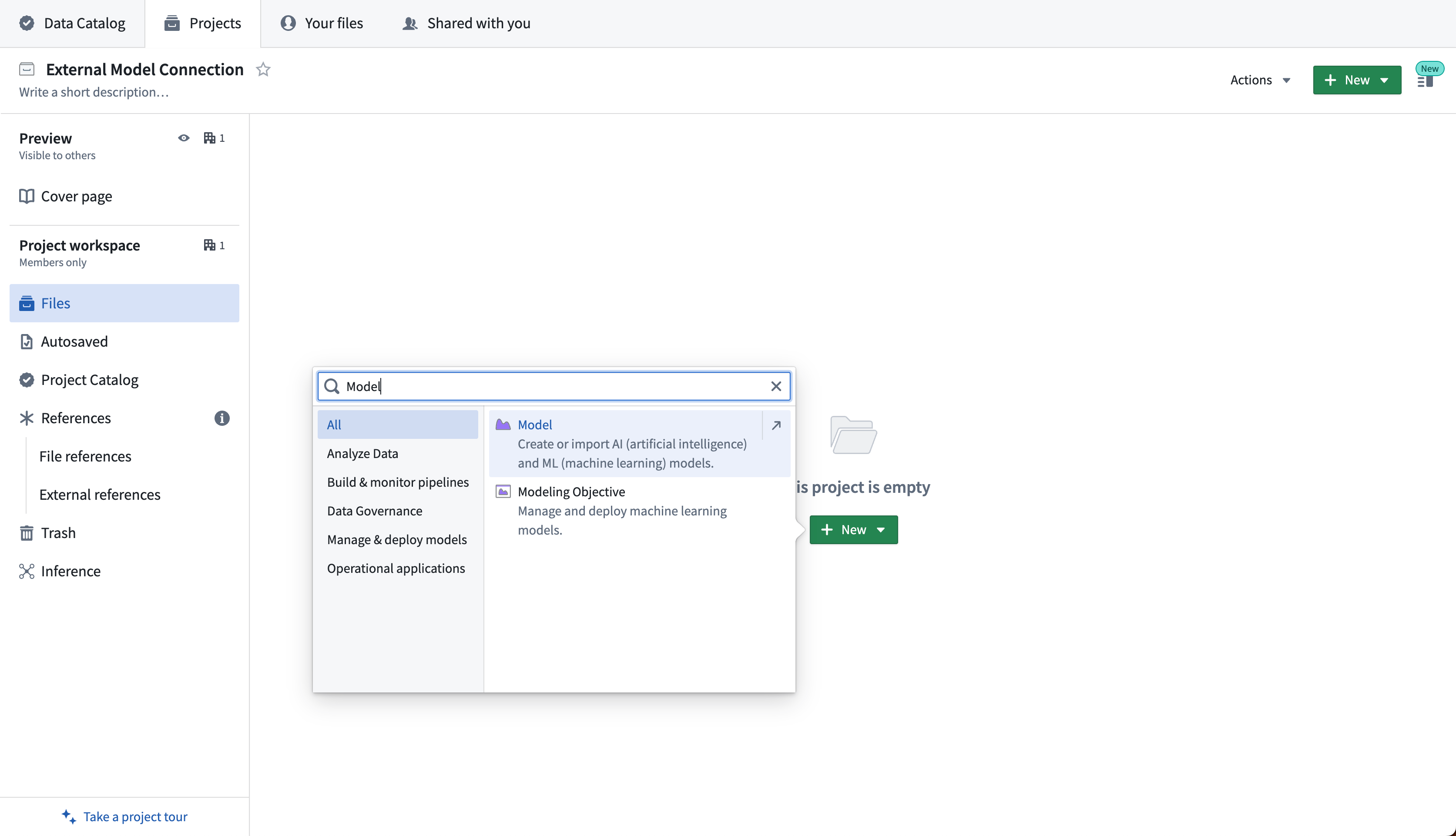
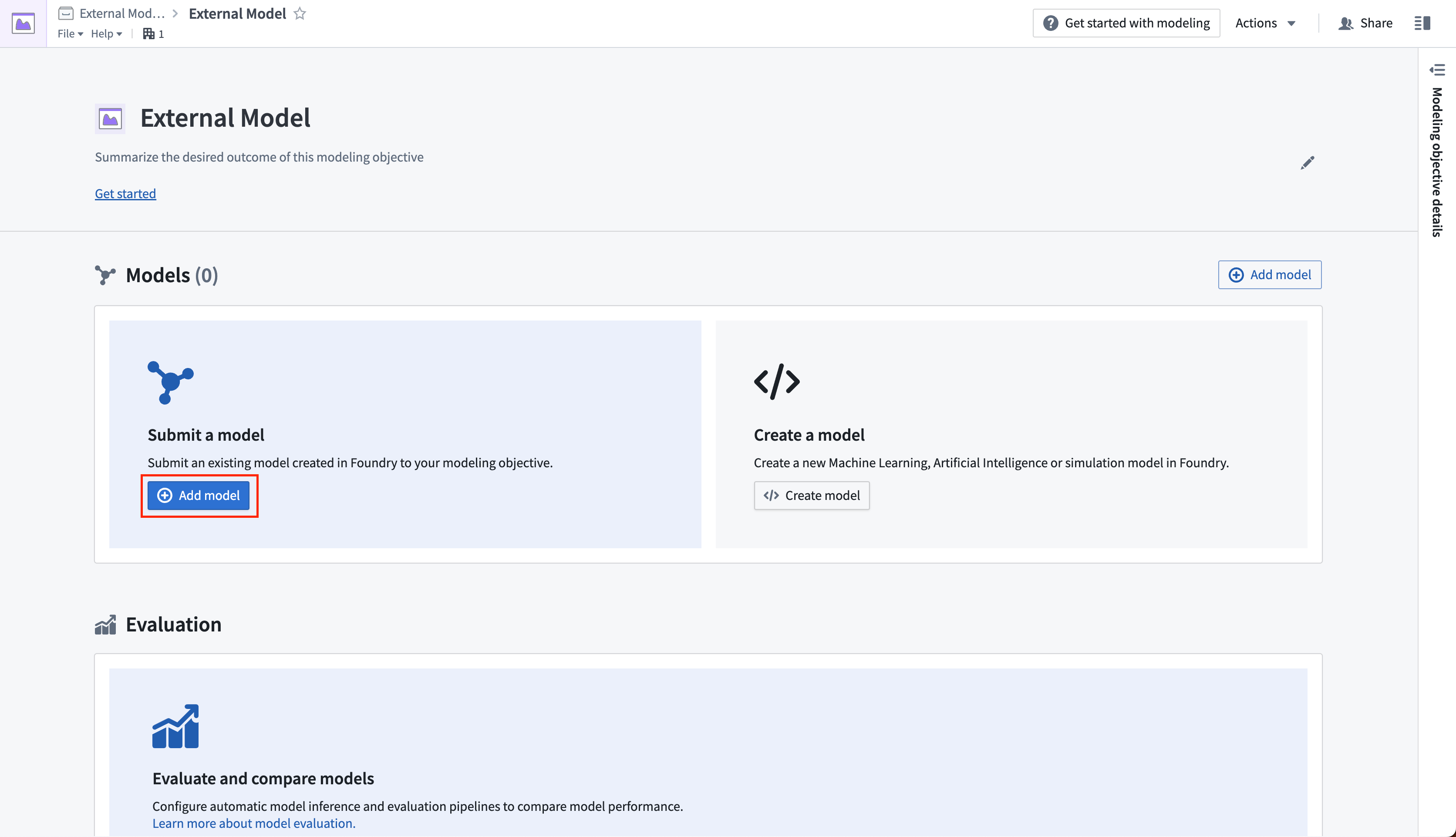
The first step is to create a new model. This can be done either by selecting +New > Model in a Foundry Project, or through a new or existing modeling objective. In the modeling objective, select Add model.
The screenshot below shows the creation of a new model in a Foundry project by selecting +New > Model.
The screenshot below shows the creation of a new model through a modeling objective by selecting Add model from the External Model screen.
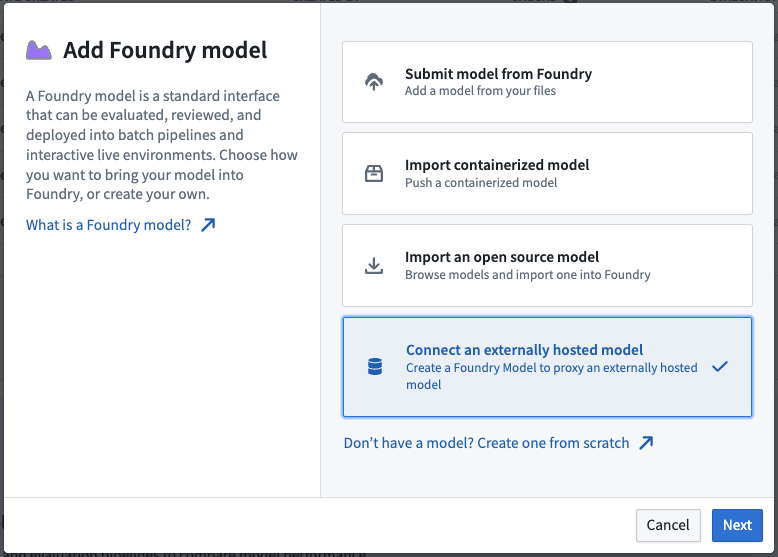
2. Select method of adding a model
Select Connect an externally hosted model, then Next.
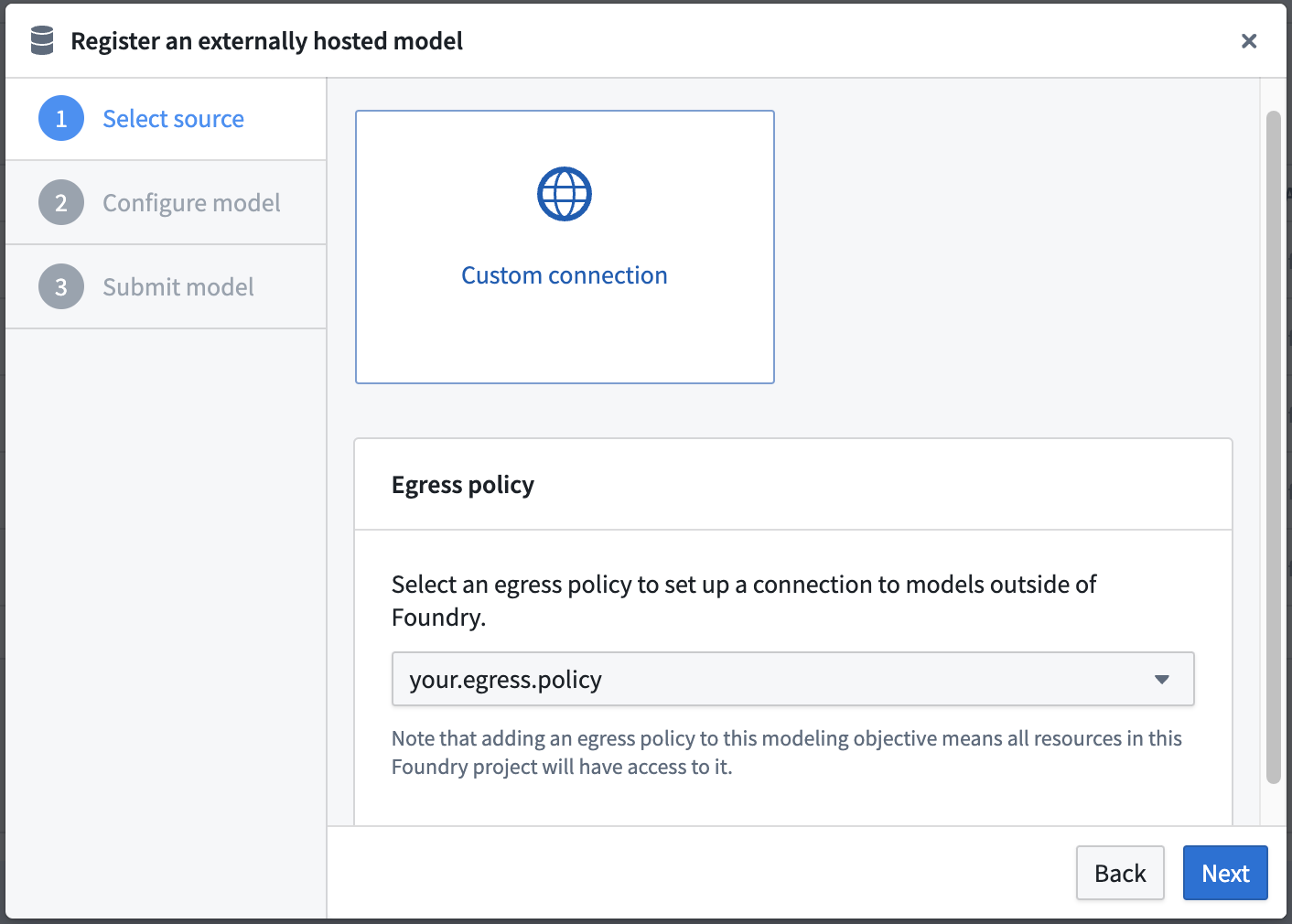
3. Set egress policy
Select Custom connection as the source for your externally hosted model and choose an egress policy in the dropdown, then select Next.
An egress policy enables a Foundry project or artifact to send data from Foundry to an external system. Egress policies may be controlled by your organization's Foundry security model. If you have the required permissions, you can browse and configure a new egress policy in the Control Panel application.
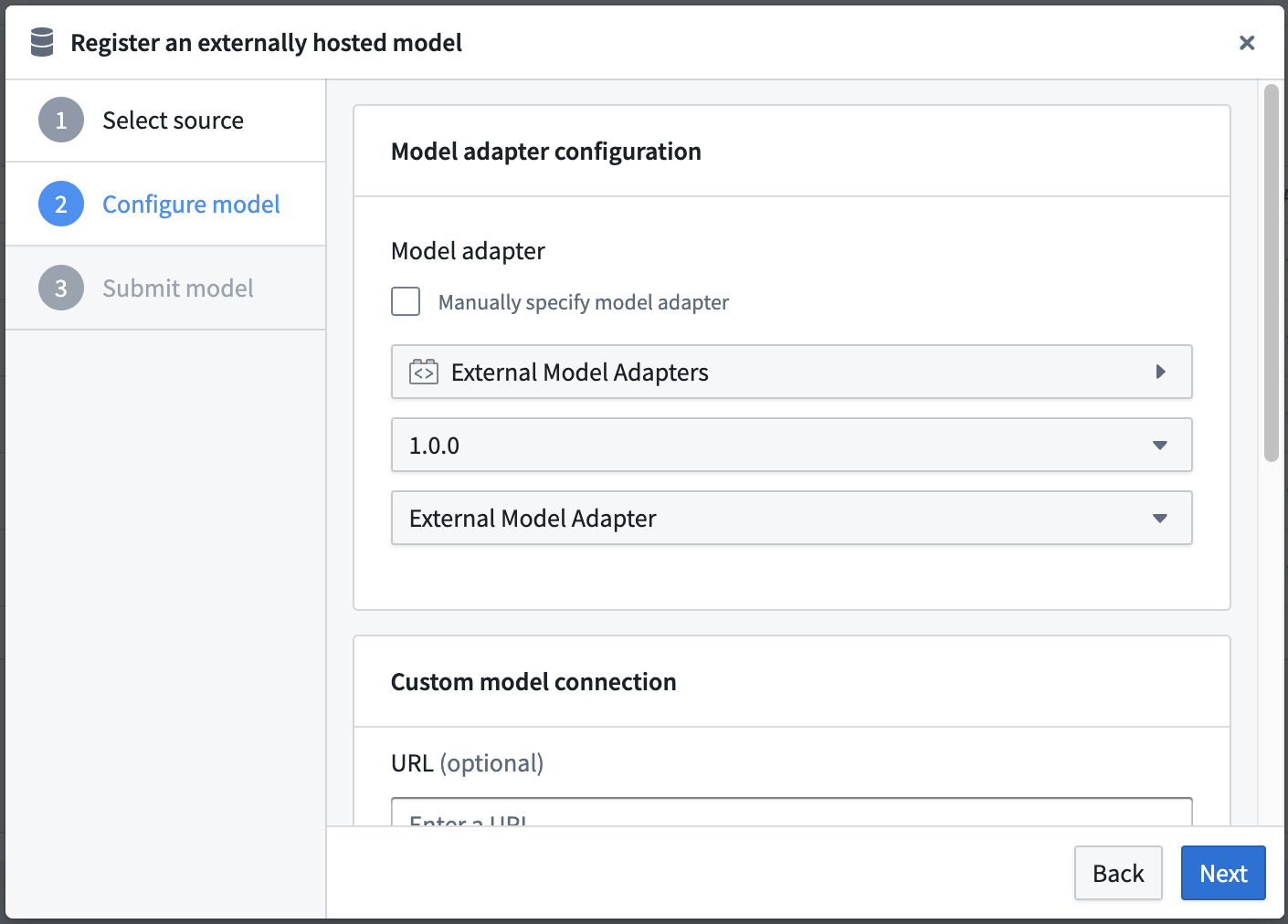
4. Configure model adapter
Select the model adapter for this model. The model adapter should be configured to take an ExternalModelContext at load time to initialize the connection to the externally hosted model. For more information, refer to the documentation on how to create a model adapter, review example model adapters for the external model, and view the API definition of the ExternalModelContext.
5. Configure model connection
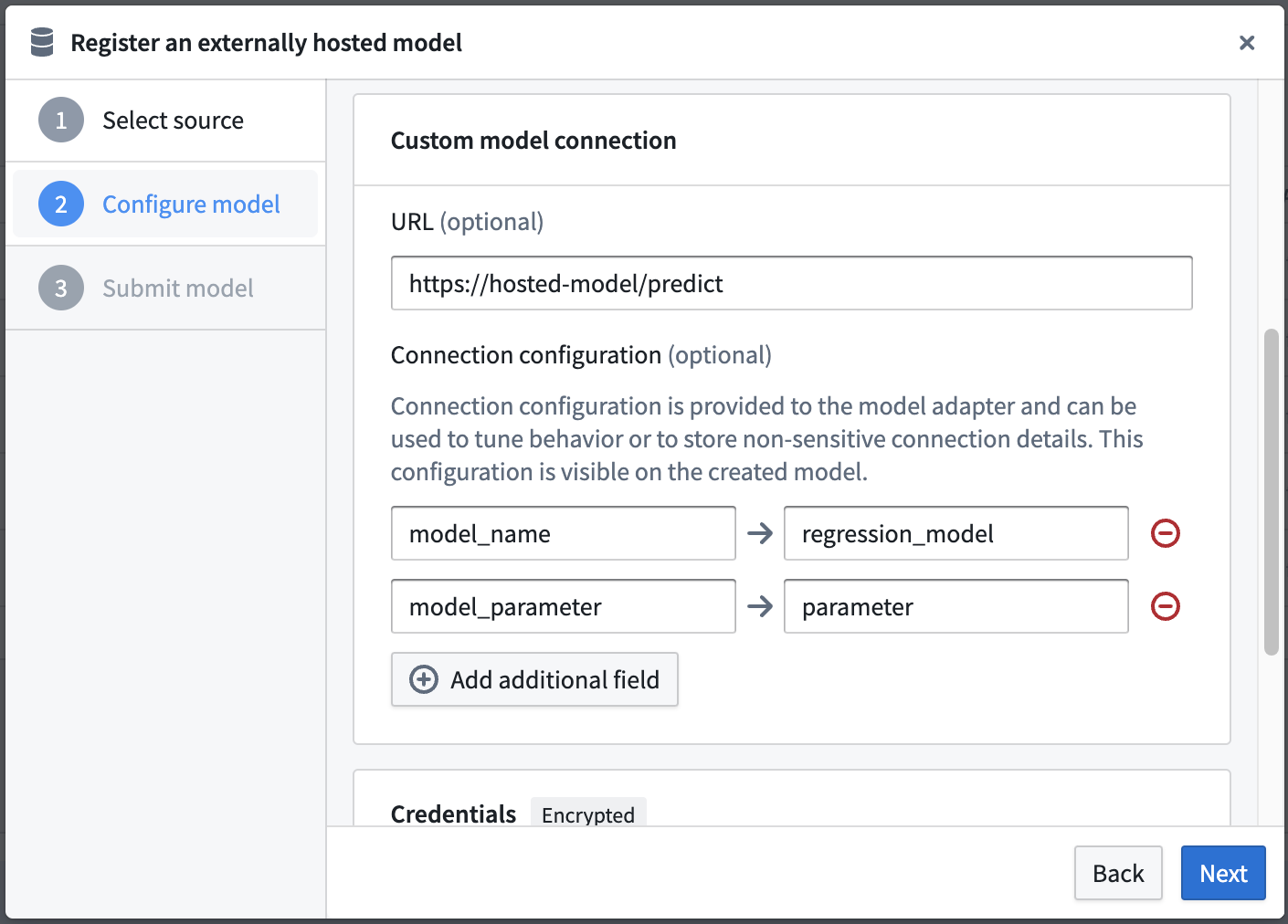
Define the model connection details for your custom model connection. The connection configuration has two components:
- URL (optional): This is the base URL that is provided to the model adapter. This is intended to be the URL of the model inference function.
- Connection Configuration (optional): The connection configuration will not be encrypted and will be viewable with the model metadata in platform. This component can store specific configuration details such as the model name, inference parameters, or thresholds.
6. Configure credentials
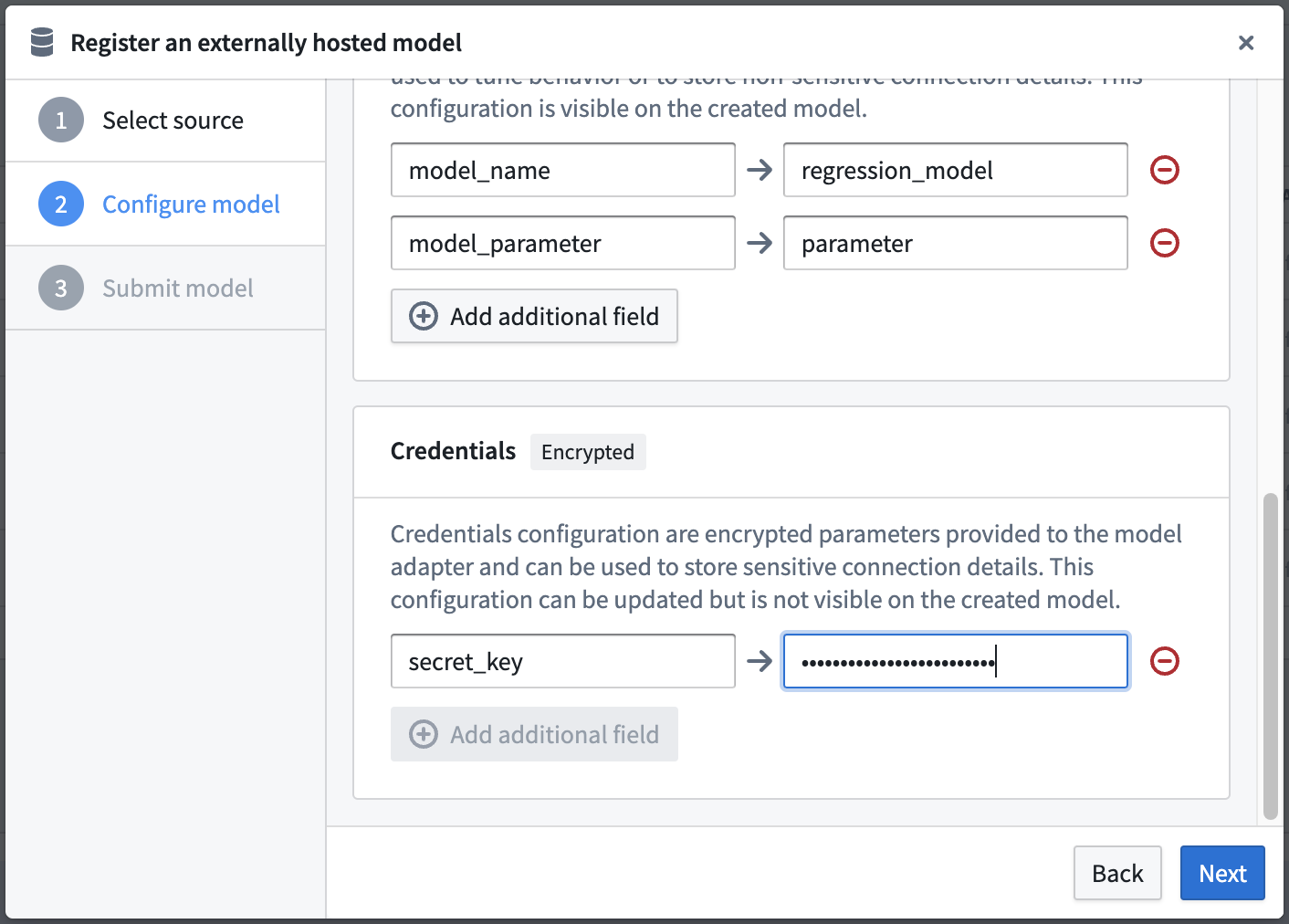
Define the credentials configuration for your custom model connection and then select Next.
- Credentials Configuration (optional): The credentials will be encrypted and safely stored alongside the Model. These credentials will be decrypted and provided to the model adapter at model load time. Note that users who have access to the model will be able to use this model to perform inference regardless of their underlying access to the external model. Select Next to proceed to save your model details.
7. Configure details and submit model
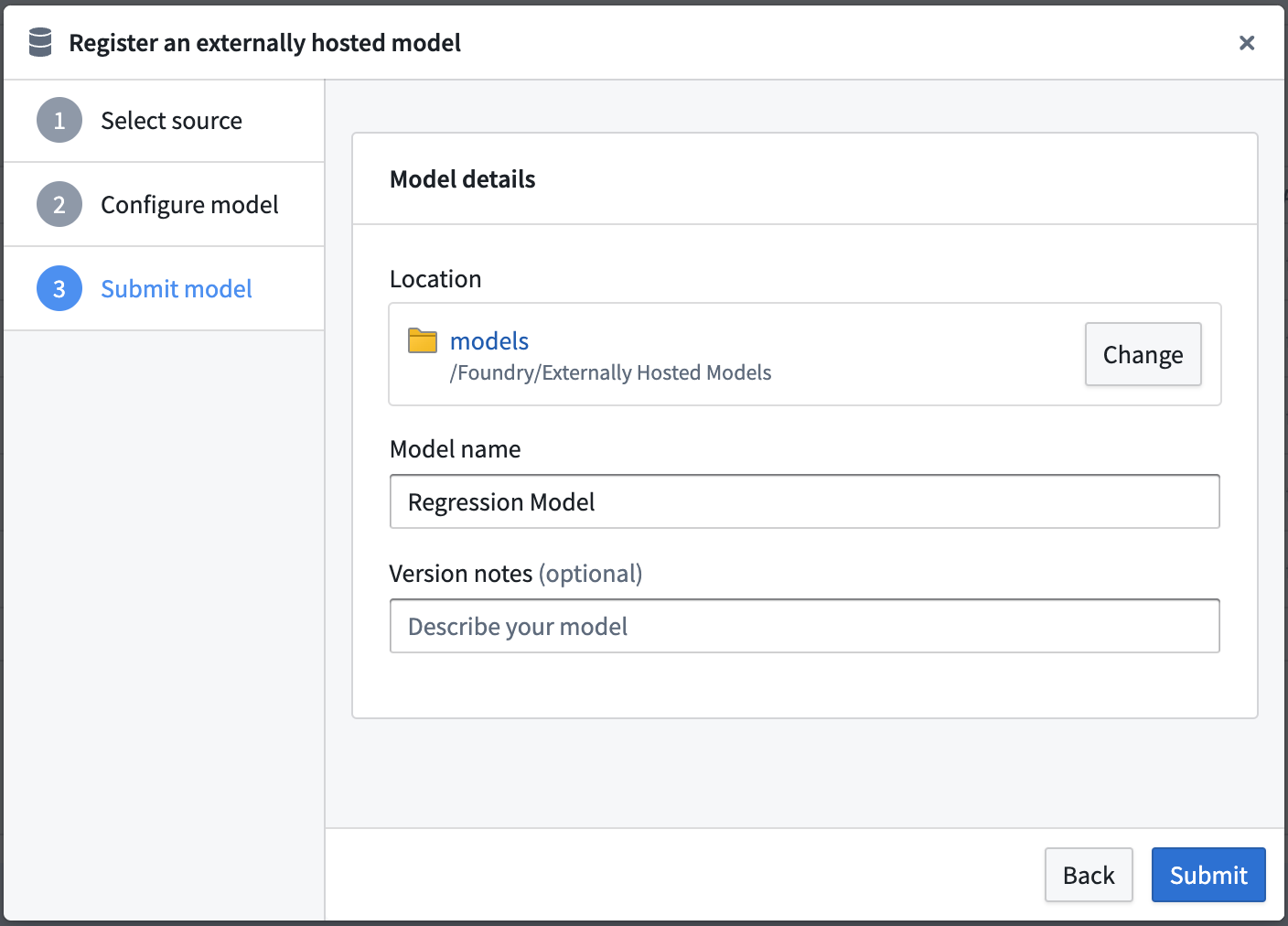
Enter your model save location, model name and version notes for this model. This will define the Foundry name, location, and metadata of your model.
If you are creating this model from a modeling objective, select Submit to create your model and submit this model to your Modeling Objective. In a modeling objective, you can navigate to the model, see the configuration and optionally update the linked credentials.
If you are creating this model in a Foundry project, choose Done to save this model.
View externally hosted models
The externally hosted model enables a user to update credentials, see the connection configuration, and copy egress policy RIDs so a user can configure Python Transforms.
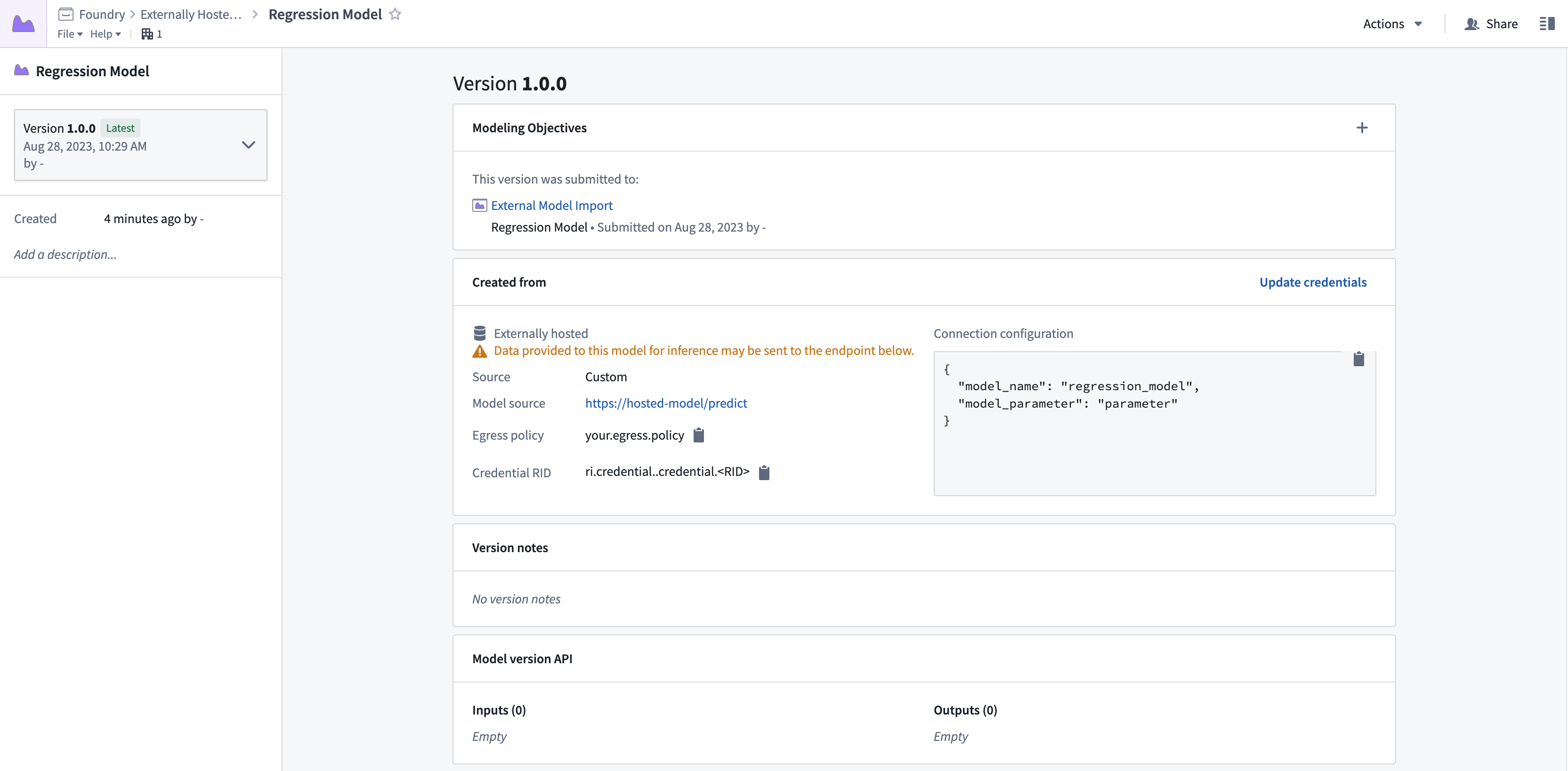
External model submission in a modeling objective
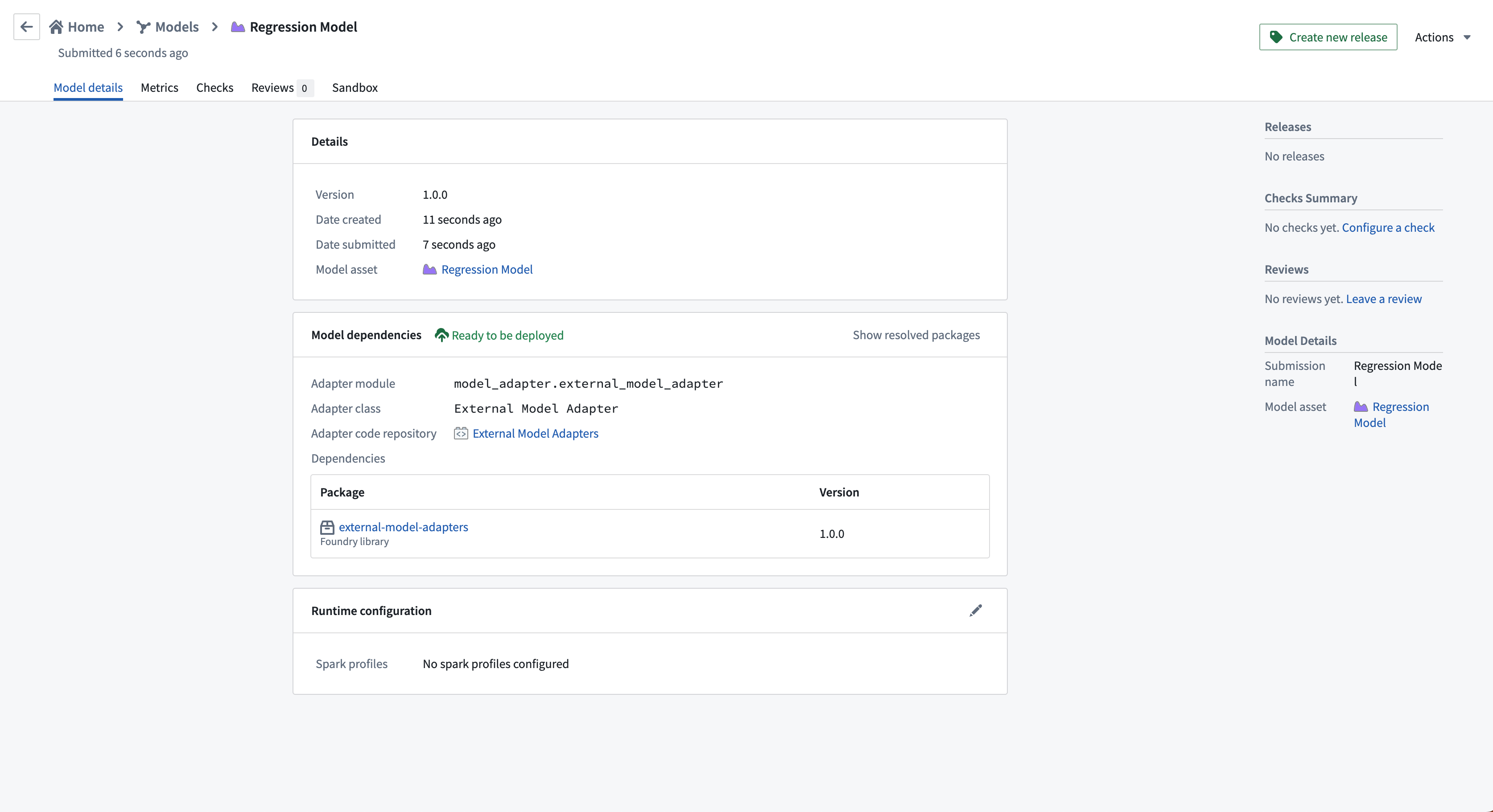
Test and operationalize an externally hosted model
There are several ways that you can test and operationalize an externally hosted model. You can:
- Deploy the model live in a modeling objective
- Configure a Python transform that uses an external model
Live deployment in modeling objectives
Follow the instructions to set up a live deployment for real time inference in Foundry.
If you are hosting your model in a modeling objective in the same Foundry project as your model, then your egress policy will be automatically added to the live deployment. Otherwise, you will need to import your egress policy into the hosting project.
Batch pipelines in modeling objectives
Externally hosted models currently do not support batch deployments or automatic model evaluation in a modeling objective.
Python transforms
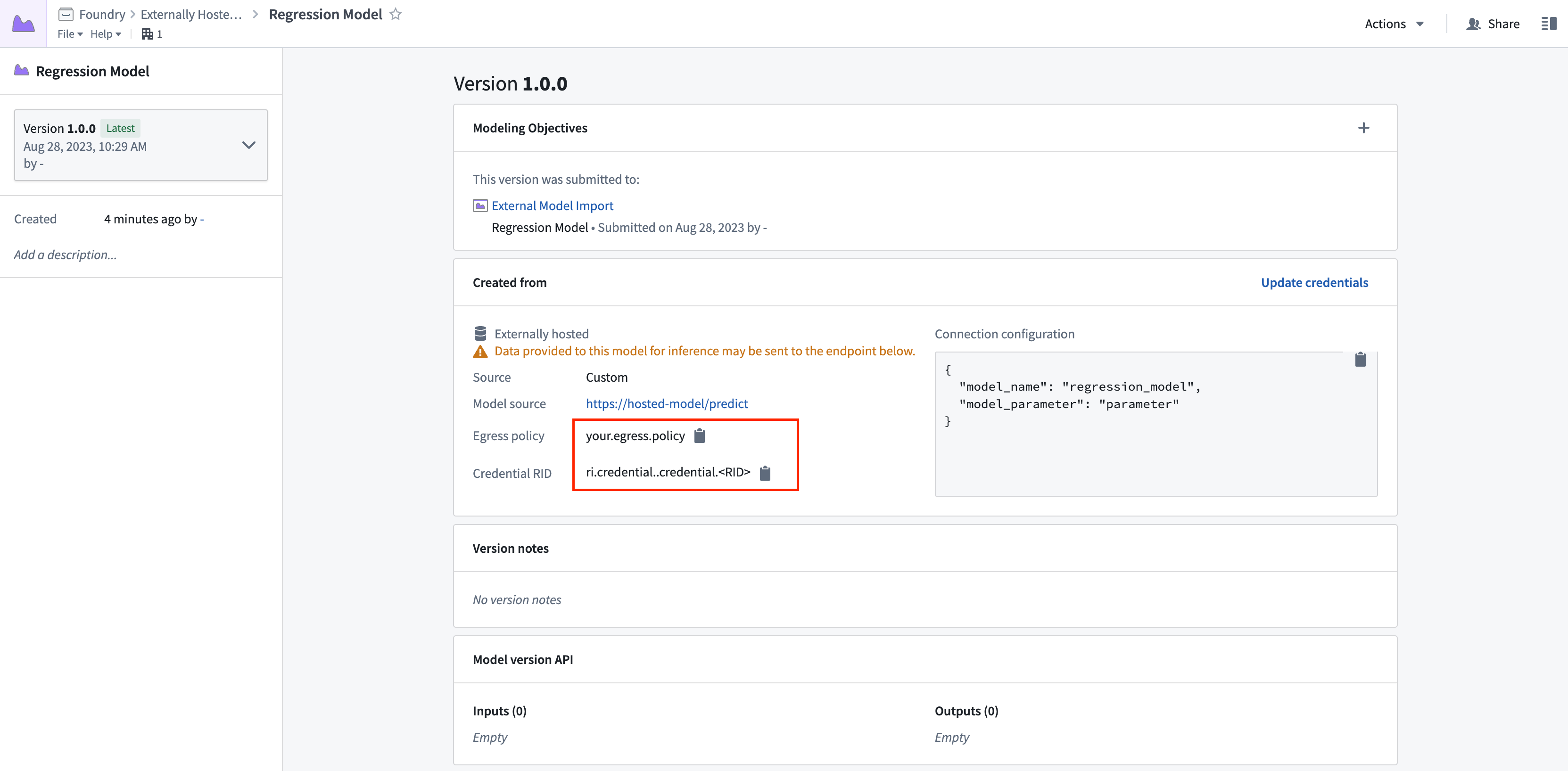
To configure a Python transform that uses an external model, you will need to manually enable network egress for that connection.
Next, you can find the required egress policy name from the model version and configure a Python transform with that model input.
Dependencies
In this example, the following dependencies are set in the Python Transforms repository. Note the added dependency on external-model-adapters for model inference and transforms-external-systems for interacting with an external system.
requirements:
  build:
    - python 3.8.*
    - setuptools

  run:
    - python 3.8.*
    - transforms {{ PYTHON_TRANSFORMS_VERSION }}
    - transforms-expectations
    - transforms-verbs
    - transforms-external-systems
    - external-model-adapters 1.0.0
Example transform
This simple example takes the externally hosted model and performs inference. Note the required export_control and egress policy that are added as inputs to the compute function. The egress policy should use the same egress policy as defined in the model.
from transforms.api import transform, Input, Output
from palantir_models.transforms import ModelInput
from transforms.external.systems import EgressPolicy, use_external_systems, ExportControl


@use_external_systems(
    export_control=ExportControl(markings=['<MARKING_ID>']),
    egress=EgressPolicy('ri.resource-policy-manager.<RID>')
)
@transform(
    output=Output("/Foundry/Externally Hosted Models/data/inferences"),
    model=ModelInput("/Foundry/Externally Hosted Models/models/Regression Model"),
    foundry_input=Input("/Foundry/Externally Hosted Models/data/regression_features_input")
)
def compute(
        export_control,
        egress,
        output,
        model,
        foundry_input
    ):
    input_df = foundry_input.pandas()
    results = model.transform(input_df)
    output.write_pandas(results.df_out)
Example model adapter structure
The below provides an example structure for a model adapter intended for use with an externally hosted model.
For additional information, we recommend referencing the following:
- The full Model Adapter API definition
- How to create and publish a model adapter
- An example connection to a model hosted in Amazon SageMaker
- An example connection to a model hosted in Google Vertex AI
- An example connection to an Open AI model
import palantir_models as pm

import json
import pandas as pd


class ExampleModelAdapter(pm.ExternalModelAdapter):

    def __init__(self, url, credentials_map, configuration_map):
        # Extract model configuration from "Connection configuration" map
        model_name = configuration_map['model_name']
        model_parameter = configuration_map['model_parameter']

        # Extract model credentials from "Credentials configuration" map
        secret_key = credentials_map['secret_key']

        # Initiate http client at model load time
        self.client = ExampleClient(url, model_name, model_parameter, secret_key)

    @classmethod
    def init_external(cls, external_context: pm.ExternalContext) -> "pm.ExternalModelAdapter":
        return cls(
            url=external_context.base_url,
            credentials_map=external_context.resolved_credentials,
            configuration_map=external_context.connection_config,
        )

    @classmethod
    def api(cls):
        inputs = {"df_in": pm.Pandas()}
        outputs = {"df_out": pm.Pandas()}
        return inputs, outputs

    def predict(self, df_in):
        payload = {
            "instances": df_in.apply(lambda row: {"features": row.tolist()}, axis=1).tolist()
        }

        # Client is an example and will need to be edited to connect to your external model
        response = self.client.predict(
            ContentType="application/json",
            Body=json.dumps(payload)
        )

        result = response["Body"].read().decode()
        predictions = pd.DataFrame(json.loads(result)["predictions"])
        return predictions
中文翻译
集成外部托管的模型
:::callout{theme="warning" title="警告"}
外部托管的模型目前不支持批量部署(Batch deployments)。请配置使用外部模型的Python转换(Python transform)。
:::
在Foundry中封装外部托管模型的好处
Foundry能够创建一个模型,作为托管在第三方应用程序、服务或模型提供商(如Azure Machine Learning、Amazon SageMaker、OpenAI或Vertex AI)中的模型的代理。这使得在Foundry外部开发的模型能够被Foundry用户、流水线和运营应用程序轻松使用。
一旦外部托管的模型被集成,Foundry将提供以下功能:
- 完整的版本控制、细粒度权限管理和受控的模型血缘关系(model lineage)。
- 通过建模目标(Modeling Objectives)进行模型管理和实时部署。
- 绑定到Foundry本体(Ontology),支持通过模型函数(functions on models)进行运营化操作和假设情景分析。
:::callout{theme="neutral"}
上述功能可能不适用于您的使用场景。例如,如果您不打算在Foundry中管理或评估模型,或者您拥有一个不应绑定到本体中特定对象类型的通用模型(如大型语言模型),那么外部托管模型可能不是最佳解决方案。在这种情况下,您可能更希望直接从Foundry调用模型的外部API,而不是将其封装为Foundry模型。
在这些情况下,可以在数据连接源(Data Connection source)中定义凭据,而不是像下文所述将其配置为模型定义的一部分。然后,可以在外部转换(external transforms)中导入此源及相关出口策略(egress policies)以实现批量推理,并在函数(function)中用于实时推理。
:::
语言模型的额外注意事项
对于语言模型,请考虑在平台中注册您的模型,以便在AIP工具(如AIP Logic或Pipeline Builder的使用LLM节点(Use LLM Node))中使用。这可以通过在Foundry中使用外部托管模型来实现,但创建模型并非必需。注册模型页面描述了如何在AIP中注册您自己的模型。
创建到外部托管模型的自定义连接
要创建到外部托管模型的连接,您需要以下内容:
- 连接到外部托管模型的连接详情。
- 一个模型适配器(model adapter),用于告诉Foundry如何创建连接并与外部托管模型交互。
- 一个允许Foundry连接到外部托管模型的Foundry出口策略(egress policy)。
您可以按照以下步骤创建代理外部托管模型的模型。
1. 创建新模型
第一步是创建一个新模型。这可以通过在Foundry项目中选择+新建 > 模型(+New > Model),或通过新建或现有的建模目标(modeling objective)来完成。在建模目标中,选择添加模型(Add model)。
以下截图显示了通过在Foundry项目中选择+新建 > 模型来创建新模型。
以下截图显示了通过建模目标,在外部模型屏幕中选择添加模型来创建新模型。
2. 选择添加模型的方式
选择连接外部托管的模型(Connect an externally hosted model),然后选择下一步(Next)。
3. 设置出口策略
选择自定义连接(Custom connection)作为外部托管模型的来源,并在下拉菜单中选择一个出口策略(egress policy),然后选择下一步。
出口策略允许Foundry项目或工件将数据从Foundry发送到外部系统。出口策略可能受您组织的Foundry安全模型控制。如果您拥有所需权限,可以在控制面板应用程序(Control Panel application)中浏览和配置新的出口策略。
4. 配置模型适配器
为此模型选择模型适配器。模型适配器应配置为在加载时接受ExternalModelContext以初始化到外部托管模型的连接。有关更多信息,请参考关于如何创建模型适配器的文档,查看外部模型的示例模型适配器,并查看ExternalModelContext的API定义。
5. 配置模型连接
为您的自定义模型连接定义模型连接详情。连接配置包含两个部分:
- URL(可选):这是提供给模型适配器的基本URL,旨在作为模型推理函数的URL。
- 连接配置(Connection Configuration)(可选):连接配置不会被加密,并且可以在平台中与模型元数据一起查看。此组件可以存储特定的配置详情,如模型名称、推理参数或阈值。
6. 配置凭据
为您的自定义模型连接定义凭据配置,然后选择下一步。
- 凭据配置(Credentials Configuration)(可选):凭据将被加密并安全地存储在模型旁边。这些凭据将在模型加载时被解密并提供给模型适配器。请注意,拥有模型访问权限的用户将能够使用此模型进行推理,无论他们对底层外部模型的访问权限如何。选择下一步以继续保存您的模型详情。
7. 配置详情并提交模型
输入模型的保存位置、模型名称和版本说明。这将定义您的模型在Foundry中的名称、位置和元数据。
如果您是从建模目标创建此模型,请选择提交(Submit)以创建模型并将其提交到您的建模目标。在建模目标中,您可以导航到模型、查看配置并可选地更新链接的凭据。
如果您是在Foundry项目中创建此模型,请选择完成(Done)以保存此模型。
查看外部托管模型
外部托管模型允许用户更新凭据、查看连接配置以及复制出口策略RID,以便用户可以配置Python转换(Python Transforms)。
在建模目标中提交外部模型
测试和运营外部托管模型
有几种方法可以测试和运营外部托管模型。您可以:
在建模目标中实时部署
按照设置实时部署的说明在Foundry中进行实时推理。
如果您在与模型相同的Foundry项目中的建模目标中托管模型,则您的出口策略将自动添加到实时部署中。否则,您需要将出口策略导入到托管项目中。
在建模目标中批量流水线
外部托管模型目前不支持建模目标中的批量部署或自动模型评估。
Python转换
要配置使用外部模型的Python转换,您需要手动为该连接启用网络出口。
接下来,您可以从模型版本中找到所需的出口策略名称,并使用该模型输入配置Python转换。
依赖项
在此示例中,Python转换仓库中设置了以下依赖项。请注意添加了对external-model-adapters(用于模型推理)和transforms-external-systems(用于与外部系统交互)的依赖。
requirements:
  build:
    - python 3.8.*
    - setuptools

  run:
    - python 3.8.*
    - transforms {{ PYTHON_TRANSFORMS_VERSION }}
    - transforms-expectations
    - transforms-verbs
    - transforms-external-systems
    - external-model-adapters 1.0.0
示例转换
这个简单的示例获取外部托管模型并执行推理。请注意必需的export_control和egress策略,它们作为计算函数的输入添加。出口策略应使用与模型中定义的相同的出口策略。
from transforms.api import transform, Input, Output
from palantir_models.transforms import ModelInput
from transforms.external.systems import EgressPolicy, use_external_systems, ExportControl


@use_external_systems(
    export_control=ExportControl(markings=['<MARKING_ID>']),
    egress=EgressPolicy('ri.resource-policy-manager.<RID>')
)
@transform(
    output=Output("/Foundry/Externally Hosted Models/data/inferences"),
    model=ModelInput("/Foundry/Externally Hosted Models/models/Regression Model"),
    foundry_input=Input("/Foundry/Externally Hosted Models/data/regression_features_input")
)
def compute(
        export_control,
        egress,
        output,
        model,
        foundry_input
    ):
    input_df = foundry_input.pandas()
    results = model.transform(input_df)
    output.write_pandas(results.df_out)
示例模型适配器结构
以下提供了适用于外部托管模型的模型适配器示例结构。
有关更多信息,我们建议参考以下内容:
- 完整的模型适配器API定义
- 如何创建和发布模型适配器
- 连接到Amazon SageMaker中托管的模型的示例
- 连接到Google Vertex AI中托管的模型的示例
- 连接到Open AI模型的示例
import palantir_models as pm

import json
import pandas as pd


class ExampleModelAdapter(pm.ExternalModelAdapter):

    def __init__(self, url, credentials_map, configuration_map):
        # 从"连接配置"映射中提取模型配置
        model_name = configuration_map['model_name']
        model_parameter = configuration_map['model_parameter']

        # 从"凭据配置"映射中提取模型凭据
        secret_key = credentials_map['secret_key']

        # 在模型加载时初始化http客户端
        self.client = ExampleClient(url, model_name, model_parameter, secret_key)

    @classmethod
    def init_external(cls, external_context: pm.ExternalContext) -> "pm.ExternalModelAdapter":
        return cls(
            url=external_context.base_url,
            credentials_map=external_context.resolved_credentials,
            configuration_map=external_context.connection_config,
        )

    @classmethod
    def api(cls):
        inputs = {"df_in": pm.Pandas()}
        outputs = {"df_out": pm.Pandas()}
        return inputs, outputs

    def predict(self, df_in):
        payload = {
            "instances": df_in.apply(lambda row: {"features": row.tolist()}, axis=1).tolist()
        }

        # 客户端是示例,需要编辑以连接到您的外部模型
        response = self.client.predict(
            ContentType="application/json",
            Body=json.dumps(payload)
        )

        result = response["Body"].read().decode()
        predictions = pd.DataFrame(json.loads(result)["predictions"])
        return predictions