Create a model adapter(创建模型适配器)
There are two primary methods for creating a model adapter:
- Through a standalone Model Adapter Library template, where the adapter is published to your Foundry environment as a Python library for use across multiple consuming repositories.
- By defining your adapter class locally to the resource the model is being published from:
- In a code repository using the Model Training Template.
- In a Jupyter® code workspace, by defining the adapter in a Python file separate from your notebook.
The Model Adapter Library template should be used for the following:
- Container-backed models
- External models
- Creating a model adapter that can be shared across repositories
The Model Training template should be used for most models that are created in Foundry through Python transforms in Code Repositories. By integrating the model adapter definition into the transforms repository, you can iterate on the adapter and training logic quicker than with the Model Adapter Library template.
When training models in a Jupyter® workspace, the adapter must be defined in a separate .py file and imported into the notebook.
Below is a comparison of the methods, along with guidance on when to use each:
| Model Training Template | Jupyter® Workspace | Model Adapter Library | |
|---|---|---|---|
| Authoring environment | Code Repositories | Jupyter® notebook | Code Repositories |
| Supported model types | Foundry-produced | Foundry-produced | Python transforms, Container, External |
| Adapter package name | Derived from repository | cws_adapter |
Configurable |
| Limitations | Hard to reuse across repositories | Hard to reuse across repositories | Slower iteration cycles |
Model Adapter Library template
To create a container, external, or re-usable Python transforms model adapter, open the Code Repositories application and choose Model Adapter Library.

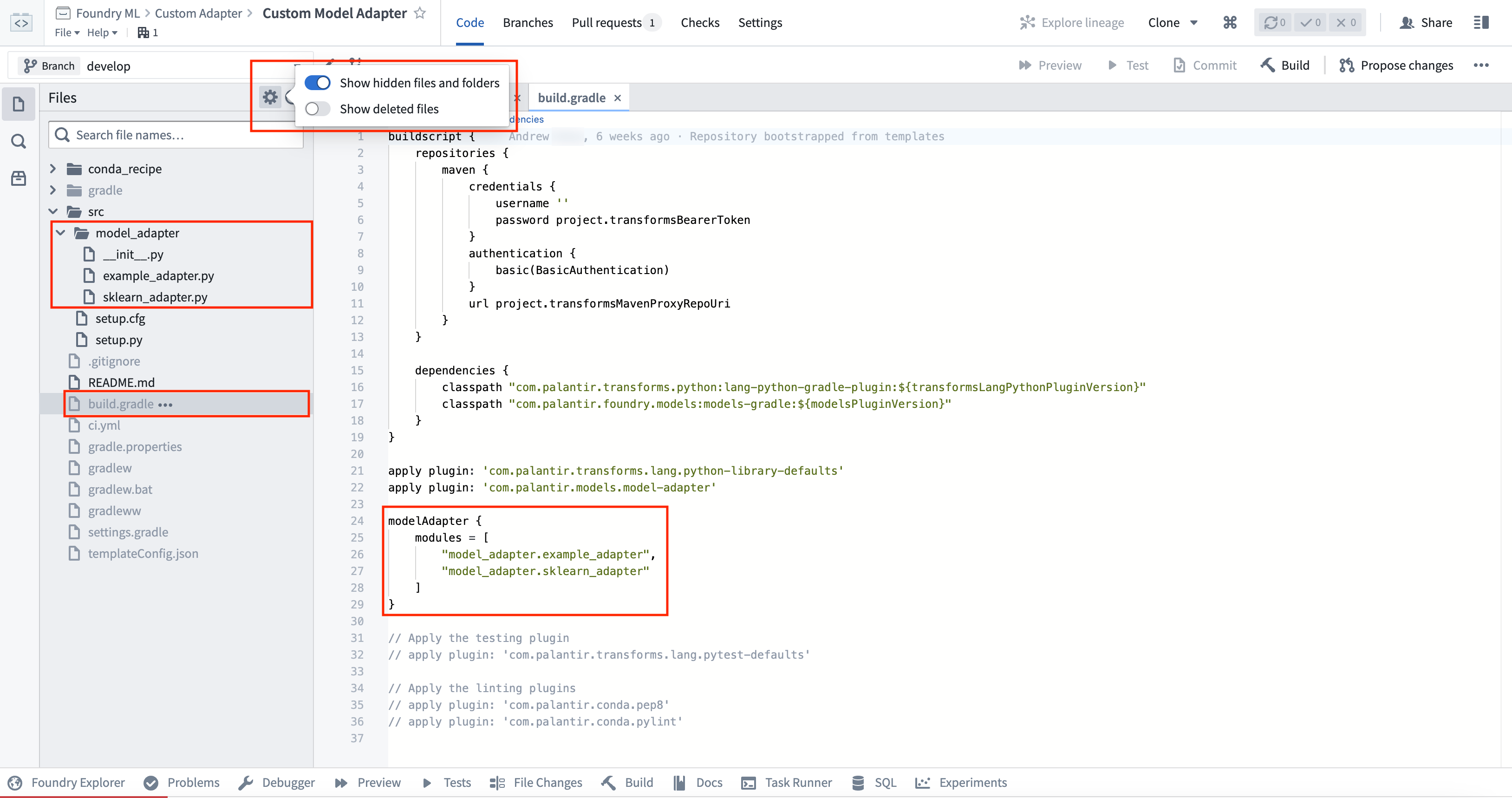
The Model Adapter Library contains some example implementation in the src/model_adapter/ directory. Model adapters produced using this template have a configurable package name, initially derived from the name of the repository. You can view and modify the condaPackageName value in the hidden gradle.properties file (note that spaces and other special characters will be replaced with - in the published library).
As with other Python library repositories, tagging commits will publish a new version of the library. These published libraries can be imported into other Python transforms repositories for both model training and inference.
A repository can publish multiple model adapters. Any additional adapter implementation files must be added as a reference to the list of model adapter modules within the build.gradle hidden file of the adapter template. By default, only the model_adapter.example_adapter will be published.
The implementation of the adapter depends on the type of model being produced. Learn more in the external model adapters documentation, or review the example container model adapter.
Model Training template
To create a model directly in Foundry using Code Repositories, open the Code Repositories application and choose the Model Training template. This repository allows you to author Python data transforms to train and run inference on models.
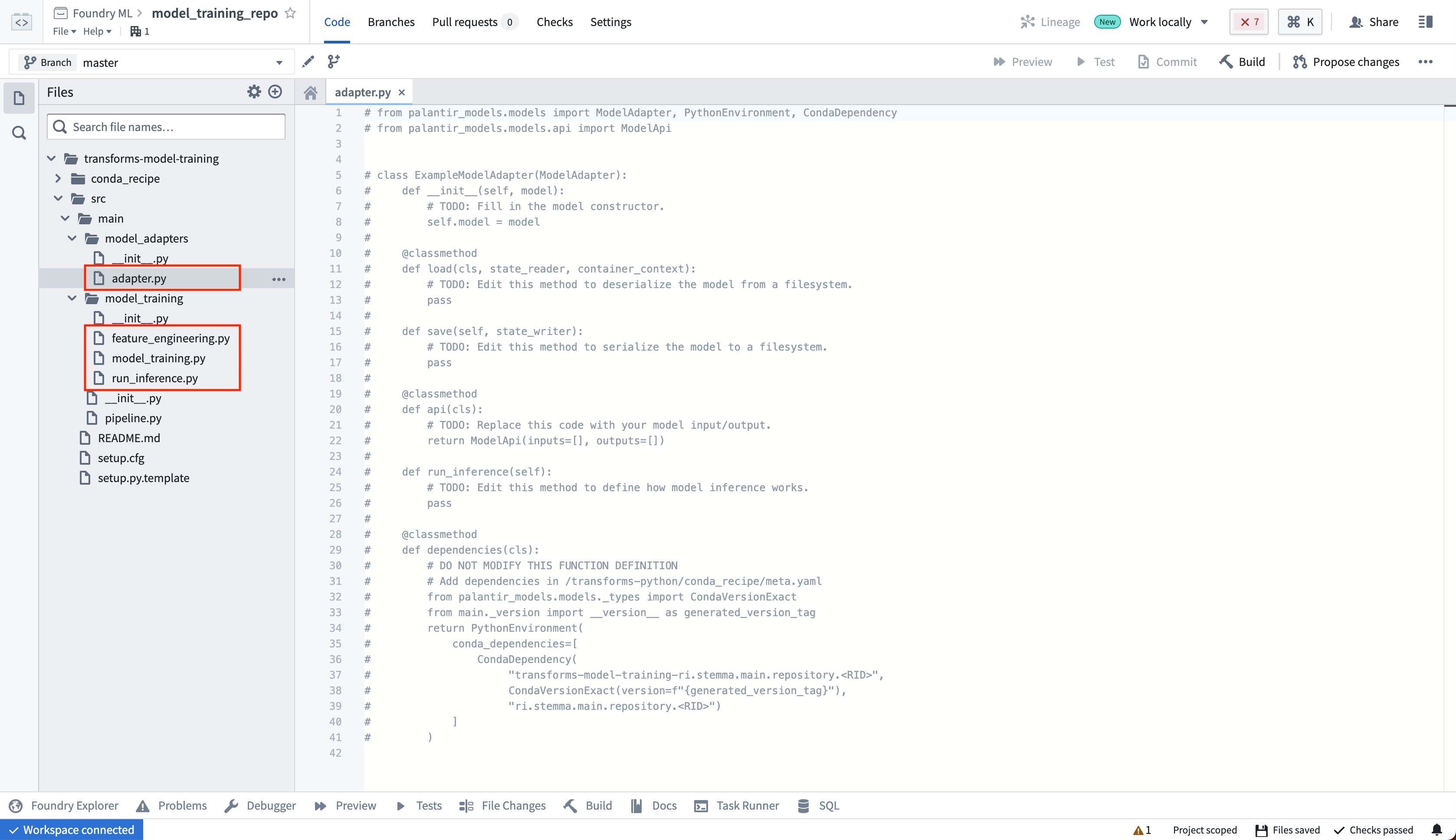
Model adapters produced using this template cannot have a custom package name or be tagged. The adapter will be published in a library called transforms-model-training-<repository rid>, and the version will be derived from the Git commit. The full name and version of the package can be viewed on the Palantir model page. This library must be added to downstream repositories to be able to load the model as a ModelInput. If this is not suitable for your use case, the Model Adapter Library template allows you to configure both the version and package name.
To learn more, read the documentation on training models in Foundry with the training template.
Code Workspaces
To create a model in a Jupyter® workspace, open the Models tab in the left sidebar and select Add model > Create new model. A skeleton model adapter will be generated in a .py file named after the alias you provide for the model.
In a Jupyter® workspace, the adapter class must be defined in a separate .py file and imported into the notebook. Defining the adapter class directly in a notebook cell is not supported. When the model is published, the adapter and other Python files in the working directory are packaged into a library called cws_adapter, and the version is derived from the latest Git tag.
To learn more, read the documentation on training models in a Jupyter® notebook.
中文翻译
创建模型适配器
创建模型适配器主要有两种方法:
- 通过独立的模型适配器库(Model Adapter Library)模板,将适配器作为Python库发布到您的Foundry环境中,供多个消费仓库使用。
- 在模型发布所在的资源本地定义适配器类:
- 在使用模型训练模板(Model Training Template)的代码仓库中。
- 在Jupyter®代码工作区中,将适配器定义在与笔记本分离的Python文件中。
模型适配器库(Model Adapter Library)模板适用于以下场景:
- 容器化模型(Container-backed models)
- 外部模型(External models)
- 创建可在多个仓库间共享的模型适配器
模型训练(Model Training)模板适用于大多数通过代码仓库中的Python转换在Foundry中创建的模型。通过将模型适配器定义集成到转换仓库中,您可以比使用模型适配器库(Model Adapter Library)模板更快地迭代适配器和训练逻辑。
在Jupyter®工作区中训练模型时,适配器必须定义在单独的.py文件中,并导入到笔记本中。
以下是各方法的对比,以及何时使用每种方法的指导:
| 模型训练模板(Model Training Template) | Jupyter®工作区(Jupyter® Workspace) | 模型适配器库(Model Adapter Library) | |
|---|---|---|---|
| 创作环境 | 代码仓库(Code Repositories) | Jupyter®笔记本 | 代码仓库(Code Repositories) |
| 支持的模型类型 | Foundry生成(Foundry-produced) | Foundry生成(Foundry-produced) | Python转换、容器、外部模型 |
| 适配器包名称 | 从仓库派生 | cws_adapter |
可配置 |
| 局限性 | 难以跨仓库复用 | 难以跨仓库复用 | 迭代周期较慢 |
模型适配器库(Model Adapter Library)模板
要创建容器、外部或可复用的Python转换模型适配器,请打开代码仓库应用(Code Repositories application)并选择模型适配器库(Model Adapter Library)。
模型适配器库(Model Adapter Library)在src/model_adapter/目录中包含一些示例实现。使用此模板生成的模型适配器具有可配置的包名称,初始派生自仓库名称。您可以在隐藏的gradle.properties文件中查看和修改condaPackageName值(请注意,空格和其他特殊字符将在发布的库中被替换为-)。
与其他Python库仓库一样,标记提交将发布新版本的库。这些已发布的库可以导入到其他Python转换仓库中,用于模型训练和推理。
一个仓库可以发布多个模型适配器。任何额外的适配器实现文件必须作为引用添加到适配器模板隐藏文件build.gradle中的模型适配器模块列表中。默认情况下,只会发布model_adapter.example_adapter。
适配器的实现取决于所生成的模型类型。在外部模型适配器文档中了解更多信息,或查看容器模型适配器示例。
模型训练模板(Model Training Template)
要使用代码仓库直接在Foundry中创建模型,请打开代码仓库应用(Code Repositories application)并选择模型训练(Model Training)模板。此仓库允许您编写Python数据转换来训练模型并运行推理。
使用此模板生成的模型适配器不能自定义包名称或进行标记。适配器将以名为transforms-model-training-<repository rid>的库发布,版本将从Git提交派生。包的完整名称和版本可以在Palantir模型页面上查看。此库必须添加到下游仓库中,才能将模型作为ModelInput加载。如果这不适合您的用例,模型适配器库(Model Adapter Library)模板允许您配置版本和包名称。
要了解更多信息,请阅读关于使用训练模板在Foundry中训练模型的文档。
代码工作区(Code Workspaces)
要在Jupyter®工作区中创建模型,请打开左侧边栏中的模型(Models)选项卡,选择添加模型(Add model) > 创建新模型(Create new model)。系统将生成一个骨架模型适配器,保存在以您为模型提供的别名命名的.py文件中。
在Jupyter®工作区中,适配器类必须定义在单独的.py文件中,并导入到笔记本中。不支持直接在笔记本单元格中定义适配器类。发布模型时,适配器和工作目录中的其他Python文件将打包到一个名为cws_adapter的库中,版本从最新的Git标签派生。
要了解更多信息,请阅读关于在Jupyter®笔记本中训练模型的文档。