Train a model in Code Repositories(在代码仓库中训练模型)
Models can be trained in the Code Repositories application with the Model Training Template.
To train a model, complete the following steps:
- Author a model adapter
- Write a Python transform to train a model
- Build your Python transform to publish the trained model
- Consume the model
1. Author a model adapter
A model uses a model adapter to ensure Foundry correctly initializes, serializes, deserializes, and performs inference on a Model. You can author model adapters in Code Repositories from either the Model Adapter Library template or the Model Training template.
:::callout{theme="warning"}
Model adapters cannot be authored directly in Python transforms repositories. To produce a model from an existing repository, use a Model Adapter Library and import the library into the transforms repository or migrate to the Model Training template.
:::
Read more about when to use each type of model adapter repository, and how to create them in the Model Adapter creation documentation. The steps below assume usage of the Model Training template.
Model adapter implementation
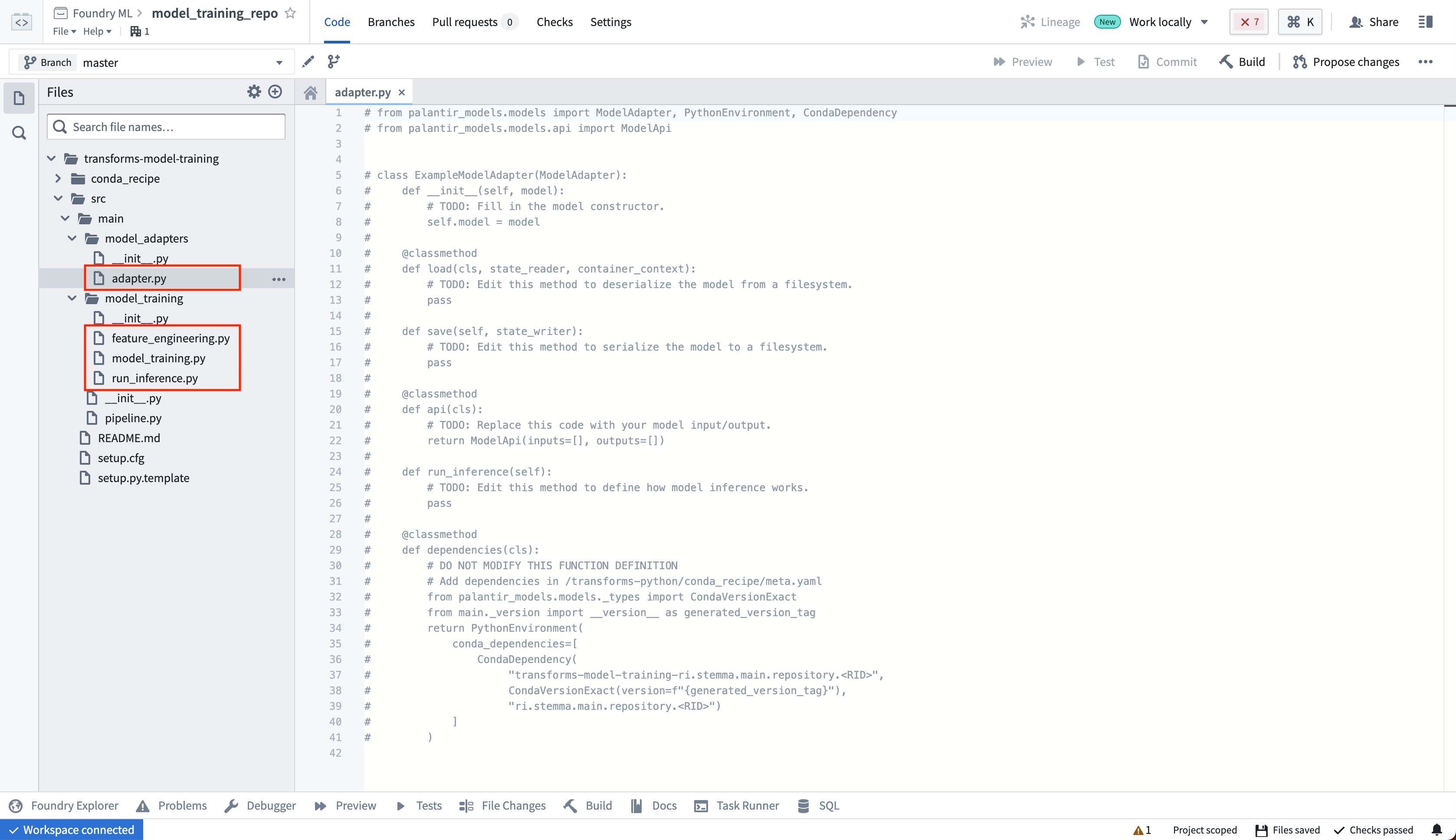
The model adapter and model training code should be in separate Python modules to ensure the trained model can be used in downstream transforms. In the template, we have separate model_adapters and model_training modules for this purpose. Author your model adapter in the adapter.py file.
The model adapter definition will be dependent on the model being trained. To learn more, consult the ModelAdapter API reference, review the example sklearn model adapter, or read through the supervised machine learning tutorial to learn more.
2. Write a Python transform to train a model
Next, in your code repository, create a new Python file to house your training logic.
from transforms.api import transform, Input
from palantir_models.transforms import ModelOutput
from model_adapter.example_adapter import ExampleModelAdapter  # This is your custom ModelAdapter


def train_model(training_data):
    '''
        This function contains your custom training logic.
    '''
    pass

@transform.using(
    training_data=Input("/path/to/training_data"),
    model_output=ModelOutput("/path/to/model")                 # This is the path to the model
)
def compute(training_data, model_output):
    '''
        This function contains logic to read and write to Foundry.
    '''
    trained_model = train_model(training_data)                 # 1. Train the model in a Python transform
    wrapped_model = ExampleModelAdapter(trained_model)         # 2. Wrap the trained model in your custom ModelAdapter
    model_output.publish(                                      # 3. Save the wrapped model to Foundry
        model_adapter=wrapped_model                            #    Foundry will call ModelAdapter.save to produce a model
    )
This logic is publishing to a ModelOutput. Foundry will automatically create a model resource at the provided path after you commit your changes. You can also configure the required resources for model training such as CPU, memory, and GPU requirements with the @configure annotation.
(Optional) Log metrics and hyperparameters to a model experiment
Model experiments is a lightweight framework for logging metrics and hyperparameters produced during a model training run, which can then be published alongside a model and persisted in the model page.
Learn more about creating and writing to experiments.
3. Preview your Python transform to test your logic
In the Code Repositories application, you can select Preview to test your transform logic without running a full build. Note that preview will run on a smaller resource profile than you may have otherwise configured with the @configure annotation.
ModelOutput preview
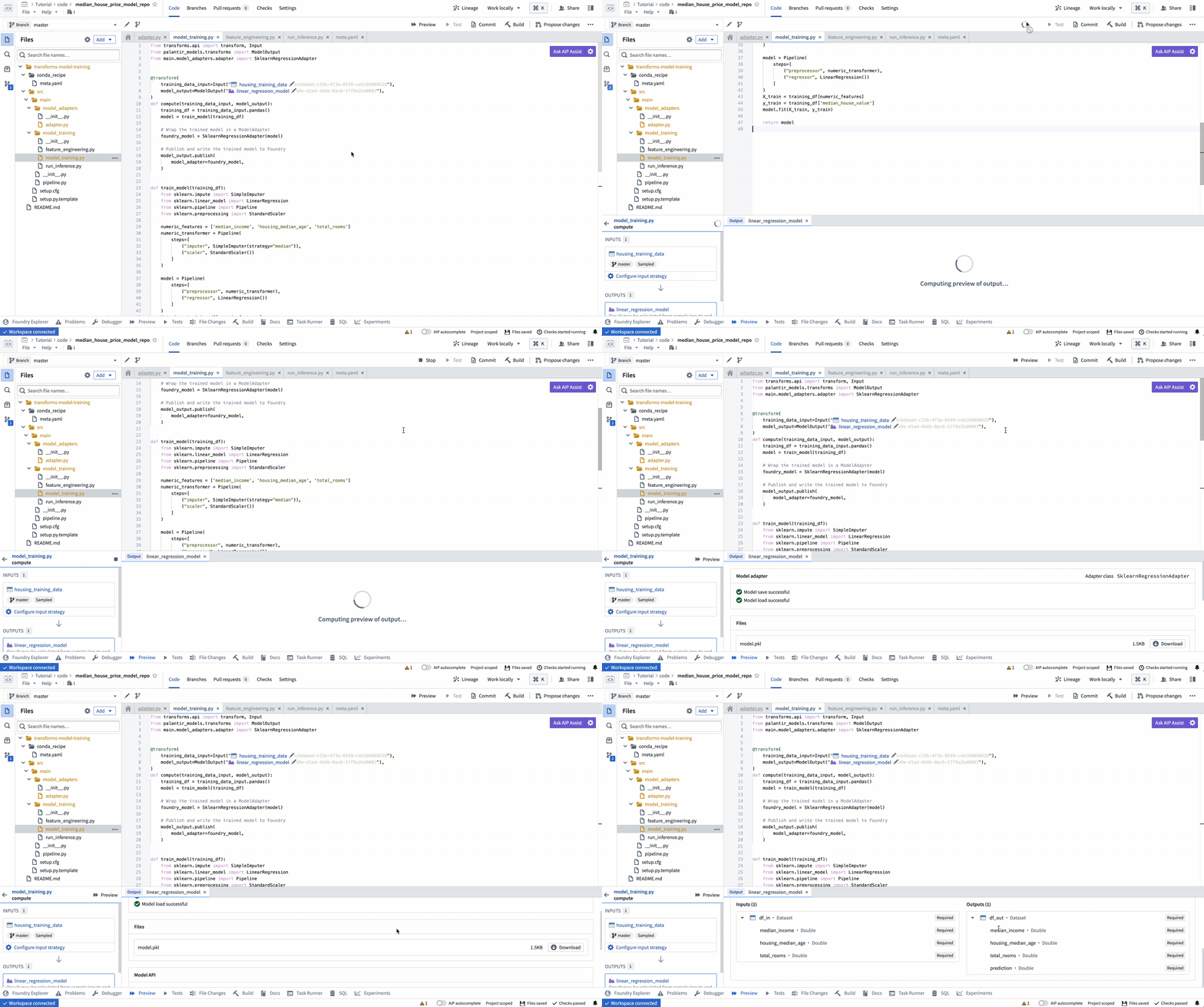
ModelOutput preview allows you to validate your model training logic as well as your model serialization, deserialization, and API implementation.
ModelInput preview
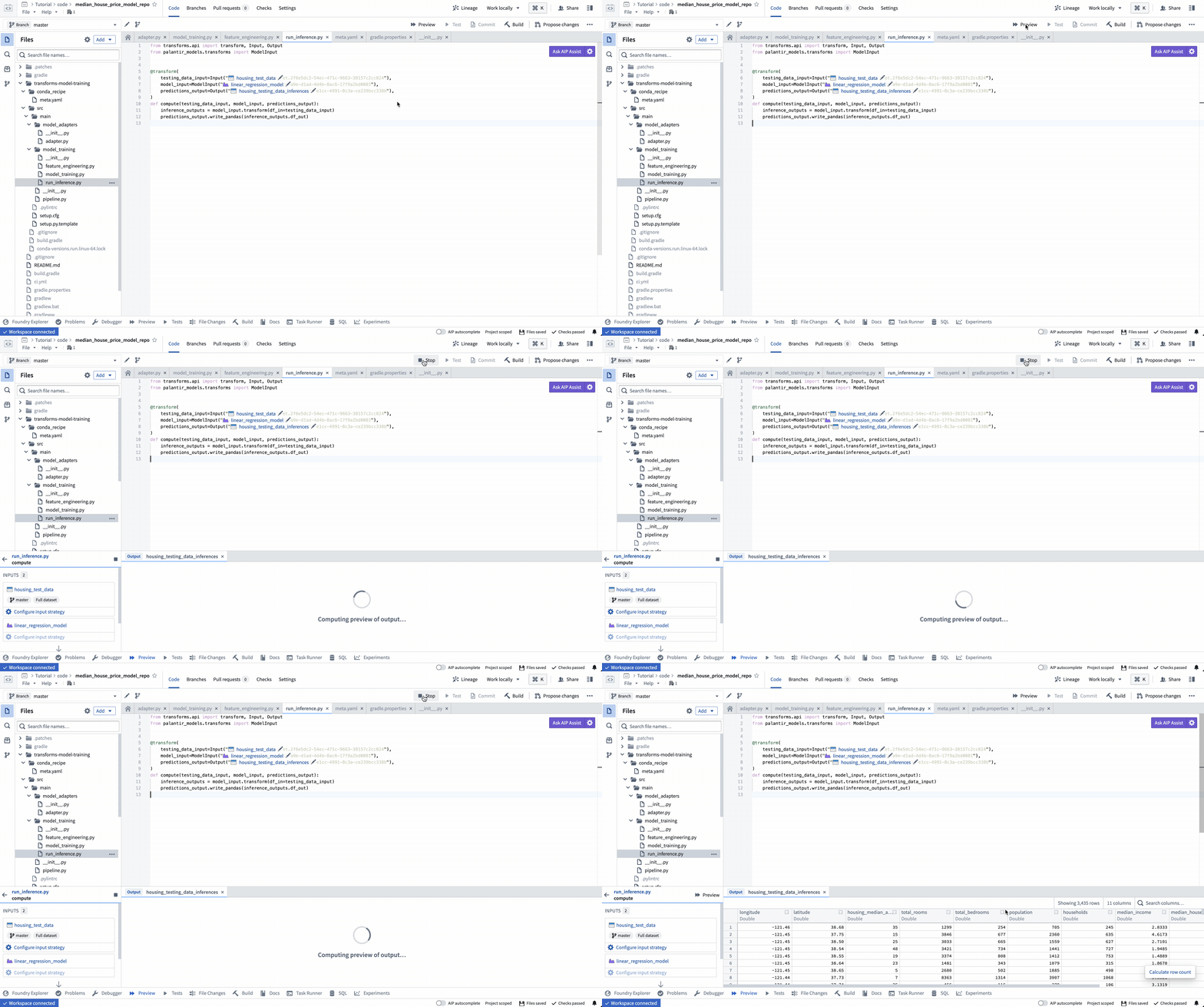
ModelInput preview allows you to validate your inference logic against an existing model. Note that for preview in Code Repositories, there is a 5GB size limit for every ModelInput.
4. Build your Python transform to publish the trained model
In your code repository, select Build to run your transform. Foundry will resolve both the Python dependencies and dependencies of your model before executing your training logic.
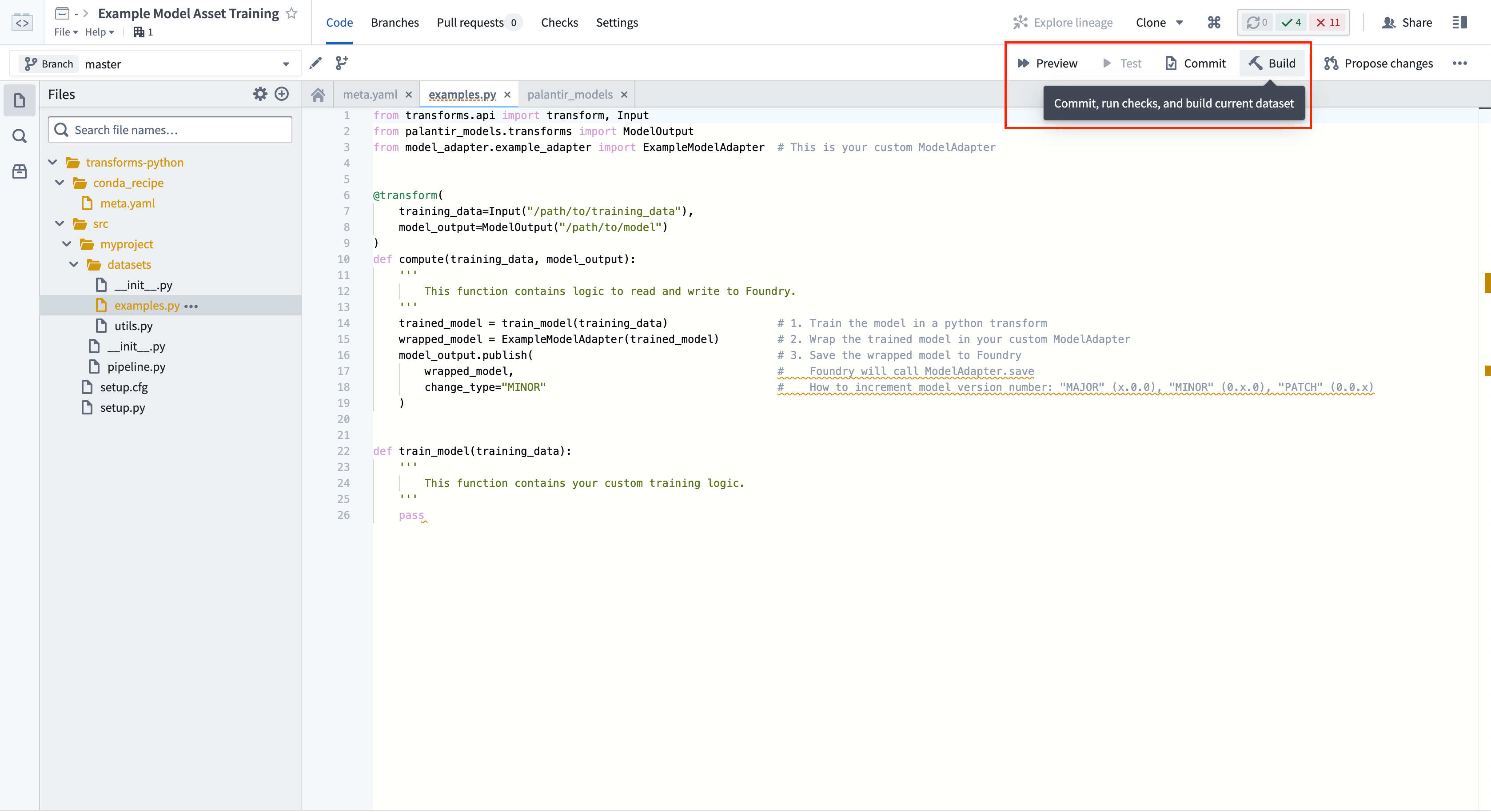
Calling ModelOutput.publish() will publish a version of your model to Foundry. Foundry will call the ModelAdapter.save() function and give your ModelAdapter the ability to serialize all required fields for execution.
5. Consume the model
Submit to a Modeling Objective
A model can be published to a modeling objective for:
Run inference in Python Transforms
You can also use the Palantir model in a pipeline as detailed below.
:::callout{theme="neutral"}
To run a model within a transform repository in which the model was not defined, set use_sidecar = True in ModelInput. This will automatically import the model adapter and its dependencies while running them in a separate environment to prevent dependency conflicts. Review the ModelInput class reference for more details. This feature is available for non-Spark transforms (using the @lightweight or @transform.usingdecorator) from palantir_models version 0.2010.0 onwards.
If use_sidecar is not set to True, the model adapter and its dependencies must be imported into or defined within the current code repository.
:::
If you are using a model in a different Python transform repository from the repository in which the model was created, you must add the model adapter Python library to your authoring Python environment. This brings the Python packages required to load the model into the consuming repository's environment. The code authoring user interface will detect if a model's dependencies are not present in the repository and offer to perform the library import when hovering over the warning. The adapter library and its version corresponding to a specific model version can be found on the model page in Foundry.
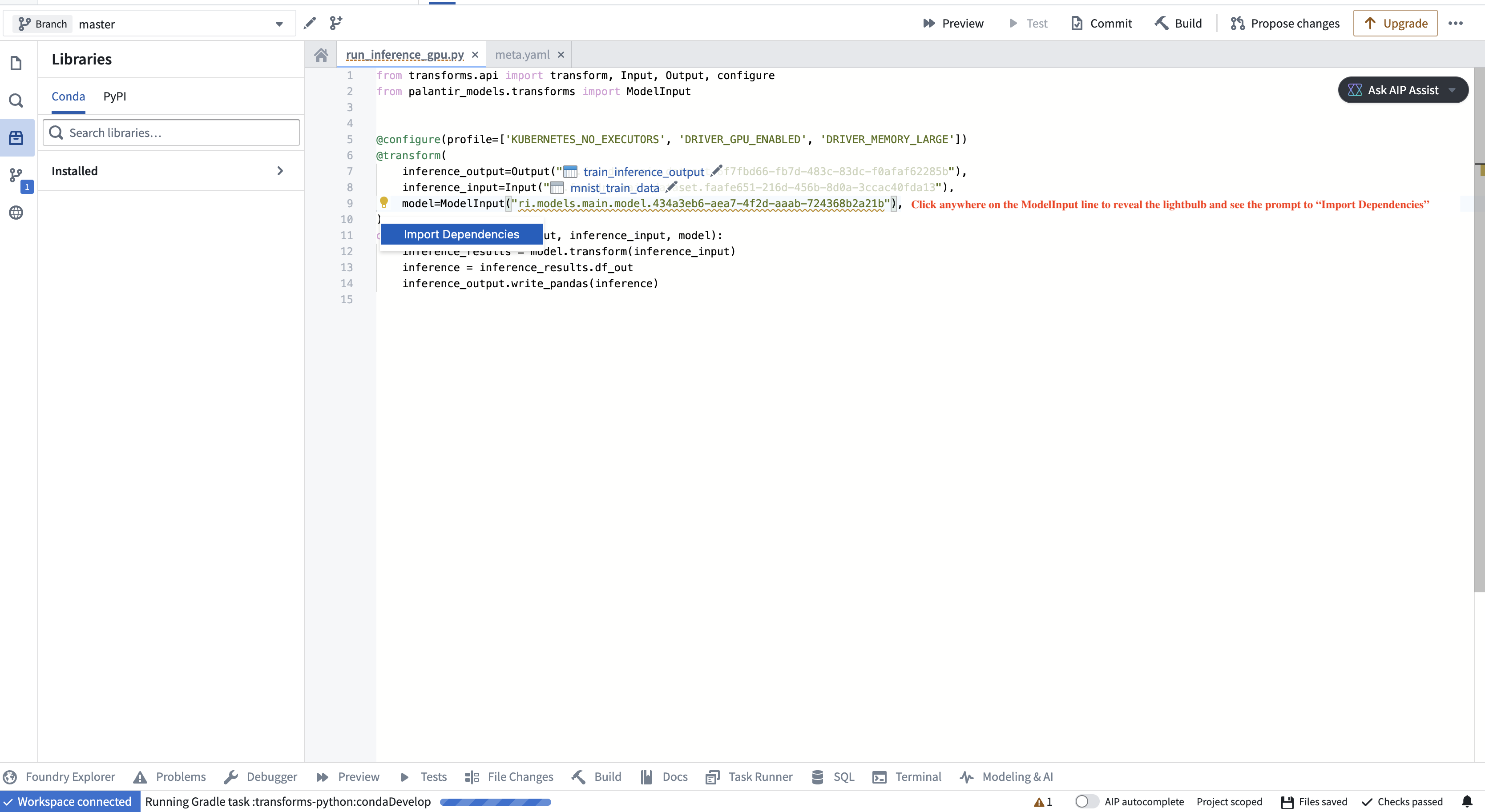
from transforms.api import transform, Input, Output, LightweightInput, LightweightOutput
from palantir_models.transforms import ModelInput
from palantir_models import ModelAdapter

@transform.using(
    inference_input=Input("/path/to/inference_input"),
    model=ModelInput(
        "/path/to/model",
        # use_sidecar=True is recommended for models defined outside the current transform repository
        ),
    inference_output=Output("/path/to/inference_output"),
)
def compute(
        inference_input: LightweightInput,
        model: ModelAdapter,
        inference_output: LightweightOutput
    ):
    inference_results = model.transform(inference_input)
    # Replace "output_data" with an output specified in the Model Version's API, viewable on the Model Version's web page.
    # For example, inference_results.output_data is appropriate output for Hugging Face adapters.
    inference = inference_results.output_data
    inference_output.write_pandas(inference)
ModelInput and ModelOutput APIs
The ModelInput and ModelOutput objects invoked in the above transforms are the objects directly responsible for interacting with models in Code Repositories. A summary of the objects is as follows:
ModelInput
# ModelInput can be imported from palantir_models.transforms

class ModelInput:
    def __init__(self, model_rid_or_path: str, model_version: Optional[str] = None):
        '''
            The `ModelInput` retrieves an existing model for use in a transform. It takes up to two arguments:
            1. A path to a model (or the model's RID).
            2. (Optional) A version RID of the model to retrieve.
            If this is not provided, the most recently published model will be used.

            For example: ModelInput("/path/to/model/asset")
        '''
        pass
In the transform function, the model specified by the ModelInput will be instantiated as an instance of the model adapter associated with the retrieved model version. Foundry will call the ModelAdapter.load or use the defined @auto_serialize instance to set up the model before initiating the transform build. Thus, the ModelInput instance has access to its associated loaded model state and all methods defined in the model adapter.
ModelOutput
# ModelOutput can be imported from palantir_models.transforms

class ModelOutput:
    def __init__(self, model_rid_or_path: str):
        '''
            The `ModelOutput` is used to publish new versions to a model.
            `ModelOutput` takes one argument, which is the path to a model (or model RID).
            If the asset does not yet exist, the ModelOutput will create the asset when a user selects Commit or Build and transforms checks (CI) are executed.
        '''
        pass
In the transform function, the object retrieved by assigning a ModelOutput is a WritableModel capable of publishing a new model version through the use of the publish() method. This method takes a model adapter as a parameter and creates a new model version associated with it. During publish(), the platform uses the defined @auto_serialize instance or executes the implemented save() method. This allows the model adapter to serialize model files or checkpoints to the state_writer object.
中文翻译
在代码仓库中训练模型
模型 可以通过"模型训练模板"(Model Training Template)在代码仓库应用中训练。
要训练模型,请完成以下步骤:
1. 编写模型适配器
模型使用模型适配器(model adapter)来确保 Foundry 正确初始化、序列化、反序列化并执行模型推理。您可以在代码仓库中通过模型适配器库模板或模型训练模板来编写模型适配器。
:::callout{theme="warning"}
模型适配器不能直接在 Python 转换仓库中编写。要从现有仓库生成模型,请使用模型适配器库(Model Adapter Library)并将该库导入转换仓库,或迁移到模型训练模板。
:::
有关何时使用每种类型的模型适配器仓库以及如何创建它们的更多信息,请参阅模型适配器创建文档。以下步骤假设使用模型训练模板。
模型适配器实现
模型适配器和模型训练代码应位于不同的 Python 模块中,以确保训练好的模型可以在下游转换中使用。在模板中,我们为此目的分别设置了model_adapters和model_training模块。请在adapter.py文件中编写您的模型适配器。
模型适配器的定义将取决于要训练的模型。要了解更多信息,请查阅ModelAdapter API 参考,查看示例 sklearn 模型适配器,或阅读监督式机器学习教程。
2. 编写 Python 转换以训练模型
接下来,在您的代码仓库中,创建一个新的 Python 文件来存放训练逻辑。
from transforms.api import transform, Input
from palantir_models.transforms import ModelOutput
from model_adapter.example_adapter import ExampleModelAdapter  # 这是您的自定义 ModelAdapter


def train_model(training_data):
    '''
        此函数包含您的自定义训练逻辑。
    '''
    pass

@transform.using(
    training_data=Input("/path/to/training_data"),
    model_output=ModelOutput("/path/to/model")                 # 这是模型的路径
)
def compute(training_data, model_output):
    '''
        此函数包含读取和写入 Foundry 的逻辑。
    '''
    trained_model = train_model(training_data)                 # 1. 在 Python 转换中训练模型
    wrapped_model = ExampleModelAdapter(trained_model)         # 2. 将训练好的模型包装在自定义 ModelAdapter 中
    model_output.publish(                                      # 3. 将包装后的模型保存到 Foundry
        model_adapter=wrapped_model                            #    Foundry 将调用 ModelAdapter.save 来生成模型
    )
此逻辑将发布到ModelOutput。提交更改后,Foundry 将在提供的路径自动创建模型资源。您还可以使用@configure注解配置模型训练所需的资源,如 CPU、内存和 GPU 需求。
(可选)将指标和超参数记录到模型实验
模型实验(Model experiments)是一个轻量级框架,用于记录模型训练运行期间产生的指标和超参数,这些数据随后可以与模型一起发布并持久保存在模型页面中。
3. 预览 Python 转换以测试逻辑
在代码仓库应用中,您可以选择预览(Preview)来测试转换逻辑,而无需运行完整构建。请注意,预览将使用比您可能通过@configure注解配置的更小的资源配置文件运行。
ModelOutput 预览
ModelOutput预览允许您验证模型训练逻辑以及模型序列化、反序列化和 API 实现。
ModelInput 预览
ModelInput预览允许您针对现有模型验证推理逻辑。请注意,对于代码仓库中的预览,每个ModelInput有 5GB 的大小限制。
4. 构建 Python 转换以发布训练好的模型
在您的代码仓库中,选择构建(Build)来运行您的转换。Foundry 将在执行训练逻辑之前解析 Python 依赖项和模型的依赖项。
调用ModelOutput.publish()将向 Foundry 发布一个模型版本。Foundry 将调用ModelAdapter.save()函数,并让您的 ModelAdapter 能够序列化执行所需的所有字段。
5. 使用模型
提交到建模目标
模型可以发布到建模目标,用于:
在 Python 转换中运行推理
您还可以按照以下详细说明在管道中使用 Palantir 模型。
:::callout{theme="neutral"}
要在未定义模型的转换仓库中运行模型,请在ModelInput中设置use_sidecar = True。这将自动导入模型适配器及其依赖项,同时在独立环境中运行它们以防止依赖冲突。有关更多详细信息,请查看ModelInput类参考。此功能适用于从palantir_models版本 0.2010.0 开始的非 Spark 转换(使用@lightweight或@transform.using装饰器)。
如果use_sidecar未设置为True,则必须将模型适配器及其依赖项导入或定义在当前代码仓库中。
:::
如果您在与创建模型的仓库不同的 Python 转换仓库中使用模型,则必须将模型适配器 Python 库添加到您的创作 Python 环境中。这将把加载模型所需的 Python 包引入消费仓库的环境。代码创作用户界面将检测模型的依赖项是否存在于仓库中,并在悬停警告时提供执行库导入的选项。适配器库及其对应于特定模型版本的版本可以在 Foundry 的模型页面上找到。
from transforms.api import transform, Input, Output, LightweightInput, LightweightOutput
from palantir_models.transforms import ModelInput
from palantir_models import ModelAdapter

@transform.using(
    inference_input=Input("/path/to/inference_input"),
    model=ModelInput(
        "/path/to/model",
        # 对于在当前转换仓库之外定义的模型,建议使用 use_sidecar=True
        ),
    inference_output=Output("/path/to/inference_output"),
)
def compute(
        inference_input: LightweightInput,
        model: ModelAdapter,
        inference_output: LightweightOutput
    ):
    inference_results = model.transform(inference_input)
    # 将 "output_data" 替换为模型版本 API 中指定的输出,可在模型版本的网页上查看。
    # 例如,对于 Hugging Face 适配器,inference_results.output_data 是合适的输出。
    inference = inference_results.output_data
    inference_output.write_pandas(inference)
ModelInput 和 ModelOutput API
上述转换中调用的ModelInput和ModelOutput对象是直接负责在代码仓库中与模型交互的对象。这些对象的摘要如下:
ModelInput
# ModelInput 可以从 palantir_models.transforms 导入

class ModelInput:
    def __init__(self, model_rid_or_path: str, model_version: Optional[str] = None):
        '''
            `ModelInput` 检索现有模型以在转换中使用。它接受最多两个参数:
            1. 模型的路径(或模型的 RID)。
            2. (可选)要检索的模型版本的版本 RID。
            如果未提供,将使用最近发布的模型。

            例如:ModelInput("/path/to/model/asset")
        '''
        pass
在转换函数中,由ModelInput指定的模型将被实例化为与检索到的模型版本关联的模型适配器实例。Foundry 将在启动转换构建之前调用ModelAdapter.load或使用定义的@auto_serialize实例来设置模型。因此,ModelInput 实例可以访问其关联的已加载模型状态以及模型适配器中定义的所有方法。
ModelOutput
# ModelOutput 可以从 palantir_models.transforms 导入

class ModelOutput:
    def __init__(self, model_rid_or_path: str):
        '''
            `ModelOutput` 用于向模型发布新版本。
            `ModelOutput` 接受一个参数,即模型的路径(或模型 RID)。
            如果该资产尚不存在,当用户选择提交(Commit)或构建(Build)并执行转换检查(CI)时,ModelOutput 将创建该资产。
        '''
        pass
在转换函数中,通过分配ModelOutput检索到的对象是一个WritableModel,能够通过使用publish()方法发布新的模型版本。此方法将模型适配器作为参数,并创建一个与之关联的新模型版本。在publish()期间,平台使用定义的@auto_serialize实例或执行实现的save()方法。这允许模型适配器将模型文件或检查点序列化到state_writer对象。