Publish a model from pre-trained files(从预训练文件发布模型)
Palantir enables the creation of a model that wrap weights produced outside of the platform. These files can include open-source model weights, models trained in a local development environment, models trained in the Code Workspaces application, and model weights from legacy systems.
Once a Palantir model has been created, Palantir provides the following:
- Integration with batch pipelines and real-time model hosting.
- Full versioning, granular permissioning, and governed model lineage.
- Model management and live deployment via Modeling Objectives.
- Binding to the Ontology, allowing for operationalization via functions on models and what-if scenario analysis.
Create a model from model files
To create a model from model files, you will need the following:
- Model files that can be uploaded to Palantir
- A model adapter that tells Palantir how to load and run inference with the model
1. Upload model files to an unstructured dataset
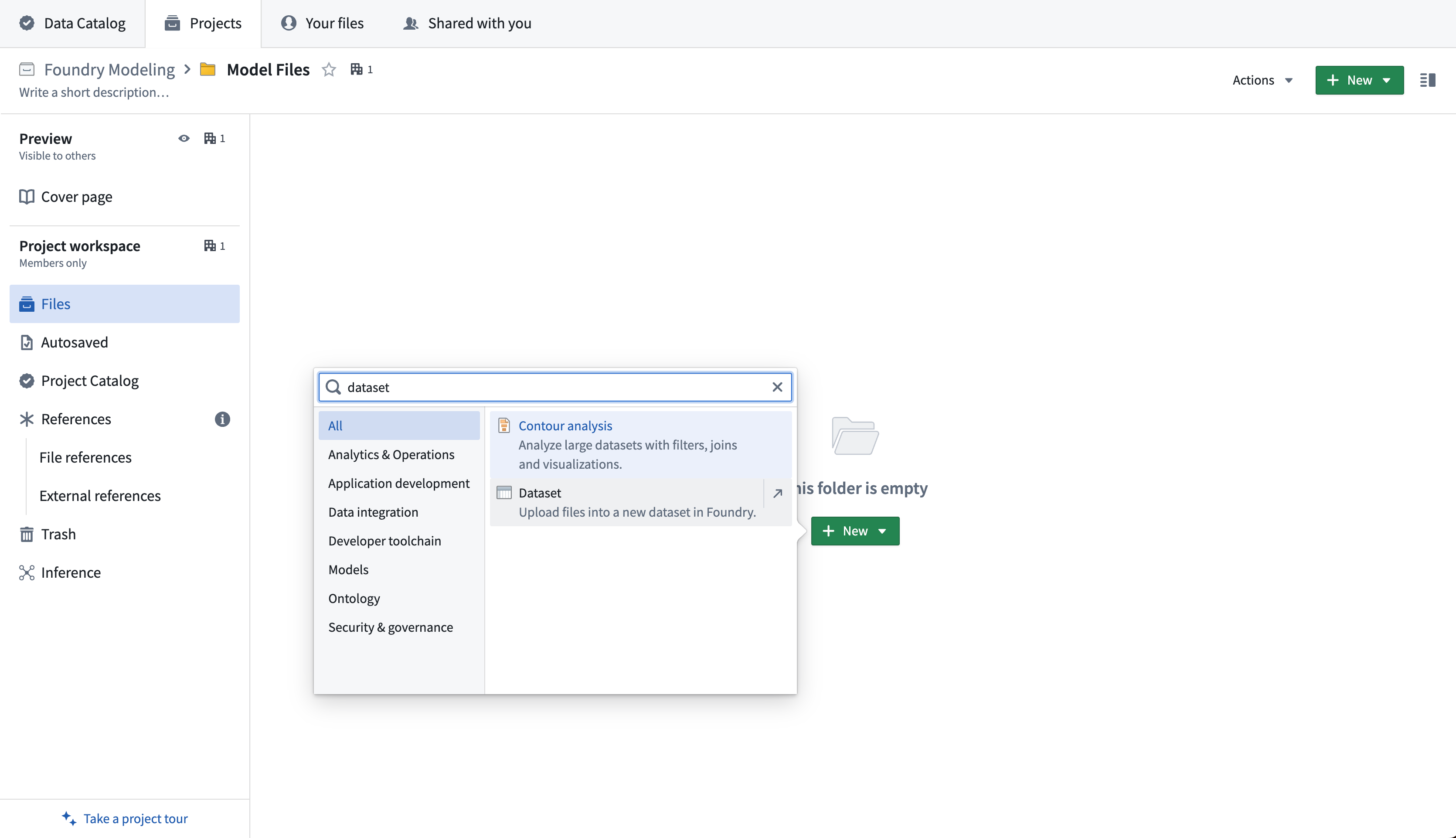
First, upload your model files to an unstructured dataset in the Palantir platform. Create a new dataset by selecting +New > Dataset in a Project.
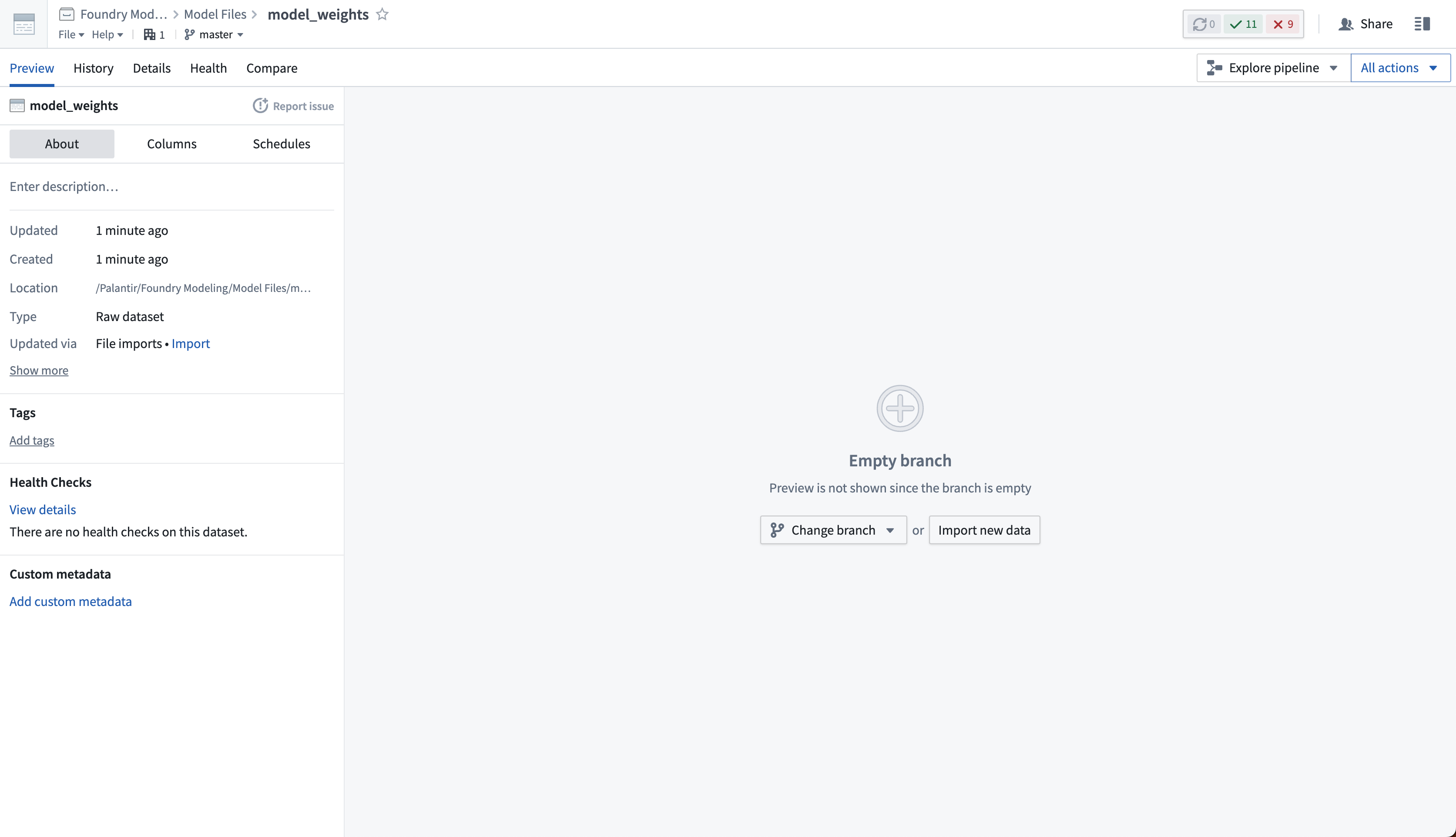
Then, select Import new data and choose the files from your computer to upload to the model.
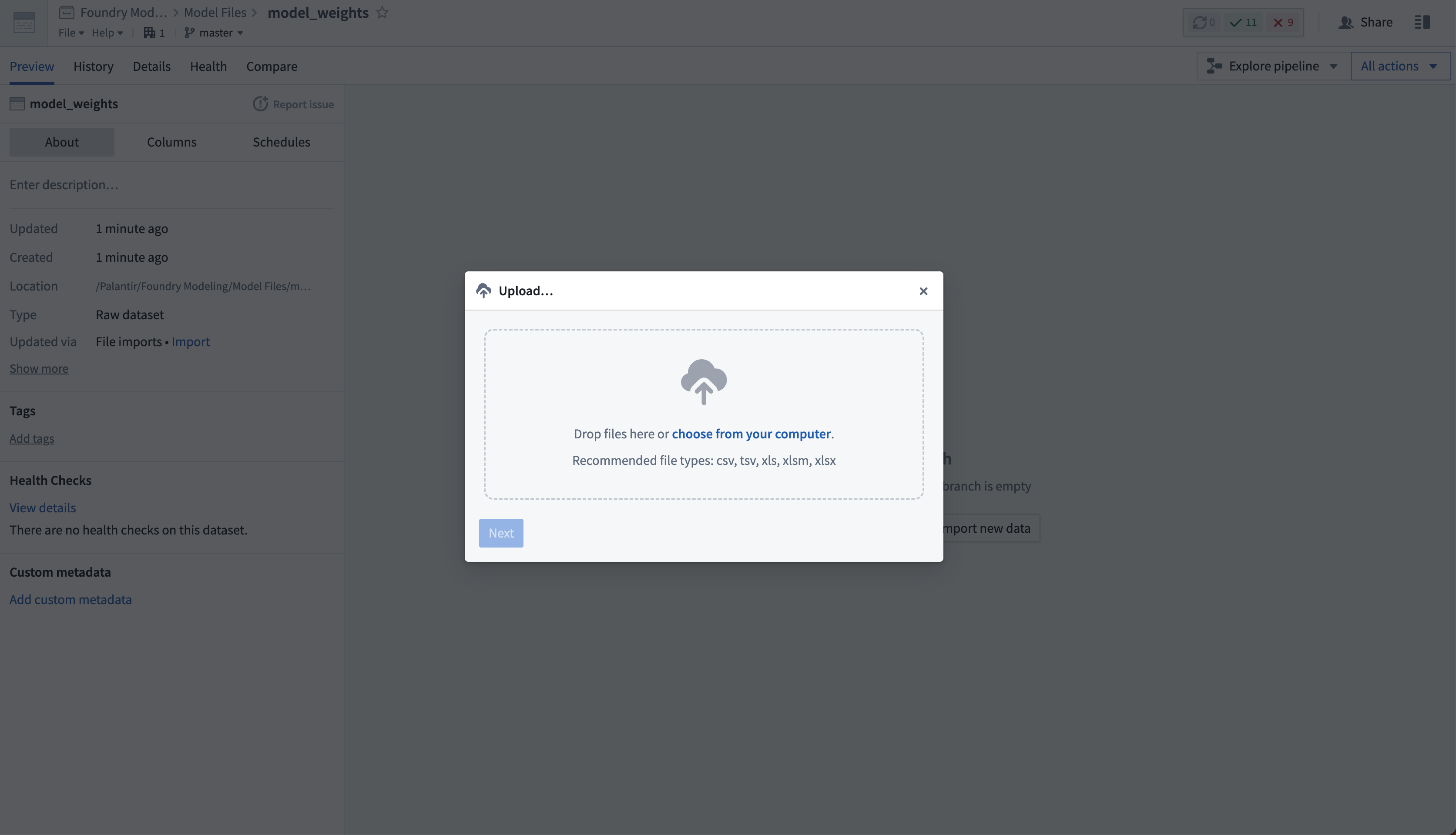
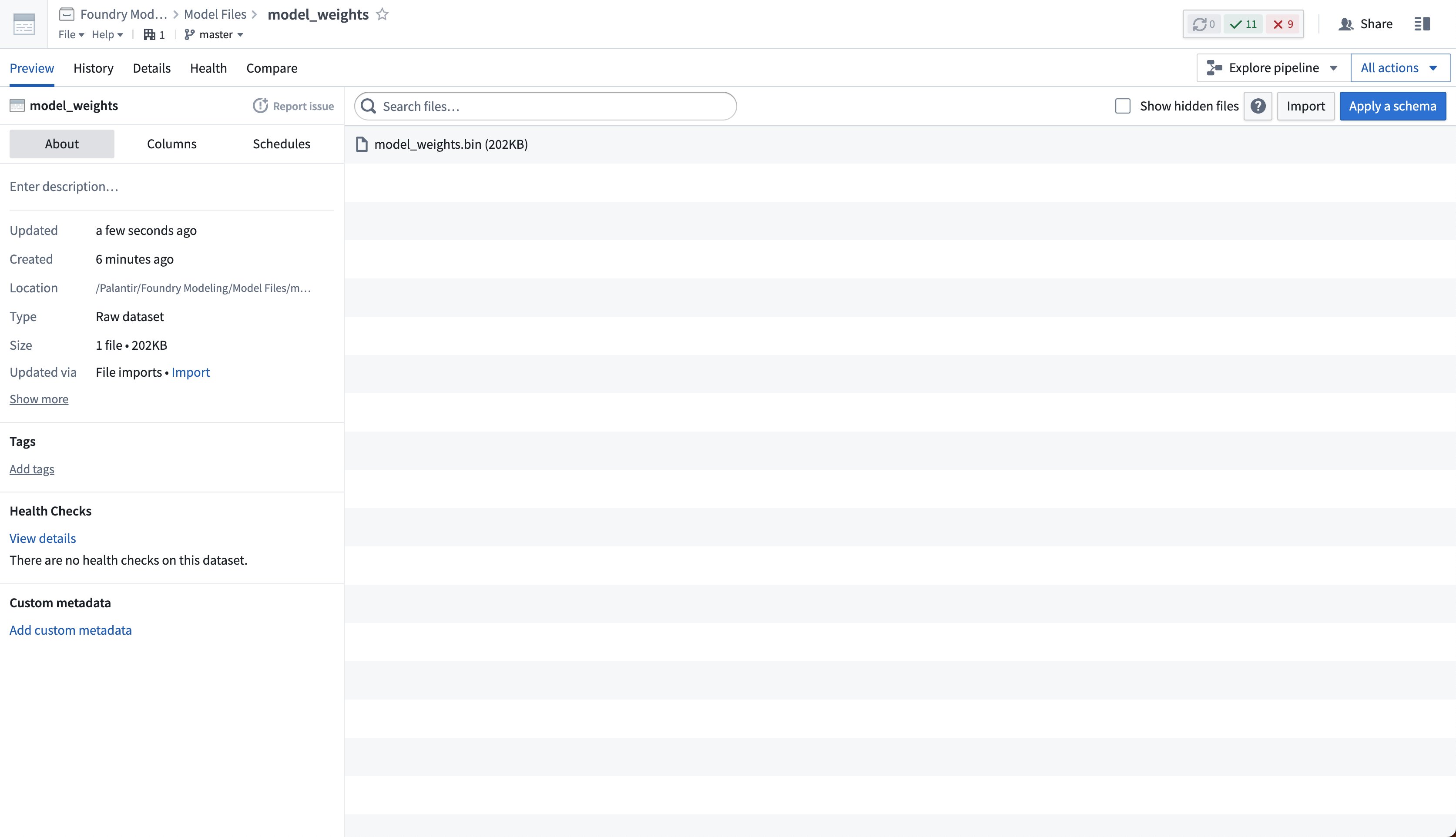
If required, you can upload many different files to the same dataset. The dataset will be unstructured, meaning it will not have a tabular schema.
2. Create a model training repository to define model adapter logic
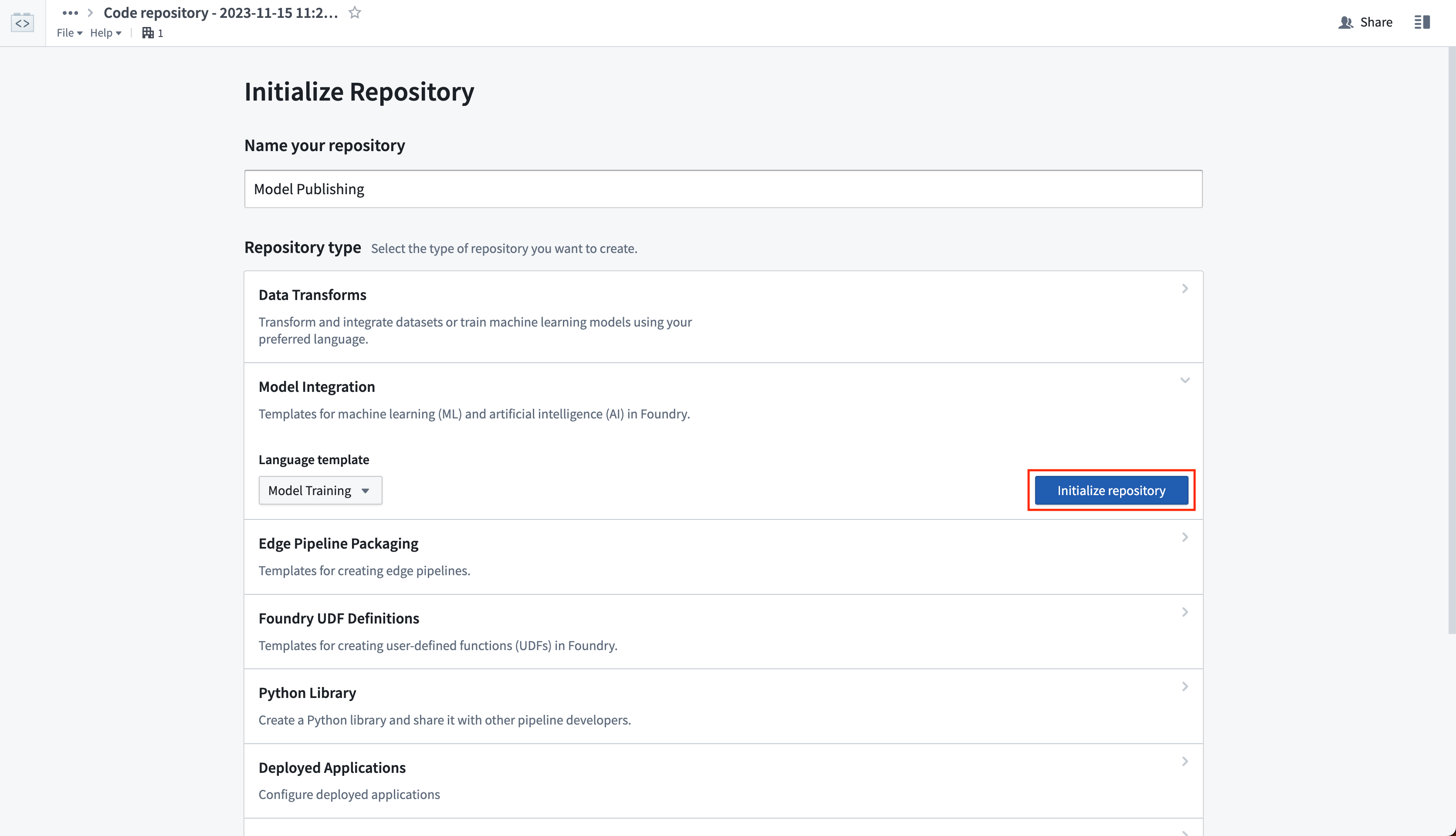
Create a new code repository that will manage the logic for reading the model files from your unstructured dataset. The logic will wrap those files in a model adapter and publish them as a model. In the Code Repositories application, choose to initialize a Model Integration repository with the Model Training language template.
View the full documentation on the Model Training template and the model adapter API for reference.
3. Publish weights to a model
To publish model files in your unstructured dataset as a Palantir model, you must author a transform that completes the following:
- Loads the saved model files into a proper Python object from the unstructured dataset
- Instantiates a model adapter using that loaded Python object
- Publishes the model adapter as a model resource
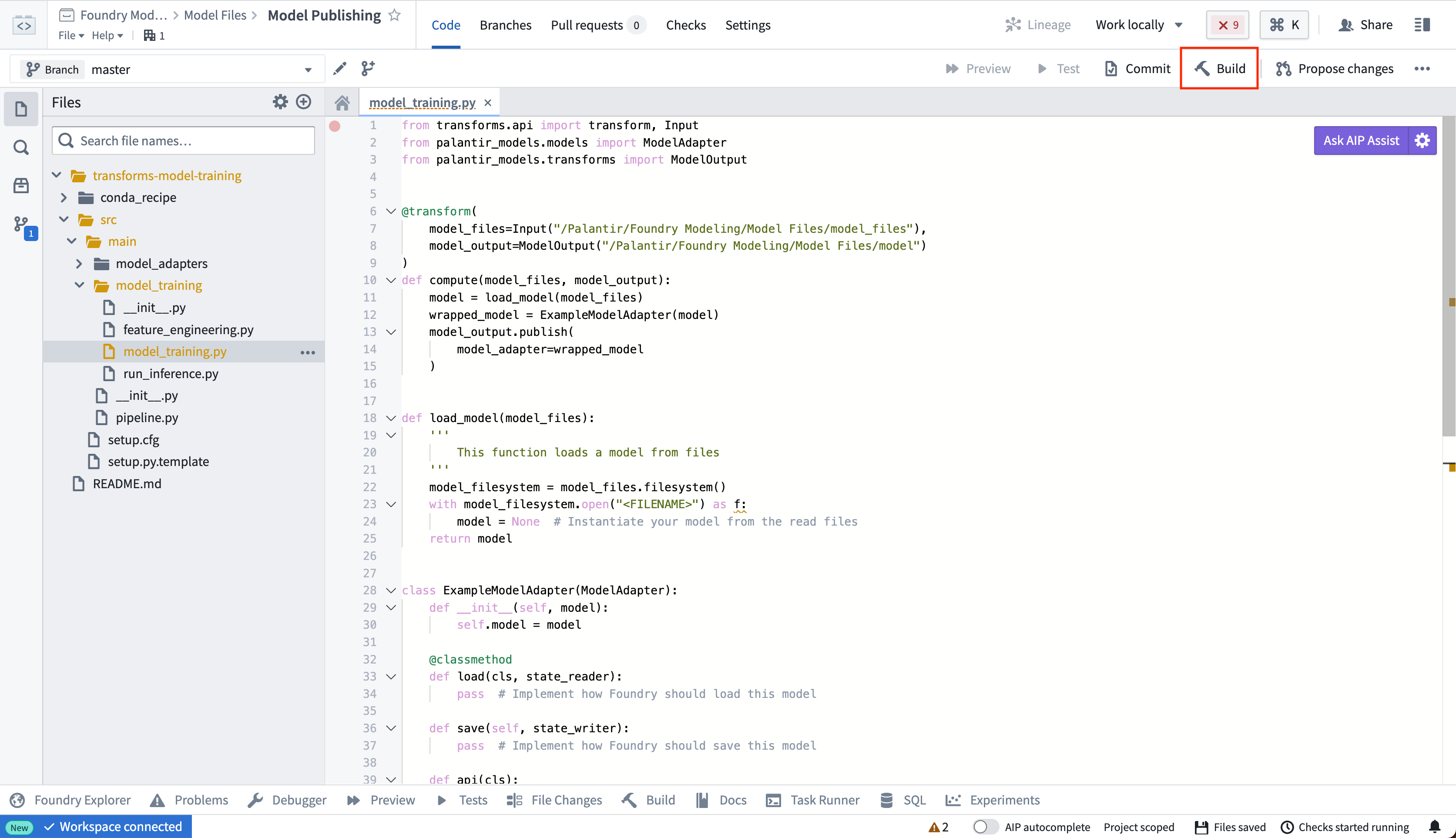
You can place the logic for loading and publishing a model within the model_training folder in the repository.
For additional information, we recommend reviewing the following documentation:
- The full Model Adapter API definition
- How to read files from an unstructured dataset
- How to create and publish a model adapter with the Model Training template
- An example wrapping of a locally-trained model
Once you have defined your model training logic, select Build to execute the logic to read the model files and publish a model.
from transforms.api import transform, Input
from palantir_models.transforms import ModelOutput, copy_model_to_driver

import palantir_models as pm

import os
import pickle

@transform(
    model_files=Input("<Model Files Dataset>"),
    model_output=ModelOutput("<Your Model Path>")
)
def compute(model_files, model_output):
    # all the files from the dataset are copied onto the driver
    model_files_path = copy_model_to_driver(model_files.filesystem())

    # for example, if you had a model saved as in a pickle file, you would then load that using pickle
    with open(os.path.join(model_files_path, "model.pkl"), 'rb') as file:
        model = pickle.load(file)

    wrapped_model = ExampleModelAdapter(model)
    model_output.publish(
        model_adapter=wrapped_model
    )

class ExampleModelAdapter(pm.ModelAdapter):

    @pm.auto_serialize
    def __init__(self, model):
        self.model = model

    @classmethod
    def api(cls):
        pass  # Implement the API of this model

    def predict(self, df_in):
        pass # Implement the inference logic
The same file loading logic applies to most other cases, where libraries (such as PyTorch or Tensorflow) may provide methods for reading serialized files to Python objects.
4. Consume the published model
Once you have successfully published a model, you can consume the model for inference. Use the following documentation for guidance:
- Deploy the model in a modeling objective for live inference
- Use the uploaded model in a batch pipeline in a modeling objective
- Configure a Python transform that performs inference with the model
中文翻译
从预训练文件发布模型
Palantir 支持创建封装平台外部生成的权重的模型。这些文件可包括开源模型权重、在本地开发环境中训练的模型、在代码工作台(Code Workspaces)应用中训练的模型,以及来自遗留系统的模型权重。
创建 Palantir 模型后,Palantir 提供以下功能:
- 与批处理管道和实时模型托管的集成。
- 完整的版本控制、细粒度权限管理和受治理的模型谱系。
- 通过建模目标(Modeling Objectives)进行模型管理和实时部署。
- 绑定到本体论(Ontology),支持通过模型上的函数(functions on models)进行操作化以及假设情景分析。
从模型文件创建模型
要从模型文件创建模型,您需要以下内容:
- 可上传至 Palantir 的模型文件
- 一个模型适配器(model adapter),用于告知 Palantir 如何加载模型并运行推理
1. 将模型文件上传至非结构化数据集
首先,将您的模型文件上传至 Palantir 平台中的非结构化数据集。在项目中通过选择 +新建 > 数据集(+New > Dataset) 来创建新数据集。
然后,选择 导入新数据(Import new data) 并从您的计算机中选择要上传到模型的文件。
如有需要,您可以将多个不同文件上传到同一数据集。该数据集将是非结构化的,意味着它不会有表格模式。
2. 创建模型训练仓库以定义模型适配器逻辑
创建一个新的代码仓库,用于管理从非结构化数据集中读取模型文件的逻辑。该逻辑将这些文件封装在模型适配器中,并将其发布为模型。在代码仓库(Code Repositories)应用中,选择使用模型训练(Model Training)语言模板初始化一个模型集成(Model Integration)仓库。
请查看模型训练模板(Model Training template)和模型适配器API(model adapter API)的完整文档作为参考。
3. 将权重发布到模型
要将非结构化数据集中的模型文件发布为 Palantir 模型,您必须编写一个转换(transform)来完成以下操作:
- 从非结构化数据集中将保存的模型文件加载为适当的 Python 对象
- 使用加载的 Python 对象实例化一个模型适配器
- 将模型适配器发布为模型资源
您可以将加载和发布模型的逻辑放置在仓库中的 model_training 文件夹内。
更多信息,建议查阅以下文档:
定义好模型训练逻辑后,选择构建(Build)以执行逻辑,读取模型文件并发布模型。
from transforms.api import transform, Input
from palantir_models.transforms import ModelOutput, copy_model_to_driver

import palantir_models as pm

import os
import pickle

@transform(
    model_files=Input("<模型文件数据集>"),
    model_output=ModelOutput("<您的模型路径>")
)
def compute(model_files, model_output):
    # 数据集中的所有文件都被复制到驱动程序上
    model_files_path = copy_model_to_driver(model_files.filesystem())

    # 例如,如果您的模型以 pickle 文件形式保存,则使用 pickle 加载
    with open(os.path.join(model_files_path, "model.pkl"), 'rb') as file:
        model = pickle.load(file)

    wrapped_model = ExampleModelAdapter(model)
    model_output.publish(
        model_adapter=wrapped_model
    )

class ExampleModelAdapter(pm.ModelAdapter):

    @pm.auto_serialize
    def __init__(self, model):
        self.model = model

    @classmethod
    def api(cls):
        pass  # 实现此模型的API

    def predict(self, df_in):
        pass # 实现推理逻辑
相同的文件加载逻辑适用于大多数其他情况,其中库(如 PyTorch 或 Tensorflow)可能提供将序列化文件读取为 Python 对象的方法。
4. 使用已发布的模型
成功发布模型后,您可以将其用于推理。请参考以下文档获取指导: