ModelInput in transforms(transforms中的ModelInput)
The ModelInput class allows you to load and use models within Python transforms, making it easy to incorporate model inference logic into your data pipelines. To learn more about using models in code workspaces, you can review details on the ModelInput class in Jupyter® Code Workspaces.
Class definition
from palantir_models.transforms import ModelInput

ModelInput(
    alias,                  # (string) Path or RID of model to load
    model_version=None,     # (Optional) RID of specific model version
    use_sidecar=False,      # (Optional) Run model in separate container
    sidecar_resources=None  # (Optional) Resource configuration for sidecar
)
Parameters
| Parameter | Type | Description | Version / Notes | ||||||||||||
|---|---|---|---|---|---|---|---|---|---|---|---|---|---|---|---|
alias |
str |
Path or resource ID (RID) of the model resource to load from. | |||||||||||||
model_version |
Optional[str] |
RID or semantic version of the specific model version to use. If not specified, the latest version will be used. | |||||||||||||
use_sidecar |
Optional[bool] |
When True, runs the model in a separate container to prevent dependency conflicts between the model adapter and transform environment. |
Introduced in palantir_models version 0.1673.0 |
||||||||||||
sidecar_resources |
Optional[Dict[str, Union[float, int]]] |
Resource configuration for the sidecar container. This parameter can only be used when use_sidecar is set to True. Supports the following options:
|
Introduced in palantir_models version 0.1673.0 |
Examples
The code snippets below demonstrate the usage of a model in a transform. The examples assume the adapter for the model has a single Pandas input and a single Pandas output DataFrame called output_df specified in its API. The transform method on the model adapter, which leverages your provided predict method, automatically converts data_in, a TransformInput/LightweightInput instance, into the tabular input (either a Spark or Pandas DataFrame) expected by your model adapter's API.
Model inference in lightweight transforms (recommended)
For use cases that do not require distributed inference in Spark, it is recommended to use lightweight transforms (the default with @transform.using) and run the model as a sidecar container. Learn more about model sidecars below.
from transforms.api import Input, Output, transform, LightweightInput, LightweightOutput
from palantir_models import ModelAdapter
from palantir_models.transforms import ModelInput


# Using use_sidecar=True with @transform.using requires palantir_models version 0.2010.0 or higher.
@transform.using(
    data_in=Input("path/to/input"),
    model_input=ModelInput(
        "path/to/my/model",
        use_sidecar=True # runs the model as a sidecar container
    ),
    out=Output('path/to/output'),
)
def my_transform(data_in: LightweightInput, model_input: ModelAdapter, out: LightweightOutput) -> None:
    # Assuming the model's API has a single Pandas input
    # and a single pandas output named `df_out`.
    inference_results = model_input.transform(data_in)
    predictions = inference_results.df_out
    # Alternatively, you can use the predict method on
    # a Pandas DataFrame instance directly:
    # predictions = model_input.predict(data_in.pandas())
    out.write_pandas(predictions)
Distributed inference in Spark transforms
Using the DistributedInferenceWrapper, the model will be distributed to each of the executors in the Spark job. Learn more about distributed Spark inference below.
from transforms.api import transform, Input, Output, configure
from palantir_models.transforms import ModelInput, DistributedInferenceWrapper

@transform.spark.using(
    input_df=Input("ri.foundry.main.dataset.3cd098b3-aae0-455a-9383-4eec810e0ac0"),
    model_input=ModelInput("ri.models.main.model.5b758039-370c-4cfc-835e-5bd3f213454c"),
    output=Output("ri.foundry.main.dataset.c0a3edbc-c917-4f20-88f1-d797ebf27cb2"),
)
def compute(ctx, input_df, model_input, output):
    model_input = DistributedInferenceWrapper(model_input, ctx, 'auto')
    # Use .predict with the DistributedInferenceWrapper and pass it a Spark DataFrame
    # It handles passing the data as pandas to the model and returns a Spark DataFrame
    predictions = model_input.predict(input_df.dataframe())
    # Write the output as a Spark DataFrame
    output.write_dataframe(predictions)
Usage notes
Importing the adapter code when not using a sidecar container
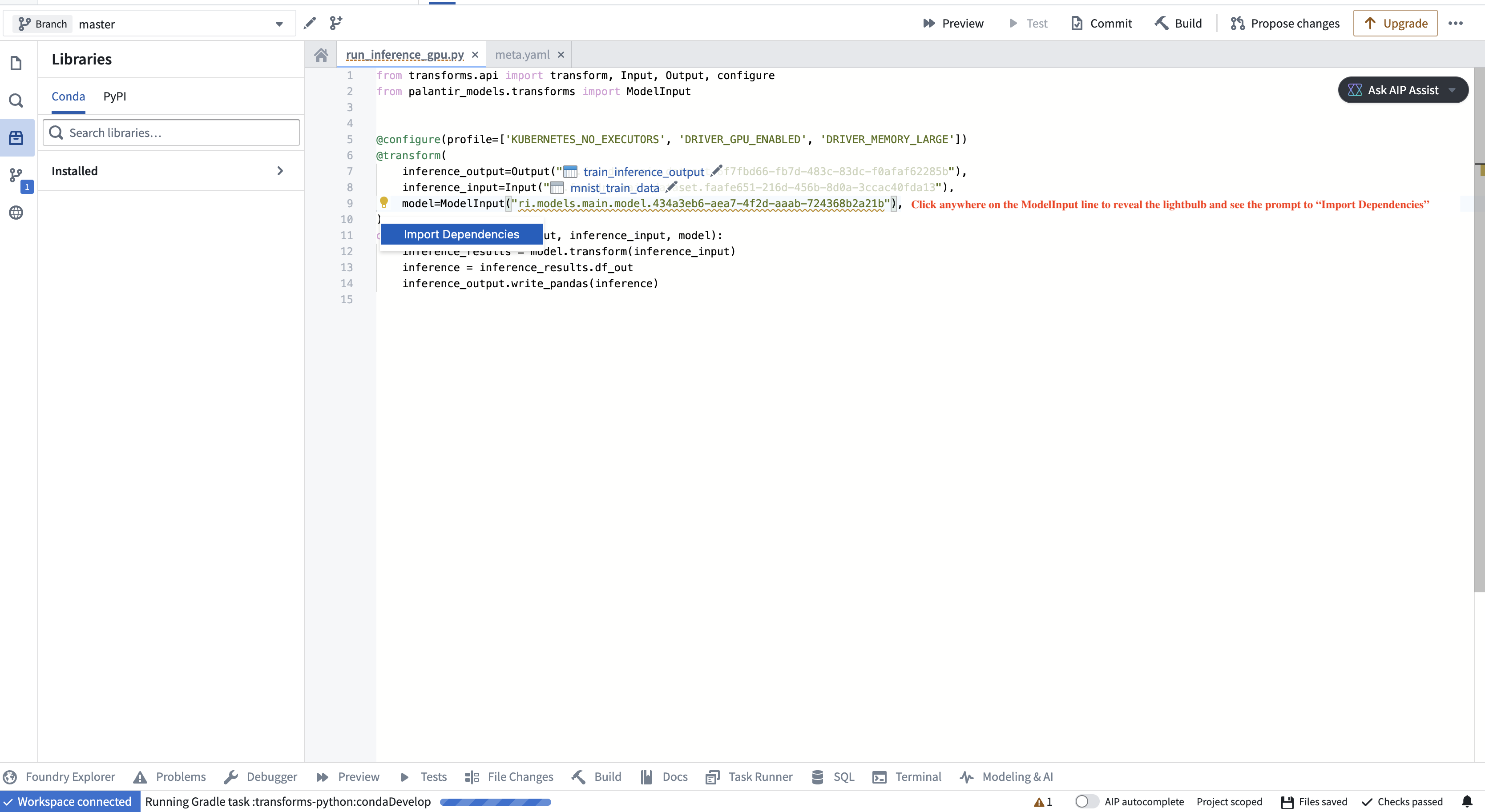
To instantiate the model adapter class, the environment must have access to the model adapter code. In particular, if the model was created in a different repository, the adapter code, which is packaged alongside the model as a Python library, needs to be imported as a dependency in your repository. The application will prompt you to do this, as shown in the screenshot below.
Specifying a version
You can specify a particular model version using the model_version parameter. This is especially recommended if the model is not being retrained on a regular schedule as it helps prevent an unintended or problematic model from reaching production. If you do not specify a model version, the system will use the latest model available on the build’s branch by default.
:::callout{theme="info"} Note that if no version is specified, each transform run will automatically fetch the latest model files for the model input, but it will not automatically update the adapter library version (containing the adapter logic you authored for that version and its Python dependencies) in the repository if the model was generated outside of the repository where it is being used. To update the library version, you will need to select the appropriate adapter version in the repository’s Libraries sidebar and verify that all checks pass. The adapter version corresponding to each model version can be found on the model’s page under Inference configuration.
If this workflow does not suit your needs, consider either using the model within the same repository where it is created or setting use_sidecar to True, as explained below.
:::
Running models as sidecar containers
Running a model in a sidecar container (use_sidecar=True) is recommended for the majority of model inference use cases.
The main benefit of running the model as a sidecar is that the exact same library versions used to produce the model will also be used to run inference with it. In contrast, importing the adapter code as prompted by the repository user interface will create a new environment solve that merges the constraints from the adapter code and the repository. This may result in different library versions being used.
Additionally, when using a sidecar container to run the model, the adapter code corresponding to the model version being used will automatically be loaded in the sidecar without the user having to manually update the dependency and run checks in the repository.
When using a sidecar, predict() requests are automatically routed to the sidecar container without any additional code changes required:
from transforms.api import Input, Output, transform, LightweightInput, LightweightOutput
from palantir_models import ModelAdapter
from palantir_models.transforms import ModelInput


# Using use_sidecar=True with @transform.using requires palantir_models version 0.2010.0 or later.
@transform.using(
    data_in=Input("path/to/input"),
    model_input=ModelInput(
        "path/to/my/model",
        use_sidecar=True
    ),
    out=Output('path/to/output'),
)
def my_transform(data_in: LightweightInput, model_input: ModelAdapter, out: LightweightOutput) -> None:
    # Assuming the model's API has a single Pandas input
    # and a single pandas output named `df_out`.
    inference_results = model_input.transform(data_in)
    predictions = inference_results.df_out
    # Alternatively, you can use the predict method on
    # a Pandas DataFrame instance directly:
    # predictions = model_input.predict(data_in.pandas())
    out.write_pandas(predictions)
Specifying resources with the sidecar
The example below will provision a sidecar alongside the driver and executor, each with 1 GPU, 2 CPUs and 4 GB of memory.
from transforms.api import Input, Output, transform, LightweightInput, LightweightOutput
from palantir_models import ModelAdapter
from palantir_models.transforms import ModelInput


# Using use_sidecar=True with @transform.using requires palantir_models version 0.2010.0 or later.
@transform.using(
    data_in=Input("path/to/input"),
    model_input=ModelInput(
        "path/to/my/model",
        use_sidecar=True,
        sidecar_resources={
            "cpus": 2.0,
            "memory_gb": 4.0,
            "gpus": 1
        }
    ),
    out=Output('path/to/output'),
)
def my_transform(data_in: LightweightInput, model_input: ModelAdapter, out: LightweightOutput) -> None:
    ...
Distributed inference using Spark executors
You can run distributed model inference using Spark executors. This approach can be beneficial for batch inference involving computationally heavy models or large datasets, with near-linear scalability.
Consider the following code snippet demonstrating how you can wrap an existing model for distributed inference:
from transforms.api import transform, Input, Output, configure
from palantir_models.transforms import ModelInput, DistributedInferenceWrapper

@transform.spark.using(
    input_df=Input("ri.foundry.main.dataset.3cd098b3-aae0-455a-9383-4eec810e0ac0"),
    model_input=ModelInput("ri.models.main.model.5b758039-370c-4cfc-835e-5bd3f213454c"),
    output=Output("ri.foundry.main.dataset.c0a3edbc-c917-4f20-88f1-d797ebf27cb2"),
)
def compute(ctx, input_df, model_input, output):
    model_input = DistributedInferenceWrapper(model_input, ctx, 'auto')
    # Use .predict with the DistributedInferenceWrapper and pass it a Spark DataFrame
    # It handles passing the data as pandas to the model and returns a Spark DataFrame
    predictions = model_input.predict(input_df.dataframe())
    # Write the output as a Spark DataFrame
    output.write_dataframe(predictions)
:::callout{theme="warning"}
Do not use the DistributedInferenceWrapper for models that require multiple input rows to produce predictions. One example of such models are time series models, which require historical data for inference. The DistributedInferenceWrapper will use native Spark partitioning to send a subset of rows to each executor, and makes no guarantees that all rows required for prediction (for example, all rows from a given time series) will be sent to the model as part of the same partition. This can lead to erroneous predictions due to incomplete input data for models that take multiple rows.
:::
The DistributedInferenceWrapper class is initialized with the following parameters:
| Parameter | Type | Description | Notes |
|---|---|---|---|
model |
ModelAdapter |
The model adapter instance to be wrapped. This is typically the model_input provided by ModelInput. |
|
ctx |
TransformContext |
The transform context, used to access Spark session information. This is typically the ctx argument of your transform function. |
|
num_partitions |
Union[Literal["auto"], int] |
Number of partitions to use for the Spark DataFrame. If 'auto', it will be set to match the number of Spark executors. If you experience Out Of Memory (OOM) errors, try increasing this value. |
Default: 'auto' |
max_rows_per_chunk |
int |
Spark splits each partition into chunks before sending it to the model. This parameter sets the maximum number of rows allowed per chunk. More rows per chunk means less overhead but more memory usage. | Default: 1,000,000 |
Usage notes:
- You can configure the number of executors through Spark profiles.
- The distributed wrapper uses Spark’s user-defined functions (UDFs).
- The provided DataFrame must be a Spark DataFrame. The wrapped predict call will return a Spark DataFrame as well.
- The model adapter API should have one pandas DataFrame input and one pandas DataFrame output, with any number of input parameters.
- Usage of the
use_sidecarparameter (described above) is supported, but optional.
中文翻译
transforms中的ModelInput
ModelInput类允许您在Python transforms中加载和使用模型,使您能够轻松地将模型推理逻辑整合到数据管道中。要了解更多关于在代码工作空间中使用模型的信息,您可以查看Jupyter®代码工作空间中关于ModelInput类的详细说明。
类定义
from palantir_models.transforms import ModelInput

ModelInput(
    alias,                  # (字符串) 要加载的模型路径或RID
    model_version=None,     # (可选) 特定模型版本的RID
    use_sidecar=False,      # (可选) 在单独的容器中运行模型
    sidecar_resources=None  # (可选) sidecar容器的资源配置
)
参数
| 参数 | 类型 | 描述 | 版本/备注 | ||||||||||||
|---|---|---|---|---|---|---|---|---|---|---|---|---|---|---|---|
alias |
str |
要加载的模型资源的路径或资源ID(RID)。 | |||||||||||||
model_version |
Optional[str] |
要使用的特定模型版本的RID或语义版本。如果未指定,将使用最新版本。 | |||||||||||||
use_sidecar |
Optional[bool] |
当设置为True时,在单独的容器中运行模型,以防止模型适配器与transform环境之间的依赖冲突。 |
在palantir_models版本0.1673.0中引入 |
||||||||||||
sidecar_resources |
Optional[Dict[str, Union[float, int]]] |
sidecar容器的资源配置。此参数仅在use_sidecar设置为True时可用。 支持以下选项:
|
在palantir_models版本0.1673.0中引入 |
示例
以下代码片段演示了在transform中使用模型的方法。这些示例假设模型的适配器在其API中指定了一个Pandas输入和一个名为output_df的Pandas输出DataFrame。模型适配器上的transform方法利用您提供的predict方法,自动将data_in(一个TransformInput/LightweightInput实例)转换为模型适配器API所期望的表格输入(Spark或Pandas DataFrame)。
轻量级transforms中的模型推理(推荐)
对于不需要在Spark中进行分布式推理的用例,建议使用轻量级transforms(@transform.using的默认方式)并将模型作为sidecar容器运行。在下方了解更多关于模型sidecar的信息。
from transforms.api import Input, Output, transform, LightweightInput, LightweightOutput
from palantir_models import ModelAdapter
from palantir_models.transforms import ModelInput


# 在@transform.using中使用use_sidecar=True需要palantir_models版本0.2010.0或更高。
@transform.using(
    data_in=Input("path/to/input"),
    model_input=ModelInput(
        "path/to/my/model",
        use_sidecar=True # 将模型作为sidecar容器运行
    ),
    out=Output('path/to/output'),
)
def my_transform(data_in: LightweightInput, model_input: ModelAdapter, out: LightweightOutput) -> None:
    # 假设模型的API有一个Pandas输入
    # 和一个名为`df_out`的Pandas输出。
    inference_results = model_input.transform(data_in)
    predictions = inference_results.df_out
    # 或者,您可以直接在Pandas DataFrame实例上使用predict方法:
    # predictions = model_input.predict(data_in.pandas())
    out.write_pandas(predictions)
Spark transforms中的分布式推理
使用DistributedInferenceWrapper,模型将被分发到Spark作业中的每个执行器(executor)。在下方了解更多关于分布式Spark推理的信息。
from transforms.api import transform, Input, Output, configure
from palantir_models.transforms import ModelInput, DistributedInferenceWrapper

@transform.spark.using(
    input_df=Input("ri.foundry.main.dataset.3cd098b3-aae0-455a-9383-4eec810e0ac0"),
    model_input=ModelInput("ri.models.main.model.5b758039-370c-4cfc-835e-5bd3f213454c"),
    output=Output("ri.foundry.main.dataset.c0a3edbc-c917-4f20-88f1-d797ebf27cb2"),
)
def compute(ctx, input_df, model_input, output):
    model_input = DistributedInferenceWrapper(model_input, ctx, 'auto')
    # 使用.predict与DistributedInferenceWrapper,并传入Spark DataFrame
    # 它会将数据作为pandas传递给模型,并返回一个Spark DataFrame
    predictions = model_input.predict(input_df.dataframe())
    # 将输出写入为Spark DataFrame
    output.write_dataframe(predictions)
使用说明
在不使用sidecar容器时导入适配器代码
要实例化模型适配器类,环境必须能够访问模型适配器代码。特别是,如果模型是在不同的仓库中创建的,那么作为Python库与模型一起打包的适配器代码需要作为依赖项导入到您的仓库中。应用程序会提示您执行此操作,如下面的截图所示。
指定版本
您可以使用model_version参数指定特定的模型版本。如果模型没有按固定计划重新训练,特别建议这样做,因为它有助于防止意外或有问题的模型进入生产环境。如果您没有指定模型版本,系统将默认使用构建分支上可用的最新模型。
:::callout{theme="info"} 请注意,如果未指定版本,每次transform运行时将自动获取模型输入的最新模型文件,但如果模型是在使用它的仓库之外生成的,它不会自动更新仓库中的适配器库版本(包含您为该版本及其Python依赖项编写的适配器逻辑)。要更新库版本,您需要在仓库的库侧边栏中选择相应的适配器版本,并验证所有检查是否通过。每个模型版本对应的适配器版本可以在模型页面的推理配置下找到。
如果此工作流程不适合您的需求,请考虑在创建模型的同一仓库中使用模型,或者将use_sidecar设置为True,如下所述。
:::
将模型作为sidecar容器运行
对于大多数模型推理用例,建议在sidecar容器中运行模型(use_sidecar=True)。
将模型作为sidecar运行的主要好处是,用于生成模型的完全相同的库版本也将用于运行推理。相比之下,按照仓库用户界面提示导入适配器代码将创建一个新的环境解决方案,合并适配器代码和仓库的约束条件。这可能导致使用不同的库版本。
此外,当使用sidecar容器运行模型时,所使用的模型版本对应的适配器代码将自动加载到sidecar中,用户无需手动更新依赖项并在仓库中运行检查。
使用sidecar时,predict()请求会自动路由到sidecar容器,无需额外的代码更改:
from transforms.api import Input, Output, transform, LightweightInput, LightweightOutput
from palantir_models import ModelAdapter
from palantir_models.transforms import ModelInput


# 在@transform.using中使用use_sidecar=True需要palantir_models版本0.2010.0或更高。
@transform.using(
    data_in=Input("path/to/input"),
    model_input=ModelInput(
        "path/to/my/model",
        use_sidecar=True
    ),
    out=Output('path/to/output'),
)
def my_transform(data_in: LightweightInput, model_input: ModelAdapter, out: LightweightOutput) -> None:
    # 假设模型的API有一个Pandas输入
    # 和一个名为`df_out`的Pandas输出。
    inference_results = model_input.transform(data_in)
    predictions = inference_results.df_out
    # 或者,您可以直接在Pandas DataFrame实例上使用predict方法:
    # predictions = model_input.predict(data_in.pandas())
    out.write_pandas(predictions)
为sidecar指定资源
下面的示例将在驱动器和执行器旁边配置一个sidecar,每个sidecar配备1个GPU、2个CPU和4 GB内存。
from transforms.api import Input, Output, transform, LightweightInput, LightweightOutput
from palantir_models import ModelAdapter
from palantir_models.transforms import ModelInput


# 在@transform.using中使用use_sidecar=True需要palantir_models版本0.2010.0或更高。
@transform.using(
    data_in=Input("path/to/input"),
    model_input=ModelInput(
        "path/to/my/model",
        use_sidecar=True,
        sidecar_resources={
            "cpus": 2.0,
            "memory_gb": 4.0,
            "gpus": 1
        }
    ),
    out=Output('path/to/output'),
)
def my_transform(data_in: LightweightInput, model_input: ModelAdapter, out: LightweightOutput) -> None:
    ...
使用Spark执行器进行分布式推理
您可以使用Spark执行器运行分布式模型推理。这种方法对于涉及计算密集型模型或大型数据集的批量推理非常有益,具有近乎线性的可扩展性。
考虑以下代码片段,演示如何包装现有模型以进行分布式推理:
from transforms.api import transform, Input, Output, configure
from palantir_models.transforms import ModelInput, DistributedInferenceWrapper

@transform.spark.using(
    input_df=Input("ri.foundry.main.dataset.3cd098b3-aae0-455a-9383-4eec810e0ac0"),
    model_input=ModelInput("ri.models.main.model.5b758039-370c-4cfc-835e-5bd3f213454c"),
    output=Output("ri.foundry.main.dataset.c0a3edbc-c917-4f20-88f1-d797ebf27cb2"),
)
def compute(ctx, input_df, model_input, output):
    model_input = DistributedInferenceWrapper(model_input, ctx, 'auto')
    # 使用.predict与DistributedInferenceWrapper,并传入Spark DataFrame
    # 它会将数据作为pandas传递给模型,并返回一个Spark DataFrame
    predictions = model_input.predict(input_df.dataframe())
    # 将输出写入为Spark DataFrame
    output.write_dataframe(predictions)
:::callout{theme="warning"}
不要对需要多行输入才能生成预测的模型使用DistributedInferenceWrapper。时间序列模型就是此类模型的一个例子,它们需要历史数据进行推理。DistributedInferenceWrapper将使用原生Spark分区将行子集发送到每个执行器,并且不保证预测所需的所有行(例如,来自给定时间序列的所有行)都将作为同一分区的一部分发送到模型。对于需要多行输入的模型,这可能导致由于输入数据不完整而产生错误的预测。
:::
DistributedInferenceWrapper类使用以下参数进行初始化:
| 参数 | 类型 | 描述 | 备注 |
|---|---|---|---|
model |
ModelAdapter |
要包装的模型适配器实例。这通常是ModelInput提供的model_input。 |
|
ctx |
TransformContext |
transform上下文,用于访问Spark会话信息。这通常是transform函数的ctx参数。 |
|
num_partitions |
Union[Literal["auto"], int] |
用于Spark DataFrame的分区数。如果为'auto',将设置为与Spark执行器数量匹配。如果遇到内存不足(OOM)错误,请尝试增加此值。 |
默认值:'auto' |
max_rows_per_chunk |
int |
Spark在将每个分区发送到模型之前会将其拆分为多个块。此参数设置每个块允许的最大行数。每个块的行数越多,开销越小,但内存使用越多。 | 默认值:1,000,000 |
使用说明:
- 您可以通过Spark配置文件配置执行器的数量。
- 分布式包装器使用Spark的用户定义函数(UDF)。
- 提供的DataFrame必须是Spark DataFrame。包装后的predict调用也将返回一个Spark DataFrame。
- 模型适配器API应有一个Pandas DataFrame输入和一个Pandas DataFrame输出,并带有任意数量的输入参数。
- 支持使用
use_sidecar参数(如上所述),但这是可选的。