Create a direct model deployment(创建直接模型部署)
Direct model deployments are live hosted endpoints that immediately connect models to user applications such as Workshop and Slate. Direct model deployments are queried in TypeScript through Functions on models or from an external system through a REST API call.
The following sections explain how to create, configure, and publish a direct model deployment and describe some debugging steps and feature considerations to review before getting started.
1. Create a direct model deployment
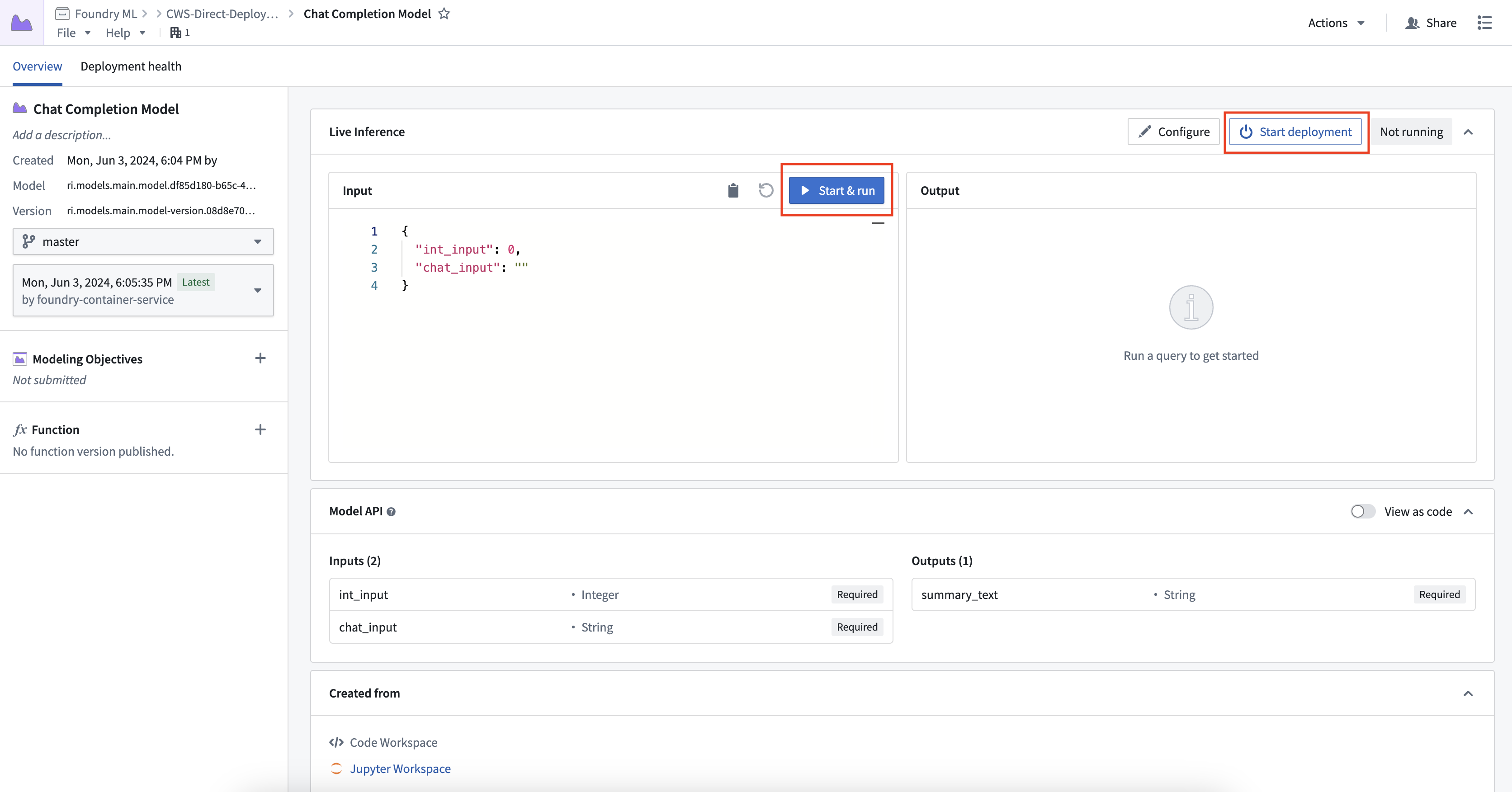
To create and start a direct model deployment, navigate to the model. Select Start Deployment at the top of a model page under Live Inference. Once running, you can interactively test the deployment by selecting Run.
2. Configure a direct model deployment
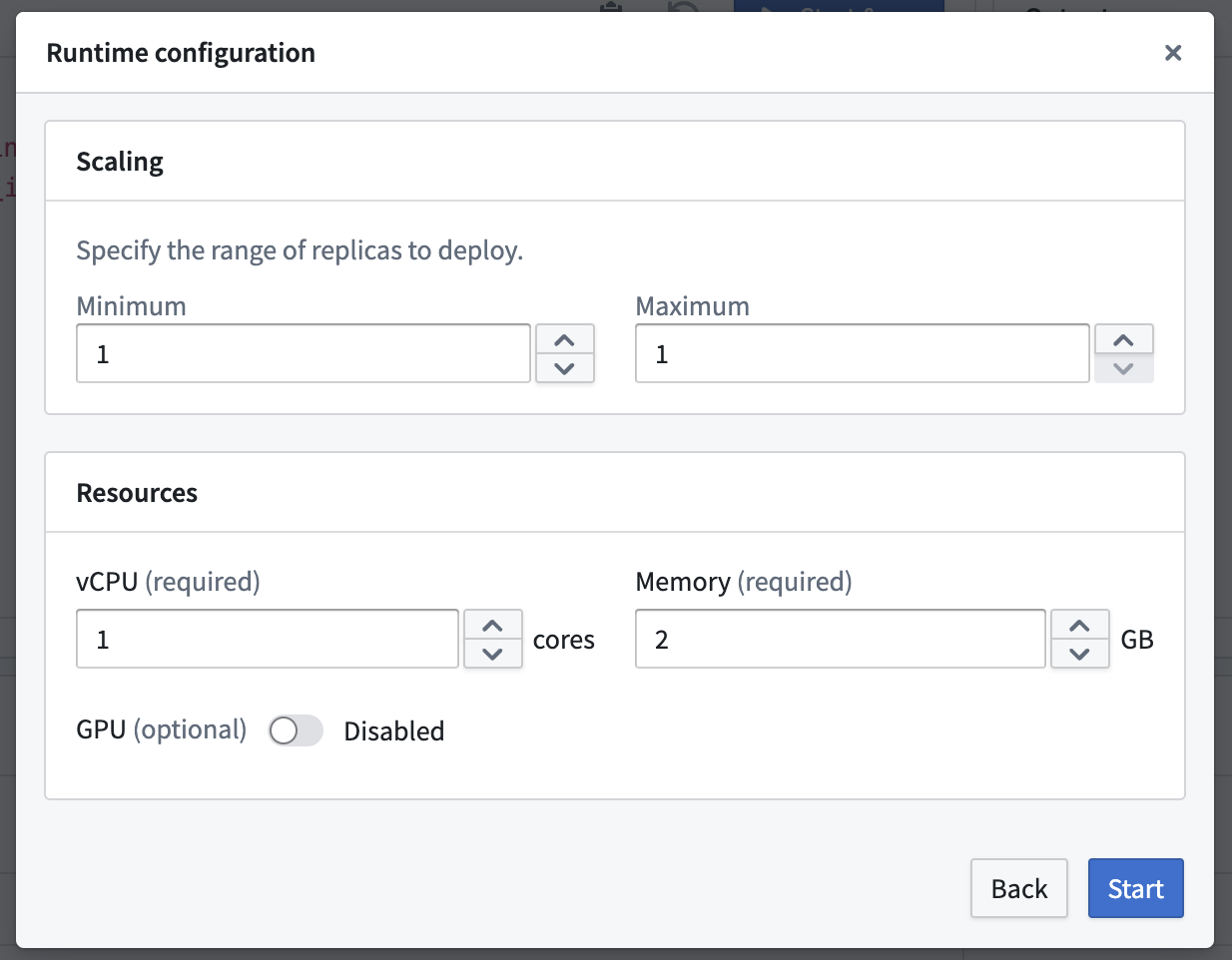
To configure the resources of a direct model deployment, select the Configure button in the top right of the Live Inference panel. Direct model deployments can be configured to scale from zero. When the deployment reaches 75% capacity, it will create an additional replica until it reaches the maximum replica count specified in the runtime scaling configuration. This also allows deployments to automatically scale down after 30 minutes without a live request.
3. Publish a function for the deployment
You can publish a function for the model, enabling usage of models for live inference in Workshop, Vertex, and other end-user applications.
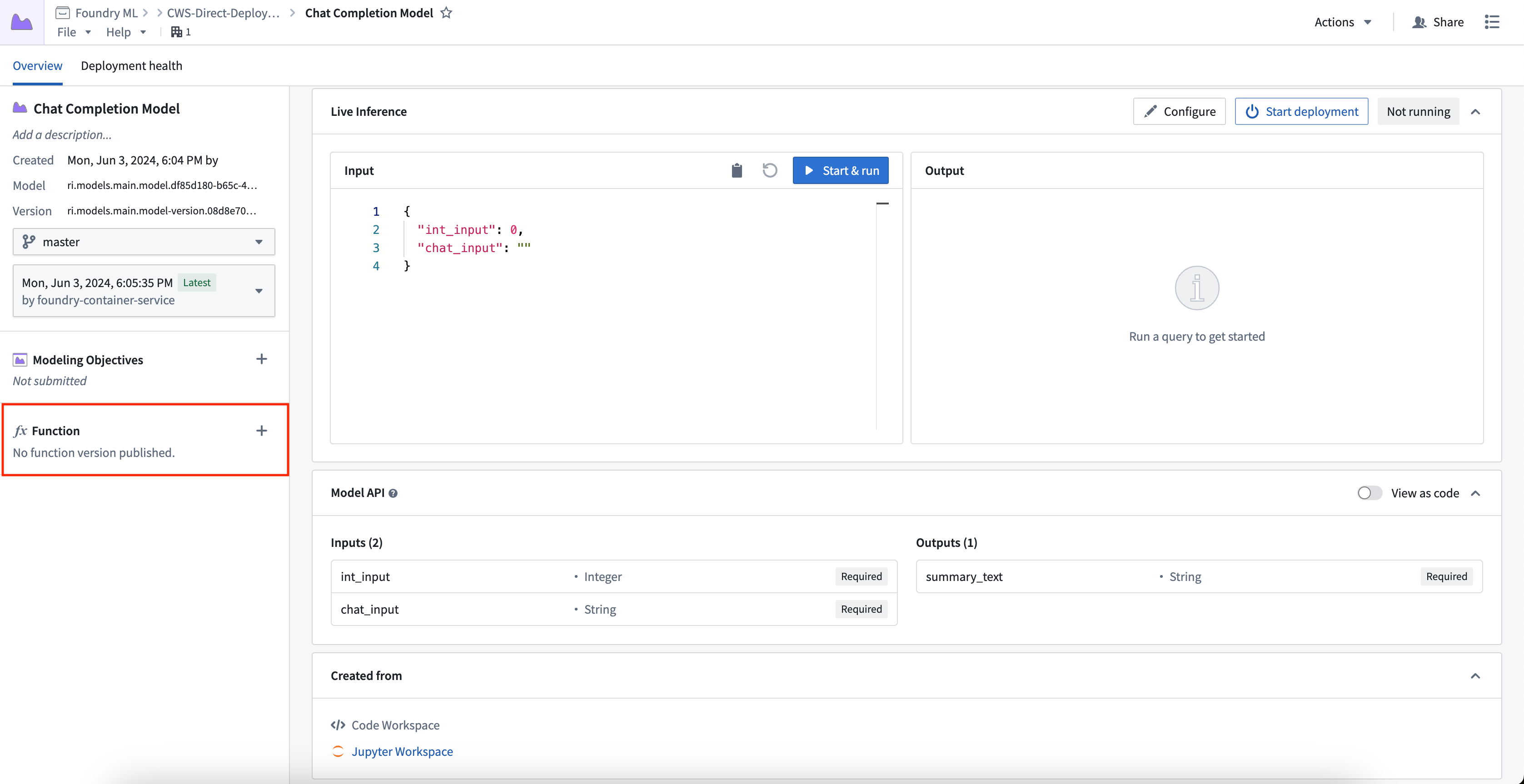
To publish a function, select the + icon in the model artifact sidebar and provide a function name. You can register one function per branch. This creates a wrapper function with the same input and output API as your model, which can be imported and called from a functions repository to add custom business logic.
For details on function behavior, version upgrades, and configuration options, see the Model functions developer guide.
Automatic upgrades
One direct model deployment can be created for each branch of a model. When a new model version is published to that branch, the direct model deployment will automatically upgrade to the new endpoint with no downtime. If you do not want automatic upgrades, consider using a Modeling Objective live deployment and review the differences between a live and a direct deployment described below. If a function was created for the deployment, a new version will automatically be created.
Automatic horizontal scaling
Direct model deployments are backed by compute modules and therefore support automatic horizontal scaling between a user-specified minimum and maximum replica range, as detailed above.
Configure a schedule override
You can schedule overrides for your minimum and maximum replica configuration on specific days and times during the week. This is useful when you expect predictable changes, such as higher traffic during business hours or reduced load on weekends.
To configure a schedule override:
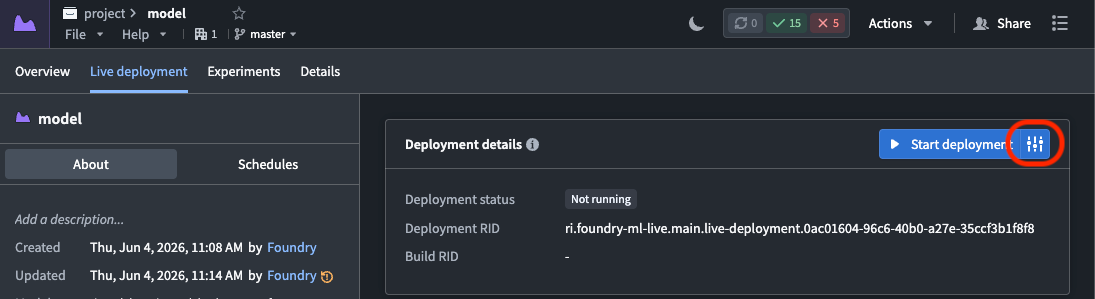
- Navigate to your direct model deployment's Live deployment tab and select the settings icon to the right of Start deployment to edit the runtime configuration.
- In the Scaling section, toggle on Enable schedule overrides to render a configuration panel where you schedule the overrides.
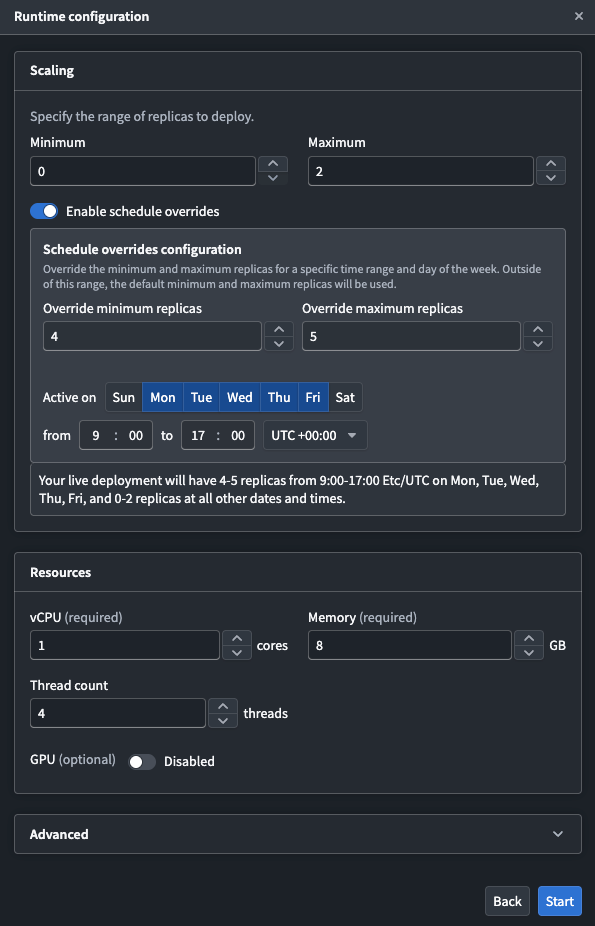
- Configure the following settings for your override:
- Override minimum replicas: The minimum number of replicas during the scheduled period.
- Override maximum replicas: The maximum number of replicas during the scheduled period.
- Active on: The days of the week that the override will be applied.
- Time range: The start and end time for the override, along with the timezone.
The default replica configuration applies outside of the configured time periods. Currently, you can only schedule one override.
Model API type safety
Direct model deployments enforce type safety for all inference requests to ensure the model API type matches the input type. Type safety is respected for all input types, particularly the following:
- Numeric values: If the API of a model is defined as type
int, and a value of 3.6 is passed to the model, the 0.6 will be truncated and the input will be 3. - Date and timestamps: Direct model deployments will cast date and timestamp types before being provided to the
predict()method. Timestamp fields now expect a string with format ISO 8601. - Enforced API structure: Direct model deployments will explicitly require fields marked as required in the model API.
:::callout{theme="neutral"} Model type safety is different from live modeling deployments which do not currently support type casting. :::
Debug a direct model deployment
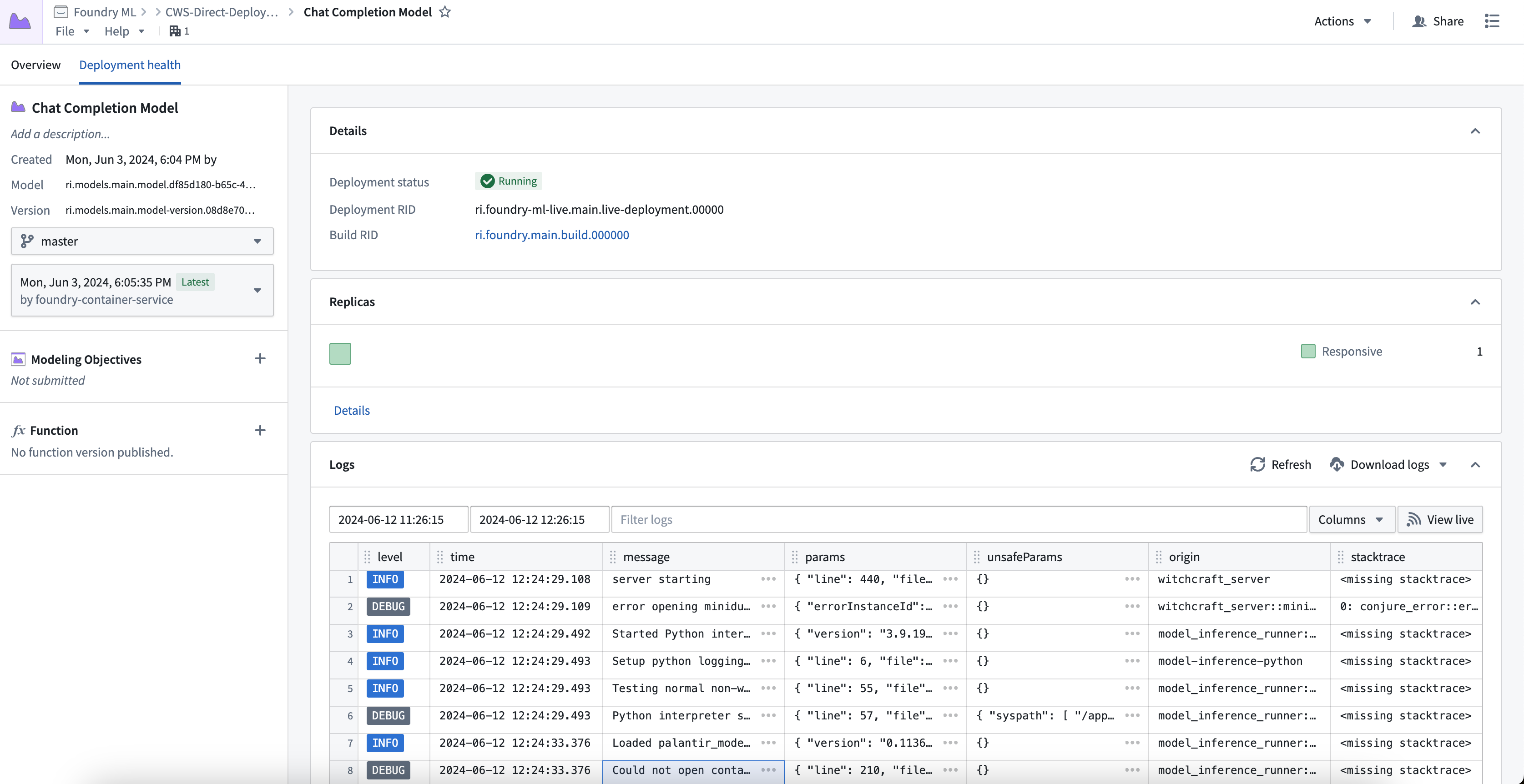
To view debugging information and logs for your direct model deployment, select the Deployment health tab at the top of the model page. Here you can find the deployment's running build, health information about replicas, logs, and metrics about each replica's state.
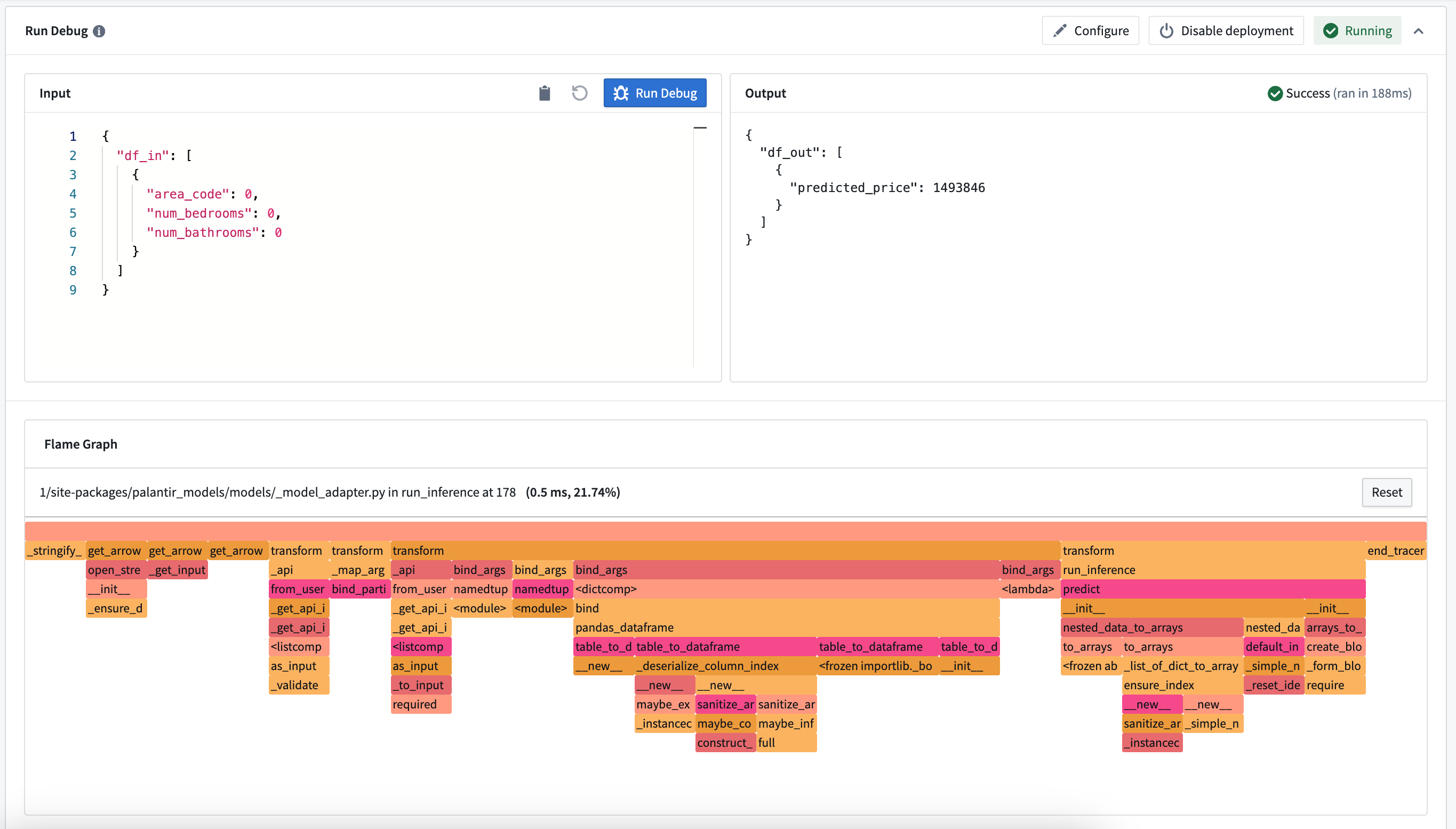
You can also view the call stack of your model inference under the Run Debug card. This allows you to see how long each python function took and where performance improvements can be made.
Note: This does not show the call stack in container models, or if an error is thrown during inference.
Comparison: Direct model deployments vs Modeling Objective live deployments
The available features of direct model deployments differ from features of Modeling Objective live deployments. Review the table below for more details.
| Feature | Direct model deployment | Modeling Objective live deployment |
|---|---|---|
| Automatic upgrades | Yes | No |
| Automatic scaling | Yes | No |
| Type safety | Yes | No |
| Scheduled overrides | Yes | No |
| Supported endpoints | Yes (V2 only) | Yes (both V1 and V2) |
| Model inference history | No | Yes |
| Pre-release review | No | Yes |
| Automatic model evaluation | No | Yes |
| Trained in Code Repositories | Yes | Yes |
| Trained in Code Workspaces | Yes | Yes |
| Supports container images | Yes | Yes |
| Supports externally-hosted models | No | Yes |
| Spark model adapter API type | No | Yes |
| Marketplace support | No | No |
中文翻译
创建直接模型部署
直接模型部署(Direct model deployment)是实时托管的端点,可将模型直接连接到用户应用程序,例如 Workshop 和 Slate。直接模型部署可通过 TypeScript 中的 模型函数 或通过 REST API 调用从外部系统进行查询。
以下部分将说明如何创建、配置和发布直接模型部署,并介绍一些调试步骤和开始前需考虑的功能特性。
1. 创建直接模型部署
要创建并启动直接模型部署,请导航至模型。在模型页面的实时推理(Live Inference)顶部选择启动部署(Start Deployment)。部署运行后,您可以通过选择运行(Run)来交互式测试部署。
2. 配置直接模型部署
要配置直接模型部署的资源,请选择实时推理面板右上角的配置(Configure)按钮。直接模型部署可以配置为从零开始自动扩缩容。当部署达到 75% 容量时,将创建额外的副本,直到达到运行时扩缩容配置中指定的最大副本数。这还允许部署在 30 分钟无实时请求后自动缩减。
3. 为部署发布函数
您可以为模型发布函数,从而在 Workshop、Vertex 和其他最终用户应用程序中使用模型进行实时推理。
要发布函数,请选择模型构件侧边栏中的 + 图标并提供函数名称。每个分支可以注册一个函数。这将创建一个包装函数,其输入和输出 API 与您的模型相同,可以从函数仓库导入和调用以添加自定义业务逻辑。
有关函数行为、版本升级和配置选项的详细信息,请参阅模型函数开发者指南。
自动升级
模型的每个分支可以创建一个直接模型部署。当新模型版本发布到该分支时,直接模型部署将自动升级到新端点,且不会造成停机。如果您不希望自动升级,请考虑使用建模目标实时部署,并查看下文所述的实时部署与直接部署之间的差异。如果已为部署创建了函数,则会自动创建新版本。
自动水平扩缩容
直接模型部署由计算模块支持,因此支持在用户指定的最小和最大副本范围之间进行自动水平扩缩容,如上文所述。
配置计划覆盖
您可以为一周中的特定日期和时间安排最小和最大副本配置的覆盖计划。当您预期出现可预测的变化时(例如工作时间内流量较高或周末负载减少),此功能非常有用。
要配置计划覆盖:
- 导航至直接模型部署的实时部署(Live deployment)选项卡,选择启动部署右侧的设置图标以编辑运行时配置。
- 在扩缩容(Scaling)部分,打开启用计划覆盖(Enable schedule overrides)开关以显示配置面板,您可以在其中安排覆盖计划。
- 为覆盖计划配置以下设置:
- 覆盖最小副本数: 计划时段内的最小副本数。
- 覆盖最大副本数: 计划时段内的最大副本数。
- 生效日期: 应用覆盖计划的一周中的天数。
- 时间范围: 覆盖计划的开始和结束时间,以及时区。
默认副本配置在配置的时间段之外应用。目前,您只能安排一个覆盖计划。
模型 API 类型安全
直接模型部署对所有推理请求强制执行类型安全,以确保模型 API 类型与输入类型匹配。所有输入类型都遵循类型安全,特别是以下类型:
- 数值: 如果模型的 API 定义为
int类型,并且向模型传递了值 3.6,则 0.6 将被截断,输入将为 3。 - 日期和时间戳: 直接模型部署将在提供给
predict()方法之前转换日期和时间戳类型。时间戳字段现在需要采用 ISO 8601 格式的字符串。 - 强制 API 结构: 直接模型部署将明确要求模型 API 中标记为必填的字段。
:::callout{theme="neutral"} 模型类型安全不同于实时建模部署,后者目前不支持类型转换。 :::
调试直接模型部署
要查看直接模型部署的调试信息和日志,请选择模型页面顶部的部署健康(Deployment health)选项卡。在此处,您可以找到部署的运行构建、副本的健康信息、日志以及每个副本状态的指标。
您还可以在运行调试(Run Debug)卡片下查看模型推理的调用堆栈。这使您可以了解每个 Python 函数花费了多长时间,以及可以在哪些方面进行性能改进。
注意: 这不会显示容器模型中的调用堆栈,也不会显示推理过程中抛出错误时的调用堆栈。
比较:直接模型部署 vs 建模目标实时部署
直接模型部署的可用功能与建模目标实时部署的功能有所不同。请查看下表了解更多详情。
| 功能 | 直接模型部署 | 建模目标实时部署 |
|---|---|---|
| 自动升级 | 是 | 否 |
| 自动扩缩容 | 是 | 否 |
| 类型安全 | 是 | 否 |
| 计划覆盖 | 是 | 否 |
| 支持的端点 | 是(仅 V2) | 是(V1 和 V2) |
| 模型推理历史 | 否 | 是 |
| 预发布审查 | 否 | 是 |
| 自动模型评估 | 否 | 是 |
| 在代码仓库中训练 | 是 | 是 |
| 在代码工作区中训练 | 是 | 是 |
| 支持容器镜像 | 是 | 是 |
| 支持外部托管模型 | 否 | 是 |
| Spark 模型适配器 API 类型 | 否 | 是 |
| Marketplace 支持 | 否 | 否 |