API: Query a model or Modeling Objective live deployment(API:查询模型或建模目标的实时部署)
In both a direct model deployment and modeling objective, you can create a live deployment and host your model over an HTTP endpoint. You can test the hosted model from the Query tab of your live deployment by using the model in production through Functions on models, or by using the live deployment API directly.
To query the hosted model directly, choose from the following endpoint options:
- Multi I/O (input/output) endpoint: A flexible endpoint that can handle complex hosted models and input types as well as simple models with a single input and output. Multi I/O endpoint URLs are suffixed with
/v2and are also known as "v2 endpoints". - Single I/O endpoint [sunset]: A legacy endpoint that can only handle simple hosted models with an API consisting of a single input and output. Single I/O endpoints are also referred to as "v1 endpoints" and will be deprecated in the future.
:::callout{theme="warning"} The single I/O endpoint is deprecated and only supported in modeling objective deployments. :::
Multi I/O endpoint
A multi I/O endpoint - sometimes referred to as a "v2 endpoint" - is a flexible endpoint that supports one or more inputs and one or more outputs.
- URL:
<ENVIRONMENT_URL>/foundry-ml-live/api/inference/transform/ri.foundry-ml-live.<LIVE_DEPLOYMENT_RID>/v2 <ENVIRONMENT_URL>: See section below for more information.- HTTP Method:
POST - Authentication type: Bearer token
- Required HTTP headers:
Content-Type: Must be"application/json".Authorization: Must be"Bearer <BEARER_TOKEN>", where<BEARER_TOKEN>is your authentication token.- Request Body: A JSON object containing the information to be sent to the model. The expected shape of this depends on API of the deployed model.
- Response: A successful response will return a status code of
200and a JSON object representing the inference response returned by the model. The shape of this object will reflect the API of the currently deployed model.
Examples: Query a live deployment with the multi I/O endpoint
For the following examples, we will use a model with a simple API of a single input and output.
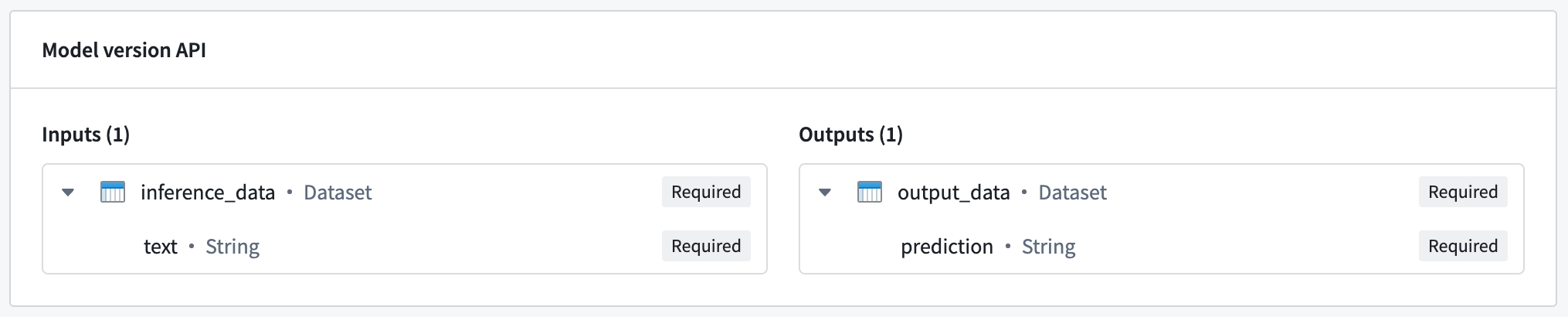
The hosted model in this example expects a single input named inference_data, which is a dataset containing a text column. In this case, the expected request format would be the following:
{
  "inference_data": [{
    "text": "<Text goes here>"
  }]
}
The model responds with a dataset named output_data, which contains a prediction column. This translates to the following response:
{
  "output_data": [{
    "prediction": "<Model prediction here>"
  }]
}
Example: curl
curl --http2 -H "Content-Type: application/json" -H "Authorization: <BEARER_TOKEN>" -d '{ "inference_data": [ { "text": "Hello, how are you?" } ] }' --request POST <ENVIRONMENT_URL>/foundry-ml-live/api/inference/transform/ri.foundry-ml-live.<LIVE_DEPLOYMENT_RID>/v2
Example: Python
import requests

url = '<ENVIRONMENT_URL>/foundry-ml-live/api/inference/transform/ri.foundry-ml-live.<LIVE_DEPLOYMENT_RID>/v2'

inference_request = { 'inference_data': [ { 'text': 'Hello, how are you?' } ] }

response = requests.post(
    url,
    json=inference_request,
    headers={ 'Content-Type': 'application/json', 'Authorization': 'Bearer <BEARER_TOKEN>' })

if response.ok:
    modelResult = response.json()
    print(modelResult)
else:
    print("An error occurred")
Example: JavaScript (using Node.js 18)
  // Construct request
  const inferenceRequest = {
    "inference_data": [{
      "text": "Hello, how are you?"
    }]
  };

  // Send the request
  const response = await fetch(
    "<ENVIRONMENT_URL>/foundry-ml-live/api/inference/transform/ri.foundry-ml-live.<RID>/v2",
    {
      method: "POST",
      headers: {
        "Content-Type": "application/json",
        Authorization:
          "Bearer <BEARER_TOKEN>",
      },
      body: JSON.stringify(inferenceRequest),
    }
  );

  if (!response.ok) {
    throw Error(`${response.status}: ${response.statusText}`);
  }

  const result = await response.json();

  console.log(result);
Example: Multi I/O models
Multi I/O models can receive multiple inputs and return multiple outputs. The image below shows an example of a model with multiple inputs and outputs:
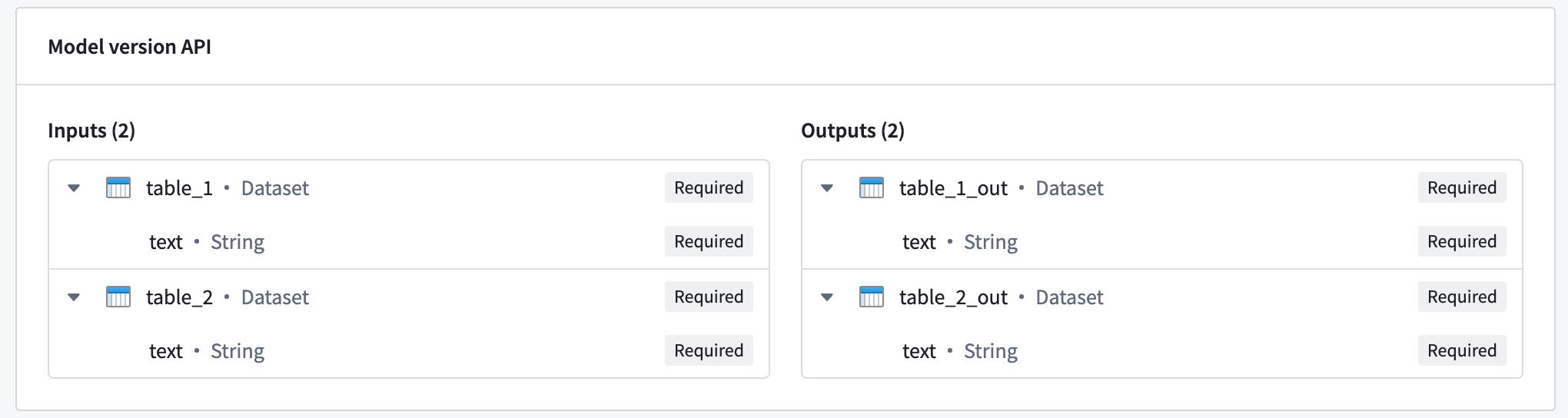
To query a multi I/O, use the same request format as shown in the previous examples, with the inference_request containing a named field for each input:
{
  "table_1": [{ "text": "Text for table one" }],
  "table_2": [{ "text": "Text for table two" }]
}
The model will also respond with an object containing a named field for each output:
{
  "table_1_out": [{ "text": "Result for table one" }],
  "table_2_out": [{ "text": "Result for table two" }],
}
Single I/O endpoint
:::callout{theme="warning"} Single I/O endpoints are no longer recommended for new implementations. Prefer the more flexible multi I/O endpoint described above. :::
- URL:
<ENVIRONMENT_URL>/foundry-ml-live/api/inference/transform/ri.foundry-ml-live.<LIVE_DEPLOYMENT_RID> <ENVIRONMENT_URL>: See section below for more information.- HTTP Method:
POST - Authentication type: Bearer token
- Required HTTP headers:
Content-Type: Must be"application/json".Authorization: Must be"Bearer <BEARER_TOKEN>", where<BEARER_TOKEN>is your authentication token.- Request Body: A JSON object with the following fields:
requestData: An array containing the information to be sent to the model. The expected shape of this depends on the API of the deployed model.- Response: A successful response will return a status code of
200and a JSON object containing the following fields: modelUuid: A string identifying the model.responseData: An array of objects, where each object represents the inference response of the model. The shape of these objects depends on the API of the deployed model.
Examples: Query a live deployment with the single I/O endpoint
:::callout{theme="warning"} Single I/O endpoints are no longer recommended for new implementations. Prefer the more flexible multi I/O endpoint described above. :::
For the following examples, we will use a model with a simple API of a single input and output.
The hosted model in this example expects a single input named inference_data, which is a dataset containing a text column. In this case, the expected request format would be the following:
{
  "requestData": [{ "text": "<Text goes here>" }],
  "requestParams": {},
}
The model responds with a dataset named output_data, which contains a prediction column. This translates to the following response:
{
  "modelUuid": "000-000-000",
  "responseData": [{
    "prediction": "<Model prediction here>"
  }]
}
Example: curl
curl --http2 -H "Content-Type: application/json" -H "Authorization: <BEARER_TOKEN>" -d '{"requestData":[ { "text": "Hello, how are you?" } ], "requestParams":{}}' --request POST <ENVIRONMENT_URL>/foundry-ml-live/api/inference/transform/ri.foundry-ml-live.<RID>
Example: Python
import requests
# This v1 endpoint is being sunset and only works for single input
# and single output models. Prefer the more generic v2 endpoint.
url = '<ENVIRONMENT_URL>/foundry-ml-live/api/inference/transform/ri.foundry-ml-live.<RID>'

inference_request = {
    'requestData': [{ 'text': 'Hello, how are you?' }],
    'requestParams': {},
}

response = requests.post(
    url,
    json=inference_request,
    headers={ 'Content-Type': 'application/json', 'Authorization': 'Bearer <BEARER_TOKEN>' })

if response.ok:
    modelResult = response.json()['responseData']
    print(modelResult)
else:
    print("An error occurred")
Example: JavaScript (using Node.js 18)
// Construct request
const inferenceRequest = {
  requestData: [{ text: "Hello, how are you?" }],
  requestParams: {},
};

// Send the request.
// This v1 endpoint is being sunset and will only work for single input
// and single output models. You should use the v2 endpoint instead of v1.
const response = await fetch(
  "<ENVIRONMENT_URL>/foundry-ml-live/api/inference/transform/ri.foundry-ml-live.<RID>",
  {
    method: "POST",
    headers: {
      "Content-Type": "application/json",
      Authorization:
        "Bearer <BEARER_TOKEN>",
    },
    body: JSON.stringify(inferenceRequest),
  }
);

if (!response.ok) {
  throw Error(`${response.status}: ${response.statusText}`);
}

const result = await response.json();

console.log(result.responseData);
Environment URL
In the examples shown above, the <ENVIRONMENT_URL> placeholder represents the URL of your environment. To retrieve your environment URL, copy the curl request from the Query tab of your deployment and extract the URL.
Error handling
The most common HTTP error codes are detailed below:
- 400: Caused by an invalid request or model failure.
- Usually caused by an exception that occurred during model inference. The stacktrace will usually be available in the response body to aid debugging.
- This error code is also returned if the request does not conform to the model API.
- 422: Caused by a request that is not properly formatted. Confirm that the JSON in the request is valid and in the expected format.
- 429: Caused by too many requests. Retry with backoff or reduce concurrency. Rate limits are dependent on your environment.
- 500: Caused by an internal server or deployment error. Manual intervention may be required.
- 503: The service or deployment is unavailable. This can happen when the deployment is under resource starvation, is out of memory, cannot handle more requests concurrently, or is automatically attempting to restart. Retry with backoff. Manual intervention may be required.
中文翻译
API:查询模型或建模目标的实时部署
在直接模型部署和建模目标中,您可以创建实时部署(live deployment)并通过 HTTP 端点托管模型。您可以通过以下方式从实时部署的查询(Query)选项卡测试托管的模型:通过模型上的函数在生产环境中使用模型,或直接使用实时部署 API。
要直接查询托管的模型,请从以下端点选项中选择:
- 多 I/O(输入/输出)端点: 一个灵活的端点,可以处理复杂的托管模型和输入类型,以及具有单一输入和输出的简单模型。多 I/O 端点 URL 以
/v2结尾,也称为"v2 端点"。 - 单 I/O 端点 [即将停用]: 一个传统端点,只能处理具有单一输入和输出 API 的简单托管模型。单 I/O 端点也称为"v1 端点",将在未来被弃用。
:::callout{theme="warning"} 单 I/O 端点已弃用,仅在建模目标部署中受支持。 :::
多 I/O 端点
多 I/O 端点(有时称为"v2 端点")是一个灵活的端点,支持一个或多个输入以及一个或多个输出。
- URL:
<ENVIRONMENT_URL>/foundry-ml-live/api/inference/transform/ri.foundry-ml-live.<LIVE_DEPLOYMENT_RID>/v2 <ENVIRONMENT_URL>:更多信息请参见下方章节。- HTTP 方法:
POST - 认证类型: Bearer token
- 必需的 HTTP 头:
Content-Type:必须为"application/json"。Authorization:必须为"Bearer <BEARER_TOKEN>",其中<BEARER_TOKEN>是您的认证令牌。- 请求体: 一个 JSON 对象,包含要发送到模型的信息。其预期结构取决于已部署模型的 API。
- 响应: 成功响应将返回状态码
200和一个 JSON 对象,表示模型返回的推理响应。该对象的结构将反映当前部署模型的 API。
示例:使用多 I/O 端点查询实时部署
在以下示例中,我们将使用一个具有单一输入和输出简单 API 的模型。
此示例中的托管模型期望一个名为 inference_data 的单一输入,这是一个包含 text 列的数据集。在这种情况下,预期的请求格式如下:
{
  "inference_data": [{
    "text": "<此处输入文本>"
  }]
}
模型响应一个名为 output_data 的数据集,其中包含一个 prediction 列。这对应以下响应:
{
  "output_data": [{
    "prediction": "<模型预测结果>"
  }]
}
示例:curl
curl --http2 -H "Content-Type: application/json" -H "Authorization: <BEARER_TOKEN>" -d '{ "inference_data": [ { "text": "Hello, how are you?" } ] }' --request POST <ENVIRONMENT_URL>/foundry-ml-live/api/inference/transform/ri.foundry-ml-live.<LIVE_DEPLOYMENT_RID>/v2
示例:Python
import requests

url = '<ENVIRONMENT_URL>/foundry-ml-live/api/inference/transform/ri.foundry-ml-live.<LIVE_DEPLOYMENT_RID>/v2'

inference_request = { 'inference_data': [ { 'text': 'Hello, how are you?' } ] }

response = requests.post(
    url,
    json=inference_request,
    headers={ 'Content-Type': 'application/json', 'Authorization': 'Bearer <BEARER_TOKEN>' })

if response.ok:
    modelResult = response.json()
    print(modelResult)
else:
    print("An error occurred")
示例:JavaScript(使用 Node.js 18)
  // 构建请求
  const inferenceRequest = {
    "inference_data": [{
      "text": "Hello, how are you?"
    }]
  };

  // 发送请求
  const response = await fetch(
    "<ENVIRONMENT_URL>/foundry-ml-live/api/inference/transform/ri.foundry-ml-live.<RID>/v2",
    {
      method: "POST",
      headers: {
        "Content-Type": "application/json",
        Authorization:
          "Bearer <BEARER_TOKEN>",
      },
      body: JSON.stringify(inferenceRequest),
    }
  );

  if (!response.ok) {
    throw Error(`${response.status}: ${response.statusText}`);
  }

  const result = await response.json();

  console.log(result);
示例:多 I/O 模型
多 I/O 模型可以接收多个输入并返回多个输出。下图显示了一个具有多个输入和输出的模型示例:
要查询多 I/O 模型,请使用与前面示例相同的请求格式,其中 inference_request 包含每个输入的命名字段:
{
  "table_1": [{ "text": "表格一的文本" }],
  "table_2": [{ "text": "表格二的文本" }]
}
模型还将响应一个包含每个输出命名字段的对象:
{
  "table_1_out": [{ "text": "表格一的结果" }],
  "table_2_out": [{ "text": "表格二的结果" }],
}
单 I/O 端点
:::callout{theme="warning"} 不建议在新实现中使用单 I/O 端点。请优先使用上述更灵活的多 I/O 端点。 :::
- URL:
<ENVIRONMENT_URL>/foundry-ml-live/api/inference/transform/ri.foundry-ml-live.<LIVE_DEPLOYMENT_RID> <ENVIRONMENT_URL>:更多信息请参见下方章节。- HTTP 方法:
POST - 认证类型: Bearer token
- 必需的 HTTP 头:
Content-Type:必须为"application/json"。Authorization:必须为"Bearer <BEARER_TOKEN>",其中<BEARER_TOKEN>是您的认证令牌。- 请求体: 一个 JSON 对象,包含以下字段:
requestData:一个数组,包含要发送到模型的信息。其预期结构取决于已部署模型的 API。- 响应: 成功响应将返回状态码
200和一个 JSON 对象,包含以下字段: modelUuid:标识模型的字符串。responseData:对象数组,每个对象表示模型的推理响应。这些对象的结构取决于已部署模型的 API。
示例:使用单 I/O 端点查询实时部署
:::callout{theme="warning"} 不建议在新实现中使用单 I/O 端点。请优先使用上述更灵活的多 I/O 端点。 :::
在以下示例中,我们将使用一个具有单一输入和输出简单 API 的模型。
此示例中的托管模型期望一个名为 inference_data 的单一输入,这是一个包含 text 列的数据集。在这种情况下,预期的请求格式如下:
{
  "requestData": [{ "text": "<此处输入文本>" }],
  "requestParams": {},
}
模型响应一个名为 output_data 的数据集,其中包含一个 prediction 列。这对应以下响应:
{
  "modelUuid": "000-000-000",
  "responseData": [{
    "prediction": "<模型预测结果>"
  }]
}
示例:curl
curl --http2 -H "Content-Type: application/json" -H "Authorization: <BEARER_TOKEN>" -d '{"requestData":[ { "text": "Hello, how are you?" } ], "requestParams":{}}' --request POST <ENVIRONMENT_URL>/foundry-ml-live/api/inference/transform/ri.foundry-ml-live.<RID>
示例:Python
import requests
# 此 v1 端点即将停用,仅适用于单输入
# 和单输出模型。请优先使用更通用的 v2 端点。
url = '<ENVIRONMENT_URL>/foundry-ml-live/api/inference/transform/ri.foundry-ml-live.<RID>'

inference_request = {
    'requestData': [{ 'text': 'Hello, how are you?' }],
    'requestParams': {},
}

response = requests.post(
    url,
    json=inference_request,
    headers={ 'Content-Type': 'application/json', 'Authorization': 'Bearer <BEARER_TOKEN>' })

if response.ok:
    modelResult = response.json()['responseData']
    print(modelResult)
else:
    print("An error occurred")
示例:JavaScript(使用 Node.js 18)
// 构建请求
const inferenceRequest = {
  requestData: [{ text: "Hello, how are you?" }],
  requestParams: {},
};

// 发送请求。
// 此 v1 端点即将停用,仅适用于单输入
// 和单输出模型。您应该使用 v2 端点代替 v1。
const response = await fetch(
  "<ENVIRONMENT_URL>/foundry-ml-live/api/inference/transform/ri.foundry-ml-live.<RID>",
  {
    method: "POST",
    headers: {
      "Content-Type": "application/json",
      Authorization:
        "Bearer <BEARER_TOKEN>",
    },
    body: JSON.stringify(inferenceRequest),
  }
);

if (!response.ok) {
  throw Error(`${response.status}: ${response.statusText}`);
}

const result = await response.json();

console.log(result.responseData);
环境 URL
在上述示例中,<ENVIRONMENT_URL> 占位符代表您环境的 URL。要获取您的环境 URL,请从部署的查询(Query)选项卡复制 curl 请求并提取 URL。
错误处理
最常见的 HTTP 错误码如下:
- 400: 由无效请求或模型故障引起。
- 通常由模型推理期间发生的异常引起。堆栈跟踪通常可在响应体中获取,以帮助调试。
- 如果请求不符合模型 API,也会返回此错误码。
- 422: 由格式不正确的请求引起。请确认请求中的 JSON 有效且格式符合预期。
- 429: 由请求过多引起。请使用退避重试或降低并发度。速率限制取决于您的环境。
- 500: 由内部服务器或部署错误引起。可能需要手动干预。
- 503: 服务或部署不可用。当部署资源不足、内存耗尽、无法处理更多并发请求或正在自动尝试重启时,可能会发生此情况。请使用退避重试。可能需要手动干预。