Model inference history(模型推理历史记录)
The model inference history is a dataset in Foundry that captures all inference requests (inputs) and inference results (outputs) that are sent to a Modeling Objective live deployment. This can enable many workflows, such as the following:
- Drift detection: Model inference history can help you to detect changes in a model's performance over time, which might indicate a drift in the underlying data distribution. Examining the inference history can provide valuable insights into how the model's accuracy is evolving.
- Continuous retraining: Model inference history can be used in continuous retraining scenarios, in which a model is iteratively trained with new data based on the model's previous predictions.
- Performance evaluation for model: The history of inference inputs and outputs can be used to evaluate a model's performance over time. Inference history can help you to identify patterns and trends in the model's performance.
- Usage Analysis: The inference history can help you to understand where and how frequently a model is being called. These insights into a model's usage patterns can inform decisions about resource allocation and optimization.
Model inference history usage
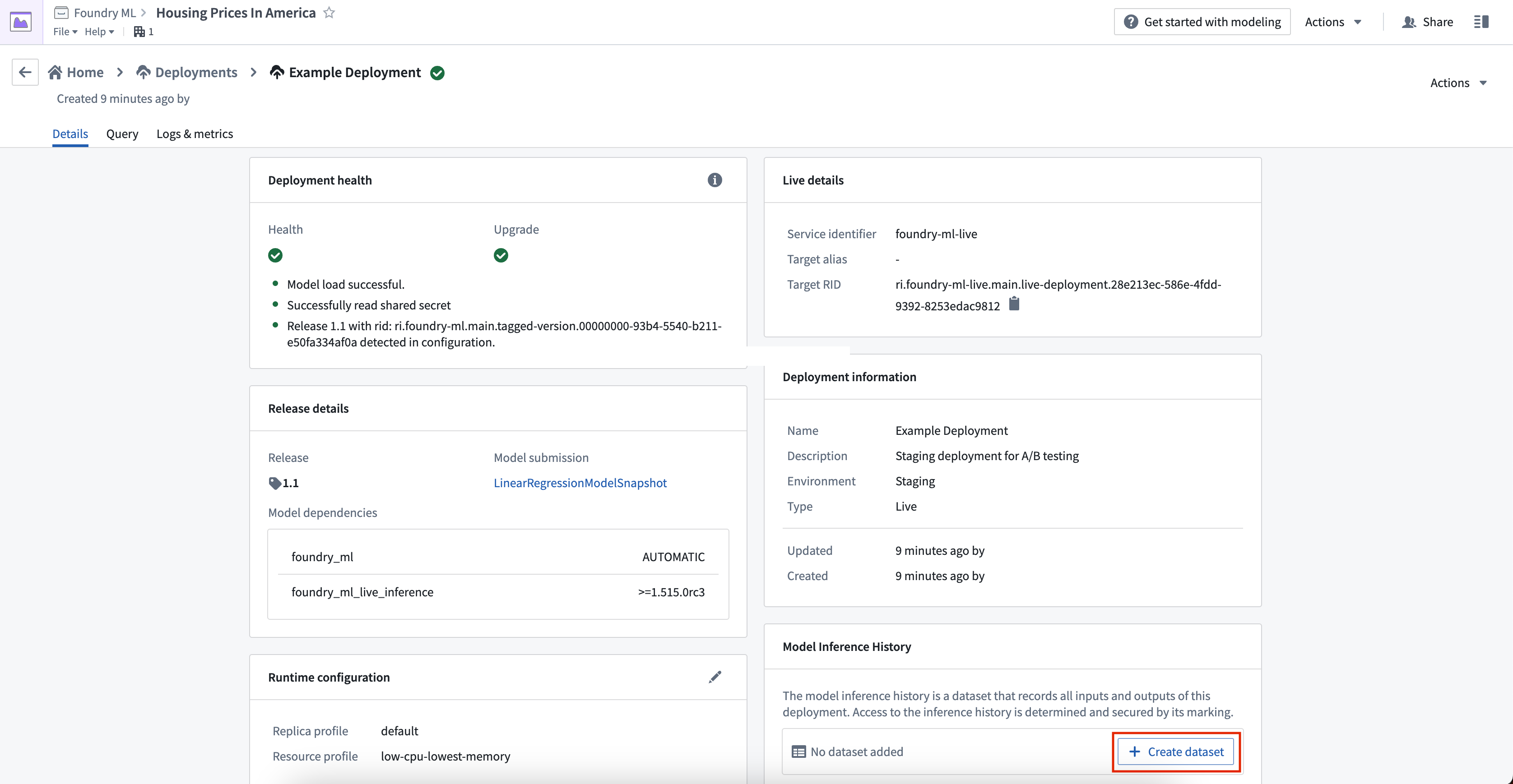
To create a model inference history, navigate to the Deployments page of your Modeling Objective and select the live deployment to which you would like to add the model inference history. Under the Model Inference History card, click on Create dataset. This will open the Create new model inference history dialog.
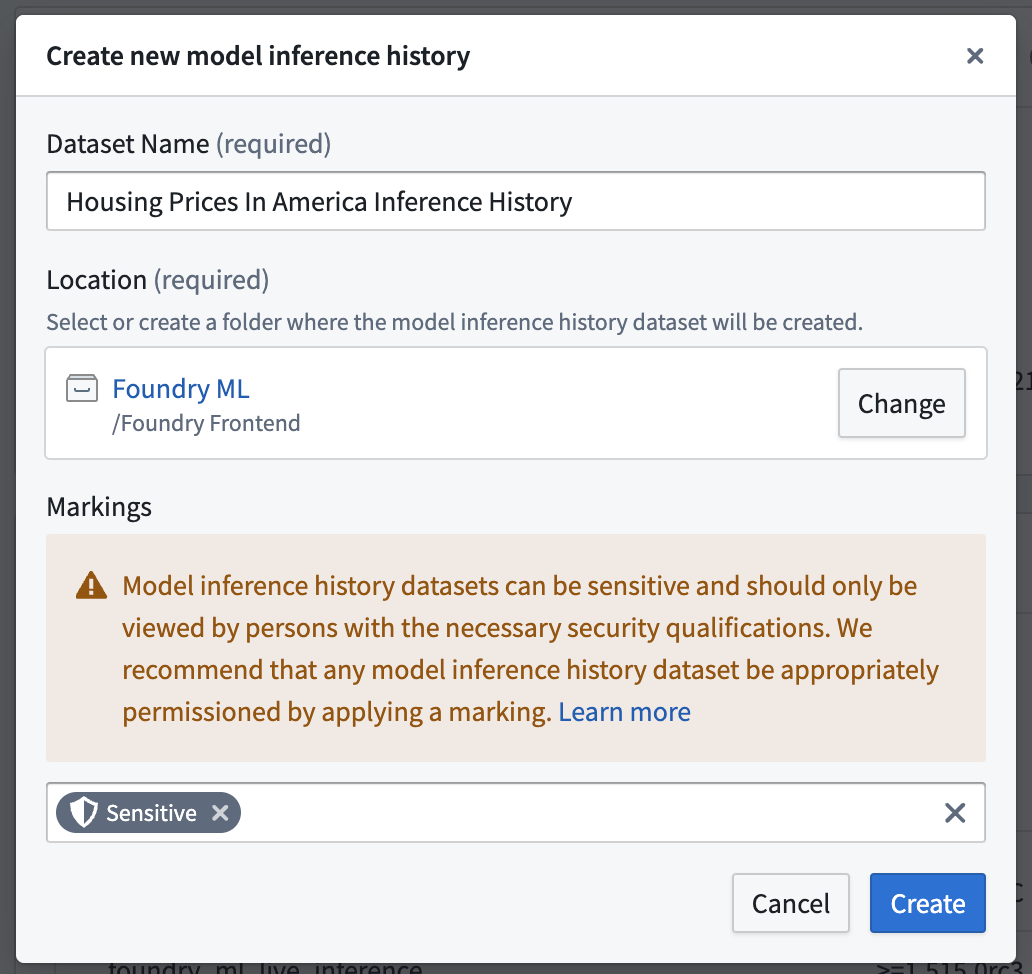
In the Create new model inference history dialog, enter a dataset name and location for the model inference history. We strongly recommend adding Security Markings since inputs and outputs may contain sensitive information and should only be accessible by individuals with the appropriate security permissions.
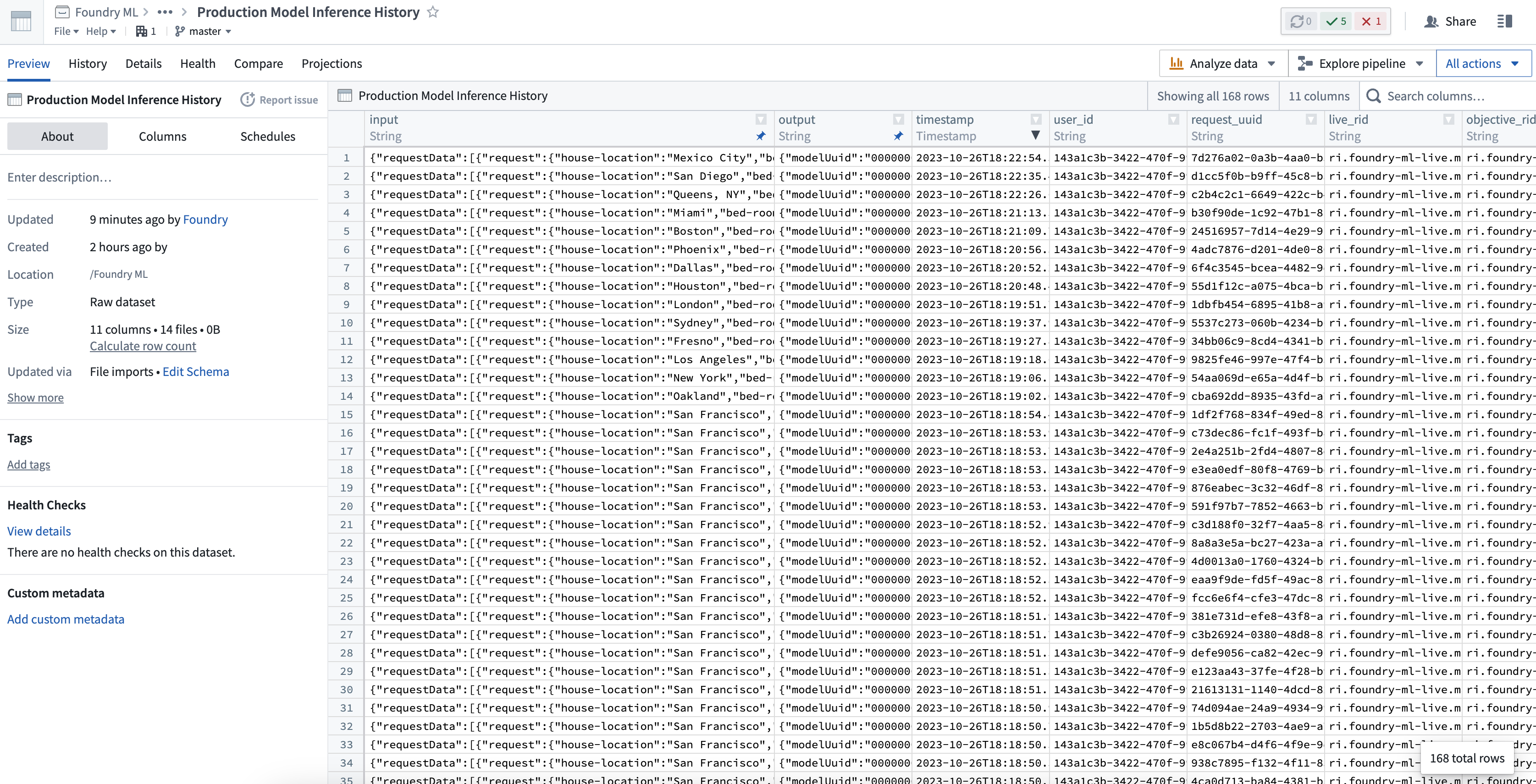
Once the model inference history is created, the following information will be recorded in the dataset:
timestamp: Timestamp of the input requestuser_id: Foundry user ID of the person who sent the requestrequest_uuid: Unique identifier of the requestlive_rid: Modeling live deployment resource identifierobjective_rid: Modeling objective resource identifiermodel_rid: Model asset resource identifiermodel_version_rid: Model asset version resource identifierinput: JSON representation of the input sent to the modeloutput: JSON representation of the model outputerror: Detailed error message or stacktrace encountered by the model while running inference on the provided input
To temporarily enable or disable a model inference history, click the toggle in the top right corner of the Model Inference History card labeled Enable Recording.
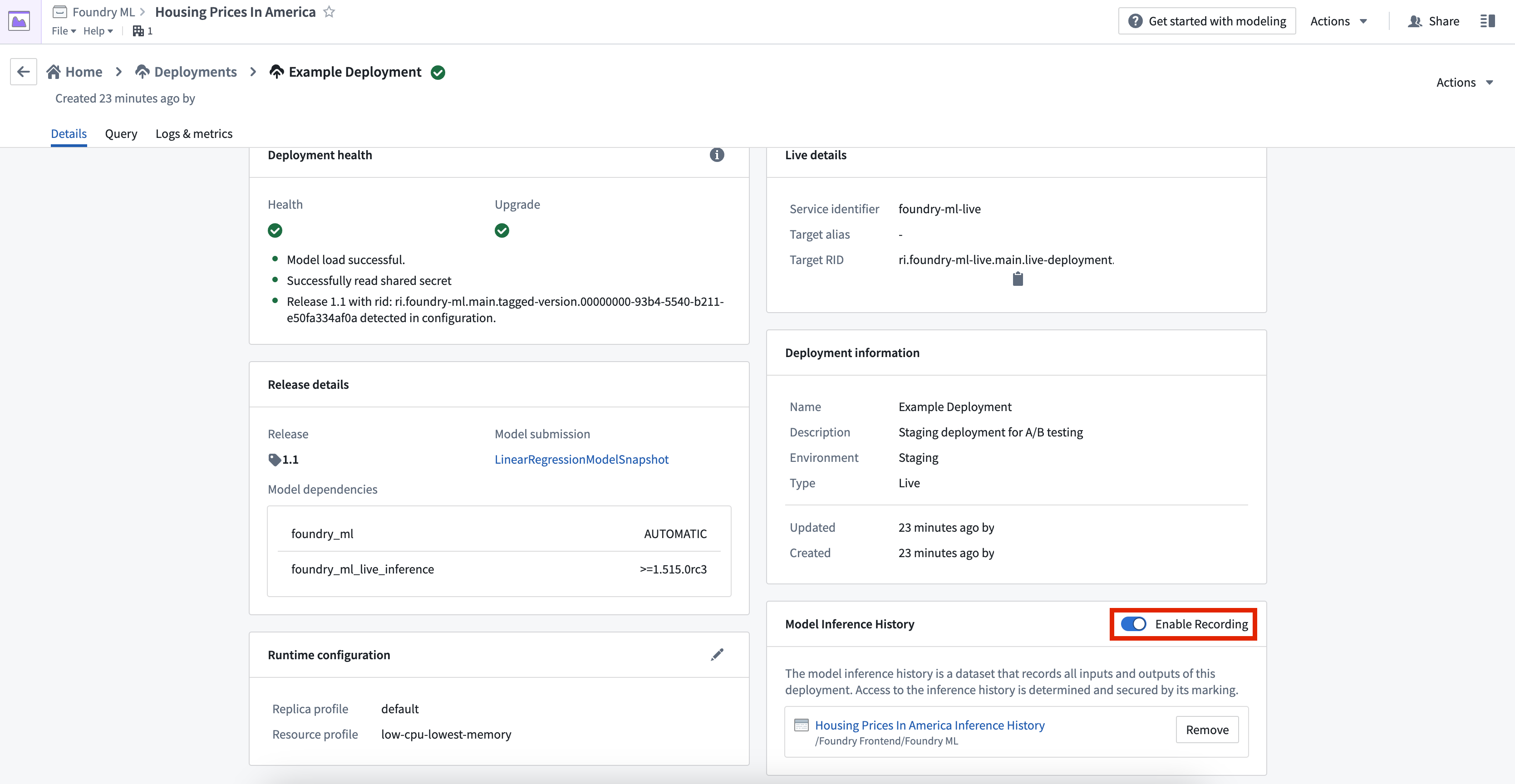
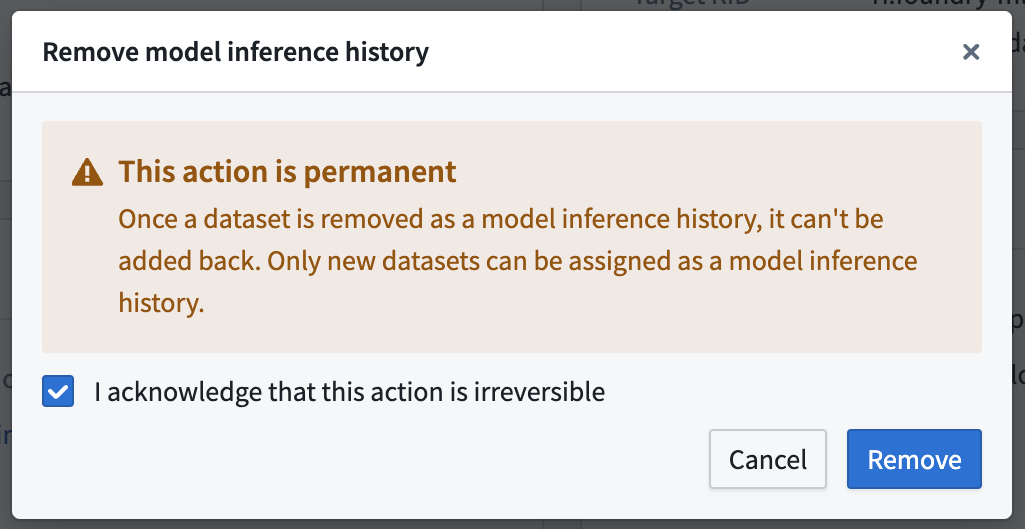
To permanently disable a model inference history, select Remove to the right of the dataset in the Model Inference History card.
:::callout{theme="danger"} Removing a model inference history is permanent and cannot be undone. Once a dataset is removed as a model inference history, the dataset will still exist, but cannot be added back to a deployment. :::
Frequently Asked Questions (FAQ)
What permissions are required to set up a model inference history on my live deployment?
To enable a model inference history a user requires the gatekeeper permission foundry-ml-live:edit-inference-ledger. Typically, this is granted with the "owner" role on a modeling objective.
Where can I save a model inference history dataset?
As inputs and outputs may contain sensitive information, you are required to save the dataset to the same project as its parent modeling objective.
Can I write model inference history inputs and outputs to an existing dataset?
To ensure the model inference history matches the designated schema, you cannot choose an existing dataset for the model inference history.
What happens if I remove my model inference history?
If you remove your model inference history, the dataset will not be deleted, however, Foundry will stop writing new records to it.
How do I temporarily enable/disable my model inference history?
You can use the recording toggle to temporarily enable or disable your model inference history.
Are there guarantees that all inference inputs will be logged to the model inference history?
Not all inputs and outputs are guaranteed to appear in the inference history. To maintain platform performance, requests that fail when trying to write to the model inference history are not retried.
中文翻译
模型推理历史记录
模型推理历史记录是 Foundry 中的一个数据集,用于捕获发送到建模目标(Modelling Objective)实时部署的所有推理请求(输入)和推理结果(输出)。这可以支持多种工作流程,例如:
- 漂移检测(Drift detection): 模型推理历史记录可以帮助您检测模型性能随时间的变化,这可能表明底层数据分布发生了漂移。检查推理历史记录可以为了解模型准确性的演变提供有价值的见解。
- 持续重新训练(Continuous retraining): 模型推理历史记录可用于持续重新训练场景,即根据模型之前的预测结果,使用新数据对模型进行迭代训练。
- 模型性能评估(Performance evaluation for model): 推理输入和输出的历史记录可用于评估模型随时间变化的性能。推理历史记录可以帮助您识别模型性能中的模式和趋势。
- 使用情况分析(Usage Analysis): 推理历史记录可以帮助您了解模型被调用的位置和频率。这些关于模型使用模式的见解可以为资源分配和优化的决策提供依据。
模型推理历史记录的使用
要创建模型推理历史记录,请导航至建模目标(Modelling Objective)的部署(Deployments)页面,然后选择要添加模型推理历史记录的实时部署。在模型推理历史记录(Model Inference History)卡片下,点击创建数据集(Create dataset)。这将打开创建新的模型推理历史记录(Create new model inference history)对话框。
在创建新的模型推理历史记录对话框中,输入数据集名称和模型推理历史记录的位置。我们强烈建议添加安全标记(Security Markings),因为输入和输出可能包含敏感信息,并且只应允许具有适当安全权限的个人访问。
创建模型推理历史记录后,以下信息将被记录在数据集中:
timestamp:输入请求的时间戳user_id:发送请求的 Foundry 用户 IDrequest_uuid:请求的唯一标识符live_rid:建模实时部署资源标识符objective_rid:建模目标资源标识符model_rid:模型资产资源标识符model_version_rid:模型资产版本资源标识符input:发送给模型的输入的 JSON 表示output:模型输出的 JSON 表示error:模型在对提供的输入运行推理时遇到的详细错误消息或堆栈跟踪
要临时启用或禁用模型推理历史记录,请点击模型推理历史记录卡片右上角标记为启用记录(Enable Recording)的切换开关。
要永久禁用模型推理历史记录,请在模型推理历史记录卡片中选择数据集右侧的移除(Remove)。
:::callout{theme="danger"} 移除模型推理历史记录是永久性操作,无法撤销。一旦数据集被移除作为模型推理历史记录,该数据集仍然存在,但无法再添加回部署中。 :::
常见问题解答 (FAQ)
在我的实时部署上设置模型推理历史记录需要哪些权限?
要启用模型推理历史记录,用户需要拥有门卫权限 foundry-ml-live:edit-inference-ledger。通常,这通过建模目标上的"所有者(owner)"角色授予。
我可以将模型推理历史记录数据集保存在哪里?
由于输入和输出可能包含敏感信息,您需要将数据集保存到与其父建模目标相同的项目中。
我可以将模型推理历史记录的输入和输出写入现有数据集吗?
为确保模型推理历史记录符合指定的模式,您不能为模型推理历史记录选择现有数据集。
如果我移除模型推理历史记录会发生什么?
如果您移除了模型推理历史记录,数据集不会被删除,但 Foundry 将停止向其中写入新记录。
如何临时启用/禁用我的模型推理历史记录?
您可以使用录制切换开关来临时启用或禁用模型推理历史记录。
是否保证所有推理输入都会被记录到模型推理历史记录中?
并非所有输入和输出都保证会出现在推理历史记录中。为了保持平台性能,尝试写入模型推理历史记录时失败的请求不会重试。