Modeling Objective settings(建模目标设置)
A modeling objective has a number of configuration options available and described below. You can navigate to the Modeling Objective settings page from the Modeling Objective home page by clicking Modeling objective settings at the top-right of the interface.
Checks
Objective checks are a way to ensure that models pass predefined quality checks before a model is operationalized. Full details of objective checks are available in the documentation on how to set up checks for all submissions.
Deployments
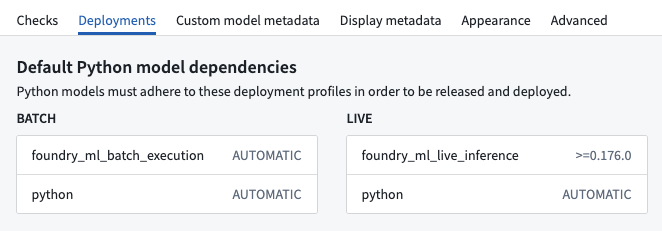
The deployment settings page defines the model submission deployment profile requirements for Python model submissions before they can be operationalized in a batch or live deployment.
Model metadata
Models that are submitted to a modeling objective can have model submission-specific metadata inside a modeling objective. That metadata can be configured for a certain objective to ensure relevant information about the models are tracked. For full configuration details, see the documentation on how to configure objective metadata.
Appearance
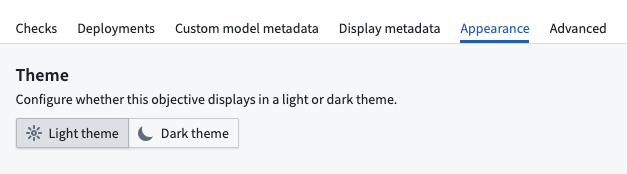
With appearance settings, you can configure whether an individual modeling objective will display in light mode or dark mode.
Advanced
The advanced settings page has non-standard configuration options. Typically, the advanced settings for a modeling objective should not be adjusted. These settings are provided to allow for backward compatibility with legacy functionality.
Evaluation settings
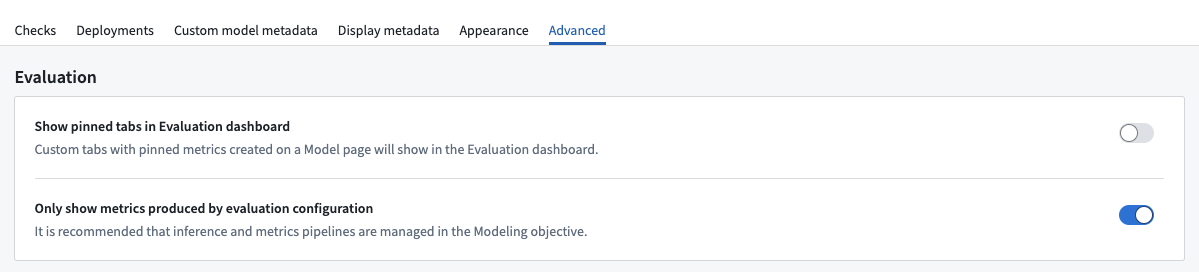
There are two advanced configuration options for the evaluation dashboard: Only show metrics produced by evaluation configuration and Show pinned tabs in evaluation dashboard.
Only show metrics produced by evaluation configuration
When a modeling objective is set to only show metrics produced by evaluation configuration, then only metrics created via the evaluation configuration will be displayed on the evaluation dashboard. We recommend enabling this setting to ensure a standard evaluation process for models in your modeling objective. If this setting is not enabled, it is not possible for your modeling objective to know whether the displayed model metrics are up to date.
:::callout{theme="neutral"} Metric pipelines configured via legacy pipeline management will not be displayed unless Only show metrics produced by evaluation configuration is toggled off. :::
In some circumstances, such as for modeling objectives which were configured before evaluation configuration was released or for non-production modeling objectives that have metrics defined in code, it may be preferable to display the metrics from outside of the modeling objective evaluation configuration, which can be enabled with this setting.
Show pinned tabs in evaluation dashboard
Optionally, the evaluation dashboard on a modeling objective can be configured to display custom metric views alongside subset tabs on the evaluation dashboard.
Inference and metrics dataset naming
Datasets produced by legacy metrics pipeline management could create naming conflicts if multiple modeling objectives created inference and metrics datasets in the same output folder, leading to unexpected behavior. This is resolved in the updated evaluation dashboard and configuration.
To maintain backwards compatibility, it is possible to use the legacy inference and metrics dataset naming scheme.
Updated naming convention:
- Inference datasets:
inference_<Model Submission Name>_<Evaluation Dataset Name>-<Generated Hash> - Metrics datasets:
metrics_<Model Submission Name>_<Evaluation Dataset Name>_<Evaluation Library Name>-<Generated Hash>
Legacy naming convention:
- Inference datasets:
<Model Submission Name> inference - Metrics datasets:
<Model Submission Name> metrics
中文翻译
建模目标设置
建模目标(Modeling Objective)提供多种配置选项,详情如下。您可以从建模目标主页导航至设置页面,只需点击界面右上角的建模目标设置即可。
检查
目标检查(Objective Checks)是一种机制,确保模型在投入运营前通过预定义的质量检查。关于目标检查的完整说明,请参阅如何为所有提交设置检查文档。
部署
部署设置页面定义了Python模型提交在批量或实时部署中投入运营前所需的模型提交部署配置文件要求。
模型元数据
提交至建模目标的模型可包含特定于模型提交的元数据。可为特定目标配置该元数据,以确保跟踪模型的相关信息。完整配置说明请参阅如何配置目标元数据文档。
外观
通过外观设置,您可以配置单个建模目标以浅色模式或深色模式显示。
高级
高级设置页面包含非标准配置选项。通常不建议调整建模目标的高级设置。提供这些设置是为了与旧版功能保持向后兼容。
评估设置
评估仪表板有两个高级配置选项:仅显示评估配置生成的指标和在评估仪表板中显示固定标签页。
仅显示评估配置生成的指标
当建模目标设置为仅显示评估配置生成的指标时,只有通过评估配置创建的指标会显示在评估仪表板上。我们建议启用此设置,以确保建模目标中的模型采用标准评估流程。若未启用此设置,建模目标将无法判断所显示模型指标是否为最新数据。
:::callout{theme="neutral"} 通过旧版管道管理配置的指标管道将不会显示,除非关闭仅显示评估配置生成的指标选项。 :::
在某些情况下(例如在评估配置发布前配置的建模目标,或使用代码定义指标的非生产环境建模目标),可能更适合显示来自建模目标评估配置之外的指标,可通过此设置启用。
在评估仪表板中显示固定标签页
可选地,建模目标的评估仪表板可配置为在评估仪表板上显示自定义指标视图及子集标签页。
推理与指标数据集命名
若多个建模目标在同一输出文件夹中创建推理和指标数据集,旧版指标管道管理生成的数据集可能产生命名冲突,导致意外行为。更新后的评估仪表板和配置已解决此问题。
为保持向后兼容,仍可使用旧版推理和指标数据集命名方案。
更新后的命名规则:
- 推理数据集:
inference_<模型提交名称>_<评估数据集名称>-<生成哈希> - 指标数据集:
metrics_<模型提交名称>_<评估数据集名称>_<评估库名称>-<生成哈希>
旧版命名规则:
- 推理数据集:
<模型提交名称> inference - 指标数据集:
<模型提交名称> metrics