Set up checks for all submissions(为所有提交设置检查)
Modeling objective checks are a way to ensure that models pass predefined quality checks before a model is operationalized. Objective checks are customizable per objective and allow model reviewers with different expertise to collaboratively evaluate a model’s performance. This evaluation ensures that model status and discussions are transparent and organized to present a clear picture of a model’s quality to all stakeholders of a modeling objective.
For example, as the manager of a modeling project, you might want all candidate models submitted to your objective to be approved prior to release. Some approvals you may require could come from:
- A pipeline infrastructure team that confirms that your model passes the smoke tests.
- A data science team that is responsible for making sure the model's metrics meet the relevant requirements prior to deploying it to an operational application.
- An ethics team that ensures proper balance in the training data or that the model meets institutional fairness requirements.
For each of the checks above, focused discussion threads with the perspective reviewer groups or users can help with reaching a conclusion on the model’s readiness for deployment and to gather feedback for your next model iteration.
You can configure an objective check for each checkpoint above to create independent discussion threads for a focused collaboration space to evaluate all model submissions in the objective.
Configure objective checks
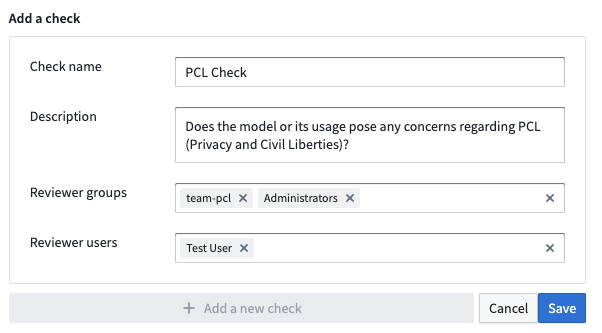
To configure checks for your objective, go to the Settings page in the right sidebar and then navigate to the Checks tab. Here, you can create a new check with the name, description, and users or groups that are eligible to approve this check. In the example below, this check will be marked as approved if anyone from the pcl-team group or the Administrators group approves the check.
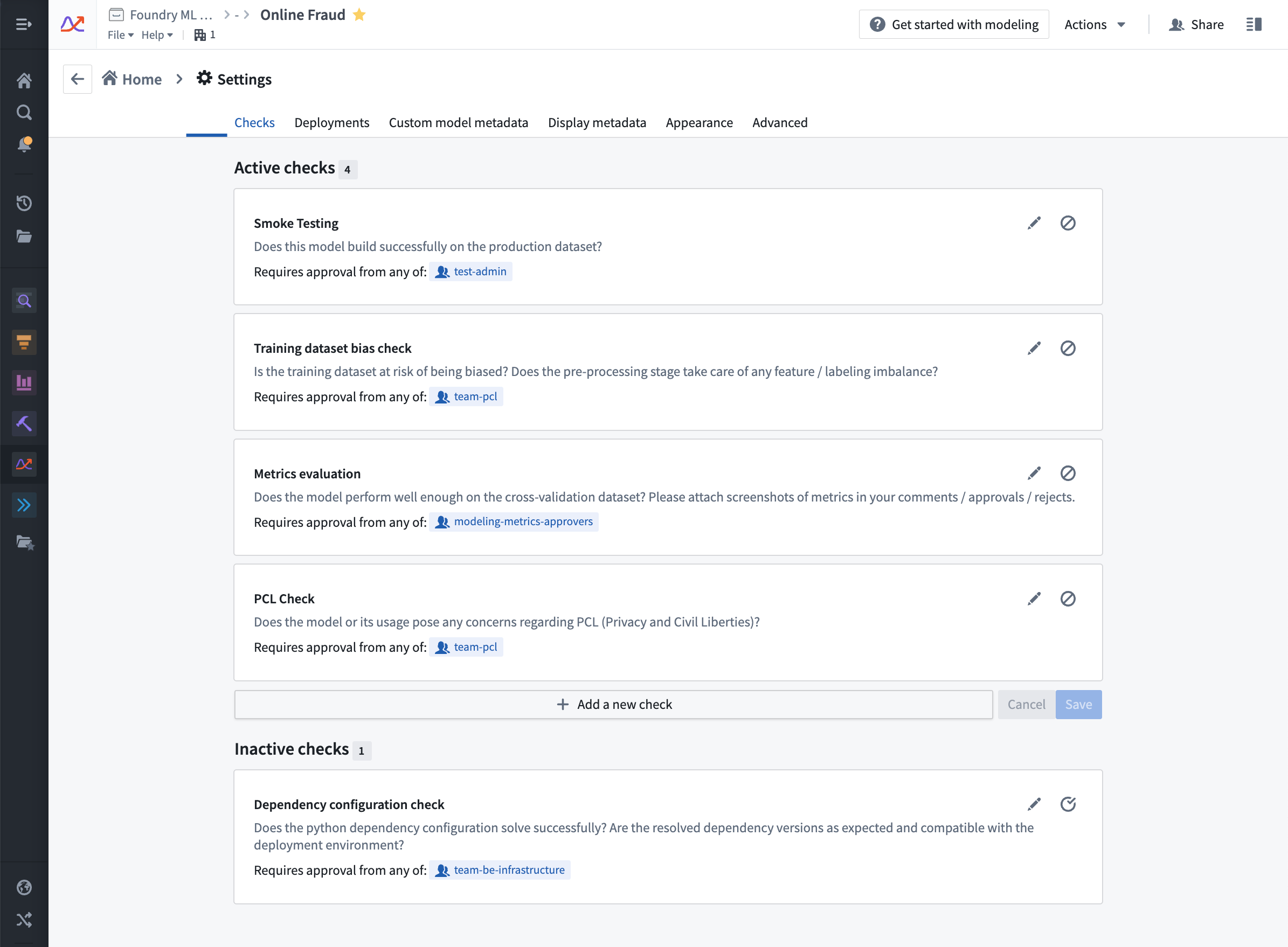
You can add additional checks based on your needs, or follow the example checks below.
Collaborate on model submission evaluation with checks
Now that you have configured relevant checks for your objective, you can start collaborating with various reviewer groups to evaluate your model submissions.
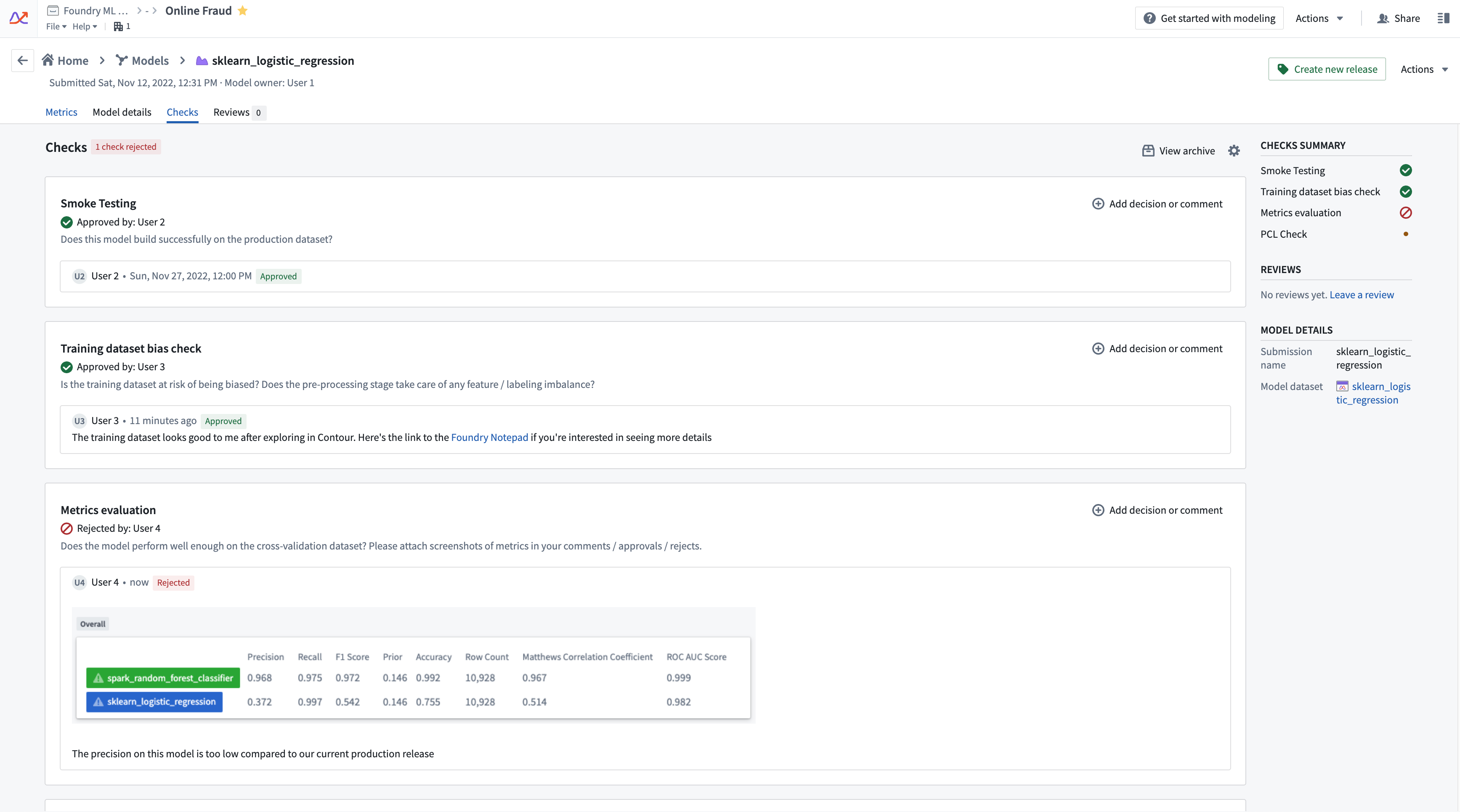
On the model submission page, navigate to the Checks panel. Here, you can see the checks you have configured for your objective. Reviewers can approve, reject, or comment on each check when evaluating the model submission. Additionally, reviewers can add attachments (such as a screenshot of metrics) or tag user groups as they see fit.
Currently, it is not mandatory for all checks to be approved before creating a release for a model submission.
Automatic evaluation-based checks
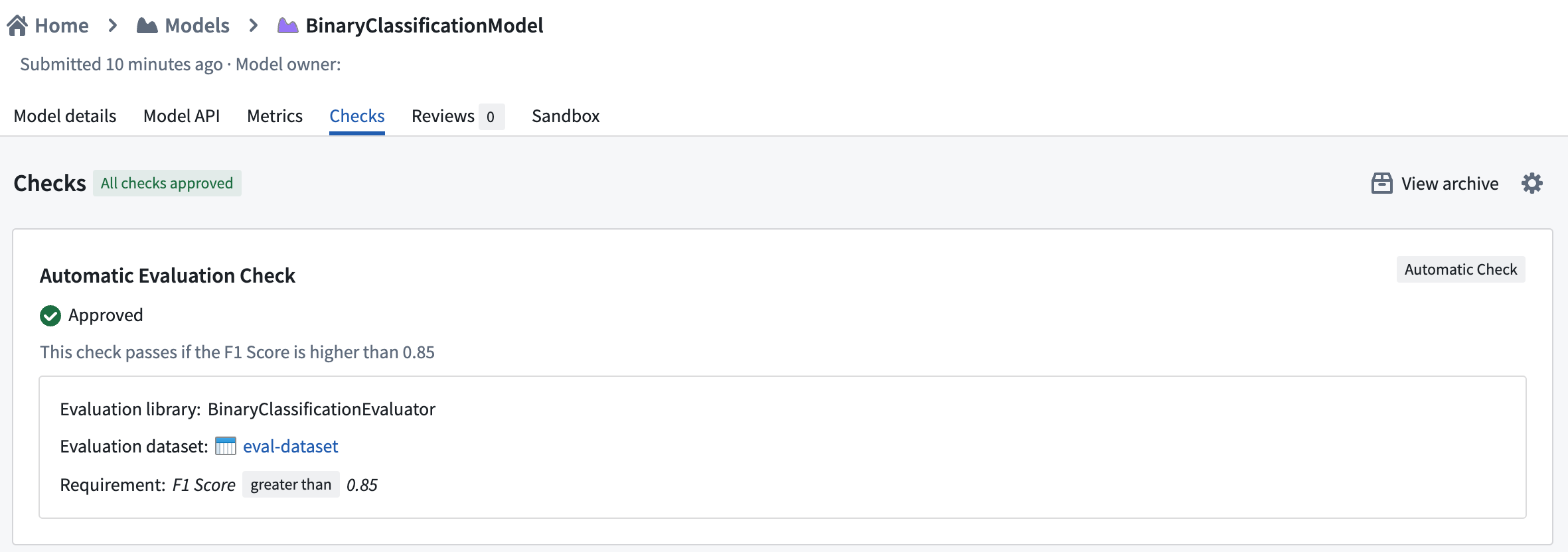
Checks can also be created where its status is based on the result of an evaluation performed on a given input dataset and evaluation library.
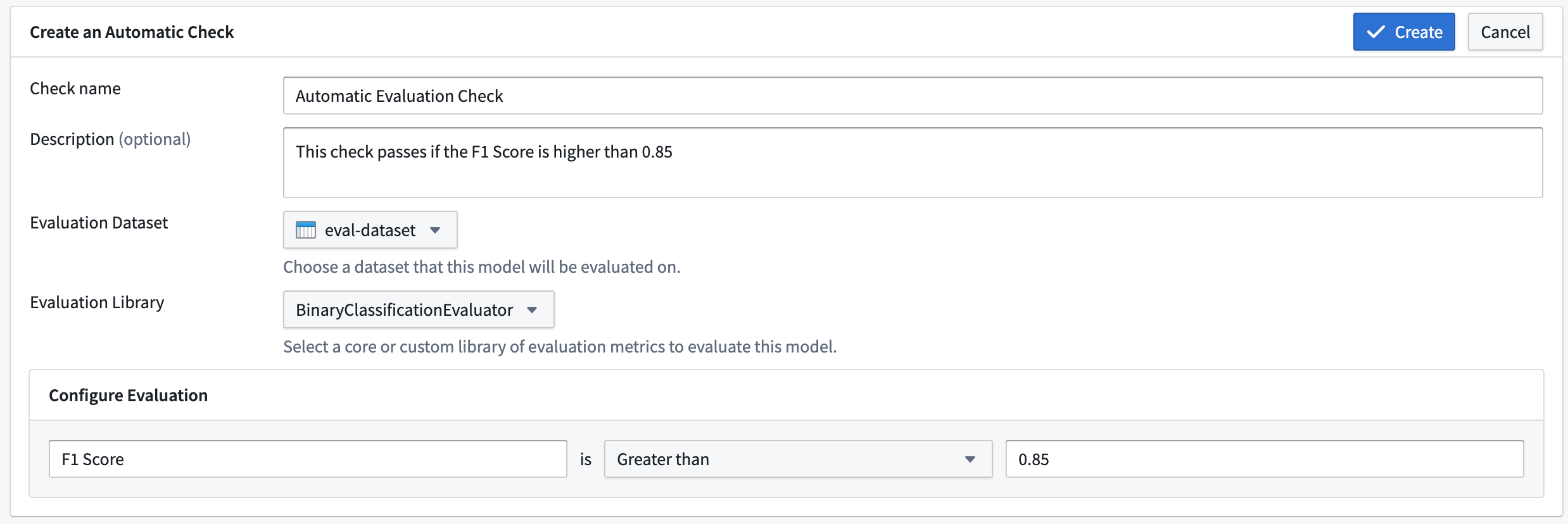
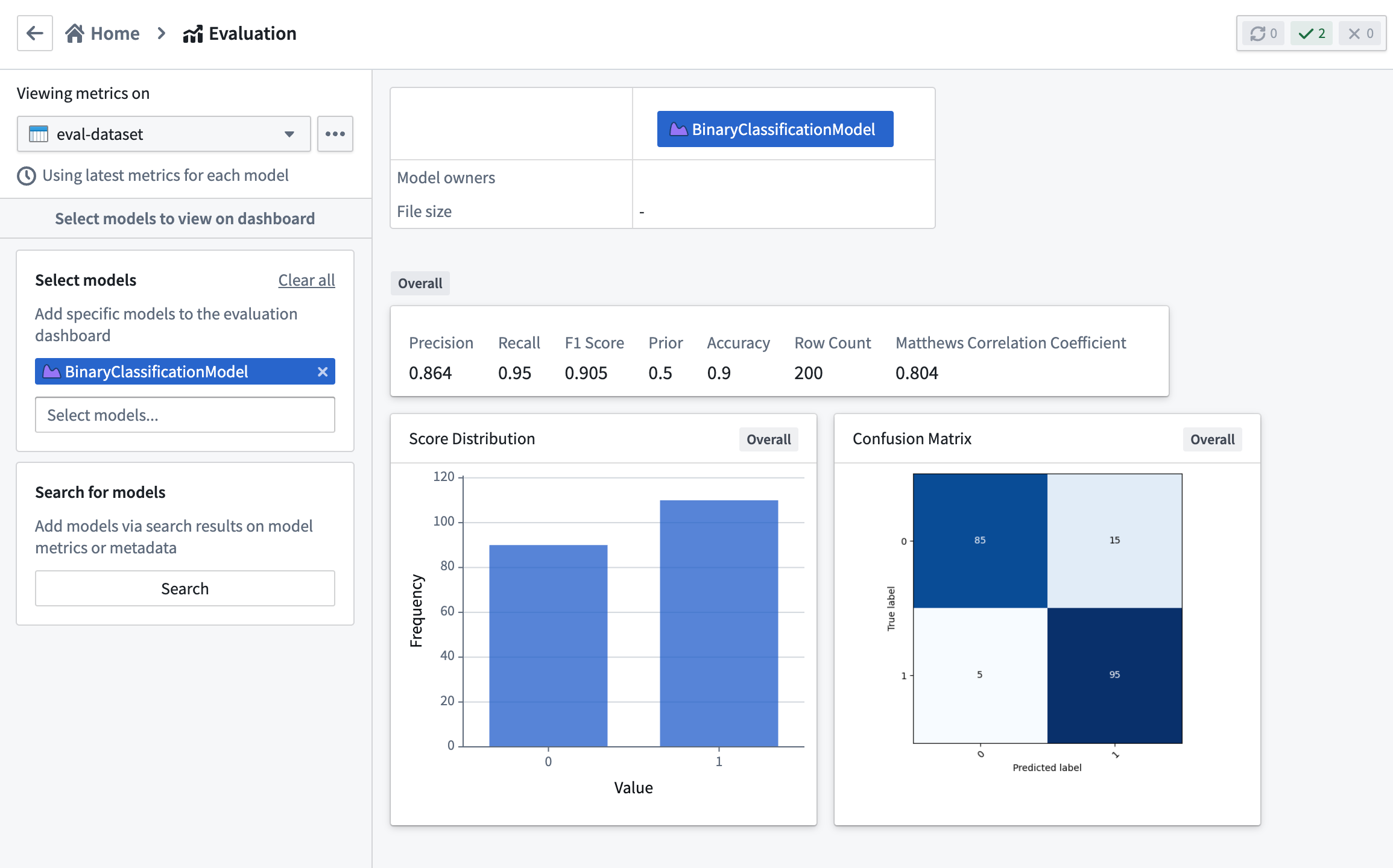
The available choices of input dataset and evaluation library will be inherited from the evaluation configuration defined in the modeling objective's evaluation dashboard. In addition, the metrics built using the evaluation dashboard are used to determine the status of the check.
The metric requirement defines the conditions for a submission to pass this check. A PASS status is achieved when the metric satisfies the requirement. If the metric fails the requirement or is not found in the set of metrics produced by the chosen evaluation library, a status of REJECT is given with a message describing the reason for rejection. If metrics were not yet built for the combination of submission, input dataset, and evaluation library associated with the check, the status of the check will be PENDING. A pending status will also occur if the metrics build fails.
Archive a check
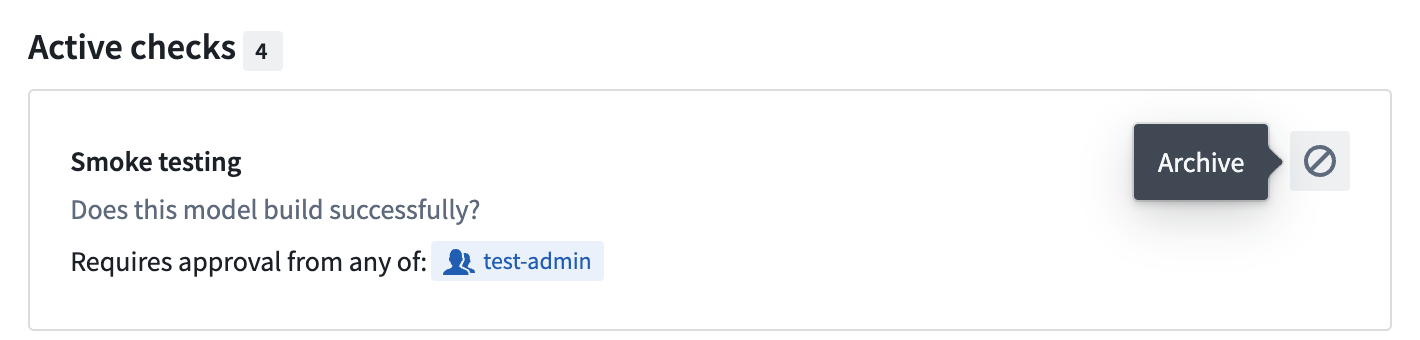
You can archive an objective check with the “disable” icon next to the check in the Settings page. Archived checks are no longer shown on the submission’s checks page by default. However, prior comments and approval histories for archived checks can be still seen by selecting the View archive button on the submission’s checks panel.
Filter models by check status
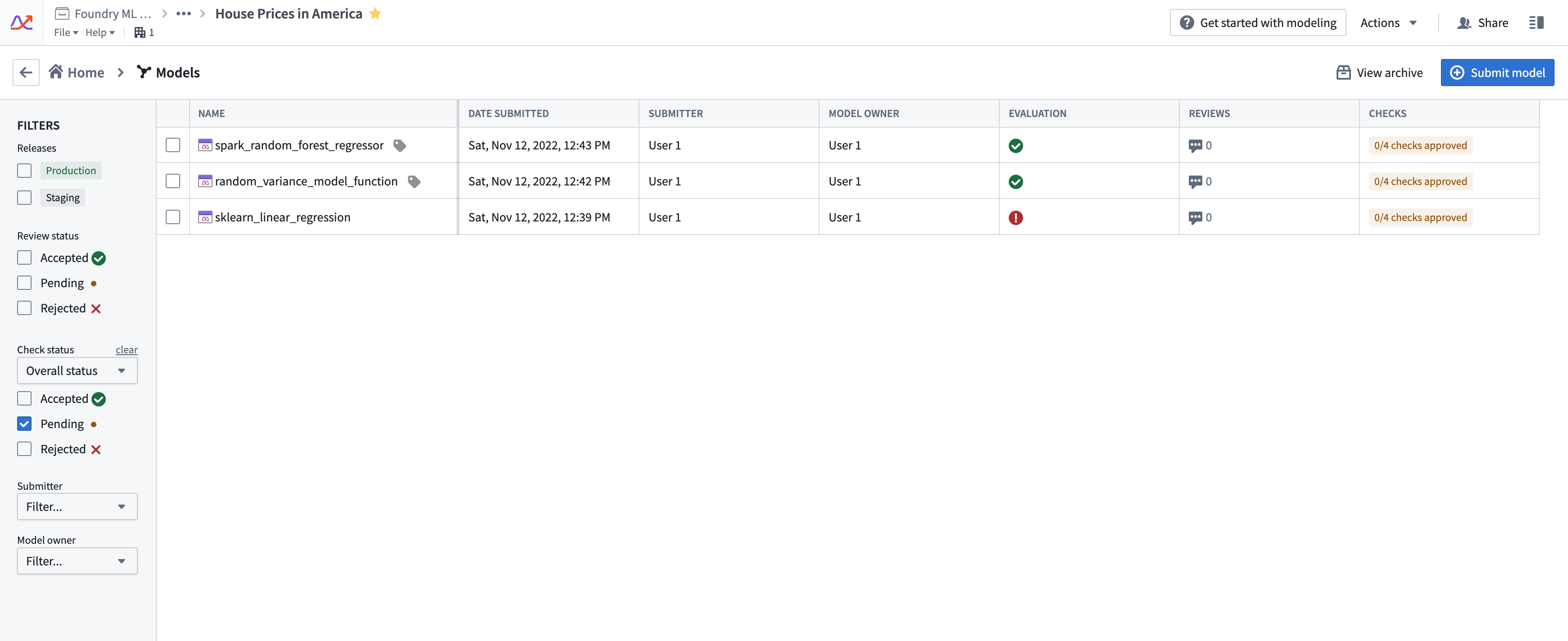
You can filter models in an objective based on the status of a particular check or the overall submission. This can help when you want to see which models have passed all the checks for deployment, or if you must review all submissions with a specific check pending.
Navigate to the Models tab on the left, then select the All models tab on top. Here, you can see a list of all model submissions along with their overall check status in the table. In the left panel, you can see a filter group under the label Check status. Here, you can select the check and its status you’d like to filter the submissions by.
中文翻译
为所有提交设置检查
建模目标检查(Modeling objective checks)是一种确保模型在投入运营前通过预定义质量检查的方法。目标检查可根据每个目标进行自定义,允许具有不同专业背景的模型评审员协作评估模型性能。这种评估确保了模型状态和讨论的透明度与条理性,从而向建模目标的所有利益相关者清晰呈现模型质量。
例如,作为建模项目的管理者,您可能希望提交至目标的所有候选模型在发布前获得批准。您可能需要以下团队的批准:
- 管道基础设施团队,确认模型通过冒烟测试(smoke tests)。
- 数据科学团队,负责确保模型指标在部署到运营应用前满足相关要求。
- 伦理团队,确保训练数据中的适当平衡,或模型符合机构的公平性要求。
对于上述每项检查,与相关评审组或用户进行有针对性的讨论线程,有助于就模型是否准备好部署达成共识,并为下一次模型迭代收集反馈。
您可以为上述每个检查点配置目标检查,创建独立的讨论线程,从而为评估目标中的所有模型提交提供专注的协作空间。
配置目标检查
要为您的目标配置检查,请转到右侧边栏的设置页面,然后导航至检查选项卡。在此处,您可以创建新的检查,包括名称、描述以及有权批准此检查的用户或组。在以下示例中,如果 pcl-team 组或 管理员 组中的任何人批准该检查,则该检查将被标记为已批准。
您可以根据需要添加其他检查,或参考以下示例检查。
通过检查协作评估模型提交
现在您已为目标配置了相关检查,即可开始与各个评审组协作评估模型提交。
在模型提交页面上,导航至检查面板。在此处,您可以看到为目标配置的检查。评审员在评估模型提交时,可以批准、拒绝或评论每项检查。此外,评审员还可以根据需要添加附件(例如指标截图)或标记用户组。
目前,在创建模型提交的发布版本之前,并非所有检查都必须获得批准。
基于自动评估的检查
还可以创建基于给定输入数据集和评估库(evaluation library)的评估结果来确定状态的检查。
输入数据集和评估库的可用选项将继承自建模目标的评估仪表板中定义的评估配置。此外,使用评估仪表板构建的指标将用于确定检查状态。
指标要求(Metric requirement)定义了提交通过此检查的条件。当指标满足要求时,状态为通过(PASS)。如果指标未满足要求,或在所选评估库生成的指标集中未找到,则状态为拒绝(REJECT),并附带描述拒绝原因的消息。如果尚未为提交、输入数据集和与检查关联的评估库的组合构建指标,则检查状态将为待定(PENDING)。如果指标构建失败,也会出现待定状态。
归档检查
您可以通过设置页面中检查旁边的“禁用”图标来归档目标检查。默认情况下,已归档的检查不再显示在提交的检查页面上。但是,通过选择提交检查面板上的查看归档按钮,仍可查看已归档检查的先前评论和批准历史。
按检查状态筛选模型
您可以根据特定检查的状态或整体提交状态来筛选目标中的模型。当您想查看哪些模型已通过所有部署检查,或必须审查所有具有特定待定检查的提交时,此功能非常有用。
导航至左侧的模型选项卡,然后选择顶部的所有模型选项卡。在此处,您可以看到所有模型提交的列表,以及表格中它们的整体检查状态。在左侧面板中,您可以看到检查状态标签下的筛选组。在此处,您可以选择要按之筛选提交的检查及其状态。