Custom evaluation library(自定义评估库(Custom evaluation library))
An evaluation library is a published Python package in Foundry that produces a model evaluator. Evaluation libraries are used to measure model performance, model fairness, model robustness, and other metrics in a reusable way across different modeling objectives.
In addition to Foundry's default model evaluators for binary classification and regression models, Foundry also allows you to create a custom model evaluator that can be used natively in a modeling objective.
Custom evaluator inside a modeling objective
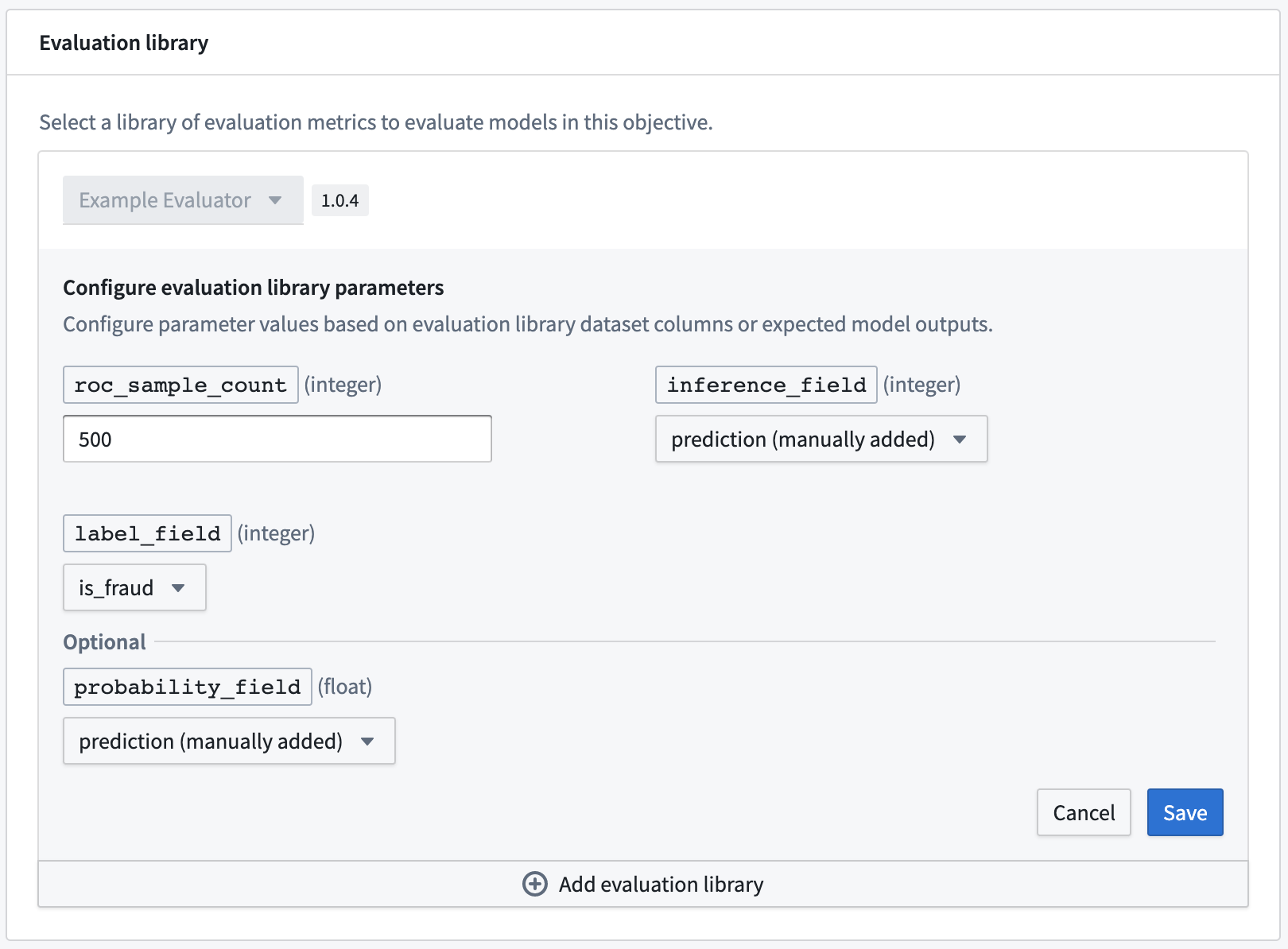
A custom evaluator, its configuration options, and produced metrics will be displayed in the Modeling Objectives application with the names and descriptions that are specified in the docstring at the top of the evaluator implementation.
Once the custom evaluator has been published, it will be available in the Modeling Objective application to any users with view access to the published library. This enables you to write reusable logic for calculating standardized metrics across your organization.
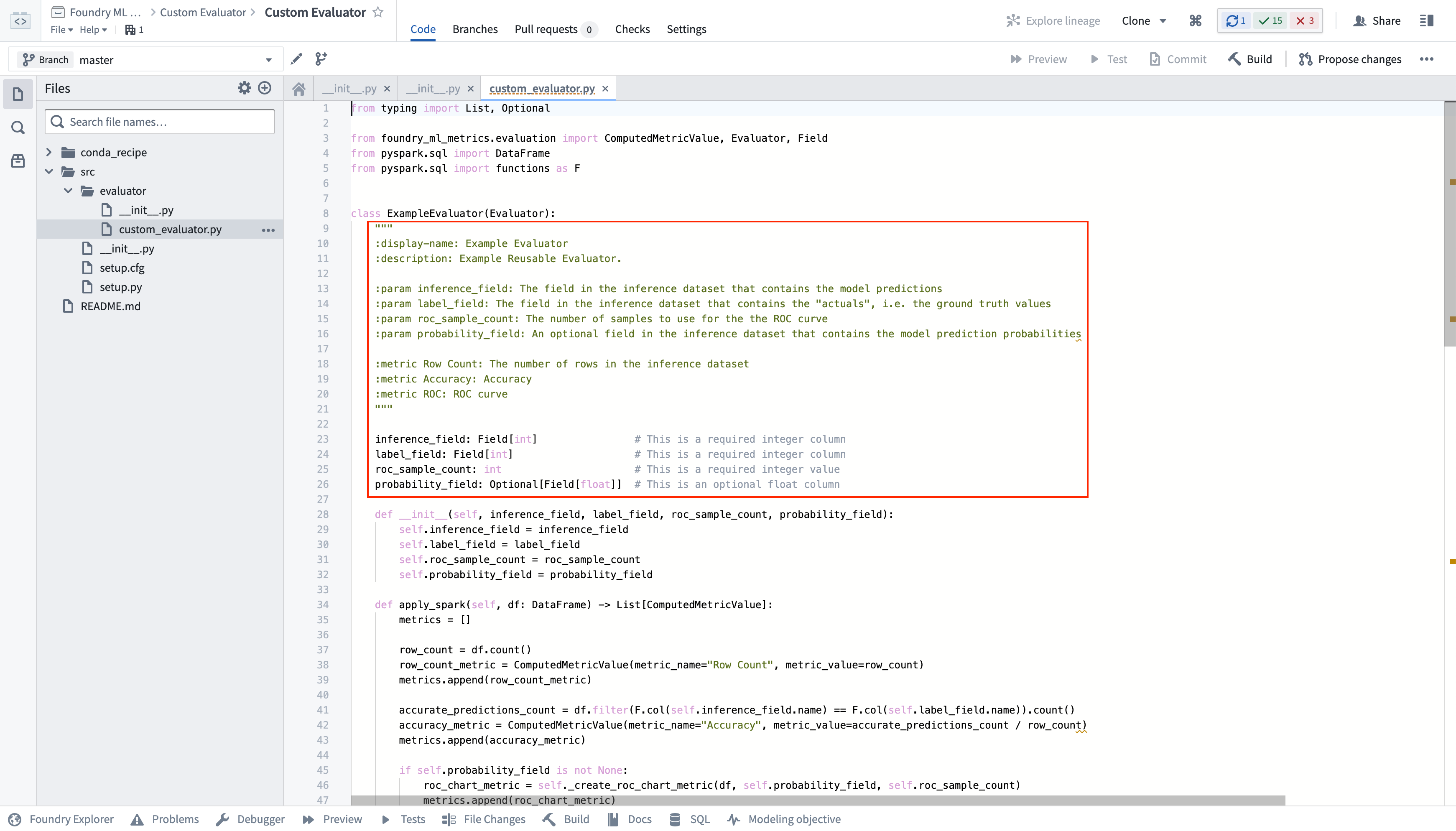
The custom evaluator is selectable inside the evaluation library configuration of a modeling objective; that library is configurable based on the parameter defined by the evaluator.
Create a custom evaluator
To create a custom evaluator:
- Create a code repository from the
Model Evaluator Template Library. - Implement your custom evaluator.
- Add parameters to your custom evaluator.
- Commit and publish a new tag with your changes.
Create a code repository
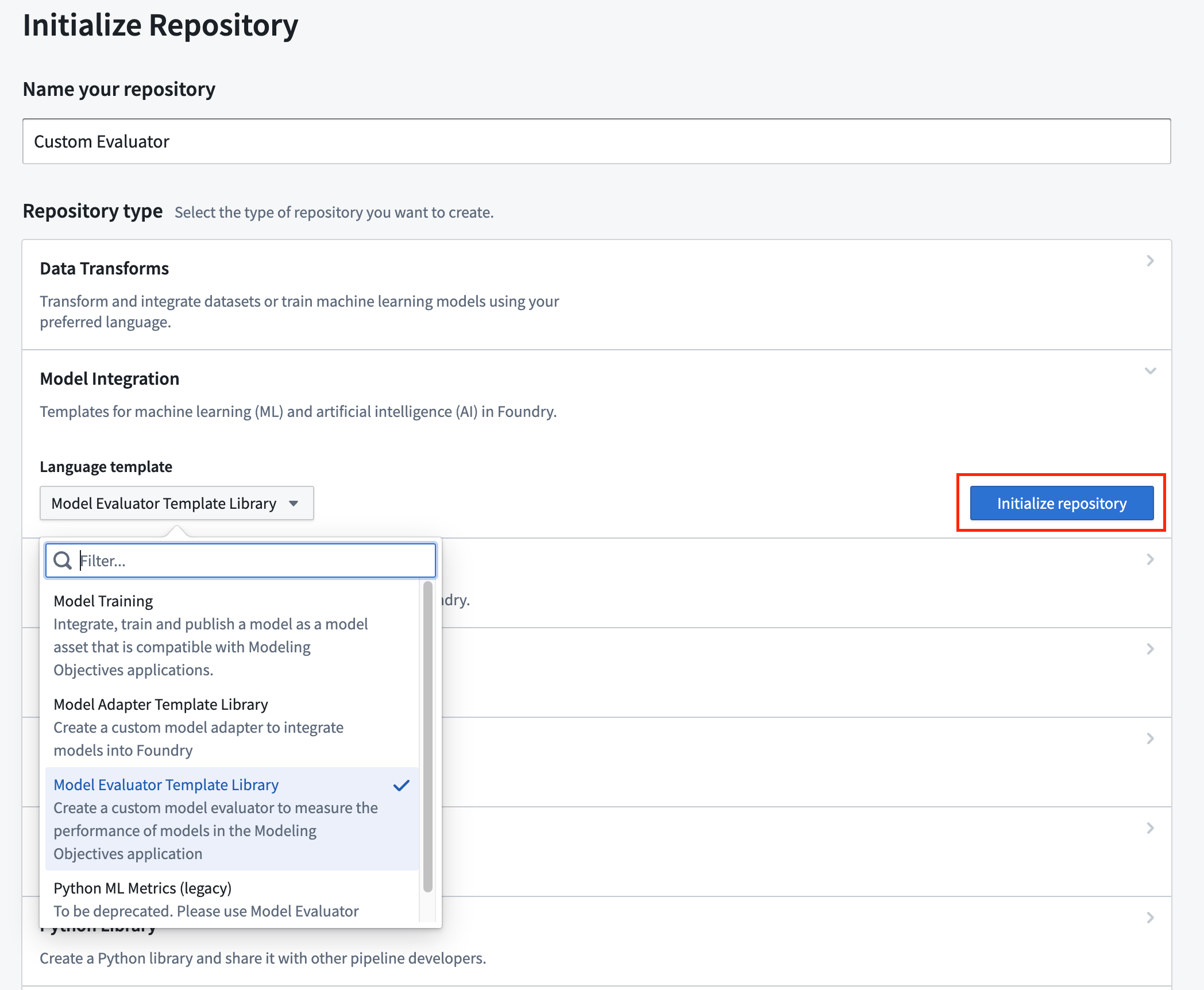
The Code Repositories application has many template implementations; here, we'll be using the Model Evaluator Template Library. Navigate to a Foundry Project, select + New > Repository type > Model Integration > Language template, select Model Evaluator Template Library, and finally select Initialize repository.
Evaluator template structure
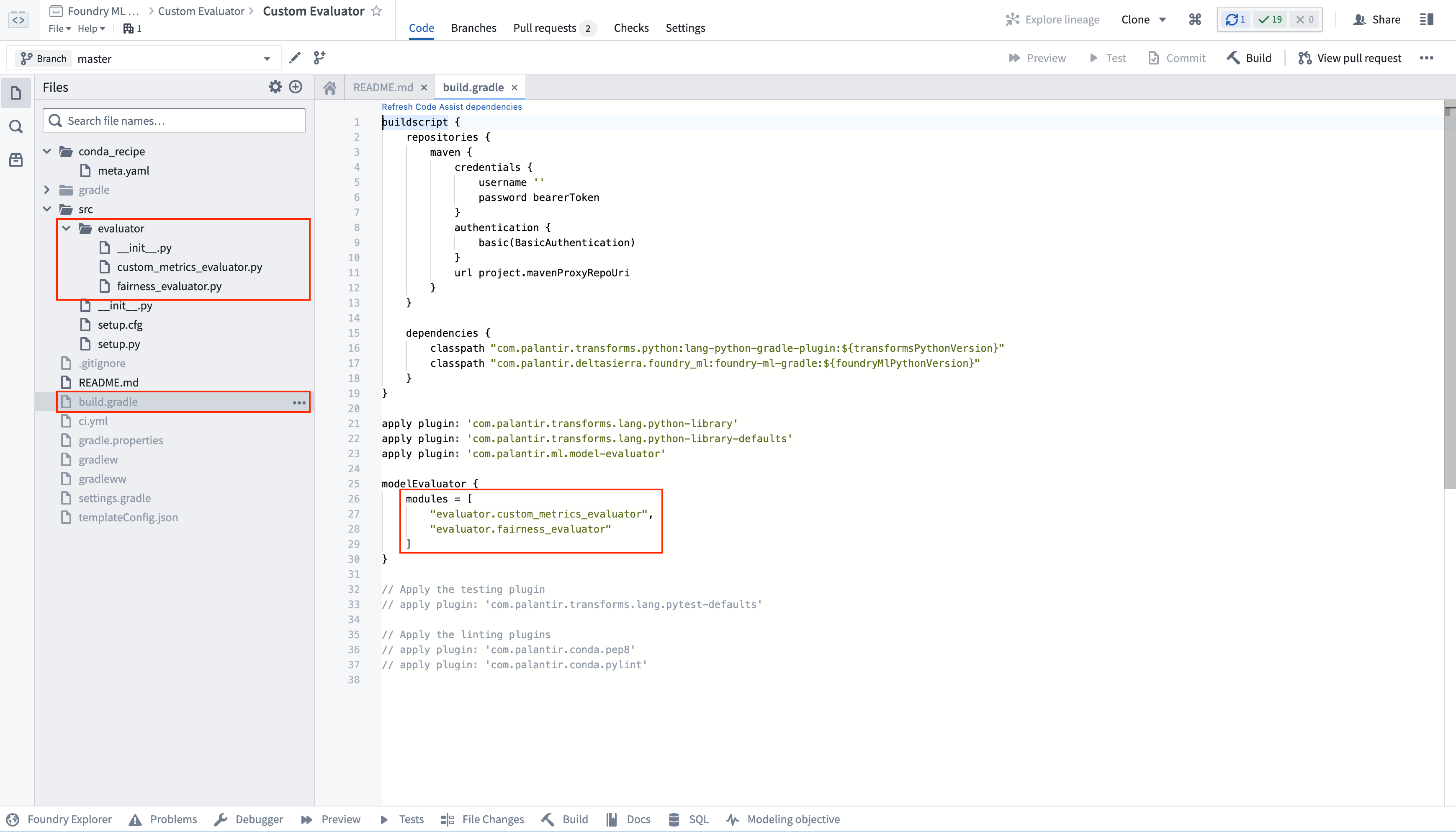
The Model Evaluator Template Library has an example implementation in the file src/evaluator/custom_evaluator.py. Any implementation of the Evaluator Python interface will automatically be registered and made available when you publish a new version of its repository with a new repository version tag.
A repository that contains custom evaluator logic can publish multiple evaluators. Any additional evaluator implementation files will need to be added as a reference to the list of model evaluator modules in the build.gradle of the evaluator template.
Implement a custom evaluator
To implement a custom evaluator, you need to create an implementation of the Evaluator interface and optionally provide configuration fields for interpretation by the Modeling Objectives application.
In the evaluator template library, add your evaluator to the file src/evaluator/custom_evaluator.py.
Evaluator interface
The interface of an evaluator is defined:
class Evaluator():

    def apply_spark(self, df: DataFrame) -> List[ComputedMetricValue]:
        """
        Applies the evaluator to compute metrics on a PySpark Dataframe.

        :param df: The PySpark DataFrame to compute metrics on
        :return: A list of computed metric values
        """

        pass
:::callout{theme="neutral"} To use your newly configured custom evaluator in the Modeling Objectives application, you will first need to publish a new version of its repository, providing it with a new repository version tag. :::
Evaluator documentation
A custom evaluator and its configuration options and produced metrics will be displayed in the Modeling Objectives application with the names and descriptions that are specified in the docstring at the top of the implementation.
The required values are:
display-name: The display name of the evaluatordescription: The description of the evaluator
You can optionally add zero or more of the following:
param: A configuration parameter of your custom evaluatormetric: A metric produced by your evaluator
Example evaluator implementation
This is an example evaluator that calculates the row count of the input dataset.
This example evaluator will be displayed in the Modeling Objectives application with:
- The title
Row Count Evaluator. - The description
This evaluator calculates the row count of the input DataFrame. - The produced metric
Row Countthat has the descriptionThe row count. - Zero configuration parameters.
from pyspark.sql import DataFrame
from pyspark.sql import functions as F
from foundry_ml_metrics.evaluation import ComputedMetricValue, Evaluator

class CustomEvaluator(Evaluator):
    """
        :display-name: Row Count Evaluator
        :description: This evaluator calculates the row count of the input DataFrame.

        :metric Row Count: The row count
    """

    def apply_spark(self, df: DataFrame) -> List[ComputedMetricValue]:
        row_count = df.count()

        return [
            ComputedMetricValue(
                metric_name='Row Count',
                metric_value=row_count
            )
        ]
Parameterize an evaluator
An evaluator can be made configurable in the Modeling Objectives application by providing configuration parameters. The configuration parameters will be populated by the Modeling Objectives application with the user-entered value at run time. A user of this evaluator will have the opportunity to configure the values of the parameters when they configure automated evaluation in a modeling objective.
The allowed configuration fields are:
int: An integer numberfloat: A floating point numberbool: A Boolean value (True or False)str: A string valueField[float]: A floating point column in the input DataFrameField[int]: A integer column in the input DataFrameField[str]: A string column in the input DataFrame
Parameters can be made optional by wrapping them in Optional (from the built-in typing package).
For example:
- An optional
strwould beOptional[str] - An optional
Field[str]would beOptional[Field[str]]
Example evaluator with configuration fields
This is an example evaluator that calculates the row count of the input dataset and the row count when the input dataframe has been filtered such that the input column column has the value value.
This example evaluator will be displayed in the Modeling Objectives application with:
- The title
Configurable Row Count Evaluator. - The description
This evaluator calculates the row count of the input DataFrame, filtered to the specified value. - A produced metric
Row Countthat has the descriptionThe unfiltered row count. - A produced metric
Filtered Row Countthat has the descriptionThe filtered row count - Two configuration parameters:
- A column in an evaluation dataset that must be an integer with the name
columnand the descriptionFiltered column. - An integer value with the name
valueand the descriptionFiltered value.
from pyspark.sql import DataFrame
from pyspark.sql import functions as F
from foundry_ml_metrics.evaluation import ComputedMetricValue, Evaluator, Field

class CustomEvaluator(Evaluator):
    """
        :display-name: Configurable Row Count Evaluator
        :description: This evaluator calculates the row count of the input DataFrame, filtered to the specified value.

        :param column: Filtered column
        :param value: Filtered value

        :metric Row Count: The unfiltered row count
        :metric Filtered Row Count: The filtered row count
    """

    column: Field[int]
    value: int

    def __init__(self, column: Field[int], value: int):
        self.column = column
        self.value = value

    def apply_spark(self, df: DataFrame) -> List[ComputedMetricValue]:
        column_name = self.column.name
        column_value = self.value

        row_count = df.count()

        filtered_row_count = df.filter(
            F.col(column_name) == column_value
        ).count()

        return [
            ComputedMetricValue(
                metric_name='Row Count',
                metric_value=row_count
            ),
            ComputedMetricValue(
                metric_name='Filtered Row Count',
                metric_value=filtered_row_count
            )
        ]
Reference classes
The below classes are provided as a reference.
Field
Fields are used as configuration parameters for your evaluator library to tell the Modeling Objective application which properties need to be implemented.
A Field has the following interface.
class Field():
    name: str
ComputedMetricValue
A ComputedMetricValue stores the information about a metric to attach to a Foundry model.
class ComputedMetricValue():
    """
    Metric computed by one of the evaluators comprising metric name, value, and subset information.
    """
    metric_name: str
    metric_value: MetricValue

    def __init__(self, metric_name, metric_value):
        self.metric_name = metric_name
        self.metric_value = metric_value
MetricValue
A MetricValue can be any of the following:
- A numeric value that is one of the types:
- int
- np.int8
- np.int16
- np.int32
- np.int64
- np.uint8
- np.uint16
- np.uint32
- np.uint64
- float
- np.float32
- np.float64
- A figure that is one of the types:
- matplotlib.Figure
- matplotlib.pyplot.Figure
- Any class that implements exactly one of the methods:
get_figure(self) -> Figure: Note that many seaborn plots implement this function.save(self, path: str): Note that many seaborn plots implement this function.savefig(self, path: str)- A BarChart
- A LineChart
中文翻译
自定义评估库(Custom evaluation library)
评估库(evaluation library)是 Foundry 中一个已发布的 Python 包,用于生成模型评估器(model evaluator)。评估库以可复用的方式衡量模型性能、模型公平性、模型鲁棒性及其他指标,适用于不同的建模目标(modeling objectives)。
除了 Foundry 为二分类(binary classification)和回归(regression)模型提供的默认模型评估器外,Foundry 还允许您创建自定义模型评估器,并可在建模目标中原生使用。
建模目标中的自定义评估器
自定义评估器及其配置选项和生成的指标,将显示在"建模目标"(Modeling Objectives)应用程序中,其名称和描述与评估器实现顶部文档字符串中指定的内容一致。
自定义评估器发布后,任何对已发布库具有查看权限的用户都可在"建模目标"应用程序中使用它。这使您能够编写可复用的逻辑,在整个组织中计算标准化指标。
在建模目标的评估库配置中,可以选择该自定义评估器;该库可根据评估器定义的参数进行配置。
创建自定义评估器
要创建自定义评估器:
- 从"模型评估器模板库"(Model Evaluator Template Library)创建一个代码仓库。
- 实现您的自定义评估器。
- 为您的自定义评估器添加参数。
- 提交并发布一个新标签(tag),包含您的更改。
创建代码仓库
代码仓库(Code Repositories)应用程序提供了多种模板实现;这里我们将使用模型评估器模板库。导航至一个 Foundry 项目,选择 + 新建 > 仓库类型 > 模型集成 > 语言模板,选择模型评估器模板库,最后选择初始化仓库。
评估器模板结构
模型评估器模板库在文件 src/evaluator/custom_evaluator.py 中包含一个示例实现。当您使用新的仓库版本标签发布仓库的新版本时,任何对 Evaluator Python 接口的实现都会自动注册并可用。
包含自定义评估器逻辑的仓库可以发布多个评估器。任何额外的评估器实现文件都需要作为引用添加到评估器模板的 build.gradle 中的模型评估器模块列表中。
实现自定义评估器
要实现自定义评估器,您需要创建 Evaluator 接口的实现,并可选地提供配置字段供"建模目标"应用程序解析。
在评估器模板库中,将您的评估器添加到文件 src/evaluator/custom_evaluator.py。
评估器接口
评估器的接口定义如下:
class Evaluator():

    def apply_spark(self, df: DataFrame) -> List[ComputedMetricValue]:
        """
        应用评估器在 PySpark DataFrame 上计算指标。

        :param df: 用于计算指标的 PySpark DataFrame
        :return: 计算出的指标值列表
        """

        pass
:::callout{theme="neutral"} 要在"建模目标"应用程序中使用您新配置的自定义评估器,您首先需要发布仓库的新版本,并为其提供一个新的仓库版本标签。 :::
评估器文档
自定义评估器及其配置选项和生成的指标,将显示在"建模目标"应用程序中,其名称和描述与实现顶部文档字符串中指定的内容一致。
必需的值包括:
display-name:评估器的显示名称description:评估器的描述
您可以选择添加以下零个或多个内容:
param:自定义评估器的配置参数metric:评估器生成的指标
评估器实现示例
这是一个计算输入数据集行数的示例评估器。
该示例评估器将在"建模目标"应用程序中显示为:
- 标题:
行数评估器(Row Count Evaluator) - 描述:
此评估器计算输入 DataFrame 的行数。 - 生成的指标:
行数(Row Count),描述为行数。 - 零个配置参数。
from pyspark.sql import DataFrame
from pyspark.sql import functions as F
from foundry_ml_metrics.evaluation import ComputedMetricValue, Evaluator

class CustomEvaluator(Evaluator):
    """
        :display-name: Row Count Evaluator
        :description: This evaluator calculates the row count of the input DataFrame.

        :metric Row Count: The row count
    """

    def apply_spark(self, df: DataFrame) -> List[ComputedMetricValue]:
        row_count = df.count()

        return [
            ComputedMetricValue(
                metric_name='Row Count',
                metric_value=row_count
            )
        ]
为评估器添加参数
通过提供配置参数,可以使评估器在"建模目标"应用程序中可配置。配置参数将由"建模目标"应用程序在运行时填充用户输入的值。该评估器的用户在建模目标中配置自动评估时,将有机会配置参数的值。
允许的配置字段类型包括:
int:整数float:浮点数bool:布尔值(True 或 False)str:字符串值Field[float]:输入 DataFrame 中的浮点数列Field[int]:输入 DataFrame 中的整数列Field[str]:输入 DataFrame 中的字符串列
通过将参数包裹在 Optional(来自内置的 typing 包)中,可以使其变为可选。
例如:
- 可选的
str为Optional[str] - 可选的
Field[str]为Optional[Field[str]]
带配置字段的评估器示例
这是一个示例评估器,它计算输入数据集的行数,以及当输入 DataFrame 经过筛选(输入列 column 的值为 value)后的行数。
该示例评估器将在"建模目标"应用程序中显示为:
- 标题:
可配置行数评估器(Configurable Row Count Evaluator) - 描述:
此评估器计算输入 DataFrame 的行数,并筛选至指定值。 - 生成的指标:
行数(Row Count),描述为未筛选的行数。 - 生成的指标:
筛选后行数(Filtered Row Count),描述为筛选后的行数。 - 两个配置参数:
- 评估数据集中的一个列,必须为整数,名称为
column,描述为筛选列。 - 一个整数值,名称为
value,描述为筛选值。
from pyspark.sql import DataFrame
from pyspark.sql import functions as F
from foundry_ml_metrics.evaluation import ComputedMetricValue, Evaluator, Field

class CustomEvaluator(Evaluator):
    """
        :display-name: Configurable Row Count Evaluator
        :description: This evaluator calculates the row count of the input DataFrame, filtered to the specified value.

        :param column: Filtered column
        :param value: Filtered value

        :metric Row Count: The unfiltered row count
        :metric Filtered Row Count: The filtered row count
    """

    column: Field[int]
    value: int

    def __init__(self, column: Field[int], value: int):
        self.column = column
        self.value = value

    def apply_spark(self, df: DataFrame) -> List[ComputedMetricValue]:
        column_name = self.column.name
        column_value = self.value

        row_count = df.count()

        filtered_row_count = df.filter(
            F.col(column_name) == column_value
        ).count()

        return [
            ComputedMetricValue(
                metric_name='Row Count',
                metric_value=row_count
            ),
            ComputedMetricValue(
                metric_name='Filtered Row Count',
                metric_value=filtered_row_count
            )
        ]
参考类
以下类供参考。
Field
Field 用作评估器库的配置参数,用于告知"建模目标"应用程序需要实现哪些属性。
Field 具有以下接口。
class Field():
    name: str
ComputedMetricValue
ComputedMetricValue 存储关于要附加到 Foundry 模型的指标信息。
class ComputedMetricValue():
    """
    由评估器之一计算的指标,包含指标名称、值和子集信息。
    """
    metric_name: str
    metric_value: MetricValue

    def __init__(self, metric_name, metric_value):
        self.metric_name = metric_name
        self.metric_value = metric_value
MetricValue
MetricValue 可以是以下任意一种:
- 数值类型之一:
- int
- np.int8
- np.int16
- np.int32
- np.int64
- np.uint8
- np.uint16
- np.uint32
- np.uint64
- float
- np.float32
- np.float64
- 图形类型之一:
- matplotlib.Figure
- matplotlib.pyplot.Figure
- 任何实现了以下方法之一的类:
get_figure(self) -> Figure:注意,许多 seaborn 图表实现了此函数。save(self, path: str):注意,许多 seaborn 图表实现了此函数。savefig(self, path: str)- BarChart(条形图)
- LineChart(折线图)