Automatically evaluate models(自动评估模型)
As modeling projects mature, scale, and become operational, it is critical to evaluate and compare current and new model submissions systematically. Model submissions should be evaluated consistently, using well-maintained representative data against well-defined metrics.
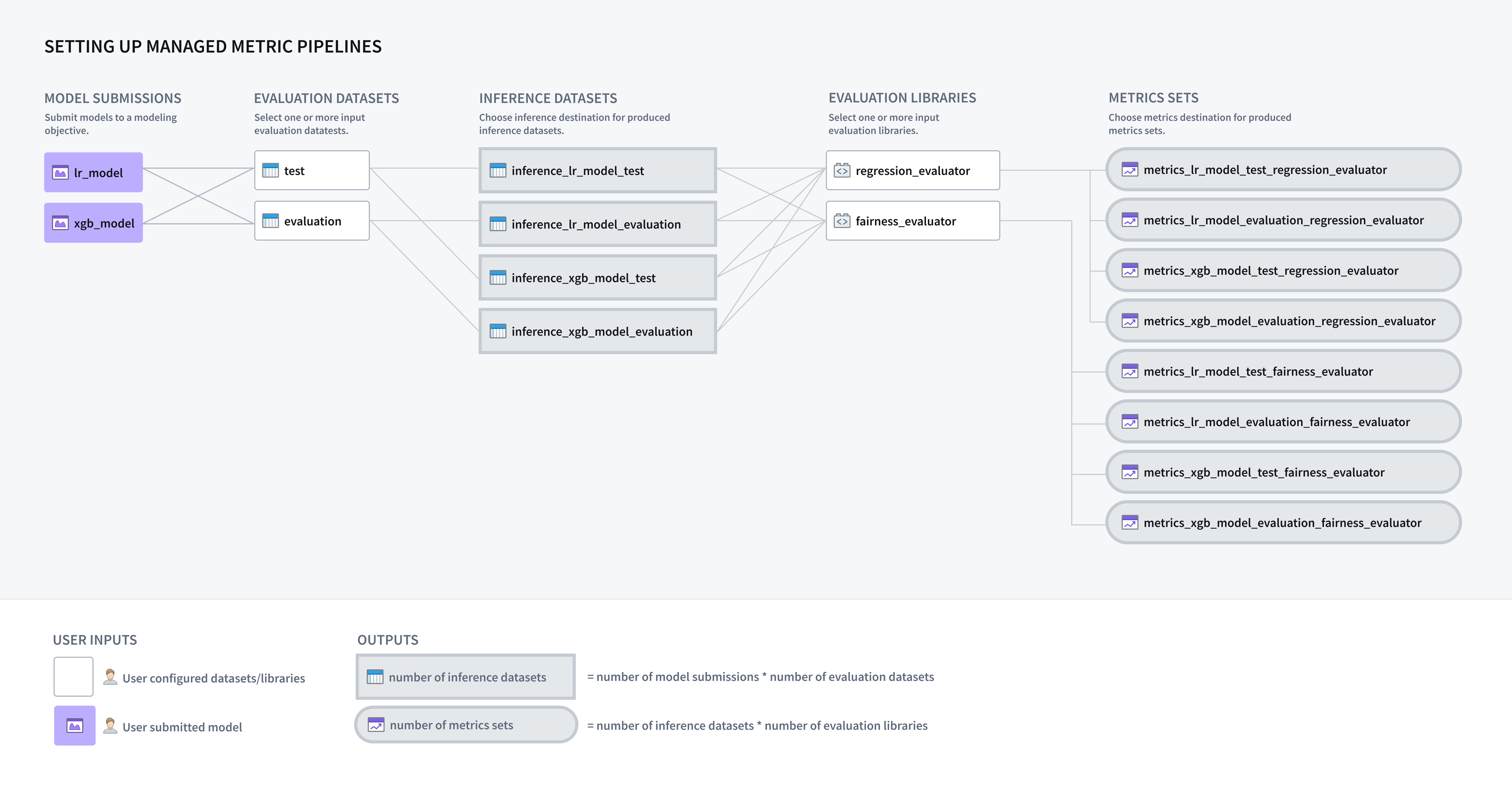
A modeling objective can be configured to automatically generate inference and metrics pipelines for all models submitted to that objective, enabling you to implement a systematic testing and evaluation (T\&E) plan in software.
Configure model evaluation
To enable automatic model evaluation you must first configure your modeling objective on how to evaluate models that are submitted to your modeling objective.
Enable pipeline management
The first step of configuring automatic model evaluation in a modeling objective is to enable inference and metrics generation. From the Modeling Objectives home page, select Configure evaluation dashboard or, if you have already configured model evaluation, select Edit evaluation configuration from the Evaluation dashboard.
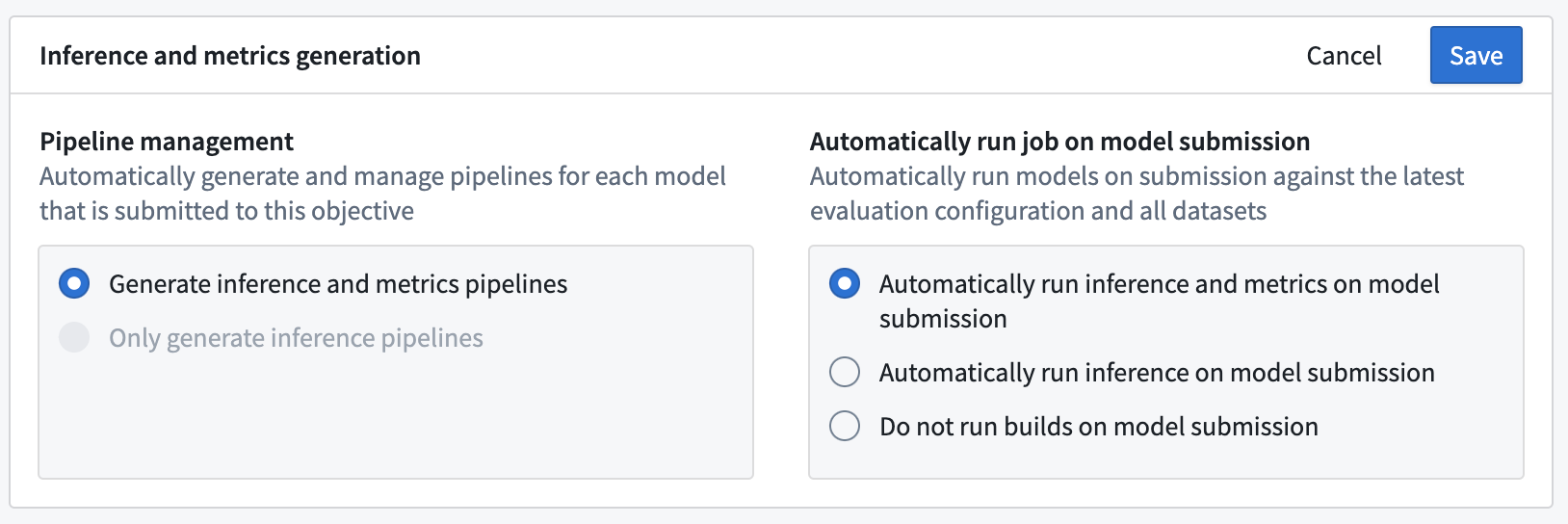
In the evaluation dashboard configuration view, you can decide whether to automatically generate inference and metrics pipelines or to only generate inference pipelines. Depending on your selection, inference and metrics datasets will be generated for all existing model submissions as well as for any new model submissions to the modeling objective.
Configure automatic model inference or evaluation
Next, you can decide whether to automatically build inference or inference and metrics datasets when a new model is submitted. Automatically building inference and metrics datasets ensures that all models that are considered for use in a modeling project are evaluated consistently.
:::callout{theme="neutral"} Inference and metrics pipelines are only built on model submission. For existing model submissions, you will need to manually initiate builds via the Build evaluation button on the evaluation dashboard. :::
Click Save to save inference and metrics generation settings.
Add evaluation datasets
An evaluation dataset is a Foundry dataset that a model will be evaluated against inside a modeling objective. If the modeling objective is configured to automatically generate inference pipelines, one inference dataset will be generated for every combination of model submission and evaluation dataset. Each evaluation dataset should be relevant and carefully maintained; it might include curated validation or test sets, production observations, user feedback instances, key test cases, or representations of hypothetical scenarios. Evaluation datasets should have the dataset fields or files required for the model to run inference from.
Evaluation datasets can have different sizes, update cadences, and permissions; keeping these datasets separate enables greater control on the cadence and permissioning of computed metrics.
:::callout{theme="neutral" title="Permissions"} Permissions are fully respected inside a modeling objective. Users cannot see models, evaluation datasets, evaluation libraries, or metrics without having the proper access. :::
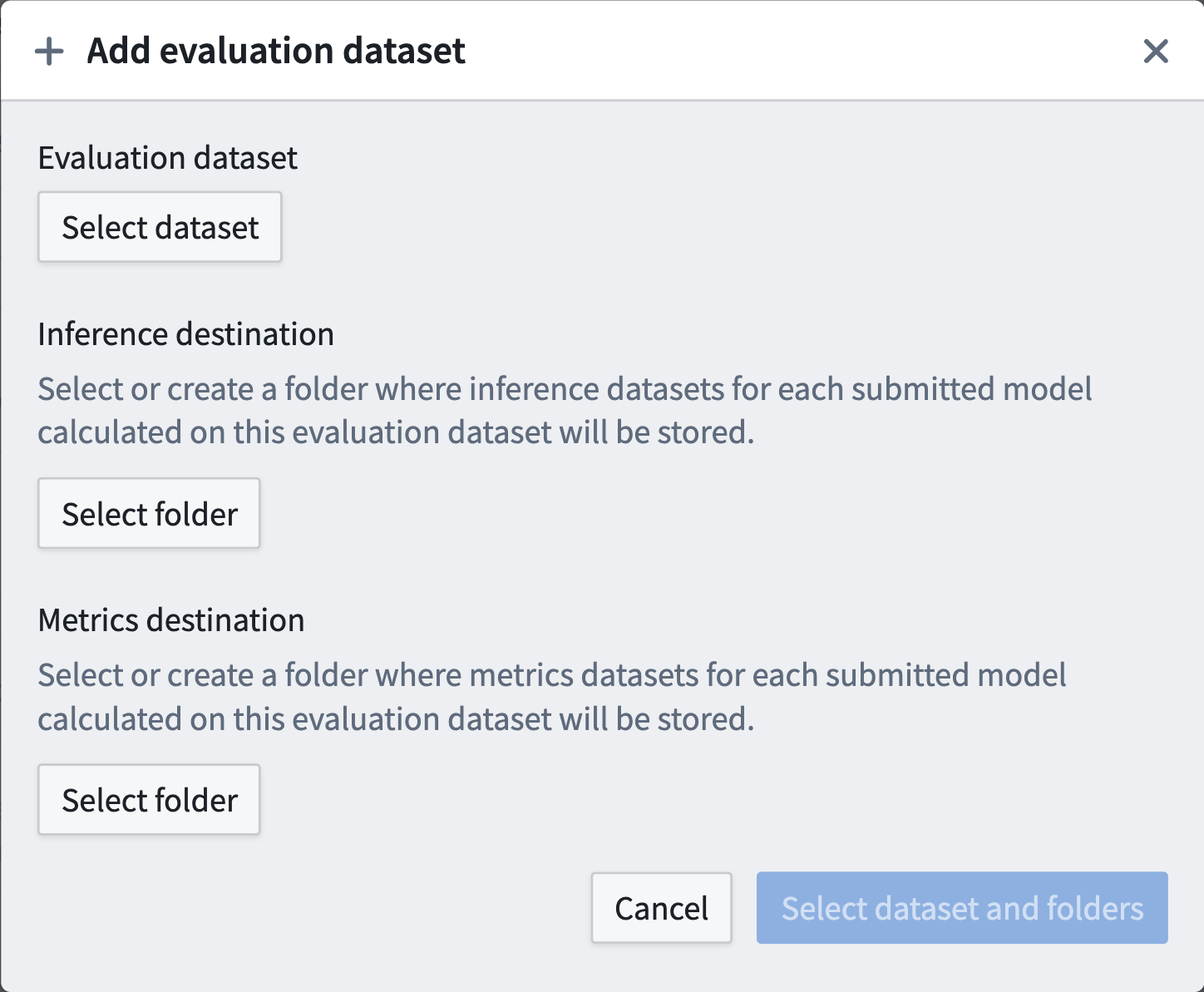
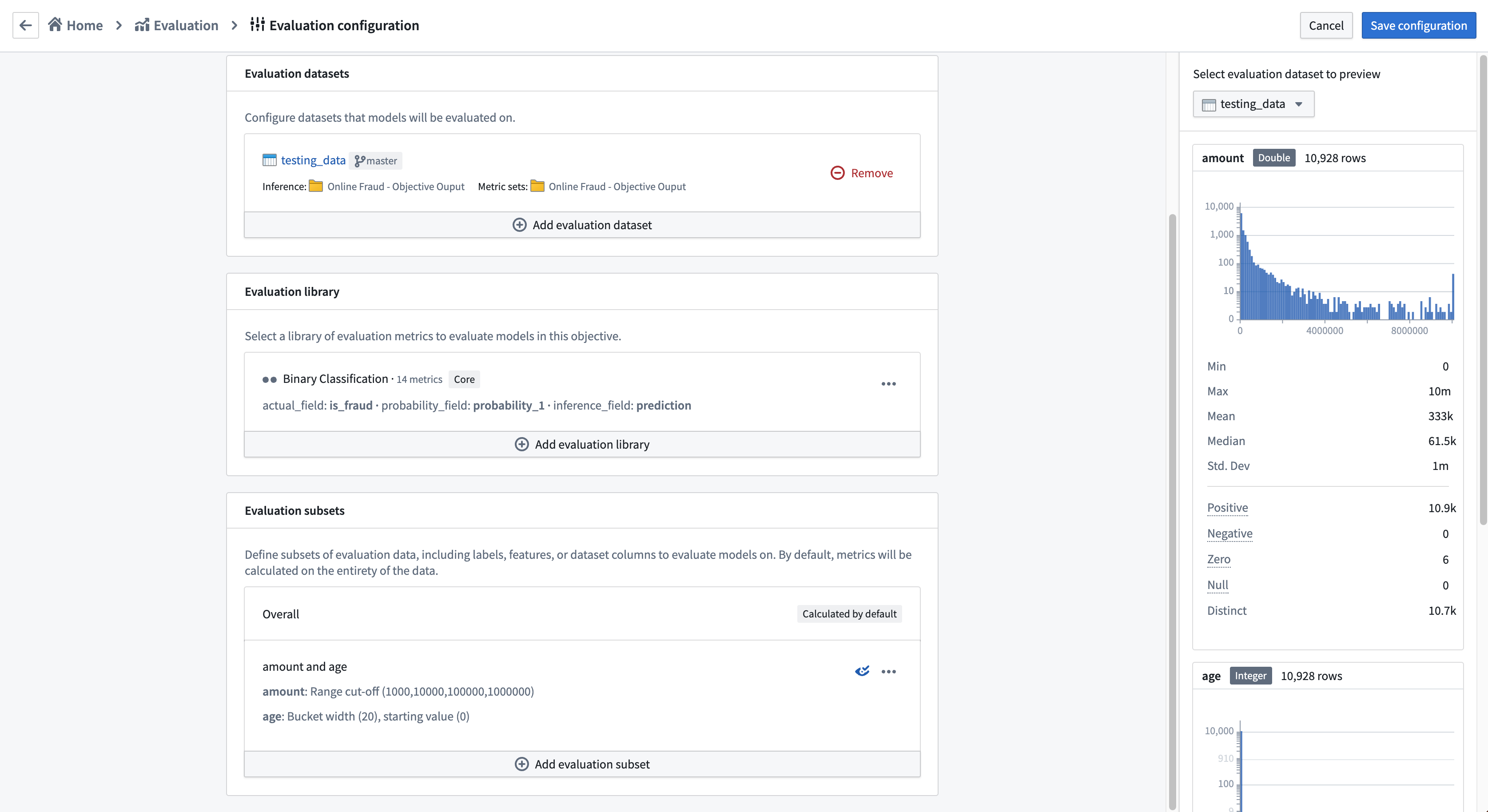
To configure an evaluation dataset, select Add evaluation dataset. A pop-up will allow you to configure:
- The evaluation dataset.
- The Foundry folder where inference datasets should be generated for this evaluation dataset.
- The Foundry folder where metrics datasets should be generated for this evaluation dataset.
The Foundry folders can be new or existing folders and are not required to be unique for evaluation datasets. Typically, we recommend one output folder per modeling objective, but this can be configured for your particular use case.
:::callout{theme="warning"} The evaluation dataset and the objective itself are required to be in the same Foundry Project as the inference and metrics destinations, or they should be added to the Foundry Project as a reference.
Automatic model evaluation in Modeling Objectives is only compatible with models that have a single tabular dataset input. :::
Configure evaluation libraries
If you have configured your modeling objective to generate metrics and inference pipelines, the next step is to configure an evaluation library. An evaluation library is a published Python package in Foundry that produces a model evaluator. Foundry comes with default model evaluators for binary classification and regression, and also allows you to build a custom model evaluator. Evaluation libraries are used to measure model performance, model fairness, model robustness, and other metrics.
When configured, an evaluation library will generate one dataset containing a metric set for every configured inference dataset.
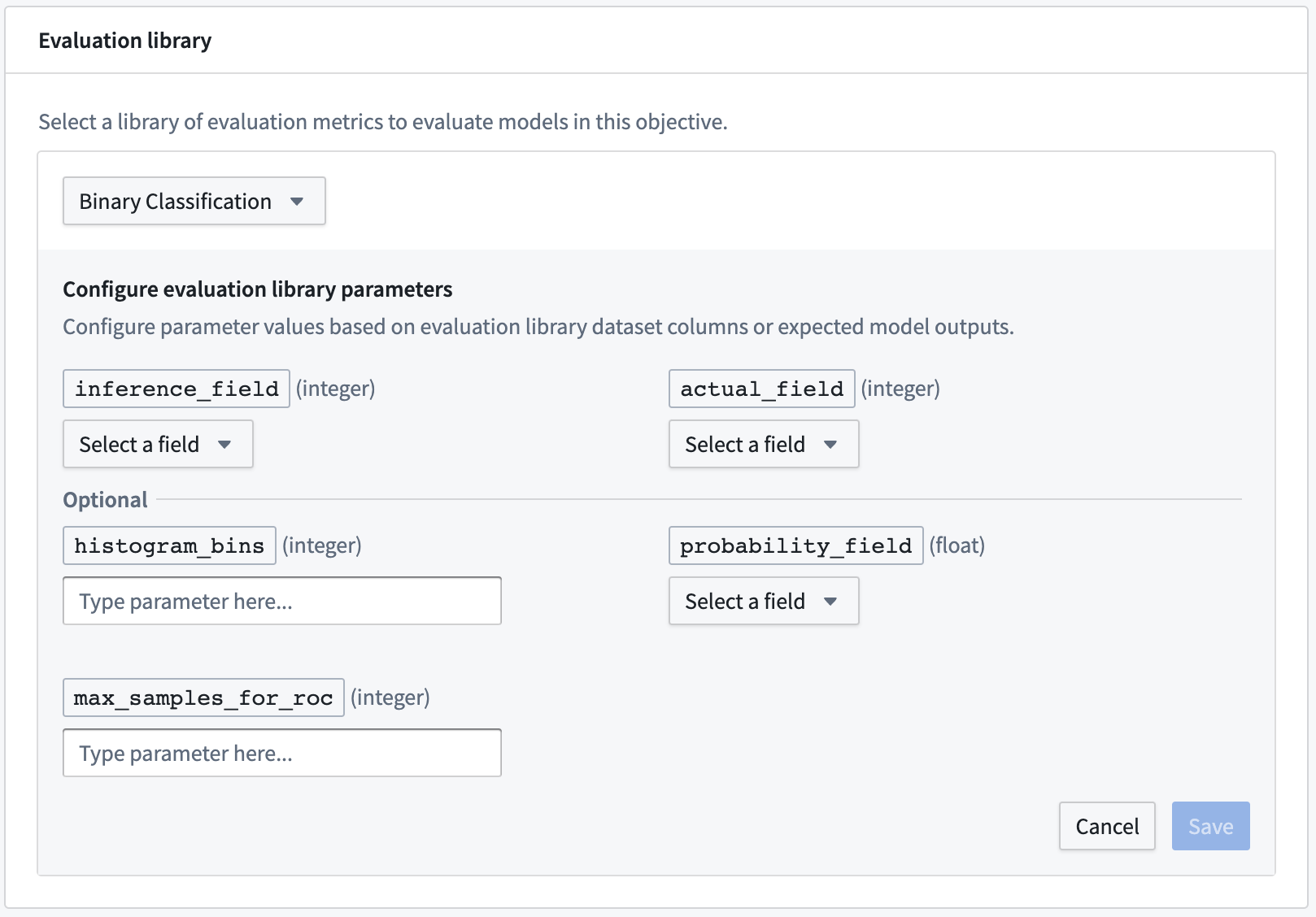
To configure an evaluation library, click Select evaluation library, select an evaluation library, and then configure the fields that are expected for that model evaluator. For column input types, the modeling objective will suggest columns that are available in any evaluation dataset. Additionally, you can also Add an expected model output to represent a column that a model submission is expected to produce if you do not see it suggested in the dropdown or know that it will be generated by the model transform.
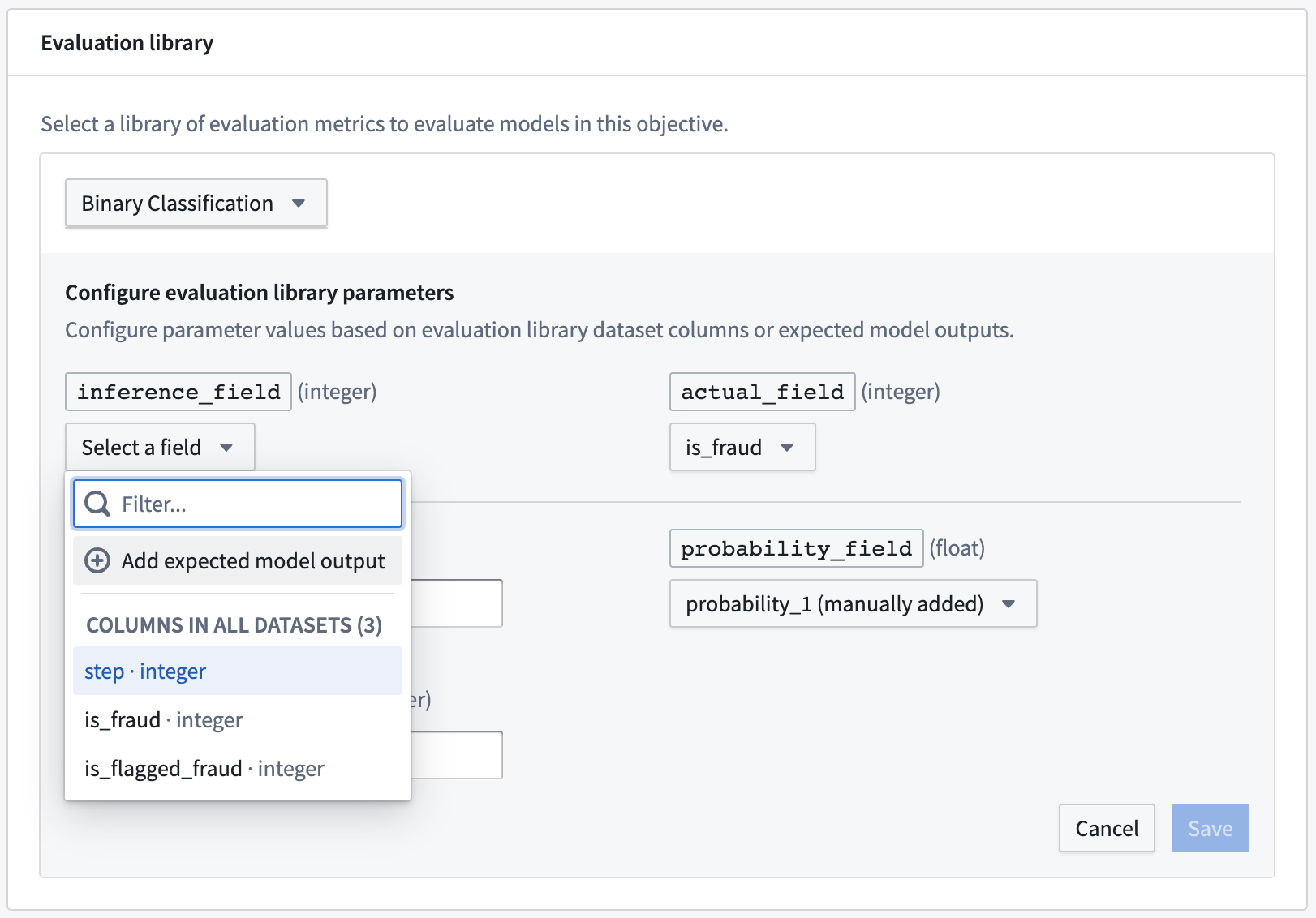
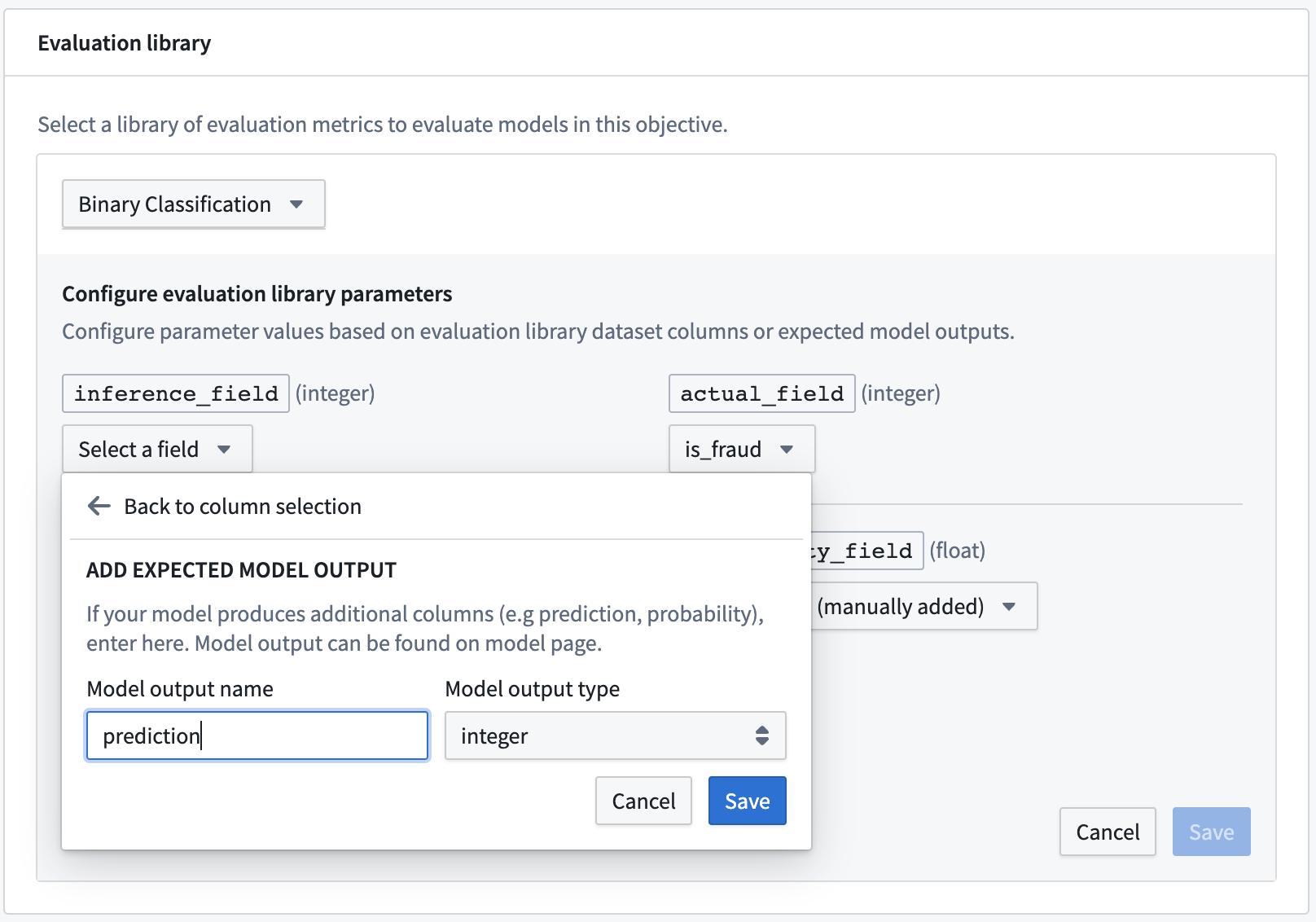
The most common types of expected model outputs are prediction outputs (often named prediction), probability outputs (often named probability_1), and confidence scores.
Configure evaluation subsets
An optional step in configuring automatic model evaluation is to define the evaluation subsets for your evaluation libraries to generate metrics against. An evaluation subset is a subset of the data in an evaluation dataset for which metrics will be separately generated. The metrics for an evaluation subset can be analyzed individually through the evaluation dashboard.
Evaluation subsets are useful to understand how a model performs on a specific group of input data and can therefore be used to improve model interpretability, explainability, and fairness across potentially protected classes. Evaluation subsets can be generated on any column of an evaluation dataset and, therefore, are not required to be generated on an input to or output of a model transformation, such as a model feature or a model prediction.
:::callout{theme="neutral"} Metrics will always be generated against the entirety, every row, of each evaluation dataset in the "Overall" subset. It is optional to configure evaluation subsets for automatic metrics generation on further subsets. :::
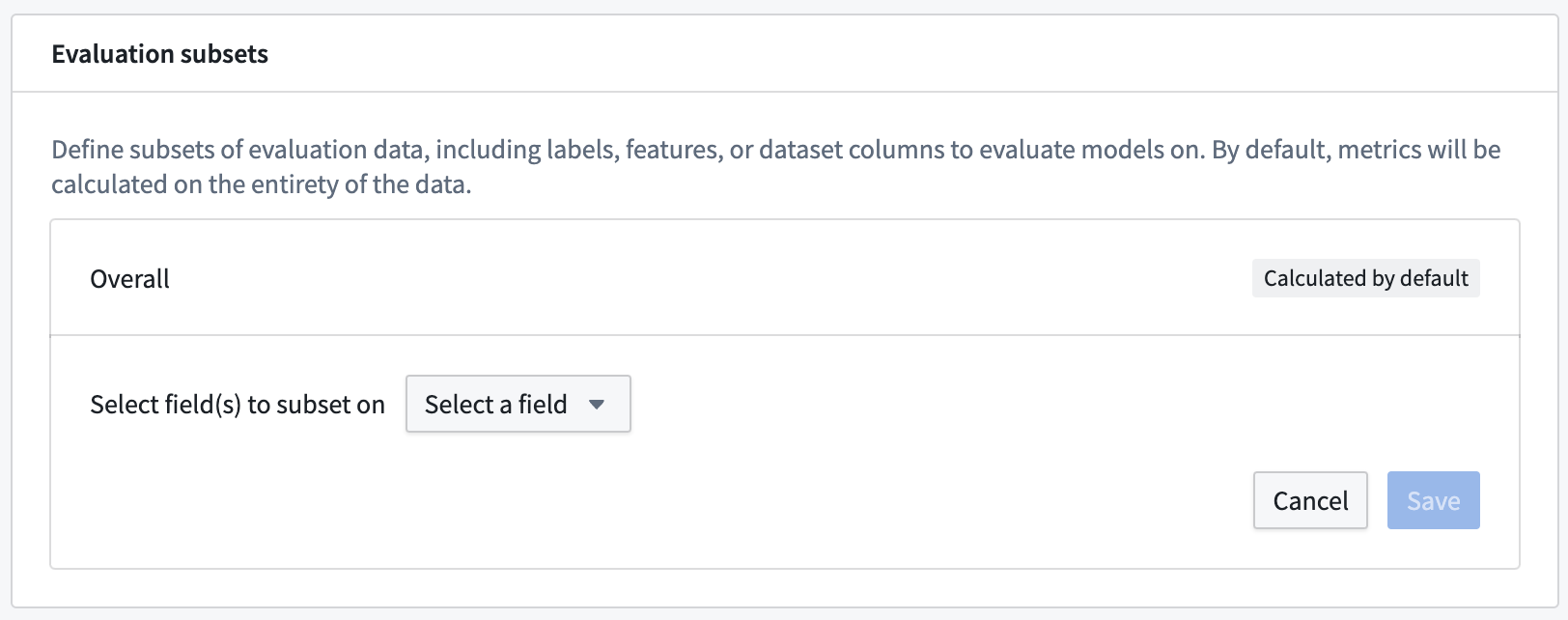
To configure an evaluation subset, click Add evaluation subset and select the evaluation dataset column or expected model output for which to create a subset.
Classification buckets
If you select a field from the evaluation subset that is of type string, a unique subset will be generated for each unique string value in the evaluation library at the time the evaluation pipeline is built.
Quantitative buckets
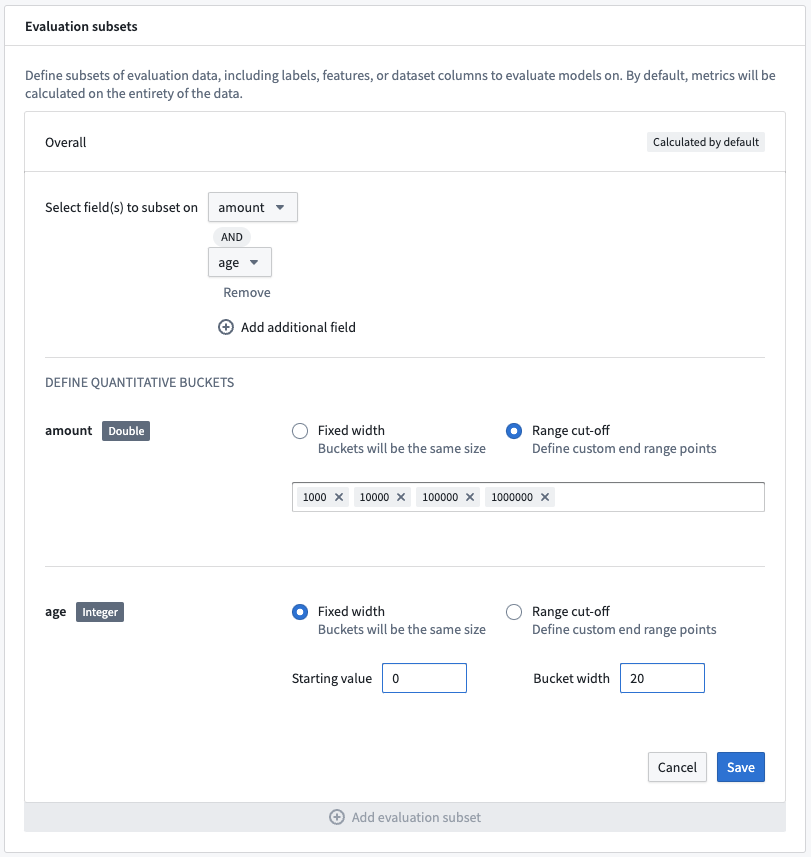
If you select a field from the evaluation subset that is a numeric type, you can select the quantitative bucketing strategy used to generate subsets. The buckets can either be of Fixed width or defined with specific Range cut-offs. Both bucketing strategies create buckets that are defined:
- From and including the lower-bound, as well as
- Up to but excluding the upper-bound.
For a fixed-width bucket you must provide both a Starting value and a Bucket width. A unique subset will be generated for every bucket width, both positively and negatively, for the entity of the range of the selected field.
A range cutoff will generate subsets that range between all values you specify. If you do not cover the entire range of the selected field, two additional buckets may be generated from the column minimum to the lowest cutoff and from the largest cutoff to the column maximum value.
:::callout{theme="warning" title="Warning"} Every unique subset is evaluated with every evaluation dataset and library. As a result, generating a large number of subsets may significantly increase build times for model evaluation. :::
Multi-field subsets
It is possible to generate subsets that represent the combination of multiple fields. Click Add additional field on multiple fields to select multiple columns or expected model outputs to combine into a single subset. This will create a subset for every combination of bucket between fields.
The quantitative bucketing strategy can be uniquely defined for each subset field.
Review evaluation subset preview
When you configure an evaluation subset, you will see a preview of the evaluation dataset on the right hand side of the page. This preview is available for every evaluation dataset that you have configured and can be used to determine how many evaluation subsets will be generated by your evaluation configuration.
Save evaluation configuration
Click Save configuration in the upper right corner of the page to save the evaluation configuration and return to the evaluation dashboard.
中文翻译
自动评估模型
随着建模项目日趋成熟、规模扩大并投入运营,系统性地评估和比较当前及新提交的模型变得至关重要。模型提交应使用维护良好的代表性数据,并依据明确定义的指标进行一致性评估。
建模目标(Modeling Objective)可配置为自动为提交至该目标的所有模型生成推理(Inference)和指标(Metrics)管道,从而使您能够在软件中实施系统性的测试与评估(T&E)计划。
配置模型评估
要启用自动模型评估,您首先需要配置建模目标,以确定如何评估提交至该目标的模型。
启用管道管理
在建模目标中配置自动模型评估的第一步是启用推理和指标生成。在建模目标主页上,选择配置评估仪表板(Configure evaluation dashboard),或者如果您已配置模型评估,则从评估仪表板中选择编辑评估配置(Edit evaluation configuration)。
在评估仪表板配置视图中,您可以决定是自动生成推理和指标管道,还是仅生成推理管道。根据您的选择,将为所有现有模型提交以及提交至该建模目标的任何新模型生成推理和指标数据集。
配置自动模型推理或评估
接下来,您可以决定在提交新模型时是否自动构建推理数据集,或推理与指标数据集。自动构建推理和指标数据集可确保所有考虑用于建模项目的模型都得到一致性评估。
:::callout{theme="neutral"} 推理和指标管道仅在模型提交时构建。对于现有模型提交,您需要通过评估仪表板上的构建评估(Build evaluation)按钮手动启动构建。 :::
点击保存(Save)以保存推理和指标生成设置。
添加评估数据集
评估数据集(Evaluation dataset)是Foundry中的一个数据集,模型将在建模目标内针对该数据集进行评估。如果建模目标配置为自动生成推理管道,则每个模型提交与评估数据集的组合都会生成一个推理数据集。每个评估数据集都应具有相关性并得到精心维护;它可能包含精选的验证集或测试集、生产观测数据、用户反馈实例、关键测试用例或假设场景的表示。评估数据集应包含模型运行推理所需的数据集字段或文件。
评估数据集可以具有不同的大小、更新频率和权限;将这些数据集分开管理可以更精细地控制计算指标的更新频率和权限设置。
:::callout{theme="neutral" title="权限(Permissions)"} 建模目标内完全遵循权限设置。用户若无适当访问权限,将无法查看模型、评估数据集、评估库或指标。 :::
要配置评估数据集,请选择添加评估数据集(Add evaluation dataset)。弹出窗口将允许您配置:
- 评估数据集。
- 应为此评估数据集生成推理数据集的Foundry文件夹。
- 应为此评估数据集生成指标数据集的Foundry文件夹。
这些Foundry文件夹可以是新建或现有的文件夹,且不要求对评估数据集唯一。通常,我们建议每个建模目标使用一个输出文件夹,但您可以根据具体用例进行配置。
:::callout{theme="warning"} 评估数据集和目标本身必须与推理和指标的目标位置位于同一个Foundry项目中,或者应作为引用添加到Foundry项目中。
建模目标中的自动模型评估仅兼容具有单个表格数据集输入的模型。 :::
配置评估库
如果您已将建模目标配置为生成指标和推理管道,下一步是配置评估库(Evaluation library)。评估库是Foundry中已发布的Python包,用于生成模型评估器。Foundry为二分类(Binary Classification)和回归(Regression)提供了默认的模型评估器,同时也允许您构建自定义模型评估器(Custom Model Evaluator)。评估库用于衡量模型性能、模型公平性、模型鲁棒性及其他指标。
配置完成后,评估库将为每个已配置的推理数据集生成一个包含指标集(Metric Set)的数据集。
要配置评估库,请点击选择评估库(Select evaluation library),选择一个评估库,然后配置该模型评估器所需的字段。对于列输入类型,建模目标会建议任何评估数据集中可用的列。此外,如果您在下拉菜单中未看到建议的列,或者知道该列将由模型转换生成,您还可以添加预期模型输出(Add an expected model output)来表示模型提交预期会生成的列。
最常见的预期模型输出类型包括预测输出(通常命名为prediction)、概率输出(通常命名为probability_1)和置信度分数。
配置评估子集
配置自动模型评估的一个可选步骤是为评估库定义评估子集(Evaluation subsets),以便针对这些子集生成指标。评估子集是评估数据集中数据的一个子集,系统会为其单独生成指标。通过评估仪表板可以单独分析评估子集的指标。
评估子集有助于了解模型在特定输入数据组上的表现,因此可用于提高模型的可解释性、可说明性以及在潜在受保护类别上的公平性。评估子集可以在评估数据集的任何列上生成,因此不要求必须在模型转换的输入或输出(如模型特征或模型预测)上生成。
:::callout{theme="neutral"} 指标将始终针对每个评估数据集的全部行(即"整体(Overall)"子集)生成。配置评估子集以在更多子集上自动生成指标是可选的。 :::
要配置评估子集,请点击添加评估子集(Add evaluation subset),然后选择要为其创建子集的评估数据集列或预期模型输出。
分类桶(Classification buckets)
如果您选择的评估子集字段类型为string,则在构建评估管道时,将为评估库中的每个唯一字符串值生成一个唯一的子集。
定量桶(Quantitative buckets)
如果您选择的评估子集字段为数值类型,则可以选择用于生成子集的定量分桶策略。桶可以是固定宽度(Fixed width),也可以使用特定的范围截断值(Range cut-offs)来定义。两种分桶策略创建的桶定义如下:
- 从下界开始并包含下界,以及
- 到上界为止但不包含上界。
对于固定宽度桶,您必须提供起始值(Starting value)和桶宽度(Bucket width)。对于所选字段的整个范围,将在正负两个方向上为每个桶宽度生成一个唯一的子集。
范围截断值将生成介于您指定的所有值之间的子集。如果您未覆盖所选字段的整个范围,则可能会额外生成两个桶:一个从列最小值到最低截断值,另一个从最大截断值到列最大值。
:::callout{theme="warning" title="警告(Warning)"} 每个唯一的子集都会与每个评估数据集和评估库一起进行评估。因此,生成大量子集可能会显著增加模型评估的构建时间。 :::
多字段子集(Multi-field subsets)
可以生成表示多个字段组合的子集。点击多个字段上的添加额外字段(Add additional field),选择多个列或预期模型输出以组合成单个子集。这将为字段之间的每个桶组合创建一个子集。
每个子集字段可以单独定义定量分桶策略。
查看评估子集预览
配置评估子集时,您将在页面右侧看到评估数据集的预览。此预览适用于您已配置的每个评估数据集,可用于确定您的评估配置将生成多少个评估子集。
保存评估配置
点击页面右上角的保存配置(Save configuration)以保存评估配置并返回评估仪表板。