Evaluate a model in code(在代码中评估模型)
:::callout{theme="warning"}
Metric sets were built for dataset-backed models using foundry_ml, a library which has been formally deprecated since October 31, 2025. For new implementations, we recommend using experiments instead. Metric sets will not appear on the model page for a model built with palantir_models, although they can be shown in a modeling objective.
:::
In Foundry, the performance of an individual model can be evaluated in code by creating one or more metric sets for that model. This page assumes knowledge of the MetricSet class.
The metrics produced by a metric set are associated with a specific transaction of the evaluation dataset and are available for review in the Modeling Objectives application. Note that you'll need to enable these metrics by toggling Only show metrics produced by evaluation configuration in the Modeling Objectives settings page.
:::callout{theme="neutral"} Metrics are associated with a specific transaction of an input dataset; you may need to rerun the code that produces a metric set each time you update the model or input dataset. :::
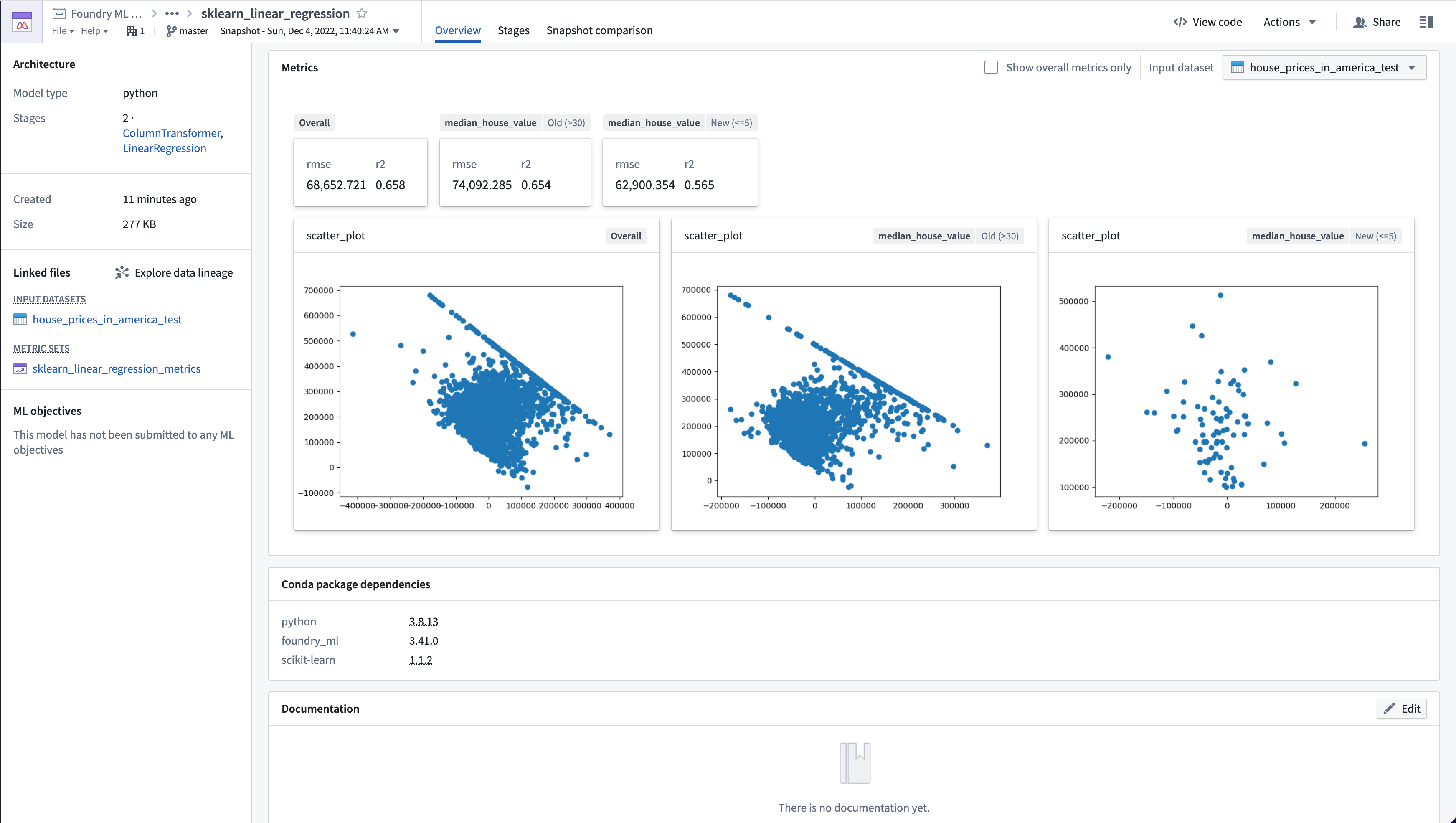
Evaluate a model in Code Workbook
To evaluate a model in the Code Workbook application:
- Create a code workbook or open an existing workbook.
- Import the
foundry_mlpackage into the environment for your code workbook. Thefoundry_ml_metricspackage will be available as part offoundry_ml. - Import the model and evaluation dataset into the code workbook.
- Create a transform that produces a
MetricSetobject in Python and associate your model and evaluation dataset as inputs of thatMetricSet. - Be sure to save the results as a dataset.
- The input types of the model will need to be an
Objectand the evaluation dataset aTransformsInput. - Add the metrics to the
MetricSetin your transform. - Return the
MetricSetas the result of the transform.
An example for a regression model named lr_model and testing dataset named testing_data is below. Note that this code snippet uses a model and testing dataset based on the housing dataset featured in the Getting Started tutorial.
def lr_evaluation_testing(lr_model, testing_data_input):
    from foundry_ml_metrics import MetricSet  # Make sure foundry_ml has been added to your environment

    model = lr_model  # Rename model
    metric_set = MetricSet(  # Create a MetricSet to add individual metrics to
        model = lr_model,  # The Foundry ML Model you are evaluating
        input_data=testing_data_input  # The TransformInput of the dataset you are evaluating performance against
    )

    testing_data_df = testing_data_input.dataframe().toPandas()  # Get a pandas dataframe from the TransformInput

    y_true_column = 'median_house_value'  # This is the column in the evaluation dataset the model is predicting
    y_prediction_column = 'prediction'  # This is the column the model produces when it transforms a dataset

    scored_df = get_model_scores(model, testing_data_df)

    # Add metrics on the entire input dataset
    add_numeric_metrics_to_metric_set(metric_set, scored_df, y_true_column, y_prediction_column)
    add_residuals_scatter_plot_to_metric_set(metric_set, scored_df, y_true_column, y_prediction_column)

    # Add metrics where the housing_median_age column is greater than 30
    old_homes_subset = {'median_house_value': 'Old (>30)'}
    old_houses_scored_df = scored_df[scored_df['housing_median_age'] > 30]
    add_numeric_metrics_to_metric_set(metric_set, old_houses_scored_df, y_true_column, y_prediction_column, old_homes_subset)
    add_residuals_scatter_plot_to_metric_set(metric_set, old_houses_scored_df, y_true_column, y_prediction_column, old_homes_subset)

    # Add metrics where the housing_median_age column is less than or equal to 5
    new_homes_subset = {'median_house_value': 'New (<=5)'}
    new_houses_scored_df = scored_df[scored_df['housing_median_age'] <= 5]
    add_numeric_metrics_to_metric_set(metric_set, new_houses_scored_df, y_true_column, y_prediction_column, new_homes_subset)
    add_residuals_scatter_plot_to_metric_set(metric_set, new_houses_scored_df, y_true_column, y_prediction_column, new_homes_subset)

    return metric_set  # Code Workbooks will save this as a MetricSet in Foundry


def get_model_scores(model, df):
    return model.transform(df)  # Create predictions based on the model


def add_numeric_metrics_to_metric_set(
            metric_set,
            scored_df,
            y_true_column,
            y_prediction_column,
            subset=None
        ):
    import numpy as np
    from sklearn.metrics import mean_squared_error, r2_score

    y_true = scored_df[y_true_column]
    y_pred = scored_df[y_prediction_column]

    # Compute metrics
    mse = mean_squared_error(y_true, y_pred)
    rmse = np.sqrt(mse)
    r2 = r2_score(y_true, y_pred)

    metric_set.add(name='rmse', value=rmse, subset=subset)  # rmse is a float
    metric_set.add(name='r2', value=r2, subset=subset)  # r2 is a float


def add_residuals_scatter_plot_to_metric_set(
            metric_set,
            scored_df,
            y_true_column,
            y_prediction_column,
            subset=None
        ):
    import matplotlib.pyplot as plt

    y_true = scored_df[y_true_column]
    y_pred = scored_df[y_prediction_column]

    scatter_plot = plt.scatter((y_true - y_pred), y_pred)  # Create a scatter plot
    figure = plt.gcf()  # Gets the current pyplot figure
    metric_set.add(name='scatter_plot', value=figure, subset=subset)  # figure is a pyplot image
    plt.close()  # Close the pyplot figure
Evaluate a model in Code Repositories
To evaluate a model in the Code Repositories application:
- Create a code repository or open an existing repository.
- Import
foundry_mlpackage into the environment for your code repository. Thefoundry_ml_metricspackage will be available as part offoundry_ml. - Create a transform that produces a
MetricSetobject in Python and associate your model and evaluation dataset as inputs of thatMetricSet. - Rather than return your MetricSet, save the metric_set with
metric_set.save(metrics_output). - The transform input types of both your model and evaluation dataset will be
TransformInput. - Add the metrics to the
MetricSetin your transform. - Return the
MetricSetas the result of the transform.
An example for a regression model named lr_model and testing dataset named testing_data is below. Note that this code snippet uses a model and testing dataset based on the housing dataset featured in the Getting Started tutorial.
from transforms.api import transform, Input, Output

# Make sure foundry_ml has been added to your run requirements in transforms-python/conda_recipe/meta.yaml
from foundry_ml import Model
from foundry_ml_metrics import MetricSet


@transform(  # As this uses @transform, the inputs will be TransformInput's
    # You will need to update the Output Path to the output location you want your metrics saved to
    metrics_output=Output("/Path/to/metrics_dataset/sklearn_linear_regression_metrics"),
    # You will need to update the Input Path to the path of your model and evaluation dataset
    model_input=Input("/Path/to/model/sklearn_linear_regression"),
    testing_data_input=Input("/Path/to/evaluation_dataset/house_prices_in_america_test")
)
def compute(metrics_output, model_input, testing_data_input):
    model = Model.load(model_input)  # Load the Foundry ML Model from the TransformInput
    metric_set = MetricSet(  # Create a MetricSet to add individual metrics to
        model=model,  # The Foundry ML Model you are evaluating
        input_data=testing_data_input  # The TransformInput of the dataset you are evaluating performance against
    )

    testing_data_df = testing_data_input.dataframe().toPandas()  # Get a pandas dataframe from the TransformInput

    y_true_column = 'median_house_value'  # This is the column in the evaluation dataset the model is predicting
    y_prediction_column = 'prediction'  # This is the column the model produces when it transforms a dataset

    scored_df = get_model_scores(model, testing_data_df)

    # Add metrics on the entire input dataset
    add_numeric_metrics_to_metric_set(metric_set, scored_df, y_true_column, y_prediction_column)
    add_residuals_scatter_plot_to_metric_set(metric_set, scored_df, y_true_column, y_prediction_column)

    # Add metrics where the housing_median_age column is greater than 30
    old_homes_subset = {'median_house_value': 'Old (>30)'}
    old_houses_scored_df = scored_df[scored_df['housing_median_age'] > 30]
    add_numeric_metrics_to_metric_set(metric_set, old_houses_scored_df, y_true_column, y_prediction_column, old_homes_subset)
    add_residuals_scatter_plot_to_metric_set(metric_set, old_houses_scored_df, y_true_column, y_prediction_column, old_homes_subset)

    # Add metrics where the housing_median_age column is less than or equal to 5
    new_homes_subset = {'median_house_value': 'New (<=5)'}
    new_houses_scored_df = scored_df[scored_df['housing_median_age'] <= 5]
    add_numeric_metrics_to_metric_set(metric_set, new_houses_scored_df, y_true_column, y_prediction_column, new_homes_subset)
    add_residuals_scatter_plot_to_metric_set(metric_set, new_houses_scored_df, y_true_column, y_prediction_column, new_homes_subset)

    metric_set.save(metrics_output)  # Save this MetricSet in to the TransformsOutput


def get_model_scores(model, df):
    return model.transform(df)  # Create predictions based on the model


def add_numeric_metrics_to_metric_set(
            metric_set,
            scored_df,
            y_true_column,
            y_prediction_column,
            subset=None
        ):
    import numpy as np
    from sklearn.metrics import mean_squared_error, r2_score

    y_true = scored_df[y_true_column]
    y_pred = scored_df[y_prediction_column]

    # Compute metrics
    mse = mean_squared_error(y_true, y_pred)
    rmse = np.sqrt(mse)
    r2 = r2_score(y_true, y_pred)

    metric_set.add(name='rmse', value=rmse, subset=subset)  # rmse is a float
    metric_set.add(name='r2', value=r2, subset=subset)  # r2 is a float


def add_residuals_scatter_plot_to_metric_set(
            metric_set,
            scored_df,
            y_true_column,
            y_prediction_column,
            subset=None
        ):
    import matplotlib.pyplot as plt

    y_true = scored_df[y_true_column]
    y_pred = scored_df[y_prediction_column]

    scatter_plot = plt.scatter((y_true - y_pred), y_pred)  # Create a scatter plot
    figure = plt.gcf()  # Gets the current pyplot figure
    metric_set.add(name='scatter_plot', value=figure, subset=subset)  # figure is a pyplot image
    plt.close()  # Close the pyplot figure
Updating metrics
As the above code snippets create transforms, the metric sets are created and computed via Foundry Builds. When a model is updated, or a new input data version becomes available, it is important to rebuild the metric set to update the metrics that are associated with that model.
中文翻译
在代码中评估模型
:::callout{theme="warning"}
指标集(Metric sets)是为使用 foundry_ml 构建的基于数据集的模型而设计的,该库已于 2025 年 10 月 31 日正式弃用。对于新的实现,我们建议改用实验(experiments)。使用 palantir_models 构建的模型页面上不会显示指标集,但指标集可以在建模目标中显示。
:::
在 Foundry 中,可以通过为模型创建一个或多个"指标集(metric sets)"来在代码中评估单个模型的性能。本文档假设您已了解 MetricSet 类。
指标集生成的指标与评估数据集(evaluation dataset)的特定事务(transaction)相关联,并可在建模目标(Modeling Objectives)应用中进行查看。请注意,您需要在建模目标设置页面中切换"仅显示评估配置生成的指标(Only show metrics produced by evaluation configuration)"选项来启用这些指标。
:::callout{theme="neutral"} 指标与输入数据集的特定事务相关联;每次更新模型或输入数据集时,您可能需要重新运行生成指标集的代码。 :::
在 Code Workbook 中评估模型
要在 Code Workbook 应用中评估模型:
- 创建一个 Code Workbook 或打开现有工作簿。
- 将
foundry_ml包导入到 Code Workbook 的环境中。foundry_ml_metrics包将作为foundry_ml的一部分提供。 - 将模型和评估数据集导入到 Code Workbook 中。
- 创建一个转换(transform),生成一个 Python 的
MetricSet对象,并将您的模型和评估数据集作为该MetricSet的输入。 - 请务必将结果保存为数据集。
- 模型的输入类型需要是
Object,评估数据集需要是TransformsInput。 - 在转换中向
MetricSet添加指标。 - 将
MetricSet作为转换的结果返回。
以下是一个名为 lr_model 的回归模型和名为 testing_data 的测试数据集的示例。请注意,此代码片段使用了基于入门教程中房屋数据集的模型和测试数据集。
def lr_evaluation_testing(lr_model, testing_data_input):
    from foundry_ml_metrics import MetricSet  # 确保已在环境中添加 foundry_ml

    model = lr_model  # 重命名模型
    metric_set = MetricSet(  # 创建一个 MetricSet 以添加各个指标
        model = lr_model,  # 您正在评估的 Foundry ML 模型
        input_data=testing_data_input  # 您正在评估性能的数据集的 TransformInput
    )

    testing_data_df = testing_data_input.dataframe().toPandas()  # 从 TransformInput 获取 pandas 数据框

    y_true_column = 'median_house_value'  # 评估数据集中模型预测的列
    y_prediction_column = 'prediction'  # 模型转换数据集时生成的列

    scored_df = get_model_scores(model, testing_data_df)

    # 在整个输入数据集上添加指标
    add_numeric_metrics_to_metric_set(metric_set, scored_df, y_true_column, y_prediction_column)
    add_residuals_scatter_plot_to_metric_set(metric_set, scored_df, y_true_column, y_prediction_column)

    # 在 housing_median_age 列大于 30 的数据上添加指标
    old_homes_subset = {'median_house_value': 'Old (>30)'}
    old_houses_scored_df = scored_df[scored_df['housing_median_age'] > 30]
    add_numeric_metrics_to_metric_set(metric_set, old_houses_scored_df, y_true_column, y_prediction_column, old_homes_subset)
    add_residuals_scatter_plot_to_metric_set(metric_set, old_houses_scored_df, y_true_column, y_prediction_column, old_homes_subset)

    # 在 housing_median_age 列小于等于 5 的数据上添加指标
    new_homes_subset = {'median_house_value': 'New (<=5)'}
    new_houses_scored_df = scored_df[scored_df['housing_median_age'] <= 5]
    add_numeric_metrics_to_metric_set(metric_set, new_houses_scored_df, y_true_column, y_prediction_column, new_homes_subset)
    add_residuals_scatter_plot_to_metric_set(metric_set, new_houses_scored_df, y_true_column, y_prediction_column, new_homes_subset)

    return metric_set  # Code Workbook 会将其保存为 Foundry 中的 MetricSet


def get_model_scores(model, df):
    return model.transform(df)  # 基于模型创建预测


def add_numeric_metrics_to_metric_set(
            metric_set,
            scored_df,
            y_true_column,
            y_prediction_column,
            subset=None
        ):
    import numpy as np
    from sklearn.metrics import mean_squared_error, r2_score

    y_true = scored_df[y_true_column]
    y_pred = scored_df[y_prediction_column]

    # 计算指标
    mse = mean_squared_error(y_true, y_pred)
    rmse = np.sqrt(mse)
    r2 = r2_score(y_true, y_pred)

    metric_set.add(name='rmse', value=rmse, subset=subset)  # rmse 是浮点数
    metric_set.add(name='r2', value=r2, subset=subset)  # r2 是浮点数


def add_residuals_scatter_plot_to_metric_set(
            metric_set,
            scored_df,
            y_true_column,
            y_prediction_column,
            subset=None
        ):
    import matplotlib.pyplot as plt

    y_true = scored_df[y_true_column]
    y_pred = scored_df[y_prediction_column]

    scatter_plot = plt.scatter((y_true - y_pred), y_pred)  # 创建散点图
    figure = plt.gcf()  # 获取当前 pyplot 图形
    metric_set.add(name='scatter_plot', value=figure, subset=subset)  # figure 是 pyplot 图像
    plt.close()  # 关闭 pyplot 图形
在 Code Repositories 中评估模型
要在 Code Repositories 应用中评估模型:
- 创建一个 Code Repository 或打开现有仓库。
- 将
foundry_ml包导入到 Code Repository 的环境中。foundry_ml_metrics包将作为foundry_ml的一部分提供。 - 创建一个转换(transform),生成一个 Python 的
MetricSet对象,并将您的模型和评估数据集作为该MetricSet的输入。 - 不要返回 MetricSet,而是使用
metric_set.save(metrics_output)保存 metric_set。 - 模型和评估数据集的转换输入类型都将是
TransformInput。 - 在转换中向
MetricSet添加指标。 - 将
MetricSet作为转换的结果返回。
以下是一个名为 lr_model 的回归模型和名为 testing_data 的测试数据集的示例。请注意,此代码片段使用了基于入门教程中房屋数据集的模型和测试数据集。
from transforms.api import transform, Input, Output

# 确保已在 transforms-python/conda_recipe/meta.yaml 的运行需求中添加 foundry_ml
from foundry_ml import Model
from foundry_ml_metrics import MetricSet


@transform(  # 由于使用 @transform,输入将是 TransformInput
    # 您需要将 Output Path 更新为您希望保存指标的输出位置
    metrics_output=Output("/Path/to/metrics_dataset/sklearn_linear_regression_metrics"),
    # 您需要将 Input Path 更新为模型和评估数据集的路径
    model_input=Input("/Path/to/model/sklearn_linear_regression"),
    testing_data_input=Input("/Path/to/evaluation_dataset/house_prices_in_america_test")
)
def compute(metrics_output, model_input, testing_data_input):
    model = Model.load(model_input)  # 从 TransformInput 加载 Foundry ML 模型
    metric_set = MetricSet(  # 创建一个 MetricSet 以添加各个指标
        model=model,  # 您正在评估的 Foundry ML 模型
        input_data=testing_data_input  # 您正在评估性能的数据集的 TransformInput
    )

    testing_data_df = testing_data_input.dataframe().toPandas()  # 从 TransformInput 获取 pandas 数据框

    y_true_column = 'median_house_value'  # 评估数据集中模型预测的列
    y_prediction_column = 'prediction'  # 模型转换数据集时生成的列

    scored_df = get_model_scores(model, testing_data_df)

    # 在整个输入数据集上添加指标
    add_numeric_metrics_to_metric_set(metric_set, scored_df, y_true_column, y_prediction_column)
    add_residuals_scatter_plot_to_metric_set(metric_set, scored_df, y_true_column, y_prediction_column)

    # 在 housing_median_age 列大于 30 的数据上添加指标
    old_homes_subset = {'median_house_value': 'Old (>30)'}
    old_houses_scored_df = scored_df[scored_df['housing_median_age'] > 30]
    add_numeric_metrics_to_metric_set(metric_set, old_houses_scored_df, y_true_column, y_prediction_column, old_homes_subset)
    add_residuals_scatter_plot_to_metric_set(metric_set, old_houses_scored_df, y_true_column, y_prediction_column, old_homes_subset)

    # 在 housing_median_age 列小于等于 5 的数据上添加指标
    new_homes_subset = {'median_house_value': 'New (<=5)'}
    new_houses_scored_df = scored_df[scored_df['housing_median_age'] <= 5]
    add_numeric_metrics_to_metric_set(metric_set, new_houses_scored_df, y_true_column, y_prediction_column, new_homes_subset)
    add_residuals_scatter_plot_to_metric_set(metric_set, new_houses_scored_df, y_true_column, y_prediction_column, new_homes_subset)

    metric_set.save(metrics_output)  # 将此 MetricSet 保存到 TransformsOutput


def get_model_scores(model, df):
    return model.transform(df)  # 基于模型创建预测


def add_numeric_metrics_to_metric_set(
            metric_set,
            scored_df,
            y_true_column,
            y_prediction_column,
            subset=None
        ):
    import numpy as np
    from sklearn.metrics import mean_squared_error, r2_score

    y_true = scored_df[y_true_column]
    y_pred = scored_df[y_prediction_column]

    # 计算指标
    mse = mean_squared_error(y_true, y_pred)
    rmse = np.sqrt(mse)
    r2 = r2_score(y_true, y_pred)

    metric_set.add(name='rmse', value=rmse, subset=subset)  # rmse 是浮点数
    metric_set.add(name='r2', value=r2, subset=subset)  # r2 是浮点数


def add_residuals_scatter_plot_to_metric_set(
            metric_set,
            scored_df,
            y_true_column,
            y_prediction_column,
            subset=None
        ):
    import matplotlib.pyplot as plt

    y_true = scored_df[y_true_column]
    y_pred = scored_df[y_prediction_column]

    scatter_plot = plt.scatter((y_true - y_pred), y_pred)  # 创建散点图
    figure = plt.gcf()  # 获取当前 pyplot 图形
    metric_set.add(name='scatter_plot', value=figure, subset=subset)  # figure 是 pyplot 图像
    plt.close()  # 关闭 pyplot 图形
更新指标
由于上述代码片段创建了转换(transforms),指标集将通过 Foundry Builds 创建和计算。当模型更新或新的输入数据版本可用时,重新构建指标集以更新与该模型关联的指标非常重要。