Review model metrics in the evaluation dashboard(在评估仪表板中查看模型指标)
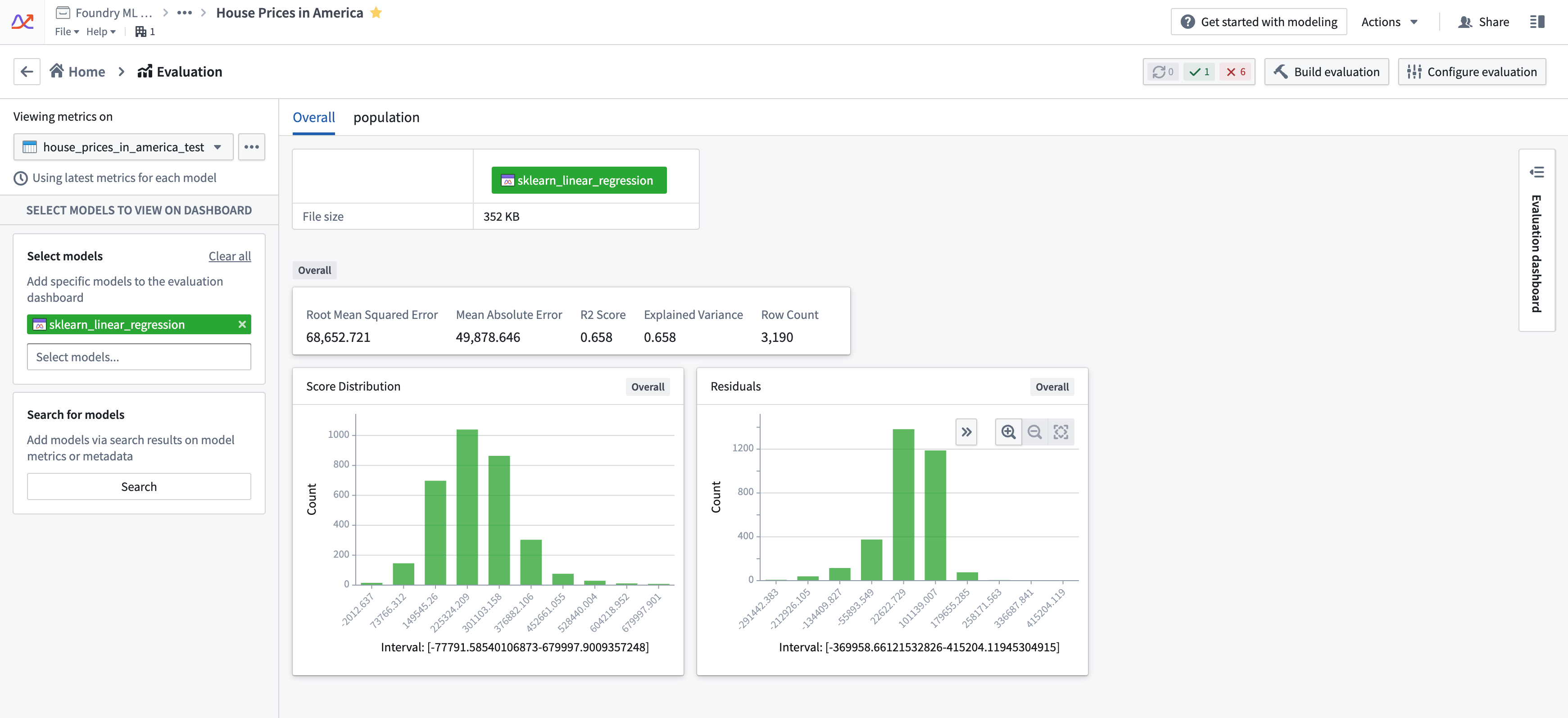
Model evaluation is critically important for operational modeling projects. Once you have generated metrics for the models submitted to your modeling objective either automatically or in code, you can compare models against each other in the evaluation dashboard. From the Modeling Objective home page, navigate to the evaluation dashboard by selecting View evaluation dashboard.

Evaluation dashboard
The evaluation dashboard provides a standard and centralized place for model metric and performance evaluation. All metrics that are associated with any model submission are available for review inside a modeling objective.
To ensure standardization of model metrics, only metrics that have been generated by the evaluation dashboard configuration are displayed by default in the evaluation dashboard. If you are instead manually evaluating models in code, you will need to adjust the settings for your modeling objective to disable Only show metrics produced by evaluation configuration in the modeling objective settings.
In the model evaluation dashboard, metrics are shown based on the intersection of the selected evaluation dataset and model submissions.
Select an input dataset
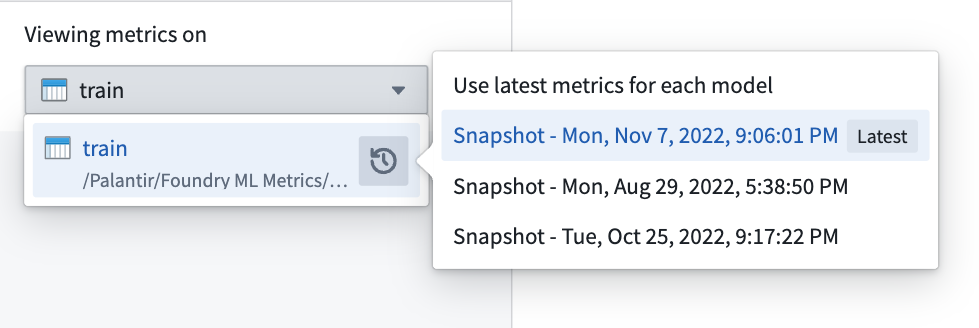
To select an input dataset, choose an evaluation dataset from the evaluation dataset dropdown at the top left of the evaluation dashboard. This selector allows you to choose an evaluation dataset or a specific dataset transaction of an evaluation dataset.
If you do not choose a specific transaction of an evaluation dataset, you will see the most recent metrics results for every selected model submission. If you select a specific transaction, you will only see the metrics that were built using that specific transaction of the evaluation dataset as input.
:::callout{theme="neutral"} It is most statistically accurate to compare models across a specific transaction of the evaluation dataset. However, cross-transaction comparison can be useful to compare performance against model submissions where the model schema has changed. :::
Select models for evaluation
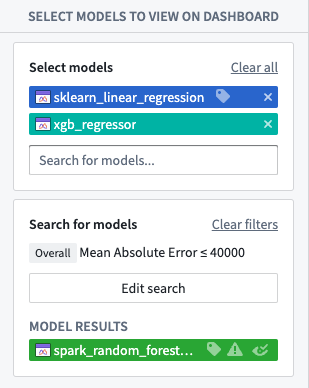
The next step to view evaluation results is to select the models for which you want to view metrics. The models displayed on the evaluation dashboard are the union of the models chosen in Select models and Search for models.
Select models
The first way to add model submissions to the evaluation dashboard is to select individual model submissions. The Select models dropdown allows you to choose one or more specific model submissions to add to the evaluation dashboard.
Search for models
If you have a large number of model submissions, it can be useful to add models that meet certain search criteria. The model submission search results will be added to the evaluation dashboard in addition to the models selected in Select models.
Model submission search supports searching for model submissions in several ways:
- Matching metrics criteria on all data in the evaluation dataset ("Overall")
- Matching metrics criteria on a defined subset of the evaluation dataset
- By a specific model owner or model submitter
- By model metadata
Evaluation dashboard layout
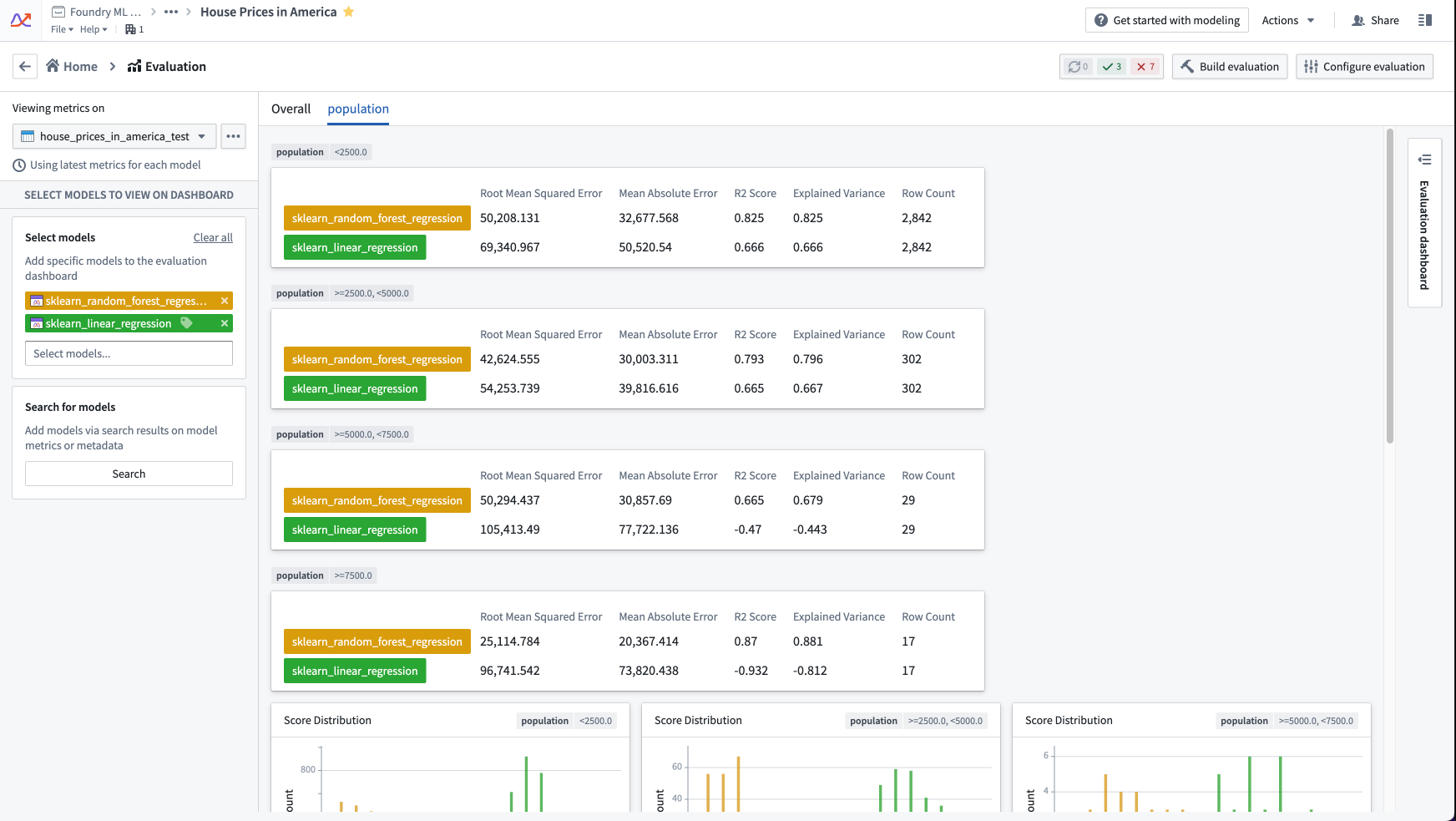
The evaluation dashboard separates the metrics on model submissions into tabs. The tabs displayed are a combination of the subsets configured in the evaluation configuration and, if enabled in the modeling objective settings, the custom pinned metrics views.
中文翻译
在评估仪表板中查看模型指标
模型评估对于运营建模项目至关重要。当你通过自动方式或代码方式为提交到建模目标的模型生成指标后,你可以在评估仪表板中对模型进行相互比较。从建模目标主页,选择查看评估仪表板即可导航至评估仪表板。
评估仪表板
评估仪表板为模型指标和性能评估提供了一个标准化且集中的场所。与任何模型提交相关的所有指标都可在建模目标内进行查看。
为确保模型指标的标准化,评估仪表板默认仅显示由评估仪表板配置生成的指标。如果你改为通过代码手动评估模型,则需要在建模目标设置中调整设置,禁用仅显示由评估配置生成的指标选项。
在模型评估仪表板中,指标基于所选评估数据集与模型提交的交集进行显示。
选择输入数据集
要选择输入数据集,请从评估仪表板左上角的评估数据集下拉菜单中选择一个评估数据集。此选择器允许你选择一个评估数据集,或该评估数据集的特定数据集事务。
如果你未选择评估数据集的特定事务,你将看到每个选定模型提交的最新指标结果。如果你选择了特定事务,则只会看到使用该评估数据集特定事务作为输入构建的指标。
:::callout{theme="neutral"} 在评估数据集的特定事务上比较模型在统计上最为准确。然而,跨事务比较对于比较模型模式已更改的模型提交的性能也很有用。 :::
选择待评估的模型
查看评估结果的下一步是选择你想要查看指标的模型。评估仪表板上显示的模型是选择模型和搜索模型中所选模型的并集。
选择模型
将模型提交添加到评估仪表板的第一种方法是选择单个模型提交。选择模型下拉菜单允许你选择一个或多个特定的模型提交添加到评估仪表板。
搜索模型
如果你有大量模型提交,添加符合特定搜索条件的模型会很有用。模型提交搜索结果将添加到评估仪表板中,与选择模型中选定的模型一同显示。
模型提交搜索支持通过以下几种方式搜索模型提交:
- 匹配评估数据集中所有数据的指标条件("整体")
- 匹配评估数据集定义子集上的指标条件
- 按特定模型所有者或模型提交者搜索
- 按模型元数据搜索
评估仪表板布局
评估仪表板将模型提交的指标按标签页进行分隔。显示的标签页是评估配置中配置的子集与(如果在建模目标设置中启用了)自定义固定指标视图的组合。