Example MCP workflows(示例 MCP 工作流)
This page contains examples of MCP workflows, which are a linked series of actions used by an AI agent to achieve a goal. MCP workflows can involve tool use as well as connection to resources like repositories.
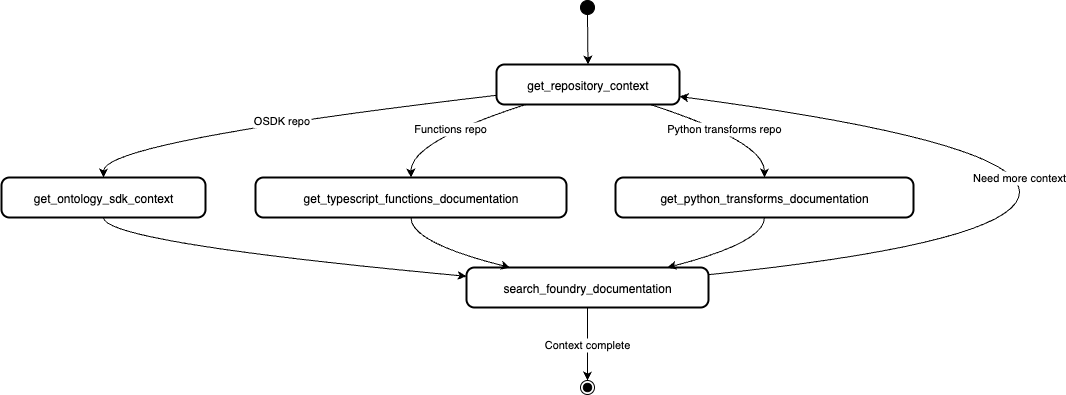
Repository context discovery
The Palantir MCP is able to provide ontology and code-snippet context to your agent loop. After the context is provided, the agent will be able to perform the following:
- Navigate your code base and use internal Palantir libraries.
- Navigate the remote Foundry project and investigate resources within the project.
Example queries:
- "Fetch code/API context for my Foundry project"
- "Use the Palantir MCP to provide context on this project"
- "Tell me about my repository"
The Palantir MCP currently provides context for React OSDK, Python transform, and Typescript function repositories.
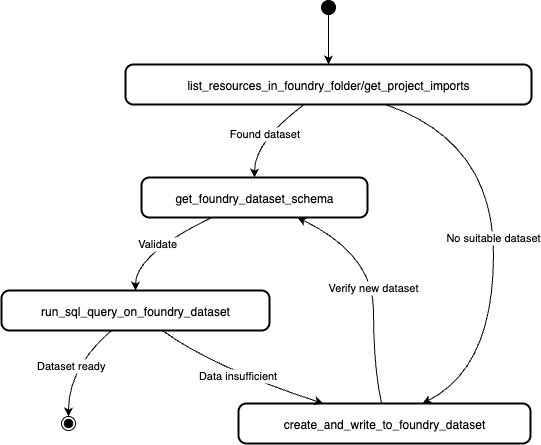
Dataset search and creation
The Palantir MCP is able to view list datasets, run SQL queries on them, and create datasets with notional data.
:::callout{theme="neutral"} Note that the Palantir MCP is not allowed to overwrite existing datasets, but can only create new ones. This provides a safeguard for your existing data. :::
Example queries:
- Explore: "What Foundry Datasets do I have access to?"
- Investigate: "Show me the top delayed Flights in /Path/to/dataset/Flight_routes."
- Investigate: "Is this dataset clean?
ri.foundry.main.dataset.033384ec-73de-41c1-bebe-45178cfc468b" - Create: "Create me a Foundry dataset with notional data. It should have columns ..., and be at least 50 rows."
- Create: "Create me a Foundry dataset with notional data. Use a script to generate 10,000 rows of data."
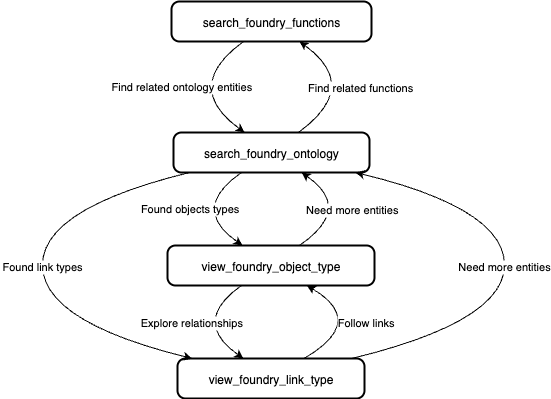
Ontology exploration
The Palantir MCP has tools for searching the ontology. The tools allow agents to search through object types, action types, and functions in your ontology.
Example queries:
- "Find me an object type {description}."
- "Find or create me an object type {description}."
- "What functions interacts with this object?"
- "Find me functions {description}."
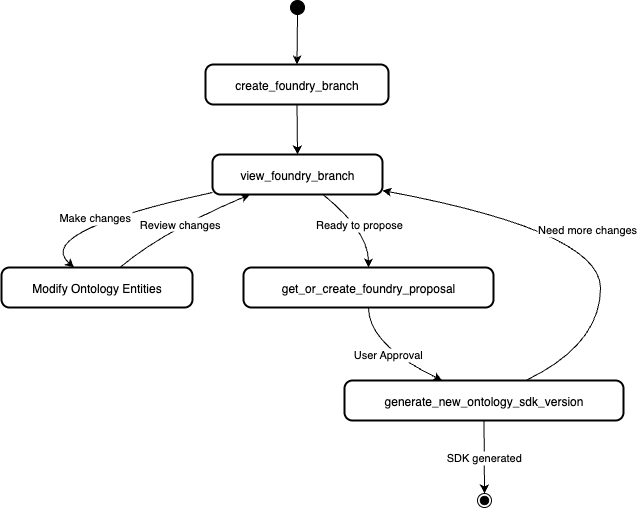
Ontology modification and SDK generation
The Palantir MCP can create proposals, modify the ontology, and regenerate your Developer Console OSDK for immediate use in code.
:::callout{theme="neutral"} Note that all modifications to the ontology must go through the proposal review process. This means that human review and approval is required before the MCP makes any lasting changes to the ontology. :::
This flow is initiated by ontology-related queries, such as the following:
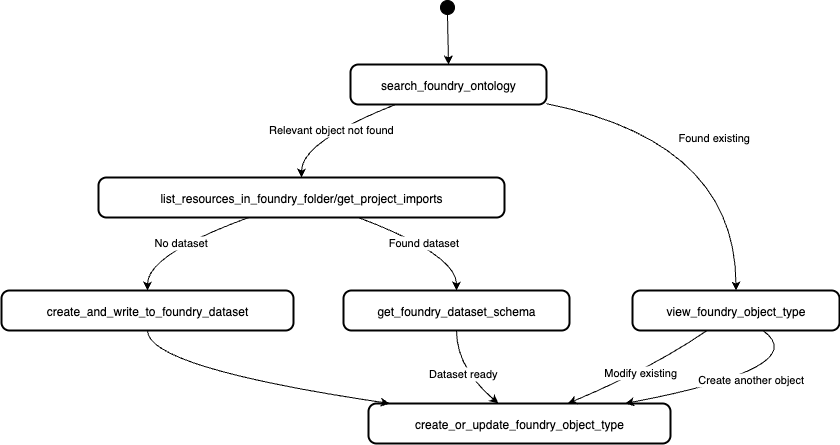
- "Create an object type {description}"
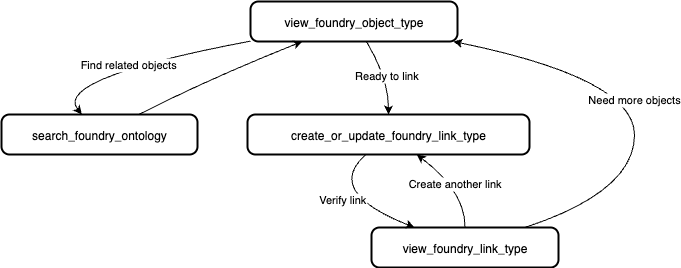
- "Create a link type {description}"
- "Create an object type {description} and link it to {description}"
- "Create a one-to-many link between {object 1} and {object 2}"
- "Create a many-to-many link between {object 1} and {object 2}"
SDK generation
Object type creation
Link type creation
中文翻译
示例 MCP 工作流
本页面包含 MCP 工作流(MCP workflows)的示例,这些工作流是由 AI 代理为实现目标而执行的一系列关联操作。MCP 工作流可以涉及工具使用以及与仓库等资源的连接。
仓库上下文发现
Palantir MCP 能够为您的代理循环提供本体和代码片段上下文。提供上下文后,代理将能够执行以下操作:
- 浏览您的代码库并使用内部 Palantir 库
- 导航远程 Foundry 项目并调查项目内的资源
示例查询:
- "获取我的 Foundry 项目的代码/API 上下文"
- "使用 Palantir MCP 提供此项目的上下文"
- "告诉我关于我的仓库的信息"
Palantir MCP 目前为 React OSDK、Python transform 和 Typescript function 仓库提供上下文。
数据集搜索与创建
Palantir MCP 能够查看数据集列表、对其运行 SQL 查询,以及创建包含模拟数据的数据集。
:::callout{theme="neutral"} 请注意,Palantir MCP 不允许覆盖现有数据集,只能创建新的数据集。这为您的现有数据提供了保护。 :::
示例查询:
- 探索:"我可以访问哪些 Foundry 数据集?"
- 调查:"显示 /Path/to/dataset/Flight_routes 中延迟最严重的航班。"
- 调查:"这个数据集是否干净?
ri.foundry.main.dataset.033384ec-73de-41c1-bebe-45178cfc468b" - 创建:"为我创建一个包含模拟数据的 Foundry 数据集。它应该包含列...,并且至少有 50 行。"
- 创建:"为我创建一个包含模拟数据的 Foundry 数据集。使用脚本生成 10,000 行数据。"
本体探索
Palantir MCP 具有搜索本体的工具。这些工具允许代理搜索本体中的对象类型(object types)、操作类型(action types)和函数(functions)。
示例查询:
- "查找一个对象类型 {描述}。"
- "查找或创建一个对象类型 {描述}。"
- "哪些函数与此对象交互?"
- "查找函数 {描述}。"
本体修改与 SDK 生成
Palantir MCP 可以创建提案、修改本体,并重新生成您的 Developer Console OSDK,以便在代码中立即使用。
:::callout{theme="neutral"} 请注意,对本体的所有修改都必须经过提案审查流程。这意味着在 MCP 对本体进行任何永久性更改之前,需要人工审查和批准。 :::
此流程由与本体相关的查询触发,例如:
- "创建一个对象类型 {描述}"
- "创建一个链接类型 {描述}"
- "创建一个对象类型 {描述} 并将其链接到 {描述}"
- "在 {对象 1} 和 {对象 2} 之间创建一对多链接"
- "在 {对象 1} 和 {对象 2} 之间创建多对多链接"
SDK 生成
对象类型创建
链接类型创建