Palantir MCP
Palantir MCP is an implementation of the Model Context Protocol ↗. Palantir MCP enables AI IDEs and AI agents to autonomously design, build, edit, and review end-to-end applications within the Palantir platform, covering everything from data integration to ontology configuration and application development. In addition, you can use Palantir MCP to allow external AI systems to query documentation, metadata, and data, as well as perform high-level tasks on the platform. Developers can use Palantir MCP to automate auxiliary tasks while they stay focused on the system they are building.
Review our installation guidance and other resources before getting started with Palantir MCP:
- Follow the installation instructions to install the Palantir MCP into your IDE. Alternatively, use the AI development tools available in a VS Code workspace to access Palantir MCP.
- Review the Palantir MCP getting started guide.
- Review our security and data flow documentation.
When should I use Palantir MCP?
The Palantir MCP provides two main benefits to developers:
- Context: Palantir MCP provides LLM agents with context to navigate internal Palantir libraries and understand Foundry architecture.
- Tools: Palantir MCP provides tools for LLM agents to explore your ontology and Foundry projects and to take actions.
Ontology MCP for consumption
Palantir MCP is designed for ontology builders and can modify ontology types, but cannot write ontology data. By contrast, Ontology MCP (OMCP) enables ontology consumers to safely read and write data to your ontology through external AI agents. Ontology MCP exposes your application's object types, action types, and query functions as MCP tools. These MCP tools can be used by external systems like Copilot Studio or Gemini Enterprise to execute actions and write data, while restricting which actions the agent can take through application restrictions. Learn more about enabling Ontology MCP in the Developer Console documentation.
Use Palantir libraries and APIs
LLM agents are powerful for writing code to integrate with new systems and libraries given the appropriate code context is provided. The Palantir MCP will provide the LLM with specific examples when necessary. The MCP recognizes your current repository and injects tailored context for the repository type (for example, OSDK repositories, Python transforms, and Typescript functions). Additionally, the MCP searches Palantir's code snippet index and provides context for libraries that do not fit a specific repository.
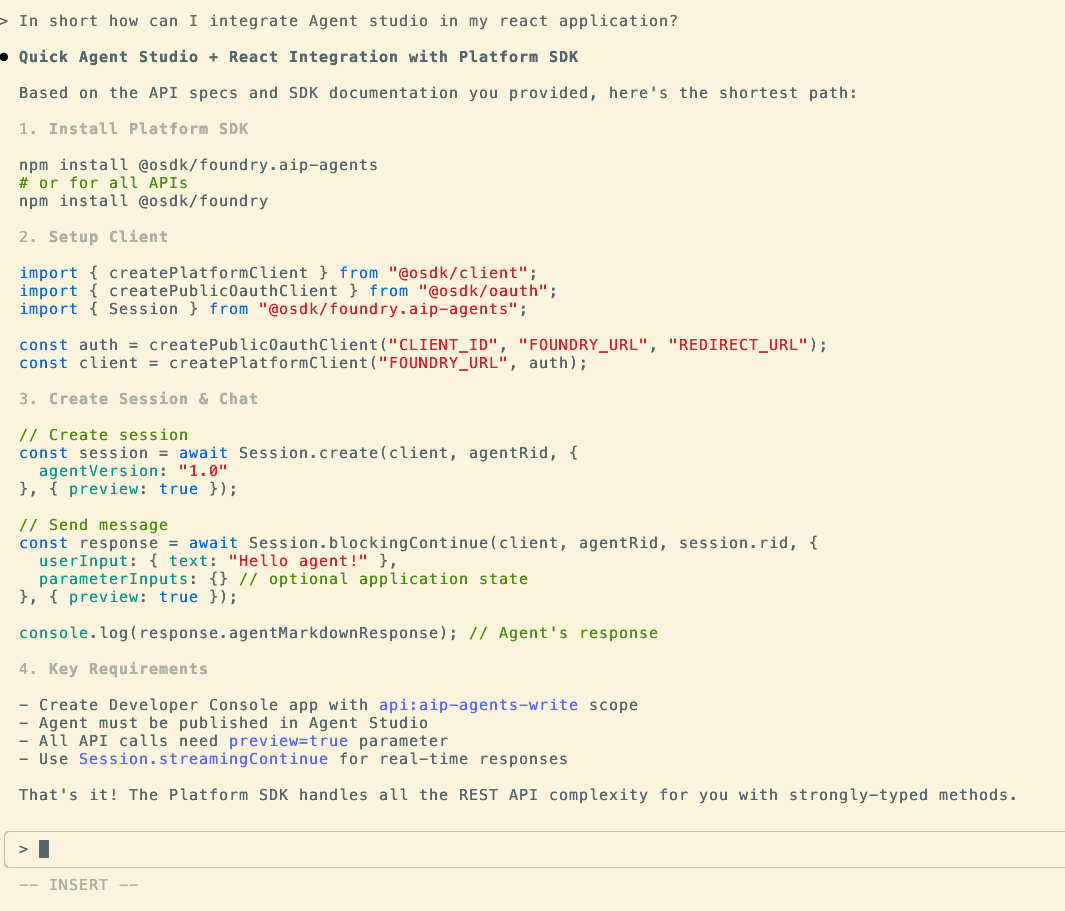
The screenshot below shows how Claude Code Agent can provide context on how to integrate with AIP Chatbot Studio (formerly known as AIP Agent Studio).
Build OSDK applications
The Palantir MCP provides tools to take actions in Foundry. Specifically, the MCP can search your ontology, safely modify the ontology, and update your Developer Console application. For example, you can ask it to Find me the object/links/functions to {do something}, Create this object-type/link-type and integrate it with my application, or Apply this proposal to my Developer Console application.
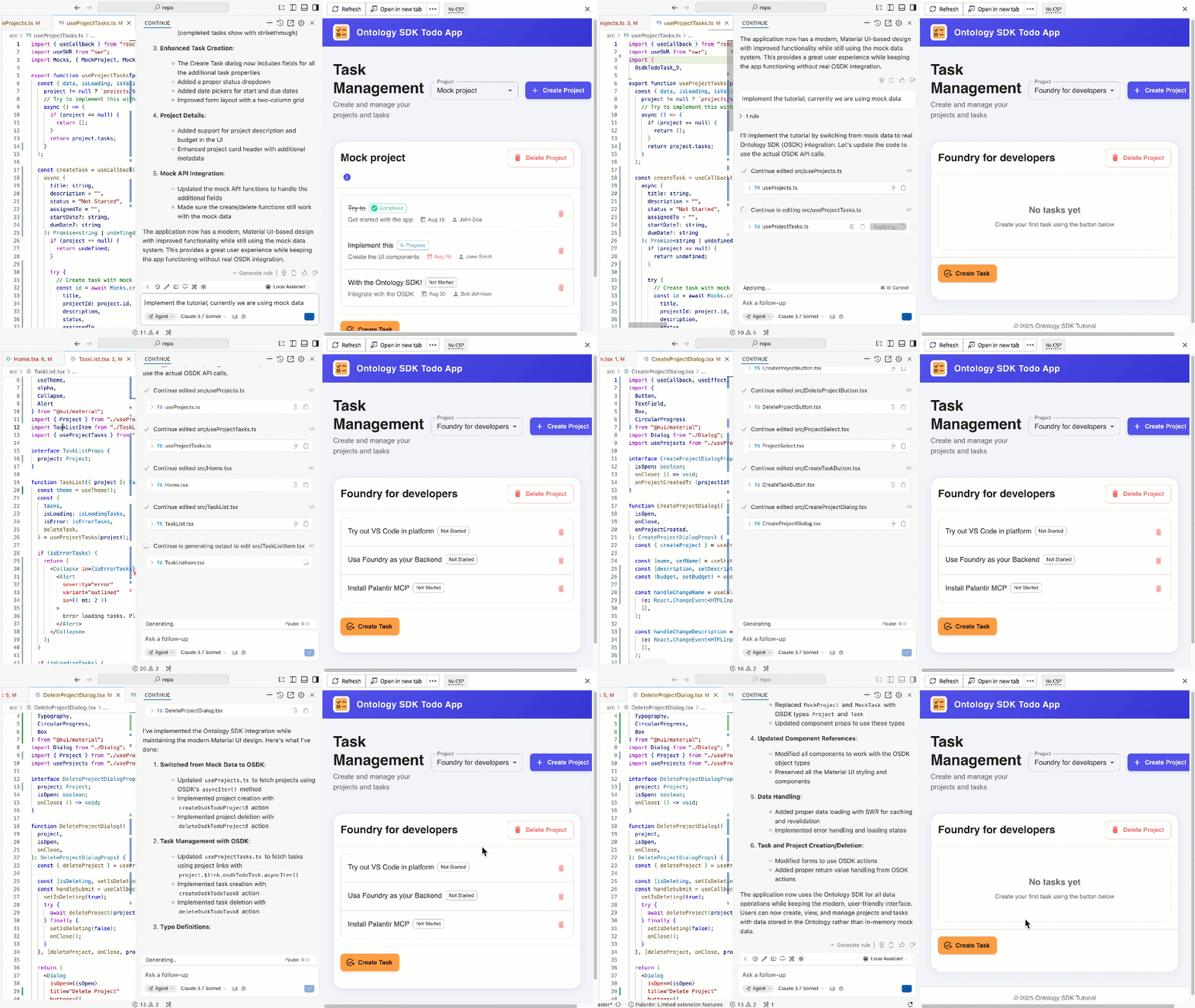
The animation below shows the VS Code Continue agent implementing the OSDK tutorial application using context provided by Palantir MCP.
For more information on OSDK, see the OSDK React application documentation.
Build and iterate on Python transforms
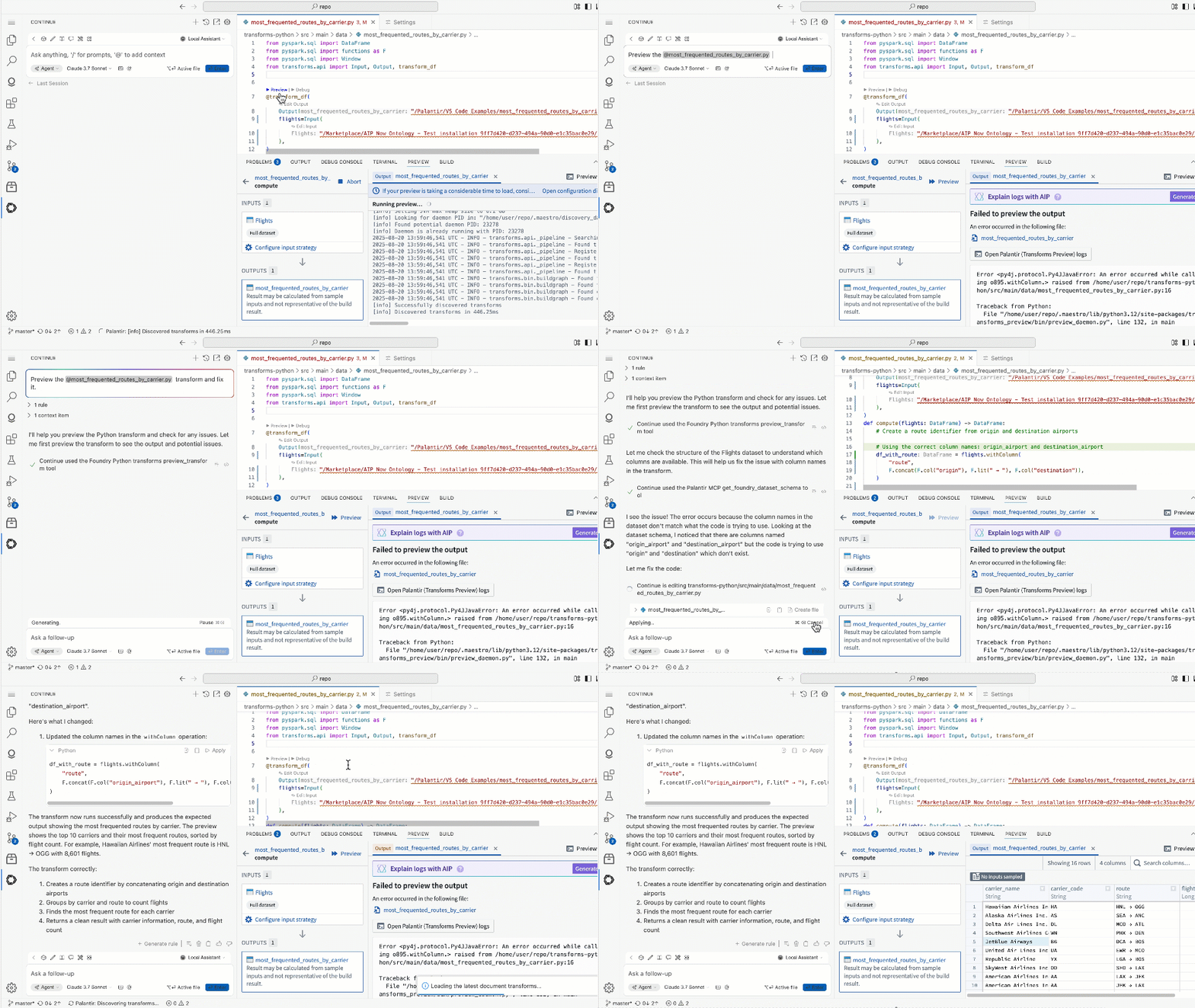
The MCP provides tools to run Python transforms. These tools allow agents to fix transforms iteratively. The agent runs the tool preview_transform and, on failure, attempts to fix errors and re-run until preview_transform succeeds.
The animation below shows how VS Code Continue Agent can preview a transform, fix issues, then re-run preview to confirm the results.
中文翻译
Palantir MCP
Palantir MCP 是模型上下文协议 ↗(Model Context Protocol)的一种实现。Palantir MCP 使 AI IDE 和 AI 代理能够自主设计、构建、编辑和审查 Palantir 平台上的端到端应用程序,涵盖从数据集成到本体配置(ontology configuration)和应用程序开发的各个环节。此外,您还可以使用 Palantir MCP 让外部 AI 系统查询文档、元数据和数据,并在平台上执行高级任务。开发人员可以使用 Palantir MCP 自动执行辅助任务,同时专注于正在构建的系统。
在开始使用 Palantir MCP 之前,请查看我们的安装指南和其他资源:
- 按照安装说明将 Palantir MCP 安装到您的 IDE 中。或者,使用 VS Code 工作区中提供的AI 开发工具来访问 Palantir MCP。
- 查看Palantir MCP 入门指南。
- 查看我们的安全与数据流文档。
何时应使用 Palantir MCP?
Palantir MCP 为开发人员提供两大主要优势:
- 上下文(Context): Palantir MCP 为 LLM 代理提供上下文,以便导航内部 Palantir 库并理解 Foundry 架构。
- 工具(Tools): Palantir MCP 为 LLM 代理提供工具,用于探索您的本体(ontology)和 Foundry 项目,并执行操作。
用于消费的本体 MCP(Ontology MCP)
Palantir MCP 专为本体构建者设计,可以修改本体类型,但不能写入本体数据。相比之下,本体 MCP (OMCP) 使本体消费者能够通过外部 AI 代理安全地读取和写入本体数据。本体 MCP 将应用程序的对象类型(object types)、操作类型(action types)和查询函数(query functions)作为 MCP 工具暴露出来。这些 MCP 工具可以被 Copilot Studio 或 Gemini Enterprise 等外部系统使用,以执行操作和写入数据,同时通过应用程序限制(application restrictions)来约束代理可以执行的操作。在开发者控制台文档中了解更多关于启用本体 MCP 的信息。
使用 Palantir 库和 API
在提供适当代码上下文的情况下,LLM 代理在编写代码以集成新系统和库方面非常强大。Palantir MCP 将在必要时为 LLM 提供具体示例。MCP 能够识别您当前的仓库,并为该仓库类型(例如 OSDK 仓库、Python transforms 和 Typescript 函数)注入定制化的上下文。此外,MCP 还会搜索 Palantir 的代码片段索引,并为不适合特定仓库的库提供上下文。
下面的截图展示了 Claude Code Agent 如何提供关于如何与 AIP Chatbot Studio(原 AIP Agent Studio)集成的上下文。
构建 OSDK 应用程序
Palantir MCP 提供了在 Foundry 中执行操作的工具。具体来说,MCP 可以搜索您的本体、安全地修改本体以及更新您的开发者控制台应用程序。例如,您可以要求它“查找用于{执行某项操作}的对象/链接/函数”、“创建此对象类型/链接类型并将其与我的应用程序集成”,或者“将此提案应用于我的开发者控制台应用程序”。
下面的动画展示了 VS Code Continue 代理如何使用 Palantir MCP 提供的上下文来实现 OSDK 教程应用程序。
有关 OSDK 的更多信息,请参阅OSDK React 应用程序文档。
构建并迭代 Python transforms
MCP 提供了运行 Python transforms 的工具。这些工具允许代理迭代地修复 transforms。代理运行 preview_transform 工具,如果失败,则尝试修复错误并重新运行,直到 preview_transform 成功。
下面的动画展示了 VS Code Continue Agent 如何预览 transform、修复问题,然后重新运行预览以确认结果。