Data governance(数据治理)
The Palantir Model Context Protocol (MCP) provides secure integration between AI systems and Foundry resources. The security and data governance policies depend on how and where the MCP is used.
Data flow and security models
Foundry platform
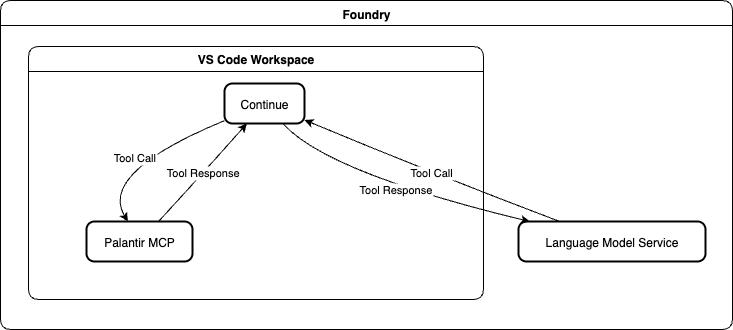
The following data flow and security model applies when using Palantir MCP through Continue in VS Code within the Foundry platform:
- LLM provider: Uses Palantir-provided third party LLMs.
- Data governance: Follows your organization's existing contract with Palantir.
- Data location: All data remains within your Foundry environment.
- Security: Inherits Foundry's security model and controls.
Local environment
:::callout{theme="neutral"} Palantir MCP for local development is disabled by default. To use Palantir MCP in a local environment, you must enable it in Control Panel. :::
The following data flow and security models apply when using Palantir MCP on local machines with third-party AI tools (such as VS Code Copilot, Claude Code, Windsurf, or Cursor):
- LLM provider: Depends on the interface.
- Claude Code: Data is sent to Anthropic.
- VS Code Copilot: Data is sent to Microsoft.
- Other tools: Check the policies of the LLM provider.
- Data flow: MCP tool outputs are sent to the respective LLM provider.
- Data governance: Depends on your contract with the specific LLM provider.

Write access
The Palantir MCP has a limited set of tools you can use to write to or modify your ontology and datasets. We do not provide destructive write tools. All tools that can perform write actions are either non-destructive or require a human to approve the changes.
LLM agents are allowed to create new datasets but are not allowed to update or delete existing datasets.
All ontology modifications (including deletions) must be processed through a proposal review; human approval is required to merge changes into your main ontology.
中文翻译
数据治理
Palantir 模型上下文协议(MCP)为AI系统与Foundry资源之间提供安全集成。其安全性和数据治理策略取决于MCP的使用方式和场景。
数据流与安全模型
Foundry平台
在Foundry平台内通过VS Code中的Continue使用Palantir MCP时,适用以下数据流和安全模型:
- LLM提供商: 使用Palantir提供的第三方大语言模型(LLM)。
- 数据治理: 遵循您组织与Palantir的现有合同约定。
- 数据位置: 所有数据均保留在您的Foundry环境内。
- 安全性: 继承Foundry的安全模型和控制机制。
本地环境
:::callout{theme="neutral"} 用于本地开发的Palantir MCP默认处于禁用状态。要在本地环境中使用Palantir MCP,您需要在控制面板中启用它。 :::
在本地机器上使用第三方AI工具(如VS Code Copilot、Claude Code、Windsurf或Cursor)时,适用以下数据流和安全模型:
- LLM提供商: 取决于所使用的界面。
- Claude Code: 数据发送至Anthropic。
- VS Code Copilot: 数据发送至Microsoft。
- 其他工具: 请查阅相应LLM提供商的政策。
- 数据流: MCP工具输出将发送至相应的LLM提供商。
- 数据治理: 取决于您与特定LLM提供商签订的合同。
写入权限
Palantir MCP提供一组有限的工具,可用于写入或修改您的本体论(Ontology)和数据集。我们不提供破坏性写入工具。所有可执行写入操作的工具要么是非破坏性的,要么需要人工批准更改。
LLM代理允许创建新数据集,但不允许更新或删除现有数据集。
所有本体论修改(包括删除操作)必须通过提案审核流程处理;将更改合并到主本体论时需要人工批准。