HyperAuto V2 architecture(HyperAuto V2 架构)
:::callout{theme="neutral"} This page describes the architecture of HyperAuto V2. For a description of HyperAuto V1's architecture, visit HyperAuto V1 overview. :::
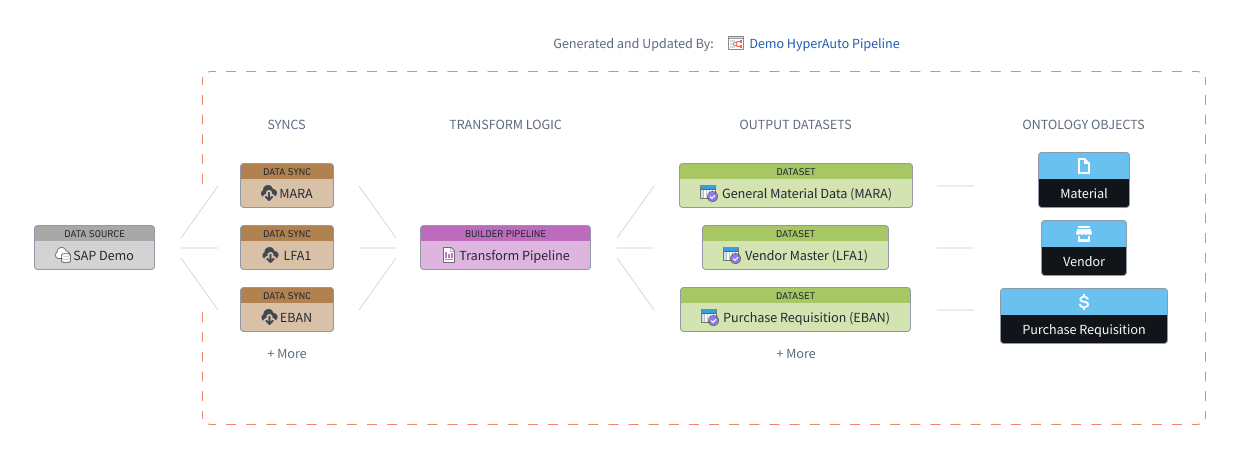
HyperAuto V2 provides orchestration and automation around three main components of the data integration workflow - Data Syncs, Builder Pipelines, and Ontology - in order to automatically generate ready-to-use outputs from supported sources.
HyperAuto leverages the metadata of a data source, querying the source in real-time to derive opinions on how syncs should be built, what transformation logic should be applied, and how an appropriate Ontology can be designed.
A HyperAuto pipeline refers to all resources managed by a single HyperAuto instance, from syncs to objects. Each pipeline takes a user-provided list of source tables as an input, syncs them to Foundry (if required) and transforms them into valuable, ready-to-use output datasets and (optionally) Ontology Objects. Users may make multiple HyperAuto pipelines per source to fit their individual needs.
Data syncs
:::callout{theme="neutral"} HyperAuto also supports the use of static files when no direct connection to the source exists, in which case this section does not apply. See the folder-based SAP documentation to learn more. :::
HyperAuto provides access to the entire set of visible tables on the source. If a user selects a source table that is not mapped to an existing data sync, a new data sync will be automatically generated.
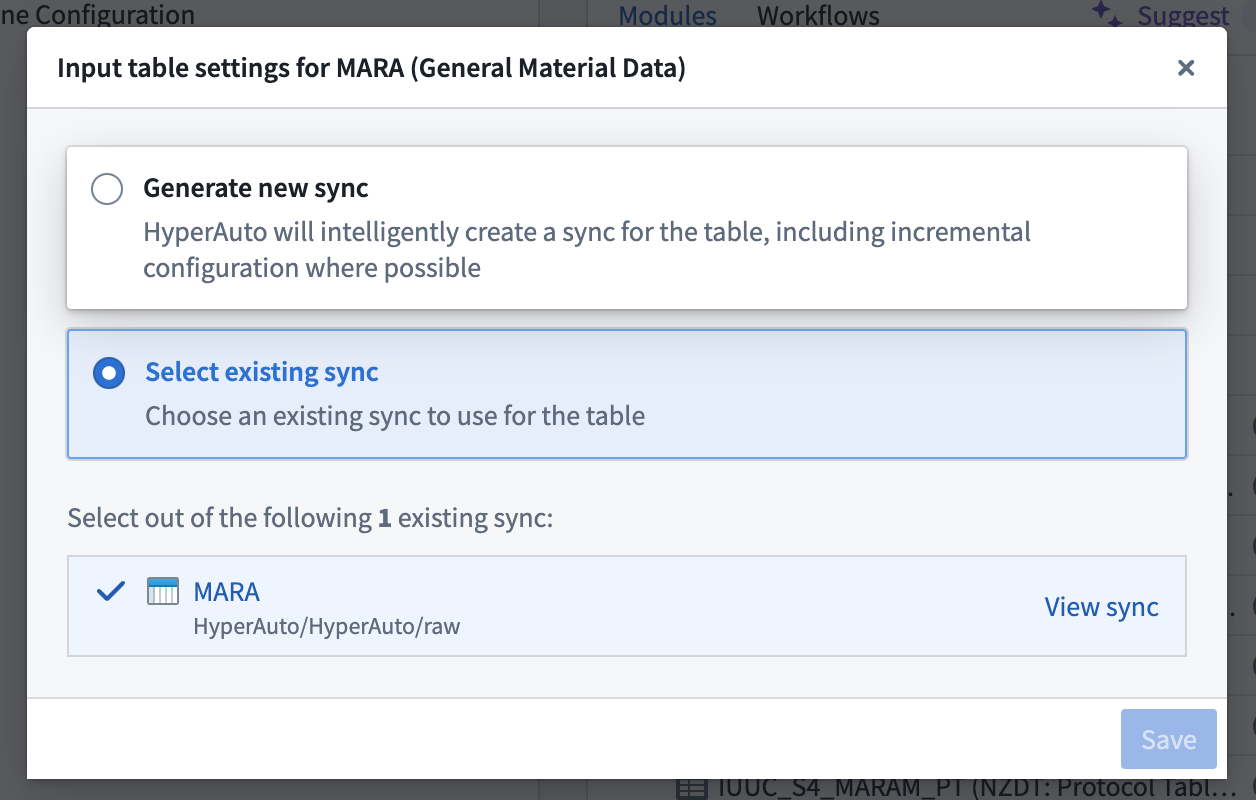
If one or multiple data syncs already exist for the selected source table, the latest sync will be selected by default. You can change that selection on the Input Configuration page by hovering over the Configure input table button. From there, either select a different existing sync to use or choose to create a new sync.
:::callout{theme="neutral"} Depending on data scale, generation may take significantly longer if HyperAuto has created new data syncs. This is because data syncs require an initial run before the rest of the HyperAuto process, such as builder pipeline generation, can take place. :::
Data transformation (Pipeline Builder)
Data transformation within HyperAuto pipelines allows hard-to-use source data to be converted into cleaned, enriched outputs that can be immediately used for analysis and application building.
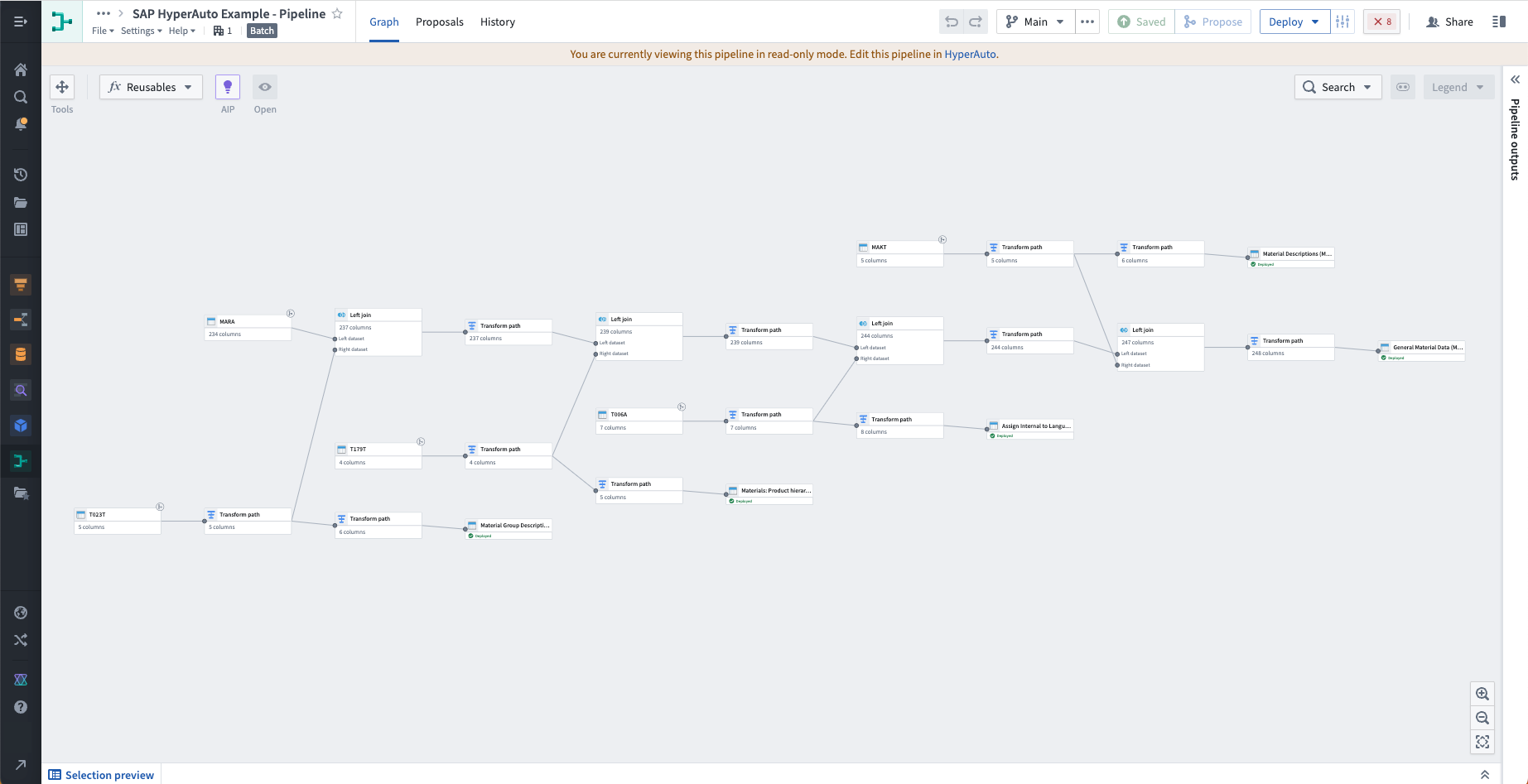
HyperAuto pipelines are powered by automatically generated builder pipelines - the primary method of data transformation within Foundry.
HyperAuto dynamically generates opinionated transformation logic based on the source type and the user's preferences. Users can view this builder pipeline by selecting View pipeline from the HyperAuto Pipeline Overview page. Edits to this pipeline are performed by changing the HyperAuto configuration through a proposal.
The types of transform functionality available within HyperAuto are as follows:
- Cleaning: Source systems often export data with common "cleanliness" issues, such as incorrect data types, poor handling of null / empty values or unwanted whitespace in string values. HyperAuto provides opinionated transformation options to fix these issues (and more).
- Renaming: By using the source's metadata, HyperAuto can rename the output tables and columns to be descriptive and self-explanatory, rather than sticking with an often non-human-readable schema.
- Joining: Source systems often store related information (such as metadata) in separate tables, for example when conforming to the "normal" data model. HyperAuto uses its understanding of the source's data model to join these tables together, providing a de-normalized, rich set of output datasets that allow for ease of analysis and a strong foundation for an Ontology.
- Filtering: Unwanted rows (such as duplicates) can be filtered out automatically by HyperAuto, for example to de-duplicate change-data-capture inputs.
Both batch and real-time streaming pipeline modes are supported, see configuration options for more detail.
Ontology
HyperAuto can use the source's data model to dynamically generate an Ontology based on the generated output datasets, including defining the semantic links between the objects.
Enabling this setting allows you to go from a new (supported) source to a fully-defined Ontology in a matter of minutes, with no manual intervention required.
If you are interested in this feature, contact your Palantir representative.
Resource management
HyperAuto pipelines are designed to fully control any resources they create, allowing the user to consistently receive benefits and upgrades to their system, including performance upgrades and bug fixes. The design of these pipelines also makes it easy to tweak already-generated resources, such as adding a new transform step or input to the pipeline.
Any edits to the underlying resources (for example, syncs or builder pipelines) must be managed via the HyperAuto application to avoid change conflicts.
If needed, deleting the HyperAuto pipeline resource will remove its ownership over the corresponding builder pipeline, allowing direct edits to the builder pipeline as normal.
中文翻译
HyperAuto V2 架构
:::callout{theme="neutral"} 本页面介绍 HyperAuto V2 的架构。 如需了解 HyperAuto V1 架构,请访问 HyperAuto V1 概述。 :::
HyperAuto V2 围绕数据集成工作流的三个主要组件——数据同步 (Data Syncs)、构建器管道 (Builder Pipelines) 和本体 (Ontology)——提供编排与自动化能力,从而从受支持的源自动生成可直接使用的输出。
HyperAuto 利用数据源的元数据,实时查询源系统,以推导出关于如何构建同步、应用何种转换逻辑以及如何设计合适本体的建议。
HyperAuto 管道 (HyperAuto pipeline) 指由单个 HyperAuto 实例管理的所有资源,涵盖从同步到对象的全部内容。每个管道以用户提供的源表列表作为输入,将其同步至 Foundry(如需),并将其转换为有价值的、可直接使用的输出数据集以及(可选)本体对象 (Ontology Objects)。用户可根据自身需求,为每个源创建多个 HyperAuto 管道。
数据同步 (Data Syncs)
:::callout{theme="neutral"} 当不存在与源的直接连接时,HyperAuto 也支持使用静态文件,此时本节内容不适用。更多信息请参阅基于文件夹的 SAP 文档。 :::
HyperAuto 提供对源上所有可见表的访问权限。如果用户选择的源表未映射到现有数据同步,系统将自动生成新的数据同步。
如果所选源表已存在一个或多个数据同步,则默认选择最新的同步。您可以在输入配置 (Input Configuration) 页面上,将鼠标悬停在配置输入表 (Configure input table) 按钮上更改此选择。随后,您可以选择使用其他现有同步,或选择创建新的同步。
:::callout{theme="neutral"} 根据数据规模的不同,如果 HyperAuto 创建了新的数据同步,生成时间可能会显著延长。这是因为数据同步需要在 HyperAuto 流程的其余部分(例如构建器管道生成)开始之前先完成初始运行。 :::
数据转换 (Pipeline Builder)
HyperAuto 管道内的数据转换能够将难以使用的源数据转换为经过清洗和增强的输出,这些输出可立即用于分析和应用构建。
HyperAuto 管道由自动生成的构建器管道 (builder pipelines) 驱动——这是 Foundry 中数据转换的主要方法。
HyperAuto 根据源类型和用户偏好动态生成具有明确意见的转换逻辑。用户可以通过在 HyperAuto 管道概览页面上选择查看管道 (View pipeline) 来查看此构建器管道。对此管道的编辑需通过提案 (proposal) 更改 HyperAuto 配置来执行。
HyperAuto 中可用的转换功能类型如下:
- 清洗 (Cleaning): 源系统导出的数据通常存在常见的"清洁度"问题,例如数据类型错误、对空值/空值的处理不当,或字符串值中存在多余空格。HyperAuto 提供具有明确意见的转换选项来修复这些问题(以及其他问题)。
- 重命名 (Renaming): 通过使用源的元数据,HyperAuto 可以将输出表和列重命名为描述性强且自解释的名称,而不是沿用通常不易读的模式。
- 连接 (Joining): 源系统通常将相关信息(例如元数据)存储在不同的表中,例如在遵循"标准"数据模型时。HyperAuto 利用其对源数据模型的理解来连接这些表,提供去规范化、丰富多样的输出数据集,便于分析并为本体奠定坚实基础。
- 过滤 (Filtering): HyperAuto 可以自动过滤掉不需要的行(例如重复行),例如对变更数据捕获 (change-data-capture) 输入进行去重。
支持批处理 (batch) 和实时流处理 (streaming) 两种管道模式,更多详情请参见配置选项。
本体 (Ontology)
HyperAuto 可以利用源的数据模型,基于生成的输出数据集动态生成本体 (Ontology),包括定义对象之间的语义链接。
启用此设置后,您可以在几分钟内从新的(受支持的)源获得一个完全定义的本体,无需任何手动干预。
如果您对此功能感兴趣,请联系您的 Palantir 代表。
资源管理 (Resource Management)
HyperAuto 管道旨在完全控制其创建的任何资源,使用户能够持续获得系统性能提升和错误修复等益处与升级。这些管道的设计也使得调整已生成的资源变得简单,例如向管道添加新的转换步骤或输入。
对底层资源(例如同步或构建器管道)的任何编辑都必须通过 HyperAuto 应用程序进行管理,以避免变更冲突。
如有需要,删除 HyperAuto 管道资源将移除其对相应构建器管道的所有权,从而允许像往常一样直接编辑该构建器管道。