HyperAuto V2 configuration options(HyperAuto V2 配置选项)
This page describes configuration options for HyperAuto V2. The following steps comprise the HyperAuto V2 configuration process:
:::callout{theme="neutral"} For HyperAuto V1 Configuration Reference, refer to the legacy documentation. :::
Name and location
The first step in the HyperAuto V2 configuration wizard is to specify the name of the new pipeline and the desired folder location within the Foundry file system. The HyperAuto pipeline resource and associated output datasets will be created within this folder.
Source configuration
The HyperAuto V2 source configuration page helps you choose the source system and the ingestion method.
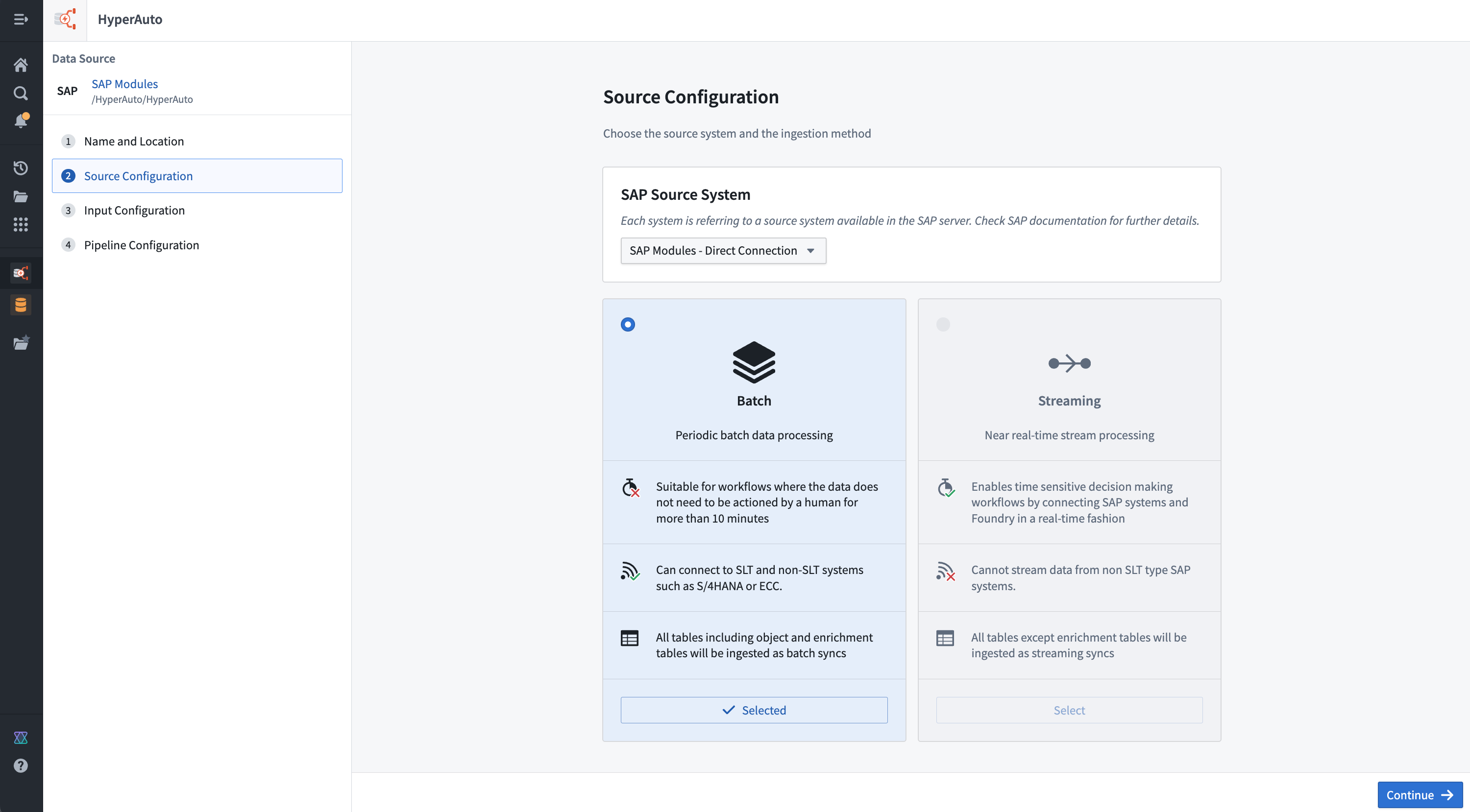
Source system
This selection is available for sources that have sub-systems users must choose between (for example "contexts" within SAP). A sub-system is defined as a configuration within a source that results in its own set of available tables and metadata. As a result, switching between sub-systems will completely change other available configurations, such as the supported pipeline mode (batch vs. streaming) and the tables and existing syncs available for selection on the Input configuration page.
SAP source systems
There are three main architectural patterns for connecting Foundry to an SAP system:
- Direct: The Connector is installed on the application server of the ERP system itself, providing direct access to tables.
- SLT: The Connector is installed on an SAP SLT Replication Server, which connects to the underlying ERP system(s). SLT is required to use the streaming pipeline mode.
- Remote: The Connector is installed on a "gateway" application server that connects to the underlying ERP system(s). Often used when SAP sources do not otherwise satisfy the connector prerequisites. In the case of an SLT or remote connection, a user must choose a context used to identify which SAP sub-system to connect to.
Pipeline modes
HyperAuto supports two modes of sync and data transformation. You can choose from streaming or batch mode on the initial HyperAuto pipeline setup on the Source configuration page.
- Batch: Each run of the pipeline reprocesses all inputs and overwrites all existing outputs. This is the default mode and allows for the biggest range of functionality, including aggregations and deduplication. This mode is recommended for most use cases.
- Streaming: The source system is constantly polled for data that has not been processed before. Once available on the source system, data is processed immediately, reducing the sync-to-Ontology latency to near real-time. This is particularly valuable to power real-time applications that rely on the Ontology to deduplicate streamed data.
:::callout{theme="warning"} Streaming requires always-on computation to process data in real-time and therefore will likely increase load on the source system and within Foundry. :::
Input configuration
The Input configuration page is where a user chooses the specific inputs to be processed by a particular HyperAuto pipeline.
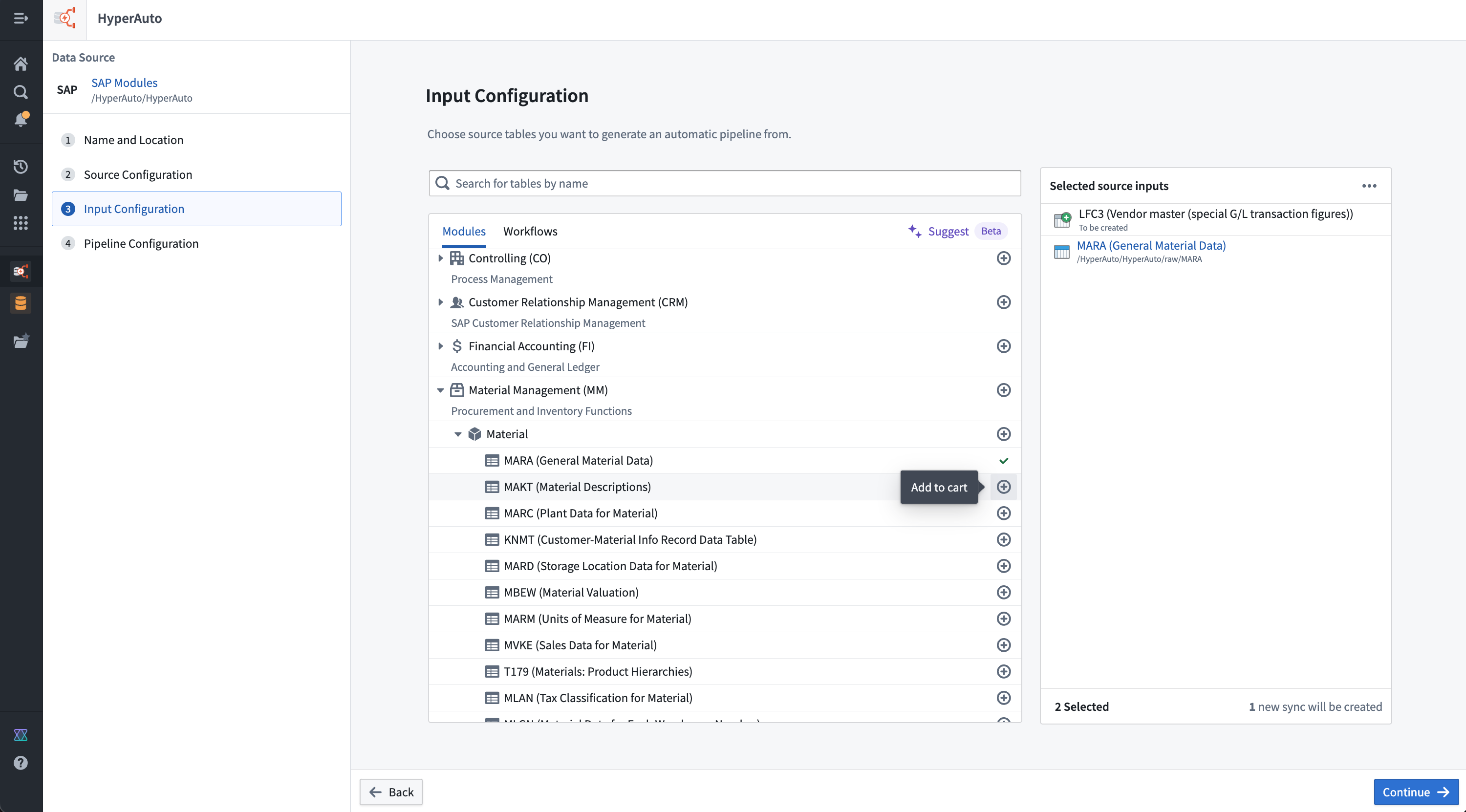
For ease of use, the input selection UI supports several methods of browsing and discovering the source tables that are relevant. For SAP, the methods are:
- Modules: An opinionated categorization of tables within a source, providing a hierarchical view from which users can explore and bulk-add. Tables may exist in multiple modules if relevant, but cannot be selected more than once.
- Workflows: Another form of table categorization, focusing on specific common use-cases for the source (such as Supply Chain management for SAP sources). Similarly, users can use the workflows to explore and bulk-add as required, and can switch between these and modules without losing their progress or duplicating selections accidentally.
Sync creation is also available from the Input configuration page, allowing users to create a new sync for any input that does not already have one. This allows a user to start from a fresh source to a fully configured HyperAuto pipeline in just a few clicks, without needing to work out how each sync should be configured.
:::callout{theme="neutral" title="Beta"} Sync creation is in the beta phase of development and may not be available on your enrollment. Functionality may change during active development. Contact Palantir Support to request access to sync creation. :::
Your Foundry enrollment may have AIP features enabled on the Suggest tab; more information can be found in the AIP documentation.
Pipeline configuration
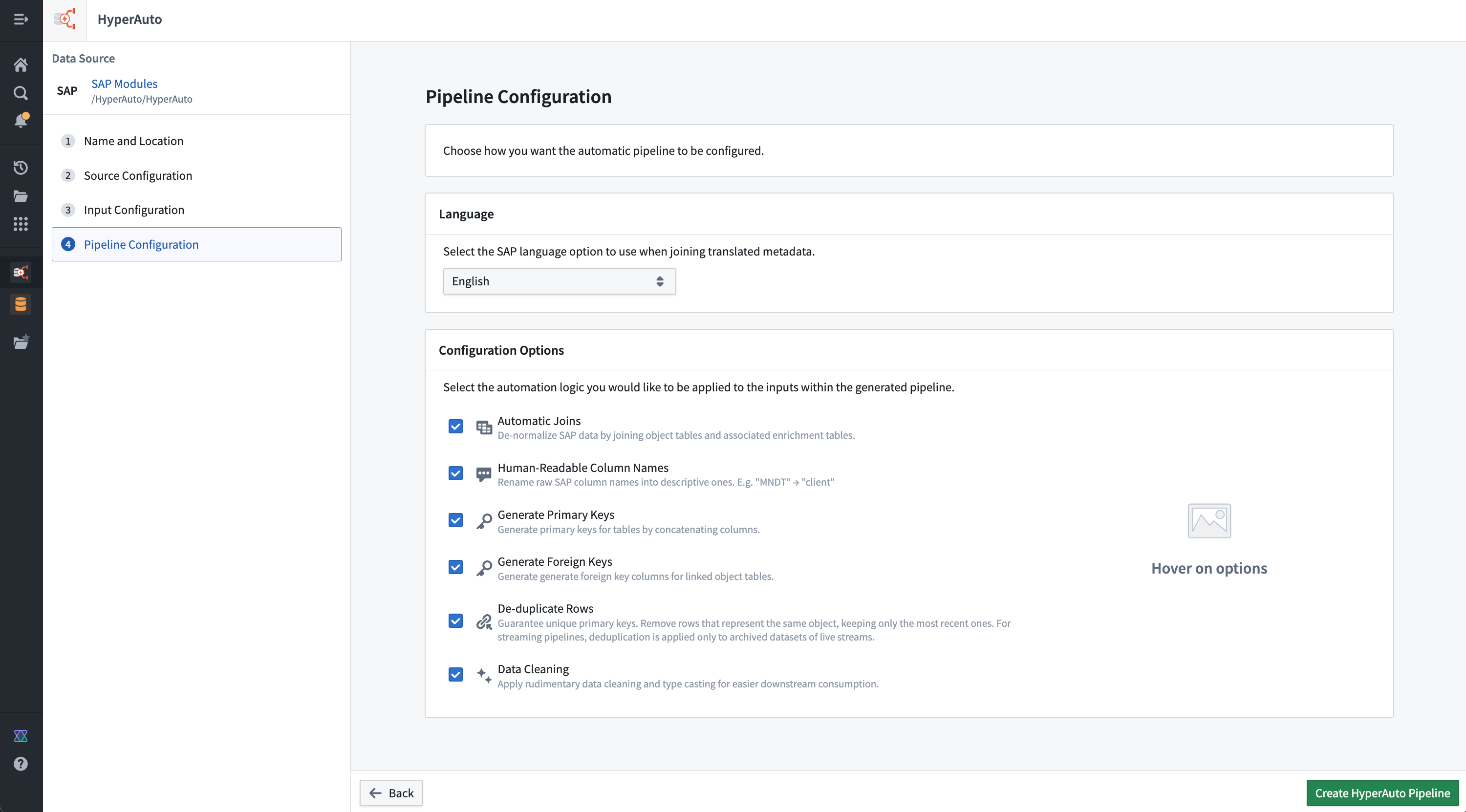
The pipeline configuration page enables you to set up a pipeline that meets your needs, with options including:
- Language selection
- Configuration options
- Automatic joins
- Human-readable column names
- Human-readable output dataset names
- Generate primary keys
- Generate foreign keys
- Deduplicate rows
- Data cleaning
- Incremental
- Batch compute settings
Language selection
For sources that contain tables with data in multiple languages, HyperAuto provides a language filtering step to avoid populating multiple rows per possible language in the outputs. The language selected here will be applied as a filter against the relevant tables, before additional transformations are applied (such as joins to other tables).
Configuration options
You can decide how much processing a user wants automatically applied across all of their source inputs from pipeline configuration options. All configuration options are enabled by default, but can be disabled as required (for example, to balance between functionality and pipeline performance).
Automatic joins

HyperAuto receives table classifications via the source's metadata, splitting them into either object or enrichment tables. In this definition, enrichment tables are those that are not intrinsically valuable on their own but instead act as extensions or lookup tables to associated object tables (for example, a text description table).
In this way, HyperAuto is able to query the object <-> enrichment table relationships from the source and produce corresponding left-joins from the enrichment tables onto the object tables. This results in a rich, comprehensive de-normalized dataset for each object without the need of joining against other tables to enable an extensive review.
This is particularly useful in building a Foundry Ontology where the standard approach is the use of a semantically-oriented, de-normalized data model.
Automatic joins in SAP
In the case of SAP, "TEXT" tables are classified as Enrichment tables within HyperAuto's processing. For example, MAKT (material descriptions) could be joined onto MARA (general material data).
Streaming
Tables classified as Enrichment will be consumed as batch inputs rather than streams. This allows the pipeline to create "lookup" left-joins onto the core streams from these tables, enhancing the stream data without trying to join together two live streams at once.
Existing syncs for Enrichment tables in streaming mode will only be offered when configuring the relevant input if the schema is compliant with Foundry streaming and the underlying Avro file format that is used.
:::callout{theme="neutral"}
Tip: For SAP syncs, the config option cleanFieldNamesForAvro set to true ensures the schema is Avro (Streaming) compliant. HyperAuto created syncs will enable this option by default.
:::
Human-readable column names

HyperAuto can use the column metadata provided by the source to rename the source-defined column names into names that are self-explanatory and easy to use by users unfamiliar with the source's schema.
This occurs by concatenating the column's human-readable name onto the original column name in the form Human readable_|_original, providing access to both forms when interacting with the data for maximum usability.
Human-readable output dataset names
When enabled, HyperAuto generates descriptive names for newly created output datasets based on the source table metadata. This makes it easier to identify and navigate pipeline outputs without needing to reference the original source table names. Existing output datasets are not renamed when this option is toggled on for an existing pipeline.
Generate primary keys

If sources do not have single-column primary keys, HyperAuto can dynamically generate primary keys. The source's metadata contains information stating which columns in the table together comprise a primary key, which HyperAuto uses to build concatenation logic to create a primary_key column.
The values are concatenated with a _|_ separator.
Having a single column for a primary key is necessary to use the output as a backing dataset for an Ontology object.
Generate foreign keys

HyperAuto also has access to object-to-object relationships as defined in the source's data model metadata. Using the metadata, logic can be created in the pipeline to generate a foreign-key column per relationship (by concatenating the relevant columns, similar to the Primary key logic, which can be used to join against or build Ontology links from.
The foreign keys are named in the form column1_column2_|_foreign_key_tableA, such that:
- Column values are built by concatenating
column1andcolumn2together with the separator_|_, and - A foreign relation exists such that a user can join this table via this column against
tableAvia itsprimary_key.
Foreign keys are necessary to produce Ontology relationships between objects.
Foreign keys are not created for object-to-enrichment table relationships when the automatic joins configuration option is enabled.
Deduplicate rows

HyperAuto provides logic to automatically deduplicate tables that contain duplicate rows. This can be useful in cases such as change data capture (CDC) systems that append new rows each time a change occurs. HyperAuto will deduplicate, selecting the latest up-to-date row for each primary key.
Streaming
Deduplication is handled differently in streaming mode. Two streaming outputs will be created. The main output will now resolve into a deduplicated dataset when read by a batch or incremental pipeline. The changelog output will provide a non-deduplicated dataset when read by a batch or incremental pipeline if required. Both outputs can be consumed by another stream as normal.
If columns that comprise the primary key of the table are not one of the below types they will be cast to string to ensure deduplication can work:
- String
- Timestamp
- Boolean
- Binary
- Integer
- Byte
- Short
- Float
- Long
- Double
Data cleaning

The data cleaning configuration option removes common data cleanliness issues from all tables. More information on the types of issues addressed can be found below.
- Empty string handling:
""strings are converted tonull(standard practice for data in Foundry). - DECIMAL casting:
DECIMALdata types are cast to beDOUBLE, which has benefits across the platform (including enabling support for Ontology properties).
Incremental
:::callout{theme="warning" title="Experimental"} Incremental processing for HyperAuto pipelines is in the experimental phase of development and may not be available for use on your enrollment. Functionality may change during active development. :::
For batch SAP pipelines, you can enable incremental processing. When enabled, the pipeline only processes new data that has been appended to the input datasets since the last build, rather than reprocessing all inputs on every run. This can reduce compute resource usage and build times for pipelines with large, frequently updating input datasets.
Incremental processing is only available for batch pipelines with direct SAP connections. For more information on incremental computation, refer to computation modes for batch input datasets.
Batch compute settings
:::callout{theme="neutral" title="Beta"} Batch compute settings for HyperAuto pipelines are in the beta phase of development. Functionality may change during active development. :::
For batch pipelines, you can select a compute backend in the Batch Compute Settings section of the Pipeline Configuration page. This setting determines the compute method used to process your pipeline.
The following compute backend options are available:
- Standard: The default backend powered by Spark ↗. This option supports the full range of expressions and transforms available in Pipeline Builder.
- Faster: An alternative backend powered by DataFusion ↗, an open-source query engine written in Rust. Faster pipelines are specifically engineered to optimize build times and execute low-latency operations efficiently. In particular, pipelines that run in under 15 minutes will benefit most from faster pipeline configuration.
You can select the faster backend when creating a new HyperAuto pipeline, or switch the backend of an existing pipeline by editing the pipeline configuration.
中文翻译
HyperAuto V2 配置选项
本文档介绍 HyperAuto V2 的配置选项。HyperAuto V2 配置流程包括以下步骤:
:::callout{theme="neutral"} 关于 HyperAuto V1 配置参考,请参阅旧版文档。 :::
名称和位置
HyperAuto V2 配置向导的第一步是指定新流水线的名称以及在 Foundry 文件系统中的目标文件夹位置。HyperAuto 流水线资源及其关联的输出数据集将在此文件夹中创建。
源配置
HyperAuto V2 源配置页面帮助您选择源系统(source system)和摄取方法(ingestion method)。
源系统
此选项适用于包含多个子系统供用户选择的源(例如 SAP 源中的"上下文")。子系统定义为源中的一种配置,该配置会产生其自身的一组可用表和元数据。因此,切换子系统将完全改变其他可用配置,例如支持的流水线模式(批处理与流式处理),以及输入配置页面上可供选择的表和现有同步。
SAP 源系统
将 Foundry 连接到 SAP 系统主要有三种架构模式:
- 直接连接(Direct): 连接器直接安装在 ERP 系统的应用服务器上,提供对表的直接访问。
- SLT: 连接器安装在 SAP SLT 复制服务器上,该服务器连接到底层 ERP 系统。使用流式流水线模式需要 SLT。
- 远程连接(Remote): 连接器安装在"网关"应用服务器上,该服务器连接到底层 ERP 系统。当 SAP 源无法满足连接器前提条件时,通常使用此方式。 对于 SLT 或远程连接,用户必须选择一个上下文(context)来标识要连接哪个 SAP 子系统。
流水线模式
HyperAuto 支持两种同步和数据转换模式。您可以在初始 HyperAuto 流水线设置的源配置页面上选择流式模式或批处理模式。
- 批处理(Batch): 流水线的每次运行都会重新处理所有输入并覆盖所有现有输出。这是默认模式,支持最广泛的功能,包括聚合和去重。此模式推荐用于大多数用例。
- 流式处理(Streaming): 系统会持续轮询源系统以获取尚未处理的新数据。数据一旦在源系统上可用,便会立即处理,从而将同步到本体(Ontology)的延迟降低到接近实时。这对于支持依赖本体对流式数据进行去重的实时应用程序尤其有价值。
:::callout{theme="warning"} 流式处理需要持续运行的计算资源来实时处理数据,因此可能会增加源系统和 Foundry 内部的负载。 :::
输入配置
输入配置页面是用户选择特定 HyperAuto 流水线要处理的具体输入的地方。
为方便使用,输入选择界面支持多种浏览和发现相关源表的方法。对于 SAP,方法包括:
- 模块(Modules): 对源内表的一种有观点的分类,提供层次化视图,用户可以从中浏览并批量添加。如果相关,表可能存在于多个模块中,但不能被多次选择。
- 工作流(Workflows): 另一种表分类形式,侧重于源的特定常见用例(例如 SAP 源的供应链管理)。同样,用户可以使用工作流按需浏览和批量添加,并且可以在这些分类和模块之间切换,而不会丢失进度或意外重复选择。
输入配置页面也支持创建同步(sync),允许用户为任何尚未拥有同步的输入创建新的同步。这使得用户只需点击几下,就能从全新的源开始,创建一个完全配置好的 HyperAuto 流水线,而无需弄清楚每个同步应如何配置。
:::callout{theme="neutral" title="Beta"} 同步创建功能处于开发阶段的 beta 阶段,您的实例可能无法使用。功能在活跃开发期间可能会发生变化。请联系 Palantir 支持以请求访问同步创建功能。 :::
您的 Foundry 实例可能在建议选项卡上启用了 AIP 功能;更多信息请参阅 AIP 文档。
流水线配置
流水线配置页面使您能够设置满足需求的流水线,选项包括:
语言选择
对于包含多语言数据表的源,HyperAuto 提供了一个语言过滤步骤,以避免在输出中为每种可能的语言填充多行。此处选择的语言将作为过滤器应用于相关表,然后再应用其他转换(例如与其他表的连接)。
配置选项
您可以通过流水线配置选项决定用户希望自动应用于所有源输入的处理量。所有配置选项默认启用,但可以根据需要禁用(例如,在功能和流水线性能之间取得平衡)。
自动连接
HyperAuto 通过源的元数据接收表分类,将其分为对象表(object table)或富化表(enrichment table)。在此定义中,富化表是那些本身没有内在价值,而是作为关联对象表的扩展或查找表(例如文本描述表)的表。
通过这种方式,HyperAuto 能够查询源中的 object <-> enrichment 表关系,并生成从富化表到对象表的相应左连接。这为每个对象生成了一个丰富、全面的反规范化数据集,无需连接其他表即可进行广泛审查。
这在构建 Foundry 本体时特别有用,因为标准方法是使用面向语义的反规范化数据模型。
SAP 中的自动连接
对于 SAP,"TEXT" 表在 HyperAuto 处理中被归类为 Enrichment 表。例如,MAKT(物料描述)可以连接到 MARA(通用物料数据)。
流式处理
被归类为 Enrichment 的表将作为批处理输入而非流式输入被消费。这允许流水线从这些表创建"查找"左连接到核心流,从而增强流数据,而无需尝试同时连接两个实时流。
在流式模式下,如果 Enrichment 表的模式符合 Foundry 流式处理和底层使用的 Avro 文件格式,则仅在配置相关输入时提供其现有同步。
:::callout{theme="neutral"}
提示:对于 SAP 同步,将配置选项 cleanFieldNamesForAvro 设置为 true 可确保模式符合 Avro(流式)要求。HyperAuto 创建的同步将默认启用此选项。
:::
人类可读的列名
HyperAuto 可以使用源提供的列元数据,将源定义的列名重命名为不言自明且易于不熟悉源模式的用户使用的名称。
这是通过将列的人类可读名称以 人类可读名称_|_原始名称 的形式连接到原始列名上来实现的,从而在交互数据时提供对两种形式的访问,以获得最大的可用性。
人类可读的输出数据集名称
启用后,HyperAuto 会根据源表元数据为新创建的输出数据集生成描述性名称。这使得识别和导航流水线输出更加容易,无需参考原始源表名称。对于现有流水线,切换此选项不会重命名现有的输出数据集。
生成主键
如果源没有单列主键,HyperAuto 可以动态生成主键。源的元数据包含哪些列共同构成主键的信息,HyperAuto 使用这些信息构建连接逻辑以创建 primary_key 列。
值使用 _|_ 分隔符连接。
拥有单列主键是将输出用作本体对象的后备数据集所必需的。
生成外键
HyperAuto 还可以访问源数据模型元数据中定义的对象到对象关系。利用这些元数据,可以在流水线中创建逻辑,为每个关系生成一个外键列(通过连接相关列,类似于主键逻辑),该列可用于连接或构建本体链接。
外键的命名形式为 column1_column2_|_foreign_key_tableA,其中:
- 列值通过使用分隔符
_|_连接column1和column2构建,并且 - 存在一个外键关系,使得用户可以通过此列将此表连接到
tableA的primary_key。
外键是生成对象之间本体关系所必需的。
当启用了自动连接配置选项时,不会为对象到富化表的关系创建外键。
行去重
HyperAuto 提供了自动对包含重复行的表进行去重的逻辑。这在变更数据捕获(CDC)系统等每次变更都追加新行的情况下非常有用。HyperAuto 将进行去重,为每个主键选择最新的行。
流式处理
在流式模式下,去重的处理方式不同。将创建两个流式输出。当由批处理或增量流水线读取时,主输出将解析为去重后的数据集。如果需要,当由批处理或增量流水线读取时,变更日志输出将提供未去重的数据集。两个输出都可以像往常一样被另一个流消费。
如果构成表主键的列不是以下类型之一,它们将被转换为字符串以确保去重能够正常工作:
- 字符串(String)
- 时间戳(Timestamp)
- 布尔值(Boolean)
- 二进制(Binary)
- 整数(Integer)
- 字节(Byte)
- 短整数(Short)
- 浮点数(Float)
- 长整数(Long)
- 双精度浮点数(Double)
数据清洗
数据清洗配置选项会移除所有表中常见的数据清洁问题。有关所解决问题的类型的更多信息,请参见下文。
- 空字符串处理:
""字符串被转换为null(Foundry 中数据的标准做法)。 - DECIMAL 类型转换:
DECIMAL数据类型被转换为DOUBLE,这在整个平台上有诸多好处(包括支持本体属性)。
增量处理
:::callout{theme="warning" title="实验性"} HyperAuto 流水线的增量处理功能处于开发阶段的 experimental 阶段,您的实例可能无法使用。功能在活跃开发期间可能会发生变化。 :::
对于批处理 SAP 流水线,您可以启用增量处理。启用后,流水线仅处理自上次构建以来追加到输入数据集的新数据,而不是每次运行时都重新处理所有输入。这可以减少具有大量频繁更新输入数据集的流水线的计算资源使用量和构建时间。
增量处理仅适用于具有直接 SAP 连接的批处理流水线。有关增量计算的更多信息,请参阅批处理输入数据集的计算模式。
批处理计算设置
:::callout{theme="neutral" title="Beta"} HyperAuto 流水线的批处理计算设置功能处于开发阶段的 beta 阶段。功能在活跃开发期间可能会发生变化。 :::
对于批处理流水线,您可以在流水线配置页面的批处理计算设置部分选择计算后端。此设置决定了用于处理流水线的计算方法。
可用的计算后端选项如下:
- 标准(Standard): 由 Spark ↗ 驱动的默认后端。此选项支持 Pipeline Builder 中可用的全部表达式和转换。
- 更快(Faster): 由 DataFusion ↗(一个用 Rust 编写的开源查询引擎)驱动的替代后端。更快的流水线专门针对优化构建时间和高效执行低延迟操作而设计。特别是,运行时间在 15 分钟以内的流水线将从更快的流水线配置中获益最多。
您可以在创建新的 HyperAuto 流水线时选择更快的后端,或者通过编辑现有流水线的配置来切换其后端。