Fallback effect(回退效果)
Fallback effects allow you to execute an alternative action when a primary effect (such as an action, logic, or function effect) fails, providing robust error handling for your automations. With fallback effects, you can implement contingency plans, capture error information, and ensure your workflows remain resilient even when primary actions encounter problems.
Configuration
To set up a fallback effect, begin by opening the automation configuration wizard. On the Effects page, add an action, logic, or function effect; this will take you to the effect configuration page with an Add failure effect option.
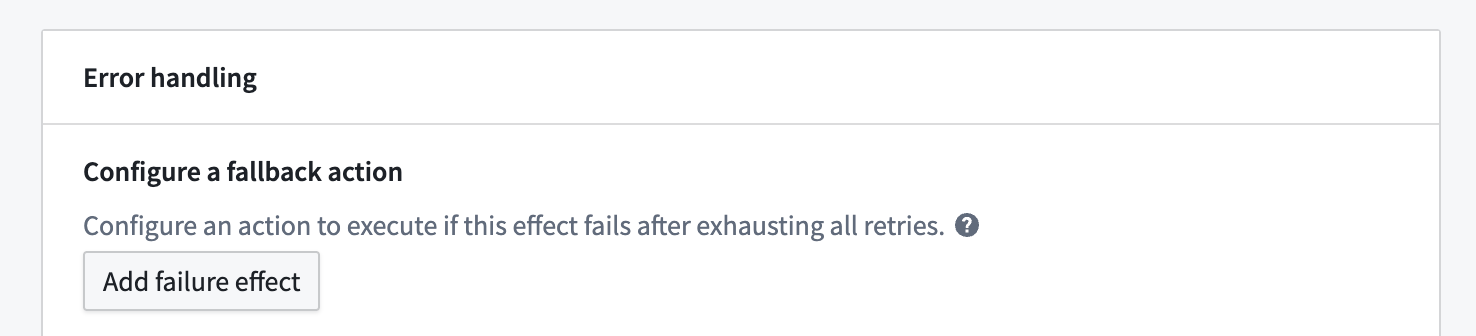
Selecting Add failure effect will create a new Action effect, which you can now configure with parameterized automation metadata as desired.
Access error information
When a primary effect fails, the fallback effect provides access to valuable error information that you can use in your fallback actions:
- Error message: The detailed error message from the failed effect.
- Automation RID: The resource identifier of the automation that triggered the fallback.
- Automation event ID: The unique identifier for the specific event that caused the failure.
This error information can be used in several ways within your fallback actions:
- Send detailed error notifications to administrators.
- Log errors to a database for later analysis.
- Trigger alternative workflows based on specific error types.
- Create support tickets with rich context about the failure.
Fallback action
Execute an alternative action when the primary effect fails. This allows you to implement recovery logic or alternative processing paths. Actions have access to:
- The original effect input that was passed to the failed effect
- Complete error information from the failure
- The automation event ID

Use condition effect inputs
Just like other effects, fallback effects can access the condition effect inputs that triggered the original automation. This means your fallback can work with the same objects and data as the primary effect.
For example, if an Objects added to set condition triggered an Action effect that subsequently failed, the fallback effect can access the same set of objects to perform alternative processing.
Note that fallback effects are triggered on a per-object basis, so if a subset of objects to the parent action fail, only that subset will be included in the fallback effect's execution. The rest of the objects will continue on to any sequential effects.
:::callout{theme="note"} A successful fallback execution does not resume the sequential execution chain. If an effect fails and triggers a fallback, subsequent effects in the sequence will not execute, even if the fallback succeeds. Fallback effects can only be configured for sequential execution and are not available for parallel execution. :::
Error handling
The fallback effect itself can be configured with retry policies to ensure successful execution even in challenging conditions. Available retry policies include:
- Constant backoff: Automatically retry with a fixed wait time between attempts
- Exponential backoff: Wait time increases exponentially between retries
You can also configure jitter settings to prevent simultaneous retries, as with other effects.
Use cases
Error reporting and logging
Configure a fallback effect to send detailed error notifications or log errors to a new object type when critical actions fail. This creates an audit trail of failures and ensures administrators are promptly notified. You can also set up an automation to monitor the new failure object type.
Graceful degradation
When a sophisticated processing action fails (such as an AIP-powered classification), fall back to a simpler alternative action that ensures basic processing continues even if the advanced features are unavailable.
Multi-stage retry with different parameters
If an action fails with one set of parameters, a fallback effect can try an alternative approach with different parameters or configuration options.
Permissions
Fallback effects operate with the permissions of the automation owner, just like the primary effects they monitor. This ensures that fallback actions have consistent security context when executing.
:::callout{theme="warning"} As with all effects, ensure that the automation owner has the necessary permissions to perform the actions configured in the fallback effect. If permissions change after the automation is configured, the fallback may not execute as expected. :::
中文翻译
回退效果
回退效果(Fallback effect)允许您在主要效果(如操作、逻辑或函数效果)失败时执行替代操作,为自动化流程提供稳健的错误处理。通过回退效果,您可以实施应急计划、捕获错误信息,并确保工作流即使在主要操作遇到问题时也能保持弹性。
配置
要设置回退效果,首先打开自动化配置向导。在效果页面上,添加一个操作、逻辑或函数效果;这将带您进入效果配置页面,其中包含添加失败效果选项。
选择添加失败效果将创建一个新的操作效果,您现在可以根据需要使用参数化的自动化元数据对其进行配置。
访问错误信息
当主要效果失败时,回退效果可提供对有价值的错误信息的访问,您可以在回退操作中使用这些信息:
- 错误消息: 来自失败效果的详细错误消息。
- 自动化 RID: 触发回退的自动化的资源标识符。
- 自动化事件 ID: 导致失败的特定事件的唯一标识符。
这些错误信息可以在回退操作中以多种方式使用:
- 向管理员发送详细的错误通知。
- 将错误记录到数据库以供后续分析。
- 根据特定错误类型触发替代工作流。
- 创建包含丰富失败上下文的支持工单。
回退操作
当主要效果失败时执行替代操作。这使您能够实施恢复逻辑或替代处理路径。操作可以访问:
- 传递给失败效果的原始效果输入
- 来自失败的完整错误信息
- 自动化事件 ID
使用条件效果输入
与其他效果一样,回退效果可以访问触发原始自动化的条件效果输入。这意味着您的回退可以与主要效果使用相同的对象和数据。
例如,如果添加到集合的对象条件触发了一个操作效果,而该效果随后失败,则回退效果可以访问相同的对象集以执行替代处理。
请注意,回退效果是基于每个对象触发的,因此如果父操作的对象子集失败,则只有该子集将包含在回退效果的执行中。其余对象将继续执行任何顺序效果。
:::callout{theme="note"} 成功的回退执行不会恢复顺序执行链。如果某个效果失败并触发了回退,则序列中的后续效果将不会执行,即使回退成功也是如此。回退效果只能配置为顺序执行,不适用于并行执行。 :::
错误处理
回退效果本身可以配置重试策略,以确保即使在具有挑战性的条件下也能成功执行。可用的重试策略包括:
- 恒定退避: 自动重试,尝试之间具有固定的等待时间
- 指数退避: 重试之间的等待时间呈指数增长
与其他效果一样,您还可以配置抖动设置以防止同时重试。
使用场景
错误报告和日志记录
配置回退效果,以便在关键操作失败时发送详细的错误通知或将错误记录到新的对象类型。这创建了失败的审计跟踪,并确保管理员及时收到通知。您还可以设置自动化来监控新的失败对象类型。
优雅降级
当复杂的处理操作失败时(例如基于 AIP 的分类),回退到更简单的替代操作,确保即使高级功能不可用,基本处理也能继续进行。
使用不同参数的多阶段重试
如果操作使用一组参数失败,回退效果可以尝试使用不同参数或配置选项的替代方法。
权限
回退效果以自动化所有者的权限运行,就像它们监控的主要效果一样。这确保了回退操作在执行时具有一致的安全上下文。
:::callout{theme="warning"} 与所有效果一样,请确保自动化所有者拥有执行回退效果中配置的操作所需的权限。如果在配置自动化后权限发生变化,回退可能无法按预期执行。 :::