Evaluation frequency(评估频率)
Automate offers three evaluation frequency modes for object set conditions: live monitoring, scheduled monitoring, and automation-dependent.
Evaluation frequency support
The following table summarizes the condition types that support each evaluation frequency mode:
| Condition type | Live monitoring | Scheduled monitoring | Automation-dependent |
|---|---|---|---|
| Time condition | - | ✓ | - |
| Objects added to set | ✓ 1 | ✓ | ✓ |
| Objects removed from set | ✓ 1 | ✓ | ✓ |
| Objects modified in set | ✓ | – | ✓ |
| Run on all objects | – | ✓ | – |
| Metric changed | – | ✓ | – |
| Threshold crossed | – | ✓ | – |
1 Only supported for batch pipelines. Streaming pipelines are not supported.
Live monitoring
Live monitoring runs evaluations within minutes of an object change appearing in the Ontology. Ontology indexing must complete before Automate detects the change. Latency expectations differ by type of change: patches (user edits) are smaller and process faster, while base versions (backing dataset changes) are larger and take longer to process.
Review the table above to understand the object set conditions that support live monitoring.
Automate live monitoring supports funnel batch pipelines, and has partial support for funnel streaming pipelines. For example, stream-backed object types cannot be used for Objects added to set or Objects removed from set condition types.
Requirements:
- Object type must use Object Storage V2.
:::callout{theme="neutral"} After migrating an object type from Object Storage V1 to V2, re-save automations to enable live monitoring. :::
Unsupported object set features:
- Relative time conditions
- More than one object type
- Joined object sets
- Certain filter types like prefixes, terms, and phrases
- Function-generated object sets
- Interfaces
Scheduled monitoring
:::callout{theme="warning"} Scheduled monitoring can result in high compute usage, especially for complex queries that run on a frequent schedule. :::
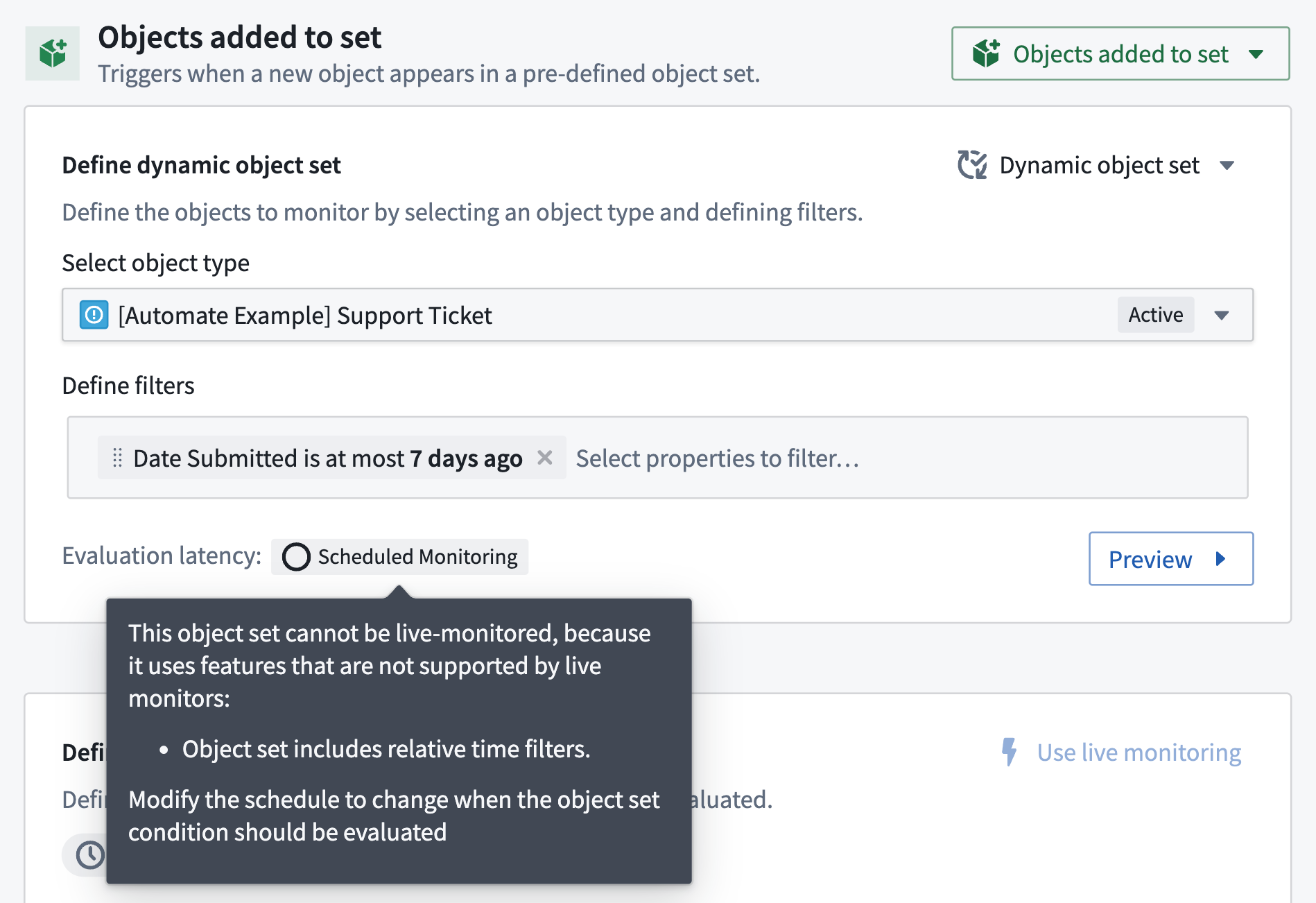
Scheduled monitoring evaluates the condition on a user-defined schedule. Conditions default to scheduled monitoring when live monitoring is unsupported. In the Automate UI, the scheduled monitoring label will explain which functionality is preventing live monitoring.
Most conditions that support live monitoring can switch to scheduled monitoring, either by choosing Scheduled Monitoring from the Evaluation frequency dropdown menu in the Automation interface or by adding a schedule. A schedule allows you to check an object set condition at a specific point in time or on a regular cadence.

Example use case: Digest emails
Send a weekly list of new Support Ticket objects created in the previous week, but only if tickets exist:
- Add a schedule for 8:00 AM Monday to an Objects added condition containing all
Support Ticketobjects. - Add a notification effect to render the list.
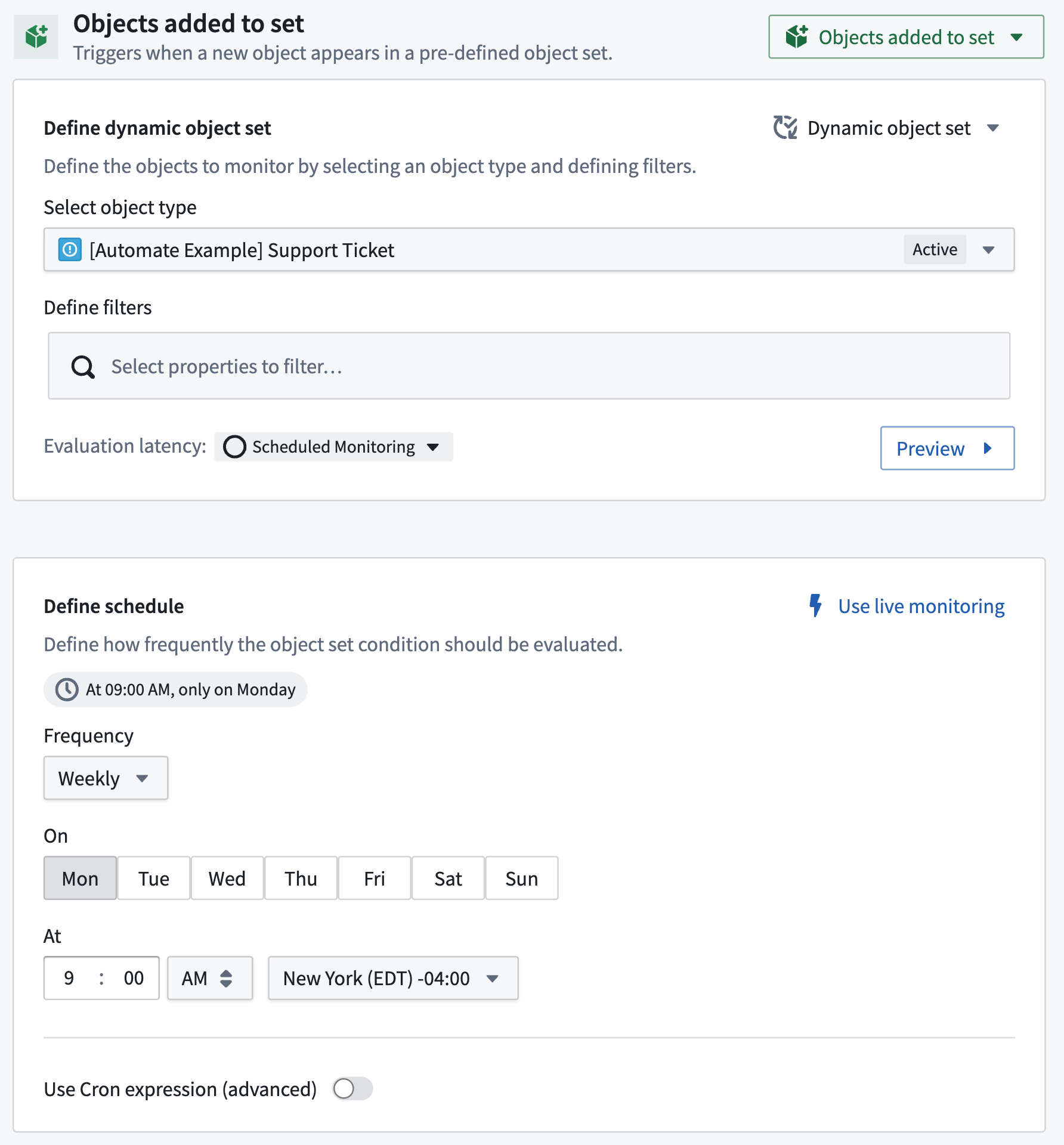
Review the weekly report example use case for a detailed walkthrough of how to configure an automation that sends digest emails.
Automation-dependent
Automation-dependent monitoring evaluates the condition dependent on another automation triggering. You can optionally add a wait-time parameter.
Most conditions that support live monitoring can switch to automation-dependent monitoring.
Learn more about automation dependencies.
中文翻译
评估频率
Automate 为对象集条件提供三种评估频率模式:实时监控、定时监控和自动化依赖。
评估频率支持
下表总结了支持每种评估频率模式的条件类型:
| 条件类型 | 实时监控 | 定时监控 | 自动化依赖 |
|---|---|---|---|
| 时间条件 | - | ✓ | - |
| 对象添加到集合 | ✓ 1 | ✓ | ✓ |
| 对象从集合移除 | ✓ 1 | ✓ | ✓ |
| 集合中对象被修改 | ✓ | – | ✓ |
| 对所有对象运行 | – | ✓ | – |
| 指标变化 | – | ✓ | – |
| 阈值突破 | – | ✓ | – |
1 仅支持批处理管道(batch pipelines)。流式管道(streaming pipelines)不受支持。
实时监控
实时监控在对象变化出现在 Ontology 后的几分钟内运行评估。Automate 检测到变化前,必须完成 Ontology 索引。延迟预期因变化类型而异:补丁(用户编辑)较小且处理更快,而基础版本(底层数据集变化)较大且处理时间更长。
查看上表了解支持实时监控的对象集条件。
Automate 实时监控支持漏斗批处理管道,并部分支持漏斗流式管道。例如,流式支持的对象类型不能用于 Objects added to set 或 Objects removed from set 条件类型。
要求:
- 对象类型必须使用 Object Storage V2。
:::callout{theme="neutral"} 将对象类型从 Object Storage V1 迁移到 V2 后,重新保存自动化以启用实时监控。 :::
不支持的对象集功能:
- 相对时间条件
- 多个对象类型
- 连接对象集
- 某些过滤器类型,如前缀、术语和短语
- 函数生成的对象集
- 接口
定时监控
:::callout{theme="warning"} 定时监控可能导致高计算使用量,尤其是对于按频繁计划运行的复杂查询。 :::
定时监控按用户定义的计划评估条件。当实时监控不受支持时,条件默认使用定时监控。在 Automate UI 中,定时监控标签会解释哪些功能阻止了实时监控。
大多数支持实时监控的条件可以切换到定时监控,方法是在 Automation 界面的 Evaluation frequency 下拉菜单中选择 Scheduled Monitoring,或添加一个计划。计划允许您在特定时间点或按固定频率检查对象集条件。
示例用例:摘要邮件
发送每周新创建的 Support Ticket 对象列表(仅当存在工单时):
- 为包含所有
Support Ticket对象的 Objects added 条件添加一个周一早上 8:00 的计划。 - 添加一个通知效果来渲染列表。
查看每周报告示例用例以获取如何配置发送摘要邮件的自动化的详细步骤。
自动化依赖
自动化依赖监控在另一个自动化触发时评估条件。您可以选择添加等待时间参数。
大多数支持实时监控的条件可以切换到自动化依赖监控。