Example: Notify contract owners of contract review(示例:通知合同负责人进行合同审查)
In this example, we want to notify contract owners when the status of a contract changes to Requires review. We will use the Contract object type, which is a custom object type that we have created for this example.
Condition
We begin in the automation creation wizard by selecting the Object added to set condition. Since we want to be notified whenever a contract changes its status to Requires review, we can add a filter on the selected object set on the contract status as shown below. This automation will always trigger when an object enters the filtered object set, whether because a new object was created with the status Requires review or because an existing object changed its status to Requires review.

Effect
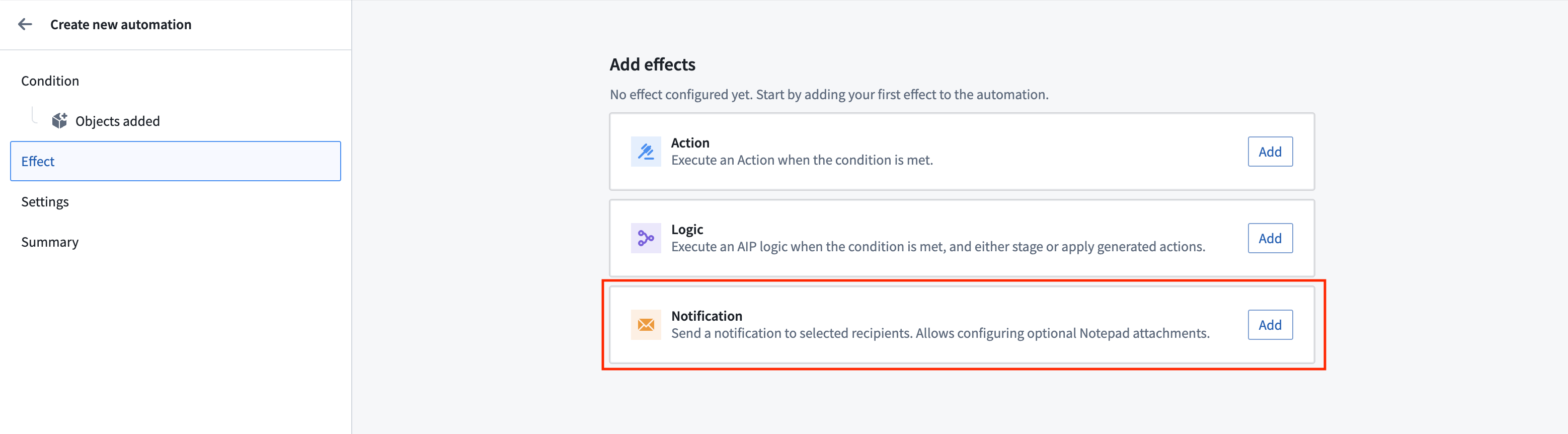
Next, we select Notification as the effect.
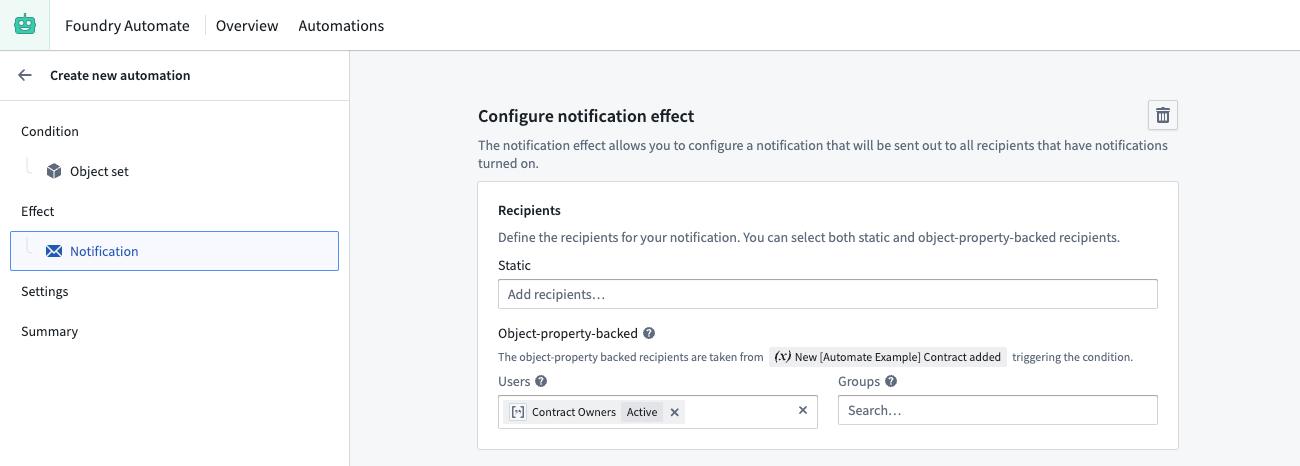
To ensure contract owners receive a separate email for each contract that requires review, select the Send one notification for each Contract added option. To dynamically send an email to the respective contract owners, use the Object-property-backed recipients feature and select the Contract Owners property as the user property. Contract owners is a property on the Contract object that contains an array of Foundry user IDs (similar to 1234a567-8bc9-12ab-3456-7ca89b1c234a) of the associated owners. Note that all recipients require at least Viewer permission on the automation or they will not receive the notification.
Next, we need to define our notification content. To configure a more complex notification for our recipients, we will use the function-generated notification content feature. Function-generated notifications provide more flexibility in how to structure our notification content and support the use of HTML content (<html>).
To support our function-generated notification, we create a function in a code repository that takes the recipient and a contract object as input and returns a notification.
import { Function, Notification, User, ShortNotification, EmailNotificationContent } from "@foundry/functions-api";
import { _automateExampleContract  } from "@foundry/ontology-api";

@Function()
public createContractStatusChangeNotification(user: User, contract: _automateExampleContract): Notification | undefined {

    const shortNotification = ShortNotification.builder()
        .heading("Contract change")
        .content(`The contract "${contract.title}" changed its status to ${contract.contractStatus}`)
        .addObjectLink("View contract", contract)
        .build();

    // Define the email body. The email body may contain headless HTML, such as tables of data
    // Note that we can access properties of both the user and the contract in the content
    const emailBody = `Hello, ${user.firstName}!
    The contract "${contract.title}" that you are owning changed its status to "${contract.contractStatus}".

    Check the contract details. View more customer information <a href="${contract.customerUrl}">here</a>.
    `;

    const emailNotificationContent = EmailNotificationContent.builder()
        .subject(`Contract change - ${contract.customerName}`)
        .body(emailBody)
        .addObjectLink("View contract", contract)
        .build();

    return Notification.builder()
        .shortNotification(shortNotification)
        .emailNotificationContent(emailNotificationContent)
        .build();
}
After publishing the function, we can select the function in the automation creation wizard and connect the function to our effect inputs. For the user property, we select the Recipient of the notification. For contract, we select New Contract added, which is exposed as a condition effect input by our object set condition.

Settings
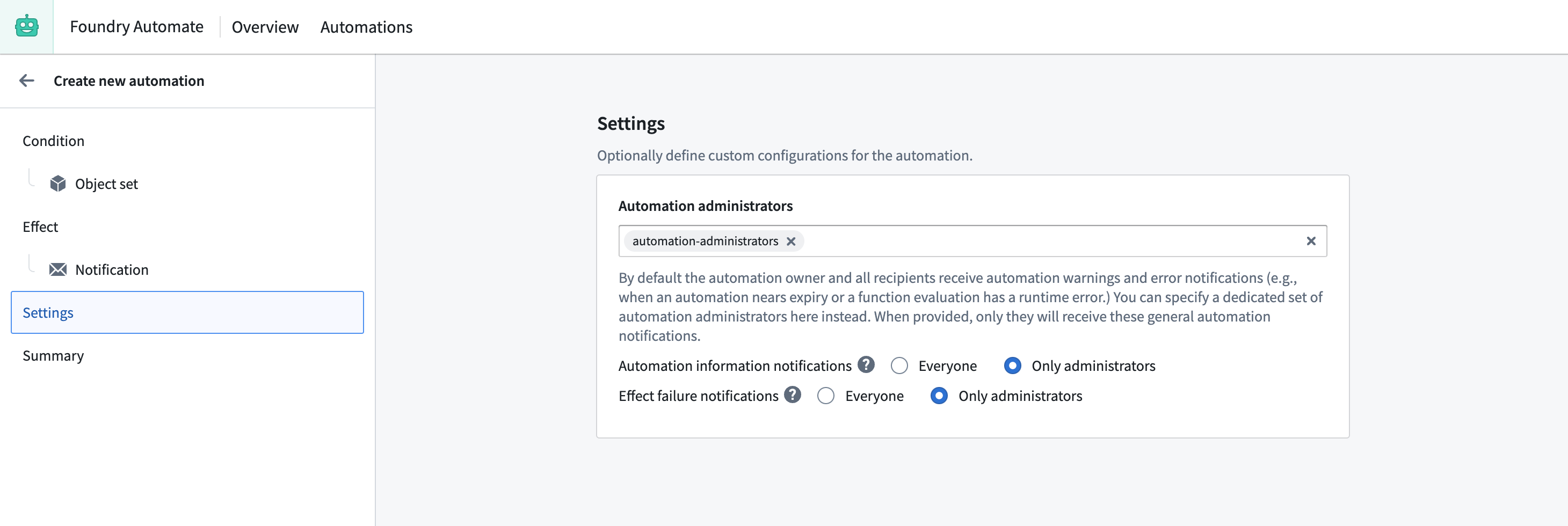
To prevent contract owners from receiving status notifications about the automation, we can add our automation administrator group to the Automation administrators setting on the Settings tab of the automation creation wizard.
Summary
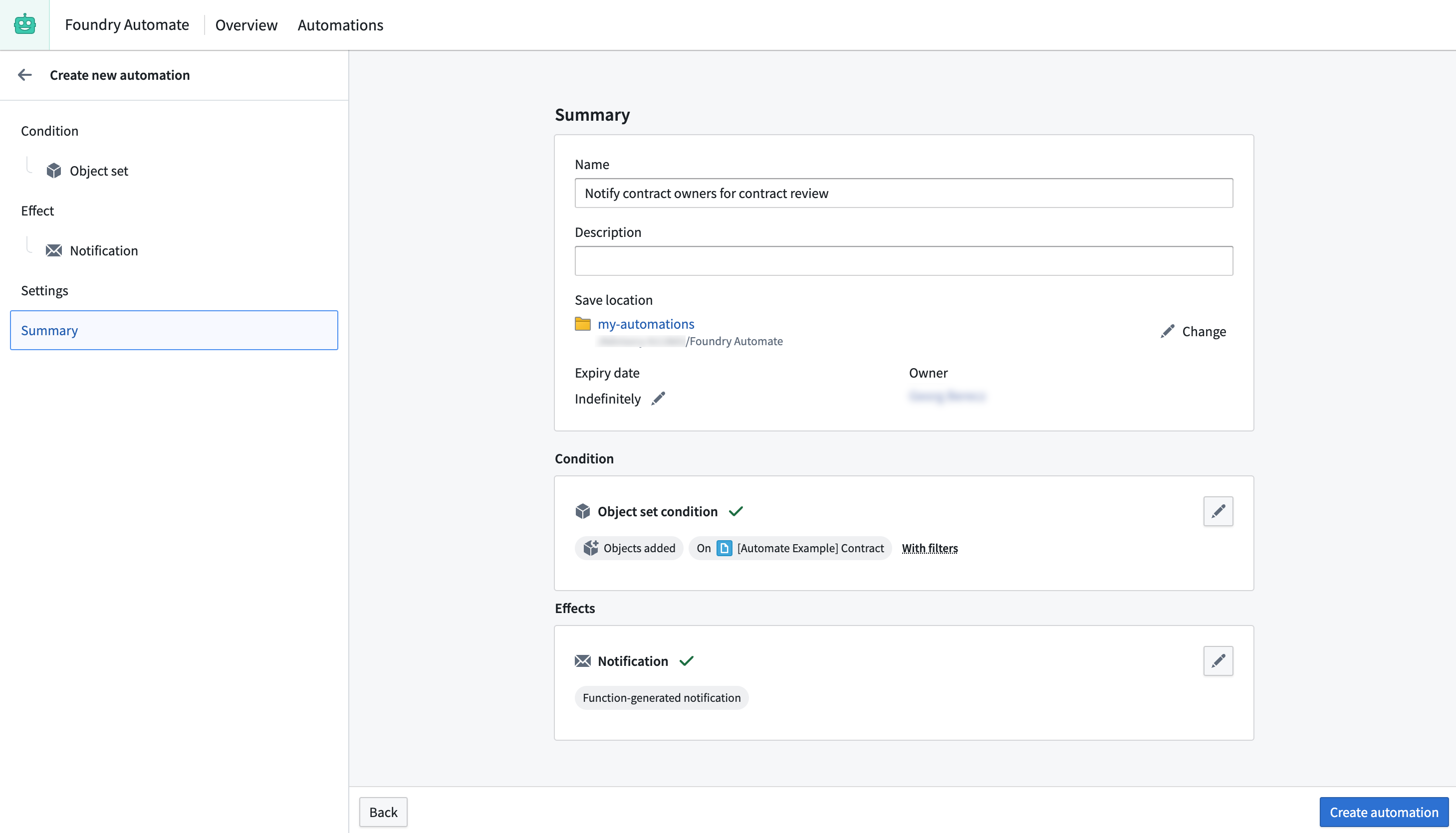
To complete the process, we provide a name for the automation, select a save location, adjust the expiration date to "never expire", and save the automation.
中文翻译
示例:通知合同负责人进行合同审查
在此示例中,我们希望在合同状态变更为"需要审查"时通知合同负责人。我们将使用Contract对象类型,这是为此示例创建的自定义对象类型。
条件
首先在自动化创建向导中选择"对象添加到集合"条件。由于我们希望在合同状态变更为"需要审查"时收到通知,可以在所选对象集合上添加针对"合同状态"的筛选条件,如下所示。当对象进入筛选后的对象集合时,此自动化将始终触发——无论是因新创建的状态为"需要审查"的对象,还是因现有对象的状态变更为"需要审查"。
效果
接下来,我们选择通知作为效果。
为确保每位合同负责人收到各自需要审查合同的独立邮件,请选择"为每个新增合同发送一条通知"选项。要动态地向相应合同负责人发送邮件,请使用"基于对象属性"的收件人功能,并选择合同负责人属性作为用户属性。合同负责人是Contract对象上的一个属性,包含关联负责人的Foundry用户ID数组(格式类似1234a567-8bc9-12ab-3456-7ca89b1c234a)。请注意,所有收件人至少需要拥有自动化的查看者权限,否则将无法收到通知。
接下来,我们需要定义通知内容。要为收件人配置更复杂的通知,我们将使用函数生成的通知内容功能。函数生成的通知在构建通知内容方面提供更大灵活性,并支持使用HTML内容(<html>)。
为支持函数生成的通知,我们在代码仓库中创建一个函数,该函数以收件人和合同对象为输入,返回一个通知。
import { Function, Notification, User, ShortNotification, EmailNotificationContent } from "@foundry/functions-api";
import { _automateExampleContract  } from "@foundry/ontology-api";

@Function()
public createContractStatusChangeNotification(user: User, contract: _automateExampleContract): Notification | undefined {

    const shortNotification = ShortNotification.builder()
        .heading("合同变更")
        .content(`合同"${contract.title}"的状态已变更为${contract.contractStatus}`)
        .addObjectLink("查看合同", contract)
        .build();

    // 定义邮件正文。邮件正文可包含无头HTML,例如数据表格
    // 注意:我们可以在内容中访问用户和合同的属性
    const emailBody = `您好,${user.firstName}!
    您负责的合同"${contract.title}"的状态已变更为"${contract.contractStatus}"。

    请查看合同详情。点击<a href="${contract.customerUrl}">此处</a>查看更多客户信息。
    `;

    const emailNotificationContent = EmailNotificationContent.builder()
        .subject(`合同变更 - ${contract.customerName}`)
        .body(emailBody)
        .addObjectLink("查看合同", contract)
        .build();

    return Notification.builder()
        .shortNotification(shortNotification)
        .emailNotificationContent(emailNotificationContent)
        .build();
}
发布函数后,我们可以在自动化创建向导中选择该函数,并将其连接到效果输入。对于user属性,我们选择通知的"收件人"。对于contract,我们选择"新增合同",这是由对象集合条件暴露的条件效果输入。
设置
为防止合同负责人收到关于自动化本身的状态通知,我们可以在自动化创建向导的"设置"选项卡中,将自动化管理员组添加到"自动化管理员"设置中。
总结
完成上述步骤后,为自动化命名、选择保存位置、将过期时间设置为"永不过期",然后保存自动化即可。