Automation history visibility and scope(自动化历史记录的可见性与范围)
Automations can be configured with different scoping options that determine who can access run history for action and Logic executions.
:::callout{theme="warning"} Regardless of scoping mode, automations execute as the owner. This means:
- Action criteria: The owner must satisfy submission requirements (group membership and permissions).
- Compute tokens: Functions receive the owner's authentication token.
- Edit attribution: Object edit history and audit logs show changes as performed by the owner.
- Permissions: All ontology reads/writes use the owner's access level. :::
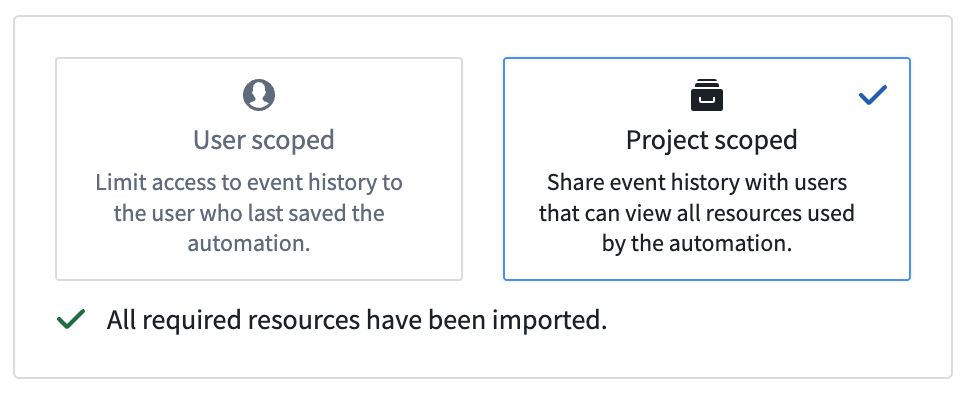
Project-scoped automations (recommended)
:::callout{theme="warning"} Project-scoped automations require all transitive resources used in the automation to be imported into the project. When dependencies change (for example, an action references a new version of a function), update the automation to reimport references and regenerate the scope. :::
Project scope mode is the recommended set-up for automations, if possible. Project scope enables team collaboration by making run history (including effect executions) visible to all users who satisfy the markings on a run. Project scoped automations still run as the owner of the automation.
Limitations
Project-scoped mode currently does not support:
- Stateful functions, including:
- Deployed Python functions
- AIP Chatbot functions
- Python and Typescript v2 functions that use a platform SDK
- Notification effects
Additionally, project-scoped mode has limited support for:
- Object types with restricted views: The owner of the automation and any viewers of event history must have access to all rows.
- Object types with object security policies: You must re-import security policies to the project after you update them.
Additionally, dependency computation for Typescript v1 is best-effort and may miss entities, meaning dependencies may be incorrectly computed. Consider using Typescript v2.
User-scoped automations
In user-scoped mode, only the owner of the automation has access to the run history. For better team collaboration and debugging, project-scoped mode is the recommended setup for automations.
With Shared trigger history enabled, users with permissions on marked data in the condition can see that runs were executed, but effect executions remain visible only to the automation's owner. For more information about configuring and viewing shared history, review the shared history events documentation.
中文翻译
自动化历史记录的可见性与范围
自动化可配置不同的范围选项,这些选项决定了谁可以访问操作(Action)和逻辑(Logic)执行的运行历史。
:::callout{theme="warning"} 无论采用何种范围模式,自动化均以所有者的身份执行。这意味着:
- 操作条件:所有者必须满足提交要求(组成员资格和权限)。
- 计算令牌:函数将接收所有者的身份验证令牌。
- 编辑归属:对象编辑历史和审计日志将显示为所有者执行的更改。
- 权限:所有本体读取/写入操作均使用所有者的访问级别。 :::
项目范围自动化(推荐)
:::callout{theme="warning"} 项目范围自动化要求自动化中使用的所有传递性资源(transitive resources)都导入到项目中。当依赖关系发生变化时(例如,操作引用了函数的新版本),请更新自动化以重新导入引用并重新生成范围。 :::
如果可能,项目范围模式是推荐的自动化设置方式。项目范围通过使运行历史(包括效果执行)对所有满足运行标记的用户可见,从而实现团队协作。项目范围自动化仍以所有者的身份运行。
限制
项目范围模式目前不支持:
- 有状态函数(Stateful functions),包括:
- 已部署的 Python 函数
- AIP 聊天机器人函数
- 使用平台 SDK 的 Python 和 Typescript v2 函数
- 通知效果
此外,项目范围模式对以下功能支持有限:
此外,Typescript v1 的依赖关系计算是尽力而为的,可能会遗漏实体,这意味着依赖关系可能计算不正确。建议使用 Typescript v2。
用户范围自动化
在用户范围模式下,只有自动化的所有者才能访问运行历史。为了更好地进行团队协作和调试,项目范围模式是推荐的自动化设置方式。
启用共享触发器历史记录(Shared trigger history)后,对条件中标记数据具有权限的用户可以看到运行已执行,但效果执行仍然仅对自动化的所有者可见。有关配置和查看共享历史的更多信息,请查阅共享历史事件文档。