Automation history(自动化历史记录)
Automation history tracks events related to condition evaluation and automation metadata changes for individual automations.
History based on the automation condition (such as Automation triggered and Automation recovered) is saved at the user level. You can only see whether an automation triggered for you, not for other users (even if you created the automation). You can learn more about history visibility below.
The history for a single automation is displayed under the History tab in the individual automation view.
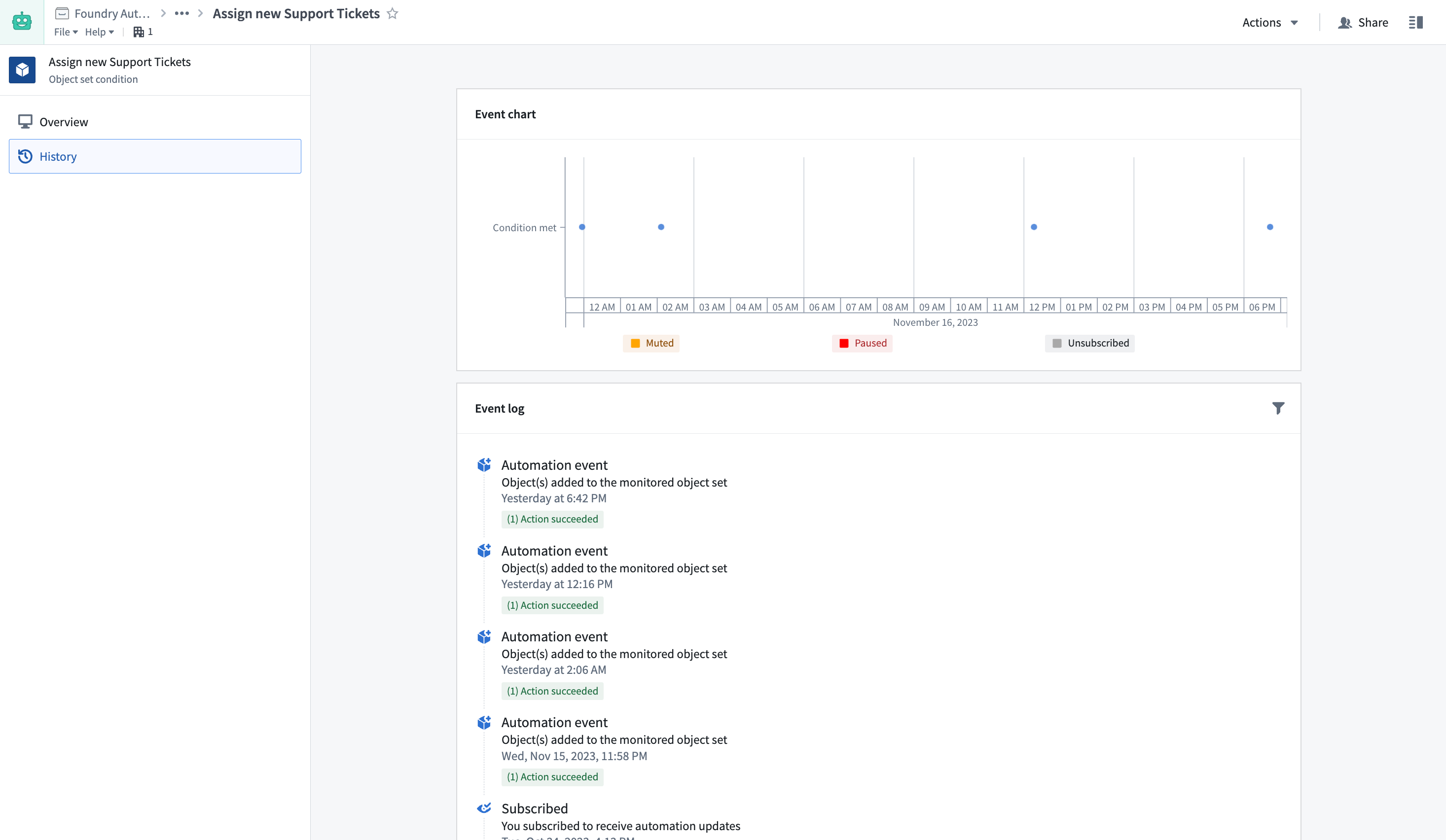
View event details
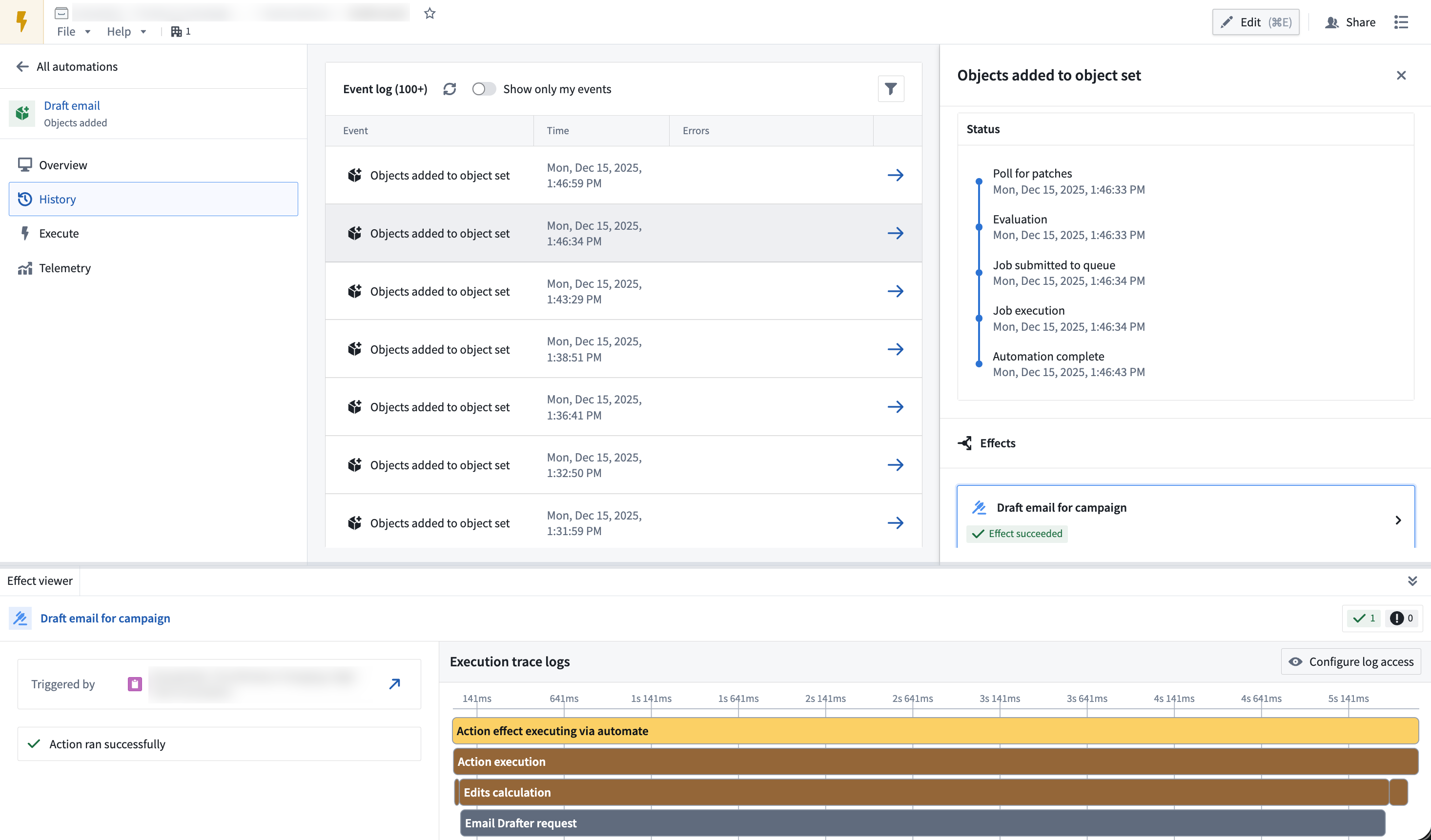
Select an event to view the full execution timeline, including condition evaluation details, effect execution status, timestamps, and any errors.
Within the event details view, select an individual effect to open a bottom panel with detailed trace logs. You can also choose the object that triggered the effect to view it in Object Explorer.
History visibility
History visibility depends on the automation's scope mode:
- Project-scoped automations: History is viewable to all users who satisfy the markings on a run, enabling team collaboration.
- User-scoped automations: By default, history is visible only to the owner. Enable shared history to make trigger events visible to other users, while keeping effect execution details private.
- Shared history for user-scoped automations: You can enable shared history on the Automate edit page. Select Summary > Security settings, choose User scoped, and then turn on Generate shared history events. With shared events enabled, you can view only your events by toggling Show only my events at the top of the Event Log table on Automate's History page.
:::callout{theme="warning"} Shared events show that executions occurred, but effect execution details (including effect status, success/failure, failure messages, and effect logs) remain visible only to the owner. :::
Event types
| Event | Description |
|---|---|
Automation triggered |
Recorded when an automation condition is met or when a threshold condition changes from false to true. |
Automation recovered |
Recorded when a threshold condition changes from true to false. Only threshold conditions on object sets generate this event. |
Condition edited |
Recorded when any user updates the automation condition. |
Subscribed |
Recorded when you subscribe to an automation. History from unsubscribed periods is not recorded or displayed. |
Unsubscribed |
Recorded when you unsubscribe from an automation. History from unsubscribed periods is not recorded or displayed. |
Evaluation failed |
Recorded when an automation fails to evaluate for any reason. View failure details in the automation's History tab. May also appear when condition evaluation succeeds but notification or action effects fail. |
Paused |
Recorded when any user pauses an automation or when an automation is automatically paused due to excessive failures. Paused automations are not evaluated. |
Resumed |
Recorded when an automation is unpaused. |
Muted |
Recorded when any user mutes an automation. Muting applies to all subscribers. Muted automations still evaluate but do not trigger notification or action effects. |
Unmuted |
Recorded when an automation is unmuted. Automations automatically unmute when the mute period expires. |
Retention
Automation history is retained for six months, then permanently deleted. To store history beyond six months, use an action to save data in a long-lived object that is managed and controlled like any other object type in the Ontology.
When data is deleted, it is removed from the automation's History tab.
You can use fallback effects to persist failure messages and error information to Ontology objects. This allows you to retain data for both successful executions (through standard action effects) and unsuccessful executions (through fallback effects), with no retention limits.
中文翻译
自动化历史记录
自动化历史记录追踪与条件评估及自动化元数据变更相关的单个自动化事件。
基于自动化条件(如"自动化已触发"和"自动化已恢复")的历史记录保存在用户级别。您只能查看自动化是否为您触发,而无法查看其他用户的情况(即使您创建了该自动化)。您可以在下方了解更多关于历史记录可见性的信息。
单个自动化的历史记录显示在该自动化视图的历史记录选项卡下。
查看事件详情
选择某个事件以查看完整的执行时间线,包括条件评估详情、效果执行状态、时间戳以及任何错误信息。
在事件详情视图中,选择单个效果可打开一个包含详细跟踪日志的底部面板。您还可以选择触发该效果的对象,在对象资源管理器(Object Explorer)中查看。
历史记录可见性
历史记录的可见性取决于自动化的作用域模式(scope mode):
- 项目作用域自动化(Project-scoped automations): 所有满足运行标记的用户均可查看历史记录,便于团队协作。
- 用户作用域自动化(User-scoped automations): 默认情况下,历史记录仅对所有者可见。启用共享历史记录可使触发事件对其他用户可见,同时保持效果执行详情私密。
- 用户作用域自动化的共享历史记录: 您可以在自动化编辑页面启用共享历史记录。选择摘要 > 安全设置,选择用户作用域,然后开启生成共享历史记录事件。启用共享事件后,您可以通过在自动化历史记录页面的事件日志表格顶部切换仅显示我的事件来仅查看自己的事件。
:::callout{theme="warning"} 共享事件显示执行已发生,但效果执行详情(包括效果状态、成功/失败、失败消息和效果日志)仍仅对所有者可见。 :::
事件类型
| 事件 | 描述 |
|---|---|
自动化已触发(Automation triggered) |
当自动化条件满足或阈值条件从false变为true时记录。 |
自动化已恢复(Automation recovered) |
当阈值条件从true变为false时记录。只有对象集上的阈值条件才会生成此事件。 |
条件已编辑(Condition edited) |
当任何用户更新自动化条件时记录。 |
已订阅(Subscribed) |
当您订阅自动化时记录。未订阅期间的历史记录不会被记录或显示。 |
已取消订阅(Unsubscribed) |
当您取消订阅自动化时记录。未订阅期间的历史记录不会被记录或显示。 |
评估失败(Evaluation failed) |
当自动化因任何原因评估失败时记录。在自动化的历史记录选项卡中查看失败详情。当条件评估成功但通知或操作效果失败时,也可能出现此事件。 |
已暂停(Paused) |
当任何用户暂停自动化,或自动化因过多失败而自动暂停时记录。暂停的自动化不会被评估。 |
已恢复(Resumed) |
当自动化取消暂停时记录。 |
已静音(Muted) |
当任何用户将自动化静音时记录。静音适用于所有订阅者。静音的自动化仍会进行评估,但不会触发通知或操作效果。 |
已取消静音(Unmuted) |
当自动化取消静音时记录。静音期到期时,自动化会自动取消静音。 |
保留期限
自动化历史记录保留六个月,之后将被永久删除。如需将历史记录保存超过六个月,请使用操作将数据存储到长期存在的对象中,该对象的管理和控制方式与本体论(Ontology)中的任何其他对象类型相同。
数据被删除后,将从自动化的历史记录选项卡中移除。
您可以使用回退效果(fallback effects)将失败消息和错误信息持久化到本体论(Ontology)对象中。这样,您既可以保留成功执行的数据(通过标准操作效果),也可以保留失败执行的数据(通过回退效果),且无保留期限限制。