Manual execution(手动执行)
You can manually run automations on existing object sets. This is useful for backfilling data or testing automations before a wider release.
Manual executions are considered run by the user who selects Execute in the Automate interface. Users must have Compass edit permissions on the Automate resource to manually execute an automation.
To manually execute an automation, first create a new automation with the desired effects. Then, open the automation and navigate to the Execute tab.
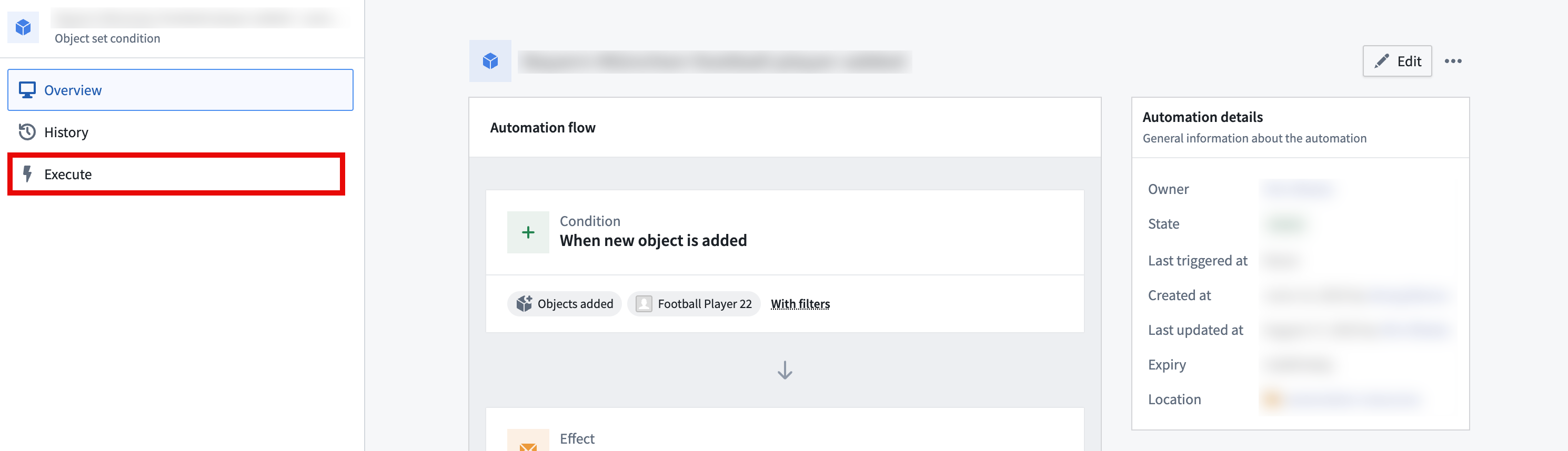
When an automation is manually executed, configured effects for that automation will be triggered immediately (optionally for a user-defined object set, depending on the condition).
Example: Remediate with manual execution
Large backlogs may cause snapshot expiration errors during manual execution. To work around this, use a function-backed object set to process the backlog in manageable batches:
- Create a function that returns the oldest N objects needing processing (for example,
oldestNObjectsWithBlankField(int count)that returns objects ordered by last edited timestamp with a limit). - Configure your automation to use a function-generated object set that calls this function.
- Manually execute the automation repeatedly with a reasonable batch size, waiting for each execution to complete.
- Continue manual executions until the backlog is reduced below the limit (typically <100K objects).
- Once the backlog is manageable, your regular condition-based automation can process new objects as they arrive.
Execution settings
Execution settings expose a number of configurable parameters:
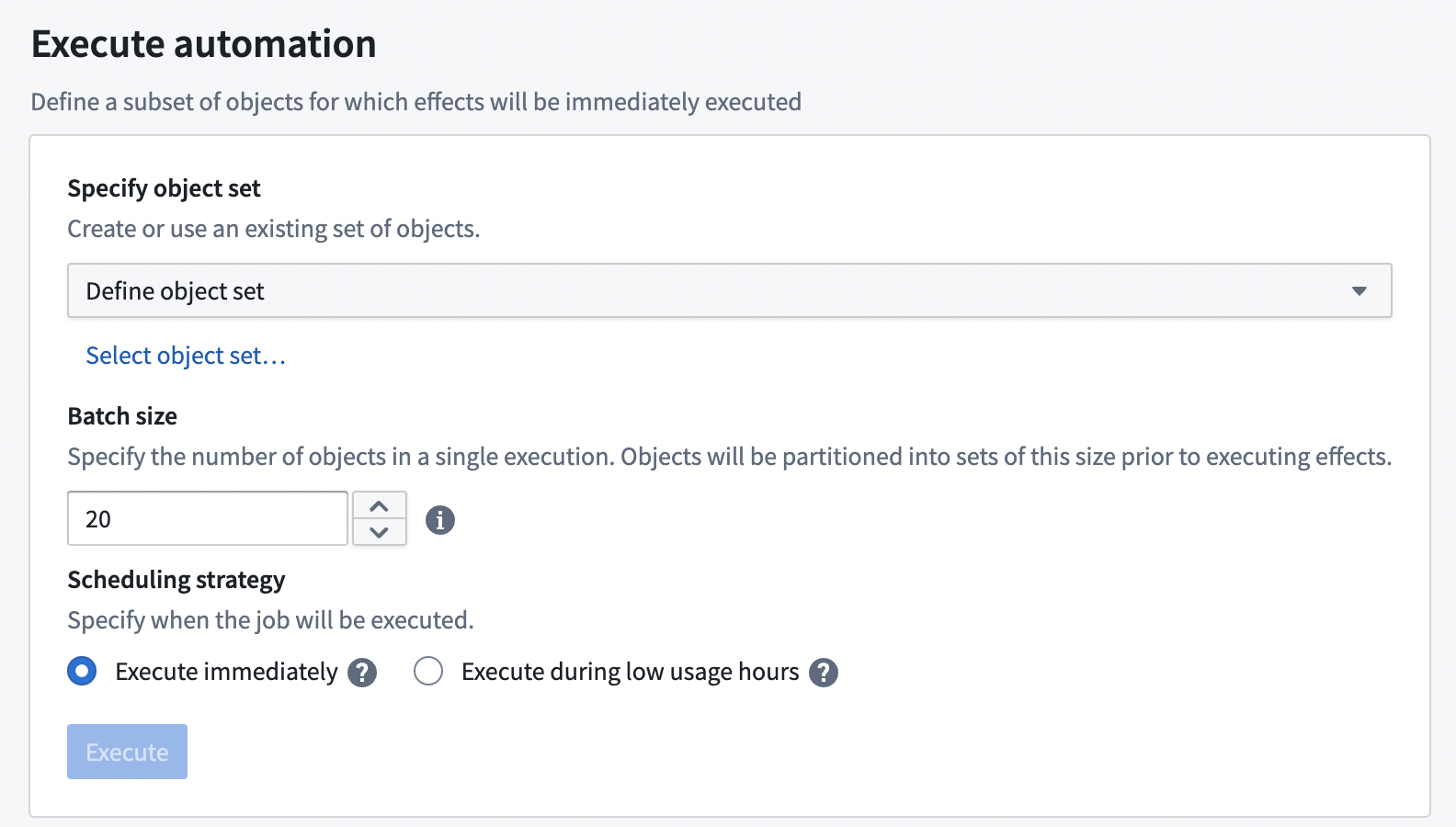
- Specify object set: For object set conditions, you can specify an input object set. See documentation on limits for object set size restrictions. This object set must contain objects of the same type as configured in the automation condition. All objects in this set will trigger the automation and be passed into any effect using
New objectparameters. Three object set types are currently supported: - Defined object set: Static (manually selected objects), or dynamic (defined by filters on a chosen object set).
- Saved object set: An object set saved as a Palantir resource.
-
Function-generated object set: Choose a function and define its parameters with static values. This function must return an object set of the same object type as the condition object set.
-
Batch size: Batch size determines the number of objects in each execution. For example, if the batch size is 100 objects, and there are 1,000 objects in the defined object set, then the automation will have 10 individual executions (each with 100 objects), scheduled 1 minute apart. Objects are partitioned in a nondeterministic, random ordering.
-
Batch size is not visible to configure if the automation's condition does not involve an object set.
-
Parallelism: Parallelism specifies how many batches should run in parallel. A higher number leads to faster execution.
-
Recipients: Manual execution supports sending notifications to all users.

When a manual execution is triggered, the object set is evaluated using the token of the user who initiated the execution. This ensures that the evaluation respects permissions and access rights of the executing user.
中文翻译
手动执行
您可以对现有对象集手动运行自动化。这对于回填数据或在广泛发布前测试自动化非常有用。
手动执行被视为在 Automate 界面中选择 执行 的用户所执行的操作。用户必须对 Automate 资源拥有 Compass 编辑权限才能手动执行自动化。
要手动执行自动化,首先创建一个新的自动化,并设置所需的效果。然后,打开该自动化并导航到 执行 选项卡。
当自动化被手动执行时,该自动化的已配置效果将立即触发(可选地针对用户定义的对象集,具体取决于条件)。
示例:通过手动执行进行修复
大量积压可能导致手动执行期间出现快照过期错误。为解决此问题,可使用函数支持的对象集(function-backed object set)以可管理的批次处理积压:
- 创建一个函数,返回需要处理的最旧的 N 个对象(例如,
oldestNObjectsWithBlankField(int count),返回按最后编辑时间戳排序并限制数量的对象)。 - 将自动化配置为使用调用此函数的函数生成对象集(function-generated object set)。
- 以合理的批次大小重复手动执行自动化,等待每次执行完成。
- 继续手动执行,直到积压减少到限制以下(通常 <100K 个对象)。
- 一旦积压变得可管理,常规的基于条件的自动化即可处理新到达的对象。
执行设置
执行设置提供多个可配置参数:
- 指定对象集: 对于对象集条件,您可以指定一个输入对象集。有关对象集大小限制,请参阅限制文档。此对象集必须包含与自动化条件中配置的对象类型相同的对象。该集合中的所有对象将触发自动化,并作为
新对象参数传递给任何效果。目前支持三种对象集类型: - 定义的对象集: 静态(手动选择的对象)或动态(通过所选对象集上的过滤器定义)。
- 已保存的对象集: 作为 Palantir 资源保存的对象集。
-
函数生成的对象集: 选择一个函数,并使用静态值定义其参数。此函数必须返回与条件对象集相同对象类型的对象集。
-
批次大小: 批次大小决定每次执行中的对象数量。例如,如果批次大小为 100 个对象,而定义的对象集中有 1,000 个对象,则自动化将进行 10 次单独执行(每次 100 个对象),每次间隔 1 分钟。对象以非确定性的随机顺序进行分区。
-
如果自动化的条件不涉及对象集,则批次大小不可见且无法配置。
-
并行度: 并行度指定应同时运行多少个批次。数值越高,执行速度越快。
-
收件人: 手动执行支持向所有用户发送通知。
当触发手动执行时,将使用发起执行的用户的令牌来评估对象集。这确保评估尊重执行用户的权限和访问权。