Permissions(权限)
Automate is governed by the same security and permissions model as the rest of the platform. Users can only see and interact with the automations to which they have access. This ensures condition evaluations and effects always reflect the appropriate data access at the time when the automation is evaluated.
Permissions for executions
- Condition evaluation: Uses automation owner's permissions
- Action and Logic effects: Execute as the automation owner. This means:
- Action submission criteria are evaluated against the owner (for example, if an action requires the user to be in group Y, the owner must be in group Y)
- Function executions in compute modules receive authentication tokens from the owner
- Ontology edit history shows the owner in the Edited by field
- Audit logs record Ontology edits as performed by the automation owner
- Notification effects: Use each recipient's individual permissions. Because notification effects use recipient permissions, an automation may:
- Trigger for some recipients but not others (based on their access)
- Send different notification content to different recipients (for function-backed notifications)
- Render different attachments for each recipient
:::callout{theme="warning"}
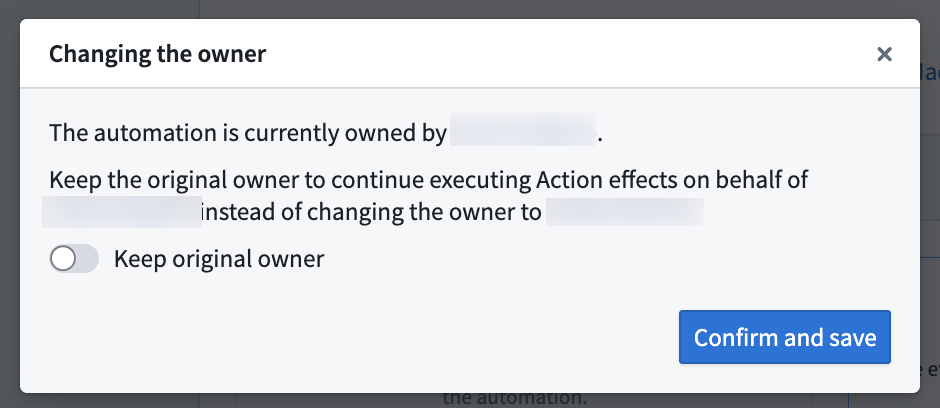
When you edit and save an automation, you may have the option to become the automation owner (taking ownership from the previous owner) or to keep the original owner. You must take ownership of the automation to make edits to the condition or effects.
Future actions effects will execute on behalf of the new owner.
 :::
:::
Example use case permissions
A Sales Opportunity object type uses a restricted view. Users have different permissions: some can access sales opportunities from Europe, others from the US.
You can configure an automation to notify users when new Sales Opportunity objects are added by using an Objects added to set condition. When a new opportunity from Europe arrives, the condition will be evaluated per recipient.
- Users without access to sales opportunities from
Europewill not see any activity on the automation; no condition event appears, no notification sent. - Users with access to opportunities from
Europewill be notified as expected.
Third-party application ownership
Automations can be owned by third-party applications instead of individual users. When an automation is owned by a third-party application, it uses a service user for all executions, providing team continuity when individual users leave or are out of office.
The following applies for third-party application ownership:
- The service user's permissions are used for condition evaluation and action/Logic effects.
- Automation execution history and permissions are tied to an organizational service account.
- Multiple automations can share the same third-party application ownership.
Learn more about setting up and transferring automation ownership in Third-party application ownership.
中文翻译
权限
Automate 遵循与平台其他部分相同的安全与权限模型。用户只能查看和操作其拥有访问权限的自动化流程。这确保了条件评估和效果始终在自动化执行时反映相应的数据访问权限。
执行权限
- 条件评估: 使用自动化所有者的权限
- 操作与逻辑效果: 以自动化所有者的身份执行。这意味着:
- 操作提交标准 根据所有者进行评估(例如,如果某个操作要求用户属于 Y 组,则所有者必须属于 Y 组)
- 计算模块中的 函数执行 会接收来自所有者的身份验证令牌
- 本体编辑历史 在 编辑者 字段中显示所有者
- 审计日志 将本体编辑记录为自动化所有者执行的操作
- 通知效果: 使用每个收件人的个人权限。由于通知效果使用收件人权限,自动化可能:
- 仅对部分收件人触发(基于其访问权限)
- 向不同收件人发送不同的通知内容(针对基于函数的通知)
- 为每个收件人生成不同的附件
:::callout{theme="warning"}
当您编辑并保存自动化时,您可以选择成为自动化所有者(从原所有者处接管所有权)或保留原所有者。您必须取得自动化所有权才能编辑条件或效果。
未来的操作效果将以新所有者的身份执行。
:::
示例用例权限
销售机会 对象类型使用了受限视图。用户拥有不同的权限:部分用户可以访问来自 欧洲 的销售机会,其他用户则可以访问来自 美国 的销售机会。
您可以通过使用 添加到集合的对象 条件,配置一个自动化流程,在新增 销售机会 对象时通知用户。当来自 欧洲 的新机会出现时,条件将根据每个收件人进行评估。
- 无权访问
欧洲销售机会的用户将不会看到自动化上的任何活动;不会出现条件事件,也不会发送通知。 - 有权访问
欧洲机会的用户将按预期收到通知。
第三方应用程序所有权
自动化可以由第三方应用程序而非个人用户拥有。当自动化由第三方应用程序拥有时,所有执行均使用服务用户,从而在个人用户离职或不在岗时提供团队连续性。
第三方应用程序所有权适用以下规则:
- 服务用户的权限用于条件评估和操作/逻辑效果。
- 自动化执行历史和权限与组织服务账户关联。
- 多个自动化可以共享同一个第三方应用程序所有权。
了解更多关于设置和转移自动化所有权的信息,请参阅第三方应用程序所有权。