Configure time series(配置时间序列)
:::callout{theme="neutral"} Prior to July 2022, Foundry Rules (previously known as Taurus) required users to create their own transform to run Foundry Rules. This section is only relevant if you deployed Foundry Rules prior to July 2022. :::
:::callout{theme="neutral"} These instructions assume time series have already been set up in your platform. Learn more about using time series in Foundry. :::
If you are creating a new workflow, follow the steps to deploy Foundry Rules. If you deployed Foundry Rules prior to July 2022, the additional steps described below are required to enable time series support.
Workshop application
There are two steps to start writing time series rules in the Workshop application:
-
The Enable time series rules configuration in the Rule Editor must be turned on. To navigate to this, edit your Workshop module, click on the Rule Editor widget, and find the option labeled Enable time series rules.

-
To create time series rules, the source object must be the root object type. Add all the root object types you require to the set of Permitted object types. All objects added here will also need to be added to the transforms pipeline.
Transforms pipeline
Foundry rules are run as part of a transform. Ensure you have already followed the instructions to set up the pipeline.
Additional inputs
This section provides the permissions to access time series metadata. For time series rules to run, you must add more items to the additional inputs:
- For each time series sync that backs the time series data, add the sync RID using
.addTimeseriesSyncRids. - For each tick dataset used in the times series syncs above, add the RID of the tick datasets using
.addBackingDatasetRids. These are the datasets containing the actual time series data. - Add the RID of the root and sensor object using
.addObjectRids. - Add the RID of the relation between the root and sensor object using
.addLinkRids.
Example
 @AdditionalInputs
    public static Set<InputSpec> additionalInputs = ImmutableOntologyInputs.builder()
        .addObjectRids("ri.ontology.main.object-type.adc4f61c-7ddd-4be2-9ade-a3a0483e63e4") // root object
        .addObjectRids("ri.ontology.main.object-type.98f40fe0-d36f-4fcc-b36c-dc3824be17b5") // sensor object
        .ontologyBranchRid("ri.ontology.main.branch.00000000-0000-0000-0000-000000000000")
        .ontologyRid("ri.ontology.main.ontology.00000000-0000-0000-0000-000000000000")

         // Time series inputs
        .addLinkRids("ri.ontology.main.relation.6e82c6be-2a9a-42be-9cf0-c84a706b4101") // root object <-> sensor Object
        .addTimeseriesSyncRids("ri.time-series-catalog.main.sync.8023a1b6-bae0-4dbf-8df5-9a879d8e0be0") // time series sync
        .addBackingDatasetRids("ri.foundry.main.dataset.7041bedc-c475-46f6-81b6-8b989f099447") // ticks dataset
        .addBackingDatasetRids("ri.foundry.main.dataset.7ee6741c-ea3d-48aa-9ba3-ec43b2ce42e4") // sensor object backing dataset
        .build()
        .getInputSpecs();
Project references
It is also necessary to import the root object type, the sensor object type, and the relation between them into the Project using the Ontology Imports helper within the Settings tab of the Code Repository.
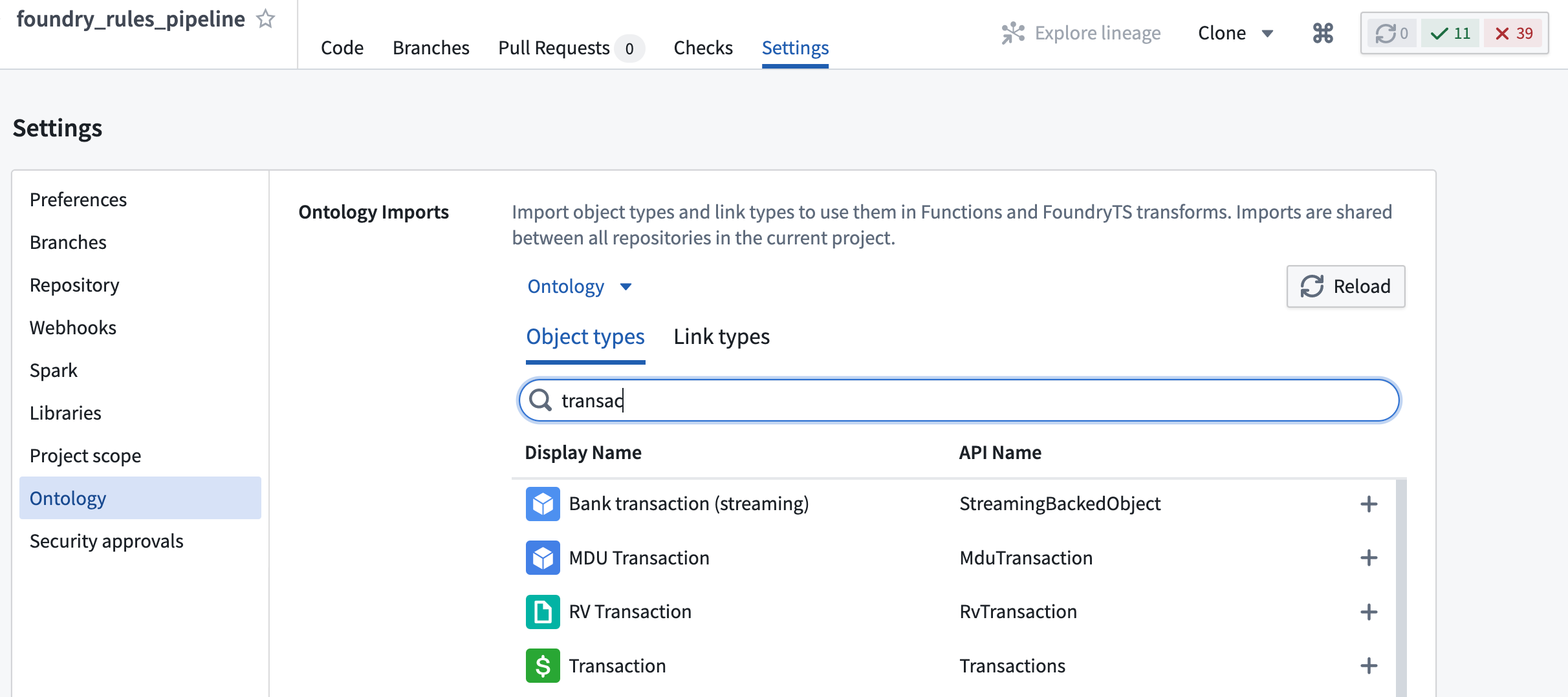
Additionally, if the time series sync or the ticks dataset that backs it are not in the same Project as the transform, then these must also be imported into the Project using the Project References section of the Project view.


中文翻译
配置时间序列
:::callout{theme="neutral"} 2022年7月之前,Foundry Rules(原名Taurus)要求用户自行创建转换来运行Foundry Rules。本部分仅适用于您在2022年7月之前部署了Foundry Rules的情况。 :::
:::callout{theme="neutral"} 以下说明假设您已在平台中设置好时间序列(time series)。了解更多关于在Foundry中使用时间序列的信息。 :::
如果您正在创建新的工作流,请按照部署Foundry Rules的步骤操作。如果您在2022年7月之前部署了Foundry Rules,则需要执行以下额外步骤以启用时间序列支持。
Workshop应用
在Workshop应用中编写时间序列规则需要两个步骤:
-
必须开启规则编辑器中的启用时间序列规则配置。要导航到此选项,请编辑您的Workshop模块,点击规则编辑器小部件,然后找到标记为启用时间序列规则的选项。
-
要创建时间序列规则,源对象(source object)必须是根对象类型(root object type)。将所有需要的根对象类型添加到允许的对象类型集合中。此处添加的所有对象也需要添加到转换管道(transforms pipeline)中。
转换管道
Foundry规则作为转换的一部分运行。请确保您已按照说明设置好管道。
额外输入
本节提供访问时间序列元数据(metadata)的权限。为了使时间序列规则能够运行,您必须在额外输入中添加更多项目:
- 对于每个支持时间序列数据的时间序列同步(time series sync),使用
.addTimeseriesSyncRids添加同步RID。 - 对于上述时间序列同步中使用的每个刻度数据集(tick dataset),使用
.addBackingDatasetRids添加刻度数据集的RID。这些是包含实际时间序列数据的数据集。 - 使用
.addObjectRids添加根对象和传感器对象(sensor object)的RID。 - 使用
.addLinkRids添加根对象与传感器对象之间关系的RID。
示例
 @AdditionalInputs
    public static Set<InputSpec> additionalInputs = ImmutableOntologyInputs.builder()
        .addObjectRids("ri.ontology.main.object-type.adc4f61c-7ddd-4be2-9ade-a3a0483e63e4") // 根对象
        .addObjectRids("ri.ontology.main.object-type.98f40fe0-d36f-4fcc-b36c-dc3824be17b5") // 传感器对象
        .ontologyBranchRid("ri.ontology.main.branch.00000000-0000-0000-0000-000000000000")
        .ontologyRid("ri.ontology.main.ontology.00000000-0000-0000-0000-000000000000")

         // 时间序列输入
        .addLinkRids("ri.ontology.main.relation.6e82c6be-2a9a-42be-9cf0-c84a706b4101") // 根对象 <-> 传感器对象
        .addTimeseriesSyncRids("ri.time-series-catalog.main.sync.8023a1b6-bae0-4dbf-8df5-9a879d8e0be0") // 时间序列同步
        .addBackingDatasetRids("ri.foundry.main.dataset.7041bedc-c475-46f6-81b6-8b989f099447") // 刻度数据集
        .addBackingDatasetRids("ri.foundry.main.dataset.7ee6741c-ea3d-48aa-9ba3-ec43b2ce42e4") // 传感器对象支持数据集
        .build()
        .getInputSpecs();
项目引用
还需要使用代码仓库中设置选项卡内的本体导入辅助工具,将根对象类型、传感器对象类型以及它们之间的关系导入到项目中。
此外,如果时间序列同步或其支持的刻度数据集与转换不在同一个项目中,则必须使用项目视图中的项目引用部分将这些内容导入到项目中。