Configure transforms pipeline(配置转换管道)
:::callout{theme="warning"} Prior to July 2022, Foundry Rules (previously known as Taurus) required users to create their own transform to run Foundry Rules. This section is only relevant if you deployed Foundry Rules prior to July 2022. :::
Once rules have been written and reviewed in the Workshop application, the encoded logic is applied as part of a transform. This section explains the various components of the transform and how to configure them for your use case. The majority of the transform is configured by default via the default deployment; however, extensions to the workflow may require additional steps.
Example transform
After deploying the Foundry Rules transform, the transform will look similar to the example below:
public final class FoundryRulesTransformExample {
    // In addition to replacing the RIDs below, you will also need to import the relevant object types
    // and relations into the Project using the "Ontology" section of the 'Settings' tab above
    @AdditionalInputs
    public static Set<InputSpec> additionalInputs = ImmutableOntologyInputs.builder()
            .addObjectRids("ri.ontology.main.object-type.4168ed49-00...") // employee
            // .addLinkRids("...") // add all referenced relations
            .ontologyRid("ri.ontology.main.ontology.00000000-0000-0000-0000-000000000000")
            .ontologyBranchRid("ri.ontology.main.branch.00000000-0000-0000-0000-000000000000")
            .build()
            .getInputSpecs();

    @Compute
    public void compute(
            @Input("ri.foundry.main.dataset.0000...") FoundryInput source_object_backing_dataset,
            @Input("ri.foundry.main.dataset.0000...") FoundryInput rules_input,
            @Output("ri.foundry.main.dataset.0000...") FoundryOutput outcome_output,
            @Output("REPLACE WITH PATH TO WRITE STATUS DATASET TO") FoundryOutput rule_status_output,
            TransformContext transformContext) {

        Dataset<Row> source = source_object_backing_dataset.asDataFrame().read();
        Dataset<Row> rulesDataset = rules_input.asDataFrame().read();

        // Configuring the Taurus Rule Runner
        Args ruleRunnerArgs = new TaurusRuleRunner.Args.Builder()
                .rules(new Rules.Builder()
                        .logicColumnName("RuleLogic")
                        .ruleIdColumnName("RuleId")
                        .dataset(rulesDataset)
                        .build())
                // Put all sources used in Foundry Rules editor Workshop app here (for datasets the name here
                // must match the dataset name in the Foundry Rules app)
                .putSources(SourceReference.objectTypeId("employee"), source)
                // .putSources(SourceReference.dataset(DatasetName.of("name in Foundry Rules app")), dataset)
                // Required if you use many-many ontology join tables:
                // .manyToManyJoinTables(ImmutableMap.of(LinkTypeId.of("relation-id"), dataset))
                // set to true to ensure the rule execution output matches the rule editor widget's preview (this flag is false by default)
                // .shouldMatchContourExecutionBehavior(true)
                .context(transformContext)
                .build();

        // Run the rules using Spark (lazily evaluated)
        RuleEffects ruleEffects = TaurusRuleRunner.runRules(ruleRunnerArgs);

        // Get the results from all the rules that use the specified actions
        Dataset<Row> outcomes = ruleEffects.actionReadyMergedDataset(
            ActionTypeRid.valueOf("ri.actions.main.action-type.b6f052c7-f7b1-4b4f-83ee-f81d9e854114"));
        outcome_output.getDataFrameWriter(outcomes).write();

        rule_status_output.getDataFrameWriter(ruleEffects.statusDataset()).write();
    }
}
Using @AdditionalInputs to add Ontology inputs
@AdditionalInputs
public static Set<InputSpec> additionalInputs = ImmutableOntologyInputs.builder()
        .addObjectRids("ri.ontology.main.object-type.4168ed49-00...") // employee
        // .addLinkRids("...") // add all referenced relations
        .ontologyRid("ri.ontology.main.ontology.00000000-0000-0000-0000-000000000000")
        .ontologyBranchRid("ri.ontology.main.branch.00000000-0000-0000-0000-000000000000")
        .build()
        .getInputSpecs();
You can use @AdditionalInputs to provide the permissions to access metadata about the object types used in Foundry Rules. Any object types configured for use in the Foundry Rules Workshop application must be added here. The first object type RID will be filled out by default, but any additional objects added as part of the deploy workflow template section must be added as additional .addObjectRids() entries.
In addition, any relations that will be used in the Workshop application must be added here as a .addLinkRids() entry. The RIDs can be obtained from the Ontology Manager using the object type and relation pages, respectively.
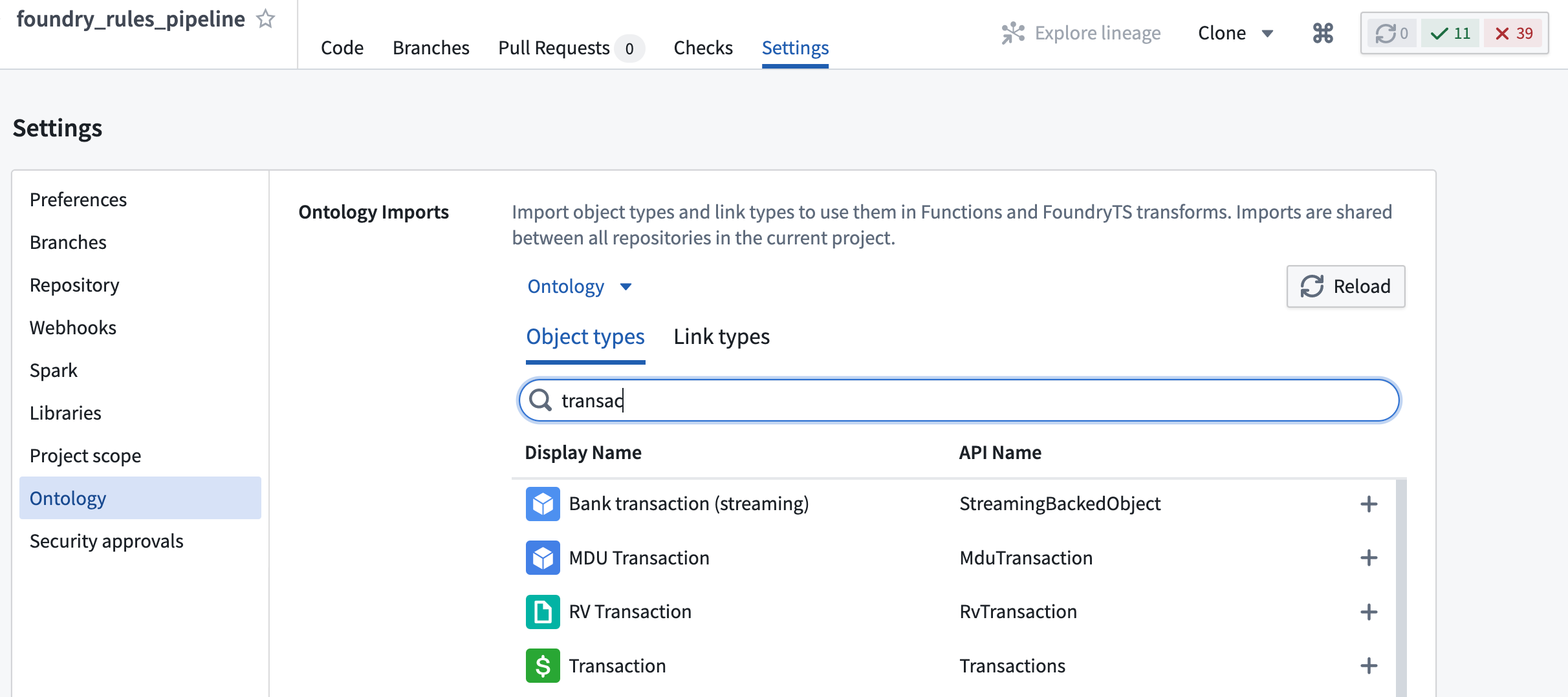
After adding these entries, it is also necessary to import the object types and relations into the Project using the Ontology Imports helper within the Settings tab of the Code Repository.
Input and output datasets
@Compute
public void compute(
        @Input("ri.foundry.main.dataset.0000...") FoundryInput source_object_backing_dataset,
        @Input("ri.foundry.main.dataset.0000...") FoundryInput rules_input,
        @Output("ri.foundry.main.dataset.0000...") FoundryOutput outcome_output,
        @Output("REPLACE WITH PATH TO WRITE STATUS DATASET TO") FoundryOutput rule_status_output,
This section provides the data for all the inputs used by the Foundry rules in your application. This includes the backing datasets for any objects and many-to-many join tables used in Foundry rules. By default, several of these will be pre-filled.
However, any additional objects or dataset added in while deploying the workflow template must be added as new @Input entries here. These datasets will be required later as part of TaurusRuleRunner.Args.
Additionally, you must provide a path for the output of rule_status_output. This dataset contains details of any rules that did not run successfully and is a useful debugging tool.
Foundry Rules rule runner
// Configuring the Foundry Rules rule runner
Args ruleRunnerArgs = new TaurusRuleRunner.Args.Builder()
        .rules(new Rules.Builder()
                .logicColumnName("RuleLogic")
                .ruleIdColumnName("RuleId")
                .dataset(rulesDataset)
                .build())
        // Put all sources used in Foundry Rules editor Workshop app here (for datasets the name here must
        // match the dataset name in the Foundry Rules application)
        .putSources(SourceReference.objectTypeId("employee"), source)
        // .putSources(SourceReference.dataset(DatasetName.of("name in Foundry Rules app")), dataset)
        // Required if you use many-many ontology join tables:
        // .manyToManyJoinTables(ImmutableMap.of(LinkTypeId.of("relation-id"), dataset))
        // set to true to ensure the rule execution output matches the rule editor widget's preview (this flag is false by default)
        // .shouldMatchContourExecutionBehavior(true)
        .context(transformContext)
        .build();
This section configures the rule runner (TaurusRuleRunner) that will ultimately run the Foundry rules provided in the rulesDataset. This section is also mostly pre-configured by default, but, as described in Input and Output Datasets, any extra inputs must be registered with the TaurusRuleRunner by adding additional .putSources() entries. Additionally, any many-to-many join tables used between objects configured with Foundry rules must be registered here using .manyToManyJoinTables() as shown in the example above.
Rule Action datasets
RuleEffects ruleEffects = TaurusRuleRunner.runRules(ruleRunnerArgs);

Dataset<Row> outcomes = ruleEffects.actionReadyMergedDataset(
    ActionTypeRid.valueOf("ri.actions.main.action-type.b6f052c7-f7b1-4b4f-83ee-f81d9e854114"));
outcome_output.getDataFrameWriter(outcomes).write();
Rule Actions act as a common output schema for a collection of Foundry rules. Having run all rules using .runRules(), it is possible to get all result rows for a particular rule Action by calling .actionReadyMergedDataset() with the Action type RID of the required Action. This RID can be found in the Action type view of the Ontology Manager.

The dataset returned can be written to an output of the transform as shown in the above example. This dataset will contain one column per Action parameter of the Action, plus a Foundry Rules_rule_id column containing the ID of the rule that the row originated from.
Additional rule Actions added to the Workshop app can be included here by copying the example, then replacing the Action type RID and adding a new output dataset, as described in the Input and Output Datasets section.
:::callout{theme="neutral"} If you encounter any errors when running the transform or CI checks, review the troubleshooting reference. :::
Reference implementation
If configured by your Palantir representative, there may be an available reference implementation of the above transform. Search for the Business Rules with Rules Workflow folder or navigate to the Foundry Training and Resources Project, then to Reference Examples → Application Development in Workshop → Business Rules with Rules Workflow.
Here, you will find a template Workflow application and transform pipeline implemented on top of the example aviation Ontology.
中文翻译
配置转换管道
:::callout{theme="warning"} 在2022年7月之前,Foundry Rules(原名Taurus)要求用户自行创建转换来运行Foundry Rules。仅当您在2022年7月之前部署了Foundry Rules时,本节内容才适用。 :::
规则在Workshop应用中编写和审核完成后,编码后的逻辑将作为转换的一部分被应用。本节将说明转换的各个组件以及如何根据您的用例进行配置。转换的大部分内容已通过默认部署进行了默认配置;但工作流的扩展可能需要额外的步骤。
示例转换
部署Foundry Rules转换后,转换将类似于以下示例:
public final class FoundryRulesTransformExample {
    // 除了替换下方的RID外,您还需要使用上方"设置"选项卡中的"Ontology"部分
    // 将相关的对象类型和关系导入到项目中
    @AdditionalInputs
    public static Set<InputSpec> additionalInputs = ImmutableOntologyInputs.builder()
            .addObjectRids("ri.ontology.main.object-type.4168ed49-00...") // employee
            // .addLinkRids("...") // 添加所有引用的关系
            .ontologyRid("ri.ontology.main.ontology.00000000-0000-0000-0000-000000000000")
            .ontologyBranchRid("ri.ontology.main.branch.00000000-0000-0000-0000-000000000000")
            .build()
            .getInputSpecs();

    @Compute
    public void compute(
            @Input("ri.foundry.main.dataset.0000...") FoundryInput source_object_backing_dataset,
            @Input("ri.foundry.main.dataset.0000...") FoundryInput rules_input,
            @Output("ri.foundry.main.dataset.0000...") FoundryOutput outcome_output,
            @Output("REPLACE WITH PATH TO WRITE STATUS DATASET TO") FoundryOutput rule_status_output,
            TransformContext transformContext) {

        Dataset<Row> source = source_object_backing_dataset.asDataFrame().read();
        Dataset<Row> rulesDataset = rules_input.asDataFrame().read();

        // 配置Taurus Rule Runner
        Args ruleRunnerArgs = new TaurusRuleRunner.Args.Builder()
                .rules(new Rules.Builder()
                        .logicColumnName("RuleLogic")
                        .ruleIdColumnName("RuleId")
                        .dataset(rulesDataset)
                        .build())
                // 在此处放置Foundry Rules编辑器Workshop应用中使用的所有源(对于数据集,此处的名称
                // 必须与Foundry Rules应用中的数据集名称匹配)
                .putSources(SourceReference.objectTypeId("employee"), source)
                // .putSources(SourceReference.dataset(DatasetName.of("Foundry Rules应用中的名称")), dataset)
                // 如果使用多对多本体连接表,则需要:
                // .manyToManyJoinTables(ImmutableMap.of(LinkTypeId.of("relation-id"), dataset))
                // 设置为true以确保规则执行输出与规则编辑器小部件的预览匹配(此标志默认为false)
                // .shouldMatchContourExecutionBehavior(true)
                .context(transformContext)
                .build();

        // 使用Spark运行规则(惰性求值)
        RuleEffects ruleEffects = TaurusRuleRunner.runRules(ruleRunnerArgs);

        // 获取所有使用指定操作的规则的结果
        Dataset<Row> outcomes = ruleEffects.actionReadyMergedDataset(
            ActionTypeRid.valueOf("ri.actions.main.action-type.b6f052c7-f7b1-4b4f-83ee-f81d9e854114"));
        outcome_output.getDataFrameWriter(outcomes).write();

        rule_status_output.getDataFrameWriter(ruleEffects.statusDataset()).write();
    }
}
使用@AdditionalInputs添加本体输入
@AdditionalInputs
public static Set<InputSpec> additionalInputs = ImmutableOntologyInputs.builder()
        .addObjectRids("ri.ontology.main.object-type.4168ed49-00...") // employee
        // .addLinkRids("...") // 添加所有引用的关系
        .ontologyRid("ri.ontology.main.ontology.00000000-0000-0000-0000-000000000000")
        .ontologyBranchRid("ri.ontology.main.branch.00000000-0000-0000-0000-000000000000")
        .build()
        .getInputSpecs();
您可以使用@AdditionalInputs提供访问Foundry Rules中使用的对象类型元数据的权限。任何配置为在Foundry Rules Workshop应用中使用的对象类型都必须在此处添加。第一个对象类型RID将默认填写,但作为部署工作流模板部分添加的任何其他对象都必须作为额外的.addObjectRids()条目添加。
此外,任何将在Workshop应用中使用的关系都必须在此处作为.addLinkRids()条目添加。RID可以分别从Ontology Manager的对象类型和关系页面获取。
添加这些条目后,还需要使用代码仓库设置选项卡中的Ontology Imports辅助工具将对象类型和关系导入到项目中。
输入和输出数据集
@Compute
public void compute(
        @Input("ri.foundry.main.dataset.0000...") FoundryInput source_object_backing_dataset,
        @Input("ri.foundry.main.dataset.0000...") FoundryInput rules_input,
        @Output("ri.foundry.main.dataset.0000...") FoundryOutput outcome_output,
        @Output("REPLACE WITH PATH TO WRITE STATUS DATASET TO") FoundryOutput rule_status_output,
此部分为应用中Foundry规则使用的所有输入提供数据。这包括任何对象的支持数据集以及Foundry规则中使用的多对多连接表。默认情况下,其中几项将预先填写。
但是,在部署工作流模板时添加的任何其他对象或数据集都必须在此处作为新的@Input条目添加。这些数据集稍后将作为TaurusRuleRunner.Args的一部分被需要。
此外,您必须为rule_status_output的输出提供路径。此数据集包含任何未成功运行的规则的详细信息,是一个有用的调试工具。
Foundry Rules规则运行器
// 配置Foundry Rules规则运行器
Args ruleRunnerArgs = new TaurusRuleRunner.Args.Builder()
        .rules(new Rules.Builder()
                .logicColumnName("RuleLogic")
                .ruleIdColumnName("RuleId")
                .dataset(rulesDataset)
                .build())
        // 在此处放置Foundry Rules编辑器Workshop应用中使用的所有源(对于数据集,此处的名称必须
        // 与Foundry Rules应用中的数据集名称匹配)
        .putSources(SourceReference.objectTypeId("employee"), source)
        // .putSources(SourceReference.dataset(DatasetName.of("Foundry Rules应用中的名称")), dataset)
        // 如果使用多对多本体连接表,则需要:
        // .manyToManyJoinTables(ImmutableMap.of(LinkTypeId.of("relation-id"), dataset))
        // 设置为true以确保规则执行输出与规则编辑器小部件的预览匹配(此标志默认为false)
        // .shouldMatchContourExecutionBehavior(true)
        .context(transformContext)
        .build();
此部分配置最终将运行rulesDataset中提供的Foundry规则的规则运行器(TaurusRuleRunner)。此部分也大多默认预配置,但如输入和输出数据集所述,任何额外的输入都必须通过添加额外的.putSources()条目注册到TaurusRuleRunner。此外,使用Foundry规则配置的对象之间的任何多对多连接表都必须使用.manyToManyJoinTables()在此处注册,如上例所示。
规则操作数据集
RuleEffects ruleEffects = TaurusRuleRunner.runRules(ruleRunnerArgs);

Dataset<Row> outcomes = ruleEffects.actionReadyMergedDataset(
    ActionTypeRid.valueOf("ri.actions.main.action-type.b6f052c7-f7b1-4b4f-83ee-f81d9e854114"));
outcome_output.getDataFrameWriter(outcomes).write();
规则操作充当一组Foundry规则的通用输出模式。使用.runRules()运行所有规则后,可以通过使用所需操作的操作类型RID调用.actionReadyMergedDataset()来获取特定规则操作的所有结果行。此RID可以在Ontology Manager的操作类型视图中找到。
返回的数据集可以写入转换的输出,如上例所示。此数据集将为操作的每个操作参数包含一列,外加一个包含行来源规则ID的Foundry Rules_rule_id列。
添加到Workshop应用的其他规则操作可以通过复制示例、替换操作类型RID并添加新的输出数据集来包含在此处,如输入和输出数据集部分所述。
:::callout{theme="neutral"} 如果在运行转换或CI检查时遇到任何错误,请查看故障排除参考。 :::
参考实现
如果由您的Palantir代表配置,可能会有上述转换的参考实现。搜索Business Rules with Rules Workflow文件夹,或导航到Foundry Training and Resources项目,然后进入Reference Examples → Application Development in Workshop → Business Rules with Rules Workflow。
在此处,您将找到一个基于示例航空本体实现的工作流应用和转换管道模板。