Permitted and default output values(允许的输出值与默认输出值)
Workflow outputs specify the destination and format for the output of all the Foundry rules in the workflow. At the end of each rule in the rule editor, in the rule output logic block, the author will assign a column or a static value to each workflow output. Assigning values ensures that the rule output is defined when its value is required and that the data can safely flow into the workflow output dataset with the correct data type.
The Permitted and default output values section can be used to streamline the assignment process and to further customize the rule output logic block. Default values will automatically be assigned when a new rule is created, and the option to assign either column or static values can be restricted to allow only one of the two value types.
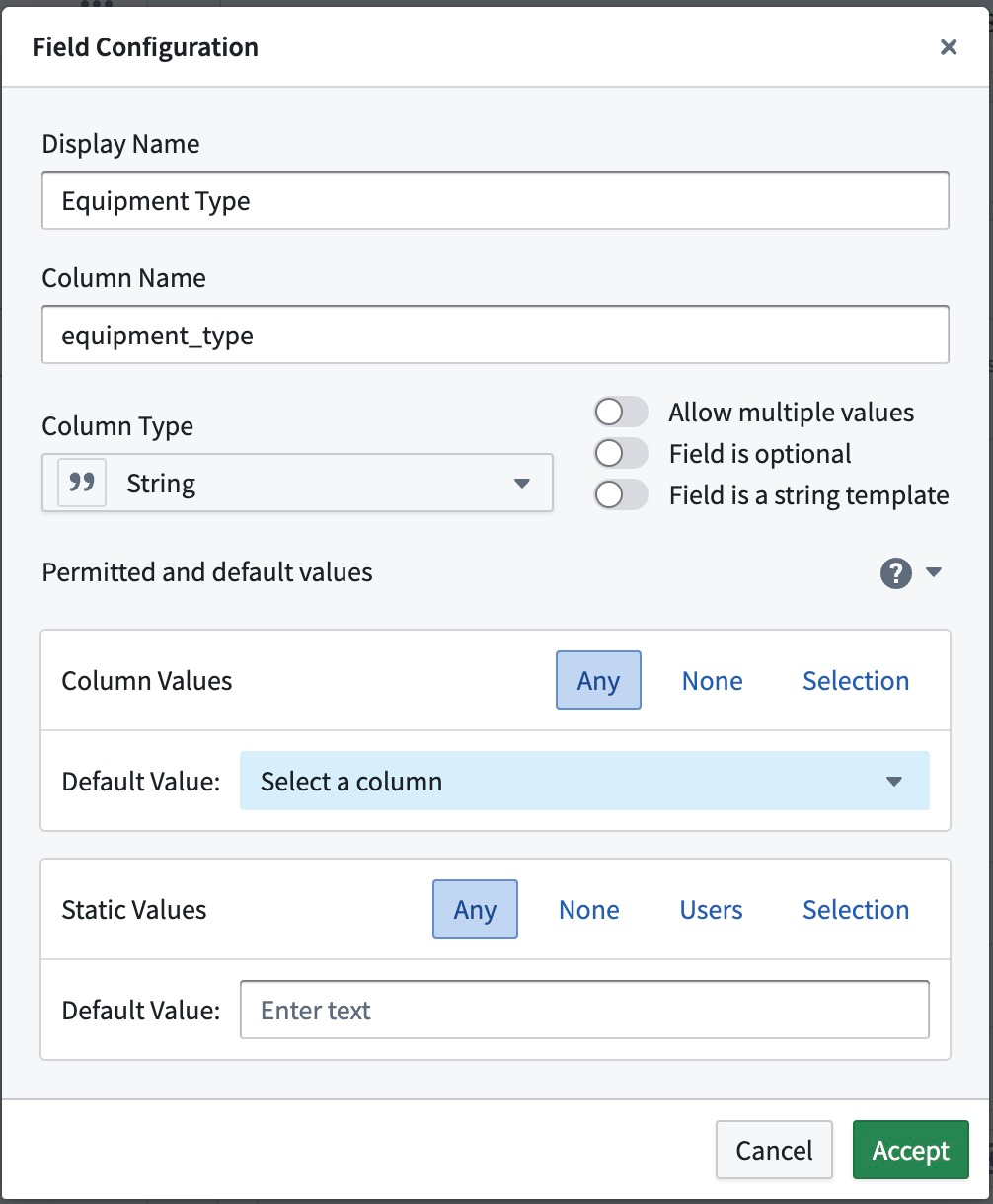
The screenshot shows the standard configuration, which is the most permissive and does not specify any default values. The Permitted and default output values section will be collapsed unless any changes have been made to the standard configuration.
Behavior and example use case
Each output field can have its own configuration. This is best illustrated by the following example:
If an equipment failure alert should link back to a specific equipment item, the field should be restricted to allow no static values (None) and only column values that are derived from the object property Serial Num.
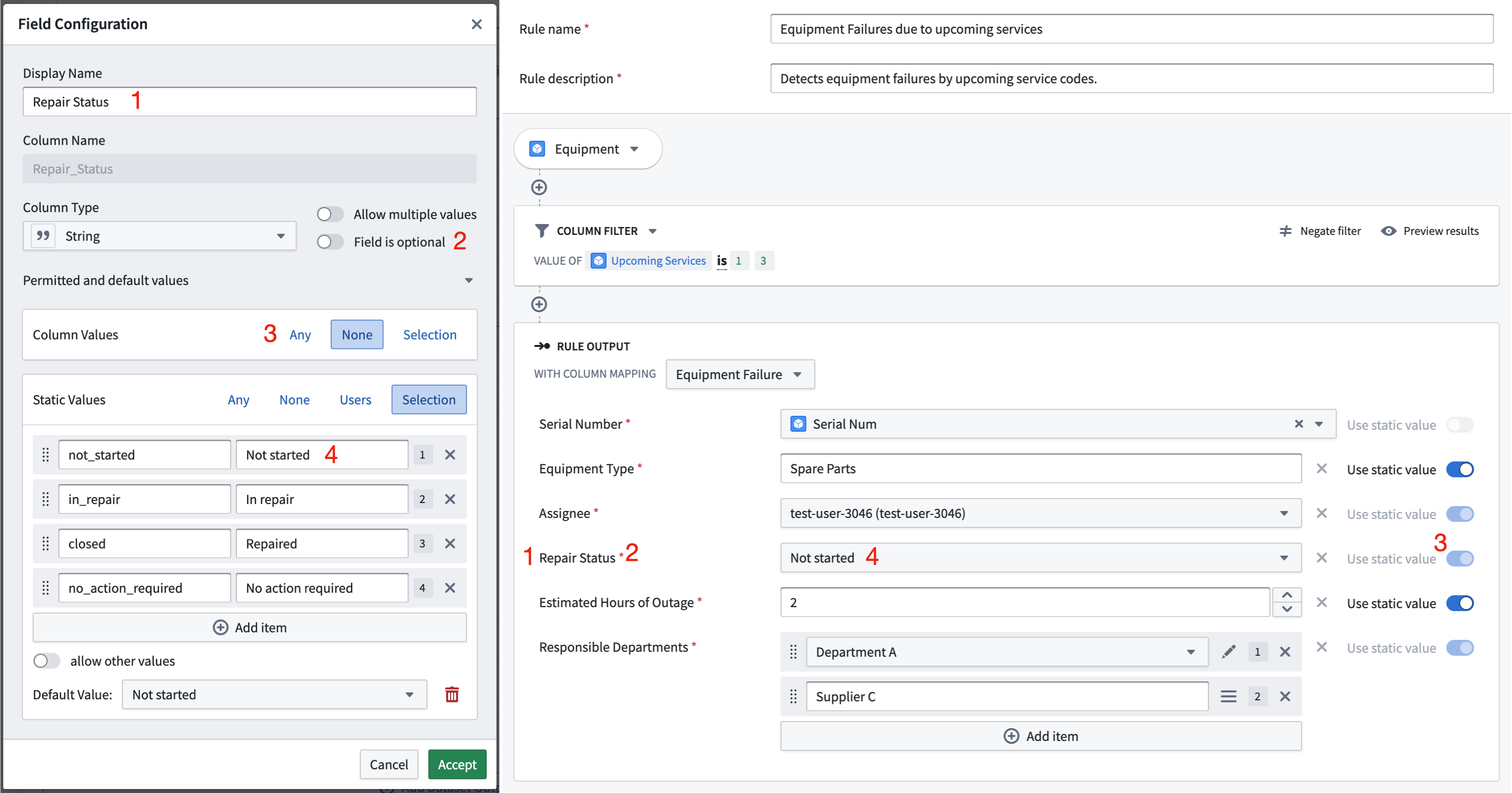
Alerts are at the core of operational workflows, so they usually tie into a process. An equipment failure will require some kind of repair, so the alert can be in one of many possible states. The workflow output will have a field Repair Status (1), which is a required field (2) of type String. Let's assume some equipment failures have an automated service routine that is triggered together with the alert, but others require manual intervention. This information is something only the rule author can determine, so column values from the input data are disabled (3, None). The status needs to be set to one of multiple possible states (4) and should be Not started by default. The rule output logic block that the rule author will see reflects this configuration. The switch between static and column values is disabled, and a selection menu with all possible status options is shown.
Configuration options
The configuration is split in two sections: column values and static values. Both sections depend on the output field type. If any configuration is incomplete or not satisfiable, an error icon will indicate the issue. The same error icon will indicate issues in the rule output logic block if the rule author provides values that are not compliant, such as an integer that is not within the required range.
For output values of type String, an option is available to make the field a string template. A string template is a combination of static and column values. If the Field is a string template option is selected, no further configurations are possible.

Column values
Column values refer to values that come from a column of the underlying dataset after the rule logic has been applied. When the rule author write the rule logic, the actual data is not known and the output column can only be restricted by type or input property name. The following options can be configured for column values:
- Any: Any existing column can be assigned to this output field.
- None: This output field will only accept static values. Column references are not allowed.
- Selection: Any column of the specified set of column options can be assigned to this field.
Static values
Static values refer to values that a rule author enters manually when creating or editing a rule. You can restrict these values so that they are within a number or date range or that inputs for multiple values have the correct length. Inputs for users and selection of values will be shown as dropdown menus so the rule author can enter the correct values more easily. The following options can be configured for static values:
- Any: Any value of the correct field type can be assigned to this output field.
- None: This output field will only accept column references. No static values are allowed.
- Selection: Any value of the specified set of values can be assigned to this output field. Optionally, other values may be allowed. Options will be displayed by their label.
- Range: Only static values that are within the specified range will be allowed. This option is available for numeric and date types only.
- Users: Any user of the specified set of Foundry Users can be assigned to this field. If no users are chosen, no restrictions will apply. This option is available for string types only.
For types that allow multiple values, the restrictions apply for each item in the input. For example, each integer in the input must be within the required range, each user must be one of the pre-selected users, or each item must be one of the labelled selection of items.
中文翻译
允许的输出值与默认输出值
工作流输出(Workflow outputs)指定了工作流中所有Foundry规则输出的目标位置和格式。在规则编辑器中每条规则的末尾,在规则输出逻辑块中,作者将为每个工作流输出分配一个列(column)或静态值(static value)。分配值可确保在需要规则输出值时其已被定义,并且数据能够以正确的数据类型安全地流入工作流输出数据集。
允许的输出值与默认输出值(Permitted and default output values)部分可用于简化分配过程,并进一步自定义规则输出逻辑块。创建新规则时将自动分配默认值,并且可以限制分配列值或静态值的选项,以仅允许两种值类型中的一种。
截图显示了标准配置,这是最宽松的配置,且未指定任何默认值。除非对标准配置进行了任何更改,否则允许的输出值与默认输出值部分将保持折叠状态。
行为与示例用例
每个输出字段都可以有自己的配置。以下示例最能说明这一点:
如果某个"设备故障警报"需要链接回特定的设备项目,则该字段应限制为不允许静态值(None),仅允许从对象属性Serial Num派生的列值。
警报是运营工作流的核心,因此它们通常与某个流程相关联。设备故障需要某种形式的修复,因此警报可能处于多种可能状态之一。工作流输出将有一个Repair Status(1)字段,这是一个必填字段(2),类型为String。假设某些设备故障具有与警报一起触发的自动化服务例程,而其他故障则需要人工干预。此信息只能由规则作者确定,因此输入数据中的列值被禁用(3, None)。状态需要设置为多个可能状态之一(4),并且默认应为Not started。规则作者将看到的规则输出逻辑块反映了此配置。静态值和列值之间的切换被禁用,并显示一个包含所有可能状态选项的选择菜单。
配置选项
配置分为两个部分:列值(column values)和静态值(static values)。这两个部分都取决于输出字段类型。如果任何配置不完整或无法满足,错误图标将指示问题。如果规则作者提供了不符合要求的值(例如不在所需范围内的整数),相同的错误图标将在规则输出逻辑块中指示问题。
对于类型为String的输出值,可以选择将该字段设为字符串模板(string template)。字符串模板是静态值和列值的组合。如果选择了字段为字符串模板(Field is a string template)选项,则无法进行进一步配置。
列值
列值指的是在应用规则逻辑后,来自底层数据集某列的值。当规则作者编写规则逻辑时,实际数据是未知的,输出列只能通过类型或输入属性名称进行限制。可以为列值配置以下选项:
- 任意(Any): 任何现有列都可以分配给此输出字段。
- 无(None): 此输出字段仅接受静态值。不允许引用列。
- 选择(Selection): 指定列选项集中的任何列都可以分配给此字段。
静态值
静态值指的是规则作者在创建或编辑规则时手动输入的值。您可以限制这些值,使其处于数字或日期范围内,或者确保多个值的输入具有正确的长度。用户输入和值选择将显示为下拉菜单,以便规则作者更轻松地输入正确的值。可以为静态值配置以下选项:
- 任意(Any): 任何正确字段类型的值都可以分配给此输出字段。
- 无(None): 此输出字段仅接受列引用。不允许使用静态值。
- 选择(Selection): 指定值集中的任何值都可以分配给此输出字段。可选地,可以允许其他值。选项将按其标签显示。
- 范围(Range): 仅允许在指定范围内的静态值。此选项仅适用于数字和日期类型。
- 用户(Users): 指定Foundry用户集中的任何用户都可以分配给此字段。如果未选择任何用户,则不施加任何限制。此选项仅适用于字符串类型。
对于允许多个值的类型,限制适用于输入中的每个项目。例如,输入中的每个整数必须在所需范围内,每个用户必须是预选用户之一,或者每个项目必须是指定标签选择中的项目之一。