Rule logic(规则逻辑)
Each Foundry rule has logic associated with it. This logic is formed of three parts:
- Inputs: The data inputs to a Foundry rule.
- Logic blocks: The transformations to be applied to the selected input(s).
- Rule output: The output format of the rule.
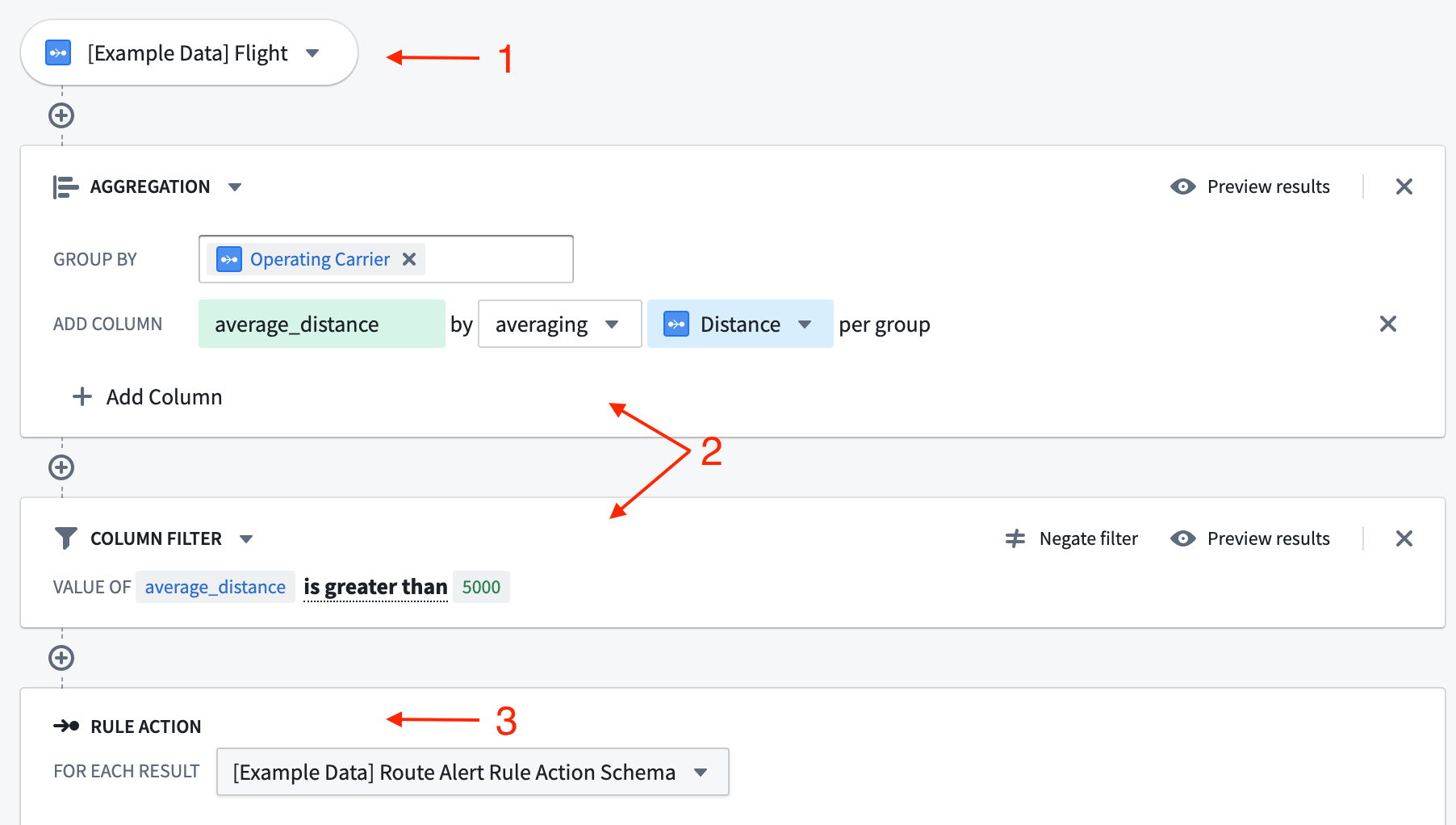
All screenshots use notional data.
Inputs
The inputs to a Foundry rule can be either datasets or objects, depending on the use case. However, using objects as inputs provides a more user-friendly interface as well as extra features, such as autocomplete dropdowns for filter values.
The datasets and objects available to rule authors are configured by the workflow owner in the Foundry Rules workflow configuration.
:::callout{theme="warning"} Foundry Rules does not support object types that are either backed by multiple data sources, have multiple materializations, or use edit-only properties. :::
:::callout{theme="neutral"} Objects backed by a restricted view cannot be used as inputs directly. Instead, configure the dataset which backs the restricted view as an alternate backing dataset. :::
Logic blocks
The transformations applied to the rule's inputs are represented as a series of logic blocks. The available transformations include filtering, expressions, aggregates, and joins. It is also possible to configure which of these transformations are made available to the end user. Learn more about enabling optional features.
Each logic block takes rows output from the previous block/source and applies the transformation, outputting a new set of rows and columns. The output can be viewed by clicking the Preview button in the top right of the block.
Rule output
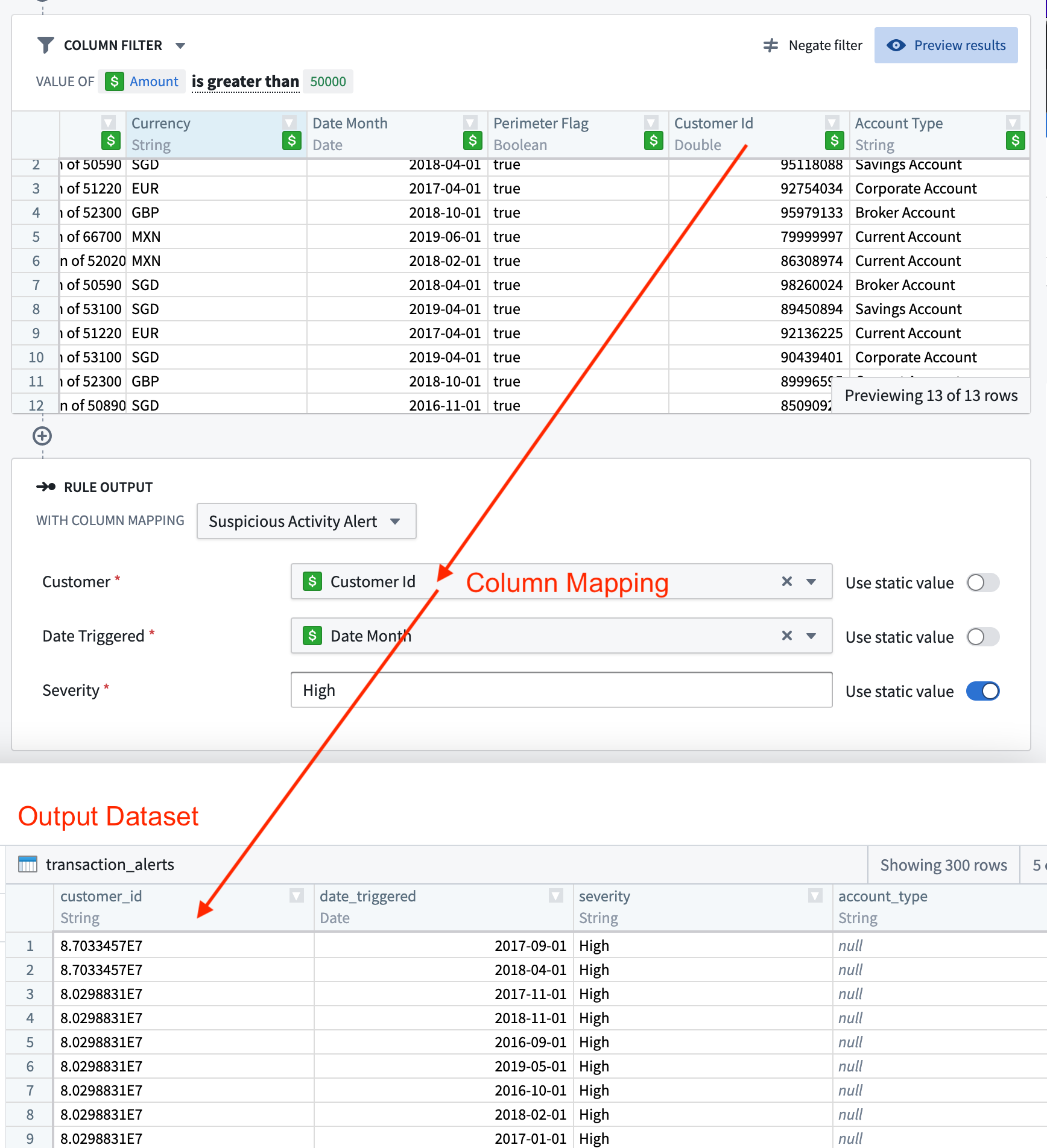
At the end of the rule is the rule output. Each rule output corresponds to an output dataset, as configured in the Foundry Rules workflow configuration. The selected output therefore specifies the destination and format for the rows output by the Foundry rule. The interface for each field may be tailored to the type of values it accepts. The output dataset produced will contain the rows output by all rules which use that output. This behavior is designed to make it easier to achieve consistency in the output of different rules.
The rule output allows workflow owners to enforce the exact columns and types that rule authors must output from their logic. Visually, this enforcement is represented as a form where each form input corresponds to a column in the output dataset.
If different Foundry rules within the same application must output rows with different schema, then it is possible to configure a choice of several different rule outputs. Alternatively, if the schemas are similar, then it may be easier to configure some of the Action parameters to be optional, instead of creating a new rule Action.
Learn more about configuring rule outputs.
中文翻译
规则逻辑
每个 Foundry 规则都包含与之关联的逻辑。该逻辑由三部分组成:
所有截图均使用示意数据。
输入
Foundry 规则的输入可以是数据集(datasets)或对象(objects),具体取决于使用场景。然而,使用对象作为输入可提供更友好的用户界面以及额外功能,例如筛选值的自动补全下拉菜单。
可供规则作者使用的数据集和对象由工作流所有者在 Foundry 规则工作流配置 中进行配置。
:::callout{theme="warning"} Foundry 规则不支持由多个数据源支持、具有多个物化版本(materializations)或仅使用编辑属性(edit-only properties)的对象类型。 :::
:::callout{theme="neutral"} 由受限视图(restricted view)支持的对象不能直接用作输入。请将支持该受限视图的数据集配置为备用支持数据集。 :::
逻辑块
应用于规则输入的转换操作以一系列逻辑块的形式呈现。可用的转换操作包括筛选(filtering)、表达式(expressions)、聚合(aggregates)和连接(joins)。还可以配置哪些转换操作可供最终用户使用。了解更多关于启用可选功能的信息。
每个逻辑块接收来自前一个块或源的行数据,应用转换操作,并输出一组新的行和列。点击块右上角的预览按钮即可查看输出结果。
规则输出
规则的末尾是规则输出。每个规则输出对应一个输出数据集,该数据集在 Foundry 规则工作流配置 中配置。因此,所选输出指定了 Foundry 规则输出行的目标位置和格式。每个字段的界面可根据其接受的值类型进行定制。生成的输出数据集将包含所有使用该输出的规则所输出的行。此设计旨在使不同规则的输出更易于保持一致。
规则输出允许工作流所有者强制规定规则作者必须从其逻辑中输出的确切列和类型。从视觉上看,这种强制规定表现为一个表单,其中每个表单输入对应输出数据集中的一列。
如果同一应用程序中的不同 Foundry 规则必须输出具有不同模式(schema)的行,则可以配置多个不同的规则输出供选择。或者,如果模式相似,则可以将某些操作参数(Action parameters)配置为可选,而不是创建新的规则操作。
了解更多关于配置规则输出的信息。