Permissions for editing rules(编辑规则的权限设置)
In some workflows, you may want to restrict the set of users that can edit or modify a rule. The following example shows how you can set up permissions so that a rule's author has final approval for any changes affecting their rule.
The permissioning setup is as follows:
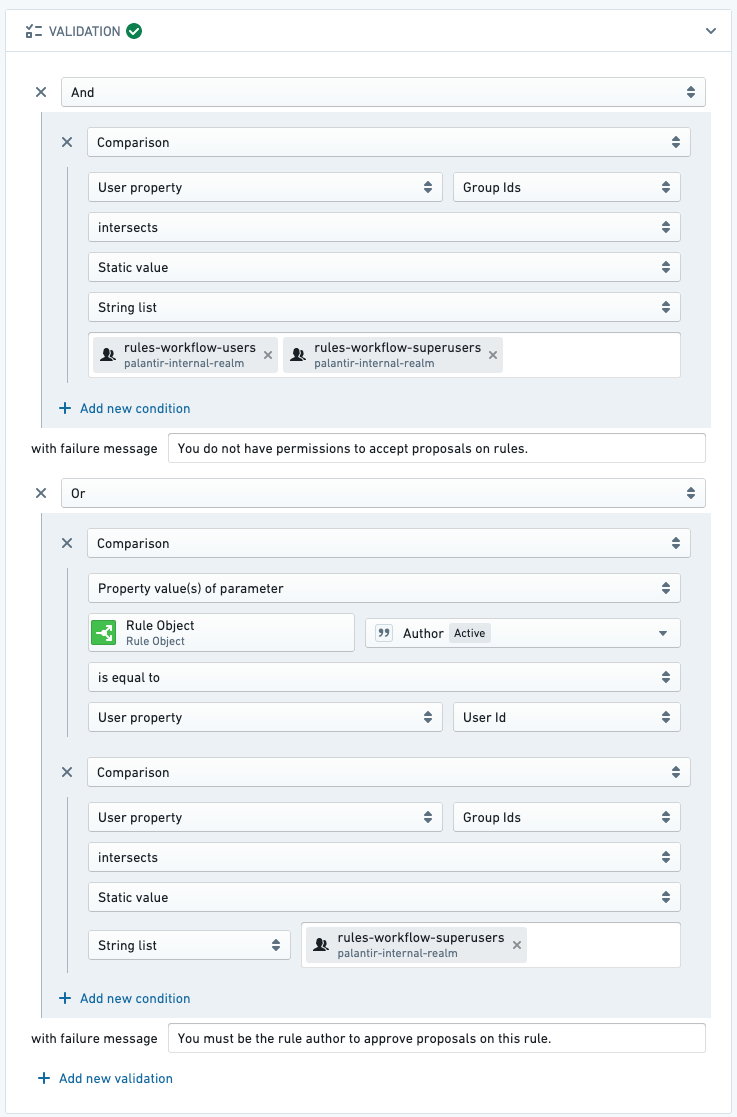
- Only rule authors (and superusers) can approve proposals that edit their rules.
- Only rule authors (and superusers) can approve proposals that delete their rules.
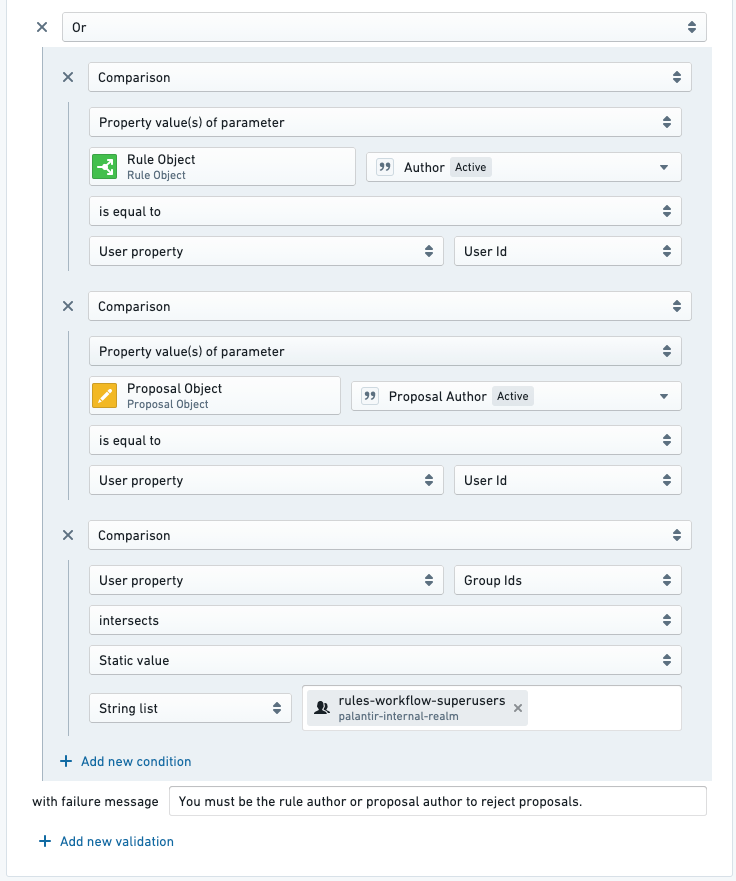
- Only rule authors and proposal creators (and superusers) can reject proposals on the rule owner's rules.
- To mitigate the issue of accidental proposals, proposal creators can also reject proposals. For example, if User A accidentally creates a proposal on User B's rule, User A is able to reject (effectively rescinding) that proposal.
Follow the steps below to achieve this permissioning setup:
-
Configure the approve a proposal to edit a rule Action so that users must either be the rule author associated with the proposal or a superuser.
-
Configure the approve a proposal to delete a rule Action so that users must either be the rule author associated with the proposal or a superuser.
-
Configure the reject a proposal Action so that users must either be the rule author associated with the proposal, the proposal author, or a superuser.
:::callout{theme="neutral"} If you do not see an option to validate based on a rule object, you likely do not have the rule object added as a parameter to the Action. Add a new rule object parameter to the reject a proposal Action, just as you would add rule object parameters of other Foundry Rules actions. :::
中文翻译
编辑规则的权限设置
在某些工作流中,您可能希望限制能够编辑或修改规则的用户范围。以下示例展示了如何设置权限,使规则的作者对影响其规则的任何更改拥有最终审批权。
权限设置如下:
- 只有规则作者(及超级用户)可以审批编辑其规则的提案。
- 只有规则作者(及超级用户)可以审批删除其规则的提案。
- 只有规则作者、提案创建者(及超级用户)可以拒绝涉及规则所有者规则的提案。
- 为减少意外提案的问题,提案创建者也可以拒绝提案。例如,如果用户A意外对用户B的规则创建了提案,用户A可以拒绝(即撤销)该提案。
请按照以下步骤完成此权限设置:
-
配置"审批编辑规则的提案"操作(Action),确保用户必须是与该提案关联的规则作者或超级用户。
-
配置"审批删除规则的提案"操作,确保用户必须是与该提案关联的规则作者或超级用户。
-
配置"拒绝提案"操作,确保用户必须是与该提案关联的规则作者、提案作者或超级用户。
:::callout{theme="neutral"} 如果您没有看到基于规则对象进行验证的选项,很可能是因为该规则对象尚未作为参数添加到操作中。请为"拒绝提案"操作添加一个新的规则对象参数,操作方式与为其他Foundry Rules操作添加规则对象参数相同。 :::