Workshop application(Workshop 应用(Workshop application))
A standard Foundry Rules application is a Workshop application that usually comprises two pages: the Rule Editor page and the Proposal Reviewer page.
- The Rule Editor page is used for creating, editing, and deleting rules.
- The Proposal Reviewer page is used for reviewing and approving/rejecting rule proposals.
An additional Rule Viewer widget is available for creating a read-only rule logic viewer.
Rule Editor
The purpose of the Rule Editor page is to allow for the creation and maintenance of rules. The following screenshot shows an example Rule Editor page consisting of the following widgets (numbered for identification):
- Filter list: A selection of filters to filter the rules shown.
- Object list: A list of existing rules that are filtered by the filter list (1) and can be selected to populate the Rule Editor (3).
- Rule Editor: A widget that accepts a Foundry Action to create a proposal and auto-generates the required fields from parameters. The form elements displayed in the Rule Editor are determined by the Action configured in the Ontology for creating a new rule.
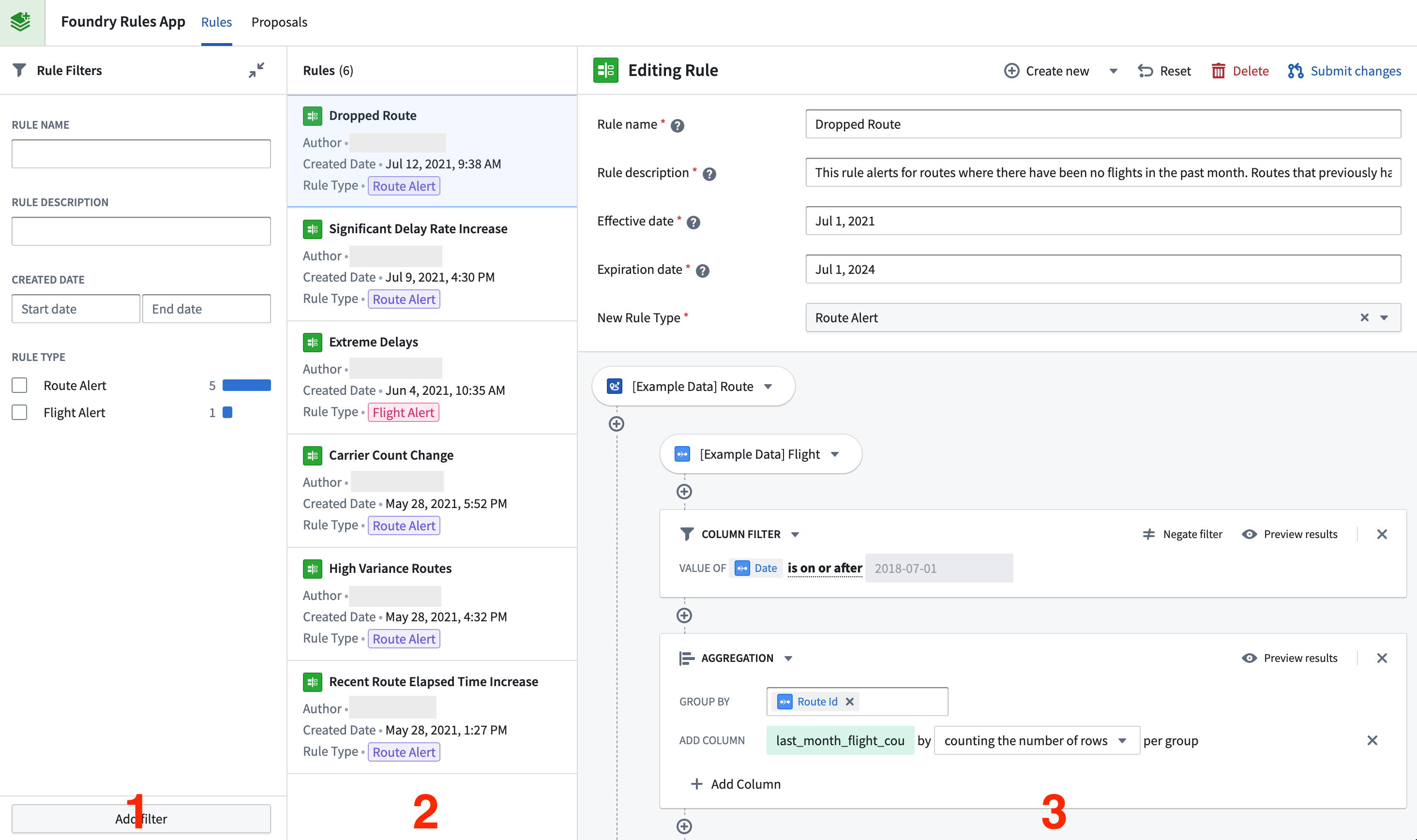
After creating or editing a rule, the Submit changes button is used to create a new proposal. This proposal can be viewed and reviewed on the Proposal Reviewer page.
Proposal Reviewer
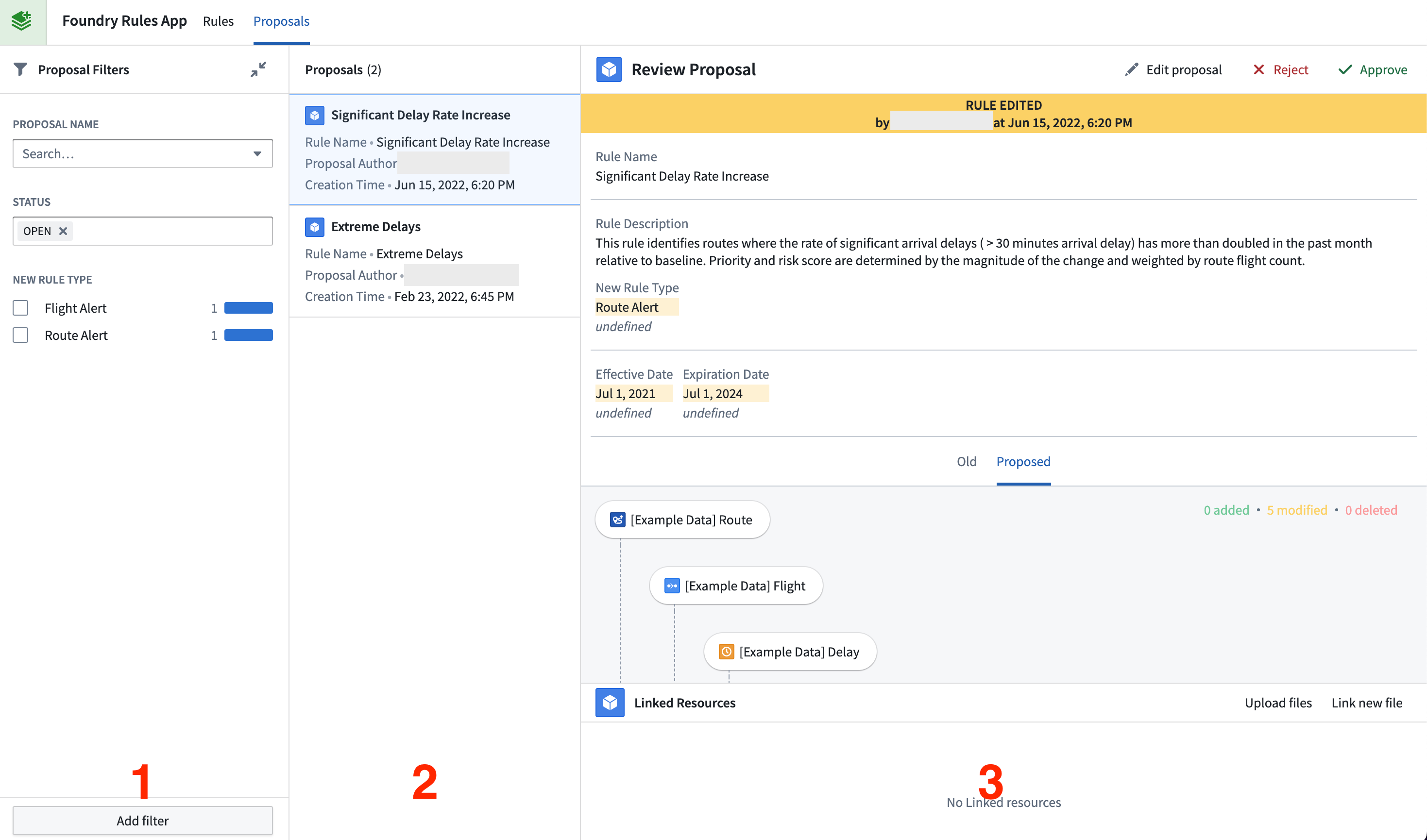
The Proposal Reviewer page allows for the review and approval/rejection of rule proposals. Like the Rule Editor, it contains three sections (identified by number in the screenshot below):
- Filter list: A selection of filters that change which proposals are shown (1).
- Object list: A list of proposals (2) that are filtered by the filter list and can be selected to populate the Proposal Reviewer (3).
- Proposal Reviewer: A widget that accepts Foundry Actions to approve or reject proposals. The widget shows a diff of the properties that have been edited, with changed values appearing in yellow and prior values in faded grey. When a user approves a proposal, the edits will be applied and the proposal will be either created, edited, or deleted (depending on the proposal).
中文翻译
Workshop 应用(Workshop application)
标准 Foundry Rules 应用是一个 Workshop 应用,通常包含两个页面:规则编辑器页面(Rule Editor page)和提案审核页面(Proposal Reviewer page)。
此外,还提供了一个规则查看器(Rule Viewer)组件,用于创建只读的规则逻辑查看器。
规则编辑器(Rule Editor)
规则编辑器页面的目的是支持规则的创建与维护。以下截图展示了一个示例规则编辑器页面,包含以下组件(已编号以便识别):
- 筛选列表(Filter list): 一组筛选条件,用于过滤显示的规则。
- 对象列表(Object list): 现有规则的列表,这些规则已通过筛选列表(1)进行过滤,可选择后填充到规则编辑器(3)中。
- 规则编辑器(Rule Editor): 一个组件,可接受 Foundry Action 来创建提案,并根据参数自动生成所需字段。规则编辑器中显示的表单元素由本体(Ontology)中配置的用于创建新规则的 Action 决定。
创建或编辑规则后,可使用提交更改(Submit changes)按钮创建新的提案。该提案可在提案审核页面中查看和审核。
提案审核(Proposal Reviewer)
提案审核页面用于审核并批准/拒绝规则提案。与规则编辑器类似,它包含三个部分(下图中以编号标识):
- 筛选列表(Filter list): 一组筛选条件,用于更改显示的提案(1)。
- 对象列表(Object list): 提案列表(2),已通过筛选列表过滤,可选择后填充到提案审核(3)中。
- 提案审核(Proposal Reviewer): 一个组件,可接受 Foundry Actions 来批准或拒绝提案。该组件会显示已编辑属性的差异对比,更改后的值以黄色显示,原始值以淡灰色显示。当用户批准提案时,编辑内容将被应用,提案将被创建、编辑或删除(具体取决于提案类型)。