Blocks(块(Blocks))
AIP Logic functions are composed of blocks, which take an input, return an output, and comprise a discrete interaction with your data. Blocks have many different purposes, such as reading or writing to the Ontology, performing a calculation, aggregating data, calling other functions, or interacting with an LLM. The output of a block can be used in subsequent blocks, enabling complex operations to be constructed by chaining blocks together.
There are many different types of blocks; a selection of commonly used blocks are described below:
Use LLM
The Use LLM block is the heart of AIP Logic and enables you to leverage LLMs to define a Logic block. Logic blocks are composed of a prompt, tools, and an output. The Use LLM block supports any available LLM in the platform, in keeping with Palantir's k-LLM philosophy.
To replace the model used across multiple Logic functions at once, you can bulk replace models in Workflow Lineage.
Prompts
Prompts are instructions for an LLM, written in natural language. We recommend starting with the most important information (such as an overview of the task the LLM should complete), followed by the data the LLM will need and guidance on when to use the tools. When composing a prompt, keep in mind that an LLM only has access to what you specifically provide.
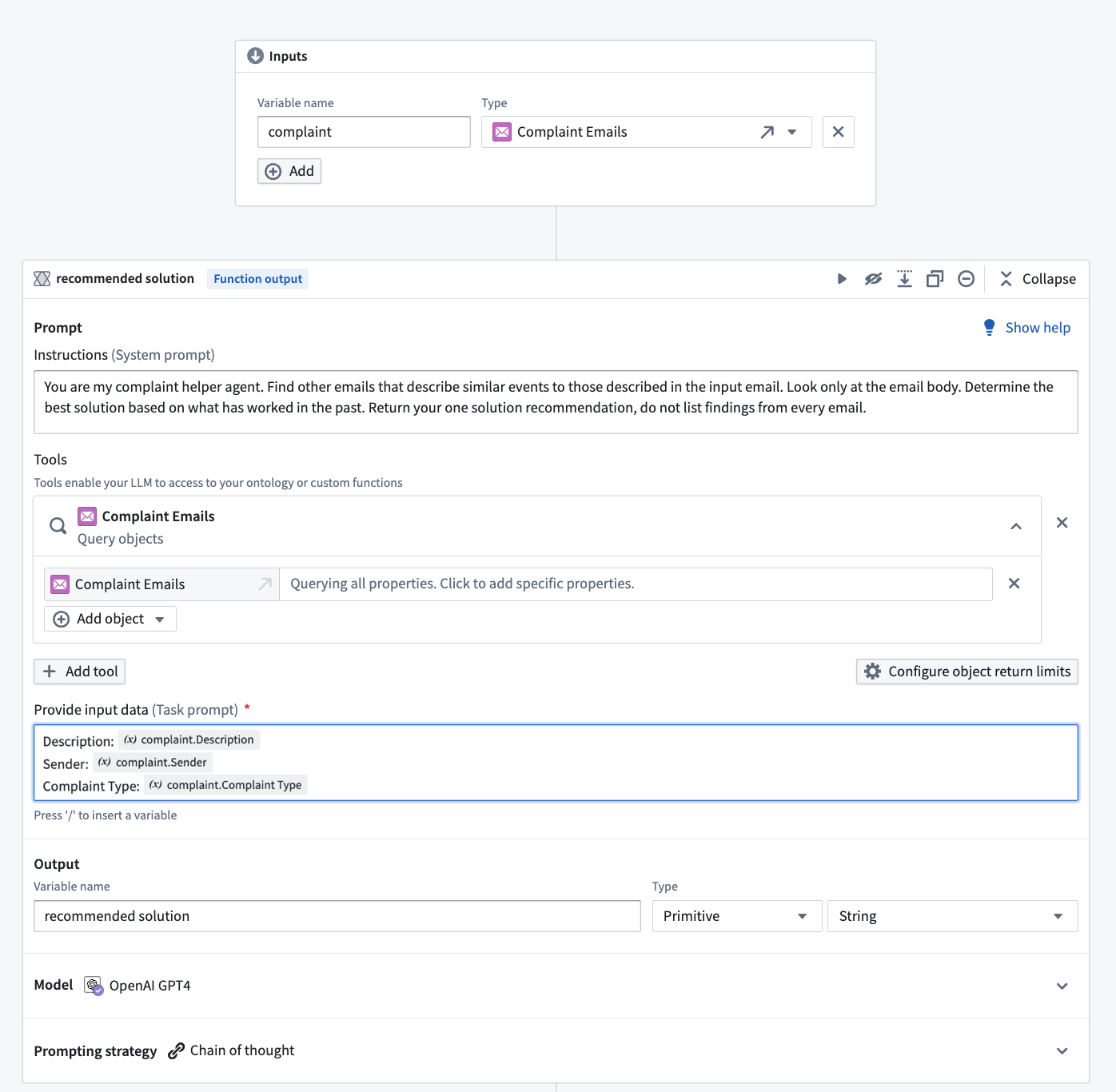
In the following notional prompt, we use the LLM to search for information from previous email conversations to provide a response to a customer seeking a solution. The notional prompt begins with the overview of the task:
You are my complaint helper agent. Find other emails that describe similar events to those described in the input email. Look only at the email body. Determine the best solution based on what has worked in the past. Return your one solution recommendation, do not list findings from every email.
Then, the prompt specifies the data to query (in this case, the complaints emails, represented as complaint objects). After entering the prompt, you can provide the LLM access to your inputs by typing “/“ and selecting one or more variables available in your analysis; in the screenshot below, we choose properties of the email object.
Tools
Tools are the mechanism by which AIP Logic enables the LLM to read or write to the Ontology and power real-world operations. AIP Logic leverages three categories of Ontology-driven tools - data, logic, and action - to effectively query data, execute logical operations, and safely take actions. Note that LLMs do not have direct access to tools; LLMs can only ask to use tools, and these tool calls are then executed by AIP Logic within the invoking user's permissions.

The available tools include:
Apply actions
The Apply actions tool enables the LLM to use Actions to edit the Ontology. You can describe when the LLM should use the Action provided. For more details on how to apply changes to the Ontology, review Make Ontology edits using Logic functions.
![Apply "Adjust delivery completion date" action on "[Titan] Delivery".](https://palantir.com/docs/resources/foundry/logic/apply-actions-example.png)
Call function
The Call function tool allows you to select functions that the LLM can call. Functions can be code-defined in repositories, or can be existing Logic functions.

Query objects
The Query objects tool specifies object types that the LLM can access. You can add as many object types as needed and specify which properties the LLM can access in order to make the query more token-efficient.
![Query objects tool with three objects of "[Titan] customer order", "[Titan] Distribution center", and "[Titan] Finished good" added.](https://palantir.com/docs/resources/foundry/logic/query-objects-example.png)
Calculator tool
The Calculator tool enables you to perform accurate mathematical calculations with an LLM.
Apply action
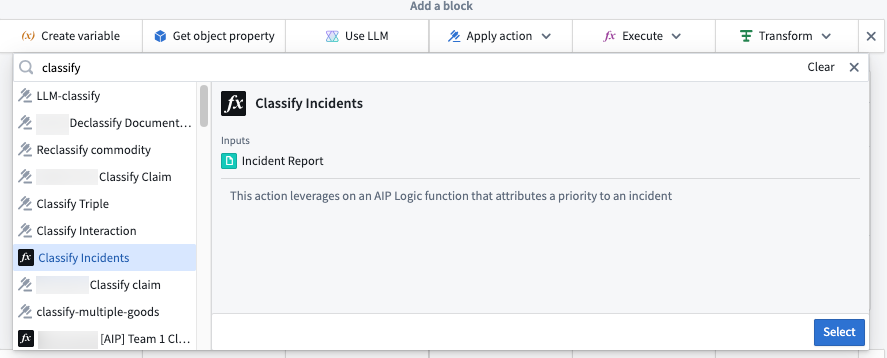
The Apply action block allows you to deterministically call actions without having to go via an LLM block. This block gives you precise control over how parameters are filled out and speeds up the execution. In this example, we can call an action that attributes a priority status to a given incident.
:::callout{theme="neutral"} Calling an AIP Logic function from an action is required for edits to be written back to the Ontology. The Ontology will not be edited unless the Logic function is executed from an action, even if the function contains an Apply action block. :::
Execute function
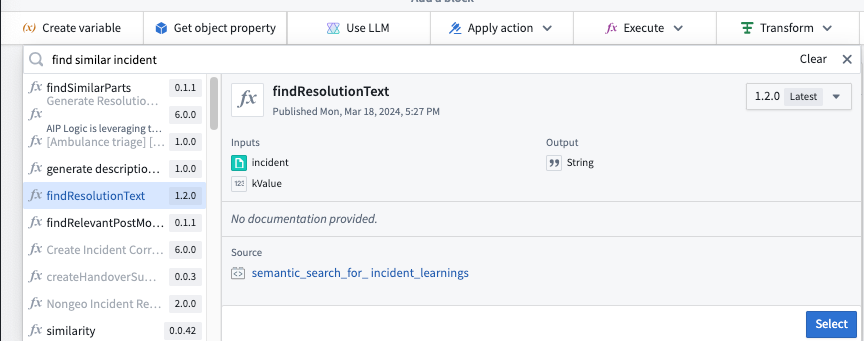
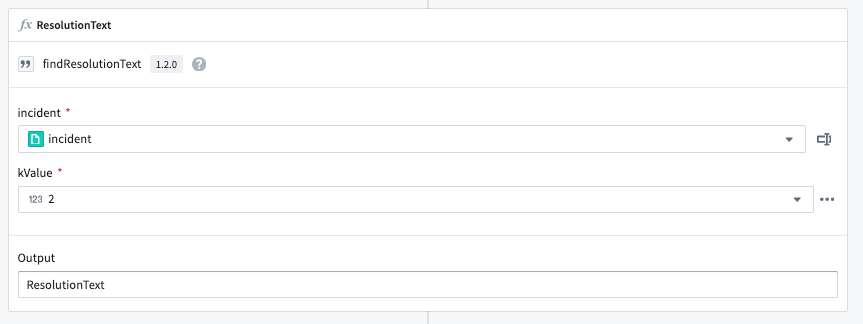
The Execute function block allows you to call other existing functions within Foundry such as TypeScript, Python, and even other Logic functions. The Execute block enables you to reuse existing functions that already accomplish your intended task, rather than reimplementing the logic yourself. In the example below, the Execute block is used to leverage the output from a semantic search function to help return the resolution text from similar incidents.
Conditionals
Conditionals are blocks that evaluate a condition and execute different paths based on whether that condition is true or false. Think of conditionals as "if-then-else" statements in traditional programming:
- If a condition is true, then perform one set of operations
- Else perform a different set of operations
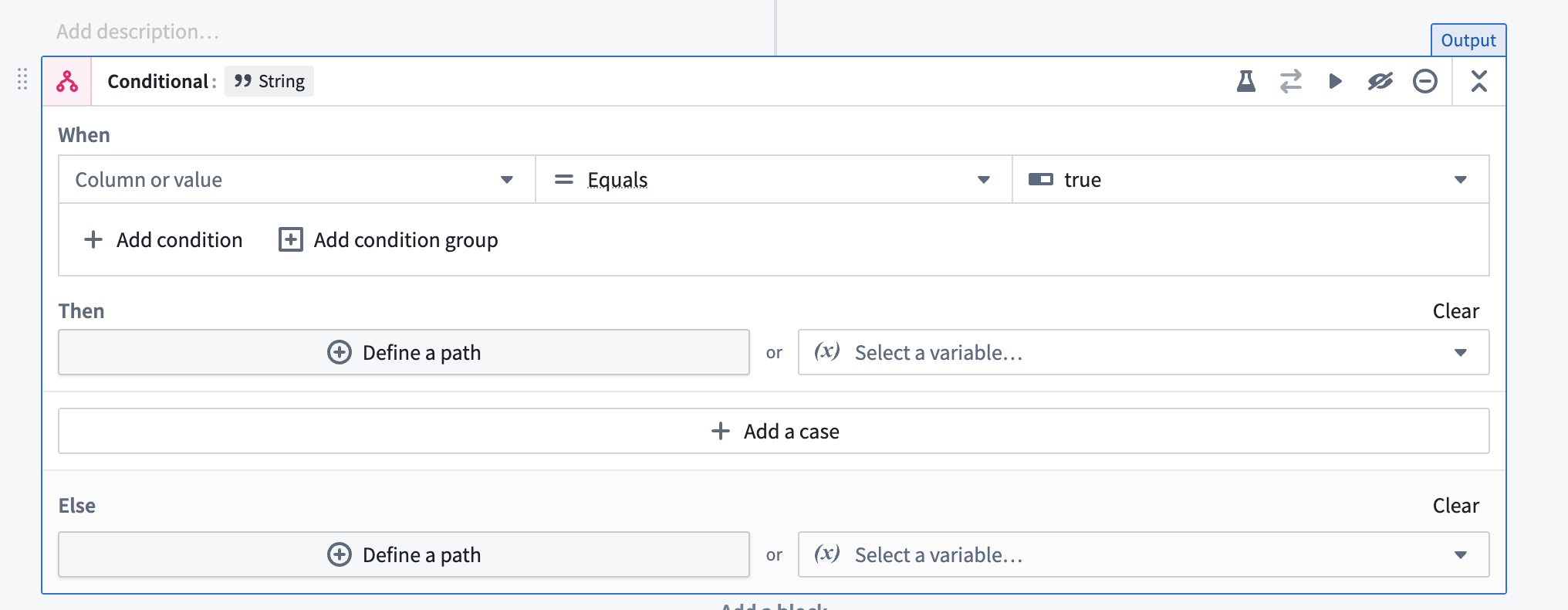
Conditionals are useful when you need to process data differently or run different actions based on specific criteria.
Branch return values
In the "then" or "else" sections, you define what values the conditional branch should return. There are 3 options:
- Define a Path: Create a sequence of blocks to execute.
- Return a Variable: Return an existing variable or previous block output.
- Take No Action: Configure the branch to take no action (available when another branch is returning ontology edits).
Note: You can configure multiple branches in a conditional block, each with its own "when" condition and "then" actions.
When working with conditional branches, all branches must return consistent output. For example, if one branch outputs a string, all other branches (including the else branch) must also output strings. If branches are returning ontology edits via actions, all branches must either run an action or explicitly specify "take no action".
Loops
Loops enable AIP Logic to iterate over a collection and, for each element, run a transformation and/or an action. Loops are useful for performing operations over a list of elements or making ontology edits on multiple objects.
The output of a loop can be either a list of values or ontology edits.

Within a loop, you can access the current element via the element variable and the index of the current element via the index variable (these can be renamed if needed).
Loops only operate on Lists, not Arrays. Selecting an array as input to a loop will automatically insert an "Array to List" block before the loop that converts the input to a list prior to passing it into the loop.

Note: If your loop contains no actions each iteration will be executed in parallel.
Create variable
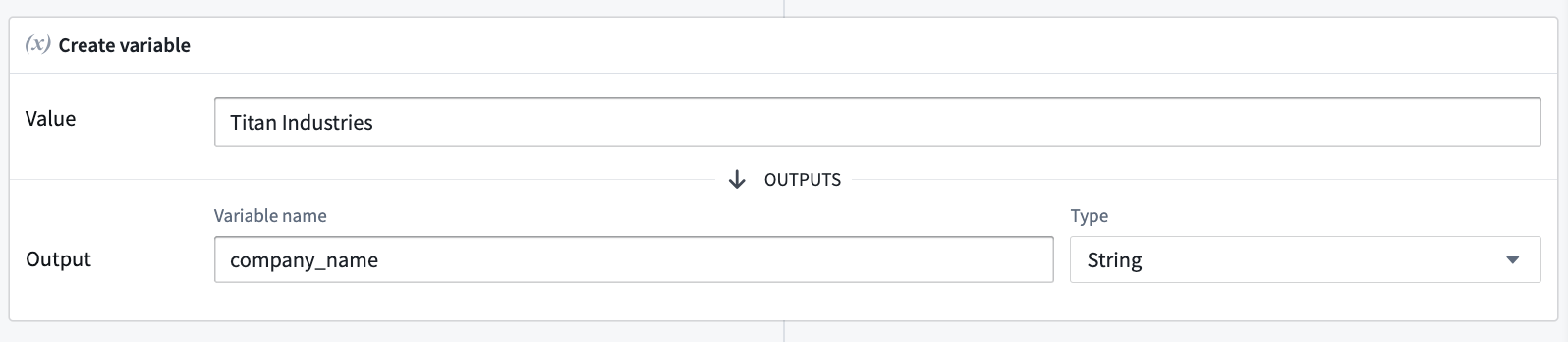
The Create variable block creates a variable that can be used in future blocks. The variable can be of the following types: array, boolean, date, double, float, integer, long, object, short, string, or timestamp.
中文翻译
块(Blocks)
AIP Logic 函数由块(blocks)构成,每个块接收输入、返回输出,并与数据执行离散交互。块具有多种用途,例如读取或写入本体(Ontology)、执行计算、聚合数据、调用其他函数或与 LLM 交互。块的输出可用于后续块,从而通过将块串联起来构建复杂操作。
块有多种类型;以下介绍一些常用块:
使用 LLM(Use LLM)
使用 LLM 块是 AIP Logic 的核心,使您能够利用 LLM 来定义逻辑块(Logic block)。逻辑块由提示词、工具和输出组成。使用 LLM 块支持平台中任何可用的 LLM,符合 Palantir 的 k-LLM 理念。
如需一次性替换多个逻辑函数中使用的模型,您可以在工作流谱系中批量替换模型。
提示词(Prompts)
提示词是用自然语言编写的 LLM 指令。我们建议从最重要的信息开始(例如 LLM 应完成的任务概述),然后是 LLM 所需的数据以及何时使用工具的指导。编写提示词时请记住,LLM 只能访问您明确提供的内容。
在以下示例提示词中,我们使用 LLM 从之前的电子邮件对话中搜索信息,以向寻求解决方案的客户提供回复。该示例提示词以任务概述开头:
你是我的投诉助手代理。查找描述与输入邮件中类似事件的其他邮件。仅查看邮件正文。根据过去有效的方法确定最佳解决方案。返回一个解决方案建议,不要列出每封邮件的发现结果。
然后,提示词指定要查询的数据(在此例中为投诉邮件,表示为 complaint 对象)。输入提示词后,您可以通过输入“/”并选择一个或多个分析中可用的变量,为 LLM 提供输入访问权限;在下面的截图中,我们选择了邮件对象的属性。
工具(Tools)
工具是 AIP Logic 使 LLM 能够读取或写入本体并驱动实际操作的机制。AIP Logic 利用三类基于本体的工具——数据、逻辑和操作——来有效查询数据、执行逻辑操作并安全地执行操作。请注意,LLM 不能直接访问工具;LLM 只能请求使用工具,这些工具调用随后由 AIP Logic 在调用用户的权限范围内执行。
可用工具包括:
应用操作(Apply actions)
应用操作工具使 LLM 能够使用操作来编辑本体。您可以描述 LLM 何时应使用所提供的操作。有关如何应用本体更改的更多详细信息,请参阅使用逻辑函数编辑本体。
调用函数(Call function)
调用函数工具允许您选择 LLM 可以调用的函数。函数可以在代码仓库中定义,也可以是现有的逻辑函数。
查询对象(Query objects)
查询对象工具指定 LLM 可以访问的对象类型。您可以根据需要添加任意数量的对象类型,并指定 LLM 可以访问哪些属性,以提高令牌效率。
计算器工具(Calculator tool)
计算器工具使您能够使用 LLM 执行精确的数学计算。
应用操作(Apply action)
应用操作块允许您以确定性方式调用操作,而无需通过 LLM 块。此块让您精确控制参数的填写方式,并加快执行速度。在此示例中,我们可以调用一个操作为给定事件分配优先级状态。
:::callout{theme="neutral"} 从操作中调用 AIP Logic 函数是编辑写回本体的必要条件。即使函数包含应用操作块,除非从操作中执行逻辑函数,否则本体不会被编辑。 :::
执行函数(Execute function)
执行函数块允许您调用 Foundry 中的其他现有函数,例如 TypeScript、Python,甚至其他逻辑函数。执行块使您能够重用已实现预期任务的现有函数,而无需重新实现逻辑。在下面的示例中,执行块用于利用语义搜索函数的输出来帮助返回类似事件的解决文本。
条件判断(Conditionals)
条件判断是评估条件并根据条件为真或假执行不同路径的块。可以将条件判断视为传统编程中的"if-then-else"语句:
- 如果条件为真,则执行一组操作
- 否则执行另一组操作
当您需要根据特定标准以不同方式处理数据或运行不同操作时,条件判断非常有用。
分支返回值
在"then"或"else"部分中,您可以定义条件分支应返回的值。有 3 个选项:
- 定义路径: 创建要执行的块序列。
- 返回变量: 返回现有变量或前一个块的输出。
- 不执行操作: 配置分支不执行任何操作(当另一个分支返回本体编辑时可用)。
注意:您可以在条件判断块中配置多个分支,每个分支都有自己的"when"条件和"then"操作。
使用条件分支时,所有分支必须返回一致的输出。例如,如果一个分支输出字符串,则所有其他分支(包括 else 分支)也必须输出字符串。如果分支通过操作返回本体编辑,则所有分支必须运行操作或明确指定"不执行操作"。
循环(Loops)
循环使 AIP Logic 能够遍历集合,并对每个元素执行转换和/或操作。循环对于对元素列表执行操作或对多个对象进行本体编辑非常有用。
循环的输出可以是值列表或本体编辑。
在循环中,您可以通过 element 变量访问当前元素,通过 index 变量访问当前元素的索引(如果需要,可以重命名这些变量)。
循环仅对列表(Lists)进行操作,而非数组(Arrays)。选择数组作为循环输入时,系统会自动在循环前插入一个"数组转列表"块,将输入转换为列表后再传入循环。
注意:如果循环中不包含任何操作,每次迭代将并行执行。
创建变量(Create variable)
创建变量块创建一个可在后续块中使用的变量。变量可以是以下类型:数组(array)、布尔值(boolean)、日期(date)、双精度浮点数(double)、浮点数(float)、整数(integer)、长整数(long)、对象(object)、短整数(short)、字符串(string)或时间戳(timestamp)。