AIP Logic FAQ(AIP Logic 常见问题解答)
This page details some frequently asked questions about the AIP Logic application.
- How can I use AIP Logic with the rest of the platform?
- How do I reduce my token count?
- When should I keep my Logic function in one block versus splitting into multiple blocks?
- How do I improve the performance of an AIP Logic block?
- Is there a way to modify the temperature of the LLM or other model parameters?
- Is it possible to support semantic search workflows using Logic?
- How can an LLM “learn” from feedback?
- How can I ensure the output of my Logic is correct?
How can I use AIP Logic with the rest of the platform?
Review the documentation on how to use a Logic function.
How do I reduce my token count?
All activity in AIP Logic counts toward token limits, including tool responses. Token limits reset on a per-block basis. You can see the number of tokens used at the end of each message in the Debugger. If the bar is red, consider reducing your token count to facilitate reliable performance.
We recommend the following steps to reduce your token count:
- Select the specific properties needed from your input object, or specify which object properties you want to query to reduce the size of the string (
OBJECT_NAME property1 property2etc.) that the LLM sends and receives; you can see this in the Debugger by selecting Show raw. - When using the Query objects tool, select a subset of properties to send to the LLM.
- Consider splitting single blocks into multiple Use LLM blocks; each block has a token limit, so you can try breaking a block into intermediate steps.
- Change your LLM model to 32k.
- Whenever possible, use deterministic blocks such as the transform block, execute block, and apply action block. These blocks help produce more predictable outcomes, and do not use any tokens, making your logic more efficient and manageable.
When should I keep my Logic function in one block versus splitting into multiple blocks?
A single large block allows you to iterate quickly and easily make large changes while experimenting with the LLM's capabilities, but you might want to split your Logic into multiple blocks if:
- You have multiple steps you want the LLM to take and are getting inconsistent results.
- The block is reaching its context limit.
- Each run is taking too long to execute.
Since each block gets its own context window, splitting into multiple blocks can have the following advantages:
- The LLM will only have access to what you pass in; intermediate results in a single large block can be potentially irrelevant.
- You are less likely to run out of tokens.
- Several smaller tasks can potentially execute faster than one long task.
How do I improve the performance of an AIP Logic block?
To improve the performance of an AIP Logic block, try the following suggestions:
- Choose 5-10 examples of inputs / output pairs and run these every time you modify prompts. Save these as unit tests in AIP Logic.
- Provide few-shot examples to the LLM; this can significantly enhance LLM performance by making the task more comprehensible for the model. You can input a system prompt for the LLM to reference.
- If you are seeing surprising failures, validate that the model has the right "understanding" of your data by asking the LLM to explain its plan and understanding of the problem - this can provide insight into what context is missing.
- Consider building a feedback loop with dynamic few-shot examples.
- Use deterministic transform boards such as the transform block, execute block, and apply action block.
Is there a way to modify the temperature of the LLM or other model parameters?
You can modify the temperature of the LLM, a parameter that represents the randomness of an LLM’s response, by editing the temperature in a Use LLM block's Configuration text field. The default temperature is 0. Lower temperatures return a more deterministic output.
Example code:
{
    "temperature": 0.9
}
Is it possible to support semantic search workflows using Logic?
Yes, you can currently add a tool that allows Logic to perform semantic search on the Ontology, made possible either through an action or writing a function-on-object which is then called from AIP Logic. Review the semantic search workflow tutorial to learn more.
How can an LLM “learn” from feedback?
You can help an LLM “learn” from feedback with this design pattern, if it suits your workflow:
- Whenever the LLM makes a recommendation, capture (1) the recommendation as well as (2) the reasoning. Then, when connecting the Logic function to Workshop and building in a human review process, write back the (3) human feedback as well as the (4) correct human-verified decision. For the sake of this example, imagine we call this writeback object the “Suggestion” object.
- In your Logic function, enable the LLM to use the Query objects tool on the “Suggestion” object, searching for other instances where the LLM has made the same recommendation. Let the LLM process the human feedback, then query the LLM about whether to proceed with the LLM’s recommendation.
How can I ensure the output of my Logic is correct?
You can add unit tests to Logic, which will test whether the function ran successfully on the given input (manually).
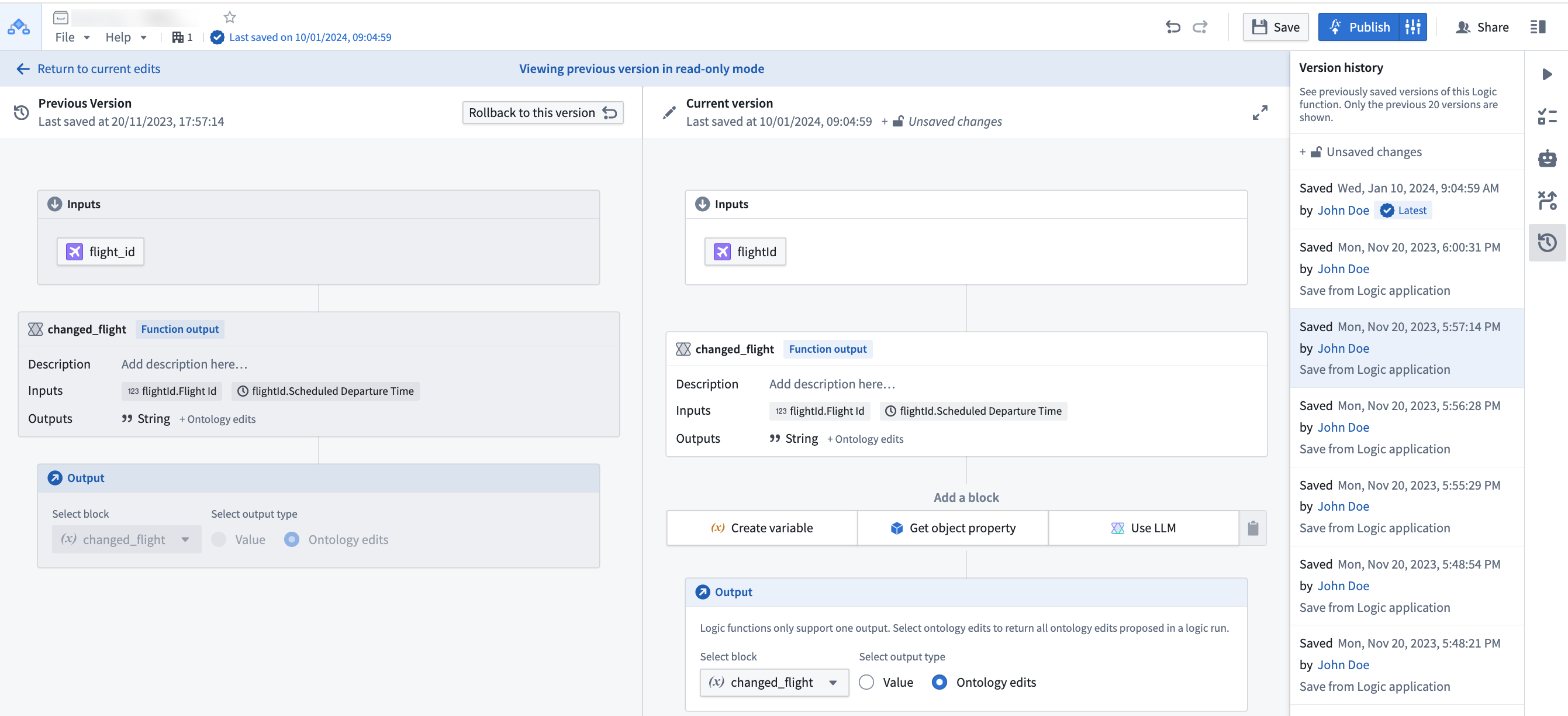
Can I see previous versions of my Logic?
Yes, you can see and rollback to previously saved versions using the version history sidebar.
Select a prior version from the list to compare with the current state.
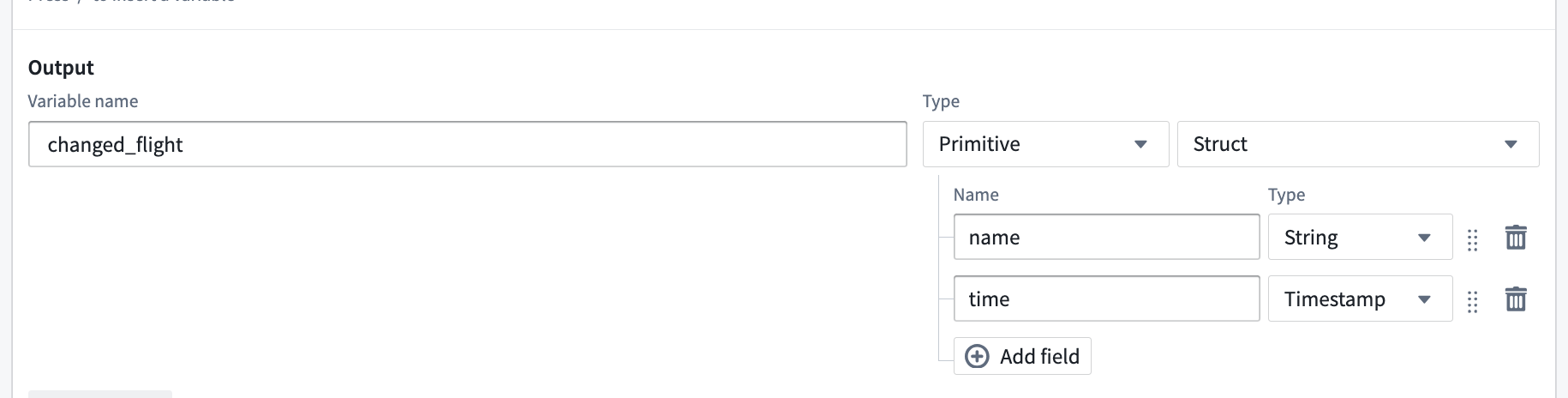
Can one LLM block return multiple values?
Yes. By using the "Struct" output type you can return multiple named values.
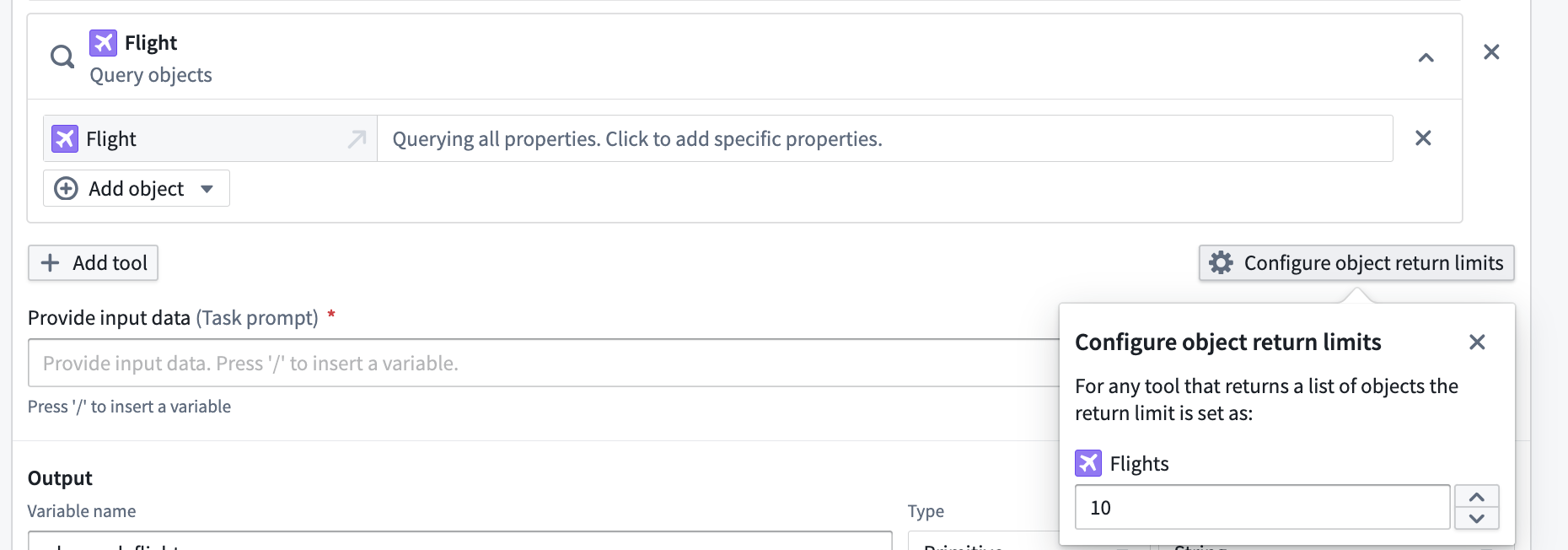
Can I configure how many objects my tools give to the LLM blocks?
Yes, when you add an Object Query tool on a Function tool in the LLM block, you can select Configure object return limits to choose the number of objects you would like to return from any tool use.
Why does my function execute successfully in AIP Logic Debugger but fail in Workshop or when called via an API?
While testing and developing your AIP Logic function in the Debugger, the function is not subject to the five-minute execution time limit. However, when the function is called from either the Workshop environment or through the function execution API, the five-minute execution time limit is enforced.
中文翻译
AIP Logic 常见问题解答
本文详细介绍了关于 AIP Logic 应用程序的一些常见问题。
- 如何将 AIP Logic 与平台其他部分结合使用?
- 如何减少 token 数量?
- 何时应将 Logic 函数保留在一个 block 中,何时应拆分为多个 block?
- 如何提升 AIP Logic block 的性能?
- 是否可以修改 LLM 的 temperature 或其他模型参数?
- 是否可以使用 Logic 支持语义搜索工作流?
- LLM 如何从反馈中"学习"?
- 如何确保 Logic 的输出正确?
如何将 AIP Logic 与平台其他部分结合使用?
请查阅关于使用 Logic 函数的文档。
如何减少 token 数量?
AIP Logic 中的所有活动(包括工具响应)都会计入 token 限制。Token 限制按 block 重置。您可以在 Debugger 中每条消息末尾看到已使用的 token 数量。如果进度条显示为红色,建议减少 token 数量以确保性能稳定。
我们建议采取以下步骤来减少 token 数量:
- 从输入对象中选择所需的特定属性,或指定要查询的对象属性,以减少 LLM 发送和接收的字符串大小(
OBJECT_NAME property1 property2等);您可以在 Debugger 中选择 Show raw 查看。 - 使用 Query objects 工具时,选择要发送给 LLM 的属性子集。
- 考虑将单个 block 拆分为多个 Use LLM block;每个 block 都有 token 限制,因此可以尝试将 block 分解为中间步骤。
- 将 LLM 模型更改为 32k。
- 尽可能使用确定性 block,如 transform block、execute block 和 apply action block。这些 block 有助于产生更可预测的结果,且不消耗任何 token,使您的逻辑更高效、更易于管理。
何时应将 Logic 函数保留在一个 block 中,何时应拆分为多个 block?
单个大型 block 允许您在试验 LLM 功能时快速迭代并轻松进行大规模更改,但在以下情况下,您可能需要将 Logic 拆分为多个 block:
- 您希望 LLM 执行多个步骤,但结果不一致。
- block 已达到其上下文限制。
- 每次运行耗时过长。
由于每个 block 拥有独立的上下文窗口,拆分为多个 block 具有以下优势:
- LLM 只能访问您传入的内容;单个大型 block 中的中间结果可能不相关。
- 更不容易耗尽 token。
- 多个小任务可能比一个长任务执行得更快。
如何提升 AIP Logic block 的性能?
要提升 AIP Logic block 的性能,请尝试以下建议:
- 选择 5-10 个输入/输出对示例,并在每次修改提示时运行这些示例。将这些示例保存为 AIP Logic 中的单元测试。
- 为 LLM 提供 few-shot 示例;这可以通过使任务对模型更易理解来显著提升 LLM 性能。您可以输入系统提示供 LLM 参考。
- 如果遇到意外失败,通过要求 LLM 解释其计划和对问题的理解来验证模型是否正确"理解"了您的数据——这可以揭示缺失的上下文信息。
- 考虑构建带有动态 few-shot 示例的反馈循环。
- 使用确定性转换板,如 transform block、execute block 和 apply action block。
是否可以修改 LLM 的 temperature 或其他模型参数?
您可以通过编辑 Use LLM block 的 Configuration 文本字段中的 temperature 来修改 LLM 的 temperature(表示 LLM 响应随机性的参数)。默认 temperature 为 0。较低的 temperature 会返回更确定性的输出。
示例代码:
{
    "temperature": 0.9
}
是否可以使用 Logic 支持语义搜索工作流?
可以。您目前可以添加一个工具,使 Logic 能够对 Ontology 执行语义搜索,这可以通过 action 或编写对象函数(object function)并在 AIP Logic 中调用实现。请查阅语义搜索工作流教程了解更多信息。
LLM 如何从反馈中"学习"?
如果适合您的工作流,您可以通过以下设计模式帮助 LLM 从反馈中"学习":
- 每当 LLM 提出建议时,捕获 (1) 建议内容以及 (2) 推理过程。然后,在将 Logic 函数连接到 Workshop 并构建人工审核流程时,回写 (3) 人工反馈以及 (4) 经人工验证的正确决策。在本示例中,假设我们将此回写对象称为"Suggestion"对象。
- 在 Logic 函数中,允许 LLM 使用 Query objects 工具查询"Suggestion"对象,搜索 LLM 曾提出相同建议的其他实例。让 LLM 处理人工反馈,然后询问 LLM 是否继续执行其建议。
如何确保 Logic 的输出正确?
您可以为 Logic 添加单元测试,以测试函数是否在给定输入上成功运行(手动测试)。
是否可以查看 Logic 的先前版本?
可以。您可以使用版本历史侧边栏查看并回滚到之前保存的版本。
从列表中选择先前版本,与当前状态进行比较。
一个 LLM block 能否返回多个值?
可以。通过使用"Struct"输出类型,您可以返回多个命名值。
是否可以配置工具提供给 LLM block 的对象数量?
可以。当您在 LLM block 的 Function 工具上添加 Object Query 工具时,可以选择 Configure object return limits 来设置每次工具使用返回的对象数量。
为什么我的函数在 AIP Logic Debugger 中执行成功,但在 Workshop 中或通过 API 调用时失败?
在 Debugger 中测试和开发 AIP Logic 函数时,函数不受五分钟执行时间限制。但是,当函数从 Workshop 环境或通过函数执行 API 调用时,会强制执行五分钟的执行时间限制。