Workflow Lineage(工作流血缘 (Workflow Lineage))
:::callout{theme="neutral"} The application previously known as Workflow Builder is now called Workflow Lineage. :::
Workflow Lineage provides an interactive workspace for understanding and managing applications and their underlying processes.
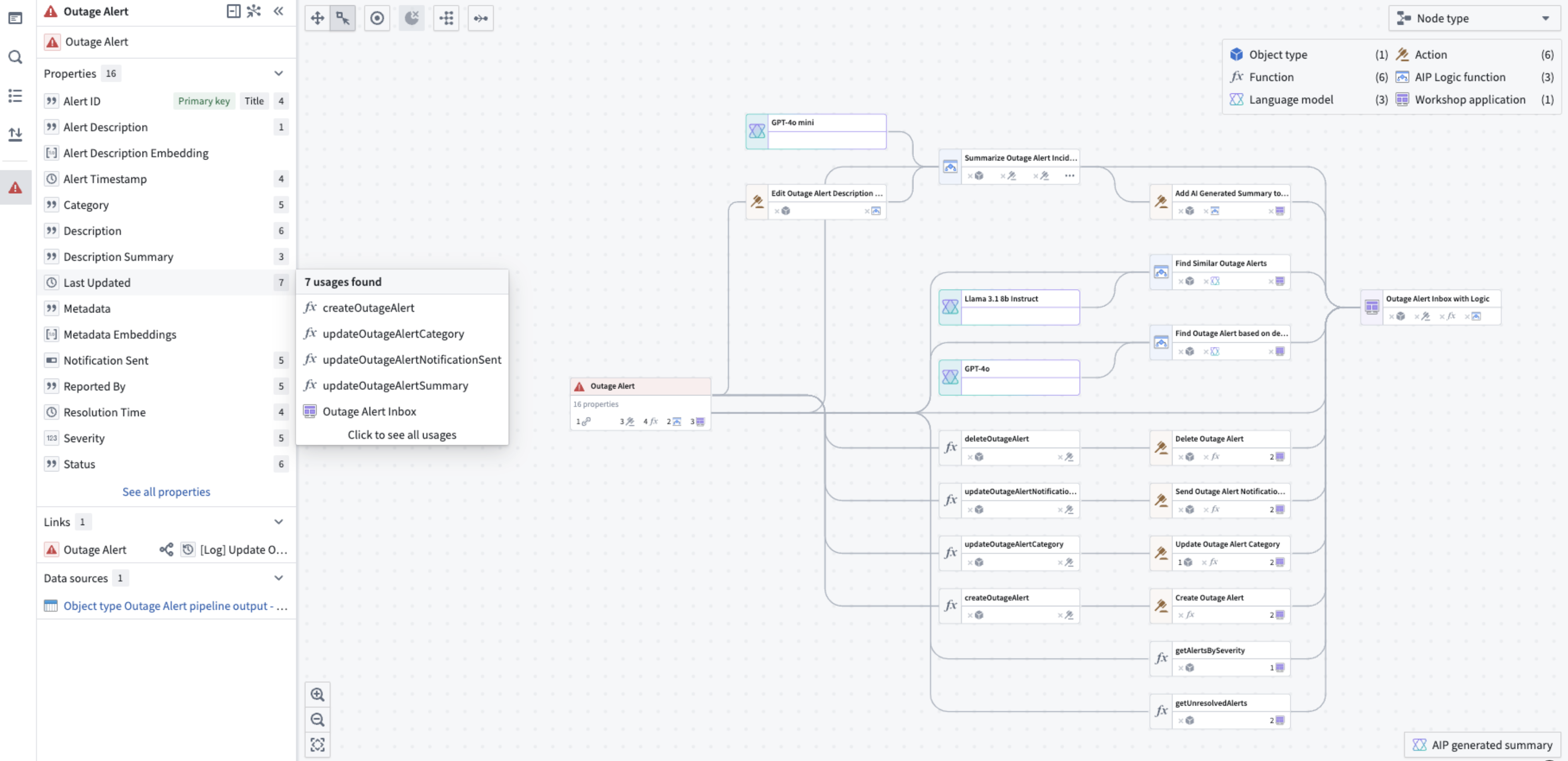
With Workflow Lineage, you can perform the following:
- Explore workflows to see details on objects, actions, functions, large language models, and applications, including:
- API names
- Inputs
- Ontology edits
- Submission criteria
- Code snippets
- For a specific column in an object, view all usages downstream including dependent actions and Workshop applications.
- Use the color legend to easily see outdated functions, resource or Ontology permissions across all actions, application views and more.
- Bulk select actions to update the actions to a specific version simultaneously.
Workflow Lineage is particularly suitable for the following users:
- Application builders that are creating, debugging or maintaining workflows. The graph of provenance, deeper property and workshop widget/variable provenance, and upgrade tooling are all helpful when making changes to or extending a workflow.
- New builders that want to learn from existing workflows to answer the question “What parts of the Ontology are used in this workflow, and how?"
- Users that are presenting existing workflows: The graph provides a high-level overview of the Ontological resources used which can be a helpful presentation and teaching tool when sharing workflows with others.
:::callout{theme="neutral"} To enable Workflow Lineage, contact your platform administrator to modify application access in Control Panel. :::
When to use Workflow Lineage
The intent of Workflow Lineage is to help understand, manage, and debug workflows. Workflows typically span a spread of ontology resources and often flow into an application. As such, Workflow Lineage is complementary to Pipeline Builder and Data Lineage:
- Pipeline Builder: Integrating data from raw sources into the Ontology.
- Workflow Lineage: Management of workflows built on top of the Ontology.
- Data Lineage: An end-to-end view of data flowing from source, to Ontology, through to workflow.
As an example, if you require information about the scheduling of data flowing into an object type in your workflow in Workflow Lineage, you can right-click and open the object type in Data Lineage to explore schedules.
Learn how to get started with Workflow Lineage.
Access control
You can control which users in your organization have access to Workflow Lineage in Control Panel.
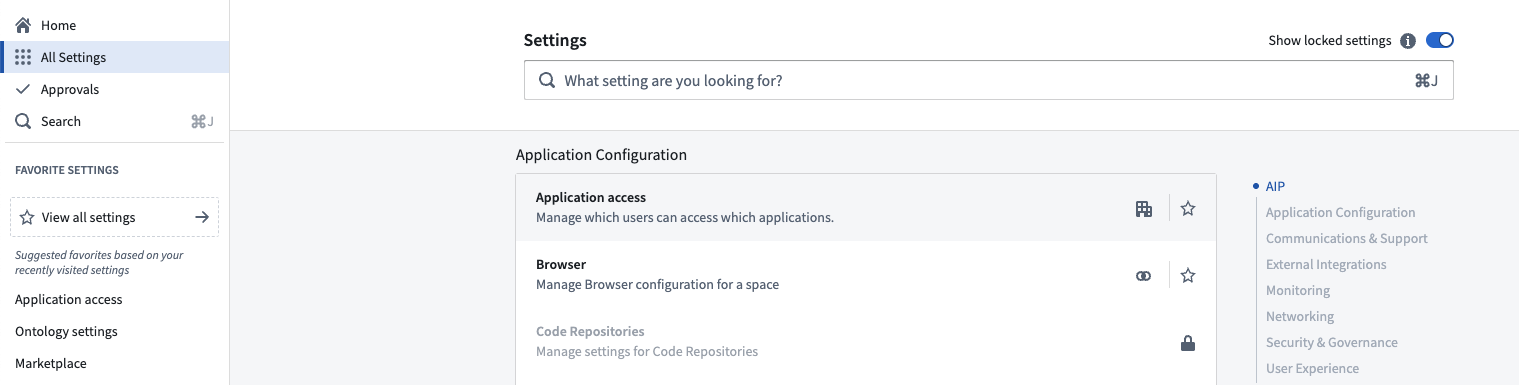
On the Application settings tab of Application access, navigate to the Ontology section. Select Manage to the right of the Workflow Lineage entry.

Select Manage to open up a window where you can configure your enrollment's preferences.

中文翻译
工作流血缘 (Workflow Lineage)
:::callout{theme="neutral"} 原名为"工作流构建器 (Workflow Builder)"的应用程序现已更名为"工作流血缘 (Workflow Lineage)"。 :::
工作流血缘 (Workflow Lineage) 提供了一个交互式工作空间,用于理解和管理应用程序及其底层流程。
通过工作流血缘 (Workflow Lineage),您可以执行以下操作:
- 探索工作流以查看对象、操作、函数、大语言模型和应用程序的详细信息,包括:
- API 名称
- 输入
- 本体编辑
- 提交条件
- 代码片段
- 针对对象中的特定列,查看所有下游使用情况,包括依赖的操作和 Workshop 应用程序。
- 使用颜色图例轻松查看所有操作、应用程序视图等中的过期函数、资源或本体权限。
- 批量选择操作,同时将操作更新到特定版本。
工作流血缘 (Workflow Lineage) 特别适合以下用户:
- 正在创建、调试或维护工作流的应用程序构建者。在修改或扩展工作流时,溯源图、更深入的属性和 Workshop 小部件/变量溯源以及升级工具都非常有用。
- 希望从现有工作流中学习的新构建者,以解答"此工作流中使用了本体的哪些部分,以及如何使用?"的问题。
- 正在展示现有工作流的用户:该图提供了所使用的本体资源的高级概览,在向他人分享工作流时,可成为有用的演示和教学工具。
:::callout{theme="neutral"} 要启用工作流血缘 (Workflow Lineage),请联系您的平台管理员,在控制面板中修改应用程序访问权限。 :::
何时使用工作流血缘 (Workflow Lineage)
工作流血缘 (Workflow Lineage) 旨在帮助理解、管理和调试工作流。工作流通常跨越多种本体资源,并经常流入应用程序。因此,工作流血缘 (Workflow Lineage) 与管道构建器 (Pipeline Builder) 和数据血缘 (Data Lineage) 互为补充:
- 管道构建器 (Pipeline Builder):将数据从原始源集成到本体中。
- 工作流血缘 (Workflow Lineage):管理构建在本体之上的工作流。
- 数据血缘 (Data Lineage):提供数据从源到本体再到工作流的端到端视图。
例如,如果您需要了解工作流血缘 (Workflow Lineage) 中工作流内流入某个对象类型的数据调度信息,可以右键单击并在数据血缘 (Data Lineage) 中打开该对象类型以探索调度。
了解如何开始使用工作流血缘 (Workflow Lineage)。
访问控制
您可以在控制面板中控制组织中哪些用户可以访问工作流血缘 (Workflow Lineage)。
在应用程序访问的应用程序设置选项卡中,导航到本体部分。选择工作流血缘 (Workflow Lineage) 条目右侧的管理。
选择管理以打开一个窗口,您可以在其中配置您的注册偏好。