Email redaction(邮件脱敏)
What is email redaction?
The platform supports sending email notifications related to actions taken within the platform. By default, email notifications are automatically scrubbed of any sensitive customer information, instead, only containing a link to the related event within the platform. This email scrubbing is a security feature called email content redaction and has controllable properties.
Email redaction ensures that sensitive information does not leave the Foundry platform. However, after acknowledging the potential risk through an in-platform prompt, you have the following options:
- Disable email redaction for notifications destined to a subset of users in your organization.
- Disable email redaction for notifications destined to specific domains.
- Disable email redaction entirely.
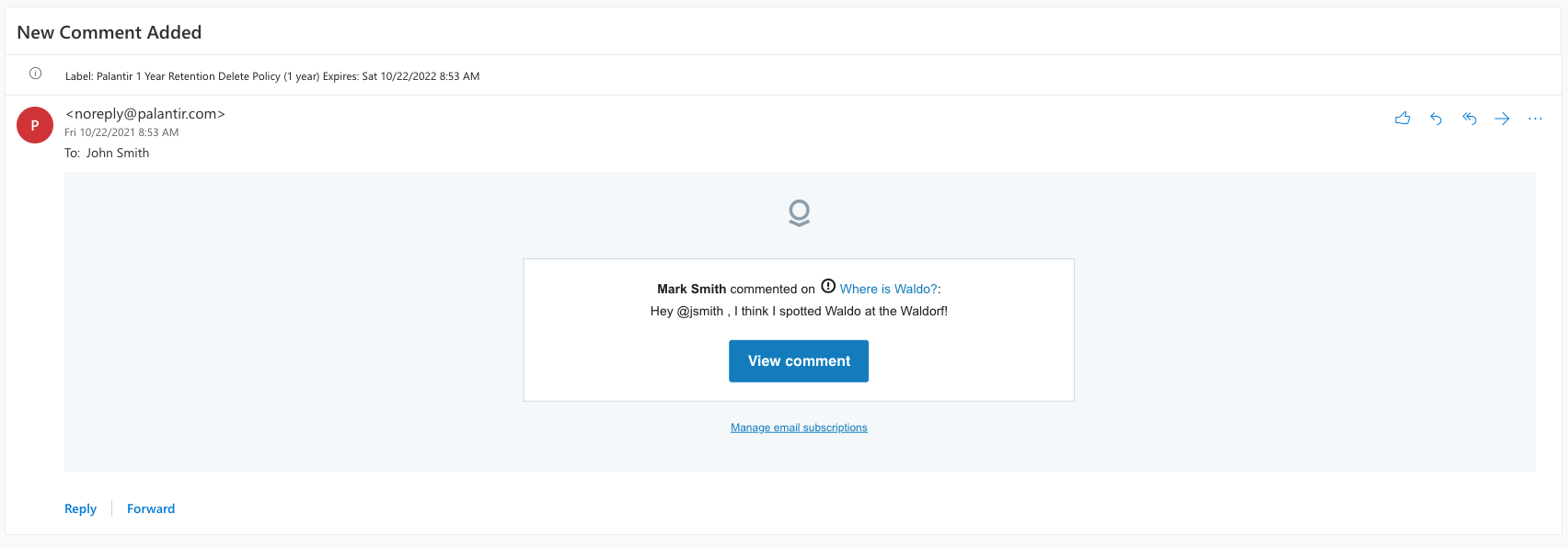
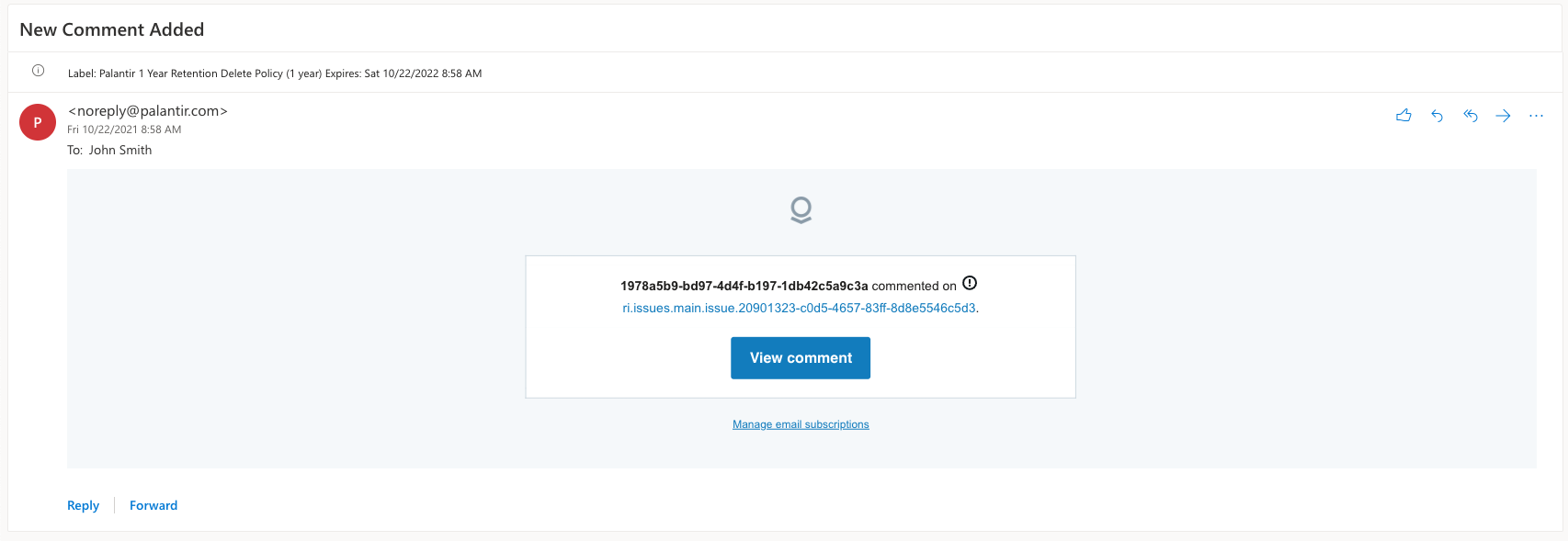
Below is an example of an unredacted email followed by an example of a redacted email:
Control email redaction
By default, email redaction applies to all notifications destined to all users. Email redaction has two modes of operation: Selected users only, or Everyone in this Organization.

Selected users only
With the Selected users only configuration, you must specify the destination domains or user groups that should receive complete, unredacted email notifications. This is the default mode when no users or domains are specified.
You may specify domains and subdomains that you wish to receive complete, unredacted email notifications. All domains and subdomains must be specified in the @domain.com format.
Alternatively, you may specify which user groups should receive complete, unredacted email notifications. This provides granular control over when and who should receive email from the Foundry platform containing complete, unredacted data. Any recipient in a specified group will receive complete, unredacted email notifications.
Domain/subdomain conditions and user group conditions are disjunctive within and across condition types. If both condition types are specified, a user that meets any of the domain/subdomain conditions or any of the user group conditions will receive complete, unredacted email notifications.
Once your configuration has been made, select Save Changes and proceed through the risk acknowledgment prompt.
Everyone in this Organization
With the Everyone in this Organization configuration, email redaction is disabled for all recipients. All users on all domains will receive complete, unredacted email notifications.
Using this mode is strongly discouraged, as it greatly increases the risks of unintentional data spillage. Depending on an organization's policies and threat model, the risks may be deemed acceptable as a trade-off for user preferences. However, Palantir recommends that you do not use this mode.
Once your configuration has been made, select Save Changes and proceed through the risk acknowledgment prompt.
Disable email redaction in action types
In certain circumstances, you might require only certain emails to be redacted. To this end, you are able to disable redaction for emails coming from specific action types during action type configuration in Ontology Manager.
This is a feature that you enable for the whole organization, and, once enabled, authorized users can configure which action types can disable redaction. Authorized users are users with the ontology:override-notification-redaction operation, which is granted by default to users with the ontology:manage-ontology operation.
To use this feature, you need to first enable Allow override redaction at the action type level setting in the Content redaction tab.
For detailed instructions on configuring specific action types after enabling this setting, visit the notification settings in action type documentation page.
中文翻译
邮件脱敏
什么是邮件脱敏?
平台支持发送与平台内操作相关的邮件通知。默认情况下,邮件通知会自动清除所有敏感客户信息,仅包含平台内相关事件的链接。这种邮件清洗功能称为邮件内容脱敏(email content redaction),并具有可配置的属性。
邮件脱敏确保敏感信息不会离开 Foundry 平台。然而,在通过平台内提示确认潜在风险后,您可以选择以下选项:
- 对发送给组织中部分用户的邮件通知禁用脱敏。
- 对发送到特定域名的邮件通知禁用脱敏。
- 完全禁用邮件脱敏。
以下是一个未脱敏邮件示例,以及一个脱敏邮件示例:
控制邮件脱敏
默认情况下,邮件脱敏适用于发送给所有用户的所有通知。邮件脱敏有两种操作模式:仅限选定用户,或组织内所有人。
仅限选定用户
使用仅限选定用户配置时,您必须指定应接收完整未脱敏邮件通知的目标域名或用户组。这是未指定任何用户或域名时的默认模式。
您可以指定希望接收完整未脱敏邮件通知的域名和子域名。所有域名和子域名必须以 @domain.com 格式指定。
或者,您可以指定哪些用户组应接收完整未脱敏邮件通知。这提供了对何时以及谁应从 Foundry 平台接收包含完整未脱敏数据的邮件的精细控制。指定组中的任何收件人都将收到完整未脱敏的邮件通知。
域名/子域名条件和用户组条件在条件类型内部和跨条件类型之间是析取关系。如果同时指定了两种条件类型,满足任何域名/子域名条件或任何用户组条件的用户将收到完整未脱敏的邮件通知。
配置完成后,选择保存更改并继续通过风险确认提示。
组织内所有人
使用组织内所有人配置时,所有收件人的邮件脱敏均被禁用。所有域名的所有用户都将收到完整未脱敏的邮件通知。
强烈不建议使用此模式,因为它会大大增加意外数据泄露的风险。根据组织的策略和威胁模型,这些风险可能被视为用户偏好的可接受权衡。然而,Palantir 建议您不要使用此模式。
配置完成后,选择保存更改并继续通过风险确认提示。
在操作类型中禁用邮件脱敏
在某些情况下,您可能只需要对特定邮件进行脱敏。为此,您可以在 Ontology Manager 的操作类型配置期间,对来自特定操作类型的邮件禁用脱敏。
这是一个为整个组织启用的功能,一旦启用,授权用户可以配置哪些操作类型可以禁用脱敏。授权用户是拥有 ontology:override-notification-redaction 操作权限的用户,默认情况下,拥有 ontology:manage-ontology 操作权限的用户会被授予此权限。
要使用此功能,您需要先在内容脱敏(Content redaction)选项卡中启用允许在操作类型级别覆盖脱敏(Allow override redaction at the action type level)设置。
有关启用此设置后配置特定操作类型的详细说明,请访问操作类型文档页面中的通知设置。