Dropdowns, locked cells, and links(下拉菜单、锁定单元格与链接)
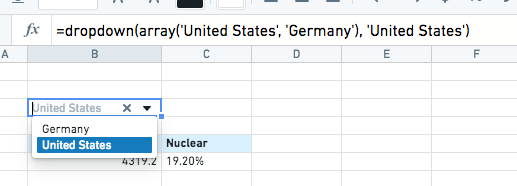
Any cell in a Fusion spreadsheet can be converted to a dropdown using the dropdown and multidropdown functions (e.g. =dropdown(array(1,2,3))). The dropdown function has other optional arguments that can be found in the function library to customize the behavior.
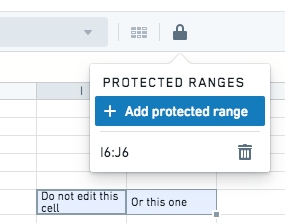
You can lock any set of cells in a shared spreadsheet to prevent accidental edits. Once locked, any user will need to remove the lock to be able to edit the cell again.
The url function allows you to create links in any cell of the spreadsheet. You can use the url_encode and query_params functions to get help formatting a string for a complex URL.
中文翻译
下拉菜单、锁定单元格与链接
Fusion 电子表格中的任意单元格均可通过 dropdown 和 multidropdown 函数转换为下拉菜单(例如 =dropdown(array(1,2,3)))。dropdown 函数还包含其他可选参数,可在函数库中查看,以自定义其行为。
您可以锁定共享电子表格中的任意单元格区域,以防止意外编辑。锁定后,任何用户都需要解除锁定才能再次编辑该单元格。
url 函数允许您在电子表格的任意单元格中创建链接。您可以使用 url_encode 和 query_params 函数来帮助格式化复杂 URL 的字符串。