Classification-based Access Controls(基于分类的访问控制(Classification-based Access Controls))
:::callout{theme="neutral"} Classification-based Access Controls are not enabled by default on Foundry. Classification markings can differ between institutions and can therefore be configured differently between Palantir environments. Configuration of classification markings requires Palantir involvement. :::
Classification-based Access Controls (CBAC) are mandatory controls used to protect sensitive government information. CBAC markings, also known as classification markings, restrict access by requiring a user to have a particular classification marking in order to access information.
Access to classification markings may correlate with security clearance processes taking place outside the Palantir platform. As with mandatory controls generally, classification markings can be combined with other access requirements like discretionary roles and mandatory markings that may be applied to a resource.
Key characteristics of classification markings
There are three notable characteristics that are specific to classification markings:
- Hierarchy: A common use case for classification markings is restricting access to sensitive information where sensitivity of information is defined in a hierarchical way. For example, you might have a group of users who are only eligible to access sensitive data marked as Secret or below. Another group of users can be eligible to access sensitive information marked as Top Secret or below, which can include Secret data.
- Disjunctive elements in classification markings: Non-classification markings work conjunctively - a user needs to have all markings applied to a resource for access. Classification markings can have disjunctive components, where users belonging to one of the groups in the classification marking's disjunctive components can satisfy the CBAC access condition. This is commonly used to define releasability, such as sharing between different organizations or countries. For example, users from either
country AORcountry Bcan satisfy the disjunctive element in a classification marking (see below). - Classification markings ubiquity: Environments that use CBAC mandatory controls require all Projects to have a Project classification set. Additionally, all datasets are required to have a data classification which means raw datasets (that is, datasets with no inputs) are required to have a file classification.
Key concepts
Classification markings
Classification markings are configured in categories. For example, one category might define the type of data, and another category might describe how that data should be disseminated (i.e. shared).
A classification can have multiple classification markings. A classification can be made up of classification markings from different categories. Rules on what constitutes valid combinations of classification markings can be configured by Palantir and enforced in platform.
Conjunctive and disjunctive classification marking categories
A defining feature of classification marking categories is that they can support disjunctive (OR) behavior. When a category is conjunctive (AND), a user must have access to all classification markings used from that category to access the classified data. When a category is disjunctive, a user can be authorized to access marked classified data by having any one marking of that category.
The components of an entire classification are combined conjunctively. This means that if a classification contains classification markings from multiple categories, a user must satisfy all components from each of the classification markings category to access the data.
Consider a simple configuration where there is a single category and two classification markings. The following simple configuration has two users: Martha Washington (mwashington) and John Adams (jadams).
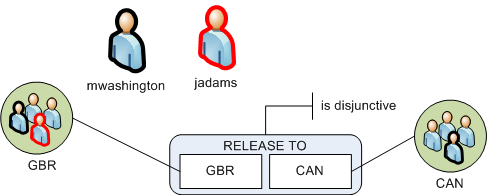
The mwashington user belongs to both the GBR and CAN classification marking groups. The user jadams belongs to the GBR group only. The RELEASE TO category is disjunctive, meaning that users must have access at least one marking. In a disjunctive category, a user who has access to one marking from the classification marking can view data even if it is also labeled with other markings from the same category. This means that data classified with GBR, CAN can be viewed by either mwashington or jadams because both users have access to at least one of those markings.
The previous example is a single category in isolation. In practice, a classification marking can contain multiple categories of markings.
File and data classification
File classification is the classification that users must satisfy to discover the file. This restriction is in addition to other requirements, such as the project's classification and project or file mandatory markings.
Data classifications apply to certain types of files, such as datasets. Data classification refers to the classification that users must satisfy to view the data in the file. Users must satisfy the data classification in order to view the data within the file, but it does not affect their ability to discover the existence of the dataset and view its metadata (such as name, description and schema). The data classification cannot be edited directly; instead, the data classification is formed by combining:
- The resource's file classification, if it has been set.
- The data classifications of all upstream data dependencies.
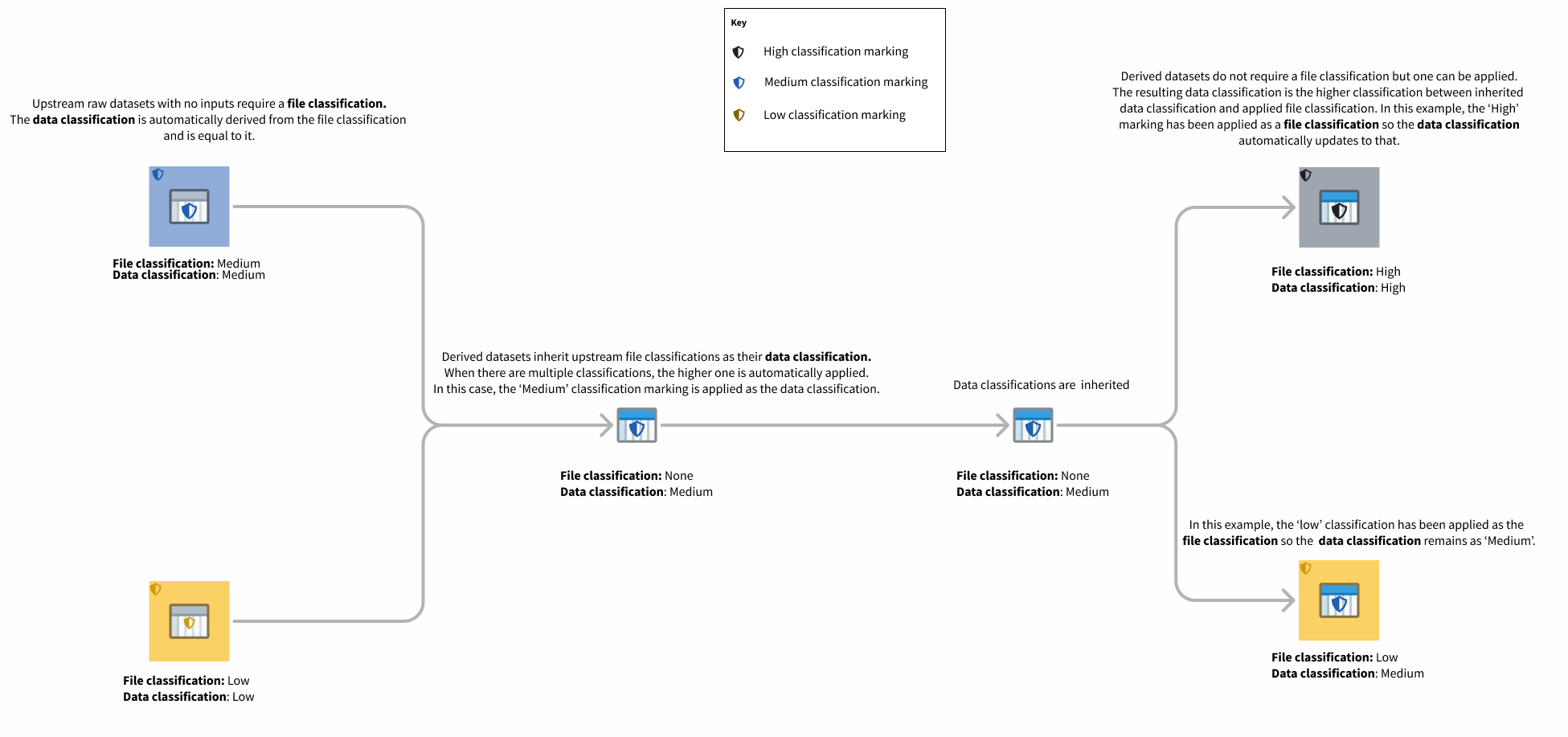
This means the data classification is always at least as strict as the file classification and the data classifications of all of the upstream data dependencies.
File, data, and project classification are communicated in the Palantir platform alongside other applicable access requirements. Unlike data classification, which is automatically inherited, file classification can be edited in the resource sidebar as shown below.
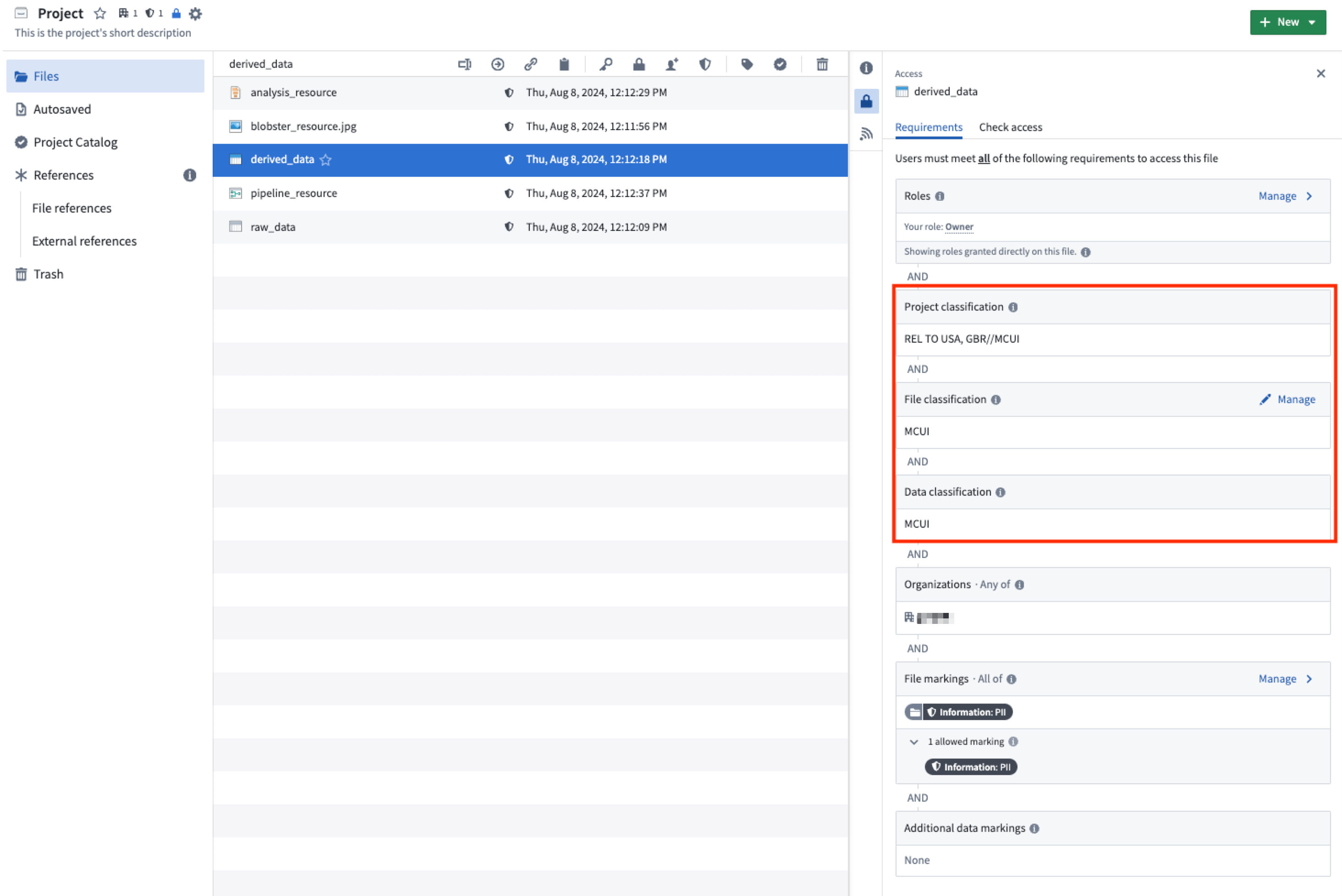
A new non-derived dataset with no input upstream datasets requires the creating user to set a file classification.
Project classification
Project classifications control who is able to discover a project and access the resources inside of it. In order to access a resource, a user must satisfy the resource's project classification and the resource's file and data classification. All projects in environments that use classification markings are required to have a project classification. A classification must be selected on project creation. Note that classifications can be updated, but not removed.
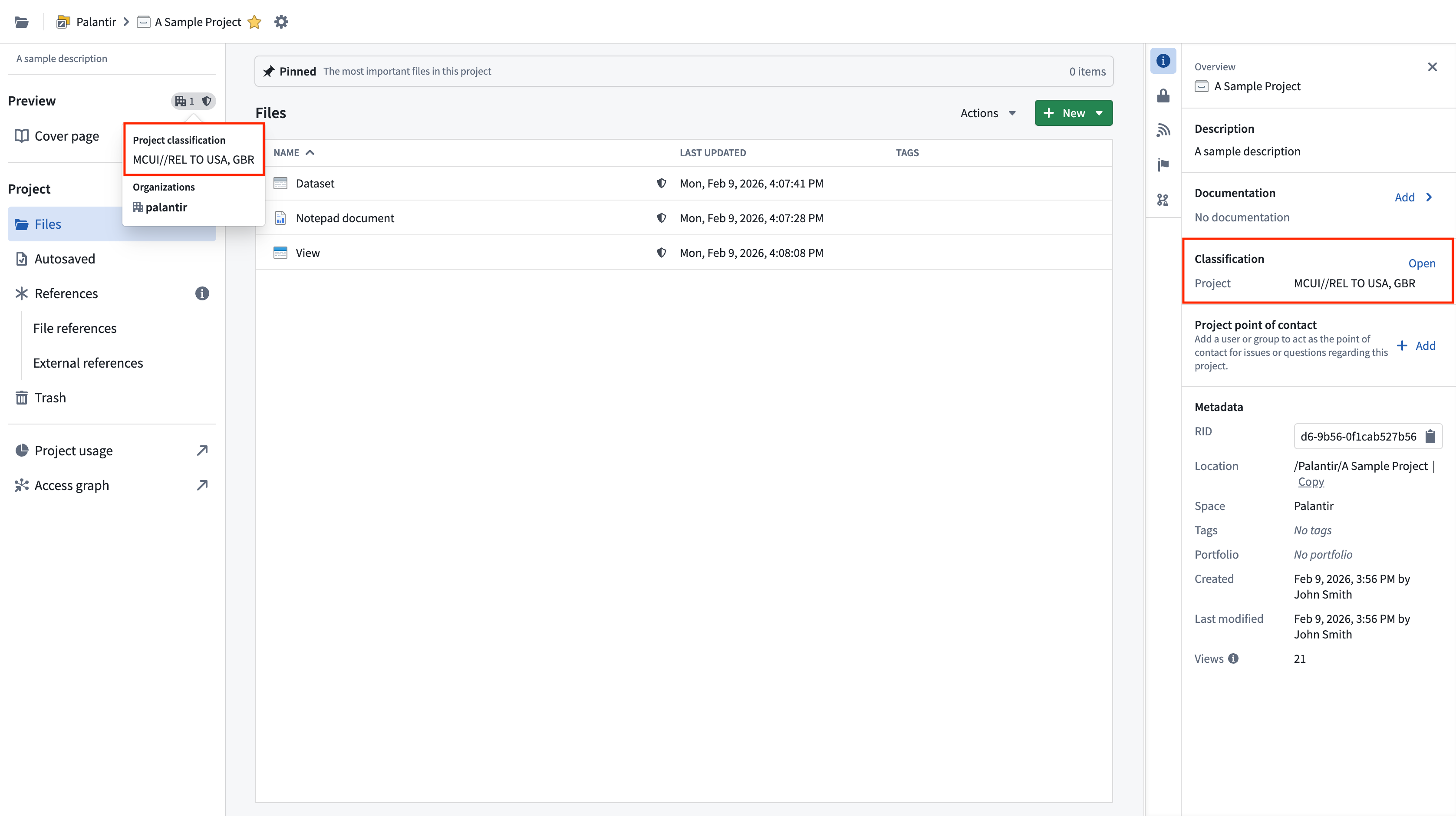
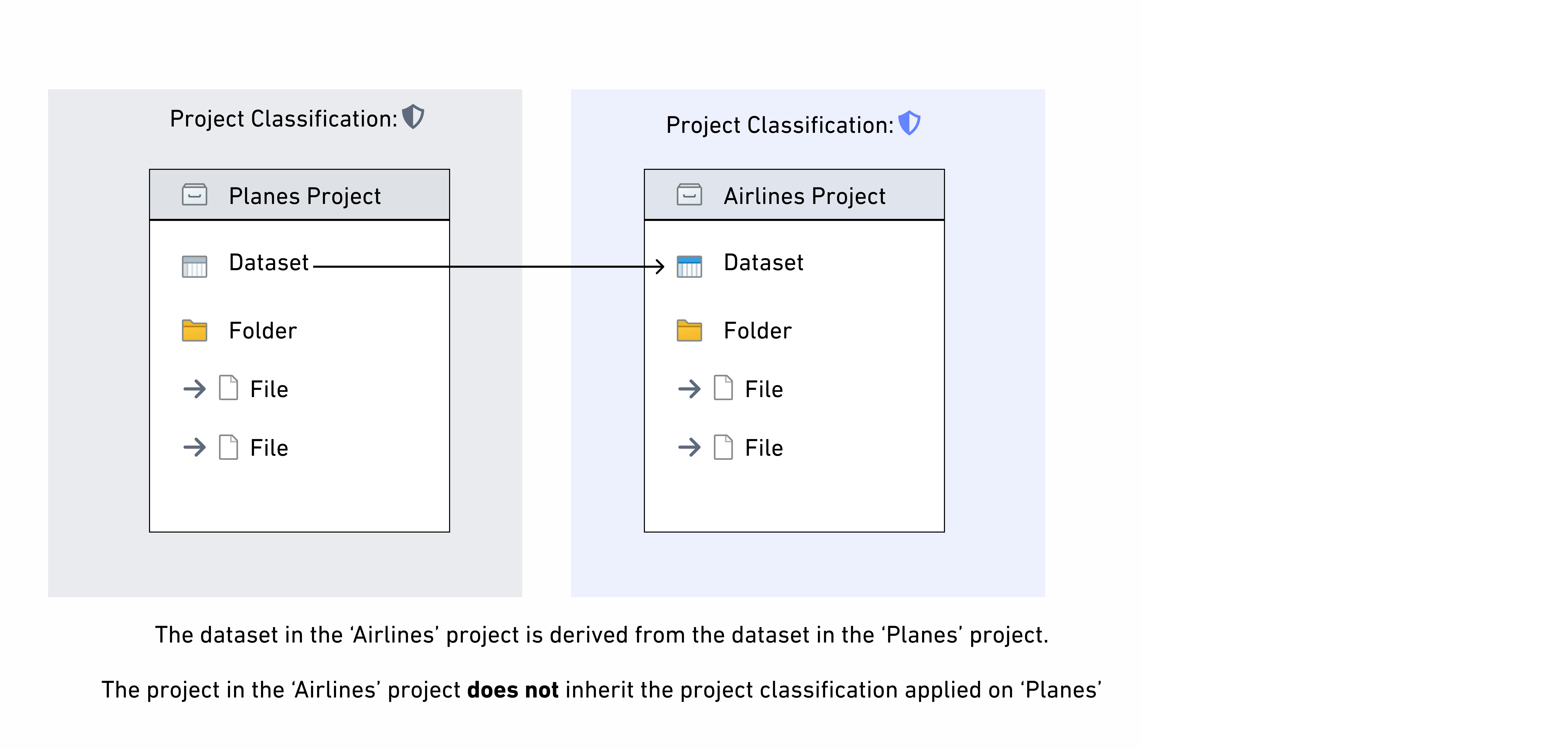
Project classifications do not affect the data classification of datasets in a project, so project classifications are not inherited along data dependencies. If there are derived downstream datasets in other projects, only the data classification is inherited. This is different from the behavior of project markings, which are inherited by downstream datasets.
Project maximum classification
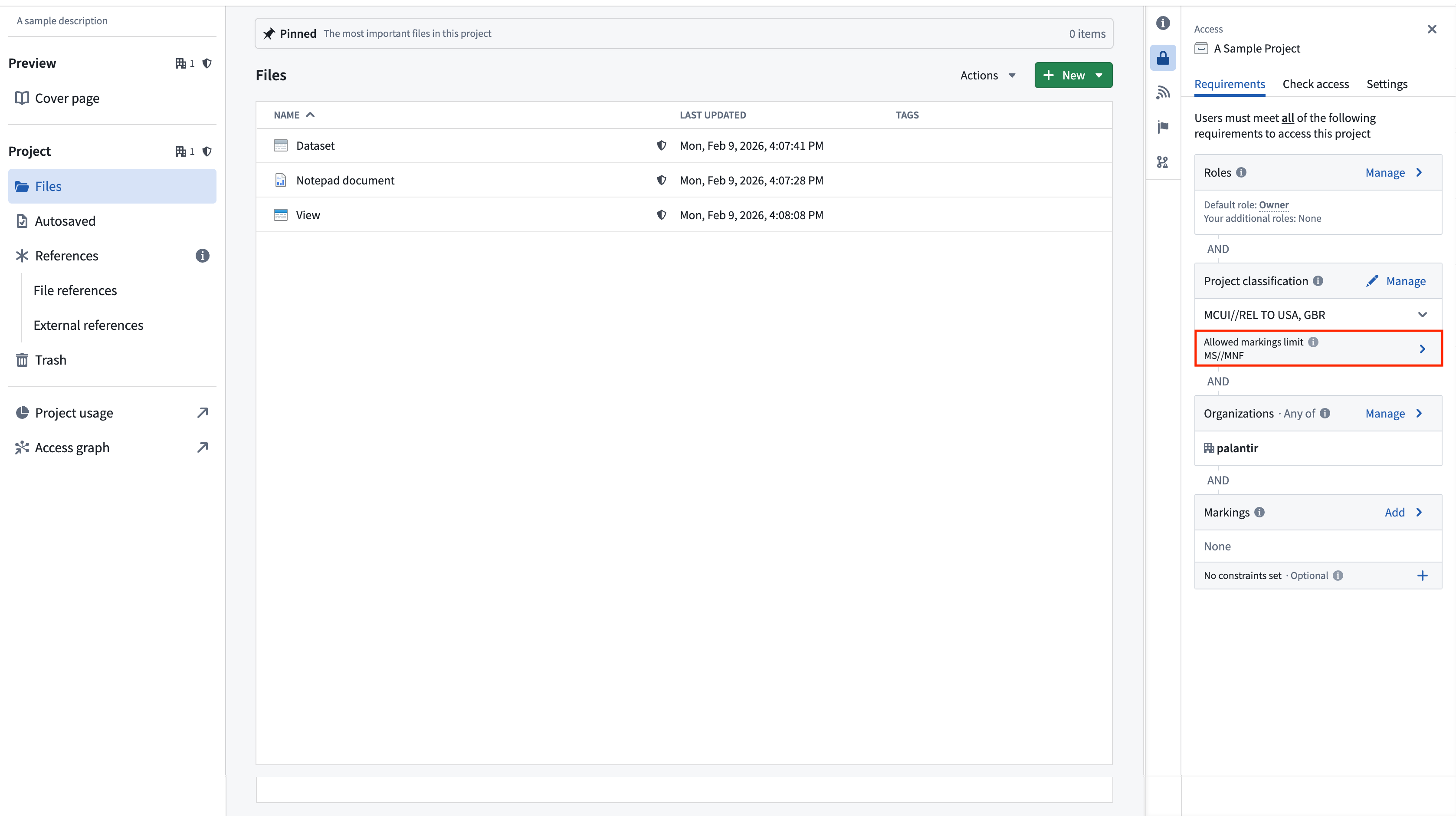
Project maximum classifications specify the maximum classification for all resources inside of a project. Project maximum classification is also referred to as the "allowed marking limit". Resources with a higher data or file classification cannot be created or moved into a project with a lower maximum classification. Resources with a classification that is lower than or equal to the project’s maximum classification can exist in the project, but these resources will only be visible to users who satisfy the overall project classification.
Project maximum classifications are equal to the project classification by default at project creation, but they can be edited or removed independently of the project classification.
Removing a project's max classification may be required to add object or link types to a project. Note though that if an object or link type is in a project, it will fail to materialize if it lacks a file classification.
If a higher classification is added as a file classification on an upstream dataset in a different project and inherited as a data marking by a dataset within that project, that data marking will violate the project maximum classification. If this happens, the data will continue to be protected by the higher classification, but a warning will be displayed and it will not be possible to build the dataset or any downstream resources in the project until the violation is resolved. This violation can be resolved by fixing the classification on the upstream dataset and removing that upstream dataset as an input and rebuilding the dataset, or by updating the project's maximum classification. This is the same behavior as project constraint violations.
中文翻译
基于分类的访问控制(Classification-based Access Controls)
:::callout{theme="neutral"} 基于分类的访问控制(Classification-based Access Controls) 在 Foundry 中默认未启用。分类标记(Classification markings) 在不同机构之间可能有所不同,因此在不同的 Palantir 环境中可以进行不同的配置。配置分类标记需要 Palantir 的参与。 :::
基于分类的访问控制(CBAC) 是用于保护敏感政府信息的强制控制(Mandatory controls)。CBAC 标记(也称为分类标记)通过要求用户具备特定的分类标记才能访问信息来限制访问。
对分类标记的访问权限可能与 Palantir 平台之外进行的安全许可流程相关。与一般的强制控制一样,分类标记可以与其他访问要求结合使用,例如应用于资源的自主角色和强制标记。
分类标记的主要特征
分类标记具有三个显著特征:
- 层级结构(Hierarchy): 分类标记的一个常见用例是限制对敏感信息的访问,其中信息的敏感性以层级方式定义。例如,您可能有一组用户仅有权访问标记为“机密(Secret)”或更低级别的敏感数据。另一组用户则有权访问标记为“绝密(Top Secret)”或更低级别的敏感信息,其中包括机密数据。
- 分类标记中的析取元素(Disjunctive elements): 非分类标记以联言(Conjunctive)方式工作——用户需要拥有应用于资源的所有标记才能获得访问权限。分类标记可以包含析取组件,即属于分类标记析取组件中任一组的用户即可满足 CBAC 访问条件。这通常用于定义可发布性(Releasability),例如在不同组织或国家/地区之间共享。例如,来自
country A或country B的用户都可以满足分类标记中的析取元素(见下文)。 - 分类标记的普遍性: 使用 CBAC 强制控制的环境要求所有项目都必须设置项目分类。此外,所有数据集都必须具有数据分类,这意味着原始数据集(即没有输入的数据集)必须具有文件分类。
核心概念
分类标记
分类标记按类别进行配置。例如,一个类别可能定义数据类型,而另一个类别可能描述该数据应如何传播(即共享)。
一个分类可以包含多个分类标记,且可以由不同类别的分类标记组成。关于哪些分类标记组合有效的规则可由 Palantir 配置并在平台中强制执行。
联言与析取分类标记类别
分类标记类别的一个决定性特征是它们可以支持析取(OR)行为。当类别为联言(AND)时,用户必须拥有该类别中使用的所有分类标记的访问权限,才能访问已分类的数据。当类别为析取时,用户只需拥有该类别中的任一标记,即可被授权访问已标记的分类数据。
整个分类的各个组件以联言方式组合。这意味着,如果一个分类包含来自多个类别的分类标记,用户必须满足每个分类标记类别中的所有组件才能访问数据。
考虑一个包含单个类别和两个分类标记的简单配置。以下简单配置包含两个用户:Martha Washington (mwashington) 和 John Adams (jadams)。
用户 mwashington 同时属于 GBR 和 CAN 分类标记组。用户 jadams 仅属于 GBR 组。RELEASE TO 类别是析取的,这意味着用户必须至少拥有一个标记的访问权限。在析取类别中,只要用户拥有分类标记中某一个标记的访问权限,即使数据还带有同一类别的其他标记,该用户也能查看数据。这意味着标记为 GBR、CAN 的数据可以被 mwashington 或 jadams 查看,因为这两个用户都至少拥有其中一个标记的访问权限。
前面的示例是孤立状态下的单个类别。在实际应用中,一个分类标记可以包含多个类别的标记。
文件与数据分类
文件分类(File classification) 是用户必须满足才能发现该文件的分类。此限制是对其他要求(如项目的分类以及项目或文件的强制标记)的补充。
数据分类(Data classification) 适用于某些类型的文件,例如数据集。数据分类是指用户必须满足才能查看文件中数据的分类。用户必须满足数据分类才能查看文件内的数据,但这不会影响他们发现数据集的存在并查看其元数据(如名称、描述和架构)的能力。数据分类不能直接编辑;相反,数据分类是通过组合以下内容形成的:
- 资源的文件分类(如果已设置)。
- 所有上游数据依赖的数据分类。
这意味着数据分类的严格程度始终至少等于文件分类和所有上游数据依赖的数据分类。
文件、数据和项目分类会在 Palantir 平台中与其他适用的访问要求一起显示。与自动继承的数据分类不同,文件分类可以在资源侧边栏中进行编辑,如下所示。
对于没有上游输入数据集的新建非派生数据集,要求创建用户设置文件分类。
项目分类
项目分类(Project classification) 控制谁能够发现项目并访问其中的资源。为了访问资源,用户必须满足资源的项目分类以及资源的文件和数据分类。在使用分类标记的环境中,所有项目都必须具有项目分类。必须在创建项目时选择分类。请注意,分类可以更新,但不能移除。
项目分类不会影响项目中数据集的数据分类,因此项目分类不会沿数据依赖继承。如果其他项目中存在派生的下游数据集,则仅继承数据分类。这与项目标记的行为不同,项目标记会被下游数据集继承。
项目最高分类
项目最高分类(Project maximum classification) 指定项目内所有资源的最高分类。项目最高分类也称为“允许标记限制(Allowed marking limit)”。具有较高数据或文件分类的资源无法创建或移动到最高分类较低的项目中。分类低于或等于项目最高分类的资源可以存在于该项目中,但这些资源仅对满足整体项目分类的用户可见。
在创建项目时,项目最高分类默认等于项目分类,但可以独立于项目分类进行编辑或移除。
若要向项目添加对象或链接类型,可能需要移除项目的最高分类。但请注意,如果对象或链接类型位于项目中,且缺乏文件分类,则将无法物化。
如果在不同项目的上游数据集上添加了更高的分类作为文件分类,并由该项目内的数据集作为数据标记继承,则该数据标记将违反项目最高分类。如果发生这种情况,数据将继续受到更高分类的保护,但会显示警告,并且在解决违规问题之前,将无法构建该数据集或项目中的任何下游资源。可以通过修复上游数据集的分类、移除该上游数据集作为输入并重新构建数据集,或者更新项目的最高分类来解决此违规问题。此行为与项目约束违规相同。