Markings(标记(Markings))
Markings provide an additional level of access control for files, folders, and Projects within Foundry. Markings define eligibility criteria that restrict visibility and actions to users who meet those criteria. To access a resource, a user must be a member of all Markings applied to a resource to access it. Platform administrators typically manage Markings within an Organization.
Access to a Marking is binary (all-or-nothing). Regardless of role, a user cannot access a file in any way unless the user satisfies all Marking requirements.
Markings are intended to allow data protection officers to centrally manage and audit exactly who can access any given category of data. A common use case for Markings is restricting access to personally identifiable information (PII). For example, you might have a group of users who are only eligible to access sensitive PII data after completing a series of trainings. A platform administrator could create a PII Marking and apply it to the sensitive datasets. This Marking ensures that access to PII is restricted to the appropriate users and cannot be shared beyond that group.
Markings are a mandatory control, while roles are a discretionary control. Mandatory controls restrict access by requiring a user to have a particular Marking in order to access data. The Expand Access permission on the Marking itself, a centrally managed permission, is required to remove a Marking. For example, even if a user has the Owner role on a dataset that is marked with the PII marking, their Owner role does not allow them to remove the marking without also having the marking's Expand Access permission. In contrast, discretionary controls expand access and are granted through data sharing workflows without centralized restrictions. For example, any user with the Owner role on a resource can grant the Owner role to another user or group.
A user must be a member of all the Markings on a file, folder, or Project in order to have access, since Markings are conjunctive (boolean AND).
Inheritance
Markings are inherited along both the file hierarchy and direct dependencies and propagate through transform and analysis logic. All resources derived from a marked file, folder, or Project will assume a Marking unless the Marking is explicitly removed. Unlike role-based access, which is based on where data lives in the platform, Markings travel with the data. A file may inherit a Marking in two ways: via the file hierarchy and/or via data dependencies.
File hierarchy
A file may inherit a marking via a containing Project or folder. If a Project or folder has a Marking, every file or folder within it inherits the Marking. This means that restricting access to a Project or folder always restricts access to everything inside it.
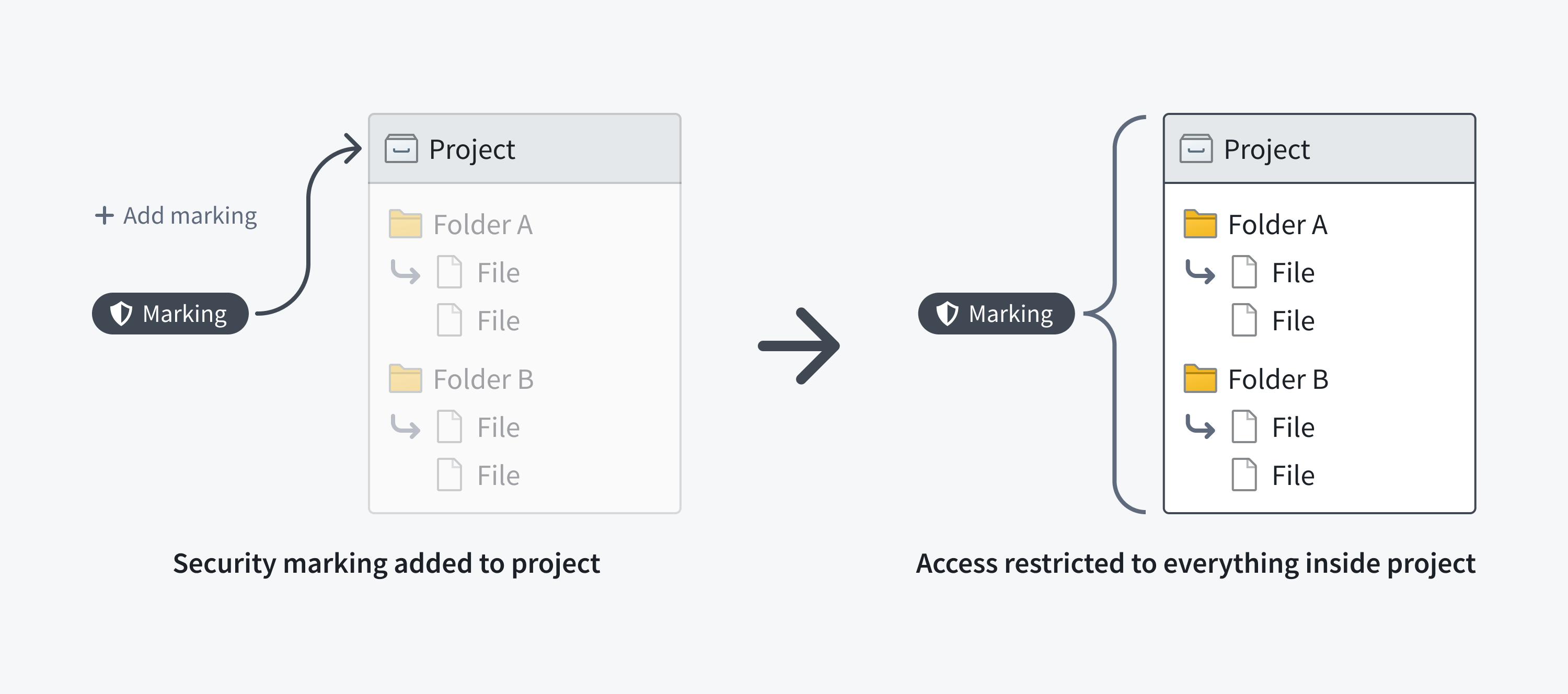

The following screenshot shows a PII Marking on a notional dataset that is inherited along the file hierarchy.
Data dependency
Restricting access to a dataset always restricts access to any data derived from it. This is because a dataset file may inherit a Marking from a dataset it depends on, like an upstream dataset. If a dataset has a file Marking, every dataset that depends on it inherits that Marking and the inherited Marking is known as a data marking.
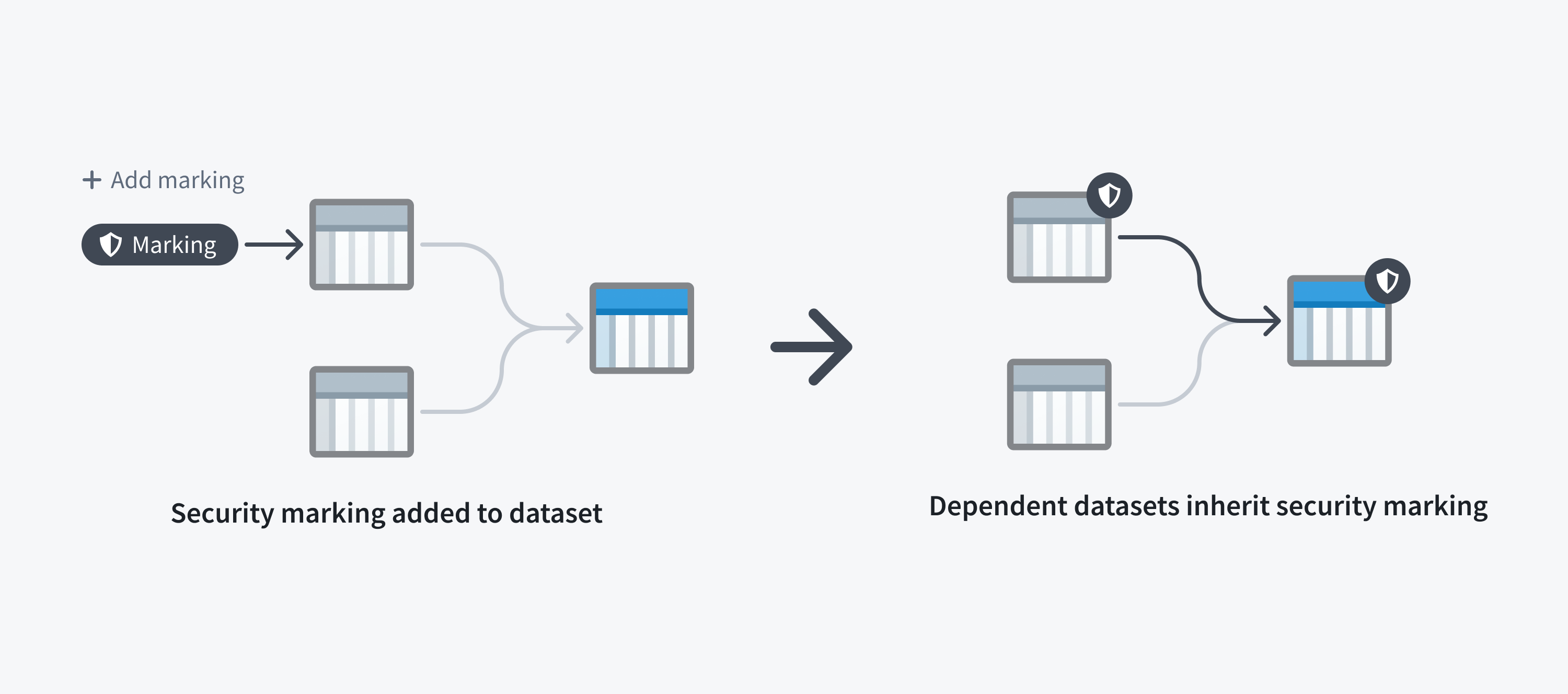
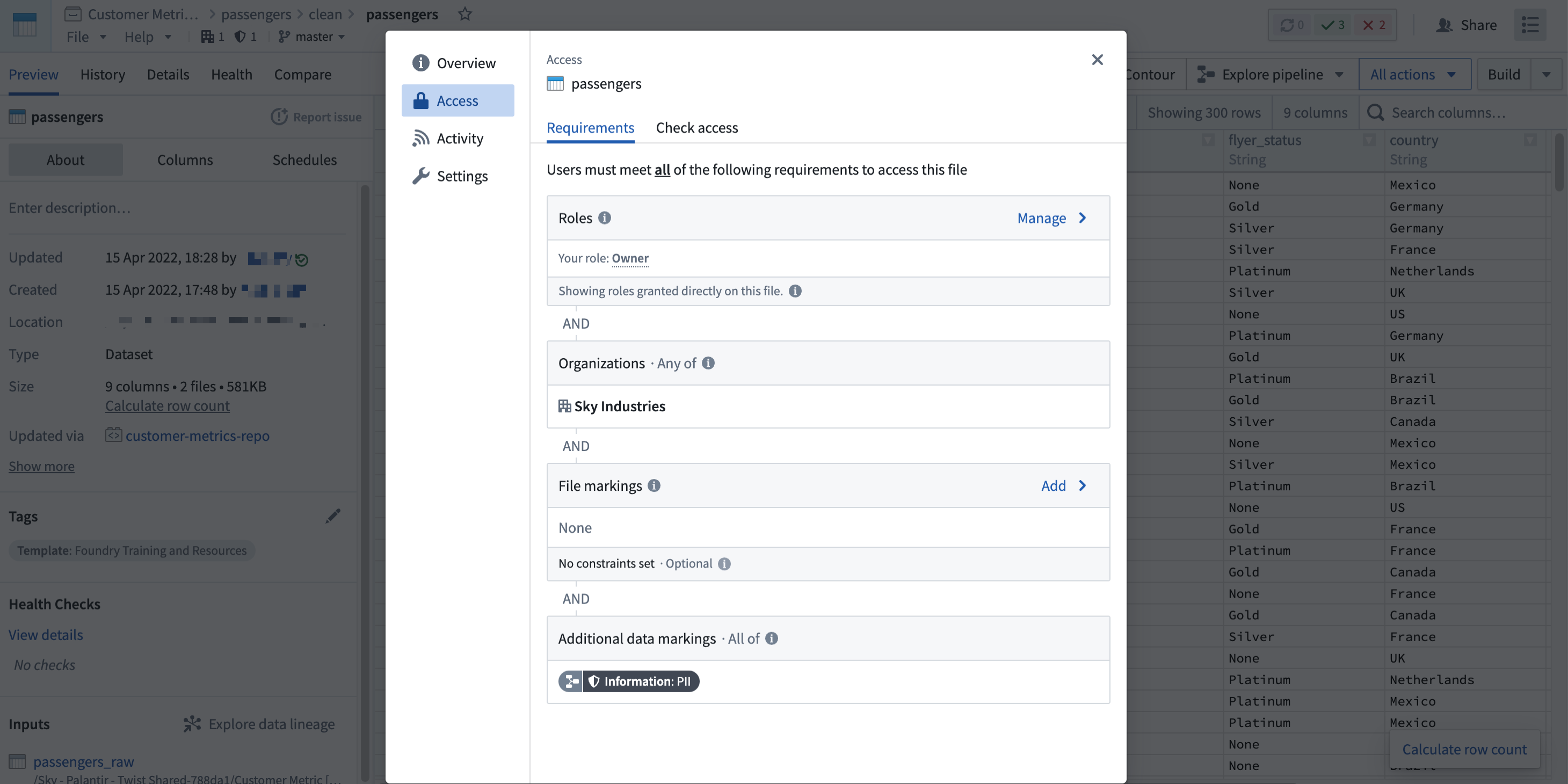
The following screenshot shows a PII Marking on a notional dataset that is inherited along a data dependency.
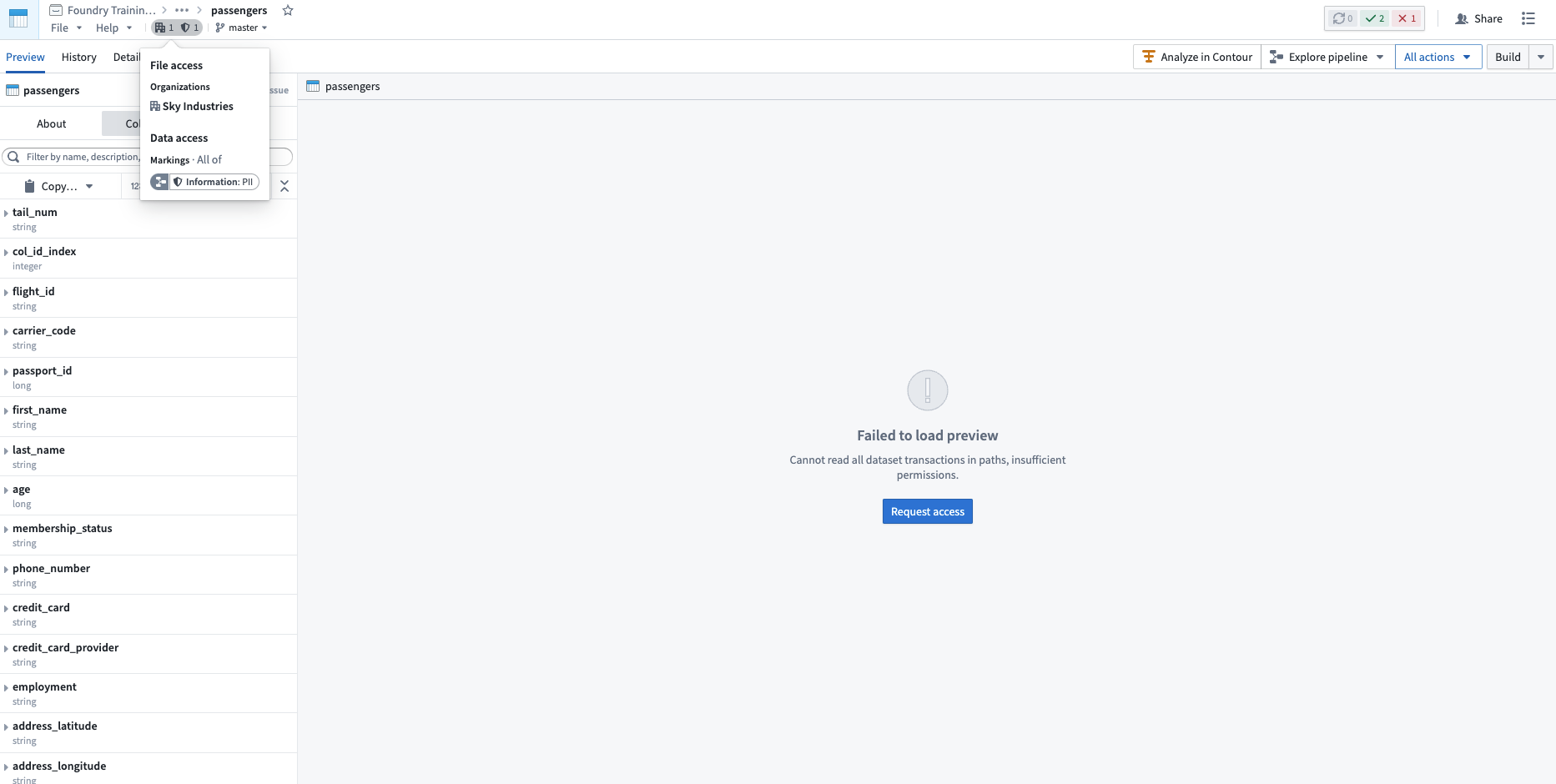
Note that a user may fulfill file access requirements without meeting the data access requirements inherited from upstream datasets. In this scenario, the user can detect the presence of the derived dataset and view the file metadata, but cannot access the data within the file dataset, as demonstrated in the screenshot below. This is different from when a user cannot discover a resource because they do not meet the file marking requirements.
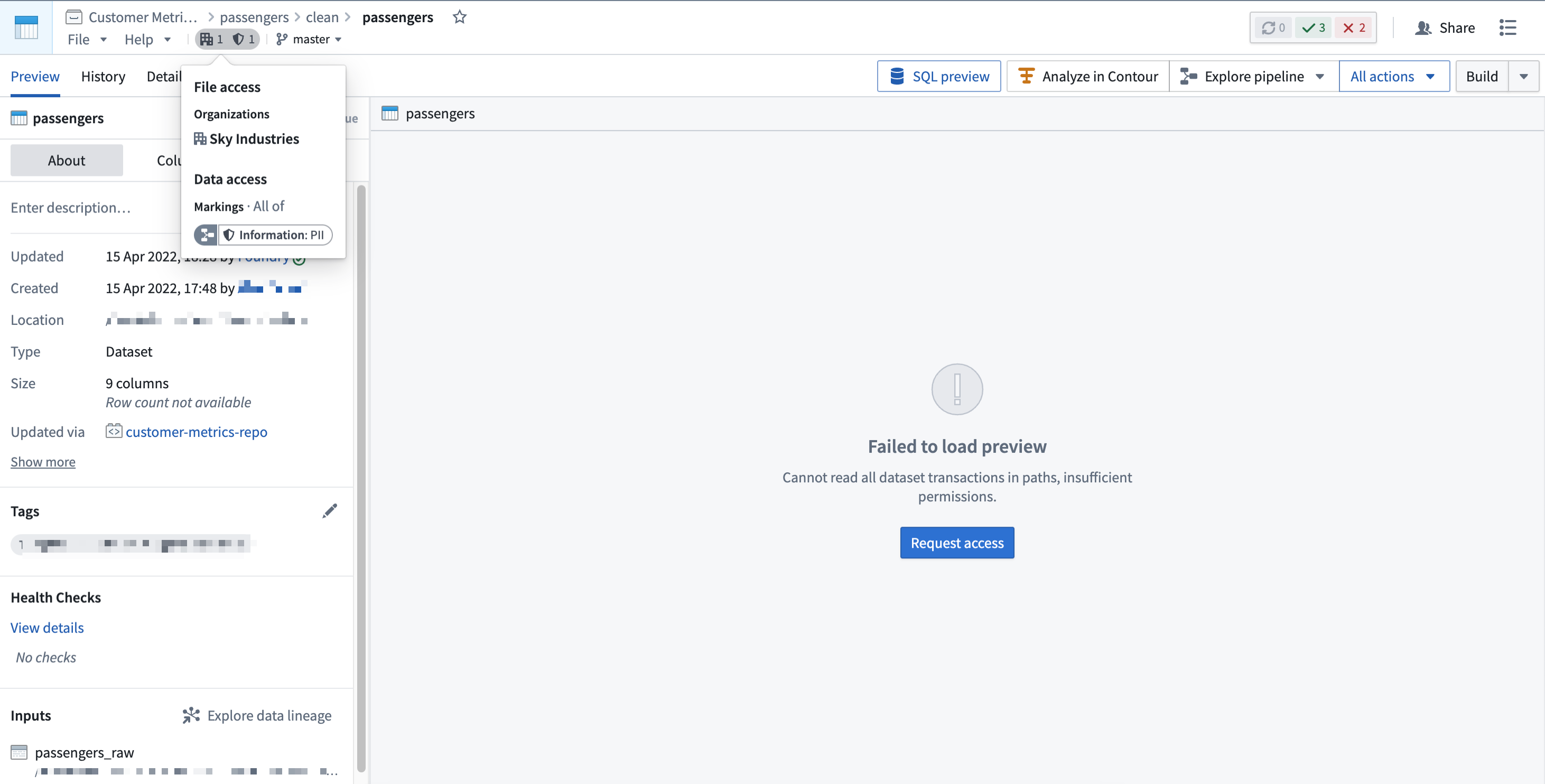
Applying a Marking is considered a sensitive action, since the Marking will immediately be inherited along all file and data dependencies. This could unintentionally lock out other users downstream. Review how to apply markings safely before using them.
Similarly, removing a Marking is considered a sensitive action. You can remove a Marking from the file, folder, or Project where it was originally applied, which will immediately remove the Marking from downstream files and data dependencies. Alternatively, a Marking can be removed in a transformation, which would only remove the Marking along data dependencies. Learn how to remove markings safely before removing them.
Use Markings
Markings are designed to restrict access to resources like files, folders, and Projects. Markings should not be used to provision access. When a user satisfies a set of Marking criteria, they receive access to the Marking and associated resources. However, a user eligible for access should not always have access. Users should be granted access to files based on role-based permissions on Projects.
For example, assume that a PII Marking is used to restrict access to all Foundry data that contains employee PII. This PII may be in financial records (like a Social Security number), health records (like information about age, gender, or diagnosis), or other personal data such as name or address.
To work with PII, users need to take proper training. Suppose a user from the financial department has completed the required training and is eligible for access to the PII Marking. As this user is from the financial department, the user is granted the Viewer role on a financial data Project. Even though this user is eligible to see other data containing employee PII, their role in the Project still governs their level of access.
Markings should be used to define access restrictions on sensitive data that requires additional protection. There are several ways to apply Markings related to data sensitivity:
- One Marking per sensitive data category
- In the most commonly-used Marking structure, one Marking is created per sensitive data category. Each Marking restricts access to all resources that contain the data category. If data has multiple types of sensitivities, all corresponding Markings are applied to the resource; only users eligible to access all relevant sensitive categories can receive access to the resource.
- You may find it useful to establish well-defined criteria for Marking requirements and sensitivity types. For example, you might mark any data containing personal attributes like gender, age, ethnicity, etc. with the
PIIMarking. - One Marking per sensitive data owner
- Under this structure, data owners can decide how to restrict access to data they own. With one Marking per sensitive data owner, the sensitive data owned by a team or group of users is marked and users are granted access to the Marking at the data owner’s discretion. For example, all data produced, consumed, and managed by the sales team could be marked with the
Sales DataMarking by the data owner, who would only grant access to sales data to eligible users. - To provide data owners additional control over their data assets, Markings propagate. This means that if a user with access to the data tries to create derived resources from the data to share with another user, the data owner will need to grant the other user access to the Marking to unlock their access to the derived resources.
- Markings for different pipeline stages
- Datasets may be ingested into Foundry in raw form and usually undergo processing and transformation before being ready for sharing with end users. Raw data may contain sensitive information that is unsuitable for downstream users, and an administrator may choose to apply a
Raw Datamarking to restrict access from unauthorized users. After processing to remove PII (such as hashing or encryption), an administrator can remove theRaw DataMarking and apply other relevant Markings to secure data further along the pipeline. - Use of Markings to restrict data discovery
- Since Markings restrict access in an all-or-nothing manner, you should use them if you must hide the existence of a resource like a file, folder, or Project. Markings can ensure that users who do not have access to the Marking will not see the marked data in search results or in the Project/folder view.
An implementation of Markings in Foundry may use a combination of strategies discussed above. For instance, you could have a Raw Data Marking at the beginning of the pipeline followed by one Marking per sensitive data category post-processing.
Example: Protect healthcare data
Consider three tiers of sensitive patient data at a hypothetical healthcare organization:
- Synthetic data: This is the least sensitive data, created to mimic actual patient records. All synthetic data is marked by the
Synthetic DataMarking. - De-identified data: This type of data has some sensitive fields, but all direct identifiers have been removed. This data might be combined with other data files to identify patients. All such data is marked with the
De-identified DataMarking. - Data with identifiers: This type of data potentially contains identifiers which can be used to directly identify individual patients. This is the highest level of sensitivity for patient data. All such data is marked with the
Identifiable DataMarking.
In this case, the data tiers are hierarchical, and users who have access to the Identifiable Data Marking also have access to the De-identified Data Marking and the Synthetic Data Marking. Similarly, users with access to the De-identified Data Marking also have access to Synthetic Data Marking.
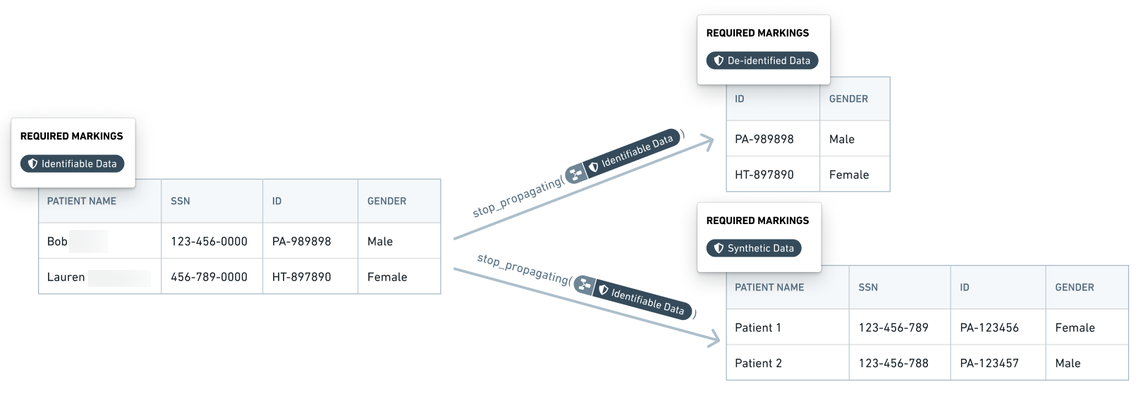
Within Foundry, data with identifiers (marked with the Identifiable Data Marking) is transformed into de-identified data (marked with the De-identified Data Marking) by removing the identifier fields. The Marking manager or data owner reviews any changes in the transform logic to ensure that all identifiers are absent from the de-identified data. Additional complex transforms generate synthetic data which is marked with the Synthetic Data Marking. At each of these transformation stages, shown with notional data in the following screenshot, the previous Marking is removed and a Marking highlighting the updated state of the data is added.
Example: Protect investigation data
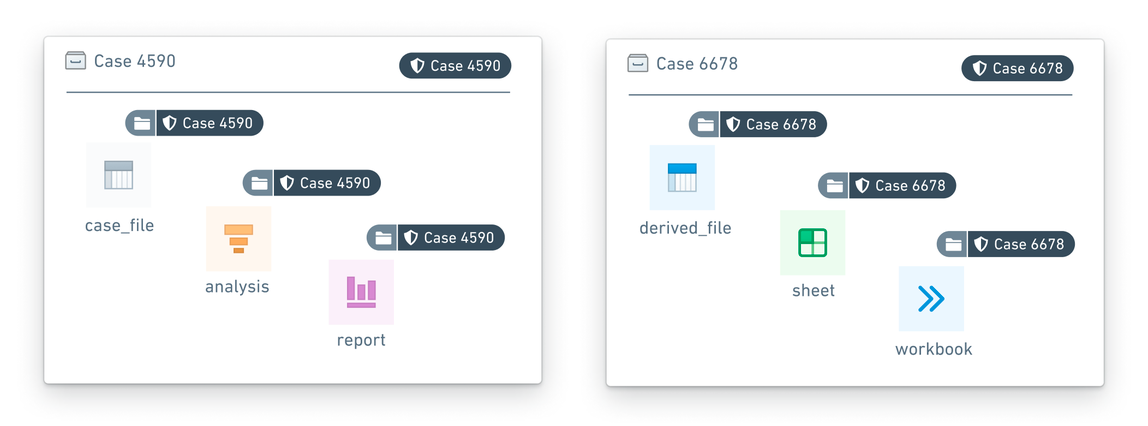
Case investigation data is particularly sensitive, as with anti-money laundering investigations. Data from one case must not mix with data from another case. Moreover, data from one case should not be visible to the investigator when that investigator is reviewing a different case. Markings enable these case access restrictions:
- Data pertaining to a particular case, including resources, images, datasets, other evidence, is marked with a unique
Case - xxxxxxMarking wherexxxxxxrepresents the case number. - Only investigators who are investigators for a particular case are granted access to the case Marking. An investigator may have access to multiple cases at a given time, but such access would be distinguished by individual Markings.
Example: Protect banking data
In a hypothetical bank, each team or department exercises full control over the data that it produces or manages. That is, each team decides which other teams can access their data assets, whether in whole or in part. For this example, we simplify the organizational setup by considering teams with corresponding Markings: Consumer Finance, Internal Compliance, and Marketing.
- Assume that the Consumer Finance team and the Marketing team give the Internal Compliance team access to, respectively, the
Consumer FinanceandMarketingMarkings. Then, the Internal Compliance team can verify that data is being used appropriately for pre-approved workflows and conduct a quarterly audit. - The results of the quarterly audit are captured in a report with the
Internal ComplianceMarking, with the other two Markings removed. These audit results can only be accessed by the Internal Compliance team. If the Internal Compliance team wants to share the quarterly audit report with the DPO (Data Protection Office), the Internal Compliance team can grant the DPO access to theInternal ComplianceMarking so that the DPO can review the compliance report.

Review the management documentation on how to configure markings.
Use scoped sessions
Scoped sessions enable a user to pick a subset of pre-defined Markings to access during their Foundry session to create a visual separation between different types of work. If scoped sessions are enabled for your Organization, you might have to pick a scoped session after you log into Foundry, restricting your access in Foundry to only the subset of Markings in the scoped session.
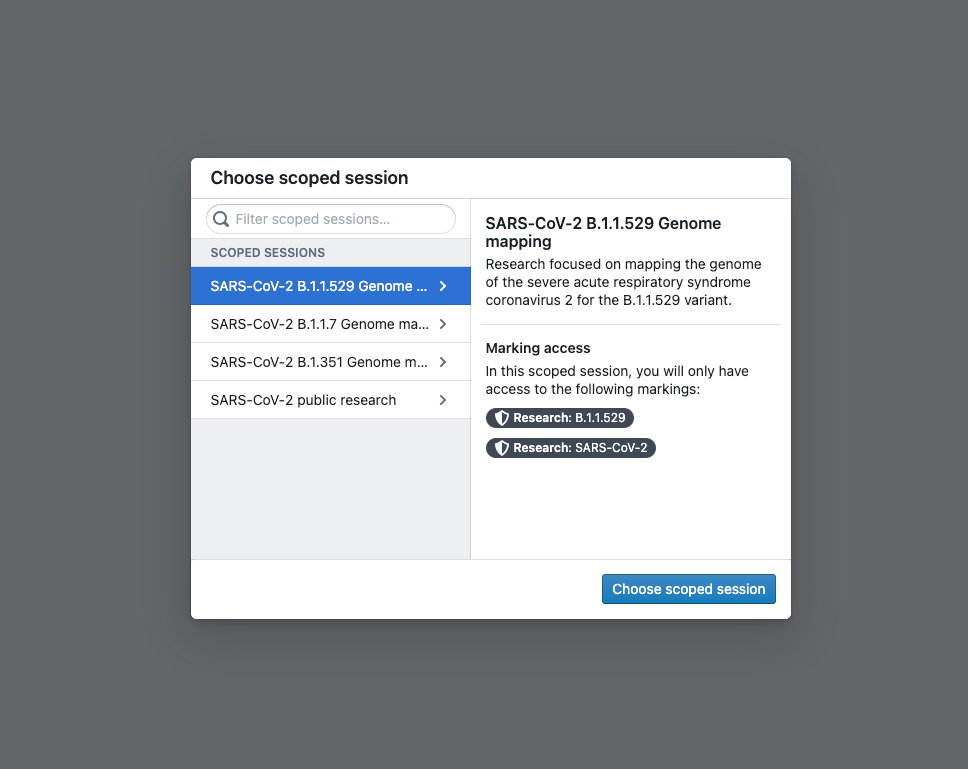
After you select a scoped session, there will be a workspace banner showing the name of the scoped session.
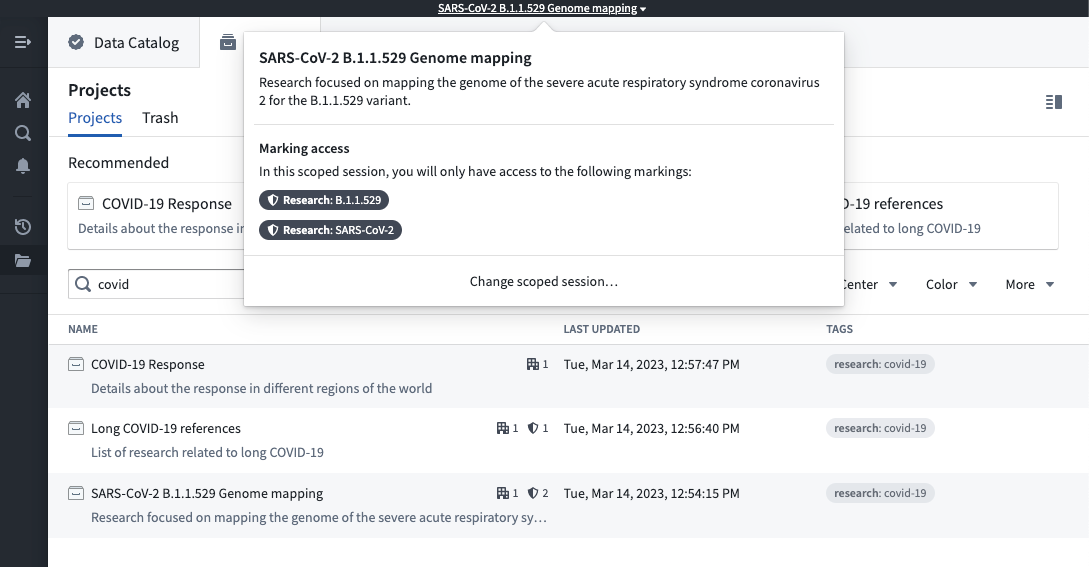
If you have access to multiple scoped sessions, you can hover over the workspace banner and select Change scoped session. This will bring up the scoped session dialog seen at login and allow you to choose a scoped session. If you pick a different scoped session than the current scoped session, the page will refresh, and you will be restricted to the new scoped session you picked.
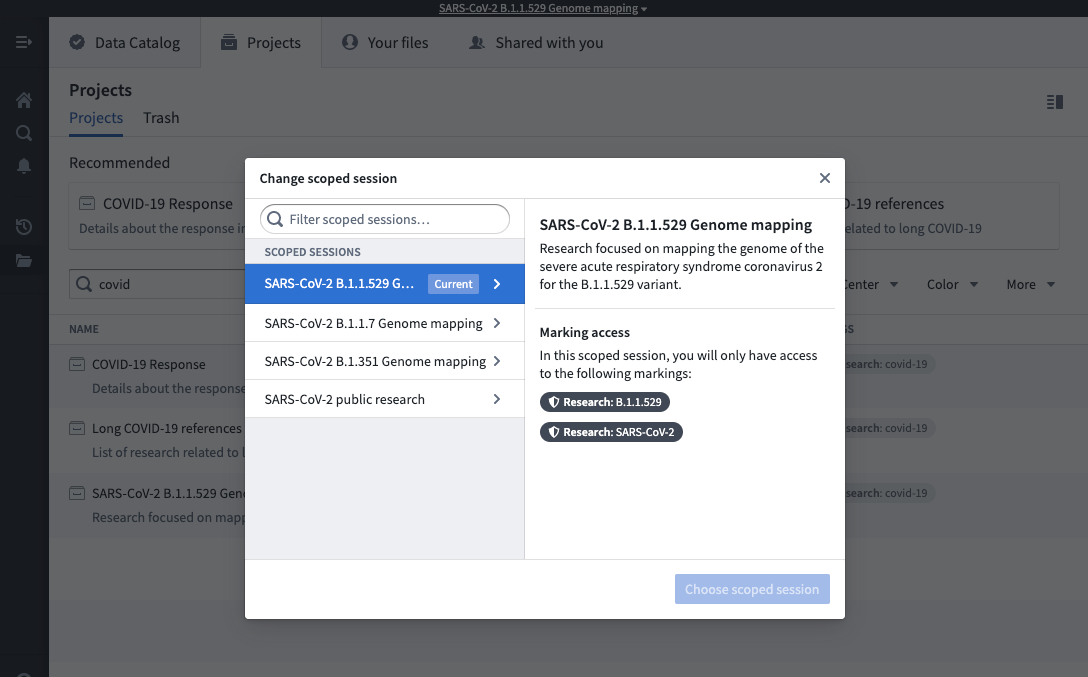
Some users might have access to the No scoped session option. This option allows a user to bypass the scoped session restriction and have access to all of their Markings.

中文翻译
标记(Markings)
标记(Markings) 为 Foundry 中的文件、文件夹和项目(Projects) 提供了额外级别的访问控制。标记定义了资格条件,将可见性和操作限制在满足这些条件的用户范围内。要访问资源,用户必须是应用于该资源的所有标记的成员。平台管理员通常在组织(Organization) 内管理标记。
对标记的访问是二元的(全有或全无)。无论角色如何,除非用户满足所有标记要求,否则无法以任何方式访问文件。
标记旨在让数据保护官(data protection officers) 能够集中管理和审计究竟谁可以访问任何给定类别的数据。标记的一个常见用例是限制对个人身份信息(PII) 的访问。例如,您可能有一组用户,他们只有在完成一系列培训后才有资格访问敏感的 PII 数据。平台管理员可以创建一个 PII 标记并将其应用于敏感数据集。此标记确保只有适当的用户才能访问 PII,并且不能在该组之外共享。
标记是一种强制控制(mandatory control),而角色是一种自主控制(discretionary control)。强制控制通过要求用户具有特定标记才能访问数据来限制访问。要移除标记,需要标记本身的“扩展访问权限(Expand Access)”,这是一种集中管理的权限。例如,即使用户对标记了 PII 标记的数据集拥有 Owner 角色,如果没有该标记的扩展访问权限,其 Owner 角色也不允许他们移除该标记。相比之下,自主控制会扩展访问权限,并通过数据共享工作流授予,没有集中限制。例如,对资源拥有 Owner 角色的任何用户都可以将 Owner 角色授予其他用户或组。
用户必须是文件、文件夹或项目上所有标记的成员才能拥有访问权限,因为标记是联合的(布尔 AND)。
继承
标记沿文件层级(file hierarchy)和直接依赖关系继承,并通过转换和分析逻辑传播。从标记的文件、文件夹或项目派生的所有资源都将继承标记,除非显式移除该标记。与基于平台中数据所在位置的基于角色的访问不同,标记随数据一起移动。文件可以通过两种方式继承标记:通过文件层级和/或数据依赖。
文件层级
文件可以通过包含它的项目或文件夹继承标记。如果项目或文件夹具有标记,则其中的每个文件或文件夹都会继承该标记。这意味着限制对项目或文件夹的访问始终会限制对其内部所有内容的访问。
以下屏幕截图显示了一个假设数据集上的 PII 标记,该标记沿文件层级继承。
数据依赖
限制对数据集的访问始终会限制对从其派生的任何数据的访问。这是因为数据集文件可能会从其依赖的数据集(如上游数据集(upstream dataset))继承标记。如果数据集具有文件标记,则依赖它的每个数据集都会继承该标记,继承的标记称为数据标记(data marking)。
以下屏幕截图显示了一个假设数据集上的 PII 标记,该标记沿数据依赖关系继承。
请注意,用户可能满足文件访问要求,但未满足从上游数据集继承的数据访问要求。在这种情况下,用户可以检测到派生数据集的存在并查看文件元数据,但无法访问文件数据集内的数据,如下面的屏幕截图所示。 这与用户因不满足文件标记要求而无法发现资源的情况不同。
应用标记被视为敏感操作,因为标记将立即沿所有文件和数据依赖关系继承。这可能会无意中锁定下游的其他用户。在使用标记之前,请查看如何安全地应用标记。
同样,移除标记也被视为敏感操作。您可以从最初应用标记的文件、文件夹或项目中移除标记,这将立即从下游文件和数据依赖关系中移除该标记。或者,可以在转换中移除标记,这只会沿数据依赖关系移除标记。在移除标记之前,请了解如何安全地移除标记。
使用标记
标记旨在限制对文件、文件夹和项目等资源的访问。标记不应用于配置访问权限。当用户满足一组标记条件时,他们将获得对标记及相关资源的访问权限。但是,有资格访问的用户并不总是应该拥有访问权限。应根据项目上基于角色的权限授予用户文件访问权限。
例如,假设使用 PII 标记来限制对所有包含员工 PII 的 Foundry 数据的访问。这些 PII 可能存在于财务记录(如社会安全号码)、健康记录(如有关年龄、性别或诊断的信息)或其他个人数据(如姓名或地址)中。
要处理 PII,用户需要接受适当的培训。假设财务部门的一名用户已完成所需培训,并有资格访问 PII 标记。由于该用户来自财务部门,因此被授予财务数据项目的 Viewer 角色。即使该用户有资格查看包含员工 PII 的其他数据,其在项目中的角色仍然决定其访问级别。
标记应用于定义对需要额外保护的敏感数据的访问限制。有几种方法可以应用与数据敏感性相关的标记:
- 每个敏感数据类别一个标记
- 在最常用的标记结构中,每个敏感数据类别创建一个标记。每个标记限制对所有包含该数据类别的资源的访问。如果数据具有多种类型的敏感性,则将所有相应的标记应用于该资源;只有有资格访问所有相关敏感类别的用户才能获得对该资源的访问权限。
- 您可能会发现为标记要求和敏感性类型建立明确定义的标准很有用。例如,您可以使用
PII标记来标记包含性别、年龄、种族等个人属性的任何数据。 - 每个敏感数据所有者一个标记
- 在这种结构下,数据所有者可以决定如何限制对他们拥有的数据的访问。每个敏感数据所有者一个标记,团队或用户组拥有的敏感数据会被标记,并由数据所有者自行决定授予用户对该标记的访问权限。例如,销售团队生成、消费和管理的所有数据都可以由数据所有者标记为
Sales Data标记,该所有者只会将销售数据的访问权限授予符合条件的用户。 - 为了给数据所有者提供对其数据资产的额外控制,标记会传播。这意味着,如果有权访问数据的用户尝试从数据创建派生资源以与另一个用户共享,则数据所有者需要授予另一个用户对该标记的访问权限,以解锁他们对派生资源的访问。
- 不同管道阶段的标记
- 数据集可能以原始形式引入 Foundry,并且通常需要经过处理和转换才能准备好与最终用户共享。原始数据可能包含不适合下游用户的敏感信息,管理员可以选择应用
Raw Data标记来限制未授权用户的访问。在处理以移除 PII(如哈希或加密)后,管理员可以移除Raw Data标记并应用其他相关标记,以进一步保护管道中的数据。 - 使用标记限制数据发现
- 由于标记以全有或全无的方式限制访问,因此如果您必须隐藏文件、文件夹或项目等资源的存在,则应使用它们。标记可以确保没有标记访问权限的用户不会在搜索结果或项目/文件夹视图中看到标记的数据。
Foundry 中标记的实现可能会结合使用上述策略。例如,您可以在管道开始时使用 Raw Data 标记,然后在后处理阶段为每个敏感数据类别使用一个标记。
示例:保护医疗数据
考虑一家假设的医疗机构中的三个级别的敏感患者数据:
- 合成数据:这是最不敏感的数据,创建用于模拟实际患者记录。所有合成数据均由
Synthetic Data标记进行标记。 - 去标识化数据:此类数据包含一些敏感字段,但所有直接标识符均已移除。此类数据可能会与其他数据文件结合以识别患者。所有此类数据均使用
De-identified Data标记进行标记。 - 包含标识符的数据:此类数据可能包含可用于直接识别个体患者的标识符。这是患者数据的最高敏感级别。所有此类数据均使用
Identifiable Data标记进行标记。
在这种情况下,数据层级是分层的,有权访问 Identifiable Data 标记的用户也有权访问 De-identified Data 标记和 Synthetic Data 标记。同样,有权访问 De-identified Data 标记的用户也有权访问 Synthetic Data 标记。
在 Foundry 中,包含标识符的数据(使用 Identifiable Data 标记标记)通过移除标识符字段转换为去标识化数据(使用 De-identified Data 标记标记)。标记管理器或数据所有者会审查转换逻辑中的任何更改,以确保去标识化数据中不存在所有标识符。额外的复杂转换会生成使用 Synthetic Data 标记标记的合成数据。在以下屏幕截图所示的每个转换阶段(使用假设数据),都会移除先前的标记并添加突出显示数据更新状态的标记。
示例:保护调查数据
案件调查数据特别敏感,例如反洗钱调查。一个案件的数据绝不能与另一个案件的数据混合。此外,当调查员审查不同案件时,不应看到另一个案件的数据。标记支持这些案件访问限制:
- 与特定案件相关的数据(包括资源、图像、数据集和其他证据)使用唯一的
Case - xxxxxx标记进行标记,其中xxxxxx代表案件编号。 - 只有特定案件的调查员才能获得该案件标记的访问权限。调查员在给定时间可能有权访问多个案件,但此类访问将通过各个标记进行区分。
示例:保护银行数据
在一家假设的银行中,每个团队或部门对其生成或管理的数据行使完全控制权。也就是说,每个团队决定哪些其他团队可以访问其数据资产,无论是全部还是部分。对于此示例,我们通过考虑具有相应标记的团队来简化组织结构:Consumer Finance、Internal Compliance 和 Marketing。
- 假设 Consumer Finance 团队和 Marketing 团队分别授予 Internal Compliance 团队对
Consumer Finance和Marketing标记的访问权限。然后,Internal Compliance 团队可以验证数据是否被适当地用于预先批准的工作流,并进行季度审计。 - 季度审计的结果记录在带有
Internal Compliance标记的报告中,并移除了其他两个标记。这些审计结果只能由 Internal Compliance 团队访问。如果 Internal Compliance 团队希望与数据保护办公室(DPO) 共享季度审计报告,Internal Compliance 团队可以授予 DPO 对Internal Compliance标记的访问权限,以便 DPO 可以审查合规报告。
查看管理文档以了解如何配置标记。
使用作用域会话
作用域会话(Scoped sessions) 使用户能够在其 Foundry 会话期间选择预定义标记的子集进行访问,从而在不同类型的工作之间创建视觉分离。如果您的组织启用了作用域会话,您可能需要在登录 Foundry 后选择一个作用域会话,将您在 Foundry 中的访问权限限制为仅包含作用域会话中的标记子集。
选择作用域会话后,将出现一个工作区横幅,显示作用域会话的名称。
如果您有权访问多个作用域会话,可以将鼠标悬停在工作区横幅上并选择更改作用域会话。这将调出登录时看到的作用域会话对话框,并允许您选择一个作用域会话。如果您选择的作用域会话与当前作用域会话不同,页面将刷新,并且您将受限于您选择的新作用域会话。
某些用户可能有权访问无作用域会话选项。此选项允许用户绕过作用域会话限制并访问其所有标记。