Organizations and spaces(组织与空间)
Organizations are strict access requirements that strongly protect your organization’s data and work inside the Palantir platform. Spaces are the primary way in which organizations are applied to exert control over your Foundry instance. Together, organizations and spaces allow both strict segregation of work, but also flexible collaboration with third parties when needed.
Organizations
Organization permissions should be managed via Control Panel.
Organizations are access requirements applied to Projects that enforce strict silos between groups of users and resources. Every user is a member of only one organization, but can be a guest member of multiple organizations. To meet access requirements, users must be a member or guest member of at least one organization applied to a Project. Organizations are inherited via the file hierarchy and direct dependencies.
Like markings, organizations are a mandatory access control. However, organizations differ from markings in a few key ways:
- The scope of information protected by organizations includes spaces, ontologies, projects, users, groups, tag categories, and collections. However, individual resources cannot be tied to an organization. In comparison, markings can only be applied to projects and resources.
- Information protected by organizations abides by cross-organization discoverability rules. Platform administrators can allow or disallow the ability of users to see the names, users, and groups of organizations outside their own.
- Users are required to be members of a single organization. There is no requirement for users to have access to markings.
Review the management documentation on how to configure organizations.
Creating new organizations
Within a single organization, governance of project and data access can be accomplished through groups. However, if you want to collaborate and share data with Foundry users who are not part of your organization (for instance, users from another company) while restricting their ability to see your organization's users and groups, you should create a new organization. The terms of data-sharing (collaboration) are defined by enrollment administrators and managed in Control Panel.
See the cross-organization collaboration documentation for information on how to create a new organization in Control Panel.
Spaces
:::callout{theme="neutral"} Spaces have been rebranded from their previous name, namespaces. :::
A space is a high-level container of projects, with one common ontology, for work with a common purpose that is shared between a set of organizations. Spaces are restricted by an organization (or set of organizations), and that restriction will apply to the projects in the space as well as the associated ontology. Most organizations will only need a single space, inside which all projects will be created. These projects can be permissioned additionally using markings and roles.
The file path of a Foundry resource, which can be found in the Details panel, indicates the space as the first element of the path: for example, space/project/sub-folder/my-file.
Review the management documentation on how to configure spaces.
Multi-organization spaces
When setting up a collaboration with an external organization, you likely want to set up a dedicated space with multiple organizations.
In the case of a space with multiple organizations, projects inside that space can have any subset of the organizations. For example, if there is a shared space with both the Sky Industries and Sunrise Airline organizations applied, projects inside that space can be created with just Sky Industries or just Sunrise Airline, restricting those projects to only the corresponding organization, or both organizations, allowing that project to be accessed by both organizations.
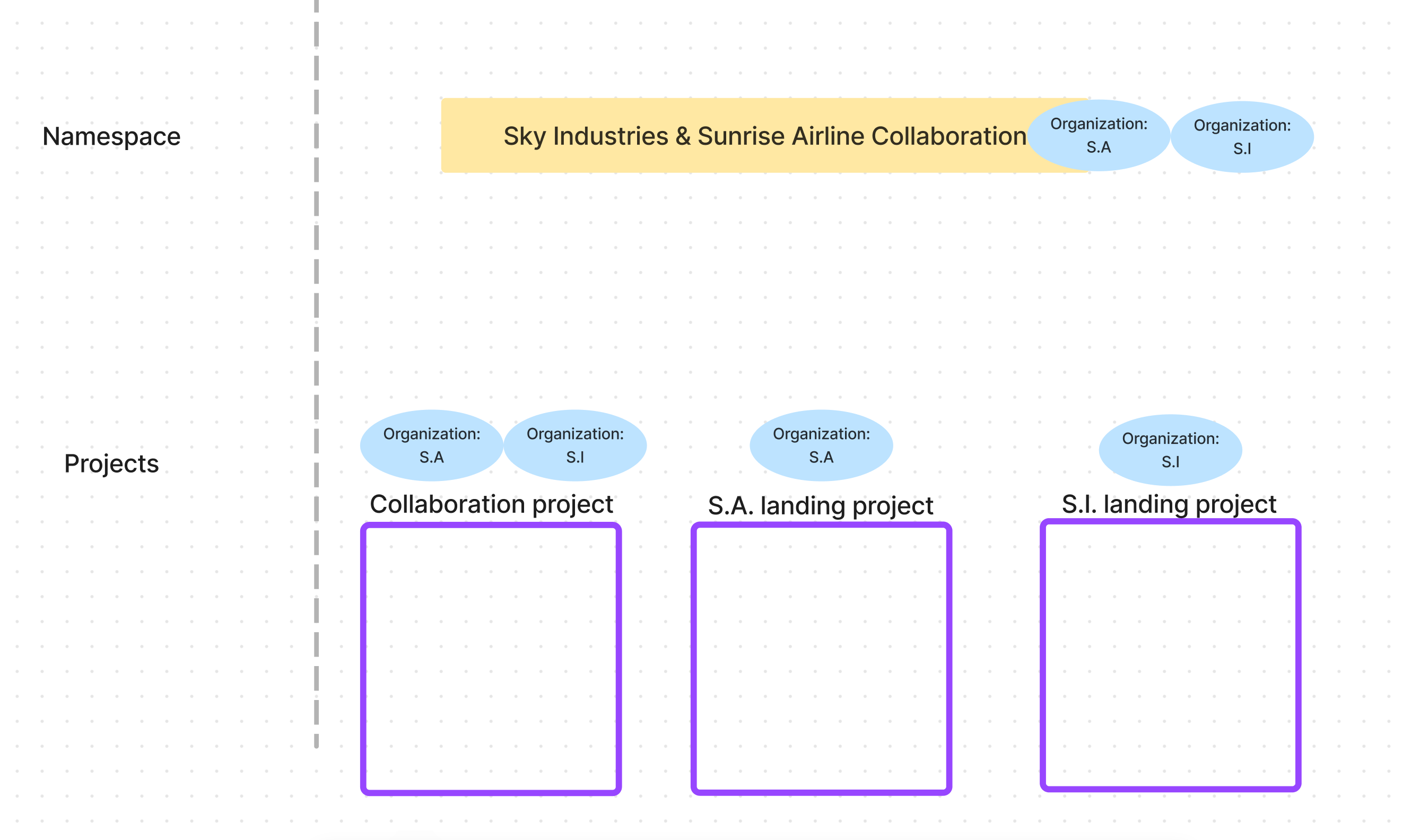
For more details on setting up a collaboration with an external organization, see Workflow: Cross-organization collaboration.
Review the management documentation on how to configure spaces.
中文翻译
组织与空间
组织是严格访问要求,可强力保护您组织在 Palantir 平台上的数据和工作。空间是将组织应用于控制 Foundry 实例的主要方式。组织与空间相结合,既能实现工作的严格隔离,又能在需要时与第三方进行灵活协作。
组织
组织权限应通过控制面板进行管理。
组织是应用于项目的访问要求,可在用户组与资源之间实施严格隔离。每个用户仅为一个组织的成员,但可作为访客成员加入多个组织。为满足访问要求,用户必须至少是应用于项目的某个组织的成员或访客成员。组织通过文件层级结构和直接依赖关系进行继承。
与标记(Markings)类似,组织是一种强制访问控制。但组织与标记在以下几个关键方面有所不同:
- 组织保护的信息范围包括空间、本体论(Ontologies)、项目、用户、组、标签类别和集合。但单个资源不能与组织绑定。相比之下,标记只能应用于项目和资源。
- 受组织保护的信息遵循跨组织可发现性规则。平台管理员可以允许或禁止用户查看其所属组织之外的其他组织的名称、用户和组。
- 用户必须是一个组织的成员。但用户无需拥有标记的访问权限。
请查阅管理文档,了解如何配置组织。
创建新组织
在单个组织内,可以通过组来实现项目和数据访问的治理。但如果您希望与不属于您组织的 Foundry 用户(例如来自其他公司的用户)协作并共享数据,同时限制他们查看您组织的用户和组,则应创建一个新组织。数据共享(协作)的条款由注册管理员定义,并在控制面板中进行管理。
有关如何在控制面板中创建新组织的信息,请参阅跨组织协作文档。
空间
:::callout{theme="neutral"} 空间(Spaces) 已从之前的名称命名空间(Namespaces) 更名而来。 :::
空间是项目的高级容器,包含一个公共本体论,用于在多个组织之间共享具有共同目的的工作。空间受一个(或一组)组织的限制,该限制将应用于空间内的项目以及关联的本体论。大多数组织只需要一个空间,所有项目都在该空间内创建。这些项目还可以使用标记和角色进行额外的权限设置。
Foundry 资源的文件路径可在详细信息面板中找到,其中空间作为路径的第一个元素:例如,space/project/sub-folder/my-file。
请查阅管理文档,了解如何配置空间。
多组织空间
在设置与外部组织的协作时,您可能需要设置一个包含多个组织的专用空间。
对于包含多个组织的空间,该空间内的项目可以包含这些组织的任意子集。例如,如果有一个同时应用了 Sky Industries 和 Sunrise Airline 组织的共享空间,那么该空间内的项目可以仅使用 Sky Industries 或仅使用 Sunrise Airline 创建,从而将这些项目限制在相应的组织内;或者使用两个组织,使该项目可供两个组织访问。
有关与外部组织建立协作的更多详情,请参阅工作流:跨组织协作。
请查阅管理文档,了解如何配置空间。