Securing an operational application(保护运营级应用)
After building your data foundation, you can start building out your ontology and a Flight Alert Inbox application on top of it. The goal is to provide operational users with a valuable workflow while also making the security legible and easy to maintain.
Object data inherit dataset permissions
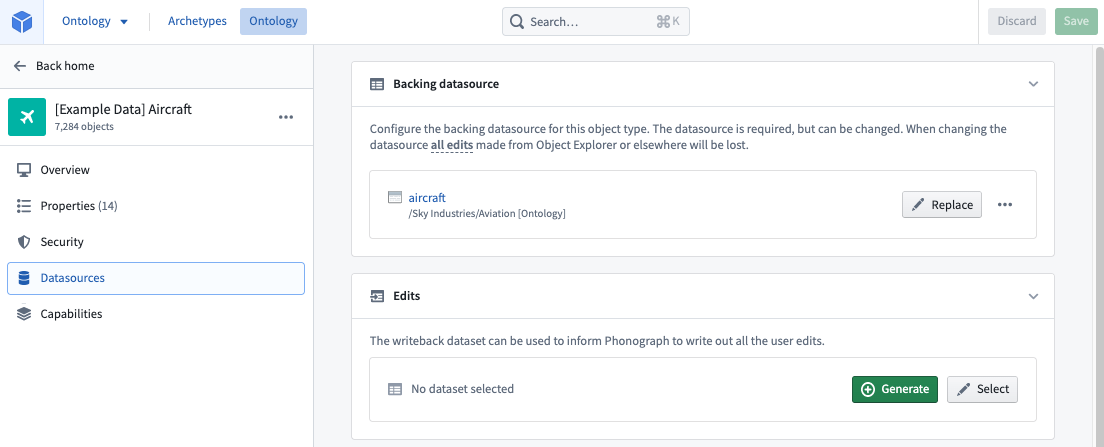
With the backing data already transformed, you can create four objects in your ontology: Flight, Flight Alert, Delay, andAircraft. To do this, create new object types and pick the backing datasets you already built for each object. During this process, you will be mapping columns in your dataset to properties in the new object type. Each column in the backing dataset will become a property in the new object type, and each row in the backing dataset will become an instance of the object type. Therefore, the data inside an object type will be protected by the permissions of the backing datasets.
For the Aircraft object, the data is protected by the permissions on the /Sky Industries/Aviation [Ontology]/aircraft dataset. Therefore, a user in the Aviation [Ontology] - Viewer group on the Aviation [Ontology] Project will be able to see the data in the Aircraft object.
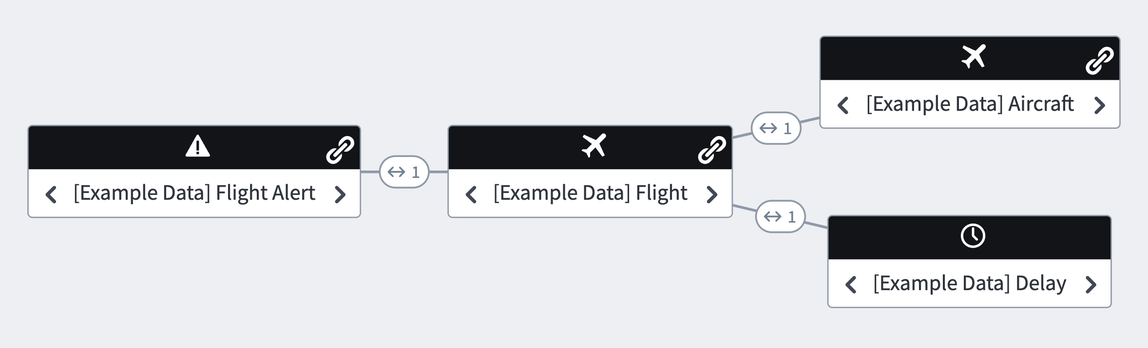
After creating the necessary objects, you can create the necessary link types between the Objects based on how they are related to each other. Below is our ontology.
To support your full workflow, you will want to add writeback for some of your objects. Writeback allows editing of the existing property values (for example, to fix incorrect values or to update a status property) but also, and perhaps more importantly, allows for the capture of new data and decisions, which enables compounding of value over time.
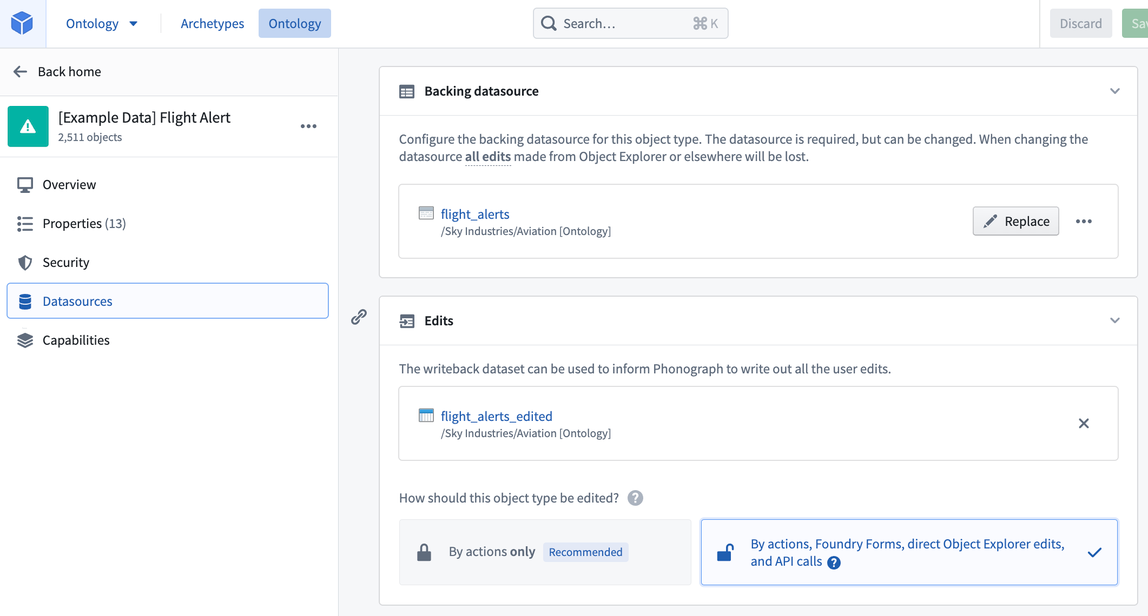
To do this, simply generate a writeback dataset in the Editor section. We recommend putting the edited dataset in the same ontology project as the backing dataset (e.g. Aviation [Ontology]), so that the permissions on the object are uniform. The recommended way to edit an object is by using Actions, which can also be called via APIs. Below is our Flight Alert object with a writeback dataset.
Granting users access to your ontology data will all be managed by the groups you created and applied in your data foundation. For example, you would only have to add a new user into the Aviation [Ontology] - Viewer group for them to see the data for all four objects: Flight, Flight Alert, Delay, and Aircraft.
Editing the ontology
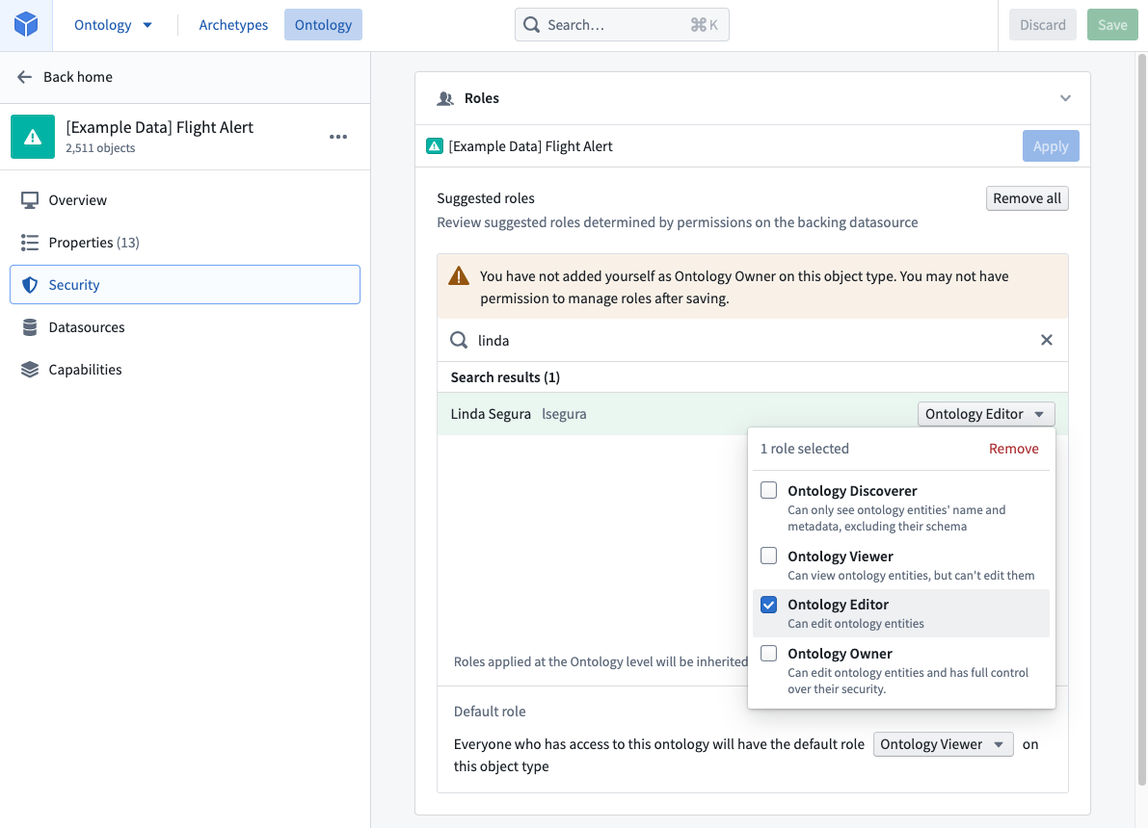
You can control who can edit the configuration of specific ontology types by managing permissions on the project where the resource is stored. Access to ontology resources (such as object types, link types, and action types) is determined by who has access to the relevant project in the Compass filesystem. For example, for a user to edit the Flight Alert object in the ontology, the user simply needs the appropriate access to the project containing the Flight Alert resource; no additional permissions or roles are required. You can manage these permissions in the Security section of each project.
:::callout{theme="neutral"} Granting a user and/or group a role on an object type only gives them permissions on the object type definition and its metadata and does not grant any permission on the data itself. Permission on the data is managed by the permissions on the backing datasource. :::
Restricting instances of objects
Later, we decide that we want to incorporate passenger data, so we integrate and build out a passenger data pipeline.
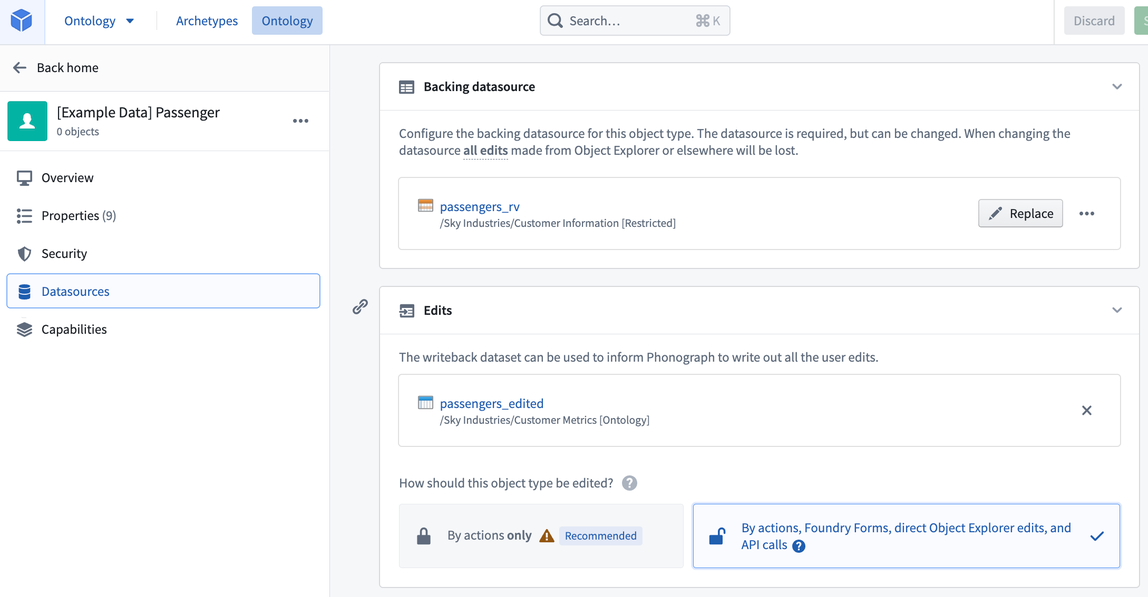
For compliance reasons, we might want operational users to only see passengers in the country in which they are located (US users can only see US passengers, German users can only see German passengers, and so on). Because our object type is backed by a dataset, its permissions are tied to the dataset as a whole. If we want to restrict permissions on individual rows, we need to back our object type by a Restricted View, which is a row-permissioned view of a single dataset.
When creating our Restricted View, we must complete the following prerequisite steps:
- Create a global group,
passenger-data-global-access, to give all the administrative users access to the global passenger data. - Confirm our users have the necessary geographic user attributes (for example,
location:country - US) - Create a project for the Restricted View, called Customer Information [Restricted], that will have all the Restricted Views related to customer information now and in the future. This will allow us to permission access to the Restricted View separately from the backing input dataset.
:::callout{theme="neutral"} User attributes can be manually configured in the user administration interface or automatically mapped from your SAML setup. :::
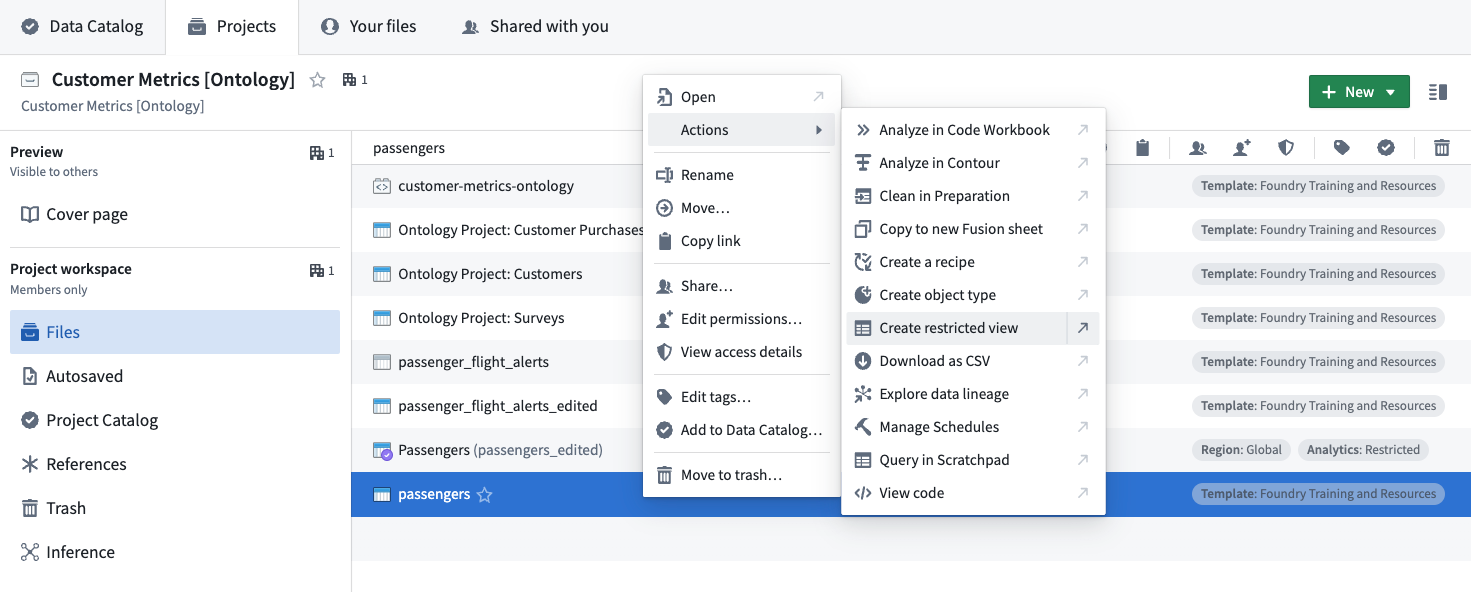
After we complete the prerequisites above, we can create the Restricted View. Navigate to the input dataset resource and select Create restricted view, as highlighted below.
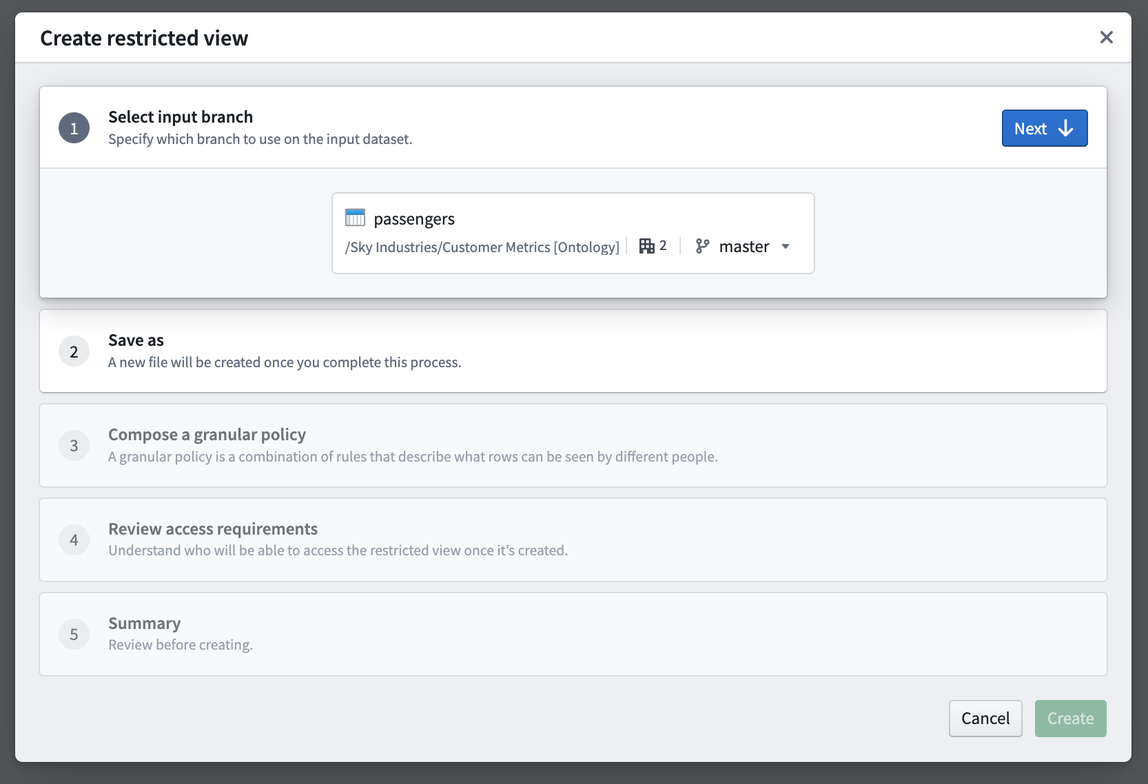
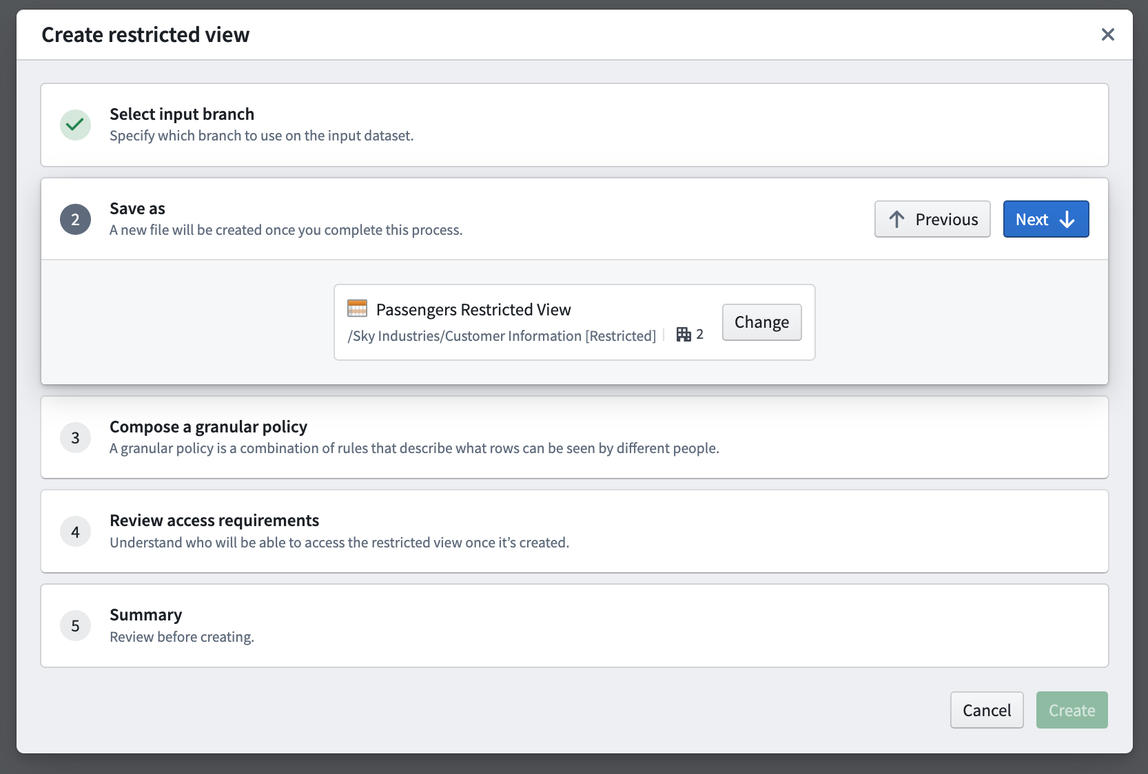
The Restricted View wizard will walk you through all the steps. Save the Restricted View in the new Customer Information [Restricted] project we created earlier.
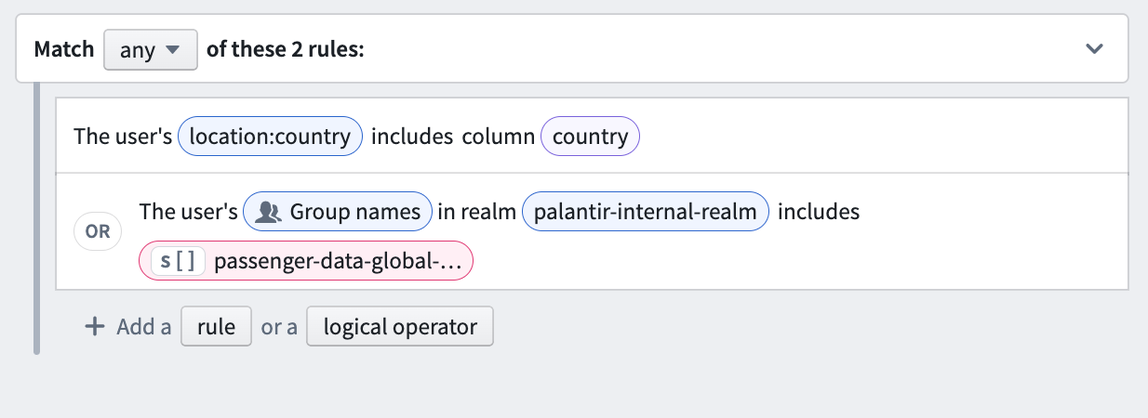
The policy is the core piece of the Restricted View, since it determines what rows users will be able to see. In this example, we will want to:
- Only show rows where the user’s attribute
location:countrymatches the value in thecountrycolumn in our dataset, OR - Show all the rows when the user is a member of the
passenger-data-global-accessgroup.
Below is what the specific policy would look like:
After the wizard is complete, the Restricted View will be built. After it is built, we can use our Restricted View to back our Passenger object. The object type will automatically inherit the Restricted View policy and use that policy to restrict which object instances a user can see.
Adding data to the Data Catalog
The Data Catalog is a browsable view of curated content in Foundry. While every dataset in Foundry can be analyzed, assuming you have the correct permissions, the datasets in the Data Catalog have been identified as the most useful or relevant to the users and are collected there for easy access.
After building out your ontology, we recommend adding all of your ontology datasets to the Data Catalog. In particular, the ontology writeback datasets should be added to your Data Catalog, since they are the canonical source for the object data.
Giving users access to your application
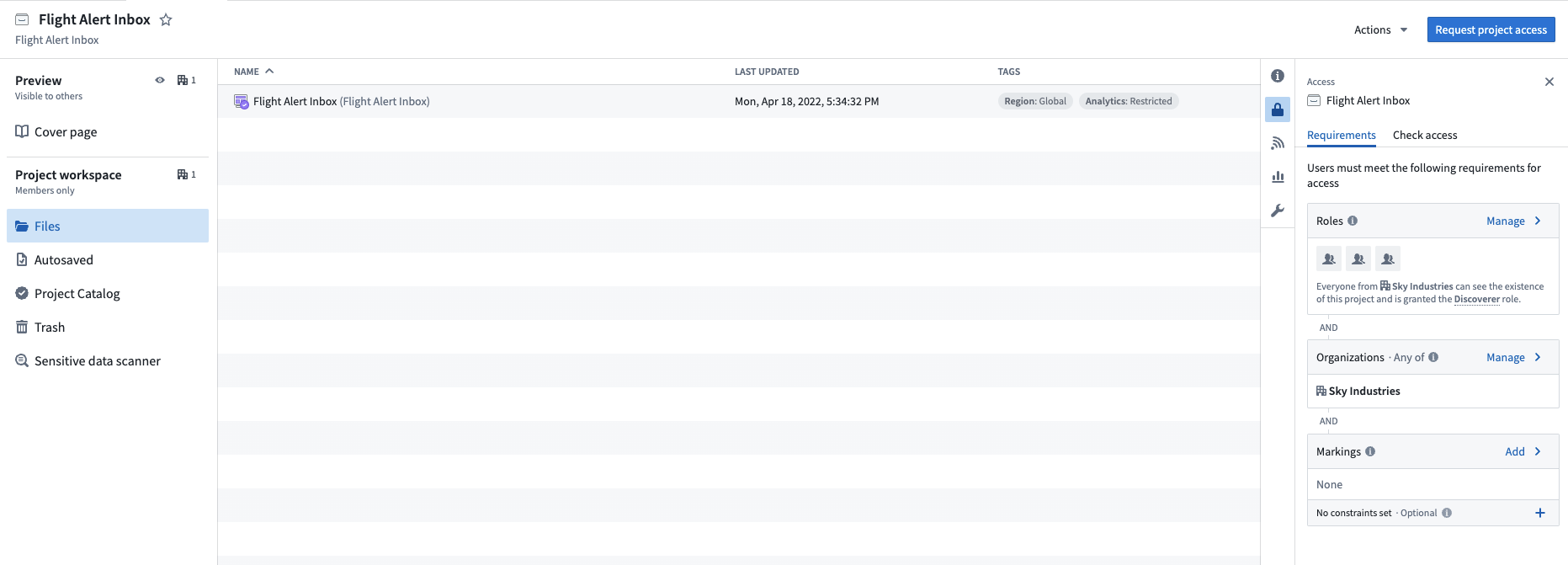
After the Flight, Flight Alert, Delay, Aircraft, and Passenger objects were built, we built out the Flight Alert Inbox application for the Operations center by following the Workshop documentation. Given we want to separate who can edit the Flight Alert Inbox application from those who can edit the ontology data, we will create a new project specifically for the Flight Alert Inbox application. The new project will be called Flight Alert Inbox.
To access this project, a user must meet all access requirements. Since there are no Markings associated with the project, users need a role and must be a member of the Sky Industries Organization.
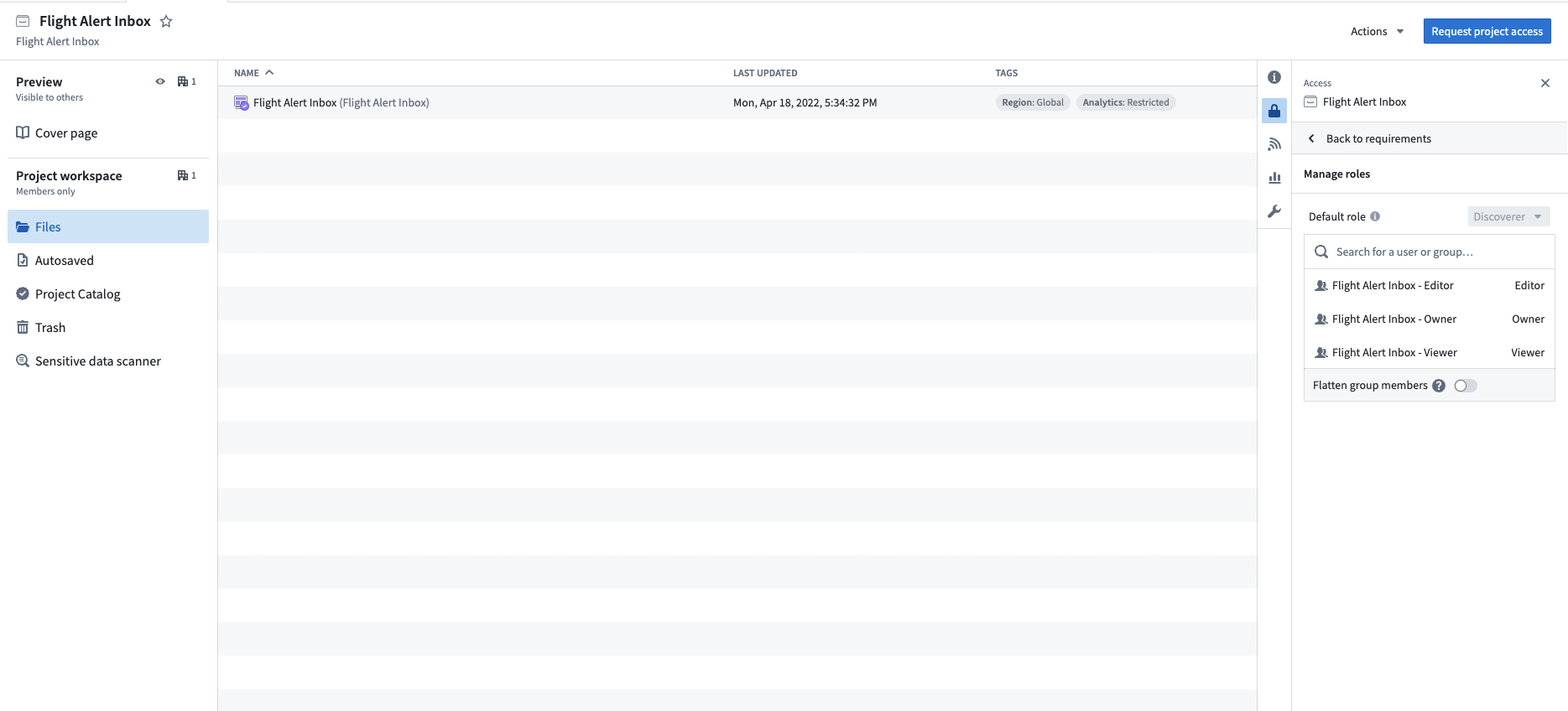
Operational consumers will be added to the Aviation [Ontology] - Viewer group to view the Flight, Flight Alert, Delay, Aircraft, and Passenger data and the Flight Alert Inbox - Viewer group to view the Flight Alert Inbox application.
Application developers will be added to the Aviation [Ontology] - Viewer group to view the Flight, Flight Alert, Delay, Aircraft, and Passenger data and the Flight Alert Inbox - Editor group to edit the Flight Alert Inbox application.
Pipeline developers will be added to the Aviation [Ontology] - Editor group to edit the Flight, Flight Alert, Delay, Aircraft, and Passenger dataset and the Flight Alert Inbox - Viewer group to view the workflow downstream of their changes.
中文翻译
保护运营级应用
在构建好数据基础层之后,您可以开始在其上构建本体论(Ontology)和航班警报收件箱应用。目标是既为运营用户提供有价值的工作流程,又使安全机制清晰易懂且易于维护。
对象数据继承数据集权限
在底层数据完成转换后,您可以在本体论中创建四个对象:Flight(航班)、Flight Alert(航班警报)、Delay(延误)和 Aircraft(飞机)。为此,请创建新的对象类型,并选择您已为每个对象构建的底层数据集。在此过程中,您需要将数据集中的列映射到新对象类型的属性。底层数据集中的每一列将成为新对象类型的一个属性,每一行将成为该对象类型的一个实例。因此,对象类型中的数据将受到底层数据集权限的保护。
对于 Aircraft 对象,其数据受到 /Sky Industries/Aviation [Ontology]/aircraft 数据集权限的保护。因此,Aviation [Ontology] 项目中 Aviation [Ontology] - Viewer 组的用户将能够查看 Aircraft 对象中的数据。
创建必要的对象后,您可以根据对象之间的关联关系创建所需的链接类型(Link Types)。以下是我们构建的本体论。
为支持完整的工作流程,您需要为某些对象添加回写(Writeback)功能。回写不仅允许编辑现有属性值(例如,修正错误值或更新状态属性),更重要的是,它还能捕获新数据和决策,从而实现价值的持续累积。
要实现这一点,只需在编辑器部分生成一个回写数据集。我们建议将编辑后的数据集放在与底层数据集相同的本体论项目中(例如 Aviation [Ontology]),以确保对象权限的一致性。编辑对象的推荐方式是使用操作(Actions),也可以通过API调用。以下是带有回写数据集的 Flight Alert 对象。
授予用户对本体论数据的访问权限,将完全通过您在数据基础层中创建和应用的组来管理。例如,您只需将新用户添加到 Aviation [Ontology] - Viewer 组,他们就能查看所有四个对象(Flight、Flight Alert、Delay 和 Aircraft)的数据。
编辑本体论
您可以通过管理资源所在项目的权限,来控制谁可以编辑特定本体论类型的配置。对本体论资源(如对象类型、链接类型和操作类型)的访问权限,取决于谁有权访问 Compass 文件系统中的相关项目。例如,用户要编辑本体论中的 Flight Alert 对象,只需拥有包含 Flight Alert 资源的项目的适当访问权限即可,无需额外的权限或角色。您可以在每个项目的安全部分管理这些权限。
:::callout{theme="neutral"} 为用户和/或组授予对象类型的角色,仅赋予他们对该对象类型定义及其元数据的权限,并不授予对数据本身的任何权限。数据权限由底层数据源的权限管理。 :::
限制对象实例
随后,我们决定整合乘客数据,因此构建了一个乘客数据管道。
出于合规原因,我们可能希望运营用户只能看到其所在国家的乘客(美国用户只能看到美国乘客,德国用户只能看到德国乘客,依此类推)。由于我们的对象类型由数据集支撑,其权限与整个数据集绑定。如果我们想限制对个别行的权限,就需要使用受限视图(Restricted View)来支撑对象类型,这是对单个数据集进行行级权限控制的视图。
创建受限视图时,必须完成以下前置步骤:
- 创建一个全局组
passenger-data-global-access,赋予所有管理员用户访问全局乘客数据的权限。 - 确认用户拥有必要的地理位置用户属性(例如
location:country - US)。 - 为受限视图创建一个项目,命名为 Customer Information [Restricted],该项目将存放当前及未来所有与客户信息相关的受限视图。这样我们就可以将受限视图的访问权限与底层输入数据集的权限分开管理。
:::callout{theme="neutral"} 用户属性可以在用户管理界面中手动配置,也可以从您的 SAML 设置中自动映射。 :::
完成上述前置步骤后,即可创建受限视图。导航到输入数据集资源,选择创建受限视图,如下所示。
受限视图向导将引导您完成所有步骤。将受限视图保存到我们之前创建的新项目 Customer Information [Restricted] 中。
策略(Policy)是受限视图的核心部分,因为它决定了用户能够看到哪些行。在本示例中,我们希望:
- 仅显示用户属性
location:country与数据集中country列的值匹配的行,或者 - 当用户是
passenger-data-global-access组的成员时,显示所有行。
以下是具体策略的样式:
向导完成后,受限视图将被构建。构建完成后,我们可以使用受限视图来支撑 Passenger 对象。对象类型将自动继承受限视图的策略,并使用该策略来限制用户可以看到的对象实例。
向数据目录添加数据
数据目录(Data Catalog)是 Foundry 中可浏览的精选内容视图。虽然 Foundry 中的每个数据集都可以进行分析(假设您拥有正确的权限),但数据目录中的数据集已被识别为对用户最有用或最相关的内容,并集中存放以便于访问。
在构建本体论之后,我们建议将所有本体论数据集添加到数据目录中。特别是本体论回写数据集,应添加到数据目录中,因为它们是对象数据的权威来源。
授予用户应用访问权限
在构建完 Flight、Flight Alert、Delay、Aircraft 和 Passenger 对象后,我们按照 Workshop 文档为运营中心构建了航班警报收件箱应用。考虑到我们希望将编辑航班警报收件箱应用的权限与编辑本体论数据的权限分开,我们将专门为航班警报收件箱应用创建一个新项目。新项目命名为 Flight Alert Inbox。
要访问此项目,用户必须满足所有访问要求。由于该项目没有关联任何标记(Markings),用户需要拥有一个角色,并且必须是 Sky Industries 组织的成员。
运营消费者将被添加到 Aviation [Ontology] - Viewer 组,以查看 Flight、Flight Alert、Delay、Aircraft 和 Passenger 数据,并添加到 Flight Alert Inbox - Viewer 组,以查看航班警报收件箱应用。
应用开发者将被添加到 Aviation [Ontology] - Viewer 组,以查看 Flight、Flight Alert、Delay、Aircraft 和 Passenger 数据,并添加到 Flight Alert Inbox - Editor 组,以编辑航班警报收件箱应用。
管道开发者将被添加到 Aviation [Ontology] - Editor 组,以编辑 Flight、Flight Alert、Delay、Aircraft 和 Passenger 数据集,并添加到 Flight Alert Inbox - Viewer 组,以查看其变更下游的工作流程。